Microsoft is preparing a Copilot-powered Suggested Rename feature for OneDrive on the web, listed in Microsoft 365 Roadmap entry 564909 for a June 2026 rollout, that will analyze uploaded files and offer clearer names for documents, PDFs, images, spreadsheets, presentations, and Markdown files. The pitch is modest: fewer mystery files called “final_final_v3” and more names that say what a file actually contains. The implication is larger: Microsoft is moving Copilot from a chat box into the ordinary maintenance layer of cloud storage. File naming is about to become another place where Windows and Microsoft 365 users negotiate how much judgment they want software to exercise on their behalf.

Cloud file manager “My files” screen showing uploads, rename suggestions, and file activity tracking.Microsoft Has Found the Most Boring Place to Put AI — and That Is Why It Matters​

Suggested Rename is not the kind of feature that produces a cinematic demo. Nobody is going to stand on a stage and ask Copilot to rename a quarterly report while a crowd applauds. Yet the feature is precisely the sort of background convenience that reveals Microsoft’s actual Copilot strategy better than another flashy chatbot panel.
The company is no longer merely asking users to go to Copilot. It is putting Copilot inside moments where users already make small decisions: sharing a file, summarizing an attachment, comparing documents, asking questions about a PDF, and now naming a file after upload. That makes the OneDrive rename feature less about filenames than about ambient automation.
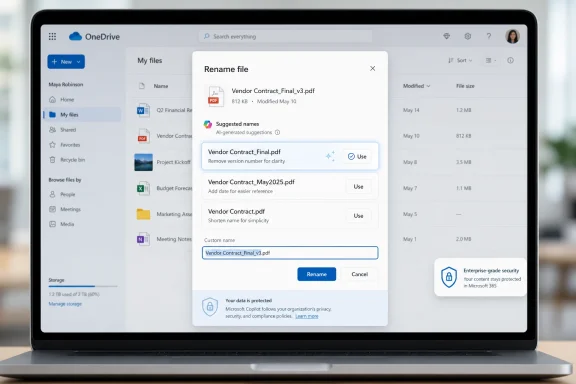
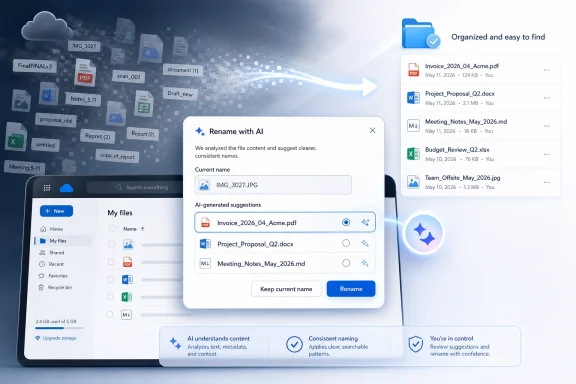
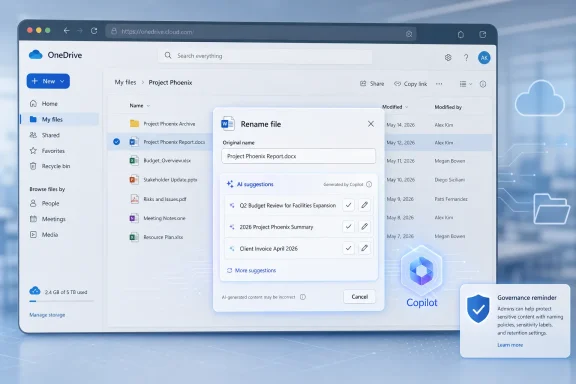
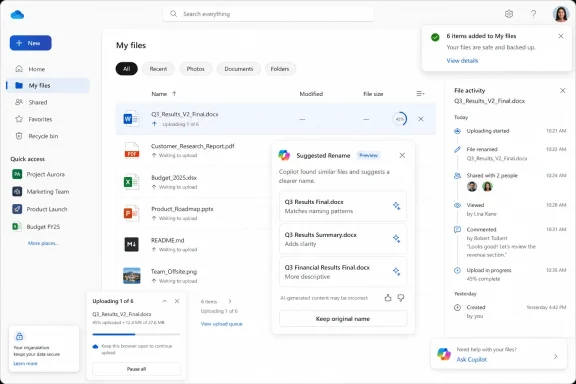
On paper, the workflow sounds simple. A user uploads a supported file to OneDrive on the web, Copilot examines its contents, and OneDrive offers three suggested names in the rename window. The user can accept one or keep the original. Suggestions may also appear when manually renaming an existing file or through toast notifications in the OneDrive web interface.
That last detail is worth slowing down on. A toast notification is not just an option buried in a menu; it is OneDrive nudging the user at the moment Microsoft believes the system has detected an opportunity. The difference between “ask Copilot for help” and “Copilot noticed this could be better” is small in UI terms and enormous in product philosophy.

The Filename Is the Oldest Metadata Problem in Personal Computing​

Anyone who has managed a Downloads folder knows the disease. Files arrive with camera names, invoice numbers, Teams recording titles, scanner defaults, cryptic attachment strings, or the immortal “Document1.” The longer a folder lives, the more it becomes a sedimentary record of interrupted attention.
Search was supposed to solve this. Windows Search, SharePoint search, Microsoft Graph, and OneDrive’s web search can all peer through metadata and, in many cases, file contents. But search has never fully replaced naming because the filename remains the first human-readable contract between a file and its owner. It is what appears in File Explorer, in sync folders, in recent files, in share dialogs, in browser downloads, and in the mental map users build around their work.
Microsoft’s new feature takes aim at that contract. If Copilot can summarize a document, it can plausibly propose a filename. If it can identify that a PDF is a signed vendor agreement or that an image is a whiteboard photo from a budget planning session, then a better name may be the cheapest productivity gain in the entire Copilot stack.
The key word is plausibly. Naming is not just description; it is convention. A law firm, a school district, a hospital, a software team, and a household budget folder may all name the same document differently because names encode workflow, retention habits, security expectations, and institutional memory. Copilot can infer content, but it may not know the local grammar of the folder.

OneDrive Becomes the Place Where Copilot Watches the Work Arrive​

OneDrive has long been more than Microsoft’s Dropbox competitor. In modern Microsoft 365, it is the personal storage layer beneath Office files, Teams meeting recordings, shared links, web attachments, sync folders, and increasingly Windows itself. That position makes it a privileged place to insert AI because so much work passes through it before users even think of it as “storage.”
Suggested Rename fits into a broader sequence of OneDrive Copilot additions. Microsoft has already pushed Copilot features that summarize files, answer questions about content, compare documents, and generate summaries when sharing. The rename feature is a natural next step because it turns content understanding into file hygiene.
That matters for Windows users because OneDrive is not confined to the browser in practice. Even when a feature begins on the web, its effects can spill into File Explorer through sync. A file renamed in OneDrive on the web becomes a file renamed on the desktop. A small web feature can therefore alter the local file experience for users who think of their OneDrive folder as just another Windows directory.
The web-only rollout also gives Microsoft a safer runway. Browser-based OneDrive is easier to update, observe, and adjust than the full desktop sync experience. If users reject suggestions, complain about poor names, or run into edge cases with sensitive files, Microsoft can tune the experience before making it more deeply native to Windows.

The Three-Suggestion Design Keeps the Human in the Loop, for Now​

The reassuring part of Suggested Rename is that Microsoft is not describing automatic renaming. Users see three proposed names and can keep the original. That makes the feature closer to autocomplete than autopilot, and that distinction will matter to administrators and privacy-conscious users.
A forced rename system would be a support nightmare. It would break scripts, confuse sync histories, annoy users, and potentially create legal or compliance problems in environments where file naming conventions are part of record management. A suggestion system, by contrast, can be framed as assistance rather than control.
Still, suggestions shape behavior. Most users do not carefully evaluate three machine-generated options if one looks “good enough.” Over time, Copilot’s style could become the default style for how files are titled, just as autocorrect and subject-line suggestions have quietly influenced how people write.
That is not necessarily bad. Many users would benefit from a machine that turns “scan0007.pdf” into something resembling “Signed Lease Agreement - May 2026.” The risk is that Microsoft optimizes for readable generic names while organizations depend on structured, durable names that carry codes, dates, client identifiers, or retention markers.

The Supported File Types Reveal Microsoft’s Confidence — and Its Limits​

At launch, Suggested Rename is expected to support Word documents, PowerPoint presentations, Excel spreadsheets, PDF files, Markdown files, and images. That is a revealing list. It covers the everyday knowledge-worker universe, but it also includes file types with very different levels of semantic clarity.
Word and PowerPoint files are comparatively friendly territory. They have text, headings, titles, slide structures, and document properties that can help an AI model infer purpose. PDFs are messier, especially when they are scanned, password-protected, poorly OCR’d, or assembled from multiple sources.
Excel is trickier still. A spreadsheet can contain a formal financial model, a raw data export, a personal budget, a pivot-table experiment, or a half-finished operational tracker. The most important meaning may be in sheet names, formulas, columns, hidden tabs, or the context of the surrounding folder rather than in visible text.
Images are the most ambitious category. Microsoft has been steadily expanding Copilot’s ability to understand visual content, and OneDrive image support suggests the rename system may be able to detect enough from screenshots, photos, diagrams, or scanned pages to propose names. That could be genuinely useful for users who collect receipts, whiteboards, product photos, or screenshots. It could also be where the funniest and most wrong suggestions appear.
Markdown support is a quiet nod to developers, writers, and technical teams. Markdown files often live in documentation repositories, note systems, static-site workflows, and project folders. Good Markdown names matter because they are frequently part of a larger information architecture, not just standalone files.

The Productivity Pitch Is Real, but It Is Not the Whole Story​

It is easy to sneer at AI file renaming as another example of Copilot being poured into every available seam of Microsoft 365. That would miss why the feature may actually land with ordinary users. File naming is tedious, repetitive, and often done at the exact moment a user wants to move on.
The best version of Suggested Rename saves time in tiny increments. A student uploads lecture notes and gets a usable name. A small business owner scans a receipt and gets a descriptive title. A project manager drops a meeting deck into OneDrive and gets a filename that reflects the client and topic. None of these moments transforms work, but all of them reduce friction.
The value compounds because filenames affect later retrieval. A better name makes search results clearer, reduces duplicate uploads, makes sharing less embarrassing, and helps collaborators understand what they are receiving. In a shared Microsoft 365 environment, a useful filename is a courtesy to everyone else.
But productivity is also the wrapper Microsoft uses to normalize deeper content inspection. Suggested Rename works only because OneDrive and Copilot can analyze file contents after upload. That may be acceptable, expected, or even contractually covered in many Microsoft 365 environments. It will still make some users uneasy, especially when the feature is presented as a convenience rather than a governance event.

Admins Will Ask the Questions Microsoft’s Marketing Does Not​

For enterprise IT, the first question is not whether Suggested Rename is clever. It is whether the feature can be controlled. Admins will want to know whether it is enabled by default, whether it requires Microsoft 365 Copilot licensing, whether it respects sensitivity labels, whether prompts and outputs are logged, and whether suggested names are retained anywhere.
The roadmap description as reported gives the basic user experience but does not answer every operational question. That is normal for roadmap entries, which are often directional rather than exhaustive. It also means IT departments should avoid treating the feature as fully understood until Microsoft publishes admin documentation or Message center guidance closer to rollout.
Naming is not cosmetic in regulated environments. A filename can reveal a client name, diagnosis, legal matter, deal code, disciplinary issue, acquisition target, or confidential project. If Copilot proposes a more descriptive name, it may also produce a name that exposes information more plainly than the original.
There is a second-order governance issue: consistency. Many organizations use file naming policies precisely because humans are inconsistent. If Copilot suggestions are inconsistent too, they may make folders look cleaner while quietly undermining naming schemes. Admins should be able to decide whether AI-generated filenames are welcome in managed libraries, personal OneDrive storage, or neither.

The Privacy Concern Is Less Sci-Fi Than Workflow​

The most predictable reaction will be that Microsoft is “reading your files.” The more precise version is that Suggested Rename requires content analysis inside a cloud service where the file has already been uploaded. That distinction matters, but it will not settle the debate.
For Microsoft 365 commercial users, Copilot operates within a framework of tenant data, permissions, and enterprise commitments. For consumers and smaller organizations, the perceived boundary is less clear. Users may not think of a filename suggestion as an AI inference generated from document contents; they may think of it as another OneDrive feature that appeared one day.
The practical concern is not that Copilot magically gets access to files it could not otherwise touch. It is that more routine UI actions are becoming opportunities for AI processing. Uploading, sharing, renaming, previewing, and searching are all mundane acts. Once Copilot is woven through them, the line between file management and content analysis fades.
Microsoft can reduce anxiety by being explicit. The rename window should make clear that suggestions are generated from file content, that users can ignore them, and that organizational policies apply. Ideally, admins should have switches granular enough to disable Suggested Rename without turning off every useful Copilot capability in OneDrive.

The Feature Could Be a Gift to Search — or a New Source of Noise​

OneDrive search and Microsoft 365 search already benefit from content indexing, permissions, and Graph signals. Better filenames would seem to improve that system. A folder full of descriptive names is easier to scan, easier to filter, and easier to share.
But AI-generated names can also create new noise if they are too generic. “Project Plan,” “Meeting Notes,” “Financial Summary,” and “Client Proposal” are better than “Untitled,” but only barely. The best filenames often include dates, entities, version markers, departments, or project codes. If Copilot omits those details, it may create pleasant-looking clutter.
There is also the risk of overconfident specificity. A model may infer the wrong client, mistake a draft for a final agreement, misread an image, or elevate a minor detail into the filename. Users may not notice until the file is shared, searched, or used in a workflow that depends on accurate naming.
The most successful version of Suggested Rename would learn from local context without becoming invasive. If a folder contains files named by date, project code, and deliverable, Copilot should follow that pattern. If an organization uses a formal naming scheme, Copilot should reinforce it. If Microsoft ships only generic semantic names, the feature will be useful for consumers and frustrating for disciplined teams.

The Roadmap Date Is a Promise Written in Pencil​

The feature is listed for June 2026, but Microsoft 365 roadmap dates are not the same as guaranteed availability dates for every tenant. Rollouts can slip, start gradually, arrive behind targeted release settings, or appear first in specific regions or license configurations. Admins who have lived through Microsoft 365 changes know that “rolling out” often means “beginning to appear somewhere.”
That uncertainty is not a criticism unique to this feature. It is the reality of Microsoft 365 as a continuously updated service. The roadmap gives customers a signal, not a shipping contract.
For WindowsForum readers, the timing is still notable. By June 2026, Copilot is no longer a novelty Microsoft is trying to introduce; it is infrastructure Microsoft is trying to normalize. Suggested Rename arrives in that phase of the product cycle where the company stops asking whether users want AI and starts deciding which everyday tasks are obvious candidates for it.
That is why this small OneDrive feature deserves attention. Not because file renaming is glamorous, but because it shows how Microsoft intends to make Copilot feel inevitable: not as a single destination, but as a layer of suggestions across the operating system-adjacent productivity stack.

The Real Competition Is Not Dropbox or Google Drive — It Is User Habit​

Cloud storage products compete on sync reliability, sharing controls, storage quotas, admin features, and ecosystem integration. Suggested Rename adds a different axis: whether the storage system can help maintain order without users thinking too hard.
Google, Dropbox, Apple, and smaller document platforms have all explored AI-assisted organization in various forms. The direction of travel is obvious. Storage is becoming less like a passive drive and more like an active assistant that classifies, summarizes, warns, and recommends.
Microsoft’s advantage is distribution. OneDrive is already embedded in Windows setup flows, Office save dialogs, Teams recordings, SharePoint libraries, and Microsoft 365 subscriptions. A rename suggestion in that environment can reach users who would never install a separate AI organizer.
Microsoft’s weakness is trust fatigue. Users and admins have endured years of branding churn, sync confusion, storage quota surprises, Teams recording policy changes, and Copilot messaging that often runs ahead of practical clarity. Even a helpful feature can be received skeptically if it appears without enough explanation or control.

Personal OneDrive Users May Love It Before Enterprises Allow It​

The consumer case is straightforward. Personal OneDrive folders are full of photos, scans, school forms, tax documents, recipes, itineraries, and old attachments. If Copilot can turn those into recognizable names, many users will happily accept the help.
The enterprise case is more conditional. A user’s personal OneDrive for Business library is still corporate data when used under a work account. Files may later be shared, discovered, retained, audited, or migrated. A filename is part of that lifecycle.
In small businesses, Suggested Rename may become a quiet productivity win because there is often no formal document management discipline. In larger organizations, it may be treated as another AI feature to evaluate through security, compliance, records management, and change-advisory lenses.
The irony is that the places with the most chaotic files may benefit most, while the places with the most rules may hesitate longest. That has been the Copilot story from the beginning: the technology is most compelling where information work is messy, but most scrutinized where information has the highest stakes.

Microsoft’s Naming Assistant Will Need a Mute Button​

The difference between helpful and annoying will come down to restraint. If Suggested Rename appears only when it has a high-confidence recommendation, users may see it as a useful polish layer. If it nags after every upload, it will become another notification to dismiss.
Toast notifications are especially delicate. OneDrive already competes for attention with Teams, Outlook, Windows notifications, browser prompts, security alerts, and app updates. A file rename suggestion is rarely urgent. Microsoft should treat it as an optional improvement, not a productivity emergency.
There is also a social dimension. If a user uploads a file and immediately sees three AI-generated alternatives, the interface is implicitly judging the original name. That may be fine for “IMG_4821,” less fine for a carefully named document that follows a team convention Copilot does not understand.
The best UI would be humble. It would say, in effect, “Here are some names that might help,” not “We found a better name.” Microsoft’s Copilot products have sometimes struggled with tone, oscillating between assistant and overconfident coworker. File naming is a place where humility will matter.

Windows Users Should Watch the Sync Boundary​

Although the roadmap points to OneDrive on the web, Windows users should think about where web actions end and local consequences begin. If a user accepts a Copilot-generated name in the browser, the renamed file will sync to devices tied to that OneDrive account. That means shortcuts, recent-file references, local habits, and third-party workflows may be affected.
Most ordinary renames are harmless. But anyone using OneDrive as a backing store for scripts, automation, linked Excel workbooks, local project references, or application data should be cautious about casual renaming. The same advice applies today, but AI suggestions may make renaming feel lower-stakes than it really is.
This is particularly relevant in hybrid work environments where users blur personal organization and team collaboration. A file renamed for clarity in one context may become confusing in another. A Teams-shared document, a SharePoint-synced library, and a local OneDrive folder can all represent the same cloud object to different users.
Microsoft could help by clearly showing path, sharing status, and sync implications in the rename experience. If a file is shared with others, part of a Teams-connected library, or referenced elsewhere, users should know before accepting a suggested name. A smart rename feature should be smart enough to warn when a rename is not just personal housekeeping.

The Small Print Will Decide Whether This Is Enterprise-Ready​

The unresolved questions are not exotic. They are the same questions every Microsoft 365 admin now asks about Copilot features. Is it on by default? Which licenses light it up? Which audit logs capture usage? Does it work in GCC, GCC High, or DoD clouds? Does it respect data residency and sensitivity labels? Can admins disable it globally or by group?
Until Microsoft publishes the full administrative details, the safe assumption is that Suggested Rename should be evaluated like any other AI-assisted content feature. That means testing it with representative files, checking how it behaves with protected content, confirming whether naming suggestions include sensitive terms, and deciding whether user training is required.
Training may sound excessive for a rename feature, but the message is simple: do not accept AI-generated names blindly. Users should treat suggestions as drafts. That is especially important for files involving customers, patients, students, HR matters, legal work, security incidents, or financial data.
If Microsoft wants broad enterprise acceptance, it should provide admin-facing documentation before rollout reaches general availability. The feature is easy to understand at the user level. The governance model is where confidence will be won or lost.

The Filename Is Becoming an AI Surface​

The deeper shift is that Microsoft is turning metadata into a generative surface. Copilot already writes summaries, drafts email, creates slides, answers questions, and interprets files. Suggested Rename extends that pattern to the label attached to the file itself.
That has symbolic weight. A filename is one of the few pieces of computing language users still routinely write themselves. It is personal, contextual, and often messy. By offering to generate it, Microsoft is saying that even the small acts of digital organization are candidates for AI mediation.
Some users will welcome that. Others will see it as another intrusion. Most will probably do what users usually do: accept the feature when it helps, ignore it when it doesn’t, and complain loudly when it gets something embarrassing wrong.
The question for Microsoft is whether Copilot can be useful without becoming presumptuous. Suggested Rename is a perfect test because the stakes are low enough for experimentation but high enough to expose real tensions around privacy, control, and trust.
The OneDrive Rename Button Now Carries a Policy Conversation​

The practical reading for WindowsForum’s audience is that Suggested Rename is worth watching not because it is revolutionary, but because it is operational. It will touch ordinary files, ordinary users, and ordinary support tickets. Those are the places where platform strategy becomes lived experience.
  • Microsoft is targeting OneDrive on the web first, with a June 2026 roadmap rollout for the Copilot-powered Suggested Rename feature.
  • The feature is expected to analyze file contents after upload and present three suggested filenames while still allowing users to keep the original name.
  • Supported launch formats include Word, PowerPoint, Excel, PDF, Markdown, and image files.
  • The most useful versions of the feature will respect folder context, organizational naming conventions, sensitivity labels, and shared-file implications.
  • Administrators should wait for Microsoft’s detailed controls and documentation before assuming the feature is appropriate for regulated or tightly governed environments.
  • Windows users should remember that a rename accepted in OneDrive on the web can sync back into File Explorer and affect local workflows.
Suggested Rename may end up being one of those Microsoft 365 features that users barely notice once it works well, which is precisely why it matters. The future Microsoft is building is not one where Copilot sits off to the side waiting for a prompt; it is one where Copilot appears in the small seams of daily work, offering to tidy, summarize, label, and route information before users ask. If Microsoft gets the controls and tone right, AI-assisted filenames could become a mundane improvement to digital hygiene. If it gets them wrong, a feature designed to reduce clutter will become another reminder that convenience in cloud software always arrives with a governance bill attached.

References​

  1. Primary source: Windows Report
    Published: 2026-06-01T07:12:09.722494
  2. Official source: microsoft.com
  3. Related coverage: pccentral.net
  4. Official source: support.microsoft.com
  5. Official source: learn.microsoft.com
  6. Official source: directionsonmicrosoft.com
  1. Related coverage: levelupm365.com
  2. Related coverage: nubis365.com
  3. Related coverage: choc.org
  4. Related coverage: techriver.com
 

Microsoft is adding Copilot Suggested Rename to OneDrive on the web in June 2026, giving personal and business users three AI-generated filename suggestions inside the rename dialog and after single-file uploads for supported files including Office documents, PDFs, Markdown, and images. That sounds like a tiny quality-of-life feature, and in one sense it is. But it also says something larger about where Microsoft believes AI belongs: not only in chat boxes and agents, but in the dull, repetitive seams of everyday file management. The question is whether this is the kind of ambient intelligence users actually want, or another Copilot surface area that administrators will have to explain, license, govern, and sometimes disable.

Laptop screen shows OneDrive rename dialog for a “Vendor Contract_Final_v3.pdf” file.Microsoft Finally Points Copilot at a Chore Everyone Understands​

The best AI features are often the least theatrical. Nobody needs a keynote demo to understand why a folder full of Document1, Scan_04182026, and FinalFINALv3 is a problem. Bad filenames are not just ugly; they are a tax on search, sharing, retention, legal discovery, and every future human who has to infer what a file contains without opening it.
Copilot Suggested Rename attacks that problem at the moment of friction. Instead of asking users to open a separate assistant, describe the file, wait for a response, and manually paste a result, Microsoft is putting the suggestion into the rename flow itself. When the user chooses to rename a file in OneDrive on the web, Copilot reads the content and offers three context-aware names.
That placement matters. Microsoft has spent the last few years stuffing Copilot into sidebars, apps, taskbars, and chat windows, often asking users to change habits before seeing value. Here, the company is doing the more useful thing: finding an existing micro-task and shaving off the part people avoid.
The feature also appears in the post-upload toast for a single supported file, which may prove more important than the rename dialog. The best time to name a file properly is immediately after it lands in storage, before it disappears into a sync folder, a shared library, or a project archive. If Microsoft can nudge users at that point, the payoff compounds over time.

The Small Feature Hints at a Bigger OneDrive Strategy​

OneDrive has become much more than a sync client. In Microsoft 365, it is the substrate for attachments, links, Teams collaboration, Office autosave, SharePoint-backed storage, Windows backup prompts, and now a growing number of Copilot experiences. Suggested Rename is not an isolated gimmick; it fits a broader pattern of Microsoft turning file storage into an intelligent work surface.
That is both logical and risky. Files are where work lives, and filenames are the oldest metadata most users still create themselves. If Copilot can summarize a document, answer questions about a deck, and generate a response grounded in your tenant data, it can probably propose a better name than Untitled presentation.
But file naming is also close to the boundary between helpful automation and unwanted inference. A rename suggestion is a claim about what a file is. For a vacation itinerary or meeting agenda, that is harmless enough. For HR records, legal drafts, acquisition plans, medical paperwork, or confidential scans, the suggested name can reveal sensitive context even before anyone opens the document.
That does not mean the feature is inherently unsafe. It means Microsoft is moving AI into metadata, and metadata has always been one of the easiest places to leak meaning. A file called Q3 workforce reduction plan draft may be more revealing in a shared directory than the content of the document itself.

Web-Only Is Not a Footnote​

Microsoft’s current plan makes Copilot Suggested Rename a OneDrive web feature, not a Windows File Explorer feature. That distinction will frustrate some users, especially Windows enthusiasts who think of file management as something that happens locally. But it is probably deliberate.
The web version of OneDrive is where Microsoft can most easily control the experience, enforce Microsoft 365 identity, apply service-side protections, and update the feature without waiting for Windows client release cycles. It is also where Copilot’s cloud-based reasoning already fits most naturally. A browser-based rename dialog can call the service, show suggestions, and avoid entangling the feature with the local filesystem and sync engine.
For administrators, web-only availability is also a containment boundary. A feature inside OneDrive on the web is easier to document and support than an AI rename layer wired into every Explorer window. The desktop sync client already has enough edge cases involving path length, invalid characters, conflicting edits, offline availability, and cross-platform behavior. Adding AI-generated names directly into that pipeline would create a much larger blast radius.
Still, the web-only launch also limits the feature’s cultural impact. Many users do not “go to OneDrive” to manage files; they live in File Explorer, Finder, Office save dialogs, Teams, Outlook attachments, and mobile camera uploads. If Suggested Rename remains a web-only convenience, it will help the users who already organize files in the browser. If it spreads to desktop and mobile later, it becomes a genuine file-management layer.

The Supported Formats Show Where Microsoft Thinks the Value Is​

The initial file coverage is broad enough to be meaningful. Word documents, Excel workbooks, PowerPoint decks, PDFs, Markdown files, and images cover a large share of what people actually store in OneDrive. More importantly, they represent the messy mix of structured work product and loosely captured information that makes cloud drives hard to navigate.
Office files are the obvious win. Their internal structure gives Copilot titles, headings, sheet names, slide text, and document bodies to inspect. PDFs are more variable, especially when they are scanned images rather than text-based documents, but they are also where bad filenames are most common. Anyone who has managed invoices, forms, contracts, receipts, or downloaded statements knows the problem.
Markdown support is a quiet nod to developers, technical writers, and note-taking workflows. It suggests Microsoft is not treating this purely as an Office-worker feature. OneDrive may not be GitHub, but plenty of technical users keep notes, drafts, scripts, documentation fragments, and personal knowledge bases in synced folders.
Image support is the most interesting and the most delicate. If Copilot can name an image from visual content, the feature becomes useful for screenshots, whiteboard photos, receipts, diagrams, and camera uploads. It also raises obvious questions about how descriptive those names should be, whether faces or locations are inferred, and whether the system will avoid names that create privacy problems.

The Real Competition Is Not Dropbox or Google Drive, but Human Neglect​

It is tempting to compare this feature with other cloud storage providers, but the more important competitor is apathy. Most users do not maintain filing systems because the payoff is delayed and the work is boring. The folder is clean only until the next deadline, download, scan, or Teams export.
Search was supposed to solve this. In practice, search helps only when users remember a keyword, when indexing works, when permissions are clear, and when the result list is not polluted by years of vaguely similar documents. A good filename remains a primitive but powerful signal. It is visible in sync folders, email links, mobile apps, backup tools, audit exports, and legal holds.
Copilot Suggested Rename is therefore not just about convenience. It is about pushing metadata creation closer to the moment of content creation. If the system can make the good behavior easier than the bad behavior, it may succeed where corporate naming conventions usually fail.
Anyone who has tried to enforce a filename policy knows how quickly it becomes theater. Users forget the pattern, abbreviate inconsistently, avoid renaming attachments, or dump everything into a “Temp” folder that becomes permanent. An AI suggestion will not create a records-management utopia, but it might reduce the long tail of useless names.

The Feature Is Only as Good as Its Judgment​

The hard part is not generating a plausible name. The hard part is generating a name that is useful, restrained, accurate, and acceptable to the person or organization storing the file. A filename is not a summary. It has to be short enough to scan, specific enough to distinguish, and safe enough to display in shared contexts.
Three suggestions is a sensible interface choice because it gives the user agency without turning the task into prompt engineering. But it also means Microsoft has to decide what “good” looks like. Should the name prioritize document title, date, client, project, author, topic, or document type? Should it preserve existing naming conventions? Should it avoid confidential terms? Should it include dates extracted from the file, the upload time, or neither?
The answer will vary by organization. A law firm, a school district, a contractor, a medical office, and a hobbyist all have different ideas of a helpful name. If the first version is too generic, users will ignore it. If it is too specific, administrators may worry about exposure. If it is inconsistent, it becomes just another source of file sprawl.
Microsoft’s best path is probably not full automation. The safest version of this feature is assistive: suggest, preview, let the user choose, and make it easy to decline. The moment it becomes silent auto-renaming, it stops being a productivity aid and becomes an incident generator.

Administrators Will Ask the Questions the Demo Skips​

For home users, the feature is easy to understand: upload a file, get a better name, move on. For business tenants, the practical questions arrive immediately. Who gets it? Is it tied to a Microsoft 365 Copilot license? Can it be disabled? Does it respect sensitivity labels, retention policies, conditional access, data residency commitments, and existing permission boundaries? How is the content processed, logged, and audited?
Microsoft’s enterprise Copilot story has consistently emphasized that work data is handled inside the Microsoft 365 service boundary and is not used to train foundation models. That assurance will matter here, but it will not end the discussion. Many organizations are less worried about model training than about oversharing, accidental disclosure, prompt injection, auditability, and user confusion.
The rename dialog is a deceptively powerful place to put AI because it touches content and metadata at once. If a user with access to a file can generate a descriptive name, that may be perfectly aligned with permissions. But the suggested name can then travel farther than the document contents: into sync logs, link previews, search results, recent-file lists, email notifications, screenshots, and external shares.
This is why IT departments will want policy controls, or at least clear documentation. Suggested Rename sounds small until it intersects with regulated data, guest sharing, eDiscovery, and classification policies. A filename created by AI is still a filename the organization owns.

Copilot’s Best Future May Be Boring​

There is a growing fatigue around AI branding, and Microsoft has earned some of it. Copilot is now attached to so many products and scenarios that the name often tells users less than it should. Is this a chat assistant, a summarizer, an agent framework, a search layer, a coding tool, a Windows shell feature, or a button that rewrites a paragraph?
Suggested Rename cuts through some of that noise because it does one job. It does not ask the user to imagine a new workflow. It does not require a grand theory of agents. It takes a common annoyance and offers a plausible shortcut.
That is where Copilot may find its most durable role. Not as an omniscient assistant hovering over every task, but as a set of small, contextual interventions that make the default path less sloppy. Rename the file. Summarize the attachment before sharing. Extract the action items. Create the meeting note. Find the policy buried in a SharePoint library. These features are not glamorous, but they map to real work.
The danger is that Microsoft will overreach. Users can tolerate AI suggestions that are easy to ignore. They are less forgiving when AI changes defaults, inserts itself into sensitive workflows, or demands attention for marginal gains. The more ambient Copilot becomes, the more important restraint becomes.

Windows Users Will Notice the Gap Between OneDrive and File Explorer​

For the WindowsForum audience, the obvious question is when this reaches File Explorer. Microsoft has been steadily making Windows more cloud-aware and Copilot-aware, but local file management remains one of the last places where users expect direct control. Bringing Suggested Rename into Explorer would be useful, but it would also be politically loaded.
A cloud-only rename suggestion in OneDrive on the web is one thing. A Windows shell feature that reads local files to propose names is another. Even if limited to synced OneDrive content, the perception would be different. Users who are already skeptical of OneDrive integration in Windows would see it as another sign that Microsoft wants the filesystem to become a Microsoft 365 surface.
There are technical reasons to move carefully. Local files can be offline, partially synced, encrypted, blocked by policy, or stored in formats Copilot cannot process reliably. Explorer also has to handle bulk operations, legacy paths, third-party shell extensions, and power-user workflows that do not map cleanly to a web toast.
Still, the user demand will be there. The people with the worst filename messes are often not carefully browsing OneDrive on the web. They are scanning documents to a desktop folder, dragging downloads into project directories, saving screenshots, and letting Office autosave into whatever location was last used. If Microsoft wants this feature to matter beyond the Microsoft 365 web experience, it eventually has to meet those users where they work.

The Filename Becomes Another AI-Written Artifact​

One subtle consequence of Suggested Rename is that it adds filenames to the growing list of AI-written artifacts inside organizations. We already have AI-drafted emails, AI-summarized meetings, AI-generated slides, AI-written code snippets, and AI-composed chat responses. Now we get AI-proposed metadata.
That may sound minor, but metadata is how systems remember. File names influence search behavior, user assumptions, retention review, and collaboration patterns. If Copilot names thousands of files across a tenant, it begins to shape the organization’s information architecture one small suggestion at a time.
This could be positive. AI may create more consistent, descriptive names than hurried humans do. It may reduce the number of mystery files that linger for years because nobody knows whether they can be deleted. It may help users who struggle with organization or who work across languages, formats, and inherited document dumps.
But it also means organizations should think about naming as policy, not merely preference. If Copilot tends to include client names, project names, personal names, dates, or document categories, that behavior becomes part of the governance picture. The feature’s value will depend on whether Microsoft lets organizations shape those conventions rather than accept a generic global style.

The Humble Rename Dialog Now Carries the AI Argument​

The most charitable reading of Copilot Suggested Rename is that Microsoft has found a genuinely useful place for generative AI. It is constrained, contextual, and user-approved. It produces a small output that can be judged quickly. It saves time without pretending to replace expertise.
The less charitable reading is that Microsoft is continuing to attach Copilot to every available surface, even the rename box, because the company needs AI to feel ubiquitous across Microsoft 365. Both readings can be true. A feature can be strategically convenient for Microsoft and still useful for users.
What makes this one worth watching is its proximity to everyday behavior. Most people do not live in AI demos. They live in cluttered folders, half-remembered downloads, and shared links with useless names. If Copilot can improve that without creating new risks, it will have done something more valuable than many flashier AI tools.
The burden is on Microsoft to keep the feature honest. Suggested Rename should remain transparent, optional, and predictable. Users should know when Copilot is reading a file, administrators should know how the feature is governed, and organizations should not have to reverse-engineer the privacy and compliance story after rollout.

The June Rollout Will Test Whether Tiny AI Is Better Than Big AI​

The practical read is simple: this is a small feature with unusually broad consequences because it sits at the intersection of user habit, cloud storage, AI processing, and enterprise governance.
  • Copilot Suggested Rename is scheduled to begin rolling out to OneDrive on the web in June 2026.
  • The feature offers three AI-generated filename suggestions inside the OneDrive rename dialog.
  • The same capability can appear after a single supported file is uploaded, letting users rename the file immediately.
  • Supported formats include Word, PowerPoint, Excel, PDF, Markdown, and image files.
  • The launch is web-only for now, so File Explorer, mobile apps, and desktop sync workflows are not the initial target.
  • The feature’s success will depend less on AI novelty than on accuracy, privacy clarity, admin controls, and whether users trust the suggested names.
If Microsoft gets those details right, Copilot Suggested Rename could become the rare AI feature that fades into the background because it is simply useful. If it gets them wrong, it will become another example of AI arriving before the controls, explanations, and user trust are ready. The future of Copilot in Windows and Microsoft 365 may be decided less by grand agents than by small moments like this, where the machine offers to clean up a mess humans have tolerated for decades.

References​

  1. Primary source: Digital Trends
    Published: 2026-06-01T09:22:31.824080
  2. Related coverage: windowsreport.com
  3. Related coverage: pccentral.net
  4. Related coverage: techradar.com
  5. Related coverage: windowscentral.com
  6. Official source: directionsonmicrosoft.com
  1. Official source: learn.microsoft.com
  2. Related coverage: tomsguide.com
 

Microsoft is preparing a OneDrive web feature called Copilot Suggested Rename for June 2026 that will analyze supported files and offer three clearer name suggestions when users rename or upload them. The feature sounds tiny, almost comically so, beside Microsoft’s louder AI ambitions. But it may be one of the more honest uses of Copilot: not replacing work, not inventing a workflow, but cleaning up the mess that modern work already creates.
The file name is one of computing’s oldest user-interface contracts, and it has aged badly. We now save screenshots, scans, PDFs, Teams exports, Office drafts, invoices, and AI-generated summaries into the same cloud folders, often with names produced by cameras, scanners, web apps, or our own end-of-day impatience. Microsoft’s bet is that Copilot can turn that sludge into searchable, descriptive order at the moment the user is already thinking about the file.

AI-assisted file renaming dialog over a cloud drive interface with suggested document names.Microsoft Finds an AI Job Small Enough to Be Useful​

The most revealing thing about Copilot Suggested Rename is its modesty. Microsoft is not promising a new operating paradigm, a “reimagined” desktop, or a synthetic coworker that understands your entire professional life. It is promising that when you rename a file in OneDrive on the web, Copilot can look at the file and suggest three better names.
That restraint matters. A great deal of AI branding in productivity software has been pitched as transformation, but transformation is not what most users need at 4:47 p.m. when a folder contains “Scan_04182026,” “Document1,” “FinalFINALv3,” and a PDF downloaded from a vendor portal with a 38-character identifier for a name. They need the computer to notice what the file is and stop pretending that “IMG_3027” is a useful description.
This is also the kind of feature that exposes whether AI is being integrated as a product layer or merely sprinkled as a marketing term. If the system can read a contract, a deck, a spreadsheet, or a scanned document and suggest a sensible name without forcing users into a chat window, then Copilot becomes part of the file experience rather than a separate destination. That is a more durable model than asking users to remember yet another prompt.
The feature’s planned placement is telling. It appears inside the rename dialog and in the post-upload toast, the little notification that appears after a file lands in OneDrive. Microsoft is inserting AI into a narrow moment of user intent: the file is new, the name is bad, and the user is already close to making a naming decision.

The Rename Box Becomes a Copilot Surface​

On paper, Copilot Suggested Rename is straightforward. When a supported file is being renamed, Copilot reviews the content and presents three context-aware suggestions in the rename interface. The user can choose one suggestion or ignore them and keep typing.
The second entry point may be even more important. After a supported file is uploaded, OneDrive can surface the rename suggestion from the upload notification, catching the problem before it becomes another forgotten artifact in cloud storage. That is the point at which naming friction is lowest, because the user still remembers why the file exists.
The supported formats are broad enough to make the feature practical rather than decorative. Microsoft Office files such as Word documents, Excel workbooks, and PowerPoint presentations are obvious targets, but support for PDFs, Markdown files, and images expands the use case beyond the Office faithful. The files people most often fail to name well are frequently not pristine Office documents; they are screenshots, exported reports, receipt scans, and documents arriving from other systems.
There is a quiet product lesson here. The right AI feature is not always the one with the most impressive demo. Sometimes it is the one that appears at the point of maximum annoyance and removes one decision from the user’s queue.

File Names Are Metadata Humans Still Have to Maintain​

The modern cloud stack is rich with metadata, but the file name remains stubbornly important. Search can index contents, OneDrive can surface recent activity, Microsoft 365 can understand document context, and SharePoint can impose columns and labels. Yet when a human scans a folder, attaches a document to an email, reviews exported files, or restores something from a backup, the file name still does an outsized amount of work.
That is why bad names become expensive at scale. A single vague file name is an annoyance. A thousand vague file names across a department become a compliance, discovery, and productivity tax. People duplicate work because they cannot find the original. They attach the wrong draft. They keep redundant copies because they are afraid to delete something whose name tells them nothing.
For Windows users, this problem is familiar because the operating system has historically treated the file name as a field the user must manage alone. Windows Explorer can sort, search, preview, and index, but it does not naturally ask whether “New Microsoft Word Document (3).docx” is a cry for help. The OneDrive web feature does not fix the Windows shell, but it does point toward a future in which file systems are less passive.
The irony is that Microsoft has spent decades making it easier to create documents and comparatively little time helping users name them. Templates, autosave, cloud sync, and real-time collaboration all increase document creation velocity. Without better naming assistance, the result is often a better-synced mess.

OneDrive Is Becoming the Real Copilot File System​

Microsoft’s choice of OneDrive as the initial home is not accidental. OneDrive is no longer just a sync client bolted onto Windows; it is the default substrate for Microsoft 365 files, sharing, collaboration, and increasingly Copilot context. If Copilot is going to reason over user files, OneDrive is where Microsoft wants those files to live.
That creates a strategic feedback loop. The more OneDrive becomes the place where Copilot features work best, the more users have reason to store files there. The more files sit in OneDrive, the more useful Copilot becomes as an organizing and retrieval layer. Suggested Rename is minor in isolation, but it reinforces the idea that the cloud copy is the intelligent copy.
This is good product strategy and also a source of tension. Many Windows users still think in terms of local folders, desktop shortcuts, and Explorer workflows. Microsoft increasingly thinks in terms of cloud-resident work graphs, permissions, document intelligence, and web surfaces. A web-only launch fits Microsoft’s direction, but it also highlights the gap between where users manipulate files and where Microsoft’s newest intelligence often appears first.
If the feature remains confined to OneDrive on the web, it will help some workflows and miss others. The user dragging files around File Explorer, saving downloads from a browser, or importing photos from a phone will not benefit unless Microsoft extends the idea into Windows, the OneDrive sync client, or mobile apps. The long-term question is not whether Copilot can rename a file in the browser. It is whether Microsoft is willing to make intelligent naming feel native across the places users actually touch files.

The Practical Magic Is Also a Privacy Prompt​

Any feature that analyzes file contents to produce a name comes with an obvious privacy tradeoff. The system cannot suggest a meaningful name for a document without inspecting enough of the document to infer its subject. For many users, that will be acceptable. For some organizations, it will demand scrutiny.
The risk is not simply that Copilot sees a file. Microsoft 365 already includes search, indexing, previews, content classification, data loss prevention, and other services that process files in cloud environments. The sharper issue is user expectation. A rename dialog has traditionally been a dumb text field; turning it into an AI suggestion surface changes what users may assume is happening at that moment.
Administrators will want clear controls. Can the feature be disabled at the tenant level? Does it respect existing sensitivity labels, retention settings, and access boundaries? Are certain file types or locations excluded? Does it behave differently for consumer OneDrive and OneDrive for Business? The answers will determine whether this becomes a helpful default or another item in the long list of Copilot features that IT teams must evaluate before rollout.
The naming output also matters. A suggested file name can accidentally reveal sensitive content if it is displayed in a notification, synced to another device, or shown in a shared folder. “Acquisition_Targets_Q3_Diligence.pdf” may be a useful name, but usefulness is not the only criterion in a regulated environment. A good AI naming feature must understand not only what a document is, but how much it should say aloud.

The First Version Will Be Judged by Its Mistakes​

The success of Copilot Suggested Rename will depend less on whether it works in perfect demos than on how gracefully it fails. File names are short, visible, and sticky. A bad summary can be ignored; a bad file name can persist for years, propagate through links, and confuse everyone who later touches the document.
There are several ways this could go wrong. Copilot might produce names that are too generic, merely replacing “Document1” with “Project Document.” It might overfit to a heading and miss the actual purpose of the file. It might suggest names that are too long, too formal, or incompatible with the naming habits of a team. It might struggle with scanned images, low-quality PDFs, multilingual documents, or files whose meaning depends on surrounding project context.
The three-suggestion design is a smart hedge. Microsoft is not asking Copilot to take unilateral control of naming; it is offering options. That preserves human judgment while reducing the blank-page problem of choosing a name from scratch. In practice, even a mediocre suggestion can be useful if it gives the user a better starting point.
But users will quickly calibrate their trust. If the first few suggestions are accurate, the feature becomes invisible in the best possible way. If they are odd, verbose, or misleading, users will dismiss them and mentally file the feature under “AI clutter.” For a utility this small, first impressions matter because there is no grand onboarding narrative to overcome skepticism.

Microsoft’s AI Push Looks Better When It Stops Performing​

Copilot has often suffered from a mismatch between ambition and daily value. Microsoft’s demos tend to show sweeping productivity gains: summarize meetings, draft documents, generate presentations, analyze spreadsheets, orchestrate agents. Those are real use cases, but they can feel distant from the repetitive friction that defines much of everyday computing.
Suggested Rename is different because it does not require users to become prompt engineers. It does not ask them to formulate intent in natural language. It does not demand that they trust a generated report or a multi-step agentic workflow. It simply notices that a file could have a better name and offers one.
That is where AI may be most persuasive in operating systems and productivity suites. Not as a theatrical assistant waiting for commands, but as ambient assistance embedded into old interfaces. Spellcheck succeeded because it lived where writing happened. Autofill succeeded because it appeared where forms were completed. A file rename helper succeeds if it appears where file chaos begins.
This is the version of Copilot that Windows users are more likely to accept: not a sidebar with a personality, but a capability that improves an existing action. Microsoft’s challenge is that the product branding often pushes in the other direction, making everything feel like a Copilot event. The best implementation of Suggested Rename would be almost boring.

The Web-Only Launch Keeps the Windows Story Unfinished​

A web-only debut makes sense for Microsoft. OneDrive on the web is easier to update, easier to instrument, and closer to the Microsoft 365 service layer where Copilot already operates. It also gives Microsoft a controlled environment before it has to deal with the complexity of Windows Explorer, macOS Finder integration, mobile storage providers, and offline sync behavior.
Still, for WindowsForum readers, the web-only detail is the catch. Most people do not experience file renaming as a web task. They rename files in File Explorer, in Save As dialogs, on the desktop, inside downloads folders, or through context menus. If Copilot naming assistance is confined to the browser, it risks becoming another cloud feature that feels adjacent to Windows rather than integrated with it.
The natural endgame is obvious. Imagine File Explorer noticing a folder of screenshots and suggesting names based on visible content. Imagine the Windows share sheet proposing a cleaned-up file name before attachment. Imagine the OneDrive sync client offering safe, policy-aware names for scans and PDFs as they arrive. Those are more technically and politically complicated, but they are also where the feature becomes genuinely system-level.
Microsoft has been steadily turning Windows into a front end for cloud identity, cloud storage, and cloud intelligence. Suggested Rename will test whether that movement can improve mundane file handling without making users feel that the local PC has become a thin client for Microsoft 365. The distinction matters, especially to enthusiasts and admins who still value local control.

IT Departments Will Read This as Governance, Not Convenience​

For consumers, the appeal is simple: fewer bad file names. For IT departments, the feature lands in a broader governance conversation. Naming conventions, retention policies, eDiscovery, DLP, sensitivity labels, and SharePoint information architecture all depend on consistent handling of documents. A feature that nudges users toward clearer names can help, but only if it behaves predictably.
There is a real upside for organizations drowning in unstructured content. Better file names improve human review, reduce accidental duplication, and make shared libraries less hostile. In departments that lack formal document management discipline, AI suggestions could produce a baseline improvement without requiring every employee to memorize a naming taxonomy.
But IT will also worry about standardization. If Copilot suggests “Quarterly Revenue Forecast,” “Q3 Sales Projection,” and “Finance Planning Deck” for similar files, the results may be individually clear but collectively inconsistent. Enterprise value comes not only from descriptiveness, but from repeatable patterns. Microsoft may eventually need controls that let organizations tune suggestions to naming conventions, department vocabularies, or SharePoint library rules.
This is where the feature could grow from convenience into infrastructure. The first version appears to be a user-facing helper. A more powerful version would understand organizational policy: project codes, client names, date formats, confidentiality markers, and lifecycle categories. That would be harder to build, but it would turn rename suggestions into a governance tool rather than a cosmetic cleanup.

The Small Feature Carries a Large Assumption​

Copilot Suggested Rename assumes that file content is the best guide to file identity. Often, that is true. A contract, invoice, report, or slide deck usually contains enough semantic information to infer a decent name. But file identity is not always inside the file.
A photo of a whiteboard may matter because it came from a specific meeting. A spreadsheet may be important because it is the version sent to a regulator, not because of the numbers on its first sheet. A PDF may be one of several nearly identical exports, distinguished only by workflow state. A Markdown note may belong to a project whose name never appears in the text.
This is the boundary between content understanding and work understanding. Copilot can read what is in the file, but the best file names often encode context: date, owner, project, version, audience, status. Some of that context lives in Microsoft 365 signals, but using it responsibly is more complex than summarizing a document’s text.
That does not make the feature weak. It means Microsoft should avoid pretending that content-aware naming is the same as perfect naming. The best version of Suggested Rename will offer useful, editable scaffolding, not insist that it knows the one true name. In file management, humility is a feature.

The Rename Button Is Where Copilot Can Earn Trust​

The most concrete lesson from this rollout is that AI in productivity software does not need to be spectacular to matter. In fact, the spectacular features often face the steepest trust barrier. Users may hesitate to let AI draft a legal memo, negotiate a spreadsheet model, or summarize a sensitive meeting. They are more likely to accept help renaming a PDF.
That lower-risk surface can build confidence. If Copilot repeatedly proves useful in small moments, users may become more willing to try it in larger workflows. If it stumbles in small moments, Microsoft’s broader Copilot pitch becomes harder to sell. A rename suggestion is not strategically trivial when it is part of a trust ladder.
The feature also points toward a more mature AI design language. Instead of a single Copilot pane trying to be everything, Microsoft can distribute task-specific intelligence throughout Microsoft 365. Rename here, summarize there, classify elsewhere, suggest sharing language at the point of send. The user does not have to “use AI” as a separate activity; AI becomes one option inside familiar workflows.
That model is less glamorous but more defensible. It respects the fact that productivity software is mostly a collection of small frictions repeated endlessly. Remove enough of them, and the product genuinely improves.

The Folder Full of Bad Names Finally Gets a First Pass​

The immediate story is simple, but its implications are broader than the rename dialog suggests.
  • Microsoft plans to begin rolling out Copilot Suggested Rename for OneDrive on the web in June 2026.
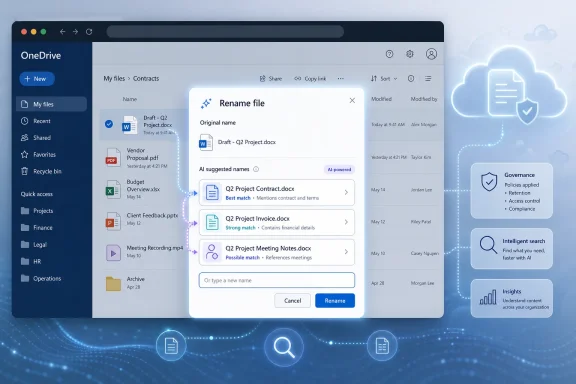
  • The feature is designed to analyze supported file contents and offer three clearer file-name suggestions when users rename a file.
  • OneDrive will also surface the feature after upload, giving users a chance to fix vague names before they disappear into a folder.
  • Supported formats are expected to include common Office documents, PDFs, Markdown files, and images.
  • The first release appears aimed at web users across personal and business OneDrive, while desktop and mobile availability remains an open question.
  • The feature’s usefulness will depend on accuracy, administrative controls, privacy expectations, and whether Microsoft eventually brings the same idea into Windows-native file workflows.
The best case is not that Copilot Suggested Rename becomes a headline feature. The best case is that it disappears into the muscle memory of saving, uploading, and organizing files, making OneDrive folders a little less chaotic without demanding attention. Microsoft’s AI future will not be judged only by agents, demos, and branded assistants; it will also be judged by whether the company can make old chores feel less neglected. If Copilot can start by naming the things we were too tired to name ourselves, that is not a revolution — but it is the sort of practical progress Windows users can actually feel.

References​

  1. Primary source: ARY News
    Published: 2026-06-01T10:29:14.442213
  2. Official source: microsoft.com
  3. Related coverage: windowsreport.com
  4. Related coverage: pccentral.net
  5. Official source: learn.microsoft.com
  6. Related coverage: techradar.com
 

Microsoft has added Copilot Suggested Rename to the Microsoft 365 roadmap as a OneDrive web feature planned to begin rolling out in June 2026, offering three AI-generated file-name suggestions when users rename or upload supported files. The feature sounds almost comically small beside Microsoft’s broader AI ambitions. But that is exactly why it matters: the next phase of Copilot is not a chatbot waiting for a grand prompt, but a quiet layer of automation embedded into the dullest parts of daily computing.
The humble filename is where personal productivity, enterprise governance, search, retention, and human laziness all collide. Microsoft is betting that if Copilot can make the boring parts of file management less painful, users will accept AI not as a separate destination but as plumbing inside the Microsoft 365 workflow.

Screenshot of OneDrive “Rename file” dialog with AI suggested contract document names and cloud governance icons.Microsoft Finds an AI Use Case Hiding in Plain Sight​

File renaming is not glamorous, which may be why it has survived for decades as a mostly manual chore. Users create “Document1,” download “Scan_04182026,” revise “FinalFINALv3,” and then expect search to rescue them later. At small scale, that chaos is tolerable; at OneDrive scale, it becomes a quiet tax on every project, handoff, audit, and archive.
Copilot Suggested Rename is designed to intervene at the moment when naming still has leverage. According to the roadmap description and subsequent reporting, the feature analyzes the contents of a supported file and offers three clearer, context-aware names inside the rename dialog. It also appears after upload in the toast notification, giving users a chance to fix a bad filename before it vanishes into the cloud.
That placement is important. Microsoft is not asking users to open a separate Copilot pane, write a prompt, and ask for help naming a file. It is inserting the AI suggestion into the ordinary file-management motion, where a user is already making a decision and may accept the machine’s answer with one click.
The supported formats also show where Microsoft sees the most obvious value. Word documents, PowerPoint decks, Excel workbooks, PDFs, Markdown files, and images cover much of the real-world clutter that accumulates in OneDrive. The feature is planned first for OneDrive on the web, for both personal and business users, with no confirmed desktop or mobile rollout yet.

The Small Feature Says More Than the Big Demo​

Microsoft’s Copilot story has often been told through expansive demos: summarize the meeting, draft the proposal, analyze the spreadsheet, build the presentation, query the company’s knowledge base. Those scenarios are useful, but they also demand trust, permissions, licensing, training, and often a tolerance for AI mistakes in visible work. Suggested Rename is a smaller wager with a lower blast radius.
A bad AI-generated filename is annoying, not catastrophic. The user still chooses among suggestions, and the original file remains under their control. That makes this kind of feature a natural proving ground for everyday AI assistance: visible enough to be useful, bounded enough to be forgiven.
It also fits Microsoft’s recent pattern of putting Copilot into file-adjacent workflows. OneDrive has become more than a sync folder; it is the substrate beneath Microsoft 365, Teams attachments, SharePoint libraries, collaboration links, Copilot grounding, and personal cloud storage. If Copilot can understand a document well enough to summarize it, answer questions about it, or use it in a workflow, then suggesting a better name is a modest but logical extension.
The irony is that this modest extension may be easier for users to appreciate than a more ambitious generative feature. Most people do not need AI to “transform work” every hour. They do need help turning “IMG_2049” into something they can recognize six months later.

OneDrive Becomes the Place Where AI Touches the File System​

Windows users have long thought of file management as something the operating system owns. Explorer shows the folder tree, file extensions, metadata, previews, and search results. But in Microsoft’s current ecosystem, the file system’s most important layer is increasingly cloud-based, identity-aware, and governed by Microsoft 365 rather than NTFS alone.
That shift matters because Copilot Suggested Rename is not arriving first in Windows File Explorer. It is arriving in OneDrive on the web. The web client is where Microsoft can update quickly, test UI changes across consumer and commercial accounts, and bind new behavior to Microsoft 365 services without waiting for a Windows release train.
For users, that means the center of gravity keeps moving. The filename may still appear in Explorer, Finder, Office, Teams, and mobile apps, but the intelligence around that name increasingly lives in OneDrive and SharePoint. Microsoft is not just adding a convenience feature; it is reinforcing the idea that files are cloud objects with semantic meaning, not merely blobs with extensions.
That is a subtle but profound change. Traditional file systems treat names as labels supplied by humans. Microsoft 365 treats files as objects with content, permissions, version history, sensitivity labels, sharing links, retention rules, and now AI-generated suggestions. The name becomes one more metadata surface that the service can improve.

The Filename Is a Productivity Problem Masquerading as User Error​

Poor file naming is usually blamed on individuals. Users are careless, hurried, inconsistent, or allergic to folders. But the persistence of bad filenames suggests a design failure as much as a human one.
Modern software creates too many files too quickly. Scanners generate generic names. Browsers download opaque names. Collaboration tools duplicate, export, and attach files with little regard for future retrieval. Office apps encourage fast creation and sharing, while the burden of disciplined naming lands on the user at the end of a task, when attention is already spent.
Copilot Suggested Rename attacks that friction directly. It says the system should help infer what a file is, rather than merely asking the user to describe it from scratch. If the AI can read a document’s title, agenda, invoice number, client name, presentation topic, or date range, it can at least propose a plausible name that is better than the default.
This is where the feature could become surprisingly sticky. Users do not need the perfect filename every time. They need a name that is good enough to make search results, folder views, and sharing dialogs less useless. A consistent improvement in “good enough” naming across thousands of files would be more meaningful than a spectacular Copilot trick used once a month.

Microsoft’s Real Audience Includes Admins, Not Just Messy Users​

For consumers, AI renaming is a convenience feature. For businesses, it intersects with information governance. Bad filenames do not merely inconvenience workers; they complicate discovery, records management, migrations, incident response, and compliance review.
Enterprise search can index content, but filenames still matter. They appear in audit logs, email links, Teams chats, sync clients, exports, legal holds, and user-facing interfaces. A file called “Q3 Vendor Contract Renewal Draft” communicates risk and relevance immediately. A file called “scan0007.pdf” forces someone, or some system, to open and inspect it.
That does not mean AI-generated filenames become compliance metadata. Administrators should not confuse a suggested name with a classification label, retention category, or sensitivity marker. But better names can reduce ambiguity at the edge of human workflows, especially when users are triaging large document sets or sharing files outside a tight team.
The governance angle also introduces risk. If Copilot proposes a name that includes sensitive client names, project codenames, health information, legal matter details, or financial terms, the filename itself may expose information in contexts where the document content remains protected. Filenames often travel farther than contents: in notifications, recent lists, sync paths, screenshots, search results, and external sharing prompts.

The Privacy Question Is Not Whether Copilot Can Read the File​

The obvious concern is that Copilot must inspect the file to suggest a name. That is true, and it will be enough to make some users uncomfortable. But in Microsoft 365, the sharper question is not whether AI can read a file in principle; it is under what permissions, policies, logging, and service boundaries that processing occurs.
Microsoft’s broader Copilot documentation emphasizes that Copilot operates within existing Microsoft 365 permission models and compliance controls. In commercial environments, that means OneDrive and SharePoint permissions, tenant sharing settings, sensitivity labels, retention policies, and audit capabilities remain central. In plain English: Copilot should not be a magic bypass around access control.
Still, “should not bypass permissions” is not the same as “has no privacy implications.” A rename suggestion is derived from content, and that derived text may reveal something. If the suggested filename surfaces in a notification, browser history, screen share, or shared folder listing, users may disclose context they did not intend to expose.
Admins will want to know whether the feature can be disabled, whether suggestions are logged, whether policy controls differ between consumer and business accounts, and how the feature behaves with protected, encrypted, or sensitivity-labeled content. The roadmap listing gives the shape of the feature, but not yet the operational detail that cautious organizations will demand before treating it as harmless.

AI Naming Will Be Judged by Its Mistakes​

The feature’s success will not be decided by whether Copilot can produce a pretty filename for a clean Word document. It will be decided by how it behaves with messy reality: scanned PDFs, blurry receipts, screenshots with partial text, multilingual files, confidential drafts, duplicated templates, poorly structured spreadsheets, and images whose meaning depends on context outside the file.
There are several ways this can go wrong. Copilot may infer the wrong subject, overemphasize a minor detail, produce names that are too long, invent context that is not actually present, or normalize files into bland corporate mush. It may suggest names that make sense in isolation but become useless when many files receive similar labels.
This is why three suggestions are smarter than one automatic rename. The user remains the final editor, and the AI is framed as an assistant rather than an authority. Microsoft appears to understand that the moment it silently renames user files without consent, a productivity feature becomes a trust problem.
The better version of this feature will likely learn from conventions without pretending to own them. People and organizations name files according to local habits: client first, date first, project code first, version last, or some ritualized blend inherited from a department’s oldest shared drive. If Copilot cannot respect those conventions eventually, it will be helpful mainly for casual users, not disciplined teams.

The Web-Only Launch Is a Signal, Not a Footnote​

The planned web-only debut will disappoint users who live in File Explorer or the OneDrive sync client. That frustration is understandable. If the problem is file clutter, many users experience it on the desktop, not in a browser tab.
But Microsoft’s web-first approach is unsurprising. OneDrive on the web is the control surface where Microsoft can expose Copilot features consistently across platforms. It also avoids the messy reality of local files that may not be synced, files stored outside OneDrive, offline access, shell extensions, and device-specific behavior.
This sequencing also lets Microsoft observe user acceptance before pushing the feature deeper into the operating system. If users adopt Suggested Rename on the web, it becomes easier to justify expansion into Windows, macOS, and mobile clients. If they ignore it, Microsoft can revise the interaction without touching the desktop shell.
For Windows enthusiasts, the open question is whether Explorer eventually becomes a beneficiary or a bystander. Microsoft has already experimented with AI and cloud integration across Windows in various forms, but file renaming is one of those basic shell operations where users are highly sensitive to latency, reliability, and control. A Copilot-powered rename inside Explorer would need to feel instant and optional, not like a cloud detour wrapped around a right-click.

The Consumer Version May Be the Messiest—and the Most Useful​

Personal OneDrive accounts are often more chaotic than business tenants. They contain school forms, tax PDFs, screenshots, recipes, resumes, downloaded manuals, family photos, insurance documents, and years of mobile uploads. The naming conventions are usually whatever the camera, scanner, website, or app happened to choose.
That makes consumers a strong fit for AI renaming. A parent uploading school paperwork, a freelancer managing invoices, or a student saving lecture notes may benefit immediately from clearer filenames. The feature could turn OneDrive from a dumping ground into something closer to an automatically maintained personal archive.
But consumer use also raises expectations that Microsoft has historically struggled to satisfy. People will expect the feature to understand photos, scans, and PDFs without requiring enterprise licensing nuance. They will also expect it not to be creepy. The difference between “helpful” and “why is Microsoft reading this?” can be a single badly surfaced suggestion.
The interface will do a lot of trust work here. If Copilot suggestions are clearly optional, easy to ignore, and presented only when the user is already renaming or uploading a file, they may feel like autocomplete. If they appear too aggressively, they will feel like surveillance wearing a productivity badge.

Enterprise IT Will Ask for Controls Before Applause​

In managed environments, even small Copilot features tend to trigger a familiar sequence. Users see convenience. Security teams see data processing. Compliance teams see discoverability and logging. Admins see another setting they need to understand before the help desk starts getting tickets.
Suggested Rename should be less controversial than features that generate new documents or answer broad questions across company data. But it still touches content, and content is where Microsoft 365 governance becomes complicated. A file rename changes a visible artifact that can affect workflows, automations, sync paths, user habits, and downstream references.
There is also the matter of user education. If Copilot suggests “Acquisition Strategy Draft” for a document that was previously called “notes,” that may be more accurate, but it may also be more revealing. Users need to understand that better names are not always safer names.
Admins may therefore want policy granularity. The ideal control set would include tenant-level enablement, sensitivity-label-aware behavior, support for audit, and perhaps the ability to restrict the feature for certain sites, accounts, or file types. Without that, some organizations may decide the feature is too minor to justify even a small uncertainty.

The Bigger Copilot Strategy Is Ambient, Not Conversational​

Copilot began, in public imagination, as a conversational assistant. Ask it something, and it responds. That model remains central, but Microsoft’s product direction increasingly points toward ambient Copilot: AI that appears inside existing workflows before the user formulates a prompt.
Suggested Rename is ambient Copilot in miniature. It anticipates a need, offers structured choices, and disappears if ignored. It is less impressive in a keynote than a multi-step agent, but it may be more acceptable in everyday software.
This matters because prompt-based AI has a usage problem. Many workers do not know what to ask, do not trust the answer, or do not want to interrupt their flow to consult a chat panel. Embedded suggestions reduce that activation energy. The user does not need to become a prompt engineer to benefit from a model that can read a file and infer a name.
The risk is that ambient AI can become ambient noise. If every Microsoft 365 surface offers suggestions, summaries, rewrites, names, classifications, and next actions, users may tune them out. The best Copilot features will be the ones that appear exactly where the decision is being made and leave the user feeling faster, not managed.

Better Names Could Make Search Better Without Changing Search​

Microsoft has invested heavily in search and semantic retrieval across Microsoft 365, but filenames still shape user behavior. People scan lists before they query indexes. They sort by name, skim recent files, recognize patterns, and share links based on visible labels.
Improved filenames therefore have a compounding effect. A file with a descriptive name is easier to find manually, easier to identify in search results, easier to distinguish from adjacent files, and easier to trust when attached or shared. It also improves the social experience of collaboration: recipients know what they are opening before they open it.
This is especially relevant in Teams and Outlook workflows, where files often travel as links rather than attachments. The filename becomes the headline. If Copilot can help users create better headlines for their documents, it improves not just storage hygiene but communication.
There is a catch. Better filenames are not a substitute for metadata, labels, or well-designed information architecture. A tenant full of AI-polished filenames can still be overshared, under-governed, and impossible to audit cleanly. Suggested Rename is a usability improvement, not a records management strategy.

The Feature Will Need to Respect the Culture of Versioning​

One of the most persistent file-naming pathologies is version sprawl. “Final,” “final2,” “final-approved,” “final-client,” and “really-final” are jokes because they are real. OneDrive and Office version history reduce the technical need for this behavior, but they have not eliminated the cultural habit.
Copilot Suggested Rename could help or hurt here. If it nudges users toward descriptive names without version clutter, it may make OneDrive libraries cleaner. If it fails to recognize version intent, it may produce polished names that obscure draft status, approval state, or handoff context.
This is where Microsoft’s integration with Office and OneDrive could become powerful over time. A future version might understand that a file is a template, a draft, a signed copy, a scan, a duplicate, or a generated export. It might recommend names that preserve meaningful lifecycle information rather than merely summarizing topic.
For now, the safest assumption is that Suggested Rename will be a convenience tool, not a workflow engine. Users who rely on strict naming schemes for legal, engineering, finance, or archival work should treat AI suggestions as drafts requiring review.

The Mundane AI Features Are the Ones That May Stick​

The technology industry has spent years selling AI as a revolution. Yet many of the most durable AI features may look more like spellcheck, autocomplete, spam filtering, photo search, and now file naming. They succeed not because they replace human work in dramatic fashion, but because they remove tiny frictions at enormous scale.
This is the lens through which Copilot Suggested Rename should be judged. It is not a reason to buy a new PC. It is not a wholesale reinvention of OneDrive. It is not proof that AI agents are ready to run the office. It is a small intervention in a workflow that almost everyone recognizes as broken.
Small interventions can still matter. If Microsoft can make OneDrive feel less like a pile of anonymous digital debris, it strengthens the value of the Microsoft 365 ecosystem. If it does so without making users feel watched, overruled, or upsold, it earns a kind of trust that splashier Copilot features have not always secured.
The inverse is also true. If the suggestions are slow, bland, inaccurate, intrusive, or administratively opaque, the feature will become another example of AI pasted onto software because the platform owner could, not because users asked.

The Rename Button Is Where Microsoft’s AI Promise Gets Practical​

The most concrete read on Copilot Suggested Rename is also the most useful one: it is a small feature with outsized implications for how Microsoft wants users to experience AI in Microsoft 365.
  • Copilot Suggested Rename is planned to begin rolling out in June 2026 for OneDrive on the web, with support for both personal and business users.
  • The feature is expected to offer three context-aware filename suggestions when users rename supported files or upload them to OneDrive.
  • Supported formats are reported to include Office documents, PDFs, Markdown files, and images, which covers much of the everyday clutter stored in cloud drives.
  • The web-first launch suggests Microsoft is testing the workflow in the cloud interface before any broader desktop or mobile integration.
  • Business customers should evaluate the feature through the lens of permissions, sensitivity, auditability, and whether clearer filenames could expose context that was previously hidden.
  • The feature’s value will depend less on AI novelty than on accuracy, speed, user control, and respect for existing naming conventions.
That is the practical bargain Microsoft is offering. Let Copilot read enough of the file to suggest what humans should have named it in the first place. Keep the user in control. Make the result boringly useful.
If Microsoft gets that balance right, Copilot Suggested Rename may become one of those features users stop noticing because it simply becomes part of how OneDrive works. That would be a quieter victory than the company’s grandest AI pitches, but perhaps a more durable one: the future of Copilot may not arrive as a talking assistant that changes everything at once, but as a thousand small nudges that make the old chores feel a little less broken.

References​

  1. Primary source: Abb Takk News
    Published: 2026-06-01T16:50:12.266128
  2. Official source: microsoft.com
  3. Related coverage: digitaltrends.com
  4. Related coverage: windowsreport.com
  5. Related coverage: gadgetcv.com
  6. Related coverage: pccentral.net
  1. Official source: learn.microsoft.com
  2. Related coverage: techradar.com
  3. Related coverage: nubis365.com
  4. Official source: cdn-dynmedia-1.microsoft.com
 

Microsoft 365 Roadmap item 564909 says Copilot Suggested Rename is in development for OneDrive on the web, with rollout starting in June 2026 and three AI-generated filename suggestions offered for supported files rather than automatic renaming. The practical answer is simple: if the feature appears in your tenant, expect it inside OneDrive web during the rename or upload flow, where Copilot analyzes the file and proposes clearer names you can accept, ignore, or replace manually. That sounds like a convenience feature, but the bigger story is Microsoft turning file hygiene into an AI-assisted layer of Microsoft 365 rather than a task users are expected to remember.
The important distinction is that this is not OneDrive suddenly taking ownership of your naming conventions. The reported behavior is suggestive, not mandatory: Copilot looks at the contents of a file and offers three descriptive names. That makes the feature less like an automated migration tool and more like a nudge at the exact moment when most users create tomorrow’s clutter.
For WindowsForum readers, the value is not that Copilot can invent a prettier filename. The value is that Microsoft is moving another small act of knowledge work into the same AI surface that already summarizes, searches, and reasons across Microsoft 365 content. File naming has always been a tiny tax on productivity; Microsoft is now trying to collect that tax through Copilot.

OneDrive interface shows a “Rename file” dialog with AI suggestions in a file management window.Microsoft Turns The Filename Into A Copilot Surface​

For decades, the filename has been one of the most boring interfaces in computing, which is precisely why it matters. A good filename is metadata that humans actually use: it survives email forwarding, local sync, SharePoint libraries, Teams attachments, exports, audits, and screenshots. A bad filename becomes an invisible productivity leak.
OneDrive’s coming Copilot Suggested Rename feature is modest in scope, at least based on what has been reported. It is listed for OneDrive web, not as a sweeping Windows shell replacement. It starts rolling out in June 2026, and it proposes three descriptive filenames rather than renaming files on its own.
That constraint is the feature’s smartest design choice. Microsoft has learned, sometimes the hard way, that users tolerate AI assistance more readily when it is framed as a suggestion at the point of action. A forced rename would trigger understandable anxiety in any organization with retention policies, legal workflows, automation scripts, or deeply ingrained folder habits.
The strategic signal is still obvious. OneDrive is no longer just a place to store files or synchronize them across Windows PCs. It is becoming a managed work surface where Copilot interprets content, proposes structure, and gradually reduces the amount of manual organization expected from the user.

The Small Feature Solves A Real Annoyance​

Anyone who has managed a shared drive, a SharePoint library, or a OneDrive folder knows the pattern. A file begins life as “Final draft,” “Document1,” “Q3 update,” “scan,” or “IMG_4821,” then gets duplicated, forwarded, edited, exported, and uploaded into a system where search is expected to rescue everyone later. Search helps, but it does not fully replace the social function of a readable filename.
The reported Copilot feature attacks that problem at the point where it is cheapest to fix. If the AI can read the document, spreadsheet, presentation, PDF, Markdown file, or image and propose a name that reflects its contents, it may prevent a bad filename before it spreads. That is more useful than a cleanup dashboard that appears six months after a department has already normalized chaos.
This is also where the feature is likely to feel better than a generic “rename file” command. The hard part of naming is not typing words into a box; it is deciding what the file is, who will need it later, and what information should be captured in the name versus left inside the document. Copilot’s pitch is that it can infer enough context to get the user most of the way there.
There is a quiet accessibility angle here too. Users who are organizing files under deadline pressure, working across languages, or cleaning up inherited folders may benefit from having a first draft of a filename. Microsoft does not need Copilot to be perfect for this feature to be useful. It only needs Copilot to be better than “Untitled presentation” often enough that users stop ignoring it.

The Rollout Is Narrow, But The Direction Is Broad​

The verified facts are thin, and that matters. The roadmap entry identifies Copilot Suggested Rename as an in-development OneDrive web feature with rollout beginning in June 2026. Coverage says it analyzes file content, offers three descriptive name suggestions, and supports common file types including Word, Excel, PowerPoint, PDF, Markdown, and images.
That tells us what Microsoft is attempting, but not everything administrators will want to know. We do not yet have enough public detail to make firm claims about tenant controls, audit logging, naming policy integration, retention interactions, or how the feature behaves with protected and sensitivity-labeled content. Those are not minor implementation details; for enterprise IT, they are the difference between a nice productivity feature and a governance review item.
The supported file types are revealing, though. Word, Excel, PowerPoint, PDF, Markdown, and images cover a huge portion of everyday business content, from formal reports to meeting decks to developer notes to receipts and screenshots. Microsoft is not limiting this to Office-native documents alone, which suggests the company wants Copilot-assisted naming to apply to the messy reality of modern OneDrive libraries.
The web-first positioning also makes sense. OneDrive on the web is where Microsoft can iterate quickly, expose Copilot experiences consistently, and avoid the complexity of changing behavior directly inside File Explorer. Windows users may eventually expect the same intelligence everywhere, but the initial battlefield is the browser-based Microsoft 365 experience.

Suggestions Are Safer Than Automation, And That Is The Point​

The most important product decision here is what the feature reportedly does not do. It does not automatically rename files by default. It offers three options and leaves the user in control.
That restraint will disappoint anyone hoping for a magic cleanup button, but it is necessary. Filename changes can have consequences. They can break human instructions, confuse collaborators, disrupt scripts, alter expected sync behavior, and complicate workflows where names carry approval status or external identifiers.
For IT departments, this means the first wave of concern should be less about Copilot randomly rewriting a library and more about user behavior. If users accept suggested names without understanding local conventions, organizations could still end up with inconsistent naming. AI can produce something descriptive while still missing the business code, client shorthand, ticket number, project prefix, or retention clue that matters internally.
That is why Suggested Rename should be treated as a productivity aid, not a records-management policy. It may help users avoid useless names, but it cannot know every organization’s private taxonomy unless Microsoft provides controls or integration points that teach it those rules. Until more is known, admins should assume this is a convenience layer sitting above existing governance, not a replacement for it.

OneDrive’s Real Job Is Shifting From Sync To Stewardship​

OneDrive began as a cloud storage and sync story for many Windows users: keep files available across devices, recover from hardware loss, and reduce dependence on local disks. That job still matters, but Microsoft’s ambitions have moved higher up the stack. The company increasingly wants OneDrive to understand what the files mean.
That shift is visible across the broader OneDrive conversation. WindowsForum readers have already seen Microsoft push OneDrive as a cloud-first companion to Windows and Microsoft 365, with changes around web experiences, collaboration, device transitions, and prompts that encourage deeper integration. Suggested Rename belongs to that same pattern, even if it arrives wearing the costume of a small quality-of-life improvement.
This is the logic of Microsoft 365 Copilot in miniature. Summarizing a document is useful after the document exists. Suggesting a filename influences how the document enters the organization’s shared memory. One is retrieval; the other is hygiene at creation.
That makes file naming a surprisingly important surface. If Copilot can improve names, it improves scanning, search results, sharing confidence, and later retrieval. If it gets names wrong or produces bland corporate mush, it becomes another AI flourish users dismiss after two weeks.

The Feature Is Also A Test Of Trust​

Microsoft has spent the last few years trying to normalize Copilot as an ambient assistant across work apps. The challenge is that users do not experience AI strategy as a keynote diagram. They experience it as a button that either helps right now or gets in the way.
Suggested Rename is a useful test because the user can judge the output instantly. A filename is short. It is either relevant, awkward, too vague, too long, or surprisingly good. Unlike a lengthy AI-generated summary, it does not require much cognitive labor to evaluate.
That immediacy may help Microsoft. If Copilot suggests “Q2 Budget Review for Facilities Expansion” instead of “Book1,” users can see the utility without a training seminar. If it suggests something generic or misleading, they can ignore it and move on.
The risk is subtle overconfidence. A filename that sounds polished may still omit the one detail that matters most. In professional environments, clarity is not just description; it is convention, context, and accountability.

Sysadmins Should Prepare For Behavior Change Before Policy Change​

The first thing IT teams should do is not panic. Based on the reported details, this is not an automatic bulk-rename engine. It is a user-facing suggestion feature for licensed Copilot users in OneDrive web, with availability varying by market according to Microsoft’s OneDrive Copilot FAQ.
The second thing IT teams should do is pay attention. Small AI assists can change habits quickly because they appear inside daily workflows. If users start accepting Copilot-generated names, those names become part of the organization’s living information architecture.
That means admins and information managers should review naming conventions before the feature lands broadly. If a department relies on prefixes, dates, client IDs, project codes, or status tags, those conventions should be written clearly enough for humans to apply even when AI suggestions appear. Otherwise, users may treat a fluent Copilot suggestion as “good enough” and skip the extra structure the business depends on.
Help desk teams should also be ready for basic questions. Users may ask why OneDrive is offering names, whether the file was changed, whether Copilot read the document, and whether accepting a suggestion affects sharing links. Some of those answers will depend on Microsoft’s final implementation, but the front-line message should be calm: a suggested rename is still a rename decision, and users should apply the same judgment they would use manually.

Enthusiasts Will Want It In File Explorer, But Microsoft Is Starting Where It Has Control​

The obvious Windows enthusiast reaction is predictable: why only OneDrive on the web? If Copilot can suggest a better name, why not do it directly in File Explorer when a file lands in the local OneDrive folder? Why not add it to the right-click menu or Windows share sheet?
Those are reasonable expectations, but web-first deployment is the safer starting point. The OneDrive website gives Microsoft a controlled interface, a clearer licensing boundary, and a place where Copilot features already make sense to users. File Explorer is more sensitive territory because it sits at the boundary between local computing, cloud sync, third-party tools, and decades of Windows muscle memory.
There is also a trust issue. Users may tolerate a Copilot prompt in OneDrive web as part of Microsoft 365. They may react differently if Windows starts suggesting names in the local file system, especially for folders that sync across personal, work, and shared contexts.
Still, the direction of travel is hard to miss. Once Microsoft proves the value of content-aware naming in OneDrive web, pressure will build to make the same capability available closer to where files are created, downloaded, scanned, or exported. The filename is not a web-only problem.

The Governance Story Is Still Unfinished​

The unanswered enterprise questions are the ones that will determine how warmly this feature is received outside consumer and small-business scenarios. Will admins be able to disable it? Will there be tenant-level controls? Will suggested names respect sensitivity labels, access restrictions, or content boundaries in ways administrators can verify? Will accepted AI suggestions be visible in audit records as ordinary rename events or as Copilot-assisted actions?
The verified reporting does not answer those questions, so the responsible conclusion is that we do not know yet. That uncertainty should not be filled with speculation dressed as fact. It should be treated as the next place Microsoft needs to provide clarity.
There is a broader compliance concern too. Naming can expose information. A document’s contents may be restricted, but its filename often travels widely in notifications, recent-file lists, sync clients, search results, and shared links. A Copilot-generated name that is more descriptive may also be more revealing.
That does not make the feature dangerous by default. It simply means that “better filename” is not always the same as “safer filename.” In regulated environments, administrators may prefer controlled vagueness over descriptive precision, especially when file names appear outside the original permission context.

This Is A Convenience Feature With Platform Ambitions​

Microsoft’s Copilot strategy often advances through features that look too small to argue about individually. A summary button here, a drafting prompt there, a sharing suggestion somewhere else. Suggested Rename fits that pattern perfectly.
On its own, it is a fix for lazy filenames. In context, it is another example of Microsoft placing AI between the user and the routine mechanics of work. Copilot is not merely answering questions; it is starting to shape the artifacts before users file them away.
That distinction matters because information work is full of micro-decisions. What should this file be called? Where should it go? Who should see it? What changed since the last version? Which copy is authoritative? Microsoft’s long-term opportunity is to make those decisions less manual across Microsoft 365.
The risk is that AI-managed hygiene becomes another layer users do not fully understand. If Copilot’s suggestions are transparent, optional, and easy to override, the feature can reduce friction. If Microsoft buries controls, overstates accuracy, or treats user acceptance as proof of correctness, the convenience story will curdle.

June 2026 Is The Start Of The Test, Not The Finish Line​

The rollout timing matters because it gives organizations a short window to decide how seriously to treat the feature. June 2026 is not a distant roadmap abstraction anymore. For tenants with eligible licensing and market availability, this is the kind of change that can appear quietly and then become normal before policy teams have discussed it.
Admins should watch the Microsoft 365 roadmap, message center communications, OneDrive release notes, and Copilot documentation for practical details. The most important items to confirm will be availability, controls, licensing behavior, audit treatment, and whether Microsoft documents any limitations around protected content. Those are the operational facts that will decide whether Suggested Rename is merely helpful or administratively sensitive.
Users should approach the feature with a simple rule: accept the suggestion only if it matches the way someone else will need to find the file later. A descriptive AI name is useful when it preserves meaning. It is less useful when it strips away the local shorthand that a team actually relies on.
For power users, the best outcome would be a hybrid habit. Let Copilot propose the plain-English core of the name, then add the human layer: date, project code, version marker, client identifier, or status. That is where AI assistance and organizational discipline can complement each other rather than compete.

The Practical Read Before Copilot Starts Naming Your Files​

The near-term story is straightforward: Copilot Suggested Rename is a OneDrive web feature in development, expected to begin rolling out in June 2026, and it is designed to suggest rather than impose filenames. The sharper read is that Microsoft is using a tiny user annoyance as an entry point for broader AI-managed file hygiene across Microsoft 365.
  • Copilot Suggested Rename is listed in Microsoft 365 Roadmap item 564909 as a OneDrive web feature with rollout starting in June 2026.
  • The feature reportedly analyzes file contents and offers three descriptive filename suggestions instead of automatically renaming files by default.
  • Reported supported file types include Word, Excel, PowerPoint, PDF, Markdown, and images.
  • Copilot in OneDrive is available through the OneDrive website and Windows PCs for licensed users, with availability varying by market.
  • IT teams should review naming conventions now so users know when an AI suggestion is helpful and when business-specific structure still needs to be added.
  • The key unanswered enterprise questions involve admin controls, audit visibility, sensitivity-aware behavior, and how the feature interacts with established governance practices.
The filename has always been a small thing that becomes a large problem only after enough people ignore it. Microsoft’s bet is that Copilot can intervene early enough to make file hygiene feel less like clerical work and more like assisted productivity. If the company keeps the feature optional, transparent, and governable, Suggested Rename could become one of those quiet Microsoft 365 improvements users adopt without ceremony; if not, it will become another reminder that even the smallest AI convenience needs enterprise-grade trust before it can become infrastructure.

References​

  1. Primary source: techcommunity.microsoft.com
  2. Independent coverage: techradar.com
  3. Independent coverage: digitaltrends.com
  4. Independent coverage: windowscentral.com
  5. Independent coverage: heise.de
  6. Primary source: WindowsForum
 

Back
Top