

In enterprise AI, the biggest shift is no longer about whether Copilot can draft a document or summarize a meeting. The real question is whether AI is helping teams finish work, automate repeatable processes, and stay governable at scale. That is the tension at the heart of UC Today’s “AI & Productivity Show: Copilot, Agents, and What’s Actually Working,” which brings together Tom Arbuthnot, Mark Nixon, and Andreas Welsch to separate genuine workplace value from the noise around generative AI.
What makes this conversation especially relevant in 2026 is that Microsoft’s own direction is changing fast: Copilot is moving from a standalone assistant into a broader platform for agents, administration, and policy control. Microsoft now positions Copilot Chat as available at no additional cost for eligible Microsoft 365 users, while agents are metered and governed through the Microsoft 365 admin center and related control planes. That combination says a lot about where the company thinks adoption is headed — not toward flashy demos, but toward practical, managed workflow automation.
For leaders, that creates a simple but uncomfortable test. If AI is not improving throughput, reducing friction, and surviving governance scrutiny, it is probably still in the experimentation phase. The organizations that are seeing value are the ones treating Copilot and agents as operational tools, not just productivity theater.
The current AI productivity conversation did not begin with agents. It began with copilots — assistants designed to help people generate text, summarize information, and surface insights faster than they could manually. Microsoft’s early positioning for Microsoft 365 Copilot centered on working inside Outlook, Word, Excel, Teams, and PowerPoint, with the promise of making familiar apps more useful without forcing users to learn a new interface. That pitch mattered because it framed AI as an augmentation layer rather than a replacement for existing work patterns.
Over time, however, the market discovered a problem. Many workers liked the convenience of AI assistance, but leaders still struggled to connect that convenience to measurable business outcomes. Drafting faster is useful, but it does not automatically mean decisions are better, cycles are shorter, or service quality is higher. That gap has pushed the discussion from “assistant” toward automation, agentic workflows, and governance-first deployment.
Microsoft has responded by broadening its story. Instead of treating Copilot as a single product, the company increasingly describes a layered ecosystem: Copilot Chat, Microsoft 365 Copilot, Copilot Studio, agents, admin controls, and enterprise protection features. In practice, that means AI is no longer just about a conversational box. It is also about policy enforcement, data access, licensing models, and lifecycle management.
That evolution helps explain why discussions like the one on UC Today are timely. Tom Arbuthnot, Mark Nixon, and Andreas Welsch represent three angles on the same market: collaboration, Microsoft go-to-market strategy, and strategic AI adoption. The value of that mix is that it avoids the usual hype cycle. Instead, it asks what organizations are actually doing, what is already producing value, and what remains too early or too fragile for broad rollout.
There is also a broader industry context. Competitors across UC, productivity, and security have all moved toward AI assistants and workflow agents, which means Microsoft is no longer setting expectations alone. The market now expects AI features to be embedded, measurable, and controllable. That is why the governance story matters almost as much as the model story. Without trust and control, enterprise AI stalls.
The important distinction is that productivity gains only become visible when teams redesign habits around the tool. If users keep their old processes and simply add AI at the edge, the net effect can be limited. If they build AI into the workflow itself, the result can be faster handoffs, cleaner documentation, and fewer context switches. That is where the ROI begins to become real.
A second pattern is the rise of departmental pilots. Sales, customer service, HR, and IT tend to be early adopters because their work is highly repeatable and text-heavy. These functions also generate enough volume that even small efficiency gains matter. The more process-oriented the team, the easier it is to prove a business case.
There is also a management issue. If employees treat Copilot like a faster keyboard, then the organization gets speed but not change. If they treat it like a work orchestrator, then AI starts to influence how work moves between people and systems. The second pattern is much more valuable, but it requires stronger change management and tighter governance. That distinction is often missed in vendor-led demos.
In other words, organizations are not just buying AI. They are deciding what kind of work they want AI to touch. That decision will determine whether productivity improvements stay at the individual level or spread across the enterprise. Leaders who understand that difference are ahead of the curve.
That ladder matters strategically. A broad free or included layer helps normalize usage, while premium tiers and agents create monetization opportunities once organizations see enough value to expand. It is a classic enterprise land-and-expand motion, except the object being expanded is not storage or security — it is AI workload consumption.
Microsoft’s broader product messaging also suggests a stronger emphasis on “frontier” work patterns, where AI helps users move between ideation, drafting, and execution. The company has increasingly described this as collaborative work between humans and agents, not merely humans and chatbots. That framing is useful because it acknowledges that enterprise value usually comes from completing tasks, not just generating text.
This segmentation may help Microsoft drive adoption, but it can also complicate procurement conversations. Buyers want to know whether AI is a platform improvement, a user benefit, or a variable operating cost. When those three things are bundled together too aggressively, organizations struggle to forecast ROI.
For enterprise buyers, the takeaway is straightforward: Copilot is no longer a single feature to compare against a competitor’s single feature. It is becoming an operating model. And once a product becomes an operating model, governance, support, licensing, and telemetry matter as much as the underlying model quality.
By contrast, open-ended agents that are allowed to roam across systems, make decisions, and trigger high-impact actions remain much more experimental. The more autonomy an agent has, the more important it becomes to control data access, approval thresholds, and logging. That is why governance is not a side topic; it is the operating condition that makes agentic AI viable.
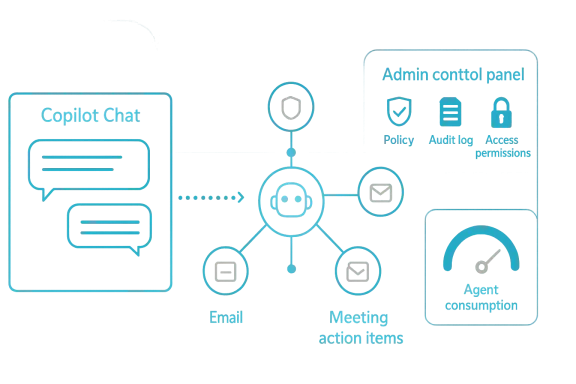
Microsoft has been explicit that agent management and controls are now core to the platform story. Recent documentation describes how admins can govern access, deploy agents on behalf of users, and manage them through the Microsoft 365 admin center. That is a strong sign that Microsoft understands the enterprise concern: agents are useful only if they are manageable.
The governance model is getting more sophisticated. Microsoft now points buyers to a mix of Copilot Control System capabilities, Microsoft 365 admin center settings, Power Platform admin controls, and Purview-based compliance features. This layered approach is sensible because no single control plane can cover every use case. But it also means the buyer’s maturity level matters a great deal. A shallow deployment can become a deep problem quickly.
Organizations that move too quickly may end up with isolated pilots that are hard to scale safely. Organizations that move too slowly may miss the productivity window and let smaller competitors gain an operational edge. The right answer is not to avoid agents; it is to limit them to well-governed, high-confidence workflows first.
This matters because adoption is often blocked not by lack of enthusiasm, but by the inability to answer basic questions: who has access, what data is exposed, what actions can be taken, and how do we prove compliance later? Microsoft’s current control story is designed to answer exactly those questions. That is why governance is now part of the AI value proposition, not just a security add-on.
There is also a practical change in how IT evaluates new features. In the past, the test was whether a tool was useful. Now the test is whether it can be enabled safely, monitored centrally, and withdrawn if needed. That is a much more enterprise-friendly posture, but it requires admins to think like platform operators. AI has turned administration into product design.
That is especially relevant for enterprises with large, messy content estates. If the underlying documents are poorly labeled, over-shared, or outdated, then a very capable AI assistant may simply expose the organization’s existing weaknesses faster. In that sense, AI becomes a mirror for information governance maturity.
For regulated industries, the lesson is even sharper. It is not enough to know that an agent can save time. Leaders also need to know how it handles sensitive data, what logs are retained, and how exceptions are escalated. Without that clarity, deployments will stay in pilot mode longer than the vendors would like.
But consumer-grade expectations can also create disappointment. Users often want AI to feel magical and immediate, while enterprise teams need it to be reliable, traceable, and policy-aware. Those requirements slow deployment, but they are not optional in business settings. The result is a gap between what users imagine and what organizations can safely deliver. Managing that gap is part of the job now.
Microsoft seems to be trying to bridge that gap by making Copilot Chat broadly accessible while reserving deeper enterprise controls and data grounding for paid tiers. That makes the consumer-to-enterprise transition smoother, but it also means expectations have to be carefully set. If users believe “Copilot” means the same thing everywhere, disappointment is inevitable.
That is why the most successful enterprise AI programs tend to start with clear owners and specific process metrics. Teams can measure ticket deflection, meeting follow-through, content reuse, or document turnaround time. Those numbers may not be glamorous, but they are the language of budget decisions.
This is good news for enterprise buyers because it pushes the market toward more mature products. But it also means switching costs rise. Once an organization has built governance and workflow assumptions around one ecosystem, changing platforms becomes expensive and risky. Platform gravity is real in enterprise AI.
Microsoft’s partner ecosystem also stands to gain. As agents become more common, there will be more demand for implementation, data readiness, custom workflows, and change management. That opens the door for consultancies, MSPs, and UC specialists who can turn abstract AI capability into operational value.
For Microsoft specifically, the upside is enormous if it can keep simplifying the experience while expanding capability. The risk is that the stack becomes so layered that buyers struggle to understand what they are actually purchasing. The more Microsoft succeeds, the more clarity it will need to preserve.
It also helps separate true productivity gains from mere activity inflation. If an AI tool creates more drafts but does not improve completion rates, the benefit is mostly cosmetic. Good adoption requires the discipline to ask whether the work actually moved forward.
The same logic applies to change management. Users need guidance on when to trust AI, when to verify it, and when to avoid it altogether. The organizations that invest in those habits will get much more from the technology than the organizations that simply turn it on and hope for the best.
For customers, the practical challenge is to decide where AI belongs first. The right answer is usually in a bounded workflow with measurable impact and a clear governance model. Once that is working, expansion becomes easier, because the organization has already built the muscles needed to support it. Success in AI is increasingly about operational maturity.
What to watch next:
Source: UC Today AI & Productivity Show: Copilot, Agents, and What’s Actually Working - UC Today
What makes this conversation especially relevant in 2026 is that Microsoft’s own direction is changing fast: Copilot is moving from a standalone assistant into a broader platform for agents, administration, and policy control. Microsoft now positions Copilot Chat as available at no additional cost for eligible Microsoft 365 users, while agents are metered and governed through the Microsoft 365 admin center and related control planes. That combination says a lot about where the company thinks adoption is headed — not toward flashy demos, but toward practical, managed workflow automation.
For leaders, that creates a simple but uncomfortable test. If AI is not improving throughput, reducing friction, and surviving governance scrutiny, it is probably still in the experimentation phase. The organizations that are seeing value are the ones treating Copilot and agents as operational tools, not just productivity theater.
 Background
The current AI productivity conversation did not begin with agents. It began with copilots — assistants designed to help people generate text, summarize information, and surface insights faster than they could manually. Microsoft’s early positioning for Microsoft 365 Copilot centered on working inside Outlook, Word, Excel, Teams, and PowerPoint, with the promise of making familiar apps more useful without forcing users to learn a new interface. That pitch mattered because it framed AI as an augmentation layer rather than a replacement for existing work patterns.Over time, however, the market discovered a problem. Many workers liked the convenience of AI assistance, but leaders still struggled to connect that convenience to measurable business outcomes. Drafting faster is useful, but it does not automatically mean decisions are better, cycles are shorter, or service quality is higher. That gap has pushed the discussion from “assistant” toward automation, agentic workflows, and governance-first deployment.
Microsoft has responded by broadening its story. Instead of treating Copilot as a single product, the company increasingly describes a layered ecosystem: Copilot Chat, Microsoft 365 Copilot, Copilot Studio, agents, admin controls, and enterprise protection features. In practice, that means AI is no longer just about a conversational box. It is also about policy enforcement, data access, licensing models, and lifecycle management.
That evolution helps explain why discussions like the one on UC Today are timely. Tom Arbuthnot, Mark Nixon, and Andreas Welsch represent three angles on the same market: collaboration, Microsoft go-to-market strategy, and strategic AI adoption. The value of that mix is that it avoids the usual hype cycle. Instead, it asks what organizations are actually doing, what is already producing value, and what remains too early or too fragile for broad rollout.
There is also a broader industry context. Competitors across UC, productivity, and security have all moved toward AI assistants and workflow agents, which means Microsoft is no longer setting expectations alone. The market now expects AI features to be embedded, measurable, and controllable. That is why the governance story matters almost as much as the model story. Without trust and control, enterprise AI stalls.
What Organizations Are Actually Doing Today
The most important reality check is that many organizations are using AI for small wins, not grand transformation. Teams often begin with drafting, summarizing, note-taking, knowledge lookup, and meeting follow-up because those tasks are easy to understand and easy to trial. These are not trivial use cases, but they are usually incremental improvements rather than structural change.Practical value starts with repeatable work
The most common successful deployments are in workflow-adjacent tasks where AI can shave minutes off routine work every day. That includes summarizing long email threads, turning meetings into action items, and helping users locate information buried in SharePoint, Teams, or email. These are the kinds of use cases that feel modest individually but can compound across a large organization.The important distinction is that productivity gains only become visible when teams redesign habits around the tool. If users keep their old processes and simply add AI at the edge, the net effect can be limited. If they build AI into the workflow itself, the result can be faster handoffs, cleaner documentation, and fewer context switches. That is where the ROI begins to become real.
A second pattern is the rise of departmental pilots. Sales, customer service, HR, and IT tend to be early adopters because their work is highly repeatable and text-heavy. These functions also generate enough volume that even small efficiency gains matter. The more process-oriented the team, the easier it is to prove a business case.
- Drafting internal communications
- Summarizing meetings and follow-ups
- Creating first-pass presentations
- Searching internal knowledge bases
- Automating ticket triage and responses
- Supporting onboarding and HR workflows
Why “doing more” is not the same as “working better”
A hidden challenge is that AI can increase output without improving outcomes. Teams may generate more content, more summaries, and more variations, but still spend too much time reviewing, correcting, and validating the results. That is why many leaders are now asking for metrics that show cycle-time reduction, reduced manual handoffs, and higher completion rates rather than generic usage counts.There is also a management issue. If employees treat Copilot like a faster keyboard, then the organization gets speed but not change. If they treat it like a work orchestrator, then AI starts to influence how work moves between people and systems. The second pattern is much more valuable, but it requires stronger change management and tighter governance. That distinction is often missed in vendor-led demos.
In other words, organizations are not just buying AI. They are deciding what kind of work they want AI to touch. That decision will determine whether productivity improvements stay at the individual level or spread across the enterprise. Leaders who understand that difference are ahead of the curve.
The Microsoft Copilot Direction That Matters
Microsoft’s direction is more interesting than a single feature list. The company is now separating the free or broadly available Copilot Chat layer from the more deeply integrated Microsoft 365 Copilot offering, while also adding agent capabilities that can be consumed on a metered basis. That signals a platform strategy built around reach, upgrade paths, and recurring consumption.From assistant to ecosystem
Copilot Chat is positioned as a widely available entry point for eligible Microsoft 365 customers, while the paid Microsoft 365 Copilot tier adds deeper access to organizational data, app integration, and advanced features. Agents sit alongside that model and can be accessed and used through metered pricing. This is important because it shows Microsoft is no longer selling “one AI experience” but an entire ladder of adoption.That ladder matters strategically. A broad free or included layer helps normalize usage, while premium tiers and agents create monetization opportunities once organizations see enough value to expand. It is a classic enterprise land-and-expand motion, except the object being expanded is not storage or security — it is AI workload consumption.
Microsoft’s broader product messaging also suggests a stronger emphasis on “frontier” work patterns, where AI helps users move between ideation, drafting, and execution. The company has increasingly described this as collaborative work between humans and agents, not merely humans and chatbots. That framing is useful because it acknowledges that enterprise value usually comes from completing tasks, not just generating text.
Licensing and value perception
The licensing structure is becoming one of the biggest adoption variables. If users can access Copilot Chat with an eligible Microsoft 365 subscription, the entry barrier is lower. But the richer value — agents, deeper app integration, and enterprise data protection — sits behind the paid Copilot model or additional consumption. That creates a practical question for CIOs: what should be universally enabled, and what should be reserved for high-value workflows?This segmentation may help Microsoft drive adoption, but it can also complicate procurement conversations. Buyers want to know whether AI is a platform improvement, a user benefit, or a variable operating cost. When those three things are bundled together too aggressively, organizations struggle to forecast ROI.
- Copilot Chat lowers the entry barrier
- Microsoft 365 Copilot increases functional depth
- Agents introduce usage-based economics
- Governance becomes part of the buying decision
- Value depends on workflow redesign, not just access
Why the direction is commercially significant
Microsoft’s shift toward agents and governance is also a signal to its partners. The company appears to be building a larger ecosystem in which partners, developers, and admins all have roles in shaping AI adoption. That could be good for scale, but it also means Microsoft must keep the experience coherent enough that customers do not feel they are assembling a product stack one piece at a time. Complexity is the tax on platform ambition.For enterprise buyers, the takeaway is straightforward: Copilot is no longer a single feature to compare against a competitor’s single feature. It is becoming an operating model. And once a product becomes an operating model, governance, support, licensing, and telemetry matter as much as the underlying model quality.
AI Agents: What’s Real and What’s Still Early
The agent conversation is where enthusiasm and caution collide most sharply. In theory, agents can do more than answer questions; they can take actions, coordinate steps, and reduce the amount of human glue required to move work forward. In practice, that promise depends on data quality, permissions, workflow design, and a tolerance for risk that many enterprises do not yet have.The realistic use cases are narrow
Today, the most credible enterprise agent use cases are bounded and repetitive. That includes handling common service desk requests, guiding users through simple tasks, summarizing interactions, and initiating actions inside well-defined systems. These are valuable because they sit close to existing process boundaries and can be tested without exposing the whole organization to automation risk.By contrast, open-ended agents that are allowed to roam across systems, make decisions, and trigger high-impact actions remain much more experimental. The more autonomy an agent has, the more important it becomes to control data access, approval thresholds, and logging. That is why governance is not a side topic; it is the operating condition that makes agentic AI viable.
Microsoft has been explicit that agent management and controls are now core to the platform story. Recent documentation describes how admins can govern access, deploy agents on behalf of users, and manage them through the Microsoft 365 admin center. That is a strong sign that Microsoft understands the enterprise concern: agents are useful only if they are manageable.
Why governance is not optional
Agents amplify both productivity and risk. If a tool can summarize content, it can also misread nuance. If it can trigger actions, it can also trigger the wrong actions at the wrong time. That makes controls around identity, permissioning, auditing, retention, and compliance essential rather than decorative.The governance model is getting more sophisticated. Microsoft now points buyers to a mix of Copilot Control System capabilities, Microsoft 365 admin center settings, Power Platform admin controls, and Purview-based compliance features. This layered approach is sensible because no single control plane can cover every use case. But it also means the buyer’s maturity level matters a great deal. A shallow deployment can become a deep problem quickly.
Organizations that move too quickly may end up with isolated pilots that are hard to scale safely. Organizations that move too slowly may miss the productivity window and let smaller competitors gain an operational edge. The right answer is not to avoid agents; it is to limit them to well-governed, high-confidence workflows first.
- Start with low-risk, repetitive tasks
- Require clear audit trails
- Limit agent permissions tightly
- Review action thresholds regularly
- Measure completion, not just usage
- Keep humans in the loop for exceptions
Governance, Compliance, and the New Control Plane
Governance has become the main differentiator between enterprise AI programs that scale and those that stall. Microsoft’s documentation now emphasizes controls for access, sharing, deployment, and agent lifecycle management, which reflects a broader industry lesson: AI without policy becomes sprawl.The admin center is now strategic
The Microsoft 365 admin center is no longer just for licensing and tenant management. It is increasingly the place where organizations control who can use Copilot, which agents are available, and how those tools are governed across the tenant. That gives IT a more unified view, but it also raises the bar for operational readiness.This matters because adoption is often blocked not by lack of enthusiasm, but by the inability to answer basic questions: who has access, what data is exposed, what actions can be taken, and how do we prove compliance later? Microsoft’s current control story is designed to answer exactly those questions. That is why governance is now part of the AI value proposition, not just a security add-on.
There is also a practical change in how IT evaluates new features. In the past, the test was whether a tool was useful. Now the test is whether it can be enabled safely, monitored centrally, and withdrawn if needed. That is a much more enterprise-friendly posture, but it requires admins to think like platform operators. AI has turned administration into product design.
Security and compliance are part of adoption
Microsoft has been tying Copilot and agents to broader data protection and compliance capabilities, including protections around data access and content governance. The company has also highlighted features such as SharePoint Advanced Management and control mechanisms for oversharing, which suggests an awareness that AI adoption can surface old data hygiene problems very quickly.That is especially relevant for enterprises with large, messy content estates. If the underlying documents are poorly labeled, over-shared, or outdated, then a very capable AI assistant may simply expose the organization’s existing weaknesses faster. In that sense, AI becomes a mirror for information governance maturity.
For regulated industries, the lesson is even sharper. It is not enough to know that an agent can save time. Leaders also need to know how it handles sensitive data, what logs are retained, and how exceptions are escalated. Without that clarity, deployments will stay in pilot mode longer than the vendors would like.
Enterprise vs Consumer Impact
The same AI brand can mean very different things to consumers and enterprises. For consumers, Copilot is largely about convenience, creativity, and time savings. For enterprises, it is about productivity plus identity, compliance, data boundaries, licensing, and supportability. That distinction is now central to Microsoft’s strategy.Consumer expectations shape enterprise pressure
Consumer AI features help create familiarity and enthusiasm, which can accelerate executive sponsorship inside companies. If employees already use AI at home, they are more likely to expect it at work. That creates bottom-up pressure on IT and business leaders to provide sanctioned tools rather than letting shadow AI spread.But consumer-grade expectations can also create disappointment. Users often want AI to feel magical and immediate, while enterprise teams need it to be reliable, traceable, and policy-aware. Those requirements slow deployment, but they are not optional in business settings. The result is a gap between what users imagine and what organizations can safely deliver. Managing that gap is part of the job now.
Microsoft seems to be trying to bridge that gap by making Copilot Chat broadly accessible while reserving deeper enterprise controls and data grounding for paid tiers. That makes the consumer-to-enterprise transition smoother, but it also means expectations have to be carefully set. If users believe “Copilot” means the same thing everywhere, disappointment is inevitable.
Enterprise success is workflow success
The enterprise use case is less about delight and more about outcomes. If AI shortens customer response times, reduces admin burden, or helps teams complete approvals faster, then it earns its place. If it only impresses in demos, it will fade into the background.That is why the most successful enterprise AI programs tend to start with clear owners and specific process metrics. Teams can measure ticket deflection, meeting follow-through, content reuse, or document turnaround time. Those numbers may not be glamorous, but they are the language of budget decisions.
- Consumers want convenience
- Enterprises need control
- Consumers tolerate novelty
- Enterprises require auditability
- Consumers buy features
- Enterprises buy outcomes
Competitive Implications Across the Market
Microsoft’s Copilot and agent strategy is influencing the whole productivity market, not just Microsoft customers. By combining a broad installed base, deep app integration, and increasingly explicit governance controls, Microsoft is raising the standard for what enterprise AI should look like. Competitors now have to answer not only “what can your AI do?” but also “how is it governed, priced, and operationalized?”Rivals must move beyond chatbot features
The era of simple chatbot differentiation is fading. In collaboration and productivity software, vendors now need agent orchestration, admin visibility, data controls, and cross-app workflows. That shifts competition away from model novelty and toward platform depth.This is good news for enterprise buyers because it pushes the market toward more mature products. But it also means switching costs rise. Once an organization has built governance and workflow assumptions around one ecosystem, changing platforms becomes expensive and risky. Platform gravity is real in enterprise AI.
Microsoft’s partner ecosystem also stands to gain. As agents become more common, there will be more demand for implementation, data readiness, custom workflows, and change management. That opens the door for consultancies, MSPs, and UC specialists who can turn abstract AI capability into operational value.
The market is shifting from features to operations
The companies that win this next phase will not necessarily be those with the flashiest demos. They will be the ones that help customers run AI safely, measure it accurately, and adapt it continuously. That is why governance, policy, and reporting are becoming part of product marketing across the industry.For Microsoft specifically, the upside is enormous if it can keep simplifying the experience while expanding capability. The risk is that the stack becomes so layered that buyers struggle to understand what they are actually purchasing. The more Microsoft succeeds, the more clarity it will need to preserve.
What Good Adoption Looks Like
The strongest AI deployments are not the ones with the biggest ambitions. They are the ones that establish a clean loop between use case, control, measurement, and iteration. That means starting with a problem worth solving, limiting the scope, instrumenting the outcome, and only then expanding.A practical rollout sequence
The most sustainable adoption pattern usually follows a simple sequence:- Identify a repetitive workflow with clear pain points.
- Define the output and the decision boundaries.
- Grant the minimum permissions needed.
- Pilot with a small, accountable user group.
- Measure time saved, errors reduced, and satisfaction improved.
- Expand only after governance and reporting are stable.
It also helps separate true productivity gains from mere activity inflation. If an AI tool creates more drafts but does not improve completion rates, the benefit is mostly cosmetic. Good adoption requires the discipline to ask whether the work actually moved forward.
Where leaders should focus next
Leadership teams should pay particular attention to the intersection of licensing, governance, and workflow ownership. Those are the decisions that determine whether AI remains a pilot, becomes a departmental tool, or scales across the enterprise. In many cases, the biggest unlock is not a model update; it is a clearer operating model.The same logic applies to change management. Users need guidance on when to trust AI, when to verify it, and when to avoid it altogether. The organizations that invest in those habits will get much more from the technology than the organizations that simply turn it on and hope for the best.
Strengths and Opportunities
The opportunity in Microsoft’s Copilot-and-agents push is not just that it adds features, but that it gives organizations a path to scale AI with some degree of order. That combination of accessibility, governance, and expanding functionality is exactly what enterprise buyers have been asking for.- Lower entry barriers through Copilot Chat make adoption easier for broad user groups.
- Deeper app integration creates real workflow value inside Teams, Outlook, Word, Excel, and PowerPoint.
- Agent metering allows organizations to match spend to actual usage.
- Centralized governance reduces the risk of unmanaged sprawl.
- Admin visibility improves accountability and lifecycle management.
- Enterprise data protection strengthens trust in regulated environments.
- Partner enablement opens the door for implementation and advisory services.
Risks and Concerns
The risks are just as significant, and leaders should not underestimate them. The same tools that promise speed can also create confusion, compliance exposure, and cost surprises if they are deployed without discipline.- Overhyped expectations can lead to disappointment and stalled adoption.
- Governance gaps can expose sensitive data or create unauthorized access.
- Agent autonomy can produce risky actions if controls are too loose.
- License fragmentation can make budgeting and value tracking difficult.
- Poor data hygiene can undermine AI quality and trust.
- Shadow AI usage may grow if official tools feel too slow or limited.
- Workflow clutter can increase review burden instead of reducing it.
Looking Ahead
The next phase of enterprise AI will be defined by execution, not announcement. Microsoft’s own roadmap suggests more agentic features, stronger control planes, and tighter integration across the Microsoft 365 stack, which means the market will likely continue shifting toward managed automation rather than standalone assistants. That is a much more serious enterprise proposition, but it is also a much harder one to implement well.For customers, the practical challenge is to decide where AI belongs first. The right answer is usually in a bounded workflow with measurable impact and a clear governance model. Once that is working, expansion becomes easier, because the organization has already built the muscles needed to support it. Success in AI is increasingly about operational maturity.
What to watch next:
- Broader rollout of agent management features in Microsoft 365 admin tools.
- More clarity on pricing and consumption for AI agents.
- Expanded use of Copilot Chat as the default entry point for eligible users.
- Stronger enterprise adoption of workflow-specific agents in IT, service, and operations.
- Continued vendor competition on governance, not just model quality.
- Evidence that AI is improving completion rates and cycle times, not just content volume.
Source: UC Today AI & Productivity Show: Copilot, Agents, and What’s Actually Working - UC Today
