

In a practical Outlook test published by Cambridge Network, a trainer used Copilot to find emails, calendar items, recent contacts, and tasks in Microsoft 365, finding that Copilot often beat standard Outlook search but failed badly around To Do and automation. The experiment is small, personal, and gloriously unscientific. It is also exactly the kind of test that matters, because Outlook’s real problem has never been a lack of features. It is that ordinary users cannot reliably get the thing to remember what they forgot.
Outlook is one of those applications that has survived by becoming infrastructure. It is not merely an email client; it is where appointments live, where tasks pretend to live, where contacts decay, and where half of a company’s institutional memory is buried beneath newsletters, meeting invites, and thread replies that say only “thanks.”
That is why search matters so much. In a modern mailbox, search is not a convenience feature. It is the retrieval layer for working life.
The Cambridge Network test starts with a familiar complaint: the user knows an email exists, remembers roughly what it concerned, and cannot remember enough formal detail to satisfy Outlook. The target was an email about Excel training, received roughly a month earlier, from an unknown sender, with unknown wording. In human terms, that is a perfectly reasonable request. In old-school Outlook terms, it is a recipe for staring into the void.
Microsoft’s official Outlook search documentation still describes a world of operators, refiners, quoted phrases, date fields, and folder-specific syntax. Some of that remains powerful, especially for admins and veteran users who know exactly what they are asking for. But the lived experience in the new Outlook is increasingly different: the search box looks simple, the backend is smarter than it used to be, and yet the user is still often expected to know the magic incantation.
That is where Copilot enters the ring. Not as a smarter search bar, exactly, but as a translator between messy human memory and Microsoft 365’s structured data. The test shows both the promise and the trap. Copilot can help when the job is interpretive. It struggles when the job becomes deterministic.
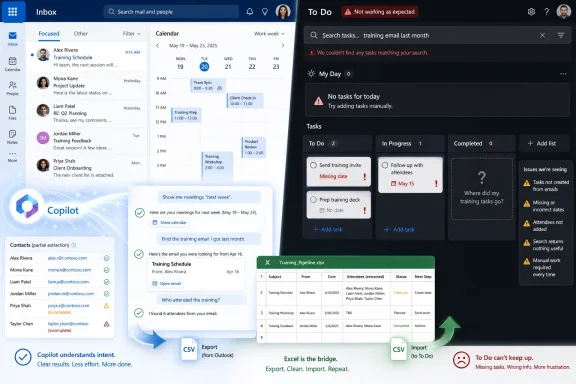
Standard Outlook search responded to “last week” with nothing useful. Copilot, by contrast, returned a digest-like view of recent email activity and then produced a list of genuine enquiries when prompted. The reported count of 42 emails for the week sounded suspiciously low to the tester, but the qualitative result mattered more: Copilot found the class of messages the user was actually looking for.
This is the point Microsoft has been trying to make with Copilot across Microsoft 365. The value is not that a large language model can replace a search index. The value is that it can infer intent, group related items, and present a working answer when the user’s memory is vague.
For Outlook, that is a big deal. Traditional search assumes the user remembers the right noun. Copilot can sometimes work from the business meaning instead: enquiries, training, follow-up, high priority, customer requests. That is a more natural model of how people remember correspondence.
But the suspicious email count is not a trivial footnote. If Copilot says there were 42 emails and the user knows there were many more, confidence takes a hit. In business software, a partial answer that looks complete is more dangerous than an obvious failure. Outlook search may annoy you by returning nothing. Copilot can annoy you by returning something plausible enough to trust.
Classic Outlook has long had advanced search tricks that could handle dates with enough precision if the user knew the syntax. New Outlook, like much of Microsoft’s modern client strategy, is simpler on the surface and cloudier underneath. In the test, standard calendar search did not deliver the expected result. Copilot eventually did.
That outcome flatters Copilot, but it also raises an uncomfortable question: why does the basic calendar search experience still feel so fragile in 2026? “Show me next week” is not a moonshot AI prompt. It is a baseline calendar function.
Microsoft’s current direction suggests that the company increasingly sees Copilot as the natural-language layer for Microsoft 365. Officially, Outlook search still has refiners and operators. Officially, Copilot in Outlook can summarize, draft, help schedule meetings, prepare users for meetings, create rules, and chat beside the mailbox. But in practical terms, the user is being nudged toward asking rather than searching.
That may be the right long-term interface. It is also a risky transition. If Microsoft lets conventional search stagnate because Copilot exists, then Copilot stops being an enhancement and becomes a paid workaround for a product weakness.
The tester’s line that Microsoft “foresaw the need to work with Copilot” lands as both praise and accusation. Yes, Copilot understood the intent better. But if the new Outlook needs Copilot to make time-based search feel sane, that is not just an AI success story. It is an indictment of the underlying UX.
Then the user asked for something more useful: list the contacts they had dealt with over the last two months. Copilot was able to infer that from email interactions, even if those people were not already formal contacts. That is exactly the kind of cross-surface intelligence Microsoft has been promising: the graph knows who you work with, even if your address book does not.
The problem came next. Copilot could identify the people, but it could not simply add them to Outlook contacts. The user had to copy the output into Excel, ask Copilot in Excel to split the pasted mess into columns, save the file as a CSV, pick the right CSV flavor, import it back into Outlook, and then verify that the contacts appeared.
That is both impressive and absurd. Impressive because Copilot and Excel together rescued a messy workflow. Absurd because the destination was Outlook all along.
This is the difference between insight and action. Copilot can often tell you what should happen. It is less consistently able to do the boring application plumbing that users actually want done. Microsoft’s newer Frontier-era Outlook Copilot features are explicitly moving toward action: creating rules, moving messages, archiving, flagging, and performing triage operations with user approval. But preview features are not the same as a generally dependable daily workflow, and Microsoft itself warns that bulk automation and pattern detection across many messages may not be comprehensive.
For IT pros, that distinction matters. A tool that can summarize recent relationships is useful. A tool that can modify contact data at scale needs governance, auditability, rollback, and predictable failure modes. Microsoft cannot simply give Copilot a magic wand over the address book and call it productivity.
This is not an edge case. Anyone who has lived inside Microsoft 365 knows the pattern. When an app cannot quite complete a workflow, Excel becomes the universal solvent. It absorbs malformed exports, reformats lists, cleans fields, and acts as a staging database for tasks that should have been one click somewhere else.
Copilot amplifies that old habit. It makes Excel better at being the rescue tool, because users no longer need to remember every text-to-columns trick or formula. But it also risks normalizing the workaround. If the answer to “Can Outlook add these recent correspondents to my contacts?” is “copy them into Excel, transform them, export a CSV, and import them,” then Copilot has not eliminated friction. It has merely made the friction more survivable.
That may still be valuable. Many business users do not need elegance; they need to get through the afternoon. If Copilot can convert a dead-end Outlook task into a clumsy but successful Excel-assisted workflow, it earns its keep.
But from a product standpoint, this is the old Microsoft showing through the new AI paint. The suite is powerful because the apps can be chained together. The suite is frustrating because the apps often must be chained together by hand.
Yet in the test, Copilot did not meaningfully appear inside To Do in Outlook. Copilot Chat failed to find recently added To Do items. A prompt asking for tasks due today returned emails rather than actual tasks. Standard search was not great either, but it at least found a colleague’s name after the user changed the filter.
This matters because tasks are the obvious next frontier for Microsoft 365 AI. Email summarization is nice. Drafting replies is useful. But the real productivity prize is extracting commitments from communications and turning them into an accurate, reviewable, manageable work queue.
That is also where the risk multiplies. A bad email summary is annoying. A missed task can cost money, damage a client relationship, or create compliance trouble. If Copilot cannot distinguish between “emails that mention a task” and “tasks in my task system,” users will quickly learn to treat it as a helpful narrator rather than an operational assistant.
Microsoft’s product sprawl makes this harder. Outlook tasks are not simply one thing anymore. There are flagged messages, To Do tasks, Planner tasks, Loop task lists, Teams follow-ups, meeting action items, and project-management integrations. The user asks a human question — “what do I have to do today?” — but Microsoft 365 hears a routing problem.
Copilot is supposed to be the layer that resolves that mess. In this test, it did not.
Microsoft has been careful to position Copilot as an add-on to Microsoft 365, with different capabilities depending on license, account type, client, and rollout channel. Copilot Chat may be available in more places than full Microsoft 365 Copilot, while deeper grounding in mailbox and calendar data is tied to work accounts, Exchange Online, supported clients, and organizational settings. Some newer action-oriented Outlook Copilot capabilities are preview-only through the Frontier program and are not universally available.
That creates a support problem. Two users can sit in the same organization, looking at what appears to be the same Outlook, and have meaningfully different capabilities. One sees “Search or ask Copilot” as a practical route through a messy mailbox. Another sees ordinary search and a knowledge-base article full of syntax.
For admins, this is not just a training issue. It affects process design. If a workflow depends on Copilot finding enquiries, summarizing appointments, or extracting recent contacts, can that workflow be documented for everyone? Can it be audited? Can a manager rely on consistent behavior across the team? Or is the organization creating a productivity fast lane for licensed users and leaving everyone else in the old search maze?
The answer will vary by tenant and license, but the strategic direction is clear. Microsoft is making the best version of Microsoft 365 increasingly conversational. The danger is that the baseline version starts to feel intentionally underpowered.
That is the line every organization needs to draw. Copilot is useful when the cost of being incomplete is low and the user can verify the result quickly. It is risky when the output looks exhaustive, the source data is scattered, and the user has no easy way to know what was missed.
This is especially true in Outlook, because mailboxes are full of implicit commitments. A customer asks for pricing “when you get a chance.” A colleague says “can you send the latest deck before Thursday?” A vendor buries a renewal deadline in paragraph four. Humans are bad at tracking this. Search is bad at understanding it. AI is promising precisely because it seems able to connect the dots.
But “seems” is doing a lot of work. Copilot can summarize, classify, and infer. It can also hallucinate emphasis, miss items outside its reach, or confuse emails with tasks. Microsoft’s own limitation notes around Outlook Copilot point to primary mailbox restrictions, unsupported shared or delegate mailboxes, encrypted message limitations, and cases where summaries may be generic if related content is thin.
That does not make Copilot useless. It makes it a tool that belongs in a supervised workflow. Ask it to find likely enquiries. Ask it to summarize a thread. Ask it to prepare you for a meeting. But when the output becomes a task list, client record, compliance response, or definitive archive search, verify before acting.
Outlook has always had a tension between power and discoverability. Classic Outlook could do a great deal, but much of it hid behind menus, local indexes, folder scope, and syntax that normal users never mastered. New Outlook attempts to simplify the experience, align it with the web, and modernize the underlying service model. In the process, some longtime users feel that old capabilities have become less visible, less predictable, or simply absent.
Copilot fits perfectly into that gap. It gives Microsoft a way to say users no longer need to learn obscure commands. Just ask. That is compelling when it works, and the test shows that it often does.
But Microsoft should resist the temptation to make Copilot the answer to every missing affordance. A calendar should understand next week. A task app should search tasks. A contacts system should have a sane path from “people I recently dealt with” to “add these people.” These are not exotic AI scenarios. They are product basics.
The best version of Copilot in Outlook would sit on top of a strong Outlook, not patch over a weak one. It would make good workflows faster, not broken workflows merely possible.
Microsoft is trying to turn Outlook from a filing cabinet with a search box into a conversational work hub. The Cambridge Network test shows why that shift is attractive: real people do not remember their work in operators and refiners. But it also shows the unfinished business. Until Copilot can see tasks cleanly, act safely, and explain its gaps as clearly as it presents its answers, the future of Outlook will feel less like an AI revolution and more like a familiar Microsoft bargain: powerful, promising, and still asking Excel to clean up the mess.
 Outlook Search Has Become the Villain in Its Own Productivity Story
Outlook is one of those applications that has survived by becoming infrastructure. It is not merely an email client; it is where appointments live, where tasks pretend to live, where contacts decay, and where half of a company’s institutional memory is buried beneath newsletters, meeting invites, and thread replies that say only “thanks.”That is why search matters so much. In a modern mailbox, search is not a convenience feature. It is the retrieval layer for working life.
The Cambridge Network test starts with a familiar complaint: the user knows an email exists, remembers roughly what it concerned, and cannot remember enough formal detail to satisfy Outlook. The target was an email about Excel training, received roughly a month earlier, from an unknown sender, with unknown wording. In human terms, that is a perfectly reasonable request. In old-school Outlook terms, it is a recipe for staring into the void.
Microsoft’s official Outlook search documentation still describes a world of operators, refiners, quoted phrases, date fields, and folder-specific syntax. Some of that remains powerful, especially for admins and veteran users who know exactly what they are asking for. But the lived experience in the new Outlook is increasingly different: the search box looks simple, the backend is smarter than it used to be, and yet the user is still often expected to know the magic incantation.
That is where Copilot enters the ring. Not as a smarter search bar, exactly, but as a translator between messy human memory and Microsoft 365’s structured data. The test shows both the promise and the trap. Copilot can help when the job is interpretive. It struggles when the job becomes deterministic.
Copilot Wins When the User Cannot Remember the Database Schema
The first round is the most favorable to Copilot because it matches the product’s natural strength. The user did not know the sender, the wording, or the exact date. They knew only the shape of the thing: an enquiry about training, probably recent, probably somewhere in the inbox.Standard Outlook search responded to “last week” with nothing useful. Copilot, by contrast, returned a digest-like view of recent email activity and then produced a list of genuine enquiries when prompted. The reported count of 42 emails for the week sounded suspiciously low to the tester, but the qualitative result mattered more: Copilot found the class of messages the user was actually looking for.
This is the point Microsoft has been trying to make with Copilot across Microsoft 365. The value is not that a large language model can replace a search index. The value is that it can infer intent, group related items, and present a working answer when the user’s memory is vague.
For Outlook, that is a big deal. Traditional search assumes the user remembers the right noun. Copilot can sometimes work from the business meaning instead: enquiries, training, follow-up, high priority, customer requests. That is a more natural model of how people remember correspondence.
But the suspicious email count is not a trivial footnote. If Copilot says there were 42 emails and the user knows there were many more, confidence takes a hit. In business software, a partial answer that looks complete is more dangerous than an obvious failure. Outlook search may annoy you by returning nothing. Copilot can annoy you by returning something plausible enough to trust.
The Calendar Test Exposes Microsoft’s Real Product Strategy
The calendar round is where the test becomes more interesting, because it shifts from retrieval to interpretation. Typing “next week” into calendar search is not really a search query in the old sense. It is a time-based instruction. The user wants Outlook to understand a relative date range and show the relevant appointments.Classic Outlook has long had advanced search tricks that could handle dates with enough precision if the user knew the syntax. New Outlook, like much of Microsoft’s modern client strategy, is simpler on the surface and cloudier underneath. In the test, standard calendar search did not deliver the expected result. Copilot eventually did.
That outcome flatters Copilot, but it also raises an uncomfortable question: why does the basic calendar search experience still feel so fragile in 2026? “Show me next week” is not a moonshot AI prompt. It is a baseline calendar function.
Microsoft’s current direction suggests that the company increasingly sees Copilot as the natural-language layer for Microsoft 365. Officially, Outlook search still has refiners and operators. Officially, Copilot in Outlook can summarize, draft, help schedule meetings, prepare users for meetings, create rules, and chat beside the mailbox. But in practical terms, the user is being nudged toward asking rather than searching.
That may be the right long-term interface. It is also a risky transition. If Microsoft lets conventional search stagnate because Copilot exists, then Copilot stops being an enhancement and becomes a paid workaround for a product weakness.
The tester’s line that Microsoft “foresaw the need to work with Copilot” lands as both praise and accusation. Yes, Copilot understood the intent better. But if the new Outlook needs Copilot to make time-based search feel sane, that is not just an AI success story. It is an indictment of the underlying UX.
Contacts Reveal the Boundary Between Insight and Action
The contacts round is the most Microsoft 365 moment in the whole experiment. Outlook could find a contact by name and could find people by domain. That is table stakes, but table stakes are worth acknowledging when so much else feels unpredictable.Then the user asked for something more useful: list the contacts they had dealt with over the last two months. Copilot was able to infer that from email interactions, even if those people were not already formal contacts. That is exactly the kind of cross-surface intelligence Microsoft has been promising: the graph knows who you work with, even if your address book does not.
The problem came next. Copilot could identify the people, but it could not simply add them to Outlook contacts. The user had to copy the output into Excel, ask Copilot in Excel to split the pasted mess into columns, save the file as a CSV, pick the right CSV flavor, import it back into Outlook, and then verify that the contacts appeared.
That is both impressive and absurd. Impressive because Copilot and Excel together rescued a messy workflow. Absurd because the destination was Outlook all along.
This is the difference between insight and action. Copilot can often tell you what should happen. It is less consistently able to do the boring application plumbing that users actually want done. Microsoft’s newer Frontier-era Outlook Copilot features are explicitly moving toward action: creating rules, moving messages, archiving, flagging, and performing triage operations with user approval. But preview features are not the same as a generally dependable daily workflow, and Microsoft itself warns that bulk automation and pattern detection across many messages may not be comprehensive.
For IT pros, that distinction matters. A tool that can summarize recent relationships is useful. A tool that can modify contact data at scale needs governance, auditability, rollback, and predictable failure modes. Microsoft cannot simply give Copilot a magic wand over the address book and call it productivity.
Excel Becomes the Emergency Exit for Outlook’s Missing Workflow
One of the funnier truths in the test is that Excel quietly saves the day. Copilot in Outlook produces a useful list. The list pastes badly. Copilot in Excel turns it into a table. Outlook finally accepts the cleaned-up CSV.This is not an edge case. Anyone who has lived inside Microsoft 365 knows the pattern. When an app cannot quite complete a workflow, Excel becomes the universal solvent. It absorbs malformed exports, reformats lists, cleans fields, and acts as a staging database for tasks that should have been one click somewhere else.
Copilot amplifies that old habit. It makes Excel better at being the rescue tool, because users no longer need to remember every text-to-columns trick or formula. But it also risks normalizing the workaround. If the answer to “Can Outlook add these recent correspondents to my contacts?” is “copy them into Excel, transform them, export a CSV, and import them,” then Copilot has not eliminated friction. It has merely made the friction more survivable.
That may still be valuable. Many business users do not need elegance; they need to get through the afternoon. If Copilot can convert a dead-end Outlook task into a clumsy but successful Excel-assisted workflow, it earns its keep.
But from a product standpoint, this is the old Microsoft showing through the new AI paint. The suite is powerful because the apps can be chained together. The suite is frustrating because the apps often must be chained together by hand.
To Do Is Where the Copilot Story Falls Apart
The To Do round is the counterweight that keeps the whole experiment honest. The user expected Copilot to find tasks added this week or tasks due today. That expectation is reasonable. Outlook, Microsoft To Do, Planner, flagged emails, Loop components, and Teams messages all orbit the same broad concept: work someone needs to do.Yet in the test, Copilot did not meaningfully appear inside To Do in Outlook. Copilot Chat failed to find recently added To Do items. A prompt asking for tasks due today returned emails rather than actual tasks. Standard search was not great either, but it at least found a colleague’s name after the user changed the filter.
This matters because tasks are the obvious next frontier for Microsoft 365 AI. Email summarization is nice. Drafting replies is useful. But the real productivity prize is extracting commitments from communications and turning them into an accurate, reviewable, manageable work queue.
That is also where the risk multiplies. A bad email summary is annoying. A missed task can cost money, damage a client relationship, or create compliance trouble. If Copilot cannot distinguish between “emails that mention a task” and “tasks in my task system,” users will quickly learn to treat it as a helpful narrator rather than an operational assistant.
Microsoft’s product sprawl makes this harder. Outlook tasks are not simply one thing anymore. There are flagged messages, To Do tasks, Planner tasks, Loop task lists, Teams follow-ups, meeting action items, and project-management integrations. The user asks a human question — “what do I have to do today?” — but Microsoft 365 hears a routing problem.
Copilot is supposed to be the layer that resolves that mess. In this test, it did not.
Licensing Turns Search Into a Class System
There is another subtext running through the experiment: only one person in the organization had Copilot Premium. That detail changes the story from “AI helper improves Outlook” to “one licensed user gets a different Outlook than everyone else.”Microsoft has been careful to position Copilot as an add-on to Microsoft 365, with different capabilities depending on license, account type, client, and rollout channel. Copilot Chat may be available in more places than full Microsoft 365 Copilot, while deeper grounding in mailbox and calendar data is tied to work accounts, Exchange Online, supported clients, and organizational settings. Some newer action-oriented Outlook Copilot capabilities are preview-only through the Frontier program and are not universally available.
That creates a support problem. Two users can sit in the same organization, looking at what appears to be the same Outlook, and have meaningfully different capabilities. One sees “Search or ask Copilot” as a practical route through a messy mailbox. Another sees ordinary search and a knowledge-base article full of syntax.
For admins, this is not just a training issue. It affects process design. If a workflow depends on Copilot finding enquiries, summarizing appointments, or extracting recent contacts, can that workflow be documented for everyone? Can it be audited? Can a manager rely on consistent behavior across the team? Or is the organization creating a productivity fast lane for licensed users and leaving everyone else in the old search maze?
The answer will vary by tenant and license, but the strategic direction is clear. Microsoft is making the best version of Microsoft 365 increasingly conversational. The danger is that the baseline version starts to feel intentionally underpowered.
Natural Language Is Not a Substitute for Trust
The test’s wrestling-score framing is playful, but the enterprise implication is serious. Copilot wins the email, calendar, and contact rounds because it lowers the cognitive burden. It loses the task round because it cannot reliably act as the system of record.That is the line every organization needs to draw. Copilot is useful when the cost of being incomplete is low and the user can verify the result quickly. It is risky when the output looks exhaustive, the source data is scattered, and the user has no easy way to know what was missed.
This is especially true in Outlook, because mailboxes are full of implicit commitments. A customer asks for pricing “when you get a chance.” A colleague says “can you send the latest deck before Thursday?” A vendor buries a renewal deadline in paragraph four. Humans are bad at tracking this. Search is bad at understanding it. AI is promising precisely because it seems able to connect the dots.
But “seems” is doing a lot of work. Copilot can summarize, classify, and infer. It can also hallucinate emphasis, miss items outside its reach, or confuse emails with tasks. Microsoft’s own limitation notes around Outlook Copilot point to primary mailbox restrictions, unsupported shared or delegate mailboxes, encrypted message limitations, and cases where summaries may be generic if related content is thin.
That does not make Copilot useless. It makes it a tool that belongs in a supervised workflow. Ask it to find likely enquiries. Ask it to summarize a thread. Ask it to prepare you for a meeting. But when the output becomes a task list, client record, compliance response, or definitive archive search, verify before acting.
The New Outlook Needs to Earn Its Own Keep
The harshest reading of the Cambridge Network experiment is that Copilot is compensating for Outlook’s failures. That reading is not entirely fair, but it is not entirely wrong either.Outlook has always had a tension between power and discoverability. Classic Outlook could do a great deal, but much of it hid behind menus, local indexes, folder scope, and syntax that normal users never mastered. New Outlook attempts to simplify the experience, align it with the web, and modernize the underlying service model. In the process, some longtime users feel that old capabilities have become less visible, less predictable, or simply absent.
Copilot fits perfectly into that gap. It gives Microsoft a way to say users no longer need to learn obscure commands. Just ask. That is compelling when it works, and the test shows that it often does.
But Microsoft should resist the temptation to make Copilot the answer to every missing affordance. A calendar should understand next week. A task app should search tasks. A contacts system should have a sane path from “people I recently dealt with” to “add these people.” These are not exotic AI scenarios. They are product basics.
The best version of Copilot in Outlook would sit on top of a strong Outlook, not patch over a weak one. It would make good workflows faster, not broken workflows merely possible.
The Scorecard Says Copilot Won, but the Tape Shows a Split Decision
The practical lesson from this test is not that Copilot is magic or that Outlook is doomed. It is that Copilot is already useful in the messy middle of office work, while still unreliable at the edges where users expect systems to act with precision.- Copilot is most helpful when the user remembers intent, context, or category but not the exact sender, subject line, or date.
- Outlook’s traditional search remains powerful on paper, but its syntax-heavy model does not match how many users remember work.
- Calendar queries show why natural language matters, but they also reveal how weak basic date search can feel in the new Outlook experience.
- Contact extraction works better as intelligence than as automation, because the final move into Outlook contacts still requires too much manual handling.
- To Do remains the weakest part of the story, with Copilot failing to provide the reliable task awareness users reasonably expect.
- Organizations should treat Copilot results as assisted discovery, not as a complete or authoritative record, especially for tasks, client commitments, and compliance-sensitive work.
Microsoft is trying to turn Outlook from a filing cabinet with a search box into a conversational work hub. The Cambridge Network test shows why that shift is attractive: real people do not remember their work in operators and refiners. But it also shows the unfinished business. Until Copilot can see tasks cleanly, act safely, and explain its gaps as clearly as it presents its answers, the future of Outlook will feel less like an AI revolution and more like a familiar Microsoft bargain: powerful, promising, and still asking Excel to clean up the mess.
References
- Primary source: Cambridge Network
Published: 2026-06-24T10:50:08.557922
Round One - Email: Can Copilot Help Your Outlook Woes? | Cambridge Network
When I think about Microsoft Outlook, and especially trying to find an email, I feel it's like I'm in the realms of impossibility.No matter what keyword I type, no matter what phrase I try to search for, it seems that Outlook puts everything in its path to stop me trying to find the...www.cambridgenetwork.co.uk
- Official source: support.microsoft.com
Use Microsoft 365 Copilot in Outlook to manage your inbox (Frontier) - Microsoft Support
 support.microsoft.com
- Official source: learn.microsoft.com
Microsoft 365 Copilot - Service Descriptions | Microsoft Learn
Learn about Microsoft 365 Copilot and its feature availability across plans.learn.microsoft.com - Official source: microsoft.com
Get More Done with Copilot in Microsoft 365 Apps | Microsoft Windows
Boost productivity on Windows 11 with Copilot in Word, Excel, PowerPoint, and Outlook—draft, summarize, and analyze faster.www.microsoft.com
- Official source: techcommunity.microsoft.com
Copilot in Outlook: New agentic experiences for email and calendar | Microsoft Community Hub
In Outlook, Copilot helps you go from intent to execution across email and calendar—without losing context or creating extra steps. Copilot in Outlook is... techcommunity.microsoft.com
- Related coverage: windowscentral.com
This is Microsoft's new "Copilot Cowork": An experiment with Anthropic's Claude AI models that plans and delegates your work | Windows Central
Microsoft ships Copilot Cowork to its Frontier program.www.windowscentral.com
- Related coverage: techradar.com
'The era of Copilot execution is here': Microsoft's Copilot Cowork is here with Anthropic AI to conquer all your biggest work tasks | TechRadar
Microsoft wants Copilot to 'take action' with your workwww.techradar.com
