

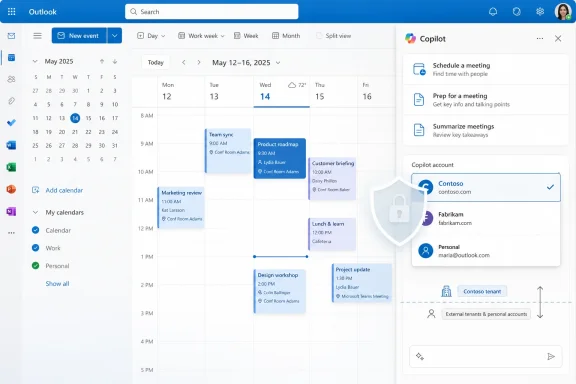
Microsoft has launched an account selector for the Copilot-enabled side pane in Outlook Calendar on the web, giving users with more than one eligible account a dropdown to see which account Copilot is using and to switch accounts after preview in April 2026 and general availability in May 2026. It is a small interface change with a larger message: Microsoft is still learning how awkward multi-account work becomes when AI is bolted onto applications that already blur personal, work, tenant, and delegated identities. The new dropdown does not make Outlook Copilot more powerful by itself, but it makes the feature less ambiguous at exactly the point where ambiguity can become a privacy, compliance, and trust problem.
The account selector exists because the new Outlook is no longer just a mail client with a calendar attached. It is becoming an AI surface where Microsoft 365 Copilot reads, summarizes, drafts, reasons over calendar context, and increasingly acts inside the user’s workflow. Once that happens, the question “which account am I in?” stops being cosmetic.
In old-fashioned Outlook usage, account context was visible through mailbox folders, calendar colors, profile separation, or the user’s own muscle memory. Copilot changes the stakes because it turns account context into data context. If the pane is analyzing calendar information, suggesting meeting preparation, or drafting text based on organizational data, the identity behind that pane matters.
Microsoft’s roadmap language is careful and narrow. The feature applies when users have more than one Copilot-enabled account added to new Outlook, and it appears in the Copilot side pane in Calendar. That means this is not a broad account-management redesign, nor is it a universal Outlook switcher. It is a targeted correction for a particular AI surface that could otherwise inherit too much uncertainty from the surrounding app.
That narrowness is the point. Microsoft is not announcing a grand new Copilot capability here; it is sanding down a sharp edge in the everyday use of Copilot. The fact that this needed a roadmap item at all tells us something about the state of AI integration in Microsoft 365: the hard part is no longer just generating better text, but making sure the assistant knows who it is working for.
That is why putting Copilot inside Calendar makes account clarity more important than it might appear in a demo. A user with two work accounts, a guest identity, or a separate consulting tenant may not simply be switching inboxes. They may be switching legal entities, data boundaries, retention policies, and administrative controls.
The account selector is Microsoft acknowledging that the Outlook shell’s account context is not always enough for the AI pane. If users must infer Copilot’s active identity from whichever mailbox or calendar Outlook happens to be displaying, the product is asking them to reason about implementation details. That is exactly the kind of invisible state modern productivity software is supposed to eliminate.
For IT admins, this is less about convenience than auditability and support. “Copilot used the wrong account” is the sort of helpdesk ticket that can quickly become a security investigation, especially if sensitive meeting context appears in the wrong place or if a user believes the assistant had access to data it should not have seen. A visible dropdown gives both users and support teams a concrete thing to inspect.
For Copilot features, that web-first cadence is useful. Microsoft can add a dropdown, adjust a side pane, change the interaction model, and ship improvements through service updates rather than waiting for traditional client release cycles. The roadmap dates — preview in April 2026, general availability in May 2026, and a late-June update to the listing — show the rhythm of modern Microsoft 365: announce, flight, launch, revise.
But the same cadence can frustrate administrators who need predictability. Outlook is a daily-critical application, and Copilot is a licensed, governed, and sometimes controversial addition to it. When small UI details affect identity boundaries, even a minor side-pane control becomes part of the enterprise change-management story.
This is where Microsoft’s “new Outlook” strategy remains contentious. The company wants Outlook to be a unified, service-connected experience that can absorb AI features quickly. Many power users and administrators still judge Outlook by the standards of a mature desktop application where profile separation, add-in behavior, and account handling were at least familiar, if not always elegant.
The account selector is therefore a microcosm of the new Outlook bargain. Users get faster AI integration, but they also need new affordances to make the web-style, multi-account interface intelligible. Microsoft is patching over that complexity one surface at a time.
An AI pane in Outlook is not a chatbot floating in empty space. It is attached to mailboxes, calendars, tenants, permissions, labels, policies, and licensing states. If the user cannot tell which identity the pane represents, the assistant becomes less trustworthy even when its answer is technically correct.
This is why the account selector is more significant than its humble form suggests. It makes identity visible inside the Copilot surface rather than assuming that Outlook’s broader UI context is sufficient. In design terms, Microsoft is moving the boundary marker closer to the action.
That matters because Copilot’s value proposition depends on privileged context. A generic chatbot can answer broad questions. Microsoft 365 Copilot is sold as something more useful precisely because it can reason over organizational data. But privileged context is also where mistakes become more consequential.
The account selector is a small piece of consent architecture. It tells the user, before or during interaction, which Copilot-enabled account is in play. That does not solve every governance issue, but it gives the human operator a clearer handle on the system.
The classic assumption that one user maps neatly to one corporate mailbox has been obsolete for years. Outlook has adapted by allowing multiple accounts in one client, but AI features complicate that convenience. A mailbox can sit beside another mailbox in the same interface; an AI assistant that draws on organizational context needs a more explicit sense of separation.
There is also a licensing dimension. The roadmap item specifies Copilot-enabled accounts, not merely Outlook accounts. That implies the dropdown is concerned with identities that can actually invoke Copilot features. In practice, users may have several accounts in Outlook but only some with the right Microsoft 365 Copilot entitlement.
That distinction matters because the account selector is not just about where data comes from. It is also about which tenant’s license, policy, and service configuration govern the Copilot session. A visible switcher helps the user understand why Copilot may be available in one context but not another.
For admins, this could reduce the familiar confusion around “Copilot is missing,” “Copilot is using the wrong mailbox,” or “Copilot cannot see my calendar.” Some of those issues may still be caused by licensing, rollout timing, policy, or service limitations. But a visible account dropdown gives users one more obvious diagnostic step before the ticket reaches IT.
The account selector reinforces that shift. It teaches users that Copilot is not a universal assistant inside Outlook, but an assistant operating under a specific account. That is a subtle but important distinction, especially as Microsoft pushes Copilot across Outlook, Teams, Word, Excel, PowerPoint, Edge, Windows, and the Microsoft 365 app.
The risk for Microsoft is that users do not want to think like tenant administrators. They want to ask the assistant for help and receive a useful answer. Every visible control is a trade-off between clarity and friction.
Still, this is the right kind of friction. A dropdown that says, effectively, “this is the account Copilot is using,” is not a roadblock. It is a seatbelt light. It appears at the point of possible confusion and gives the user a way to correct course without hunting through Outlook’s broader account controls.
That is especially valuable in Calendar because the user may be working from an event rather than a mailbox. Calendar interactions often happen quickly: check a meeting, open details, prepare notes, ask Copilot for context, jump to the next call. In that flow, relying on the surrounding Outlook UI to communicate account state is optimistic at best.
The practical reading is that organizations should expect this behavior to be part of the Outlook on the web experience for eligible users. It is not something most admins will need to deploy manually, but it is something they may need to explain. In the Copilot era, user education increasingly means explaining not only what a feature does, but which identity and data boundary it operates within.
There is also the question of documentation drift. The roadmap entry was created in mid-April 2026, previewed in April, generally available in May, and updated on June 26, 2026. That late update suggests Microsoft is still maintaining the item as part of its rollout record, even though the feature is already marked launched.
For regulated organizations, that chronology matters. Change advisory boards and Microsoft 365 admins often reconstruct when a feature appeared, which release ring received it, and whether it applied to worldwide tenants or specialized clouds. This item is scoped to the worldwide standard multi-tenant cloud, which means government and sovereign cloud customers should not assume identical timing unless Microsoft separately says so.
The absence of classic Outlook from the listed platform is also notable. The feature is described for web, aligning with Microsoft’s continuing emphasis on the new Outlook stack. Organizations still heavily invested in classic Outlook should not read this as evidence that the same Copilot side-pane account selector will appear there in the same form.
That second wave is where enterprise software becomes real. A feature that dazzles on stage can fail in production if users cannot tell what it is doing, where its data comes from, or which account it represents. The account selector belongs to that less flashy but more durable category of improvement.
It also shows that Microsoft is responding to the messy reality of multi-account usage rather than pretending the idealized single-tenant employee is the norm. New Outlook’s account model has always had to serve overlapping identities. Copilot forces Microsoft to expose more of that model because the assistant’s usefulness depends on knowing which world it is operating in.
There is a broader lesson here for every AI feature being embedded into productivity software. As assistants become more agentic, account state becomes action state. If the assistant can summarize, draft, recommend, schedule, or eventually execute tasks, the “wrong account” problem becomes more than a UI annoyance.
This is why the account dropdown is better understood as infrastructure than decoration. It is one of the little pieces that must exist before users can safely trust AI inside the daily work surface. Without it, Copilot risks feeling like an intelligence layer with too little situational awareness.
Those details will determine whether the feature feels polished or merely present. Microsoft’s roadmap entry gives the product intent, but day-to-day usefulness depends on implementation. Identity controls need to be unambiguous, especially when users are moving quickly between meetings.
There is also the human factor. Users who do not understand Microsoft 365 identity boundaries may still assume Copilot can see everything in Outlook. Others may assume the opposite and think data is more isolated than it really is. A dropdown helps, but it does not replace training around work accounts, guest access, tenant data, and Copilot permissions.
Security teams will also want to watch how this interacts with data loss prevention, sensitivity labels, conditional access, and audit logs. The selector makes account choice visible to the user, but governance still lives in the tenant. A good interface can reduce mistakes; it cannot compensate for weak policy design.
Microsoft’s challenge is to keep adding clarity without turning Copilot into a compliance dashboard. Users need enough information to make safe choices, not so much that the assistant becomes another administrative chore. The account selector is promising because it is simple, but simplicity will have to survive as Copilot’s Outlook capabilities expand.
Invisible assumptions are dangerous in mature software because expert users stop seeing them and new users never learn them. Outlook has accumulated decades of such assumptions, from profiles and shared mailboxes to calendar overlays and delegated access. Copilot adds a new layer, and Microsoft cannot afford to make that layer guessy.
A visible account selector says the product team understands that AI needs local context cues. If the assistant appears in a side pane, the side pane should carry the relevant identity information. That is basic interface hygiene, but basic hygiene becomes strategically important when the feature handles sensitive organizational data.
There is an implicit admission here, too. Microsoft’s unified experiences can blur boundaries faster than users can track them. The company often frames that unification as seamless productivity. Enterprise IT often experiences it as another place where policy, identity, and user expectation collide.
The dropdown does not end that tension. It merely makes one collision less likely. In Microsoft 365, that counts as progress.
For administrators, it is worth communicating because it changes the support script. When a user says Copilot is responding from the wrong context or cannot access the expected calendar information, the account dropdown becomes an obvious first checkpoint. That may not solve the ticket, but it narrows the problem.
For Microsoft, the feature is another sign that Copilot’s future depends as much on product discipline as model capability. AI assistants in enterprise apps must be clear about identity, scope, and authority. The more Microsoft pushes Copilot into Outlook’s daily surfaces, the more these mundane controls become essential.
This is not a feature that will sell Copilot licenses on its own. Nobody is buying Microsoft 365 Copilot because of a calendar-side-pane account dropdown. But customers may keep trusting Copilot because dozens of small controls like this make the assistant feel governed rather than loose.
 Microsoft Fixes the Identity Problem It Created by Making Copilot Ambient
The account selector exists because the new Outlook is no longer just a mail client with a calendar attached. It is becoming an AI surface where Microsoft 365 Copilot reads, summarizes, drafts, reasons over calendar context, and increasingly acts inside the user’s workflow. Once that happens, the question “which account am I in?” stops being cosmetic.In old-fashioned Outlook usage, account context was visible through mailbox folders, calendar colors, profile separation, or the user’s own muscle memory. Copilot changes the stakes because it turns account context into data context. If the pane is analyzing calendar information, suggesting meeting preparation, or drafting text based on organizational data, the identity behind that pane matters.
Microsoft’s roadmap language is careful and narrow. The feature applies when users have more than one Copilot-enabled account added to new Outlook, and it appears in the Copilot side pane in Calendar. That means this is not a broad account-management redesign, nor is it a universal Outlook switcher. It is a targeted correction for a particular AI surface that could otherwise inherit too much uncertainty from the surrounding app.
That narrowness is the point. Microsoft is not announcing a grand new Copilot capability here; it is sanding down a sharp edge in the everyday use of Copilot. The fact that this needed a roadmap item at all tells us something about the state of AI integration in Microsoft 365: the hard part is no longer just generating better text, but making sure the assistant knows who it is working for.
The Calendar Is Where Account Confusion Becomes Operational Risk
Calendar looks harmless until you remember what lives there. Meetings reveal projects, customers, legal matters, hiring plans, acquisition discussions, medical appointments, performance reviews, and internal strategy. In many organizations, the calendar is the most casually exposed confidential database in the company.That is why putting Copilot inside Calendar makes account clarity more important than it might appear in a demo. A user with two work accounts, a guest identity, or a separate consulting tenant may not simply be switching inboxes. They may be switching legal entities, data boundaries, retention policies, and administrative controls.
The account selector is Microsoft acknowledging that the Outlook shell’s account context is not always enough for the AI pane. If users must infer Copilot’s active identity from whichever mailbox or calendar Outlook happens to be displaying, the product is asking them to reason about implementation details. That is exactly the kind of invisible state modern productivity software is supposed to eliminate.
For IT admins, this is less about convenience than auditability and support. “Copilot used the wrong account” is the sort of helpdesk ticket that can quickly become a security investigation, especially if sensitive meeting context appears in the wrong place or if a user believes the assistant had access to data it should not have seen. A visible dropdown gives both users and support teams a concrete thing to inspect.
New Outlook’s Web DNA Cuts Both Ways
The feature is listed for Outlook on the web, which fits the broader direction of the new Outlook experience. Microsoft has been steadily aligning Outlook across web and Windows, replacing decades of thick-client assumptions with a more web-driven model. That brings faster feature delivery, but it also exposes users to a product that behaves more like a constantly changing service than a stable desktop tool.For Copilot features, that web-first cadence is useful. Microsoft can add a dropdown, adjust a side pane, change the interaction model, and ship improvements through service updates rather than waiting for traditional client release cycles. The roadmap dates — preview in April 2026, general availability in May 2026, and a late-June update to the listing — show the rhythm of modern Microsoft 365: announce, flight, launch, revise.
But the same cadence can frustrate administrators who need predictability. Outlook is a daily-critical application, and Copilot is a licensed, governed, and sometimes controversial addition to it. When small UI details affect identity boundaries, even a minor side-pane control becomes part of the enterprise change-management story.
This is where Microsoft’s “new Outlook” strategy remains contentious. The company wants Outlook to be a unified, service-connected experience that can absorb AI features quickly. Many power users and administrators still judge Outlook by the standards of a mature desktop application where profile separation, add-in behavior, and account handling were at least familiar, if not always elegant.
The account selector is therefore a microcosm of the new Outlook bargain. Users get faster AI integration, but they also need new affordances to make the web-style, multi-account interface intelligible. Microsoft is patching over that complexity one surface at a time.
Copilot Needs Explicit Boundaries, Not Just Better Prompts
The temptation with Copilot coverage is to focus on model quality: whether summaries are accurate, whether drafts sound natural, whether scheduling suggestions are useful. Those things matter, but they are not the only measure of an enterprise assistant. In business software, the assistant’s boundary awareness is just as important as its fluency.An AI pane in Outlook is not a chatbot floating in empty space. It is attached to mailboxes, calendars, tenants, permissions, labels, policies, and licensing states. If the user cannot tell which identity the pane represents, the assistant becomes less trustworthy even when its answer is technically correct.
This is why the account selector is more significant than its humble form suggests. It makes identity visible inside the Copilot surface rather than assuming that Outlook’s broader UI context is sufficient. In design terms, Microsoft is moving the boundary marker closer to the action.
That matters because Copilot’s value proposition depends on privileged context. A generic chatbot can answer broad questions. Microsoft 365 Copilot is sold as something more useful precisely because it can reason over organizational data. But privileged context is also where mistakes become more consequential.
The account selector is a small piece of consent architecture. It tells the user, before or during interaction, which Copilot-enabled account is in play. That does not solve every governance issue, but it gives the human operator a clearer handle on the system.
Multi-Account Outlook Is No Longer a Power-User Edge Case
Microsoft’s description targets users with more than one Copilot-enabled account, and that population is only going to grow. Consultants, managed service providers, executives with board roles, contractors, educators, developers, and employees in merged organizations routinely juggle multiple Microsoft identities. Even ordinary users may have separate accounts for work, school, volunteer organizations, and personal productivity.The classic assumption that one user maps neatly to one corporate mailbox has been obsolete for years. Outlook has adapted by allowing multiple accounts in one client, but AI features complicate that convenience. A mailbox can sit beside another mailbox in the same interface; an AI assistant that draws on organizational context needs a more explicit sense of separation.
There is also a licensing dimension. The roadmap item specifies Copilot-enabled accounts, not merely Outlook accounts. That implies the dropdown is concerned with identities that can actually invoke Copilot features. In practice, users may have several accounts in Outlook but only some with the right Microsoft 365 Copilot entitlement.
That distinction matters because the account selector is not just about where data comes from. It is also about which tenant’s license, policy, and service configuration govern the Copilot session. A visible switcher helps the user understand why Copilot may be available in one context but not another.
For admins, this could reduce the familiar confusion around “Copilot is missing,” “Copilot is using the wrong mailbox,” or “Copilot cannot see my calendar.” Some of those issues may still be caused by licensing, rollout timing, policy, or service limitations. But a visible account dropdown gives users one more obvious diagnostic step before the ticket reaches IT.
Microsoft Is Quietly Teaching Users to Treat AI as a Tenant-Scoped Tool
The old Office mental model was document-centered. You opened a file, edited it, saved it, shared it. The Microsoft 365 model is more identity-centered: your account determines the data you can see, the apps you can use, the policies that apply, and now the Copilot experience you receive.The account selector reinforces that shift. It teaches users that Copilot is not a universal assistant inside Outlook, but an assistant operating under a specific account. That is a subtle but important distinction, especially as Microsoft pushes Copilot across Outlook, Teams, Word, Excel, PowerPoint, Edge, Windows, and the Microsoft 365 app.
The risk for Microsoft is that users do not want to think like tenant administrators. They want to ask the assistant for help and receive a useful answer. Every visible control is a trade-off between clarity and friction.
Still, this is the right kind of friction. A dropdown that says, effectively, “this is the account Copilot is using,” is not a roadblock. It is a seatbelt light. It appears at the point of possible confusion and gives the user a way to correct course without hunting through Outlook’s broader account controls.
That is especially valuable in Calendar because the user may be working from an event rather than a mailbox. Calendar interactions often happen quickly: check a meeting, open details, prepare notes, ask Copilot for context, jump to the next call. In that flow, relying on the surrounding Outlook UI to communicate account state is optimistic at best.
The Roadmap Says “Launched,” but Admins Should Still Read It as a Change
The roadmap status is Launched, with worldwide standard multi-tenant availability and both Targeted Release and General Availability rings listed. That sounds final, but in Microsoft 365 language, “launched” does not always mean every user will see the feature at the same moment or in the same way. Service rollout, licensing, client state, and tenant configuration still matter.The practical reading is that organizations should expect this behavior to be part of the Outlook on the web experience for eligible users. It is not something most admins will need to deploy manually, but it is something they may need to explain. In the Copilot era, user education increasingly means explaining not only what a feature does, but which identity and data boundary it operates within.
There is also the question of documentation drift. The roadmap entry was created in mid-April 2026, previewed in April, generally available in May, and updated on June 26, 2026. That late update suggests Microsoft is still maintaining the item as part of its rollout record, even though the feature is already marked launched.
For regulated organizations, that chronology matters. Change advisory boards and Microsoft 365 admins often reconstruct when a feature appeared, which release ring received it, and whether it applied to worldwide tenants or specialized clouds. This item is scoped to the worldwide standard multi-tenant cloud, which means government and sovereign cloud customers should not assume identical timing unless Microsoft separately says so.
The absence of classic Outlook from the listed platform is also notable. The feature is described for web, aligning with Microsoft’s continuing emphasis on the new Outlook stack. Organizations still heavily invested in classic Outlook should not read this as evidence that the same Copilot side-pane account selector will appear there in the same form.
The Small UI Patch Reveals a Larger Copilot Maturity Curve
The first wave of Copilot announcements was about spectacle. Microsoft showed assistants drafting emails, summarizing meetings, building presentations, and finding information across the Microsoft Graph. The second wave is less glamorous: controls, boundaries, labels, selectors, policy hooks, and user education.That second wave is where enterprise software becomes real. A feature that dazzles on stage can fail in production if users cannot tell what it is doing, where its data comes from, or which account it represents. The account selector belongs to that less flashy but more durable category of improvement.
It also shows that Microsoft is responding to the messy reality of multi-account usage rather than pretending the idealized single-tenant employee is the norm. New Outlook’s account model has always had to serve overlapping identities. Copilot forces Microsoft to expose more of that model because the assistant’s usefulness depends on knowing which world it is operating in.
There is a broader lesson here for every AI feature being embedded into productivity software. As assistants become more agentic, account state becomes action state. If the assistant can summarize, draft, recommend, schedule, or eventually execute tasks, the “wrong account” problem becomes more than a UI annoyance.
This is why the account dropdown is better understood as infrastructure than decoration. It is one of the little pieces that must exist before users can safely trust AI inside the daily work surface. Without it, Copilot risks feeling like an intelligence layer with too little situational awareness.
Where Enterprise IT Will Still Be Skeptical
Even with the dropdown, admins will have reasonable questions. Does the selector reflect only Copilot-enabled accounts, or does it also make clear why other accounts are not eligible? How obvious is the active account in dense side-pane layouts? Does switching accounts change the calendar context immediately, or does it require reopening the pane or refreshing the view?Those details will determine whether the feature feels polished or merely present. Microsoft’s roadmap entry gives the product intent, but day-to-day usefulness depends on implementation. Identity controls need to be unambiguous, especially when users are moving quickly between meetings.
There is also the human factor. Users who do not understand Microsoft 365 identity boundaries may still assume Copilot can see everything in Outlook. Others may assume the opposite and think data is more isolated than it really is. A dropdown helps, but it does not replace training around work accounts, guest access, tenant data, and Copilot permissions.
Security teams will also want to watch how this interacts with data loss prevention, sensitivity labels, conditional access, and audit logs. The selector makes account choice visible to the user, but governance still lives in the tenant. A good interface can reduce mistakes; it cannot compensate for weak policy design.
Microsoft’s challenge is to keep adding clarity without turning Copilot into a compliance dashboard. Users need enough information to make safe choices, not so much that the assistant becomes another administrative chore. The account selector is promising because it is simple, but simplicity will have to survive as Copilot’s Outlook capabilities expand.
The Real Win Is Fewer Invisible Assumptions
The most important part of this feature is not that users can switch accounts. It is that they no longer have to rely solely on Outlook’s broader UI context to infer which Copilot account is active. That is the invisible assumption Microsoft is removing.Invisible assumptions are dangerous in mature software because expert users stop seeing them and new users never learn them. Outlook has accumulated decades of such assumptions, from profiles and shared mailboxes to calendar overlays and delegated access. Copilot adds a new layer, and Microsoft cannot afford to make that layer guessy.
A visible account selector says the product team understands that AI needs local context cues. If the assistant appears in a side pane, the side pane should carry the relevant identity information. That is basic interface hygiene, but basic hygiene becomes strategically important when the feature handles sensitive organizational data.
There is an implicit admission here, too. Microsoft’s unified experiences can blur boundaries faster than users can track them. The company often frames that unification as seamless productivity. Enterprise IT often experiences it as another place where policy, identity, and user expectation collide.
The dropdown does not end that tension. It merely makes one collision less likely. In Microsoft 365, that counts as progress.
The Dropdown Is Small Because the Stakes Are Not
For WindowsForum readers, the practical story is straightforward: if you use new Outlook on the web with multiple Copilot-enabled accounts, the Calendar Copilot side pane should now identify the active account and let you switch from within the pane. That is the kind of change users may overlook until the day it prevents confusion.For administrators, it is worth communicating because it changes the support script. When a user says Copilot is responding from the wrong context or cannot access the expected calendar information, the account dropdown becomes an obvious first checkpoint. That may not solve the ticket, but it narrows the problem.
For Microsoft, the feature is another sign that Copilot’s future depends as much on product discipline as model capability. AI assistants in enterprise apps must be clear about identity, scope, and authority. The more Microsoft pushes Copilot into Outlook’s daily surfaces, the more these mundane controls become essential.
This is not a feature that will sell Copilot licenses on its own. Nobody is buying Microsoft 365 Copilot because of a calendar-side-pane account dropdown. But customers may keep trusting Copilot because dozens of small controls like this make the assistant feel governed rather than loose.
The Calendar Pane Now Carries the Identity Burden
This update is best understood as a practical adjustment for a world where one Outlook window may contain several professional lives. The account selector does not resolve every complexity of Microsoft 365 identity, but it places a clear control where users need it: inside the Copilot interaction itself.- Users with multiple Copilot-enabled accounts in new Outlook on the web can see which account the Calendar Copilot side pane is using.
- The dropdown allows account switching from within the Copilot pane instead of forcing users to rely on Outlook’s surrounding account context.
- The feature reached preview in April 2026 and general availability in May 2026, with the roadmap item marked launched.
- The rollout is scoped to Outlook on the web in the worldwide standard multi-tenant cloud, not every Outlook client or cloud environment.
- The change is most important for users and organizations that juggle multiple work identities, tenants, or licensed Copilot accounts.
- Administrators should treat the dropdown as a support and training aid, not as a substitute for tenant-level governance.
References
- Primary source: Microsoft 365 Roadmap
Published: 2026-06-26T22:01:51.0909953Z
Microsoft 365 Roadmap | Microsoft 365
The Microsoft 365 Roadmap lists updates that are currently planned for applicable subscribers. Check here for more information on the status of new features and updates.www.microsoft.com
- Related coverage: m365admin.handsontek.net
Outlook: Account Selector in Outlook Copilot Side Pane - M365 Admin
When users have more than one Copilot-enabled account added to new Outlook, the Copilot side pane in Calendar will include an account dropdown that makes it clear which Copilot-enabled account you’re using and lets you switch accounts without relying on Outlook UI’s account context. Product...m365admin.handsontek.net - Related coverage: mwpro.co.uk
Outlook Copilot Account Switcher in Side Pane | MC1290822
Explore the new Microsoft Outlook Copilot Account Switcher in the Outlook side pane. Learn how MC1290822 enhances productivity by streamlining account management in Outlook.mwpro.co.uk - Related coverage: winbuzzer.com
Microsoft Edge Will Auto-Launch Copilot on Outlook Links
Microsoft has announced Edge will automatically open the Copilot side pane when users click Outlook links, raising pushback over forced AI integration.winbuzzer.com - Related coverage: techradar.com
Microsoft's planned new AI trick for Edge will 'automatically open the Copilot side pane' with Outlook email links — and I can feel the hate already | TechRadar
New feature is on the roadmap for May 2026www.techradar.com - Related coverage: windowscentral.com
Microsoft Edge may open Copilot automatically from Outlook links | Windows Central
Clicking links in Outlook could soon open Copilot in Edge automatically.www.windowscentral.com
