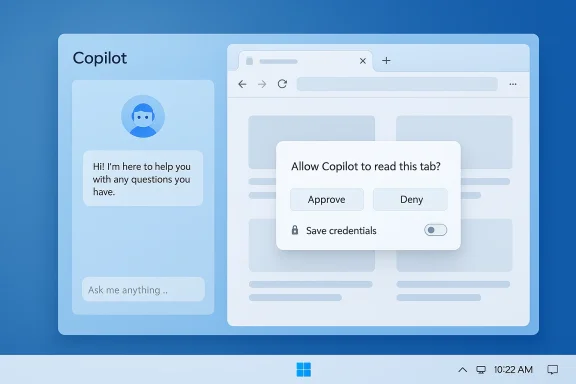
Microsoft’s Copilot app for Windows has quietly taken a major step toward keeping you inside the assistant instead of shunting you into a separate browser window — links clicked inside a Copilot conversation now open in a docked side pane, tabs are saved with the conversation, and, with explicit permission, Copilot can read the content of those tabs to summarize, compare, or draft text based on what you opened.
Microsoft announced the change on March 4, 2026, as a staged rollout to Windows Insiders. The update is distributed as Copilot app package version 146.0.3856.39 and higher, and Microsoft says it’s beginning to appear across Insider channels with a gradual global expansion. The company frames the move as a productivity improvement: reduce context switching, keep the conversation and source material visible at once, and let the assistant operate within the same workspace where you’re asking it to help.
This is not a sudden idea — Microsoft has been experimenting with Copilot experiences across Edge and Microsoft 365 for months. What’s new here is shifting the web-rendering experience into the Copilot app itself and adding conversation-scoped tab persistence and opt-in credentials sync to support longer, multi-step workflows inside the assistant.
That technical choice has three immediate consequences:
However, there are important caveats and open questions that users and administrators should note:
However, embedding pages also means the Copilot app will now carry additional rendering workload. Performance on lower-end devices, or on systems with many concurrent Copilot sessions and tabs, should be validated. Accessibility testing across complex pages inside the pane is important: assistive technologies may behave differently in embedded web views versus full browsers, so testers should confirm screen-reader compatibility and keyboard focus behavior inside the Copilot pane.
For developers, SaaS vendors, and IT planners, the emergence of Copilot as a workspace suggests that integrations (and policies) will need to account for assistant-driven workflows. For regulators and privacy advocates, the trend raises questions about scope, consent, and transparency — especially as assistants gain the ability to persist and reuse user context across sessions.
But simplicity in the user interface does not erase complexity under the hood. The decision to embed an Edge-based web view, the introduction of saved-tab persistence, and optional credential sync raise meaningful questions about storage, telemetry, enterprise governance, and security. Microsoft’s consent-first language is encouraging, but organizations and power users should validate the feature’s behavior in controlled environments before adopting it widely.
If you value uninterrupted workflow and quick synthesis of multiple web sources, this update to Copilot looks promising. If you’re responsible for protecting sensitive data or enforcing compliance, treat the rollout as a test case: evaluate the mechanics, ask for detailed documentation, and map the feature against your policies before enabling it broadly. The productivity gains are real — but so are the governance choices that accompany them.
Source: Digital Trends Microsoft Copilot just made browser switching a thing of the past
 Background
Microsoft announced the change on March 4, 2026, as a staged rollout to Windows Insiders. The update is distributed as Copilot app package version 146.0.3856.39 and higher, and Microsoft says it’s beginning to appear across Insider channels with a gradual global expansion. The company frames the move as a productivity improvement: reduce context switching, keep the conversation and source material visible at once, and let the assistant operate within the same workspace where you’re asking it to help.This is not a sudden idea — Microsoft has been experimenting with Copilot experiences across Edge and Microsoft 365 for months. What’s new here is shifting the web-rendering experience into the Copilot app itself and adding conversation-scoped tab persistence and opt-in credentials sync to support longer, multi-step workflows inside the assistant.
What changed — the user-visible features
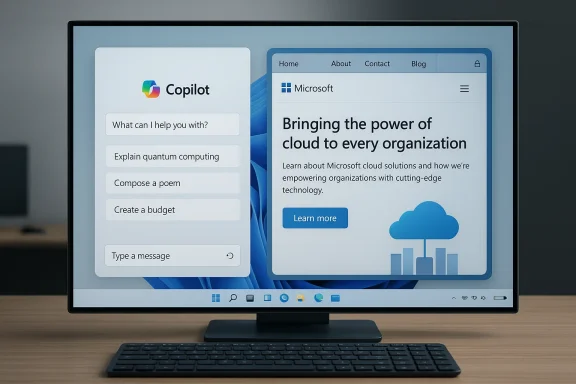
Microsoft’s announcement and subsequent hands-on coverage reveal a small set of tightly-focused changes that together alter how Copilot and the web interact on Windows:- Click a link inside a Copilot conversation and the web page opens in a side pane that is docked next to the chat, rather than launching your default browser.
- Tabs you open inside a given conversation are saved with that conversation, turning a chat into a persistent research workspace you can return to later.
- With explicit permission, Copilot can read the content of those tabs — but that permission is scoped to the conversation.
- There’s an optional password and form-data sync you can enable to let Copilot autofill credentials and complete multi-step web tasks inside the pane.
- The update also brings performance and reliability improvements across the Copilot app and folds in some features previously available on Copilot.com (for example, Podcasts and Study & Learn modes). Microsoft says some features may be temporarily removed while the team iterates and that priority features will be restored before general availability.
How it behaves in practice
- When you click a link while chatting, the page loads in the pane. You can open additional links and they become managed tabs within that pane.
- If you want Copilot to use the open webpages as context, the app will ask you for permission for that conversation. Once allowed, follow-up prompts like “Summarize the three tabs I opened” become possible.
- Tabs saved with the conversation are restored when you reopen or continue that chat — in effect turning a session into a mini workspace that persists across uses.
Under the hood — rendering, engines, and platform mechanics
The side pane is implemented using Microsoft’s web-rendering technology rather than a third-party engine. Practically speaking, the embedded web view reuses the rendering stack that powers Microsoft Edge (the same WebView2 technology Microsoft has used for years), so pages render as they would in Edge even though they appear inside the Copilot app.That technical choice has three immediate consequences:
- Rendering fidelity and compatibility will closely mirror Edge behavior.
- The experience will be consistent across Copilot and Edge-based side panes elsewhere in Windows.
- The underlying implementation makes it technically straightforward for Microsoft to reuse existing Edge capabilities for things like form autofill and credential sync — but it also makes the move feel, to some, like another way the company is binding apps into the Edge ecosystem.
Productivity upside — why this matters for everyday work
There’s a clear, practical productivity case for the change:- Less context switching. Research and writing tasks often require toggling between a chat assistant and multiple web pages. Docking the page beside the conversation keeps your train of thought intact.
- Persistent workspaces. Saving tabs with a conversation transforms ephemeral browsing into a revisit-able research session. That’s useful when you want Copilot to stitch together insights from several sources over time.
- Actionable follow-up prompts. Being able to ask Copilot to summarize, compare, or extract quotes from the pages you opened reduces manual copy-paste and speeds drafting.
- Streamlined multi-step tasks. With password/form-data sync enabled, sign-ins and form submissions can happen inside the pane, which makes multi-step workflows (e.g., booking a meeting room, taking information from a page into a composer) smoother.
Privacy, consent, and the scope of access — key considerations
Microsoft has built the feature with an explicit consent model: Copilot will not read the content of pages opened in the pane unless you give it permission for that conversation. That constraint is welcome — it’s a baseline privacy control that distinguishes "viewing" content from "processing it with AI."However, there are important caveats and open questions that users and administrators should note:
- The announcement states tabs are saved with the conversation, but it does not fully document where those saved tabs live (local-only, synced to Microsoft account, or backed up in the cloud for cross-device continuity). That detail matters for privacy, retention, and enterprise data protection policies.
- Enabling password and form-data sync is opt-in, but any feature that centralizes credentials for autofill increases the attack surface if an account or device is compromised. The convenience tradeoff is real.
- The consent model is scoped to a conversation, which is safer than broad or persistent access, but users need to be vigilant about when they grant that permission and to which conversations.
- The feature implicitly inherits browser-level behaviors from the embedded engine. That raises questions about cookie handling, tracking, extensions, and how cross-site data is isolated or sandboxed in the Copilot context.
Security and enterprise implications
This feature’s arrival has several potential implications for IT teams, security architects, and compliance officers:- Data loss prevention (DLP). If Copilot can read web page content and store tabs as conversation artifacts, DLP policies must explicitly account for the new surface. IT should evaluate whether sensitive data might be summarized or stored and how to limit those interactions by policy.
- Credential management risks. Password sync inside Copilot increases convenience but concentrates credential access. Organizations that require hardware-bound authenticators or strict credential vaulting will need to decide whether to allow this feature for managed devices.
- Account compromise scenarios. If a Microsoft account is compromised, an attacker could potentially access conversation histories and the saved tabs that accompany them — and, where enabled, form data. That calls for strong account protection (MFA, device registration, conditional access) and perhaps elevated monitoring around Copilot activity.
- Regulatory considerations. Industries with strict data residency or handling rules need clarity about where conversation artifacts and saved tabs are stored. If anything is synced to the cloud, cross-border data transfer rules could be triggered.
- Administrative controls. Microsoft provides enterprise configuration and group policies for many Windows features; organizations should test current controls and ask the vendor for explicit Copilot governance knobs that block tab saving, disable in-pane browsing, or prevent credential sync.
Competition, browser choice, and antitrust optics
Because the side pane uses Edge’s rendering stack, some observers see the change as another way Microsoft increases reliance on Edge’s technology even when the user’s default browser is something else. There are two competing narratives here:- The productivity argument: embedding the engine is simply the path of least resistance to build a fast, compatible web view inside Copilot with predictable behavior.
- The antitrust/market-power argument: bundling the Edge rendering stack into Copilot effectively reduces the practical choice of browser at the point where Copilot surfaces web content, because pages will render with Edge behavior and integrations regardless of the user's default browser.
Usability trade-offs and potential user friction
There are several usability trade-offs to keep in mind:- The side-pane UI is compact. Pages that are designed for full-width browsing might feel cramped, forcing you to switch to a full browser for immersive tasks like long-form reading, interactive visualization, or complex web apps.
- Not all web interactions translate well into an embedded pane (e.g., web apps that insist on certain cookies, extensions, or pop-up behavior).
- Some users actively want their default browser to handle links for extension support, password managers, or enterprise certificates. The Copilot pane’s built-in autofill and credential sync will not necessarily replicate every password manager’s behavior.
- Because the feature is rolled out to Insiders first, actual user flows will likely evolve as Microsoft adjusts based on feedback. If Microsoft temporarily removes some features to iterate (as they’ve said they will), the experience may feel inconsistent during the preview stage.
Accessibility and performance
Microsoft claims the update makes Copilot “faster” and “more reliable,” and bringing the web into the same UI reduces the number of processes and transitions required for simple workflows. That can benefit users who rely on keyboard navigation, screen readers, or reduced-motion settings by keeping everything in a single context.However, embedding pages also means the Copilot app will now carry additional rendering workload. Performance on lower-end devices, or on systems with many concurrent Copilot sessions and tabs, should be validated. Accessibility testing across complex pages inside the pane is important: assistive technologies may behave differently in embedded web views versus full browsers, so testers should confirm screen-reader compatibility and keyboard focus behavior inside the Copilot pane.
How to test it now (Insider guidance)
If you are a Windows Insider and want to try the feature:- Ensure you have Copilot app package version 146.0.3856.39 or higher.
- Open Copilot and start a conversation.
- Click a link in the conversation to see it open in the side pane.
- When prompted about permissions, carefully read the dialog before allowing Copilot to read the tab content.
- If you want to test password sync, enable it intentionally and try a simple sign-in flow; then evaluate how credentials are stored and whether they integrate with your existing password manager.
- Provide feedback using the Copilot app’s built-in feedback mechanism so Microsoft can iterate.
Recommendations for users and IT teams
For individuals:- Treat saved tabs and permission grants like any other persistent record — only grant Copilot access for conversations that you trust.
- Use separate accounts for sensitive admin or financial tasks and avoid enabling password sync for accounts you use for high-value actions unless you understand the storage model.
- Keep strong account protections in place: enable MFA, use a dedicated password manager for cross-app credentials, and review account activity logs regularly.
- Add Copilot behaviors to your DLP, acceptable-use, and cloud-storage policies; test how conversation artifacts are retained and whether they’re subject to corporate discovery tools or backups.
- Validate whether group policies or endpoint management tools can disable in-pane browsing or prevent credential sync.
- Update user training materials so employees understand the consent prompts they will see and the security trade-offs of enabling tab-reading or password sync.
What Microsoft still needs to clarify
Microsoft’s announcement is explicit about the feature’s existence and the consent model, but several implementation details remain unclear and should be clarified publicly:- Where are saved tabs stored — local-only, synced to the user’s Microsoft account, or persisted in the cloud for cross-device continuity?
- What telemetry is captured when Copilot reads tab content, and how long is that content retained in logs or conversation history?
- How does the embedded engine isolate third-party trackers, cookies, and cross-site storage compared with a full browser?
- Exactly which features are being temporarily removed and when “priority” features are scheduled to return prior to general availability?
The bigger picture — Copilot as a platform
This update is part of a broader shift: Copilot is increasingly a platform rather than a single chat box. Microsoft continues to build capabilities that let the assistant stay contextually aware of the content you open, whether that content originates in Office, Outlook, Edge, or now the Copilot app itself. These changes simplify workflows for many users but also change where processing happens and who controls the user experience.For developers, SaaS vendors, and IT planners, the emergence of Copilot as a workspace suggests that integrations (and policies) will need to account for assistant-driven workflows. For regulators and privacy advocates, the trend raises questions about scope, consent, and transparency — especially as assistants gain the ability to persist and reuse user context across sessions.
Final assessment — strengths and risks
Strengths:- Real, measurable productivity gains for users who work with multiple sources and want rapid summarization and drafting.
- Cleaner workflow: fewer app switches, and session persistence that mirrors how people actually research and write.
- Consistent rendering due to reuse of Edge’s engine, reducing surprises when pages don’t behave as expected.
- Concentration of credentials via optional password sync increases the attack surface if accounts or devices are compromised.
- Unclear data residency and storage semantics for saved tabs and conversation artifacts, which matters for compliance.
- Ecosystem optics: embedding Edge’s rendering stack inside Copilot may be perceived as further tying Microsoft services together, which could invite regulator attention or user pushback.
- Accessibility and compatibility edge cases that may differ from full-browser behaviors and require testing.
What to watch next
- How Microsoft documents storage, telemetry, and retention for saved tabs and conversation artifacts.
- Which features are temporarily removed, when they are restored, and whether Microsoft adjusts the consent UX based on Insider feedback.
- Enterprise controls: Microsoft’s release of specific group policies or Intune settings to govern in-pane web access, tab persistence, and credential sync.
- Broader integration: whether similar in-pane browsing becomes a pattern across Copilot in Office, Outlook, and other Microsoft surfaces.
- Regulatory response and community sentiment: how privacy advocates, enterprise customers, and browser competitors react as the feature expands beyond Insiders.
Conclusion
By turning Copilot into a mini research workspace that can host web pages beside your conversation, Microsoft has solved a genuine productivity pain point: the constant context switching between an AI assistant and a browser. The change is simple in concept and powerful in practice for many use cases, especially research, summarization, and drafting.But simplicity in the user interface does not erase complexity under the hood. The decision to embed an Edge-based web view, the introduction of saved-tab persistence, and optional credential sync raise meaningful questions about storage, telemetry, enterprise governance, and security. Microsoft’s consent-first language is encouraging, but organizations and power users should validate the feature’s behavior in controlled environments before adopting it widely.
If you value uninterrupted workflow and quick synthesis of multiple web sources, this update to Copilot looks promising. If you’re responsible for protecting sensitive data or enforcing compliance, treat the rollout as a test case: evaluate the mechanics, ask for detailed documentation, and map the feature against your policies before enabling it broadly. The productivity gains are real — but so are the governance choices that accompany them.
Source: Digital Trends Microsoft Copilot just made browser switching a thing of the past