

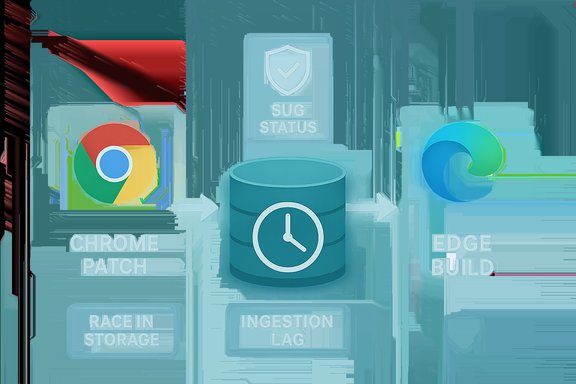
Microsoft’s Security Update Guide lists CVE‑2025‑12434 — described upstream as a “Race in Storage” in Chromium — because Edge is built on Chromium and Microsoft uses the Security Update Guide (SUG) to record upstream CVEs and to tell administrators when the downstream Edge build has ingested the fix and is no longer vulnerable.
Chromium is an open‑source engine that supplies Blink, V8, ANGLE, Storage, and other core browser subsystems to a broad ecosystem: Google Chrome, Microsoft Edge (Chromium‑based), Brave, Opera, Vivaldi, Electron apps and countless embedded products. A security flaw discovered in Chromium therefore has both an upstream origin (Chromium/Chrome) and downstream ripples: every product that consumes that Chromium code is potentially affected until that vendor ingests and ships the upstream fix.
Microsoft documents these upstream CVEs in the Security Update Guide so Edge customers can track whether Microsoft’s downstream build includes the Chromium remediation. The SUG entry is effectively the downstream confirmation — it does not mean Microsoft authored the bug; it confirms whether Edge is still shipping the vulnerable upstream code or has been patched via ingestion and a subsequent Edge release. This is Microsoft’s stated process for communicating ingestion and mitigation to enterprise customers.
Source: MSRC Security Update Guide - Microsoft Security Response Center
 Background — why a Chromium CVE appears in Microsoft’s Security Update Guide
Chromium is an open‑source engine that supplies Blink, V8, ANGLE, Storage, and other core browser subsystems to a broad ecosystem: Google Chrome, Microsoft Edge (Chromium‑based), Brave, Opera, Vivaldi, Electron apps and countless embedded products. A security flaw discovered in Chromium therefore has both an upstream origin (Chromium/Chrome) and downstream ripples: every product that consumes that Chromium code is potentially affected until that vendor ingests and ships the upstream fix.Microsoft documents these upstream CVEs in the Security Update Guide so Edge customers can track whether Microsoft’s downstream build includes the Chromium remediation. The SUG entry is effectively the downstream confirmation — it does not mean Microsoft authored the bug; it confirms whether Edge is still shipping the vulnerable upstream code or has been patched via ingestion and a subsequent Edge release. This is Microsoft’s stated process for communicating ingestion and mitigation to enterprise customers.
The ingestion model, in short
- Google/Chromium publishes a patch and a Chrome Stable release that contains the fix.
- Downstream vendors (Microsoft for Edge) ingest that Chromium change, run internal tests, and then ship a vendor‑specific build.
- Microsoft records the upstream CVE and marks the Edge build as mitigated in SUG when that Edge build is released and confirmed to include the upstream fix.
What “Race in Storage” likely means (technical summary)
The terse CVE title “Race in Storage” points to a race condition in a storage‑related component of Chromium (IndexedDB, Cache Storage, Storage APIs, or other persistent store code). The public SUG and upstream summaries often use concise language; technical details are commonly restricted until patches propagate widely. Still, the general risk pattern for a storage race condition is clear:- A race implies a timing or ordering bug where two code paths access or modify the same resource concurrently without correct synchronization.
- In a storage context, that can lead to inconsistent validation, use‑after‑free, stale handle dereferences, or unauthorized access to storage items (cookies, tokens, cached responses, or extension data).
- The worst realistic consequences are cross‑origin data exposure, memory corruption (if object lifetimes are mishandled), or other logic compromises that escalate into higher‑impact attacks when chained with other engine bugs.
How Microsoft’s SUG entry should be read (what it tells you)
When you open the SUG entry for a Chromium CVE (for example the MSRC page for CVE‑2025‑12434), it serves two practical functions for Edge customers:- It documents the upstream CVE metadata and the fact the vulnerability affects Chromium code consumed by Edge.
- It provides the downstream status: the Edge build number (or statement) indicating Edge is no longer vulnerable once Microsoft has completed ingestion, testing, and shipping the patched Edge build.
How to check whether your browser (Edge or Chrome) is patched
The simplest way to verify local status is to read your browser’s About page and compare the installed version to the fixed build noted upstream or in Microsoft’s SUG and Edge release notes.For Microsoft Edge (desktop)
- Open Microsoft Edge.
- Click Settings and more (the three dots) → Help and feedback → About Microsoft Edge, or type edge://settings/help into the address bar and press Enter.
- Edge will display the installed version and automatically check for updates; if an update is available it will show “Download and install” or “Restart” after a download.
For Google Chrome (desktop)
- Open Chrome → Menu → Help → About Google Chrome, or visit chrome://settings/help.
- Chrome displays its full version string and will check for updates and relaunch when a new stable build is installed. Use chrome://version for the underlying Chromium revision when necessary.
What to look for in the version string
A typical version looks like:- Microsoft Edge Version 140.0.7339.xxx
- Google Chrome Version 140.0.7339.xxx
- The upstream Chrome fixed build (for many recent high‑severity fixes that baseline was Chrome 140.0.7339.185/.186 — see Chrome stable release notes).
- The Edge build documented in Microsoft’s SUG or the Edge release notes that indicates ingestion of the Chromium fix. Edge is safe only when the SUG/Edge release notes list the patched Edge build or when your local Edge version is equal to or newer than that build.
Step‑by‑step: confirm and remediate (home users and admins)
- Open About in your browser:
- Edge: edge://settings/help. Confirm the full version string.
- Chrome: chrome://settings/help. Confirm the full version string.
- Consult Microsoft’s Security Update Guide entry for CVE‑2025‑12434 and Edge release notes to find the Edge build number that Microsoft states is mitigated.
- If your Edge version ≥ patched Edge build → Edge is no longer vulnerable.
- If your Edge version is older → update Edge (or follow your organization’s patch process).
- If Chrome’s version is at or newer than the fixed Chrome build, Chrome is protected upstream — but Edge may still lag until Microsoft ships its ingestion build. Do not assume Edge is patched just because Chrome has been updated.
- For managed environments, use your patch management tools to inventory deployed versions (Intune, SCCM/MECM, Jamf, Google Admin), prioritize high‑risk endpoints, and accelerate rollout.
Risks, caveats, and blind spots to watch for
- Ingestion lag: Chrome’s upstream patching is often faster than downstream ingestion by Edge. That ingestion window is the operational risk window for Edge customers; SUG exists precisely to signal when Microsoft’s build is safe.
- Embedded Chromium runtimes: Electron apps, kiosk images, Playwright/automation runtimes, and other bundled Chromium instances often do not update in lockstep with desktop browsers. These embedded runtimes are a common blind spot and require inventory and separate remediation.
- Terse advisories: Browser vendors frequently withhold exploit mechanics during early patch rollout. Lack of a public proof‑of‑concept does not imply lack of risk — assume weaponizable potential until your fleet is patched.
- Version mapping complexity: Chrome and Edge version strings are similar but not identical in ingestion timing. Use the specific Edge build number from Microsoft’s SUG or Edge release notes to determine downstream status; do not rely solely on an upstream Chrome fixed build number to conclude Edge is safe.
Detection and temporary mitigations while you wait to patch
If you cannot immediately update every endpoint, apply compensating controls and detection tuning:- Enforce web filtering and proxy rules to block access to untrusted domains and known malicious hosting networks.
- Restrict browsing from high‑privilege or admin workstations; use a separate hardened browser for sensitive tasks.
- Temporarily tighten browser policies (block extension installs, remove high‑risk extensions).
- Monitor EDR and crash telemetry for increases in renderer crashes or unusual child process activity originating from msedge.exe/chrome.exe. Hunt for suspicious child processes spawned by browser binaries.
- Unexpected child processes or command‑line activity spawned by msedge.exe/chrome.exe.
- Sudden spikes in renderer crashes or GPU process crashes.
- Outbound connections from browser processes to unusual endpoints following unusual browser behavior.
Practical guidance for enterprise patch workflows
- Inventory first: export versions for all Chromium‑based binaries (Edge, Chrome) and any embedded Chromium runtimes (Electron apps, automation containers).
- Prioritize: internet‑facing endpoints, privileged users, kiosks, and point‑of‑sale devices.
- Pilot fast: stage the patched Edge/Chrome build in a small pilot ring; validate internal web apps for compatibility regressions (WebGL, WebGPU, internal extension behavior).
- Roll out urgently: push the patched build out‑of‑band to high‑risk groups and accelerate the broader deployment.
- Verify ingestion: confirm the Edge build deployed matches the SUG/Edge release notes ingestion entry for CVE‑2025‑12434 before marking the fleet as remediated.
Strengths and limitations of Microsoft’s SUG approach — critical analysis
Strengths- Authoritative downstream confirmation: SUG provides a centralized, auditable record showing whether Microsoft’s Edge builds are still vulnerable or have been remediated — invaluable for compliance and enterprise operations.
- Operational clarity: By listing Chromium CVEs that affect Edge, Microsoft removes ambiguity: administrators can see a downstream statement rather than guessing ingestion status.
- Timing window (ingestion lag): There is always a short lag between an upstream Chrome fix and the downstream Edge release; during that period Edge customers remain at risk if they assume Chrome parity. That gap is operationally meaningful and must be planned for.
- Blind spots in embedded Chromium: Applications that bundle Chromium do not automatically benefit from Edge/Chrome updates. Enterprises must inventory and track those separately.
- Conservative disclosures limit triage detail: The common practice of withholding deep technical details reduces immediate risk but increases the burden on defenders to act without full exploit context. That trade‑off is deliberate but still imposes cost on incident response teams.
Cross‑verification and what’s verifiable now
- Microsoft explicitly uses SUG to announce downstream remediation and to integrate MSRC blog/advisory content into SUG; this is Microsoft’s published practice for the Security Update Guide.
- Chrome stable releases that remedied clusters of high‑severity CVEs in the 140.x series were published as 140.0.7339.185/.186 (Windows/macOS) and 140.0.7339.185 (Linux) in mid‑September 2025; multiple independent security vendors and Chrome Releases confirm those builds as the upstream remediation baseline. This pattern — a Chrome stable update first, then downstream ingestion for Edge — is the normal operational model.
- If the specific text or low‑level exploit mechanics for CVE‑2025‑12434 cannot be found in a public technical write‑up, treat that as intentionally withheld disclosure until patch propagation completes. When details cannot be independently verified in public sources, mark them as time‑sensitive and proceed with patching and detection.
Short checklist (copyable) — immediate actions
- Home user:
- Open Edge → edge://settings/help and update if an update is available. Confirm version string.
- Open Chrome → chrome://settings/help and update if necessary.
- Small business / IT:
- Inventory Edge/Chrome versions across endpoints.
- Check Microsoft SUG entry for CVE‑2025‑12434 and match your Edge build to the SUG/Edge release notes ingestion build.
- Accelerate update for high‑risk users; apply web filtering while waiting.
- Enterprise:
- Export version map from Intune/SCCM/Jamf.
- Identify embedded Chromium instances (Electron, Playwright images, kiosks).
- Pilot patched Edge build and then deploy broadly.
- Tune EDR to detect renderer crash spikes and suspicious child processes.
Conclusion
CVE‑2025‑12434 is cataloged in Microsoft’s Security Update Guide because Edge consumes Chromium OSS; SUG exists to tell Edge customers when Microsoft’s downstream build has ingested the upstream Chromium patch and is no longer vulnerable. The practical steps for any user or administrator are straightforward: check your browser’s About/version page (edge://settings/help or chrome://settings/help), compare the local version to the fixed build stated by the vendor (Chrome’s release notes upstream and Microsoft’s SUG/Edge release notes downstream), and patch quickly. While Chrome upstream fixes can appear before Edge ingestion, Microsoft’s SUG is the downstream signal you should trust before declaring Edge remediated. In parallel, inventory embedded Chromium runtimes, apply compensating controls if necessary, and monitor telemetry for exploitation indicators while updates roll out.Source: MSRC Security Update Guide - Microsoft Security Response Center
