

CVE-2026-11035 is a Google Chrome for Android Custom Tabs vulnerability, published on June 4, 2026 and fixed before version 149.0.7827.53, that allowed a local attacker to escalate privileges through a crafted XML file when user interaction was involved. The bug is not the scariest item in Chrome 149’s enormous security rollup, but it is one of the more revealing ones. It sits at the seam between the browser, Android, app-to-web handoff flows, and the trust users place in familiar in-app browsing surfaces. That makes it a useful reminder that “medium” browser flaws can still matter when the browser is no longer just a browser.
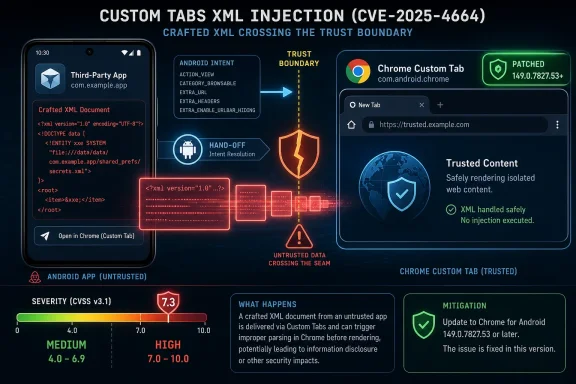
The headline description is compact: insufficient validation of untrusted input in Custom Tabs, affecting Google Chrome on Android before 149.0.7827.53, with privilege escalation possible through a crafted XML file. Google classified the Chromium severity as Medium. CISA’s ADP scoring, however, assigned a CVSS 3.1 base score of 7.3, landing it in High territory because the modeled impact spans confidentiality, integrity, and availability.
That mismatch is not necessarily a contradiction. Chrome’s internal severity rating reflects Google’s own view of exploitability, reachable attack surface, mitigations, and product context. CVSS, by contrast, is a standardized scoring model that can make a local, user-assisted flaw look severe when the consequences after successful exploitation are broad.
The practical reading is somewhere between panic and indifference. This is not described as a remotely exploitable, drive-by renderer compromise. It requires local attack conditions, low privileges, and user interaction. But it is also not a harmless parsing bug: privilege escalation in a browser component on Android is the kind of thing attackers like to chain with other weaknesses.
Chrome 149 shipped with a staggering number of security fixes, and CVE-2026-11035 is one entry in that flood. The danger for administrators is that medium-severity mobile issues can disappear into a spreadsheet beneath critical desktop memory-corruption bugs. The danger for users is simpler: the thing that opens when they tap a link inside an app may be more security-sensitive than it looks.
That architecture is useful precisely because it blurs boundaries. A user taps a news link in a social app, a payment link in a shopping app, or an identity flow in a corporate app, and the result looks like part app, part browser. The browser engine is doing the heavy lifting, but the calling app still frames the experience.
Security people tend to distrust blurred boundaries because attackers do, too. A classic browser tab has a relatively clear origin model and user mental model: the address bar, the page, the browser. A Custom Tab adds another actor, the app that launched it, and a surrounding set of Android intents, configuration data, callbacks, and presentation choices.
That does not make Custom Tabs unsafe by design. In fact, they are often safer than embedding arbitrary WebViews, especially when authentication and account sessions are involved. But it does mean input validation in that path is not a housekeeping detail. If the handoff layer mishandles XML, intents, metadata, or policy state, the weakness lands in a privileged crossroads of the mobile experience.
CVE-2026-11035’s description is sparse, as Chrome vulnerability details often remain restricted until enough users are patched. Still, the public wording tells us enough to understand the risk class. A crafted XML file is not merely “content” if the receiving code treats it as configuration, policy, UI structure, or routing material. In browser-adjacent code, malformed input can become a decision.
The phrase “insufficient validation of untrusted input” is broad, almost bureaucratic. It can describe everything from accepting a field that should have been rejected to allowing crafted data to cross a trust boundary. In this case, the Custom Tabs component and the privilege-escalation outcome are what elevate the description.
Privilege escalation on Android can mean many things, and the public record does not spell out the exact target privilege or chain. It may involve Chrome’s own internal privileges, a mishandled interaction with Android components, or a path where local input causes Chrome to perform an action it should not. Without the restricted bug details, responsible analysis has to stop short of a proof-of-concept narrative.
But that uncertainty cuts both ways. Defenders should not assume the bug is trivial just because the visible description is short. Chrome advisories intentionally compress sensitive detail; the absence of exploit code in the public write-up is not evidence that the underlying flaw is operationally meaningless.
The crafted-file requirement also matters. A local attacker needs some route to place, present, or induce interaction with the malicious XML. That is a higher bar than a malicious webpage alone. Yet on Android, local attack paths are not exotic: another app, a downloaded file, a managed workflow, a shared storage location, or a social-engineered document can all become part of the threat model.
That leaves patch managers in the familiar position of choosing which authority to operationalize. If your vulnerability platform keys off vendor severity, this looks like one medium item among hundreds. If it keys off CVSS, this becomes a high-priority item, albeit one with local attack requirements and user interaction.
For enterprise IT, the sane answer is to stop treating a single number as the decision. A local, user-assisted Android Chrome flaw may be less urgent than an exploited V8 zero-day on desktops, but it still affects the browser surface used for sign-in, SSO handoffs, payment flows, device enrollment journeys, and app-embedded support portals. In managed fleets, that context can matter more than the abstract label.
The CVSS vector is also revealing. Attack vector local, attack complexity low, privileges required low, user interaction required, scope unchanged, and high impact across confidentiality, integrity, and availability. In plain English, the model imagines an attacker who already has some foothold or local delivery mechanism, can trigger the bug without sophisticated conditions, needs the user to participate, and may gain serious control if successful.
That profile maps well to chained mobile attacks. A malicious or compromised app rarely gets everything it wants in one step. It collects permissions, tricks the user into opening a file or link, abuses an IPC boundary, and then looks for a trusted component that will do something unsafe. Custom Tabs, because they sit between apps and Chrome, are attractive in exactly that kind of chain.
That kind of release creates two competing narratives. The consumer-facing narrative is easy: update Chrome. The enterprise narrative is messier: inventory the affected platform, understand which CVEs apply to which operating systems, test the build, deploy it, confirm adoption, and explain residual exposure to leadership before the next Chrome release lands.
CVE-2026-11035 illustrates the problem. The referenced Chrome release post is a desktop stable-channel post, but the CVE description specifically calls out Chrome on Android. NVD’s configuration data pairs the Chrome application CPE with Android as an operating system. Anyone blindly reading only the release headline could miss the mobile relevance; anyone blindly reading only the CVE title could miss that the fix is tied to the broader Chrome 149 train.
This is not just an annoyance for compliance teams. Modern browser patching increasingly spans desktop browsers, mobile browsers, embedded browser components, WebViews, enterprise app wrappers, kiosk devices, and identity broker flows. A flaw in “Chrome” may not live where the help desk first thinks to look.
The lesson is that Chrome vulnerability management is now product-line management. Windows admins still need to push Chrome updates on PCs, but security teams also need to ask whether Android work profiles, managed Play deployments, bring-your-own-device policies, and enterprise mobility tools are actually moving users to the fixed build.
The Android ecosystem is built around many apps sharing a device while supposedly remaining isolated by sandboxing, permissions, signing, and mediated intents. A low-privilege local attacker might simply be another app installed by the user, a compromised app with limited permissions, or a file delivered into a place another component later consumes. That is not equivalent to an attacker sitting at the keyboard with admin rights.
This is why privilege escalation remains a serious class on mobile platforms. The initial malicious app may have very little power. Its value increases if it can cause a trusted system component, browser component, or another app’s privileged pathway to process hostile input.
User interaction does not eliminate the risk either. Most successful mobile attacks contain some user interaction because phones are interaction machines. Tapping a file, approving a prompt, opening a link inside a trusted app, or following a support instruction is not an unusual event; it is the normal rhythm of mobile computing.
Custom Tabs add another wrinkle: users may not perceive when they are crossing from app logic into browser logic. If a malicious flow can make a crafted artifact appear ordinary inside that transition, the “UI:R” part of the CVSS vector may be less reassuring than it looks on paper.
A mobile browser privilege escalation can become an enterprise incident without ever touching a Windows kernel. If an attacker compromises a managed Android device, steals session material, tampers with a browser-mediated authentication flow, or gains leverage inside the work profile, the blast radius can include Microsoft 365, Entra ID-connected apps, VPN portals, remote desktops, and administrative consoles.
This is especially relevant for organizations that have tightened Windows patching while leaving mobile patching to best effort. Many companies can tell you the Chrome version on every Windows endpoint within an hour. Fewer can say the same for Chrome on personally owned Android devices accessing corporate email or SSO-protected web apps.
The browser has become a control plane. On Windows, that has been obvious for years because Chrome, Edge, and WebView2 sit at the center of work. On Android, the same shift is disguised by app icons. Custom Tabs are one of the mechanisms that make the browser disappear into the application layer, which is convenient until security teams need to prove what version is actually in use.
This does not mean CVE-2026-11035 is a Windows vulnerability. It is not. It means Windows administrators who own enterprise risk cannot stop at Windows when browser-mediated access is cross-platform.
For IT departments, the remediation sentence is easy and the evidence trail is harder. Managed Android fleets should verify Chrome version compliance, not merely assume auto-update did its job. BYOD environments should consider conditional access rules, device compliance checks, or user prompts where the browser version is below the fixed build.
The trick is that Chrome on Android may not be the only browser-adjacent surface in use. Apps can use Custom Tabs through Chrome, but Android devices may also have WebView-dependent app flows, alternative browsers, OEM browsers, and identity broker apps. CVE-2026-11035 is specifically a Chrome-on-Android issue, but the operational response should still include mapping which apps launch web content through Chrome Custom Tabs.
Security teams should also resist the urge to wait for exploit chatter. The public issue details are likely restricted, and Chrome’s disclosure model intentionally reduces the attacker’s ability to weaponize fresh bugs while the update is still rolling out. By the time exploit write-ups are widely available, the defensive window has already narrowed.
The better approach is boring: deploy, verify, monitor. In browser security, boring is usually what success looks like.
For CVE-2026-11035, NVD’s initial analysis added a vulnerable configuration for Google Chrome versions before 149.0.7827.53 and paired it with Android. That is useful, but CPE modeling can still be awkward for mobile software because the vulnerable product is an app, the platform is an operating system, and the exploitable pathway may involve app-to-browser integration rather than the OS itself.
This matters because many scanners and asset systems were designed around servers and desktop software. They are comfortable with “Windows Server version X has package Y installed.” They are less comfortable with “Android device has Chrome app version Z, launched by multiple managed and unmanaged apps through Custom Tabs, under a work profile policy.”
A missing or overly broad CPE can produce false negatives, false positives, or noisy dashboards. If Chrome’s Android package is not inventoried, the vulnerability may never show up. If the generic Chrome CPE is mapped too broadly, desktop teams may chase an Android-only exposure. If Android is modeled as vulnerable rather than as the platform condition, reporting can become misleading.
This is one reason security teams should treat CVE metadata as input, not gospel. NVD, vendor advisories, CISA enrichment, mobile device management inventory, and real deployment telemetry all describe different slices of the same risk. The job is to reconcile them, not worship the first severity badge that appears.
In CVE-2026-11035, the restricted Chromium issue means we do not have a public patch diff narrative, exploit primitive, or exact privilege boundary explanation. That makes deep technical analysis speculative. It also means public defenders should avoid inventing a more dramatic exploit chain than the record supports.
But restricted details do not prevent practical action. The affected component is known. The fixed version is known. The attack preconditions are sketched. The impact class is serious enough to merit rapid patching, especially on managed Android devices that touch corporate resources.
The best security writing in this phase is disciplined: describe what is known, explain what it implies, and mark the unknowns honestly. CVE-2026-11035 is a good example of why. Overstating it as a remote Chrome apocalypse would be wrong; dismissing it as “only medium” would also be lazy.
CVE-2026-11035 will probably be remembered, if at all, as one medium entry in Chrome 149’s massive security ledger. That would undersell its value as a signal. The browser is now an operating layer for identity, documents, payments, and enterprise access, even when it appears inside someone else’s app. The next wave of browser security work will not be only about patching rendering engines faster; it will be about seeing every place the browser quietly became part of the platform.
 A Medium Chrome Bug With a High-Friction Attack Still Deserves Attention
The headline description is compact: insufficient validation of untrusted input in Custom Tabs, affecting Google Chrome on Android before 149.0.7827.53, with privilege escalation possible through a crafted XML file. Google classified the Chromium severity as Medium. CISA’s ADP scoring, however, assigned a CVSS 3.1 base score of 7.3, landing it in High territory because the modeled impact spans confidentiality, integrity, and availability.That mismatch is not necessarily a contradiction. Chrome’s internal severity rating reflects Google’s own view of exploitability, reachable attack surface, mitigations, and product context. CVSS, by contrast, is a standardized scoring model that can make a local, user-assisted flaw look severe when the consequences after successful exploitation are broad.
The practical reading is somewhere between panic and indifference. This is not described as a remotely exploitable, drive-by renderer compromise. It requires local attack conditions, low privileges, and user interaction. But it is also not a harmless parsing bug: privilege escalation in a browser component on Android is the kind of thing attackers like to chain with other weaknesses.
Chrome 149 shipped with a staggering number of security fixes, and CVE-2026-11035 is one entry in that flood. The danger for administrators is that medium-severity mobile issues can disappear into a spreadsheet beneath critical desktop memory-corruption bugs. The danger for users is simpler: the thing that opens when they tap a link inside an app may be more security-sensitive than it looks.
Custom Tabs Turned the Browser Into Shared Infrastructure
Custom Tabs exist because mobile browsing is awkward. App developers want users to open web content without being thrown entirely out of the app, while browser vendors want the security, cookies, saved passwords, and performance of a real browser rather than a homemade WebView bolted into every application. Chrome Custom Tabs became the compromise: an app-controlled browser surface backed by Chrome.That architecture is useful precisely because it blurs boundaries. A user taps a news link in a social app, a payment link in a shopping app, or an identity flow in a corporate app, and the result looks like part app, part browser. The browser engine is doing the heavy lifting, but the calling app still frames the experience.
Security people tend to distrust blurred boundaries because attackers do, too. A classic browser tab has a relatively clear origin model and user mental model: the address bar, the page, the browser. A Custom Tab adds another actor, the app that launched it, and a surrounding set of Android intents, configuration data, callbacks, and presentation choices.
That does not make Custom Tabs unsafe by design. In fact, they are often safer than embedding arbitrary WebViews, especially when authentication and account sessions are involved. But it does mean input validation in that path is not a housekeeping detail. If the handoff layer mishandles XML, intents, metadata, or policy state, the weakness lands in a privileged crossroads of the mobile experience.
CVE-2026-11035’s description is sparse, as Chrome vulnerability details often remain restricted until enough users are patched. Still, the public wording tells us enough to understand the risk class. A crafted XML file is not merely “content” if the receiving code treats it as configuration, policy, UI structure, or routing material. In browser-adjacent code, malformed input can become a decision.
The XML Detail Is the Clue, Not the Whole Story
XML has a long and unglamorous security history because it is both flexible and deceptively structured. Developers read it as data; parsers sometimes treat it as instructions. Even when the bug is not one of the old textbook XML external entity problems, XML remains a format where validation errors can become privilege, path, or state errors.The phrase “insufficient validation of untrusted input” is broad, almost bureaucratic. It can describe everything from accepting a field that should have been rejected to allowing crafted data to cross a trust boundary. In this case, the Custom Tabs component and the privilege-escalation outcome are what elevate the description.
Privilege escalation on Android can mean many things, and the public record does not spell out the exact target privilege or chain. It may involve Chrome’s own internal privileges, a mishandled interaction with Android components, or a path where local input causes Chrome to perform an action it should not. Without the restricted bug details, responsible analysis has to stop short of a proof-of-concept narrative.
But that uncertainty cuts both ways. Defenders should not assume the bug is trivial just because the visible description is short. Chrome advisories intentionally compress sensitive detail; the absence of exploit code in the public write-up is not evidence that the underlying flaw is operationally meaningless.
The crafted-file requirement also matters. A local attacker needs some route to place, present, or induce interaction with the malicious XML. That is a higher bar than a malicious webpage alone. Yet on Android, local attack paths are not exotic: another app, a downloaded file, a managed workflow, a shared storage location, or a social-engineered document can all become part of the threat model.
The Severity Disagreement Is Really About Patch Prioritization
The most interesting thing about CVE-2026-11035 may be the split personality of its severity. Chromium says Medium. CISA-ADP’s CVSS vector says High. NVD, at the time reflected in the submitted record, had not supplied its own CVSS score, while NIST enrichment added affected configurations tying Chrome versions before 149.0.7827.53 to Android.That leaves patch managers in the familiar position of choosing which authority to operationalize. If your vulnerability platform keys off vendor severity, this looks like one medium item among hundreds. If it keys off CVSS, this becomes a high-priority item, albeit one with local attack requirements and user interaction.
For enterprise IT, the sane answer is to stop treating a single number as the decision. A local, user-assisted Android Chrome flaw may be less urgent than an exploited V8 zero-day on desktops, but it still affects the browser surface used for sign-in, SSO handoffs, payment flows, device enrollment journeys, and app-embedded support portals. In managed fleets, that context can matter more than the abstract label.
The CVSS vector is also revealing. Attack vector local, attack complexity low, privileges required low, user interaction required, scope unchanged, and high impact across confidentiality, integrity, and availability. In plain English, the model imagines an attacker who already has some foothold or local delivery mechanism, can trigger the bug without sophisticated conditions, needs the user to participate, and may gain serious control if successful.
That profile maps well to chained mobile attacks. A malicious or compromised app rarely gets everything it wants in one step. It collects permissions, tricks the user into opening a file or link, abuses an IPC boundary, and then looks for a trusted component that will do something unsafe. Custom Tabs, because they sit between apps and Chrome, are attractive in exactly that kind of chain.
Chrome 149’s Scale Makes Individual Bugs Easier to Miss
Chrome 149’s security release is unusually large, with hundreds of fixes bundled into the stable channel promotion for Windows, macOS, and Linux, and related vulnerability records touching Android-specific Chrome behavior. The desktop release notes highlighted externally reported fixes and included many critical, high, and medium CVEs across ANGLE, Network, GPU, V8, WebRTC, Password Manager, Autofill, Extensions, DevTools, and more.That kind of release creates two competing narratives. The consumer-facing narrative is easy: update Chrome. The enterprise narrative is messier: inventory the affected platform, understand which CVEs apply to which operating systems, test the build, deploy it, confirm adoption, and explain residual exposure to leadership before the next Chrome release lands.
CVE-2026-11035 illustrates the problem. The referenced Chrome release post is a desktop stable-channel post, but the CVE description specifically calls out Chrome on Android. NVD’s configuration data pairs the Chrome application CPE with Android as an operating system. Anyone blindly reading only the release headline could miss the mobile relevance; anyone blindly reading only the CVE title could miss that the fix is tied to the broader Chrome 149 train.
This is not just an annoyance for compliance teams. Modern browser patching increasingly spans desktop browsers, mobile browsers, embedded browser components, WebViews, enterprise app wrappers, kiosk devices, and identity broker flows. A flaw in “Chrome” may not live where the help desk first thinks to look.
The lesson is that Chrome vulnerability management is now product-line management. Windows admins still need to push Chrome updates on PCs, but security teams also need to ask whether Android work profiles, managed Play deployments, bring-your-own-device policies, and enterprise mobility tools are actually moving users to the fixed build.
Android Makes “Local Attacker” Less Comforting Than It Sounds
In desktop security, “local attacker” often reads as a downgrade. If the attacker is already local, the argument goes, something else has already gone wrong. On Android, that logic is too casual.The Android ecosystem is built around many apps sharing a device while supposedly remaining isolated by sandboxing, permissions, signing, and mediated intents. A low-privilege local attacker might simply be another app installed by the user, a compromised app with limited permissions, or a file delivered into a place another component later consumes. That is not equivalent to an attacker sitting at the keyboard with admin rights.
This is why privilege escalation remains a serious class on mobile platforms. The initial malicious app may have very little power. Its value increases if it can cause a trusted system component, browser component, or another app’s privileged pathway to process hostile input.
User interaction does not eliminate the risk either. Most successful mobile attacks contain some user interaction because phones are interaction machines. Tapping a file, approving a prompt, opening a link inside a trusted app, or following a support instruction is not an unusual event; it is the normal rhythm of mobile computing.
Custom Tabs add another wrinkle: users may not perceive when they are crossing from app logic into browser logic. If a malicious flow can make a crafted artifact appear ordinary inside that transition, the “UI:R” part of the CVSS vector may be less reassuring than it looks on paper.
The Windows Angle Is Indirect but Real
WindowsForum readers may reasonably ask why an Android Custom Tabs CVE belongs in their patch radar. The answer is that Chrome is not a single-platform risk anymore, and most Windows environments are not Windows-only environments. The same identity provider, password vault, conditional access policy, and SaaS estate spans PCs and phones.A mobile browser privilege escalation can become an enterprise incident without ever touching a Windows kernel. If an attacker compromises a managed Android device, steals session material, tampers with a browser-mediated authentication flow, or gains leverage inside the work profile, the blast radius can include Microsoft 365, Entra ID-connected apps, VPN portals, remote desktops, and administrative consoles.
This is especially relevant for organizations that have tightened Windows patching while leaving mobile patching to best effort. Many companies can tell you the Chrome version on every Windows endpoint within an hour. Fewer can say the same for Chrome on personally owned Android devices accessing corporate email or SSO-protected web apps.
The browser has become a control plane. On Windows, that has been obvious for years because Chrome, Edge, and WebView2 sit at the center of work. On Android, the same shift is disguised by app icons. Custom Tabs are one of the mechanisms that make the browser disappear into the application layer, which is convenient until security teams need to prove what version is actually in use.
This does not mean CVE-2026-11035 is a Windows vulnerability. It is not. It means Windows administrators who own enterprise risk cannot stop at Windows when browser-mediated access is cross-platform.
The Fix Is Simple; Proving It Landed Is the Work
For individual users, the fix path is straightforward: update Chrome on Android to 149.0.7827.53 or later. In practice, most users will receive Chrome through Google Play updates unless their device is too old, their Play configuration is broken, or an OEM and management policy combination interferes with update flow.For IT departments, the remediation sentence is easy and the evidence trail is harder. Managed Android fleets should verify Chrome version compliance, not merely assume auto-update did its job. BYOD environments should consider conditional access rules, device compliance checks, or user prompts where the browser version is below the fixed build.
The trick is that Chrome on Android may not be the only browser-adjacent surface in use. Apps can use Custom Tabs through Chrome, but Android devices may also have WebView-dependent app flows, alternative browsers, OEM browsers, and identity broker apps. CVE-2026-11035 is specifically a Chrome-on-Android issue, but the operational response should still include mapping which apps launch web content through Chrome Custom Tabs.
Security teams should also resist the urge to wait for exploit chatter. The public issue details are likely restricted, and Chrome’s disclosure model intentionally reduces the attacker’s ability to weaponize fresh bugs while the update is still rolling out. By the time exploit write-ups are widely available, the defensive window has already narrowed.
The better approach is boring: deploy, verify, monitor. In browser security, boring is usually what success looks like.
The CPE Question Exposes a Bigger Metadata Problem
The submitted NVD record asks, in effect, whether a CPE is missing. That small line is familiar to anyone who has lived inside vulnerability scanners: product metadata is the plumbing, and when the plumbing is wrong, prioritization gets weird.For CVE-2026-11035, NVD’s initial analysis added a vulnerable configuration for Google Chrome versions before 149.0.7827.53 and paired it with Android. That is useful, but CPE modeling can still be awkward for mobile software because the vulnerable product is an app, the platform is an operating system, and the exploitable pathway may involve app-to-browser integration rather than the OS itself.
This matters because many scanners and asset systems were designed around servers and desktop software. They are comfortable with “Windows Server version X has package Y installed.” They are less comfortable with “Android device has Chrome app version Z, launched by multiple managed and unmanaged apps through Custom Tabs, under a work profile policy.”
A missing or overly broad CPE can produce false negatives, false positives, or noisy dashboards. If Chrome’s Android package is not inventoried, the vulnerability may never show up. If the generic Chrome CPE is mapped too broadly, desktop teams may chase an Android-only exposure. If Android is modeled as vulnerable rather than as the platform condition, reporting can become misleading.
This is one reason security teams should treat CVE metadata as input, not gospel. NVD, vendor advisories, CISA enrichment, mobile device management inventory, and real deployment telemetry all describe different slices of the same risk. The job is to reconcile them, not worship the first severity badge that appears.
Google’s Restricted Details Policy Is Annoying and Necessary
Chrome advisories often withhold bug details until a majority of users have received the fix. Researchers and defenders sometimes dislike that opacity because it prevents immediate technical validation. Attackers would like the opposite for exactly the same reason.In CVE-2026-11035, the restricted Chromium issue means we do not have a public patch diff narrative, exploit primitive, or exact privilege boundary explanation. That makes deep technical analysis speculative. It also means public defenders should avoid inventing a more dramatic exploit chain than the record supports.
But restricted details do not prevent practical action. The affected component is known. The fixed version is known. The attack preconditions are sketched. The impact class is serious enough to merit rapid patching, especially on managed Android devices that touch corporate resources.
The best security writing in this phase is disciplined: describe what is known, explain what it implies, and mark the unknowns honestly. CVE-2026-11035 is a good example of why. Overstating it as a remote Chrome apocalypse would be wrong; dismissing it as “only medium” would also be lazy.
What This One Custom Tabs Bug Should Change This Week
CVE-2026-11035 should not send administrators into emergency mode by itself, but it should change what they verify after Chrome 149. The important move is to treat Chrome on Android as part of the enterprise browser estate, not as a consumer app floating outside the patch program.- Chrome for Android should be updated to version 149.0.7827.53 or later wherever the device is used for work, authentication, or access to sensitive services.
- Security teams should confirm mobile Chrome versions through management telemetry rather than assuming Google Play auto-update has completed everywhere.
- Vulnerability dashboards should distinguish this Android Custom Tabs issue from desktop Chrome vulnerabilities in the same Chrome 149 release wave.
- Organizations using BYOD Android devices should decide whether outdated Chrome builds affect conditional access, SSO, or app protection policy enforcement.
- Developers of Android apps that rely on Custom Tabs should review how their apps pass files, XML, intents, and untrusted parameters into browser-mediated flows.
- Patch prioritization should account for the CISA high CVSS score without ignoring Google’s medium Chromium severity and the local, user-assisted attack requirements.
CVE-2026-11035 will probably be remembered, if at all, as one medium entry in Chrome 149’s massive security ledger. That would undersell its value as a signal. The browser is now an operating layer for identity, documents, payments, and enterprise access, even when it appears inside someone else’s app. The next wave of browser security work will not be only about patching rendering engines faster; it will be about seeing every place the browser quietly became part of the platform.
References
- Primary source: NVD / Chromium
Published: 2026-06-09T07:00:54-07:00
NVD - CVE-2026-11035
 nvd.nist.gov
- Security advisory: MSRC
Published: 2026-06-09T07:00:54-07:00
Original feed URL
Security Update Guide - Microsoft Security Response Center
 msrc.microsoft.com
- Official source: nist.gov
National Vulnerability Database
NIST maintains the National Vulnerability Database (NVD), a repository of information on software and hardware flaws that can compromise computer security. This is a key piece of the nation’s cybersecurity infrastructure.www.nist.gov - Related coverage: vuldb.com
CVE-2026-11035 Google Chrome Custom Tabs input validation (ID 497936 / WID-SEC-2026-1794)
A vulnerability has been found in Google Chrome on Android. This vulnerability is traded as CVE-2026-11035. Upgrading the affected component is recommended.vuldb.com - Related coverage: stack.watch
- Related coverage: govcert.gov.hk
GovCERT.HK - Security Alert (A26-06-08): Multiple Vulnerabilities in Google Chrome
Security Alert (A26-06-08): Multiple Vulnerabilities in Google Chromewww.govcert.gov.hk

- Related coverage: labs.cloudsecurityalliance.org
NVD Enrichment Triage: Enterprise Vulnerability Programs Must Adapt
PDF documentlabs.cloudsecurityalliance.org
