

Google published CVE-2026-11072 on June 4, 2026, describing a medium-severity use-after-free flaw in Chrome’s Android WebView before version 149.0.7827.53 that could let a local attacker run arbitrary code if a user opened a malicious file. The dry wording hides the more interesting story: this is not just another Chrome memory bug, but a reminder that WebView sits in the awkward space between browser, app platform, and operating-system dependency. For WindowsForum readers, the vulnerability matters less because it threatens Windows directly and more because it exposes how modern patch management now spans browsers, embedded runtimes, mobile endpoints, and enterprise app ecosystems. The browser is no longer a single application you update; it is infrastructure hiding in plain sight.
Chrome vulnerabilities are usually discussed as browser vulnerabilities, but CVE-2026-11072 lives in WebView, and that changes the shape of the risk. Android WebView is the Chromium-powered component that lets apps render web content without launching the full Chrome browser. It is what makes an in-app login page, help center, payment flow, document preview, or embedded web interface feel native while still relying on browser engine code.
That convenience has always carried a trade-off. When WebView breaks, the breakage is not confined to people who knowingly opened Chrome. It can surface inside any app that relies on the component, which means the exposed attack surface is broader and harder for users to reason about.
The CVE description says exploitation requires a malicious file and user interaction, and CISA’s ADP scoring places the attack vector as local rather than network. That matters. This is not being presented as a drive-by website exploit where merely visiting a page triggers compromise. The attacker needs a path to get a file in front of the victim and persuade them to open it in a context that reaches the vulnerable WebView code.
Even so, “local” should not be confused with “low concern.” In 2026, malicious files arrive by messaging apps, cloud drives, email attachments, shared collaboration spaces, QR-code workflows, sideloaded apps, and mobile device management channels gone wrong. The practical question for defenders is not whether the bug is theoretically remote, but how many user workflows can carry a hostile file into a WebView-backed rendering path.
The CISA vector is blunt: no privileges required, low attack complexity, user interaction required, unchanged scope, and high impact to confidentiality, integrity, and availability. In plainer English, if an attacker can get the user to open the wrong file through the wrong path, the consequences may be serious. That is why a “medium” Chromium issue can still deserve fast enterprise attention.
Use-after-free bugs are especially uncomfortable because they belong to a long and familiar family of memory-safety failures. They occur when software continues to use memory after it has been released, creating opportunities for memory corruption and, in the right conditions, code execution. Modern browser engines are layered with sandboxing, hardening, and exploit mitigations, but attackers keep returning to these bug classes because they can be shaped into powerful primitives.
The vulnerability’s WebView location also means defenders do not get the clean boundary they would prefer. A user may not think they are using Chrome when a third-party Android app opens a file preview or renders web content. That mismatch between user perception and technical dependency is exactly where patch gaps become durable.
That sequence matters because many security tools ingest NVD data as if it were instantly authoritative. In reality, vulnerability records evolve. A scanner result seen on June 5 may not look the same as one seen on June 8, and the CPE mapping may arrive after organizations have already started triage.
Here, NIST added a configuration tying vulnerable Chrome versions below 149.0.7827.53 to Android. That makes sense given the description’s specific reference to Google Chrome on Android and WebView. But it also highlights a recurring weakness in CPE-driven vulnerability management: product identity is clean in databases and messy in the field.
Is the vulnerable thing Chrome? Android WebView? Android itself? A third-party app embedding WebView? The answer, operationally, is “yes, depending on what you are measuring.” CPEs help scanners match software to advisories, but they rarely capture dependency chains with the precision administrators wish they had.
But anyone asking whether “we are missing a CPE here” is pointing at a real ambiguity. WebView vulnerabilities often sit at the intersection of package names, OS components, app dependencies, and vendor distribution models. Android System WebView can be updated through Google Play on many devices, but Android ecosystem fragmentation means update paths vary by device policy, vendor image, region, and management state.
For enterprise inventory, the CPE does not answer the most important question: which devices are actually running the fixed WebView/Chrome component? A fleet report that says “Android present” is not enough. A report that says “Chrome installed” may still be incomplete if apps are using a WebView provider with a different update state.
This is where mobile endpoint management needs to be more precise than traditional desktop patch reporting. Admins should care about the actual installed version of Chrome and the active WebView provider, not just the operating system family. If the fleet includes personally owned Android devices under BYOD, the visibility problem becomes even harder.
That makes mobile browser and WebView vulnerabilities part of the Windows admin’s threat model. A compromised Android device may not be a compromised Windows workstation, but it can still hold session tokens, cached documents, authenticator prompts, corporate chat history, and access to cloud control planes. In hybrid environments, identity is often the bridge between mobile compromise and broader enterprise risk.
There is also a developer angle. Many internal enterprise apps are wrappers around web content, and Android apps frequently rely on WebView for authentication and content display. If those apps handle files or render documents through WebView-adjacent code paths, a vulnerability like CVE-2026-11072 should trigger more than a browser update reminder. It should trigger a review of how files enter the app, how they are previewed, and whether risky formats can be opened unnecessarily.
The uncomfortable lesson is that browser engine vulnerabilities are now supply-chain issues inside applications. A developer can write safe business logic and still inherit exposure from the rendering engine underneath. That does not make WebView a bad design choice; it makes update discipline non-negotiable.
But those controls are uneven on mobile. Users often move files through consumer messaging platforms, personal cloud storage, and cross-device sharing tools that sit outside enterprise mail gateways. The Android share sheet makes it easy to pass content between apps, and the app that finally renders the file may not be the app that received it.
This is why user interaction is a weaker barrier than it looks. In modern phishing and social-engineering campaigns, convincing a user to open a file is not an exotic requirement. It is the baseline. The attacker’s job is to make the file look like an invoice, itinerary, résumé, QR-linked document, support log, or collaboration artifact.
The good news is that there is no public indication in the supplied record that CVE-2026-11072 is being exploited in the wild. That distinction matters, especially during a week when other Chrome security fixes may involve active exploitation. Defenders should not inflate every memory bug into a zero-day panic. They should, however, patch quickly because exploitability often becomes clearer after advisories are published and researchers begin diffing fixed builds.
The execution is less simple. Chrome releases roll out, users defer updates, managed devices may be pinned, and Android’s component update model can vary. In some environments, administrators can enforce browser updates through enterprise mobility management. In others, they can only set compliance policies that block access from devices below a required version.
That is the right posture here. If a mobile device is used to access corporate resources, it should meet a minimum browser and WebView patch level just as a Windows PC must meet a minimum OS and Defender state. Conditional access policies are not glamorous, but they are often the only way to turn advisory language into enforceable risk reduction.
For unmanaged users, the advice is still direct: update Chrome from Google Play and ensure Android System WebView is current where it is present as a separate component. Restarting the device after update is a reasonable extra step, not because every Chrome update requires it, but because mobile component state can be opaque and users often leave apps suspended for days.
Administrators should resist over-reading that reference. The affected product language and version threshold are more important than the title of a linked advisory page. If a scanner flags the CVE on Linux or Windows solely because it sees Chrome below a version number, that finding deserves validation against the actual affected configuration.
This is one of the reasons vulnerability management teams should not treat CVEs as self-executing truth. A CVE is a record; an exposure is a condition in your environment. The two overlap only after inventory, version detection, platform matching, and exploitability assumptions are checked.
That does not mean the finding should be dismissed. It means the remediation owner needs to be precise. Patch Chrome everywhere as routine hygiene, but prioritize Android/WebView exposure for this specific CVE unless later vendor information broadens the affected set.
Use-after-free is particularly stubborn. It is the sort of bug that memory-safe languages are meant to prevent by design, yet browser engines contain deep layers of legacy C++ and performance-critical systems code. Rewriting everything is not realistic on a tidy schedule, so vendors chip away with safer components, better tooling, and narrower attack surfaces.
For users and administrators, that means patch velocity remains the practical defense. It is tempting to think of browser security as a solved problem because exploitation is harder than it was a decade ago. But harder is not the same as impossible, and the browser engine remains one of the most targeted pieces of software on any endpoint.
WebView extends that reality into apps. Even if a user never opens the Chrome icon, Chromium code may still be rendering content. That is why WebView patching deserves the same seriousness as browser patching, and why mobile security baselines should name it explicitly.
That fragmentation is familiar to anyone who has run enterprise IT. The vulnerability-management dashboard produces a finding, but the remediation path crosses organizational boundaries. The fix may require a managed Play Store policy, an app compatibility check, a compliance rule, a user communication, and an exception process for older devices.
Smaller organizations face a different version of the same problem. They may not have mobile device management at all, but employees still access work email and documents on Android phones. In that world, the security control is mostly policy and user behavior: require updates, remove access from stale devices, and avoid pretending that mobile endpoints are outside the corporate perimeter.
The right lesson is not to panic over CVE-2026-11072. The right lesson is to use it as a test case. If your organization cannot answer which Android devices are running a fixed Chrome/WebView component, the problem is bigger than this CVE.
It is not enough to justify claims of mass exploitation unless new evidence appears. The advisory record does not say the vulnerability is being exploited in the wild. It does not say Windows Chrome is directly affected by this WebView issue. It does not provide public exploit details, and the Chromium bug reference requires permissions.
That uncertainty is normal. Browser vendors often restrict bug details until users have had time to update. Security teams should be comfortable acting without full exploit mechanics when the vendor has shipped a fix and the affected component is widely deployed.
The best response is boring by design. Verify the fixed version, push updates, tighten compliance checks, and watch for vendor or NVD revisions. Boring is what successful patch management looks like before an exploit turns a routine advisory into an incident report.
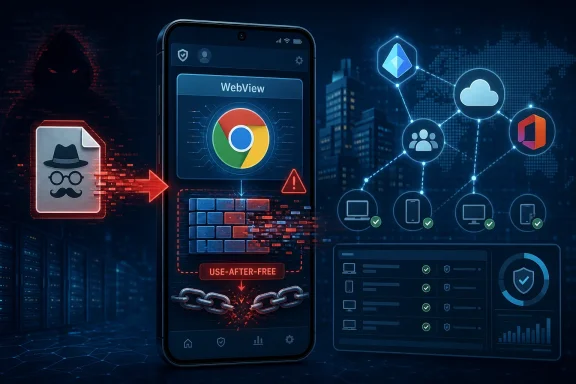 WebView Turns a Browser Bug Into an App-Platform Problem
Chrome vulnerabilities are usually discussed as browser vulnerabilities, but CVE-2026-11072 lives in WebView, and that changes the shape of the risk. Android WebView is the Chromium-powered component that lets apps render web content without launching the full Chrome browser. It is what makes an in-app login page, help center, payment flow, document preview, or embedded web interface feel native while still relying on browser engine code.That convenience has always carried a trade-off. When WebView breaks, the breakage is not confined to people who knowingly opened Chrome. It can surface inside any app that relies on the component, which means the exposed attack surface is broader and harder for users to reason about.
The CVE description says exploitation requires a malicious file and user interaction, and CISA’s ADP scoring places the attack vector as local rather than network. That matters. This is not being presented as a drive-by website exploit where merely visiting a page triggers compromise. The attacker needs a path to get a file in front of the victim and persuade them to open it in a context that reaches the vulnerable WebView code.
Even so, “local” should not be confused with “low concern.” In 2026, malicious files arrive by messaging apps, cloud drives, email attachments, shared collaboration spaces, QR-code workflows, sideloaded apps, and mobile device management channels gone wrong. The practical question for defenders is not whether the bug is theoretically remote, but how many user workflows can carry a hostile file into a WebView-backed rendering path.
The Medium Label Understates the Operational Headache
Chromium assigned CVE-2026-11072 a medium severity rating, while CISA’s ADP CVSS 3.1 vector gives it a 7.8 high score. That difference is not necessarily a contradiction; it is a difference in scoring philosophy. Chrome’s internal severity language often weighs exploitability in the browser’s real-world security architecture, while CVSS emphasizes impact once the exploit conditions are satisfied.The CISA vector is blunt: no privileges required, low attack complexity, user interaction required, unchanged scope, and high impact to confidentiality, integrity, and availability. In plainer English, if an attacker can get the user to open the wrong file through the wrong path, the consequences may be serious. That is why a “medium” Chromium issue can still deserve fast enterprise attention.
Use-after-free bugs are especially uncomfortable because they belong to a long and familiar family of memory-safety failures. They occur when software continues to use memory after it has been released, creating opportunities for memory corruption and, in the right conditions, code execution. Modern browser engines are layered with sandboxing, hardening, and exploit mitigations, but attackers keep returning to these bug classes because they can be shaped into powerful primitives.
The vulnerability’s WebView location also means defenders do not get the clean boundary they would prefer. A user may not think they are using Chrome when a third-party Android app opens a file preview or renders web content. That mismatch between user perception and technical dependency is exactly where patch gaps become durable.
The NVD Record Shows the Vulnerability Database Catching Up in Public
The NVD entry for CVE-2026-11072 is a useful snapshot of how vulnerability intelligence is assembled after disclosure, not handed down fully formed. The CVE was received from Chrome on June 4. CISA added a CVSS 3.1 score and CWE mapping on June 5, then modified the CWE entry on June 6. NIST’s initial analysis followed on June 8, adding affected software configuration data and reference classifications.That sequence matters because many security tools ingest NVD data as if it were instantly authoritative. In reality, vulnerability records evolve. A scanner result seen on June 5 may not look the same as one seen on June 8, and the CPE mapping may arrive after organizations have already started triage.
Here, NIST added a configuration tying vulnerable Chrome versions below 149.0.7827.53 to Android. That makes sense given the description’s specific reference to Google Chrome on Android and WebView. But it also highlights a recurring weakness in CPE-driven vulnerability management: product identity is clean in databases and messy in the field.
Is the vulnerable thing Chrome? Android WebView? Android itself? A third-party app embedding WebView? The answer, operationally, is “yes, depending on what you are measuring.” CPEs help scanners match software to advisories, but they rarely capture dependency chains with the precision administrators wish they had.
The CPE Is Useful, but It Is Not the Whole Asset Story
The NVD change history shows an affected configuration containing Google Chrome versions up to, but excluding, 149.0.7827.53, combined with Android. That is probably the right high-level representation for a vulnerability described as affecting Chrome on Android prior to that build. It gives vulnerability-management tools a hook and tells administrators the minimum fixed version to look for.But anyone asking whether “we are missing a CPE here” is pointing at a real ambiguity. WebView vulnerabilities often sit at the intersection of package names, OS components, app dependencies, and vendor distribution models. Android System WebView can be updated through Google Play on many devices, but Android ecosystem fragmentation means update paths vary by device policy, vendor image, region, and management state.
For enterprise inventory, the CPE does not answer the most important question: which devices are actually running the fixed WebView/Chrome component? A fleet report that says “Android present” is not enough. A report that says “Chrome installed” may still be incomplete if apps are using a WebView provider with a different update state.
This is where mobile endpoint management needs to be more precise than traditional desktop patch reporting. Admins should care about the actual installed version of Chrome and the active WebView provider, not just the operating system family. If the fleet includes personally owned Android devices under BYOD, the visibility problem becomes even harder.
Windows Shops Should Still Pay Attention
At first glance, this is not a Windows story. The affected platform in the description is Chrome on Android, and the exploit path centers on WebView. But WindowsForum’s audience lives in mixed estates, and the old desktop-only security model is gone. A Microsoft 365 tenant, an Entra ID deployment, a Teams environment, a VPN, a password manager, and an SSO flow can all be touched from Android endpoints.That makes mobile browser and WebView vulnerabilities part of the Windows admin’s threat model. A compromised Android device may not be a compromised Windows workstation, but it can still hold session tokens, cached documents, authenticator prompts, corporate chat history, and access to cloud control planes. In hybrid environments, identity is often the bridge between mobile compromise and broader enterprise risk.
There is also a developer angle. Many internal enterprise apps are wrappers around web content, and Android apps frequently rely on WebView for authentication and content display. If those apps handle files or render documents through WebView-adjacent code paths, a vulnerability like CVE-2026-11072 should trigger more than a browser update reminder. It should trigger a review of how files enter the app, how they are previewed, and whether risky formats can be opened unnecessarily.
The uncomfortable lesson is that browser engine vulnerabilities are now supply-chain issues inside applications. A developer can write safe business logic and still inherit exposure from the rendering engine underneath. That does not make WebView a bad design choice; it makes update discipline non-negotiable.
The Malicious File Detail Narrows the Path but Not the Risk
The phrase “via a malicious file” gives defenders something useful. It suggests exploitation is not merely about visiting a hostile website. The user must interact with a file, which gives organizations places to add friction: attachment filtering, file-type restrictions, safe preview systems, content disarm and reconstruction, and user education around unexpected documents.But those controls are uneven on mobile. Users often move files through consumer messaging platforms, personal cloud storage, and cross-device sharing tools that sit outside enterprise mail gateways. The Android share sheet makes it easy to pass content between apps, and the app that finally renders the file may not be the app that received it.
This is why user interaction is a weaker barrier than it looks. In modern phishing and social-engineering campaigns, convincing a user to open a file is not an exotic requirement. It is the baseline. The attacker’s job is to make the file look like an invoice, itinerary, résumé, QR-linked document, support log, or collaboration artifact.
The good news is that there is no public indication in the supplied record that CVE-2026-11072 is being exploited in the wild. That distinction matters, especially during a week when other Chrome security fixes may involve active exploitation. Defenders should not inflate every memory bug into a zero-day panic. They should, however, patch quickly because exploitability often becomes clearer after advisories are published and researchers begin diffing fixed builds.
Chrome 149 Is the Patch Line Administrators Need to Verify
The key version number is 149.0.7827.53. Chrome on Android before that version is the affected range described in the CVE. For practical purposes, the administrative task is simple: make sure Android devices that rely on Chrome/WebView have moved to that build or later.The execution is less simple. Chrome releases roll out, users defer updates, managed devices may be pinned, and Android’s component update model can vary. In some environments, administrators can enforce browser updates through enterprise mobility management. In others, they can only set compliance policies that block access from devices below a required version.
That is the right posture here. If a mobile device is used to access corporate resources, it should meet a minimum browser and WebView patch level just as a Windows PC must meet a minimum OS and Defender state. Conditional access policies are not glamorous, but they are often the only way to turn advisory language into enforceable risk reduction.
For unmanaged users, the advice is still direct: update Chrome from Google Play and ensure Android System WebView is current where it is present as a separate component. Restarting the device after update is a reasonable extra step, not because every Chrome update requires it, but because mobile component state can be opaque and users often leave apps suspended for days.
The Desktop Advisory Reference Adds Noise to the Signal
One oddity in the record is the Chrome release blog reference labeled as a desktop stable-channel update. The CVE text, however, describes Chrome on Android and WebView. This kind of mismatch is not unusual in vulnerability databases, where vendor advisories, umbrella release posts, restricted bug tracker entries, and platform-specific fixes may be cross-linked imperfectly.Administrators should resist over-reading that reference. The affected product language and version threshold are more important than the title of a linked advisory page. If a scanner flags the CVE on Linux or Windows solely because it sees Chrome below a version number, that finding deserves validation against the actual affected configuration.
This is one of the reasons vulnerability management teams should not treat CVEs as self-executing truth. A CVE is a record; an exposure is a condition in your environment. The two overlap only after inventory, version detection, platform matching, and exploitability assumptions are checked.
That does not mean the finding should be dismissed. It means the remediation owner needs to be precise. Patch Chrome everywhere as routine hygiene, but prioritize Android/WebView exposure for this specific CVE unless later vendor information broadens the affected set.
Memory Safety Keeps Haunting the Browser Stack
CVE-2026-11072 is another entry in the long ledger of browser memory bugs, and the pattern is getting harder to ignore. Chrome, Edge, Safari, Firefox, and the mobile platforms around them have spent years adding sandboxing, site isolation, compiler hardening, fuzzing, and exploit mitigations. Attackers still find memory-corruption flaws because the codebase is enormous, performance-sensitive, and constantly parsing hostile input.Use-after-free is particularly stubborn. It is the sort of bug that memory-safe languages are meant to prevent by design, yet browser engines contain deep layers of legacy C++ and performance-critical systems code. Rewriting everything is not realistic on a tidy schedule, so vendors chip away with safer components, better tooling, and narrower attack surfaces.
For users and administrators, that means patch velocity remains the practical defense. It is tempting to think of browser security as a solved problem because exploitation is harder than it was a decade ago. But harder is not the same as impossible, and the browser engine remains one of the most targeted pieces of software on any endpoint.
WebView extends that reality into apps. Even if a user never opens the Chrome icon, Chromium code may still be rendering content. That is why WebView patching deserves the same seriousness as browser patching, and why mobile security baselines should name it explicitly.
Enterprise Risk Lives in the Gaps Between Teams
The most dangerous part of a vulnerability like this is not the bug itself; it is the ownership ambiguity. Desktop teams patch Chrome on Windows. Mobile teams manage Android. App teams own WebView-based applications. Security teams track CVEs. Identity teams enforce conditional access. Somewhere between them, a WebView flaw can become everybody’s problem and nobody’s queue.That fragmentation is familiar to anyone who has run enterprise IT. The vulnerability-management dashboard produces a finding, but the remediation path crosses organizational boundaries. The fix may require a managed Play Store policy, an app compatibility check, a compliance rule, a user communication, and an exception process for older devices.
Smaller organizations face a different version of the same problem. They may not have mobile device management at all, but employees still access work email and documents on Android phones. In that world, the security control is mostly policy and user behavior: require updates, remove access from stale devices, and avoid pretending that mobile endpoints are outside the corporate perimeter.
The right lesson is not to panic over CVE-2026-11072. The right lesson is to use it as a test case. If your organization cannot answer which Android devices are running a fixed Chrome/WebView component, the problem is bigger than this CVE.
The Practical Reading of This Advisory Is Narrow but Urgent
CVE-2026-11072 does not need theatrical treatment. It is a medium Chromium issue with a high CVSS score from CISA ADP, affecting Chrome on Android before 149.0.7827.53, involving WebView, a use-after-free condition, and malicious-file-triggered local code execution. That is enough to justify quick patching and careful inventory.It is not enough to justify claims of mass exploitation unless new evidence appears. The advisory record does not say the vulnerability is being exploited in the wild. It does not say Windows Chrome is directly affected by this WebView issue. It does not provide public exploit details, and the Chromium bug reference requires permissions.
That uncertainty is normal. Browser vendors often restrict bug details until users have had time to update. Security teams should be comfortable acting without full exploit mechanics when the vendor has shipped a fix and the affected component is widely deployed.
The best response is boring by design. Verify the fixed version, push updates, tighten compliance checks, and watch for vendor or NVD revisions. Boring is what successful patch management looks like before an exploit turns a routine advisory into an incident report.
The Patch Story Hidden Inside CVE-2026-11072
The important details are concrete enough for administrators to act now, even while the public record continues to mature.- CVE-2026-11072 affects Google Chrome on Android before version 149.0.7827.53, with the vulnerable area identified as WebView.
- The flaw is a use-after-free memory-safety issue categorized as CWE-416, and successful exploitation could allow arbitrary code execution.
- The described attack path requires a malicious file and user interaction, which narrows exposure but does not eliminate realistic phishing and file-sharing risk.
- CISA’s ADP scoring rates the issue 7.8 high under CVSS 3.1, while Chromium labels the security severity medium.
- NVD added affected configuration data on June 8, after the CVE was published on June 4, so scanner behavior may have changed during the first few days of disclosure.
- Windows administrators should treat this as a mobile and identity-adjacent risk, especially where Android devices access Microsoft 365, corporate apps, VPNs, or internal WebView-based tools.
References
- Primary source: NVD / Chromium
Published: 2026-06-09T07:00:37-07:00
NVD - CVE-2026-11072
 nvd.nist.gov
- Security advisory: MSRC
Published: 2026-06-09T07:00:37-07:00
Original feed URL
Security Update Guide - Microsoft Security Response Center
 msrc.microsoft.com
- Related coverage: govcert.gov.hk
GovCERT.HK - Security Alert (A26-06-08): Multiple Vulnerabilities in Google Chrome
Security Alert (A26-06-08): Multiple Vulnerabilities in Google Chromewww.govcert.gov.hk
- Related coverage: encyb.com
