

CVE-2026-11097 is a medium-severity Chrome for Android WebView vulnerability published on June 4, 2026, affecting Google Chrome on Android before 149.0.7827.53 and allowing a remote attacker to leak cross-origin data through a crafted HTML page. The short answer is yes: the current affected-product mapping looks incomplete if it stops at desktop Chrome-style CPEs and generic Android. The longer answer is more interesting, because this is exactly the kind of browser-platform ambiguity that turns a “medium” CVE into an asset-management headache. For WindowsForum readers, the lesson is not that Chrome suddenly became a Windows problem here; it is that modern browser vulnerabilities increasingly live in shared engines, embedded runtimes, and packaging layers that our old vulnerability databases still describe awkwardly.
CVE-2026-11097 is not being described as a remote-code-execution bug, a sandbox escape, or an actively exploited zero-day. Its published description is narrower: an inappropriate implementation in WebView in Google Chrome on Android before version 149.0.7827.53 could let a remote attacker leak cross-origin data with a crafted HTML page. CISA’s ADP scoring gives it a CVSS 3.1 base score of 6.5, with network attack vector, low attack complexity, no privileges required, user interaction required, unchanged scope, high confidentiality impact, and no integrity or availability impact.
That vector tells us a lot. The attacker does not need an account, does not need local access, and does not need to chain through a privileged management interface. But the victim does need to interact with hostile content, and the described impact is data exposure rather than code execution or system compromise.
In ordinary patch-triage language, this is the sort of bug that security teams often classify as “patch in normal browser cadence unless threat intel says otherwise.” But browser cadence is not a single thing anymore. On Android, Chrome, the Android System WebView component, OEM firmware images, managed app stores, enterprise mobility controls, and embedded app browsers can all sit between the vulnerability and the user.
That is why the CPE question matters. A clean CPE entry is not merely paperwork for vulnerability managers. It is the hinge between a CVE existing in a database and a scanner, SBOM tool, mobile device management platform, or patch dashboard knowing which devices actually require attention.
The problem is that CPE was built around relatively neat product identities: an application, an operating system, a hardware device. WebView blurs those categories. It is browser technology, packaged as an Android component, used by apps that are not browsers, updated through channels that may or may not look like classic OS patching, and exposed to web content through UI surfaces that users do not necessarily recognize as Chrome.
So yes, if the question is whether the affected software configuration is probably missing a more precise Android WebView identifier, the answer is likely yes. The current mapping may be logically serviceable for “Chrome on Android,” but it is not the whole operational picture if an enterprise is trying to discover exposure across Android System WebView, WebView-based in-app browsers, or Chromium packages distributed outside Google’s own Chrome channel.
The tricky part is that being “missing” in a CPE sense does not necessarily mean the CVE itself is wrong. It means the vulnerability database has not yet expressed the affected software universe with the precision that defenders want. For a CVE published on June 4 and modified by June 8, that is not unusual. Early enrichment often lags vendor wording, and CPE configurations can change after initial publication as NIST, CISA, vendors, and downstream scanners reconcile their models.
A crafted HTML page is not necessarily reached by typing a suspicious address into Chrome. It may be rendered inside a social app, a helpdesk app, a payment flow, a corporate portal wrapper, an identity prompt, or an app that uses WebView as a lightweight UI layer. The user may think they are inside a trusted application while the vulnerable rendering component is doing the risky work underneath.
That does not make every WebView bug catastrophic. It does mean that product naming becomes security-relevant. If a scanner says “Chrome vulnerable,” an Android admin may look for the Chrome app version. If the exploitable path is through WebView embedded in another app, that same admin needs to know whether updating Chrome is sufficient, whether Android System WebView must be updated separately, whether the device vendor controls the fix, or whether an app has bundled its own Chromium runtime.
That ambiguity is not academic. It is where patch compliance dashboards produce green boxes while users still carry vulnerable software. It is also where security teams waste cycles chasing false positives because a CPE match was too broad and mapped a desktop fleet to an Android-only issue.
Still, the reference is a reminder that vendor advisories are written for release delivery, while vulnerability databases are read for exposure modeling. A Chrome stable release blog post may bundle hundreds of fixes across platforms and components. A single CVE line inside that broader release can point to a specific platform, while the advisory headline may be about desktop availability or stable-channel rollout.
This is where automated ingestion gets brittle. If a tool sees the vendor advisory and “Chrome before 149.0.7827.53,” it may flag Windows, macOS, Linux, and Android uniformly. If another tool honors the Android condition too aggressively, it may miss Android System WebView. Both errors are plausible. Both create work for administrators who already have too many browser CVEs competing for attention.
For WindowsForum’s audience, the desktop angle is mostly indirect. This particular CVE is not described as a Windows Chrome vulnerability. But Windows shops increasingly manage Android endpoints, virtual Android environments, mobile access to Microsoft 365, Edge/Chrome policy baselines, and conditional-access postures. A Chrome-on-Android WebView issue can therefore become a Windows admin’s problem through identity, compliance, and endpoint governance rather than through Win32 patching.
The CVSS vector’s high confidentiality impact reflects that. No integrity impact means the attacker is not described as modifying data. No availability impact means this is not about crashing systems or denying service. But confidentiality is often the point of browser exploitation, especially where authentication cookies, single sign-on sessions, and internal web applications are involved.
User interaction is required, but that is a thin comfort in browser security. Web exploitation commonly starts with a link, redirect, malicious ad, compromised page, QR code, chat message, or in-app web flow. On mobile, where users move quickly through app surfaces and where URLs are often hidden or truncated, “user interaction” is not the same thing as “highly unlikely.”
The medium severity label is therefore useful but incomplete. It tells patch teams not to treat the CVE like a wormable domain controller flaw. It does not tell them to ignore it until the next quarterly review. The right posture is to fold it into the normal fast browser/WebView update rhythm and to verify that management tooling sees the Android-specific exposure correctly.
For WebView, that is plausible territory. Embedded browser surfaces often inherit APIs, policies, navigation rules, storage behavior, permission models, and origin checks from a larger browser engine, then apply them in a constrained or app-mediated environment. If one code path assumes behavior that another implementation does not provide consistently, a boundary can crack open.
We should be careful not to over-read the CWE. Public CVE descriptions for Chrome bugs are intentionally sparse until enough users have updated. The Chromium issue tracker entry is permission-restricted, which is standard for security bugs during the patch window. Without the underlying bug details, nobody outside the vendor and authorized researchers should pretend to know the exact primitive.
But the CWE does reinforce the practical lesson. WebView vulnerabilities often arise not because a browser forgot that origins matter, but because the embedding context changes the rules just enough that an assumption becomes unsafe. That is exactly the kind of defect that can evade simple “is the browser up to date?” thinking.
In this case, the NVD configuration described in the user-supplied record combines a Google Chrome application CPE with Android OS. That may catch “Google Chrome on Android before 149.0.7827.53.” What it may not cleanly catch is Android System WebView as its own updatable component, or downstream Chromium-derived packages that use affected WebView code but do not identify as Google Chrome. Conversely, if scanners simplify the logic and ignore the Android condition, they may flag desktop Chrome installations that the CVE text does not actually describe.
Security teams should therefore treat the current CPE as a clue, not a verdict. The reliable facts are the CVE description, the affected version threshold, the platform wording, and the vendor release train. The asset-management translation needs validation inside each environment.
That validation is especially important for organizations that use Android Enterprise, managed Google Play, Samsung Knox, dedicated devices, rugged handhelds, kiosk apps, healthcare scanners, retail point-of-sale companions, or field-service tablets. Those fleets often lag consumer app updates because update windows, OEM support, testing rules, and network controls differ from personal phones.
That default is not wrong. Updating Chrome is almost always the right first move. But it does not answer the CPE question, because the purpose of CPE is not simply to say “patch Chrome.” It is to help an organization know which assets are affected, which exceptions matter, which detections are false positives, and which products should appear in reports to auditors or customers.
The platform split matters because Android’s update story is not the same as desktop Chrome’s. Desktop Chrome typically updates through Google’s updater, enterprise MSI channels, package managers, or browser management tooling. Android Chrome and Android System WebView update through Google Play on most mainstream devices, but not all enterprise devices behave like current consumer Pixels. Some are pinned, some are offline, some are OEM-controlled, and some are effectively appliances.
That is where a medium browser CVE can become an operational drag. The exploitability may be modest, but the work required to prove non-exposure can be significant if the CPE metadata does not line up with reality.
A cross-origin data leak in a mobile WebView context is therefore not just a mobile-device concern. It can become an identity and data-boundary concern. If a user’s authenticated session to a corporate web resource is exposed through a crafted page, the affected device’s operating system logo is beside the point.
That does not mean administrators should panic or rewrite policy overnight. It means mobile browser runtimes deserve the same seriousness as desktop browsers in patch SLAs. Many organizations have excellent Chrome and Edge patch discipline on Windows but a weaker grasp of WebView versions on Android endpoints. This CVE is a useful prompt to close that gap.
The Windows ecosystem has its own WebView story in Microsoft Edge WebView2, which is not implicated by the description of this CVE. But the architectural rhyme is obvious: embedded browser engines have become application infrastructure. When the browser engine moves, the application risk moves with it.
For enterprises, the important step is not merely to publish a “patch Chrome” notice. It is to verify what management tooling reports for Android Chrome, Android System WebView, OEM browsers, managed app WebView usage, and devices that cannot reach Google Play directly. If the fleet includes Android devices that are frozen for line-of-business reasons, the risk decision should be explicit rather than accidental.
Security teams should also check whether vulnerability scanners have already ingested the NVD configuration and how they are interpreting it. If desktop Chrome is being flagged for CVE-2026-11097 solely because the Chrome version is below 149.0.7827.53, that may be an overbroad match. If Android devices are considered clean because only the Chrome app CPE is checked and WebView is ignored, that may be an underbroad match.
Neither outcome is rare. Vulnerability management platforms are only as good as the product identity data they consume, and browser components are among the hardest products to identify cleanly across platforms.
CPE wants product names. Modern software supply chains increasingly give us components, shared engines, embedded libraries, app-store packages, and feature modules. A browser vulnerability may live in Blink, V8, WebView, Custom Tabs, PDFium, Skia, ANGLE, or a permissions layer, then be delivered through different products on different platforms. The CVE describes the bug; CPE tries to name the affected purchasable or installable thing; defenders need to secure the actual runtime.
This mismatch is one reason SBOM discussions keep resurfacing. A software bill of materials does not magically solve browser patching, but it better matches the component reality. If the vulnerable code is in a shared engine, organizations need ways to ask which deployed products include that engine, not merely which products share a marketing name.
Until that model matures, CPE enrichment remains a necessary approximation. It is useful, but it should not be treated as scripture when the underlying product architecture is more complicated than the identifier.
CVE-2026-11097 follows that pattern. We know the affected component, platform, version boundary, broad weakness category, impact type, and attack preconditions. We do not know the exact API behavior, the origin boundary that failed, whether Android System WebView was directly affected as a separate package, or how easy it would be to build a reliable exploit in the wild.
The correct editorial posture is therefore restraint. This is not a known exploited emergency based on the public record provided. It is not a desktop Windows Chrome bug based on the CVE wording. It is also not harmless, because cross-origin data leakage in mobile WebView contexts can expose sensitive authenticated data.
Administrators should resist both extremes: do not inflate it into a catastrophic Chrome zero-day, and do not bury it because the severity says medium. Treat it as a targeted browser-runtime confidentiality issue that deserves prompt update verification and careful asset mapping.
Some organizations allow automatic app updates but pin business-critical apps. Some use private app stores or staged rollouts. Some field devices stay on older Android releases long after mainstream support expectations would make security teams uncomfortable. Some ruggedized devices ship with vendor-customized browsers or WebView implementations that lag Google’s release train.
In those environments, the question “are we missing a CPE?” becomes a question about operational truth. Which package renders web content inside your managed apps? Which version is installed? Which update channel controls it? Which devices cannot update to 149.0.7827.53 or later? Which security tools can prove that?
Those are not glamorous questions, but they are the difference between compliance theater and risk reduction. Browser CVEs are frequent enough that organizations need repeatable answers, not a bespoke investigation for every medium-severity leak.
But overly narrow matching is just as dangerous. If tools wait for a perfect Android WebView CPE that never arrives, exposed devices may not appear in vulnerability reports at all. The dashboard looks clean because the product identity is missing, not because the fleet is patched.
CVE-2026-11097 sits right in that tension. The text is Android-specific. The version threshold shares a Chrome release family with desktop. The component is WebView, which may be updated or consumed differently from the visible Chrome browser. The NVD configuration appears to approximate that reality by combining Chrome and Android, but the approximation leaves room for both overreporting and underreporting.
The practical response is to annotate the vulnerability internally. If your scanner flags Windows Chrome, confirm whether the vendor description supports that finding before escalating. If your Android inventory lacks WebView visibility, treat that as a coverage gap and not as evidence that the issue does not apply.
Attackers understand that the browser is no longer a single app icon. Web content flows through QR scanners, authentication prompts, chat previews, payment dialogs, document viewers, help pages, captive portals, and app support widgets. A vulnerability in that rendering path can matter even when the user never thinks, “I am opening Chrome.”
That is why this CVE’s modest public severity should not hide the structural issue. Defenders need visibility into browser runtimes wherever they are embedded. Chrome, Edge, WebView2, Android System WebView, Custom Tabs, and in-app browsers are all part of the same security conversation: web content executing inside trusted workflows.
The industry has spent years telling users to keep browsers updated. The next phase is telling organizations to keep browser components inventoried, mapped, and governed even when they are buried inside applications.
That does not automatically mean every WebView consumer is vulnerable. The public description says “WebView in Google Chrome on Android,” not “all Android WebView consumers everywhere.” Without the restricted Chromium issue details, we should not broaden the affected set beyond the available evidence. But vulnerability management is allowed to be more cautious than public prose, especially when the component named is a shared rendering surface.
The right move is to track the CVE for enrichment changes. NVD records often evolve after initial publication, and vendor or ecosystem advisories may later clarify whether Android System WebView has a separate affected package, whether Chrome for Android alone is sufficient, or whether downstream Chromium projects need independent treatment.
In the meantime, organizations should patch to the fixed version or later, check Android WebView update status, and document any scanner mismatch rather than waiting for the database to become perfect.
The same logic applies to reporting. If leadership asks whether the fleet is exposed, “Chrome is patched” may not be enough. The stronger answer distinguishes desktop Chrome, Chrome on Android, Android System WebView, unsupported Android builds, and app environments that embed web content.
This is also a reminder that medium-severity vulnerabilities can be high-friction vulnerabilities. They may not justify emergency war rooms, but they expose weaknesses in inventory, scanner logic, and ownership. The operational cost comes not from exploit drama, but from uncertainty.
The lesson for administrators is to build a browser-runtime inventory before the next critical WebView bug arrives. CVE-2026-11097 is the practice round; a future WebView issue with active exploitation or code execution would be a much worse time to discover that nobody owns the embedded browser layer.
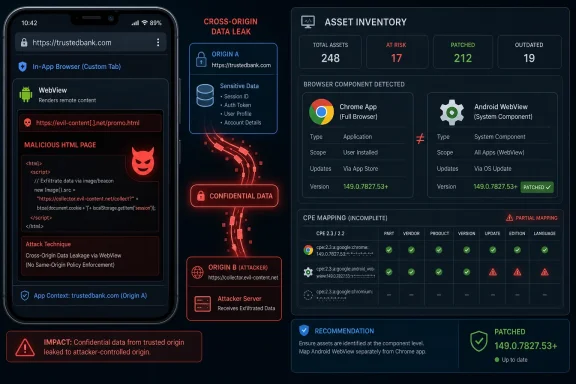 The Vulnerability Is Small on Paper and Messy in the Real World
CVE-2026-11097 is not being described as a remote-code-execution bug, a sandbox escape, or an actively exploited zero-day. Its published description is narrower: an inappropriate implementation in WebView in Google Chrome on Android before version 149.0.7827.53 could let a remote attacker leak cross-origin data with a crafted HTML page. CISA’s ADP scoring gives it a CVSS 3.1 base score of 6.5, with network attack vector, low attack complexity, no privileges required, user interaction required, unchanged scope, high confidentiality impact, and no integrity or availability impact.That vector tells us a lot. The attacker does not need an account, does not need local access, and does not need to chain through a privileged management interface. But the victim does need to interact with hostile content, and the described impact is data exposure rather than code execution or system compromise.
In ordinary patch-triage language, this is the sort of bug that security teams often classify as “patch in normal browser cadence unless threat intel says otherwise.” But browser cadence is not a single thing anymore. On Android, Chrome, the Android System WebView component, OEM firmware images, managed app stores, enterprise mobility controls, and embedded app browsers can all sit between the vulnerability and the user.
That is why the CPE question matters. A clean CPE entry is not merely paperwork for vulnerability managers. It is the hinge between a CVE existing in a database and a scanner, SBOM tool, mobile device management platform, or patch dashboard knowing which devices actually require attention.
NVD’s Current Mapping Looks Like a Compromise, Not a Final Answer
The NVD change history says the initial NIST analysis added a configuration requiring Google Chrome versions before 149.0.7827.53 and the Google Android operating system. That is a recognizable attempt to express “Chrome on Android” in CPE logic: vulnerable Chrome application, on Android platform. It is also awkward, because the vulnerability description names WebView in Google Chrome on Android, not generic desktop Chrome, not Android as a whole, and not every Chromium-derived browser.The problem is that CPE was built around relatively neat product identities: an application, an operating system, a hardware device. WebView blurs those categories. It is browser technology, packaged as an Android component, used by apps that are not browsers, updated through channels that may or may not look like classic OS patching, and exposed to web content through UI surfaces that users do not necessarily recognize as Chrome.
So yes, if the question is whether the affected software configuration is probably missing a more precise Android WebView identifier, the answer is likely yes. The current mapping may be logically serviceable for “Chrome on Android,” but it is not the whole operational picture if an enterprise is trying to discover exposure across Android System WebView, WebView-based in-app browsers, or Chromium packages distributed outside Google’s own Chrome channel.
The tricky part is that being “missing” in a CPE sense does not necessarily mean the CVE itself is wrong. It means the vulnerability database has not yet expressed the affected software universe with the precision that defenders want. For a CVE published on June 4 and modified by June 8, that is not unusual. Early enrichment often lags vendor wording, and CPE configurations can change after initial publication as NIST, CISA, vendors, and downstream scanners reconcile their models.
WebView Is Where the Browser Becomes Infrastructure
For desktop administrators, Chrome is a browser. For Android administrators, Chrome is also part of a web runtime ecosystem. WebView lets Android apps display web content without handing the user off to a full browser session, and that convenience is precisely why WebView bugs have a larger blast radius than their short descriptions suggest.A crafted HTML page is not necessarily reached by typing a suspicious address into Chrome. It may be rendered inside a social app, a helpdesk app, a payment flow, a corporate portal wrapper, an identity prompt, or an app that uses WebView as a lightweight UI layer. The user may think they are inside a trusted application while the vulnerable rendering component is doing the risky work underneath.
That does not make every WebView bug catastrophic. It does mean that product naming becomes security-relevant. If a scanner says “Chrome vulnerable,” an Android admin may look for the Chrome app version. If the exploitable path is through WebView embedded in another app, that same admin needs to know whether updating Chrome is sufficient, whether Android System WebView must be updated separately, whether the device vendor controls the fix, or whether an app has bundled its own Chromium runtime.
That ambiguity is not academic. It is where patch compliance dashboards produce green boxes while users still carry vulnerable software. It is also where security teams waste cycles chasing false positives because a CPE match was too broad and mapped a desktop fleet to an Android-only issue.
The Desktop Advisory Reference Adds More Fog Than Light
One of the odder details in the record is the reference to a Chrome stable channel update for desktop. The CVE description says Google Chrome on Android. The affected version threshold is 149.0.7827.53, which also appears in Chrome 149 desktop release context. That overlap is not inherently suspicious; Chrome version numbering spans platforms, and security fixes often travel through the same release family.Still, the reference is a reminder that vendor advisories are written for release delivery, while vulnerability databases are read for exposure modeling. A Chrome stable release blog post may bundle hundreds of fixes across platforms and components. A single CVE line inside that broader release can point to a specific platform, while the advisory headline may be about desktop availability or stable-channel rollout.
This is where automated ingestion gets brittle. If a tool sees the vendor advisory and “Chrome before 149.0.7827.53,” it may flag Windows, macOS, Linux, and Android uniformly. If another tool honors the Android condition too aggressively, it may miss Android System WebView. Both errors are plausible. Both create work for administrators who already have too many browser CVEs competing for attention.
For WindowsForum’s audience, the desktop angle is mostly indirect. This particular CVE is not described as a Windows Chrome vulnerability. But Windows shops increasingly manage Android endpoints, virtual Android environments, mobile access to Microsoft 365, Edge/Chrome policy baselines, and conditional-access postures. A Chrome-on-Android WebView issue can therefore become a Windows admin’s problem through identity, compliance, and endpoint governance rather than through Win32 patching.
Cross-Origin Leaks Are the Browser Bugs That Refuse to Sound Dramatic
“Leak cross-origin data” is a phrase that can sound bloodless compared with “remote code execution.” It should not be dismissed. The web security model depends on origin boundaries: one site should not be able to read another site’s data merely because both are open in the same browser engine. When those boundaries fail, the result can be exposure of tokens, account state, private content, internal application responses, or other information that was supposed to be isolated.The CVSS vector’s high confidentiality impact reflects that. No integrity impact means the attacker is not described as modifying data. No availability impact means this is not about crashing systems or denying service. But confidentiality is often the point of browser exploitation, especially where authentication cookies, single sign-on sessions, and internal web applications are involved.
User interaction is required, but that is a thin comfort in browser security. Web exploitation commonly starts with a link, redirect, malicious ad, compromised page, QR code, chat message, or in-app web flow. On mobile, where users move quickly through app surfaces and where URLs are often hidden or truncated, “user interaction” is not the same thing as “highly unlikely.”
The medium severity label is therefore useful but incomplete. It tells patch teams not to treat the CVE like a wormable domain controller flaw. It does not tell them to ignore it until the next quarterly review. The right posture is to fold it into the normal fast browser/WebView update rhythm and to verify that management tooling sees the Android-specific exposure correctly.
CWE-474 Is an Odd but Telling Classification
CISA-ADP assigned CWE-474, “Use of Function with Inconsistent Implementations.” That classification is not as instantly evocative as use-after-free, out-of-bounds write, or type confusion. It points toward a class of problems where behavior differs across implementations or contexts in a way that security assumptions do not survive.For WebView, that is plausible territory. Embedded browser surfaces often inherit APIs, policies, navigation rules, storage behavior, permission models, and origin checks from a larger browser engine, then apply them in a constrained or app-mediated environment. If one code path assumes behavior that another implementation does not provide consistently, a boundary can crack open.
We should be careful not to over-read the CWE. Public CVE descriptions for Chrome bugs are intentionally sparse until enough users have updated. The Chromium issue tracker entry is permission-restricted, which is standard for security bugs during the patch window. Without the underlying bug details, nobody outside the vendor and authorized researchers should pretend to know the exact primitive.
But the CWE does reinforce the practical lesson. WebView vulnerabilities often arise not because a browser forgot that origins matter, but because the embedding context changes the rules just enough that an assumption becomes unsafe. That is exactly the kind of defect that can evade simple “is the browser up to date?” thinking.
The CPE Gap Is a Scanner Problem Before It Is a Security Problem
CPEs are not the vulnerability. They are the addressing system for vulnerability data. When the addressing system is wrong or incomplete, the security problem becomes either invisible or exaggerated.In this case, the NVD configuration described in the user-supplied record combines a Google Chrome application CPE with Android OS. That may catch “Google Chrome on Android before 149.0.7827.53.” What it may not cleanly catch is Android System WebView as its own updatable component, or downstream Chromium-derived packages that use affected WebView code but do not identify as Google Chrome. Conversely, if scanners simplify the logic and ignore the Android condition, they may flag desktop Chrome installations that the CVE text does not actually describe.
Security teams should therefore treat the current CPE as a clue, not a verdict. The reliable facts are the CVE description, the affected version threshold, the platform wording, and the vendor release train. The asset-management translation needs validation inside each environment.
That validation is especially important for organizations that use Android Enterprise, managed Google Play, Samsung Knox, dedicated devices, rugged handhelds, kiosk apps, healthcare scanners, retail point-of-sale companions, or field-service tablets. Those fleets often lag consumer app updates because update windows, OEM support, testing rules, and network controls differ from personal phones.
Chrome 149’s Scale Makes Individual CVEs Easier to Miss
Chrome 149 appears to have landed with a large security payload, and that matters for communications. When a release fixes dozens or hundreds of issues, the individual CVE that affects a specific platform can disappear into the release note fog. Administrators then default to the broadest possible action: update Chrome everywhere.That default is not wrong. Updating Chrome is almost always the right first move. But it does not answer the CPE question, because the purpose of CPE is not simply to say “patch Chrome.” It is to help an organization know which assets are affected, which exceptions matter, which detections are false positives, and which products should appear in reports to auditors or customers.
The platform split matters because Android’s update story is not the same as desktop Chrome’s. Desktop Chrome typically updates through Google’s updater, enterprise MSI channels, package managers, or browser management tooling. Android Chrome and Android System WebView update through Google Play on most mainstream devices, but not all enterprise devices behave like current consumer Pixels. Some are pinned, some are offline, some are OEM-controlled, and some are effectively appliances.
That is where a medium browser CVE can become an operational drag. The exploitability may be modest, but the work required to prove non-exposure can be significant if the CPE metadata does not line up with reality.
Windows Admins Should Care Because Identity Has Made Browsers the Perimeter
It is tempting to file CVE-2026-11097 under “Android issue” and move on. In a purely desktop Windows estate, that may be reasonable. But few Microsoft-centric environments are purely desktop anymore. Mobile devices access Entra ID-protected applications, Outlook, Teams, SharePoint, SaaS dashboards, VPN portals, remote support systems, and internal web apps through browser and WebView surfaces.A cross-origin data leak in a mobile WebView context is therefore not just a mobile-device concern. It can become an identity and data-boundary concern. If a user’s authenticated session to a corporate web resource is exposed through a crafted page, the affected device’s operating system logo is beside the point.
That does not mean administrators should panic or rewrite policy overnight. It means mobile browser runtimes deserve the same seriousness as desktop browsers in patch SLAs. Many organizations have excellent Chrome and Edge patch discipline on Windows but a weaker grasp of WebView versions on Android endpoints. This CVE is a useful prompt to close that gap.
The Windows ecosystem has its own WebView story in Microsoft Edge WebView2, which is not implicated by the description of this CVE. But the architectural rhyme is obvious: embedded browser engines have become application infrastructure. When the browser engine moves, the application risk moves with it.
The Right Fix Is Boring: Update, Then Verify the Update Path
For users, the advice is straightforward: Chrome on Android should be updated to 149.0.7827.53 or later, and the Android System WebView component should also be kept current where it is separately visible. Most consumers will get these updates through Google Play, assuming automatic updates are enabled and the device still receives supported app updates.For enterprises, the important step is not merely to publish a “patch Chrome” notice. It is to verify what management tooling reports for Android Chrome, Android System WebView, OEM browsers, managed app WebView usage, and devices that cannot reach Google Play directly. If the fleet includes Android devices that are frozen for line-of-business reasons, the risk decision should be explicit rather than accidental.
Security teams should also check whether vulnerability scanners have already ingested the NVD configuration and how they are interpreting it. If desktop Chrome is being flagged for CVE-2026-11097 solely because the Chrome version is below 149.0.7827.53, that may be an overbroad match. If Android devices are considered clean because only the Chrome app CPE is checked and WebView is ignored, that may be an underbroad match.
Neither outcome is rare. Vulnerability management platforms are only as good as the product identity data they consume, and browser components are among the hardest products to identify cleanly across platforms.
The Missing CPE Is Really a Missing Model
The best CPE entry for this CVE would distinguish Chrome on Android from Chrome on desktop and, if warranted by the underlying vendor fix, include Android System WebView or the relevant Google WebView package identity. It would also avoid implying that all Android itself is vulnerable independent of the Chrome/WebView component. That is easy to say and harder to encode in CPE’s aging grammar.CPE wants product names. Modern software supply chains increasingly give us components, shared engines, embedded libraries, app-store packages, and feature modules. A browser vulnerability may live in Blink, V8, WebView, Custom Tabs, PDFium, Skia, ANGLE, or a permissions layer, then be delivered through different products on different platforms. The CVE describes the bug; CPE tries to name the affected purchasable or installable thing; defenders need to secure the actual runtime.
This mismatch is one reason SBOM discussions keep resurfacing. A software bill of materials does not magically solve browser patching, but it better matches the component reality. If the vulnerable code is in a shared engine, organizations need ways to ask which deployed products include that engine, not merely which products share a marketing name.
Until that model matures, CPE enrichment remains a necessary approximation. It is useful, but it should not be treated as scripture when the underlying product architecture is more complicated than the identifier.
Google’s Sparse Chrome CVEs Force Defenders to Read Between the Lines
Chrome security disclosures are deliberately concise. Google often withholds detailed technical information until most users have updated, especially when a bug could be weaponized. That is good for user safety but frustrating for defenders trying to estimate exposure.CVE-2026-11097 follows that pattern. We know the affected component, platform, version boundary, broad weakness category, impact type, and attack preconditions. We do not know the exact API behavior, the origin boundary that failed, whether Android System WebView was directly affected as a separate package, or how easy it would be to build a reliable exploit in the wild.
The correct editorial posture is therefore restraint. This is not a known exploited emergency based on the public record provided. It is not a desktop Windows Chrome bug based on the CVE wording. It is also not harmless, because cross-origin data leakage in mobile WebView contexts can expose sensitive authenticated data.
Administrators should resist both extremes: do not inflate it into a catastrophic Chrome zero-day, and do not bury it because the severity says medium. Treat it as a targeted browser-runtime confidentiality issue that deserves prompt update verification and careful asset mapping.
The Patch Story Depends on the Android Estate You Actually Have
For a personal Android phone with Play Store updates enabled, this may be a non-event. The browser updates, WebView updates, and the user moves on. For a managed Android fleet, the answer depends on policy.Some organizations allow automatic app updates but pin business-critical apps. Some use private app stores or staged rollouts. Some field devices stay on older Android releases long after mainstream support expectations would make security teams uncomfortable. Some ruggedized devices ship with vendor-customized browsers or WebView implementations that lag Google’s release train.
In those environments, the question “are we missing a CPE?” becomes a question about operational truth. Which package renders web content inside your managed apps? Which version is installed? Which update channel controls it? Which devices cannot update to 149.0.7827.53 or later? Which security tools can prove that?
Those are not glamorous questions, but they are the difference between compliance theater and risk reduction. Browser CVEs are frequent enough that organizations need repeatable answers, not a bespoke investigation for every medium-severity leak.
The False-Positive Problem Cuts Both Ways
A bad CPE match can make teams ignore alerts. If every Chrome CVE appears to affect every platform, analysts learn to discount the feed. That is dangerous, because the one alert that really does map to a high-risk system gets lost in the noise.But overly narrow matching is just as dangerous. If tools wait for a perfect Android WebView CPE that never arrives, exposed devices may not appear in vulnerability reports at all. The dashboard looks clean because the product identity is missing, not because the fleet is patched.
CVE-2026-11097 sits right in that tension. The text is Android-specific. The version threshold shares a Chrome release family with desktop. The component is WebView, which may be updated or consumed differently from the visible Chrome browser. The NVD configuration appears to approximate that reality by combining Chrome and Android, but the approximation leaves room for both overreporting and underreporting.
The practical response is to annotate the vulnerability internally. If your scanner flags Windows Chrome, confirm whether the vendor description supports that finding before escalating. If your Android inventory lacks WebView visibility, treat that as a coverage gap and not as evidence that the issue does not apply.
The Real Risk Is the Long Tail of Embedded Browsers
Consumer Chrome updates quickly. Enterprise desktop Chrome usually updates quickly too, at least in mature environments. The stubborn risk lives in the long tail: embedded browsers in mobile apps, unmanaged Android devices, frozen appliance builds, old tablets in warehouses, and line-of-business software that treats WebView as a harmless UI convenience.Attackers understand that the browser is no longer a single app icon. Web content flows through QR scanners, authentication prompts, chat previews, payment dialogs, document viewers, help pages, captive portals, and app support widgets. A vulnerability in that rendering path can matter even when the user never thinks, “I am opening Chrome.”
That is why this CVE’s modest public severity should not hide the structural issue. Defenders need visibility into browser runtimes wherever they are embedded. Chrome, Edge, WebView2, Android System WebView, Custom Tabs, and in-app browsers are all part of the same security conversation: web content executing inside trusted workflows.
The industry has spent years telling users to keep browsers updated. The next phase is telling organizations to keep browser components inventoried, mapped, and governed even when they are buried inside applications.
The Chrome-on-Android CPE Should Not Be Treated as Settled
The most defensible reading today is that CVE-2026-11097 affects Google Chrome on Android before 149.0.7827.53, with a WebView-related cross-origin data leak condition. The NVD configuration using Chrome plus Android is a reasonable early attempt to encode that. But if you are asking whether an Android System WebView CPE or more precise mobile package mapping is absent, the answer is that the record appears under-specified for operational use.That does not automatically mean every WebView consumer is vulnerable. The public description says “WebView in Google Chrome on Android,” not “all Android WebView consumers everywhere.” Without the restricted Chromium issue details, we should not broaden the affected set beyond the available evidence. But vulnerability management is allowed to be more cautious than public prose, especially when the component named is a shared rendering surface.
The right move is to track the CVE for enrichment changes. NVD records often evolve after initial publication, and vendor or ecosystem advisories may later clarify whether Android System WebView has a separate affected package, whether Chrome for Android alone is sufficient, or whether downstream Chromium projects need independent treatment.
In the meantime, organizations should patch to the fixed version or later, check Android WebView update status, and document any scanner mismatch rather than waiting for the database to become perfect.
The Practical Read for WindowsForum Readers
This CVE is not a reason to sound the alarm across Windows desktops, but it is a useful diagnostic for how well your organization understands browser risk beyond Windows. If your patch program can tell you the Chrome version on every laptop but not the WebView version on managed Android devices, you have found the real issue.The same logic applies to reporting. If leadership asks whether the fleet is exposed, “Chrome is patched” may not be enough. The stronger answer distinguishes desktop Chrome, Chrome on Android, Android System WebView, unsupported Android builds, and app environments that embed web content.
This is also a reminder that medium-severity vulnerabilities can be high-friction vulnerabilities. They may not justify emergency war rooms, but they expose weaknesses in inventory, scanner logic, and ownership. The operational cost comes not from exploit drama, but from uncertainty.
The lesson for administrators is to build a browser-runtime inventory before the next critical WebView bug arrives. CVE-2026-11097 is the practice round; a future WebView issue with active exploitation or code execution would be a much worse time to discover that nobody owns the embedded browser layer.
The Fix Is a Version Number, but the Lesson Is an Inventory Problem
CVE-2026-11097’s immediate response is simple enough: update Chrome on Android to 149.0.7827.53 or later and ensure WebView-related components are current where applicable. The broader response is to stop treating browser engines as user-facing apps only.- CVE-2026-11097 is a medium-severity confidentiality bug in Chrome on Android’s WebView path, not a publicly described Windows desktop Chrome flaw.
- The current CPE-style mapping appears incomplete or at least imprecise if it does not separately capture the Android WebView component where that component is affected.
- Scanner results should be checked for both false positives on desktop Chrome and false negatives on Android WebView or embedded browser surfaces.
- Managed Android fleets should verify Chrome and WebView update channels rather than assuming Play Store auto-update behavior applies everywhere.
- The absence of public exploit details does not eliminate risk, because cross-origin data leaks can matter in authenticated mobile and enterprise web workflows.
- The durable control is inventory: organizations need to know which browser runtimes exist across endpoints, apps, kiosks, and managed mobile devices.
References
- Primary source: NVD / Chromium
Published: 2026-06-09T07:00:04-07:00
NVD - CVE-2026-11097
 nvd.nist.gov
- Security advisory: MSRC
Published: 2026-06-09T07:00:04-07:00
Original feed URL
Security Update Guide - Microsoft Security Response Center
 msrc.microsoft.com
- Related coverage: security.snyk.io
CVE-2026-11097 in chromium | CVE-2026-11097 | Snyk
CVE-2026-11097 in chromium | CVE-2026-11097security.snyk.io - Related coverage: govcert.gov.hk
GovCERT.HK - Security Alert (A26-06-08): Multiple Vulnerabilities in Google Chrome
Security Alert (A26-06-08): Multiple Vulnerabilities in Google Chromewww.govcert.gov.hk
- Related coverage: encyb.com
