

Google published CVE-2026-11290 on June 4, 2026, describing a low-severity integer overflow in Chrome’s Android WebView before version 149.0.7827.53 that could let a local attacker trigger a denial of service through a malicious file. That sounds narrow, and in exploit terms it is. But for WindowsForum readers, the interesting part is not that this bug will ruin anyone’s week by itself. It is that even “low” Chrome bugs now sit inside a sprawling update chain where browsers, embedded web controls, mobile runtimes, enterprise patch policy, and vulnerability scoring systems all tell slightly different stories.
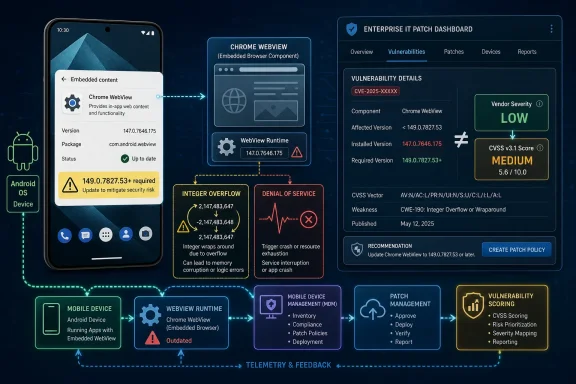
CVE-2026-11290 is not the kind of vulnerability that sends incident-response teams into weekend mode. The published description points to Google Chrome on Android, specifically WebView, and says the practical result is denial of service rather than code execution, data theft, or privilege escalation. The attack also requires local access, low privileges, and user interaction according to the CISA ADP vector, which is why the score lands in the middle of the CVSS scale while Chromium rates the issue low.
That mismatch is worth pausing on. Security teams often want a single number, but Chrome vulnerabilities increasingly resist that compression. A “low” Chromium bug can still receive a CVSS 3.1 base score of 5.0 because CVSS rewards availability impact and formal exploit preconditions differently than Google’s own product security severity labels.
The result is a familiar dashboard problem. A vulnerability scanner may show medium severity, a vendor advisory may say low, and an administrator may be left deciding whether this is urgent, routine, or noise. The honest answer is that CVE-2026-11290 is routine in isolation but still belongs in the normal Chrome patch pipeline, because Chrome’s attack surface is too large and too frequently updated to treat individual low-severity entries as disposable trivia.
The affected version boundary matters more than the drama. Chrome on Android prior to 149.0.7827.53 is the line in the sand, and the practical remediation is to update beyond it. For most users that will happen through the Play Store and system component updates, but managed fleets have to care about verification, not assumptions.
That distinction matters for CVE-2026-11290 because the vulnerable component sits in the connective tissue between apps and web content. A malicious file triggering a crash may not sound catastrophic, but the target is a rendering and integration layer that many users do not know exists. In corporate environments, the affected experience may appear as “the app crashed” rather than “Chrome WebView hit an integer overflow.”
An integer overflow is one of the oldest classes of software flaw, but age has not made it irrelevant. At a high level, it happens when arithmetic exceeds the range a program expects, causing values to wrap or be misinterpreted. In memory-heavy parsing paths, that can create crashes, corrupted calculations, or — in more severe cases — a foothold for deeper memory safety exploitation.
Here, the available record points to denial of service, not a breakout. That distinction should hold unless future enrichment or exploit analysis says otherwise. Still, denial of service in WebView can be more disruptive than the label suggests, especially when the affected app is used for identity, workflow approval, field operations, logistics, or device enrollment.
For Windows administrators, the Android angle may seem remote until the estate map comes out. Enterprises that manage Windows endpoints often also manage Android handhelds, tablets, rugged devices, kiosks, or bring-your-own-device access to Microsoft 365 and line-of-business apps. WebView flaws are a reminder that “browser patching” is no longer confined to the desktop browser icon.
That distinction is easy to blur, and security tooling often does blur it. A vulnerability record may cite a Chrome stable-channel post that primarily discusses desktop updates, while the CVE text itself names Chrome on Android. Linux package trackers, scanner plugins, and third-party vulnerability databases may then ingest the same CVE into inventories where the affected product mapping looks broader than the exploit path.
This is not necessarily a mistake; Chromium is a shared codebase and downstream packaging is complicated. But it does mean IT teams should avoid translating the CVE headline into a simplistic “all Chrome everywhere” panic. The more precise move is to verify Android Chrome and Android System WebView versions, then make sure desktop Chrome is also current because the same update train carried many other fixes.
That last clause is where the practical work lives. Administrators rarely patch a single Chrome CVE; they patch the release that contains it. CVE-2026-11290 may be a low-severity WebView denial-of-service issue, but the Chrome 149 security train around it included many other vulnerabilities with different components, severities, and exploit conditions. A fleet that ignores the release because this one CVE looks boring may still miss more consequential fixes nearby.
The right operational posture is therefore boring by design. Keep Chrome and WebView on supported stable builds, confirm that mobile device management policies do not defer component updates indefinitely, and treat stale WebView versions as hygiene failures. CVE-2026-11290 is not a five-alarm fire, but it is a useful audit prompt.
This is where vulnerability management becomes less like mathematics and more like editorial judgment. CVSS is useful because it forces a structured description of exploit conditions and impact. But vendor severity often incorporates product-specific context: reachable code paths, sandboxing, exploit maturity, mitigations, telemetry, and whether the bug class has plausible escalation potential.
Neither view is inherently wrong. CVSS is saying that if the attack succeeds, availability can be meaningfully affected. Chromium is saying that in the context of Chrome security triage, this issue is not in the same league as a sandbox escape, type confusion in V8, use-after-free in a renderer, or remote code execution through crafted web content.
The danger is treating either label as self-executing. A scanner that blindly escalates every medium CVE can bury teams under patch noise. A team that blindly ignores every vendor-low issue can accumulate avoidable crashes and exposure. The mature reading is to combine exploitability, affected asset type, update availability, and business use.
For a personal Android phone, the answer is simple: update and move on. For a fleet of managed Android devices running WebView-heavy apps, the answer is still to update, but also to test whether any brittle internal app depends on old WebView behavior. For a Windows-only desktop fleet, this CVE is less directly relevant, but it should still reinforce the habit of checking Chrome’s entire stable-channel payload rather than cherry-picking by headline severity.
That gray zone is not new, but it has become more visible as vulnerability volumes rise. Chrome and Chromium advisories can generate dense batches of CVEs, and downstream databases must normalize each one into products, packages, platforms, and scores. During that interval, different tools may disagree about severity, affected software, or whether a given Linux package, Android component, or desktop build is in scope.
This is why security operations teams increasingly need a two-track workflow. The first track is vendor-driven: when Google ships a stable security update, deploy it according to risk and change policy. The second track is database-driven: when NVD, CISA ADP, scanner vendors, and package maintainers finish enriching the record, use that metadata to clean up reporting and exceptions.
CVE-2026-11290 illustrates the point neatly. The vendor text provides enough information to act: affected component, affected platform, version boundary, and impact. The enrichment process adds taxonomy and scoring, but it should not be a prerequisite for routine patching. Waiting for perfect metadata is a luxury Chrome’s release cadence does not offer.
For WindowsForum’s sysadmin audience, this also applies outside Android. Windows vulnerability reporting often feels more settled because Microsoft’s Security Update Guide, KB articles, and WSUS/Intune metadata create a familiar chain of custody. Chrome, Edge, Electron, WebView2, Android WebView, and Chromium-derived applications do not always fit that model. The browser ecosystem moves faster than many enterprise reporting systems were designed to handle.
Still, Windows shops should care because the operational pattern is the same. Modern Windows estates are full of Chromium-derived surfaces: Edge, embedded WebView2 controls, Teams components, third-party Electron apps, sign-in flows, admin portals, and embedded browser widgets inside management tools. The browser engine is no longer one application; it is an application substrate.
That substrate changes the meaning of patch compliance. Updating the visible browser may not update every embedded runtime or every Chromium-based application. Edge WebView2 has its own runtime servicing model. Electron applications may bundle their own Chromium versions and lag behind upstream security fixes. Android WebView updates may depend on Play system updates, OEM behavior, or device management rules.
CVE-2026-11290 is therefore a small example of a larger management problem. Security teams cannot simply ask, “Is Chrome patched?” They need to ask which Chromium runtimes exist, which update channels govern them, which devices can report exact versions, and which business apps would break if the runtime moves.
That sounds tedious because it is. But tedious is where browser security now lives. The spectacular zero-day gets the headline; the durable risk is the estate that cannot tell which embedded browser component is doing the rendering.
But local does not mean irrelevant. On Android, a local attacker can mean a malicious app, a shared device scenario, a compromised user context, a file delivered through messaging or email, or a workflow that asks users to open externally supplied content. The description’s reference to a malicious file is important because files are how many business processes cross trust boundaries.
A denial-of-service outcome also deserves context. Crashing a WebView-dependent app may be a nuisance on a consumer phone, but it can be operationally meaningful on a scanner in a warehouse, a tablet in a clinic, a field-service device, or a kiosk handling check-ins. Availability impact is not glamorous, but it is measurable when the affected device is part of a workflow.
This is not an argument to overstate CVE-2026-11290. There is no public indication in the provided record of active exploitation, remote code execution, data compromise, or privilege escalation. It is an argument to avoid under-reading denial of service simply because it is less frightening than compromise.
The right question is not “Could this bug own the device?” The right question is “Would a crash in this component interrupt something users or the business actually rely on?” In many fleets, the answer will be no. In some, especially Android-heavy operational environments, it may be yes.
Enterprise IT, meanwhile, prefers predictability. Testing rings, phased deployment, deferral windows, rollback plans, and compatibility gates exist because endpoints are not lab machines. The tension between Chrome’s speed and enterprise caution is not a failure of either side; it is the reality of running a fast-moving browser inside a slow-moving business.
CVE-2026-11290 sits at the low-friction end of that tension. It should not require emergency change control in most environments. But it should be absorbed into the normal update stream quickly enough that old WebView builds do not linger. The cost of making an exception for every low-severity issue is usually higher than the cost of staying current.
This is especially true because Chrome releases bundle fixes. Administrators who debate one CVE in isolation may miss the aggregate value of the update. A release that fixes a low-severity WebView denial of service may also contain memory safety fixes, renderer hardening, graphics patches, or component-specific bugs that matter more to the fleet.
The better model is risk-tiered automation. Let ordinary Chrome and WebView security releases flow through a short validation ring, then push broadly. Reserve manual drama for exploited zero-days, regressions, high-impact compatibility issues, or fixes that touch especially sensitive workflows.
That fragmentation matters for vulnerabilities like CVE-2026-11290. If a fleet management console cannot reliably show Chrome and Android System WebView versions, the organization may have to infer compliance from policy rather than prove it from telemetry. That is not good enough for regulated environments or for devices in operational roles.
The fix is not exotic. Device management baselines should capture browser and WebView versions, enforce update policy where possible, and flag devices that have not checked in or updated within an acceptable window. Security teams should also know whether apps use system WebView, custom tabs, embedded SDK browsers, or bundled rendering engines.
There is a cultural fix too. Mobile devices should not be treated as softer endpoints simply because they are smaller, battery-powered, or personally assigned. They access the same identity systems, open the same files, render the same web content, and often sit outside the network controls that once protected desktop fleets.
CVE-2026-11290 is modest, but it points at that larger asymmetry. A Windows laptop missing a browser update is visible in most shops. An Android device with an old WebView may be much easier to overlook.
CWE tags are useful, but they are not always a perfect narrative of root cause. A CVE may receive one classification from the assigning authority and another from an enrichment body. One may describe the low-level programming error; another may describe an adjacent weakness pattern or initial triage view. Tools then ingest both, sometimes without explaining why they coexist.
For defenders, this is another reason to treat CVE records as living documents rather than stone tablets. Early records can be sparse. Metadata can change. Scores can be added later. Product applicability can be refined. References may initially point to broad release notes rather than detailed bug reports.
The core facts in CVE-2026-11290 are still coherent despite that metadata wrinkle. The bug is described as an integer overflow in WebView on Chrome for Android before 149.0.7827.53, exploitable locally with a malicious file to cause denial of service. That is the operationally important sentence.
Everything else helps categorize, prioritize, and report. It should not distract from the patch decision, which remains refreshingly simple.
The risk is in the habits that form around small CVEs. One bad habit is panic: treating every vulnerability as if it were an exploited remote-code-execution flaw. That burns credibility with users and change managers. Another bad habit is dismissal: ignoring anything below high severity until scanners accumulate a backlog that nobody trusts.
CVE-2026-11290 calls for the middle posture. Read the affected product carefully. Confirm the version boundary. Understand the exploit requirements. Patch through the normal channel. Verify deployment. Move on, but keep the telemetry.
That posture is not glamorous, which is precisely why it works. Browser security in 2026 is not won by heroic reaction to every advisory. It is won by update systems that do the ordinary thing reliably before the extraordinary thing arrives.
 A Low-Severity Chrome Bug Still Deserves a Serious Reading
CVE-2026-11290 is not the kind of vulnerability that sends incident-response teams into weekend mode. The published description points to Google Chrome on Android, specifically WebView, and says the practical result is denial of service rather than code execution, data theft, or privilege escalation. The attack also requires local access, low privileges, and user interaction according to the CISA ADP vector, which is why the score lands in the middle of the CVSS scale while Chromium rates the issue low.That mismatch is worth pausing on. Security teams often want a single number, but Chrome vulnerabilities increasingly resist that compression. A “low” Chromium bug can still receive a CVSS 3.1 base score of 5.0 because CVSS rewards availability impact and formal exploit preconditions differently than Google’s own product security severity labels.
The result is a familiar dashboard problem. A vulnerability scanner may show medium severity, a vendor advisory may say low, and an administrator may be left deciding whether this is urgent, routine, or noise. The honest answer is that CVE-2026-11290 is routine in isolation but still belongs in the normal Chrome patch pipeline, because Chrome’s attack surface is too large and too frequently updated to treat individual low-severity entries as disposable trivia.
The affected version boundary matters more than the drama. Chrome on Android prior to 149.0.7827.53 is the line in the sand, and the practical remediation is to update beyond it. For most users that will happen through the Play Store and system component updates, but managed fleets have to care about verification, not assumptions.
WebView Is Where “The Browser” Stops Being a Browser
WebView is not Chrome in the everyday sense of a tab strip, bookmarks bar, and address field. It is the embedded web runtime that Android apps use when they need to display web content without pushing the user into a full browser session. That makes it both ordinary and awkward: invisible when it works, blamed only when it breaks, and shared by a long tail of apps that may never mention Chrome at all.That distinction matters for CVE-2026-11290 because the vulnerable component sits in the connective tissue between apps and web content. A malicious file triggering a crash may not sound catastrophic, but the target is a rendering and integration layer that many users do not know exists. In corporate environments, the affected experience may appear as “the app crashed” rather than “Chrome WebView hit an integer overflow.”
An integer overflow is one of the oldest classes of software flaw, but age has not made it irrelevant. At a high level, it happens when arithmetic exceeds the range a program expects, causing values to wrap or be misinterpreted. In memory-heavy parsing paths, that can create crashes, corrupted calculations, or — in more severe cases — a foothold for deeper memory safety exploitation.
Here, the available record points to denial of service, not a breakout. That distinction should hold unless future enrichment or exploit analysis says otherwise. Still, denial of service in WebView can be more disruptive than the label suggests, especially when the affected app is used for identity, workflow approval, field operations, logistics, or device enrollment.
For Windows administrators, the Android angle may seem remote until the estate map comes out. Enterprises that manage Windows endpoints often also manage Android handhelds, tablets, rugged devices, kiosks, or bring-your-own-device access to Microsoft 365 and line-of-business apps. WebView flaws are a reminder that “browser patching” is no longer confined to the desktop browser icon.
The Version Number Is the Real Remediation
The cleanest fact in this advisory is the fixed-version threshold: Chrome 149.0.7827.53. Everything before that on Android is in scope for CVE-2026-11290; everything at or beyond the fixed build should include the remediation. In the desktop channel, related Chrome 149 builds also appeared around the same security release window, but this specific CVE description calls out Android WebView.That distinction is easy to blur, and security tooling often does blur it. A vulnerability record may cite a Chrome stable-channel post that primarily discusses desktop updates, while the CVE text itself names Chrome on Android. Linux package trackers, scanner plugins, and third-party vulnerability databases may then ingest the same CVE into inventories where the affected product mapping looks broader than the exploit path.
This is not necessarily a mistake; Chromium is a shared codebase and downstream packaging is complicated. But it does mean IT teams should avoid translating the CVE headline into a simplistic “all Chrome everywhere” panic. The more precise move is to verify Android Chrome and Android System WebView versions, then make sure desktop Chrome is also current because the same update train carried many other fixes.
That last clause is where the practical work lives. Administrators rarely patch a single Chrome CVE; they patch the release that contains it. CVE-2026-11290 may be a low-severity WebView denial-of-service issue, but the Chrome 149 security train around it included many other vulnerabilities with different components, severities, and exploit conditions. A fleet that ignores the release because this one CVE looks boring may still miss more consequential fixes nearby.
The right operational posture is therefore boring by design. Keep Chrome and WebView on supported stable builds, confirm that mobile device management policies do not defer component updates indefinitely, and treat stale WebView versions as hygiene failures. CVE-2026-11290 is not a five-alarm fire, but it is a useful audit prompt.
CVSS Says Medium, Chromium Says Low, and Both Can Be Right
The published CVSS 3.1 vector from CISA ADP is AV:L/AC:L/PR:L/UI:R/S:U/C:N/I:N/A:H. In plain English, that means local attack vector, low attack complexity, low privileges required, user interaction required, unchanged scope, no confidentiality impact, no integrity impact, and high availability impact. That combination produces a medium score even though the vendor severity is low.This is where vulnerability management becomes less like mathematics and more like editorial judgment. CVSS is useful because it forces a structured description of exploit conditions and impact. But vendor severity often incorporates product-specific context: reachable code paths, sandboxing, exploit maturity, mitigations, telemetry, and whether the bug class has plausible escalation potential.
Neither view is inherently wrong. CVSS is saying that if the attack succeeds, availability can be meaningfully affected. Chromium is saying that in the context of Chrome security triage, this issue is not in the same league as a sandbox escape, type confusion in V8, use-after-free in a renderer, or remote code execution through crafted web content.
The danger is treating either label as self-executing. A scanner that blindly escalates every medium CVE can bury teams under patch noise. A team that blindly ignores every vendor-low issue can accumulate avoidable crashes and exposure. The mature reading is to combine exploitability, affected asset type, update availability, and business use.
For a personal Android phone, the answer is simple: update and move on. For a fleet of managed Android devices running WebView-heavy apps, the answer is still to update, but also to test whether any brittle internal app depends on old WebView behavior. For a Windows-only desktop fleet, this CVE is less directly relevant, but it should still reinforce the habit of checking Chrome’s entire stable-channel payload rather than cherry-picking by headline severity.
NVD Enrichment Lag Is Now Part of the Patch Story
The NVD record for CVE-2026-11290 was still marked as undergoing enrichment shortly after publication. That means NVD had not yet completed its own CVSS assessment, CPE applicability statement, or full metadata association. In practice, many enterprise tools still treat NVD as a canonical source, so enrichment lag can create a temporary gray zone.That gray zone is not new, but it has become more visible as vulnerability volumes rise. Chrome and Chromium advisories can generate dense batches of CVEs, and downstream databases must normalize each one into products, packages, platforms, and scores. During that interval, different tools may disagree about severity, affected software, or whether a given Linux package, Android component, or desktop build is in scope.
This is why security operations teams increasingly need a two-track workflow. The first track is vendor-driven: when Google ships a stable security update, deploy it according to risk and change policy. The second track is database-driven: when NVD, CISA ADP, scanner vendors, and package maintainers finish enriching the record, use that metadata to clean up reporting and exceptions.
CVE-2026-11290 illustrates the point neatly. The vendor text provides enough information to act: affected component, affected platform, version boundary, and impact. The enrichment process adds taxonomy and scoring, but it should not be a prerequisite for routine patching. Waiting for perfect metadata is a luxury Chrome’s release cadence does not offer.
For WindowsForum’s sysadmin audience, this also applies outside Android. Windows vulnerability reporting often feels more settled because Microsoft’s Security Update Guide, KB articles, and WSUS/Intune metadata create a familiar chain of custody. Chrome, Edge, Electron, WebView2, Android WebView, and Chromium-derived applications do not always fit that model. The browser ecosystem moves faster than many enterprise reporting systems were designed to handle.
The Windows Angle Runs Through Edge, WebView2, and Policy Muscle Memory
CVE-2026-11290 itself is about Chrome on Android WebView, not Microsoft Edge WebView2 on Windows. That caveat matters. There is no basis in the published description to claim that Windows WebView2 is affected by this specific CVE, and administrators should not transpose Android WebView risk onto Windows without evidence.Still, Windows shops should care because the operational pattern is the same. Modern Windows estates are full of Chromium-derived surfaces: Edge, embedded WebView2 controls, Teams components, third-party Electron apps, sign-in flows, admin portals, and embedded browser widgets inside management tools. The browser engine is no longer one application; it is an application substrate.
That substrate changes the meaning of patch compliance. Updating the visible browser may not update every embedded runtime or every Chromium-based application. Edge WebView2 has its own runtime servicing model. Electron applications may bundle their own Chromium versions and lag behind upstream security fixes. Android WebView updates may depend on Play system updates, OEM behavior, or device management rules.
CVE-2026-11290 is therefore a small example of a larger management problem. Security teams cannot simply ask, “Is Chrome patched?” They need to ask which Chromium runtimes exist, which update channels govern them, which devices can report exact versions, and which business apps would break if the runtime moves.
That sounds tedious because it is. But tedious is where browser security now lives. The spectacular zero-day gets the headline; the durable risk is the estate that cannot tell which embedded browser component is doing the rendering.
Local Attacks Are Not Automatically Low-Risk in Managed Environments
Security teams often relax when they see “local attacker.” Compared with remote web exploitation, local access suggests a narrower attack path and fewer internet-scale consequences. CVE-2026-11290 also requires user interaction, which further lowers the odds of broad automated exploitation.But local does not mean irrelevant. On Android, a local attacker can mean a malicious app, a shared device scenario, a compromised user context, a file delivered through messaging or email, or a workflow that asks users to open externally supplied content. The description’s reference to a malicious file is important because files are how many business processes cross trust boundaries.
A denial-of-service outcome also deserves context. Crashing a WebView-dependent app may be a nuisance on a consumer phone, but it can be operationally meaningful on a scanner in a warehouse, a tablet in a clinic, a field-service device, or a kiosk handling check-ins. Availability impact is not glamorous, but it is measurable when the affected device is part of a workflow.
This is not an argument to overstate CVE-2026-11290. There is no public indication in the provided record of active exploitation, remote code execution, data compromise, or privilege escalation. It is an argument to avoid under-reading denial of service simply because it is less frightening than compromise.
The right question is not “Could this bug own the device?” The right question is “Would a crash in this component interrupt something users or the business actually rely on?” In many fleets, the answer will be no. In some, especially Android-heavy operational environments, it may be yes.
Chrome’s Release Cadence Punishes Patch Exceptionalism
Chrome security updates are frequent enough that every individual CVE cannot become a boardroom event. That is by design. The browser’s security model assumes constant repair, rapid rollout, and a user base that generally moves forward without studying each defect.Enterprise IT, meanwhile, prefers predictability. Testing rings, phased deployment, deferral windows, rollback plans, and compatibility gates exist because endpoints are not lab machines. The tension between Chrome’s speed and enterprise caution is not a failure of either side; it is the reality of running a fast-moving browser inside a slow-moving business.
CVE-2026-11290 sits at the low-friction end of that tension. It should not require emergency change control in most environments. But it should be absorbed into the normal update stream quickly enough that old WebView builds do not linger. The cost of making an exception for every low-severity issue is usually higher than the cost of staying current.
This is especially true because Chrome releases bundle fixes. Administrators who debate one CVE in isolation may miss the aggregate value of the update. A release that fixes a low-severity WebView denial of service may also contain memory safety fixes, renderer hardening, graphics patches, or component-specific bugs that matter more to the fleet.
The better model is risk-tiered automation. Let ordinary Chrome and WebView security releases flow through a short validation ring, then push broadly. Reserve manual drama for exploited zero-days, regressions, high-impact compatibility issues, or fixes that touch especially sensitive workflows.
Mobile Patch Visibility Still Lags Desktop Confidence
Windows administrators are accustomed to a certain kind of patch visibility. It may be messy, but tools can usually report OS build, cumulative update status, Edge version, Defender state, and application inventory. Android WebView introduces a different reporting culture, one split across app stores, system components, OEMs, enterprise mobility management, and user behavior.That fragmentation matters for vulnerabilities like CVE-2026-11290. If a fleet management console cannot reliably show Chrome and Android System WebView versions, the organization may have to infer compliance from policy rather than prove it from telemetry. That is not good enough for regulated environments or for devices in operational roles.
The fix is not exotic. Device management baselines should capture browser and WebView versions, enforce update policy where possible, and flag devices that have not checked in or updated within an acceptable window. Security teams should also know whether apps use system WebView, custom tabs, embedded SDK browsers, or bundled rendering engines.
There is a cultural fix too. Mobile devices should not be treated as softer endpoints simply because they are smaller, battery-powered, or personally assigned. They access the same identity systems, open the same files, render the same web content, and often sit outside the network controls that once protected desktop fleets.
CVE-2026-11290 is modest, but it points at that larger asymmetry. A Windows laptop missing a browser update is visible in most shops. An Android device with an old WebView may be much easier to overlook.
The CWE Confusion Shows How Vulnerability Records Accrete Meaning
The record includes CWE-190, the straightforward classification for integer overflow or wraparound. It also includes CWE-472, external control of an assumed-immutable web parameter, attributed to Chrome in the change history. That combination is odd enough to notice, and it reflects the messy way vulnerability metadata can accrete during publication and enrichment.CWE tags are useful, but they are not always a perfect narrative of root cause. A CVE may receive one classification from the assigning authority and another from an enrichment body. One may describe the low-level programming error; another may describe an adjacent weakness pattern or initial triage view. Tools then ingest both, sometimes without explaining why they coexist.
For defenders, this is another reason to treat CVE records as living documents rather than stone tablets. Early records can be sparse. Metadata can change. Scores can be added later. Product applicability can be refined. References may initially point to broad release notes rather than detailed bug reports.
The core facts in CVE-2026-11290 are still coherent despite that metadata wrinkle. The bug is described as an integer overflow in WebView on Chrome for Android before 149.0.7827.53, exploitable locally with a malicious file to cause denial of service. That is the operationally important sentence.
Everything else helps categorize, prioritize, and report. It should not distract from the patch decision, which remains refreshingly simple.
The Real Risk Is Not This CVE, but the Habit of Misreading Small Ones
A low-severity WebView crash bug is not a crisis. It is not proof that Chrome is uniquely unsafe, nor is it a reason to abandon WebView, Android, or embedded web technologies. Complex software produces defects, and modern browser vendors fix them continuously.The risk is in the habits that form around small CVEs. One bad habit is panic: treating every vulnerability as if it were an exploited remote-code-execution flaw. That burns credibility with users and change managers. Another bad habit is dismissal: ignoring anything below high severity until scanners accumulate a backlog that nobody trusts.
CVE-2026-11290 calls for the middle posture. Read the affected product carefully. Confirm the version boundary. Understand the exploit requirements. Patch through the normal channel. Verify deployment. Move on, but keep the telemetry.
That posture is not glamorous, which is precisely why it works. Browser security in 2026 is not won by heroic reaction to every advisory. It is won by update systems that do the ordinary thing reliably before the extraordinary thing arrives.
The Chrome 149 WebView Fix Leaves Administrators With a Narrow but Useful Checklist
CVE-2026-11290 is a small vulnerability with an unusually clear lesson: the less dramatic the bug, the more disciplined the process needs to be. Treat it as a chance to confirm that Chrome and WebView updates are boring, measurable, and fast enough to matter.- Chrome on Android and Android WebView installations should be updated to 149.0.7827.53 or later where that version applies.
- The known impact is denial of service through a malicious file, not confirmed code execution or data theft.
- The attack conditions are constrained by local access, low privileges, and user interaction, which supports routine rather than emergency handling for most fleets.
- Security dashboards may show medium severity while Chromium labels the issue low, so teams should document the prioritization logic instead of arguing over a single label.
- Windows administrators should not assume Edge WebView2 is affected by this Android WebView CVE, but they should use the case to review all Chromium-derived runtimes in their estate.
- Mobile device inventories should report Chrome and WebView versions directly, because policy intent is not the same as patch proof.
References
- Primary source: NVD / Chromium
Published: 2026-06-09T07:00:36-07:00
NVD - CVE-2026-11290
 nvd.nist.gov
- Security advisory: MSRC
Published: 2026-06-09T07:00:36-07:00
Original feed URL
Security Update Guide - Microsoft Security Response Center
 msrc.microsoft.com
- Related coverage: security.snyk.io
External Control of Assumed-Immutable Web Parameter in chromium | CVE-2026-11290 | Snyk
External Control of Assumed-Immutable Web Parameter in chromium | CVE-2026-11290security.snyk.io - Related coverage: encyb.com
