

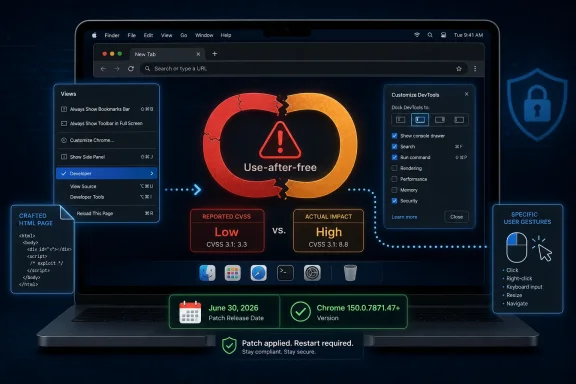
Google fixed CVE-2026-14025 in the June 30, 2026 Chrome Stable desktop update, closing a Mac-specific use-after-free flaw in Chrome’s Views interface code before version 150.0.7871.47 that could let a remote attacker trigger heap corruption through a crafted page and user gestures. The bug is awkwardly small and large at the same time: Chromium labels it Low severity, while CISA’s enrichment assigns it a High CVSS score. That mismatch is the real story for administrators, because browser patch triage increasingly depends less on a single severity word and more on understanding the exploit path, the affected platform, and the rollout mechanics.
CVE-2026-14025 sits in Chrome’s Views component, the UI framework that helps draw and manage parts of the browser’s interface. According to the NVD entry sourced from Chrome, the vulnerability affects Google Chrome on macOS prior to 150.0.7871.47 and requires the attacker to convince the user to perform specific UI gestures on a crafted HTML page.
That is not the same thing as a drive-by remote code execution bug that fires the instant a tab opens. The exploit path includes user interaction, and CISA’s SSVC enrichment says exploitation was not known and the issue was not automatable at the time of assessment. Those details explain why Chromium’s own security severity is Low.
But Low does not mean “ignore.” A use-after-free vulnerability is a memory-safety failure in which software continues using memory after it has been released, potentially allowing corrupted data or attacker-shaped objects to be treated as legitimate program state. In a browser, where untrusted web content constantly brushes against privileged interface and process boundaries, even a constrained memory bug deserves respect.
The patched version number matters more than the adjective. Google’s Chrome Releases blog says the Stable Channel update moved desktop Chrome to the 150.0.7871.46/.47 range for Windows and Mac and 150.0.7871.46 for Linux, with CVE-2026-14025 listed as a Low-severity use-after-free in Views. For Mac users, the cutoff in the CVE record is explicit: prior to 150.0.7871.47.
Both views can be rational, but they answer different questions. Chromium’s internal severity is often shaped by exploitability in the browser’s architecture, reachable attack surface, bug class, mitigations, and whether the flaw crosses important boundaries such as the renderer sandbox. CISA’s CVSS vector, by contrast, is a standardized scoring lens that can produce a high number when theoretical impact is severe, even if exploitation requires a very particular interaction sequence.
That distinction matters in real patch management. If a vulnerability scanner simply shouts “High” and an engineering team simply replies “Google called it Low,” neither side is doing analysis. The better answer is that CVE-2026-14025 appears to be a Mac-only Chrome memory-safety bug with no reported exploitation, but it is fixed in a major Stable update that also carries many other security fixes.
In other words, this is not a panic button. It is a compliance and hygiene button. Enterprises should not treat CVE-2026-14025 as evidence of an active emergency campaign, but they also should not carve it out as safe to defer if Chrome 150 is already approved for deployment.
The CVE description says the attacker needs to convince a user to engage in “specific UI gestures.” That phrase is doing real work. It suggests the bug is not merely in parsing hostile content, but in the interaction between web content and browser UI behavior on macOS. The crafted page is the stage; the user gesture is the trigger.
Security teams sometimes downgrade UI-dependent bugs because they sound like social engineering. That is a mistake. Browser exploitation has long lived in the overlap between technical weakness and user behavior, from clickjacking to permission abuse to download prompts that train people to make unsafe choices. If a memory corruption bug can be reached through plausible interface choreography, it belongs in the patch queue.
The Mac limitation also cuts both ways. It narrows exposure for Windows-heavy fleets, but it may concentrate risk in executive, developer, design, and BYOD populations where Macs are common and where browser profiles often contain high-value credentials. For WindowsForum readers managing mixed environments, “Mac-only” should mean “scope accurately,” not “discard.”
For managed fleets, the harder problem is visibility. Chrome can download an update without every user relaunching promptly, and many endpoint inventories report installed binaries, running process versions, or application bundle metadata at different times. That gap is where vulnerability dashboards get noisy.
Administrators should distinguish three states. A machine may have the updated package staged, the patched version installed, or the patched executable actually running after restart. Only the last one ends the browser-session exposure. That is especially important for users who keep Chrome open for weeks with tab restore acting as a substitute for memory.
The CPE entry added by NIST also reflects a common vulnerability-management nuisance. The configuration combines Google Chrome versions before 150.0.7871.47 with Apple macOS, which is the right conceptual scope, but scanners and asset systems may lag in mapping exact platform/version combinations. If your tooling flags Linux or Windows endpoints for this specific CVE, it may be applying the Chrome version threshold too broadly rather than respecting the Mac-specific description.
A single Low-rated bug might not justify an emergency change window in a locked-down enterprise. A broad Chrome Stable security rollup usually does. Browser updates are cumulative security events, and the operational question is rarely whether one CVE alone is dramatic enough. It is whether the browser can safely remain behind the current Stable security train.
This is where organizations get into trouble with CVE-by-CVE debate. Chrome’s rapid release model assumes frequent updates, fast restarts, and limited tolerance for stale builds. If a fleet has to convene a special committee for every browser patch, the process is already misaligned with the threat model.
That does not mean every Chrome update is risk-free. Reddit reports and user forums often surface regressions after major builds, and Chrome 150 appears to have prompted complaints around extension behavior and media playback in some environments. But regression management should be paired with rings and rollback plans, not used as a standing argument for staying exposed.
Still, the broader lesson applies to Edge as much as Chrome. Chromium bugs often travel through the ecosystem, but vendors may ship different version numbers, different feature flags, different platform exposure, and different patch timing. A Chrome CVE is a signal to check Chromium-based browser posture, not proof that every Chromium browser is equally affected.
For Windows shops, that nuance matters because Chrome and Edge may coexist across the same estate. Some users run Chrome for personal sync, Edge for Microsoft 365 integration, and WebView2-backed applications for line-of-business workflows. Browser security is no longer a single application inventory line; it is an engine, a shell, an update channel, and a runtime dependency.
The practical move is to verify Chrome separately from Edge and WebView2. Do not assume that patching one closes the other. Do not assume that a Chrome-only CVE is irrelevant to Chromium governance. Treat it as a prompt to confirm that every Chromium consumer in the environment is on an actively serviced build.
For CVE-2026-14025, the interaction requirement appears specific enough to reduce exploitability. CISA’s SSVC entry marks the issue as not automatable, which is meaningful. A non-automatable bug is harder to weaponize at scale than one that reliably triggers on page load.
But targeted attacks are different. If an attacker knows a victim’s platform, browser, and workflow, a crafted page that encourages particular gestures may be plausible. Think of fake document viewers, login troubleshooting pages, calendar invites, support portals, or design review mockups that ask the user to interact with browser-adjacent UI in a carefully staged way.
That does not make CVE-2026-14025 the next headline zero-day. It makes it a reminder that required interaction is a speed bump, not a wall. Browser UI is part of the attack surface because attackers can design experiences around it.
Google and the wider Chromium project have invested heavily in mitigations, fuzzing, sandboxing, site isolation, MiraclePtr-style protections, and memory-safe experiments. Those efforts reduce the blast radius and increase exploit cost, but they do not eliminate entire classes of memory corruption overnight. CVE-2026-14025 is one more small invoice for that architecture.
The industry’s long-term answer is likely more memory-safe code in critical components, more process isolation, more hardened allocators, and more aggressive deprecation of unsafe patterns. But administrators do not get to wait for that future. They live in the present, where the browser remains both the universal client and the most exposed application on most endpoints.
This is also why browser patching has become a first-class security control. Ten years ago, many organizations treated browsers like user preferences. Today, they are managed infrastructure. Version drift in Chrome or Edge should be viewed with the same seriousness as drift in VPN clients, endpoint agents, or identity components.
That precision should reduce unnecessary alarm. A Windows-only business reading the CVE literally may not need to create a special incident around CVE-2026-14025. It still needs to deploy the Chrome 150 Stable update because the release contains other security fixes relevant across platforms.
Mixed fleets face a different calculus. Macs often sit outside the most mature Windows patch pipelines, especially in organizations that grew from Windows-first management into hybrid endpoint management over time. If Jamf, Kandji, Intune, or another MDM is managing macOS, Chrome update enforcement should be measurable there too.
The weakest browser is often the one outside the standard dashboard. CVE-2026-14025 is a good excuse to check whether Mac Chrome versions are visible, restart compliance is tracked, and exception processes cover browser updates rather than only operating system patches.
The right response is to document the distinction. The CVE affects Chrome on macOS prior to 150.0.7871.47, requires user interaction, has no known exploitation in the CISA SSVC data, and is fixed by updating Chrome. If the scanner reports it on non-macOS systems, ask whether the product is matching only the Chrome version or respecting the OS portion of the configuration.
Security teams should also avoid overfitting to the CVSS number. CVSS is useful for consistency, but it is not a deployment strategy. A High score with no known exploitation and required user interaction may be less urgent than a Medium bug under active exploitation, while still being important enough to patch within the normal browser SLA.
The best vulnerability programs combine scanner data with vendor release notes, asset context, exploit intelligence, and operational constraints. CVE-2026-14025 is a textbook case because the raw score, vendor label, and affected platform each tell only part of the story.
A good Chrome policy does not merely allow updates. It enforces a maximum version age, pushes restarts after a reasonable grace period, and reports devices that fail to comply. For most organizations, browser update SLAs should be measured in days, not weeks, especially for Stable Channel security updates.
There is also a communications angle. Users should not be trained to fear every browser restart as a productivity loss. IT can reduce resistance by preserving sessions, announcing restart windows, and making browser relaunch prompts predictable rather than nagging and random.
The irony is that CVE-2026-14025 requires user interaction to exploit, but user inaction can preserve exposure. A downloaded update that waits behind a relaunch button is not a completed mitigation. The final mile of browser security is still the mundane act of closing and reopening the app.
For WindowsForum’s audience, the Windows answer is almost paradoxical. CVE-2026-14025 itself is described as a Mac Chrome issue, yet the management lesson is highly relevant to Windows administrators because most environments now run multiple Chromium surfaces. Chrome, Edge, WebView2, Electron apps, and embedded browsers create a patching ecosystem where upstream security work flows downstream unevenly.
The safest operational posture is boring. Keep Chrome on Stable, deploy 150.0.7871.47 or later where applicable, confirm relaunches, watch for vendor-specific Edge guidance separately, and resist the temptation to argue severity labels as if they were verdicts.
 A Low-Severity Chrome Bug Can Still Deserve a Fast Patch
CVE-2026-14025 sits in Chrome’s Views component, the UI framework that helps draw and manage parts of the browser’s interface. According to the NVD entry sourced from Chrome, the vulnerability affects Google Chrome on macOS prior to 150.0.7871.47 and requires the attacker to convince the user to perform specific UI gestures on a crafted HTML page.That is not the same thing as a drive-by remote code execution bug that fires the instant a tab opens. The exploit path includes user interaction, and CISA’s SSVC enrichment says exploitation was not known and the issue was not automatable at the time of assessment. Those details explain why Chromium’s own security severity is Low.
But Low does not mean “ignore.” A use-after-free vulnerability is a memory-safety failure in which software continues using memory after it has been released, potentially allowing corrupted data or attacker-shaped objects to be treated as legitimate program state. In a browser, where untrusted web content constantly brushes against privileged interface and process boundaries, even a constrained memory bug deserves respect.
The patched version number matters more than the adjective. Google’s Chrome Releases blog says the Stable Channel update moved desktop Chrome to the 150.0.7871.46/.47 range for Windows and Mac and 150.0.7871.46 for Linux, with CVE-2026-14025 listed as a Low-severity use-after-free in Views. For Mac users, the cutoff in the CVE record is explicit: prior to 150.0.7871.47.
The Severity Mismatch Is a Browser-Security Rorschach Test
The most confusing line in this CVE is not the bug description. It is the split between Chromium’s Low severity and CISA-ADP’s CVSS 3.1 score of 8.8 High, using a vector that describes network attackability, low complexity, no privileges required, required user interaction, unchanged scope, and high confidentiality, integrity, and availability impact.Both views can be rational, but they answer different questions. Chromium’s internal severity is often shaped by exploitability in the browser’s architecture, reachable attack surface, bug class, mitigations, and whether the flaw crosses important boundaries such as the renderer sandbox. CISA’s CVSS vector, by contrast, is a standardized scoring lens that can produce a high number when theoretical impact is severe, even if exploitation requires a very particular interaction sequence.
That distinction matters in real patch management. If a vulnerability scanner simply shouts “High” and an engineering team simply replies “Google called it Low,” neither side is doing analysis. The better answer is that CVE-2026-14025 appears to be a Mac-only Chrome memory-safety bug with no reported exploitation, but it is fixed in a major Stable update that also carries many other security fixes.
In other words, this is not a panic button. It is a compliance and hygiene button. Enterprises should not treat CVE-2026-14025 as evidence of an active emergency campaign, but they also should not carve it out as safe to defer if Chrome 150 is already approved for deployment.
Views Is Boring Until It Is Not
Chrome’s Views layer is not as famous as V8, Blink, Skia, or GPU process code, but boring UI plumbing is exactly where modern browsers hide a lot of complexity. Menus, dialogs, permission prompts, page-info surfaces, tab strips, omnibox interactions, and platform-specific interface behavior all create state machines that have to remain correct while pages load, scripts run, windows move, focus changes, and users click faster than developers expect.The CVE description says the attacker needs to convince a user to engage in “specific UI gestures.” That phrase is doing real work. It suggests the bug is not merely in parsing hostile content, but in the interaction between web content and browser UI behavior on macOS. The crafted page is the stage; the user gesture is the trigger.
Security teams sometimes downgrade UI-dependent bugs because they sound like social engineering. That is a mistake. Browser exploitation has long lived in the overlap between technical weakness and user behavior, from clickjacking to permission abuse to download prompts that train people to make unsafe choices. If a memory corruption bug can be reached through plausible interface choreography, it belongs in the patch queue.
The Mac limitation also cuts both ways. It narrows exposure for Windows-heavy fleets, but it may concentrate risk in executive, developer, design, and BYOD populations where Macs are common and where browser profiles often contain high-value credentials. For WindowsForum readers managing mixed environments, “Mac-only” should mean “scope accurately,” not “discard.”
The Patch Is Simple; Proving It Landed Is the Work
For individual users, the fix is straightforward: update Chrome and restart the browser so the patched build is actually running. On macOS, the safe target is Chrome 150.0.7871.47 or later. The About Chrome page remains the simplest confirmation path for unmanaged machines.For managed fleets, the harder problem is visibility. Chrome can download an update without every user relaunching promptly, and many endpoint inventories report installed binaries, running process versions, or application bundle metadata at different times. That gap is where vulnerability dashboards get noisy.
Administrators should distinguish three states. A machine may have the updated package staged, the patched version installed, or the patched executable actually running after restart. Only the last one ends the browser-session exposure. That is especially important for users who keep Chrome open for weeks with tab restore acting as a substitute for memory.
The CPE entry added by NIST also reflects a common vulnerability-management nuisance. The configuration combines Google Chrome versions before 150.0.7871.47 with Apple macOS, which is the right conceptual scope, but scanners and asset systems may lag in mapping exact platform/version combinations. If your tooling flags Linux or Windows endpoints for this specific CVE, it may be applying the Chrome version threshold too broadly rather than respecting the Mac-specific description.
Chrome 150 Is Bigger Than This One CVE
CVE-2026-14025 arrived as one entry in a much larger Chrome 150 Stable Channel update. Google’s release notes list many security fixes, and third-party coverage from Malwarebytes described the update as a large security release containing hundreds of fixes across desktop and Android builds. That context changes the risk calculation.A single Low-rated bug might not justify an emergency change window in a locked-down enterprise. A broad Chrome Stable security rollup usually does. Browser updates are cumulative security events, and the operational question is rarely whether one CVE alone is dramatic enough. It is whether the browser can safely remain behind the current Stable security train.
This is where organizations get into trouble with CVE-by-CVE debate. Chrome’s rapid release model assumes frequent updates, fast restarts, and limited tolerance for stale builds. If a fleet has to convene a special committee for every browser patch, the process is already misaligned with the threat model.
That does not mean every Chrome update is risk-free. Reddit reports and user forums often surface regressions after major builds, and Chrome 150 appears to have prompted complaints around extension behavior and media playback in some environments. But regression management should be paired with rings and rollback plans, not used as a standing argument for staying exposed.
The Microsoft Edge Angle Is Quiet but Relevant
Because Microsoft Edge is Chromium-based, Windows administrators will naturally ask whether this Chrome CVE applies directly to Edge. The specific NVD record names Google Chrome on Mac, and the provided affected software entry is Chrome, not Edge. That means CVE-2026-14025 should not automatically be treated as an Edge vulnerability unless Microsoft maps the upstream Chromium fix into Edge release notes or its own security guidance.Still, the broader lesson applies to Edge as much as Chrome. Chromium bugs often travel through the ecosystem, but vendors may ship different version numbers, different feature flags, different platform exposure, and different patch timing. A Chrome CVE is a signal to check Chromium-based browser posture, not proof that every Chromium browser is equally affected.
For Windows shops, that nuance matters because Chrome and Edge may coexist across the same estate. Some users run Chrome for personal sync, Edge for Microsoft 365 integration, and WebView2-backed applications for line-of-business workflows. Browser security is no longer a single application inventory line; it is an engine, a shell, an update channel, and a runtime dependency.
The practical move is to verify Chrome separately from Edge and WebView2. Do not assume that patching one closes the other. Do not assume that a Chrome-only CVE is irrelevant to Chromium governance. Treat it as a prompt to confirm that every Chromium consumer in the environment is on an actively serviced build.
User Interaction Is Not a Comfort Blanket
Security advisories often include “user interaction required” as though it were a major shield. In consumer reality, user interaction is cheap. People click, drag, dismiss, accept, copy, paste, and navigate all day, often inside pages designed to capture attention and compress judgment.For CVE-2026-14025, the interaction requirement appears specific enough to reduce exploitability. CISA’s SSVC entry marks the issue as not automatable, which is meaningful. A non-automatable bug is harder to weaponize at scale than one that reliably triggers on page load.
But targeted attacks are different. If an attacker knows a victim’s platform, browser, and workflow, a crafted page that encourages particular gestures may be plausible. Think of fake document viewers, login troubleshooting pages, calendar invites, support portals, or design review mockups that ask the user to interact with browser-adjacent UI in a carefully staged way.
That does not make CVE-2026-14025 the next headline zero-day. It makes it a reminder that required interaction is a speed bump, not a wall. Browser UI is part of the attack surface because attackers can design experiences around it.
Memory Safety Remains the Browser Tax
Use-after-free bugs keep appearing because browsers are some of the most complicated software shipped to ordinary users. They mix legacy C and C++ code, modern sandboxing, multi-process isolation, GPU acceleration, platform UI frameworks, media stacks, extension APIs, enterprise policies, password managers, sync, and web standards that evolve faster than many operating systems.Google and the wider Chromium project have invested heavily in mitigations, fuzzing, sandboxing, site isolation, MiraclePtr-style protections, and memory-safe experiments. Those efforts reduce the blast radius and increase exploit cost, but they do not eliminate entire classes of memory corruption overnight. CVE-2026-14025 is one more small invoice for that architecture.
The industry’s long-term answer is likely more memory-safe code in critical components, more process isolation, more hardened allocators, and more aggressive deprecation of unsafe patterns. But administrators do not get to wait for that future. They live in the present, where the browser remains both the universal client and the most exposed application on most endpoints.
This is also why browser patching has become a first-class security control. Ten years ago, many organizations treated browsers like user preferences. Today, they are managed infrastructure. Version drift in Chrome or Edge should be viewed with the same seriousness as drift in VPN clients, endpoint agents, or identity components.
Apple’s Platform Boundary Makes the Triage Cleaner
The Mac-specific nature of CVE-2026-14025 is useful because it allows more precise triage. Windows endpoints do not appear to be the primary affected population for this specific CVE, based on the NVD description. Linux is likewise not named in the vulnerability description, even though Chrome 150 shipped for Linux in the same Stable update family.That precision should reduce unnecessary alarm. A Windows-only business reading the CVE literally may not need to create a special incident around CVE-2026-14025. It still needs to deploy the Chrome 150 Stable update because the release contains other security fixes relevant across platforms.
Mixed fleets face a different calculus. Macs often sit outside the most mature Windows patch pipelines, especially in organizations that grew from Windows-first management into hybrid endpoint management over time. If Jamf, Kandji, Intune, or another MDM is managing macOS, Chrome update enforcement should be measurable there too.
The weakest browser is often the one outside the standard dashboard. CVE-2026-14025 is a good excuse to check whether Mac Chrome versions are visible, restart compliance is tracked, and exception processes cover browser updates rather than only operating system patches.
Scanner Noise Will Be the Most Visible Symptom
For many readers, CVE-2026-14025 will first appear not as a Google blog post but as a red entry in a vulnerability scanner. That entry may say High because of the CISA-ADP CVSS score, even while the upstream Chromium severity says Low. The helpdesk ticket that follows will be less about heap corruption than about why two trusted systems seem to disagree.The right response is to document the distinction. The CVE affects Chrome on macOS prior to 150.0.7871.47, requires user interaction, has no known exploitation in the CISA SSVC data, and is fixed by updating Chrome. If the scanner reports it on non-macOS systems, ask whether the product is matching only the Chrome version or respecting the OS portion of the configuration.
Security teams should also avoid overfitting to the CVSS number. CVSS is useful for consistency, but it is not a deployment strategy. A High score with no known exploitation and required user interaction may be less urgent than a Medium bug under active exploitation, while still being important enough to patch within the normal browser SLA.
The best vulnerability programs combine scanner data with vendor release notes, asset context, exploit intelligence, and operational constraints. CVE-2026-14025 is a textbook case because the raw score, vendor label, and affected platform each tell only part of the story.
The Real Patch Policy Is the One Users Cannot Dodge
Chrome’s automatic updater is one of the great quiet successes of modern endpoint security, but enterprise environments can blunt it. Deferred updates, pinned versions, blocked restarts, unmanaged personal profiles, and stale VDI images all create pockets where fixed bugs remain alive.A good Chrome policy does not merely allow updates. It enforces a maximum version age, pushes restarts after a reasonable grace period, and reports devices that fail to comply. For most organizations, browser update SLAs should be measured in days, not weeks, especially for Stable Channel security updates.
There is also a communications angle. Users should not be trained to fear every browser restart as a productivity loss. IT can reduce resistance by preserving sessions, announcing restart windows, and making browser relaunch prompts predictable rather than nagging and random.
The irony is that CVE-2026-14025 requires user interaction to exploit, but user inaction can preserve exposure. A downloaded update that waits behind a relaunch button is not a completed mitigation. The final mile of browser security is still the mundane act of closing and reopening the app.
The Chrome 150 Lesson for Mac Admins Is Narrow but Sharp
This CVE will not define the year in browser security, and there is no public indication from the supplied NVD data that attackers are exploiting it in the wild. Its value is more diagnostic. It shows whether an organization can interpret conflicting severity signals, scope a platform-specific browser bug, and get a patched build running without turning every Chrome release into a drama.For WindowsForum’s audience, the Windows answer is almost paradoxical. CVE-2026-14025 itself is described as a Mac Chrome issue, yet the management lesson is highly relevant to Windows administrators because most environments now run multiple Chromium surfaces. Chrome, Edge, WebView2, Electron apps, and embedded browsers create a patching ecosystem where upstream security work flows downstream unevenly.
The safest operational posture is boring. Keep Chrome on Stable, deploy 150.0.7871.47 or later where applicable, confirm relaunches, watch for vendor-specific Edge guidance separately, and resist the temptation to argue severity labels as if they were verdicts.
The Practical Read on CVE-2026-14025
CVE-2026-14025 is a small bug with a useful message: modern browser risk is contextual, cumulative, and operational. The details point away from panic, but they point strongly toward disciplined patching.- Google fixed CVE-2026-14025 in the June 30, 2026 Chrome Stable desktop update, and Mac users should be on Chrome 150.0.7871.47 or later.
- The vulnerability is a use-after-free issue in Chrome’s Views UI framework, and exploitation requires a crafted HTML page plus specific user interface gestures.
- Chromium rates the issue Low severity, while CISA-ADP assigns a High CVSS 3.1 score, so administrators should document both the exploit constraints and the theoretical impact.
- The NVD description scopes the CVE to Google Chrome on macOS, so scanner findings on other platforms should be checked for overly broad version matching.
- The broader Chrome 150 security release matters more than this single CVE, because browser updates are cumulative and stale builds quickly become difficult to defend.
- Updating is not complete until Chrome has restarted and the patched version is actually running.
References
- Primary source: NVD / Chromium
Published: 2026-07-03T07:00:05-07:00
NVD - CVE-2026-14025
 nvd.nist.gov
- Security advisory: MSRC
Published: 2026-07-03T07:00:05-07:00
Original feed URL
Security Update Guide - Microsoft Security Response Center
 msrc.microsoft.com
- Related coverage: cvefeed.io
CVE-2026-14025 - Google Chrome Use-After-Free in Views
Use after free in Views in Google Chrome on Mac prior to 150.0.7871.47 allowed a remote attacker who convinced a user to engage in specific UI gestures to potentially exploit heap corruption via a crafted HTML page. (Chromium security severity: Low)cvefeed.io - Related coverage: windowsforum.com
Chrome 150 Patch Urgent: CVE-2026-13784 UI Use-After-Free Fix | Windows Forum
Google published Chrome 150 to the stable channel on June 30, 2026, including a fix for CVE-2026-13784, a critical use-after-free flaw in Chrome’s Views UI...windowsforum.com
