

Google Chrome on macOS before version 149.0.7827.103 contained CVE-2026-11637, a critical use-after-free flaw in the browser’s Views UI framework that could let a remote attacker execute arbitrary code through a crafted HTML page. The bug was published by Chrome on June 8, 2026, enriched by CISA the same day, and initially analyzed by NIST on June 9. The terse record is easy to file away as just another Chrome memory-safety issue, but that would miss the larger point: the browser’s interface layer is now part of the web attack surface. For WindowsForum readers, the macOS label should not be a reason to ignore it; it is a reminder that Chromium security is a shared ecosystem problem, even when a particular CVE lands on only one desktop platform.
The most important word in this advisory is not “critical.” It is “Views.”
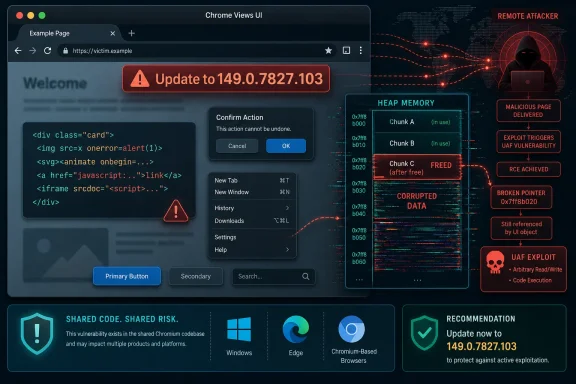
In Chromium, Views is not the JavaScript engine, the network stack, or a media codec. It is part of the user-interface framework used to build browser surfaces: windows, controls, widgets, menus, dialogs, and the machinery around the page rather than the page itself. A flaw there is unsettling because it blurs the comfortable line between hostile web content and the supposedly more boring browser shell that frames it.
The NVD description says the exploit path is a crafted HTML page, which means the attacker does not need the victim to install a malicious extension or open a suspicious document. The victim’s interaction requirement in the CISA CVSS vector is the familiar browser-risk pattern: get someone to land on the wrong page, and the rest depends on the vulnerable code path. That is not exotic tradecraft. It is the daily physics of phishing, malvertising, watering-hole attacks, compromised websites, and link-driven social engineering.
The macOS-specific affected configuration matters, but it should not lull Windows administrators into thinking the underlying lesson is platform-specific. Chromium is a sprawling cross-platform codebase where fixes, regressions, and architectural assumptions routinely move across operating-system boundaries. A bug that manifests in Chrome on Mac today can still illuminate the kinds of browser internals that enterprise defenders should be watching everywhere.
That absence is not unusual in the first days after a Chrome security release. Browser vendors often restrict bug tracker details until most users have received the fix, especially when exploit information could help attackers reproduce the issue. The linked Chromium issue requires permission, which is exactly what one would expect for a high-impact browser memory-corruption flaw shortly after disclosure.
Still, the thinness changes how defenders should read the advisory. We do not know from the public text whether this was discovered internally, through fuzzing, through a researcher report, or in relation to suspicious activity. We do not know the exact UI object lifecycle that failed. We do not know whether exploit reliability depends on a particular macOS version, display configuration, accessibility setting, or browser state.
That uncertainty is not a reason to downgrade the bug. It is a reason to patch first and theorize later. In browser security, the absence of a public proof of concept is often less reassuring than it looks, because the people most capable of weaponizing the bug may not need one.
That sounds abstract until it lands in a browser. Chrome is a hostile-content execution environment by design: it processes untrusted HTML, CSS, JavaScript, images, fonts, video, GPU instructions, and increasingly complex UI transitions at speed. A bug in object lifetime management can become a bridge from a web page into browser process behavior the page should never control.
Modern Chrome has layers of mitigation: sandboxing, site isolation, pointer protections, hardened allocators, compiler defenses, and a release process that moves quickly. Those defenses matter. They are also the reason many advisories now describe exploitation as code execution inside a sandbox or code execution gated by additional escape requirements, rather than immediate total machine compromise.
CVE-2026-11637’s description says arbitrary code execution, and the CISA vector gives it high impact across the classic CIA triad. That does not automatically mean every affected Mac was one click away from full system takeover. It does mean that the vulnerable component sat close enough to trusted browser behavior that Google and the vulnerability ecosystem treated it as a serious remote-code-execution-class issue.
But mixed fleets are the norm in many organizations that otherwise think of themselves as Windows shops. Developers, executives, design teams, security staff, and BYOD users often run Macs on the edge of an Active Directory, Entra ID, Okta, or Google Workspace identity plane. A browser compromise on one of those machines can still reach corporate mail, SaaS sessions, password vaults, VPN portals, source repositories, administrative consoles, and synced browser data.
That is why platform scoping must not become platform complacency. The question for IT is not only “Do we have vulnerable Macs?” It is also “Do we have the telemetry and patch controls to know whether our Chrome estate is current across platforms?” If the answer depends on users noticing an update prompt, the organization is already operating on hope.
The version detail also complicates the casual advice to “update Chrome.” On this release line, the patched Mac version is 149.0.7827.103, while contemporary reporting on the broader stable-channel update shows Windows and Linux patched at adjacent build numbers. Patch management systems that compare only major versions, or that flatten version logic across platforms, can misclassify exposure. Security teams need platform-aware version checks, not vibes.
NIST’s initial analysis shows a logical configuration combining Google Chrome versions before 149.0.7827.103 with Apple macOS. In plain English, that means Chrome on macOS is the vulnerable pairing. A scanner that understands the AND relationship should not flag every Chrome installation everywhere, nor every macOS host regardless of Chrome version. A scanner that mishandles the logic can create noise in one direction and blind spots in the other.
This is not pedantry. Vulnerability dashboards are increasingly used as operational truth by executives, auditors, cyber insurers, and incident responders. A bad CPE match can turn a clean Windows fleet into a false emergency, or worse, allow a vulnerable Mac population to hide behind a generic Chrome asset record that nobody owns.
There is also a timing issue. NVD received the CVE on June 8, CISA-ADP added the CVSS vector shortly afterward, and NIST added the CPE configuration on June 9. Many enterprise tools ingest this data on schedules of their own. For a day or two, two reputable systems can disagree simply because one has fresher enrichment than the other.
That is why the right operational response is not to wait for the database to become perfect. The right response is to verify the vendor-fixed version directly, query managed endpoints for installed Chrome versions, and use NVD/CPE data as one input rather than the sole source of truth.
Enterprises are different. They pin versions for testing, route updates through management products, disable auto-update in tightly controlled environments, package browsers through third-party patch catalogs, and maintain separate policies for Windows, macOS, Linux, VDI, and kiosk systems. Those practices can be rational. They can also turn a browser’s rapid response into a slow internal change-management ticket.
CVE-2026-11637 is the kind of flaw that exposes that gap. The patch is not a quarterly maintenance nicety. It is a browser memory-safety fix for a remote attack path. If your update process treats Chrome like a productivity app rather than an internet-facing runtime, the process is mispriced.
There is a second human gap: restart behavior. Chrome can download an update and still leave the vulnerable binary running until the browser relaunches. On Macs, users are notorious for leaving browsers open for days or weeks, with dozens of tabs preserved like archaeological strata. Admins who only check the installed version on disk may miss whether the running process has actually crossed the patch boundary.
The practical result is that enterprise security teams cannot treat Chromium advisories as “Google news” and move on. They have to ask whether Edge, Brave, Vivaldi, Electron-based applications, embedded WebView runtimes, and other Chromium-derived surfaces are affected, unaffected, or simply not yet updated in public trackers. That is especially true for UI-framework and platform-integration bugs, where the exploitability boundary may depend on how each downstream product uses the shared code.
For Windows administrators, Edge has the advantage of mature policy management through Group Policy, Intune, and the Microsoft 365 ecosystem. Chrome has its own strong enterprise controls. The mistake is assuming either browser is self-solving. Browser choice does not eliminate the need to track update channels, restart compliance, extension policy, and web attack telemetry.
The broader Chromium ecosystem is a triumph of shared engineering. It is also a concentration of risk. One memory-safety defect can ripple through billions of endpoints, but one fix can, in theory, protect them quickly. The difference between those two outcomes is operational discipline.
A successful browser exploit may expose cookies, tokens, password manager contents, autofill data, session storage, or access to privileged web applications. Even when sandboxing limits direct system impact, an attacker who can manipulate browser context may be close to the SaaS control plane that actually matters. In 2026, the endpoint is often less valuable than the session it holds.
That makes CVE-2026-11637 especially relevant to security-minded administrators in hybrid Windows/macOS environments. A compromised Mac used by a developer or administrator can become an identity incident that spills into Windows infrastructure. The operating system boundary is not the security boundary when the same person uses the same browser profile to reach GitHub, Azure, Microsoft 365, Slack, Jira, and remote-management portals.
This is why browser patching belongs next to conditional access, phishing-resistant MFA, device compliance, and session controls. Updating Chrome closes the known memory-corruption door. Reducing token lifetime, enforcing device health, limiting admin portals to compliant devices, and monitoring unusual SaaS activity reduce the blast radius if another door opens tomorrow.
Chrome’s internal severity classification reflects the project’s view of how dangerous a bug is in its own architecture. CVSS tries to encode general exploitability and impact characteristics in a standardized way. A browser vendor may call a bug critical because of where it sits in the codebase and what exploitation could mean, while a CVSS score remains below 9.0 because user interaction is required or because scope is modeled in a particular way.
For defenders, the distinction is useful but should not become an argument for delay. A remotely triggerable browser memory-corruption flaw with low attack complexity and no privilege requirement is urgent even if the numeric score stops at 8.8. The presence of user interaction is not much comfort in a browser. Browsers exist for user interaction.
The more subtle point is that severity labels are starting points for prioritization, not substitutes for context. A critical Chrome bug on a small unmanaged Mac population used by executives may outrank a larger pile of medium server CVEs buried behind compensating controls. Conversely, a scanner that flags the CVE against Windows Chrome because of sloppy CPE handling may send teams chasing a ghost. Priority is where severity meets exposure.
For Windows-heavy shops, the immediate move is to confirm Mac exposure if macOS devices exist anywhere in the managed estate. That means checking MDM inventory, endpoint detection telemetry, vulnerability management results, and any third-party patch product that handles Chrome. It also means verifying the running version, not just the package version.
For organizations using Chrome enterprise policies, update controls should be reviewed with a security lens. If update deferrals exist, they should be short and justified. If users can postpone relaunches indefinitely, the policy is not really patching the browser. If unmanaged Chrome installs exist beside managed Edge deployments, the organization has two browser estates whether it admits it or not.
The same thinking applies to home users and enthusiasts. Chrome’s built-in updater is good, but it is not magic. Opening the browser’s About page forces an update check and shows the installed version. If an update is pending, relaunching is the step that actually matters.
If the answer takes more than a few minutes, the vulnerability has already done its diagnostic work. It has revealed an asset-management problem. The patch itself is straightforward; the hard part is knowing where to apply pressure.
A useful inventory answer must include platform, browser channel, exact version, update policy, last check-in time, and whether the browser has relaunched after update. It should also distinguish Google Chrome from Chromium-derived browsers and from embedded runtimes. The difference between “Chrome exists somewhere” and “Chrome 149.0.7827.103 or later is running on all managed Macs” is the difference between a dashboard and an operational control.
This is where Windows administrators can learn from the macOS scope rather than dismiss it. The next Chromium flaw may land in Windows-specific GPU code, printing integration, font handling, or shell interaction. The organizations that practiced clean inventory and rapid browser verification on this Mac-only CVE will be faster when the affected platform is theirs.
 The Browser Chrome Around the Web Page Is Still Attack Surface
The most important word in this advisory is not “critical.” It is “Views.”In Chromium, Views is not the JavaScript engine, the network stack, or a media codec. It is part of the user-interface framework used to build browser surfaces: windows, controls, widgets, menus, dialogs, and the machinery around the page rather than the page itself. A flaw there is unsettling because it blurs the comfortable line between hostile web content and the supposedly more boring browser shell that frames it.
The NVD description says the exploit path is a crafted HTML page, which means the attacker does not need the victim to install a malicious extension or open a suspicious document. The victim’s interaction requirement in the CISA CVSS vector is the familiar browser-risk pattern: get someone to land on the wrong page, and the rest depends on the vulnerable code path. That is not exotic tradecraft. It is the daily physics of phishing, malvertising, watering-hole attacks, compromised websites, and link-driven social engineering.
The macOS-specific affected configuration matters, but it should not lull Windows administrators into thinking the underlying lesson is platform-specific. Chromium is a sprawling cross-platform codebase where fixes, regressions, and architectural assumptions routinely move across operating-system boundaries. A bug that manifests in Chrome on Mac today can still illuminate the kinds of browser internals that enterprise defenders should be watching everywhere.
A Critical Bug With an Incomplete Public Story
The public record for CVE-2026-11637 is thin by design. NVD lists the issue as a use-after-free in Views, maps it to CWE-416, and shows a CISA-ADP CVSS 3.1 score of 8.8 with network attack vector, low attack complexity, no privileges required, user interaction required, and high impact to confidentiality, integrity, and availability. NVD itself had not yet supplied its own CVSS score in the snapshot provided.That absence is not unusual in the first days after a Chrome security release. Browser vendors often restrict bug tracker details until most users have received the fix, especially when exploit information could help attackers reproduce the issue. The linked Chromium issue requires permission, which is exactly what one would expect for a high-impact browser memory-corruption flaw shortly after disclosure.
Still, the thinness changes how defenders should read the advisory. We do not know from the public text whether this was discovered internally, through fuzzing, through a researcher report, or in relation to suspicious activity. We do not know the exact UI object lifecycle that failed. We do not know whether exploit reliability depends on a particular macOS version, display configuration, accessibility setting, or browser state.
That uncertainty is not a reason to downgrade the bug. It is a reason to patch first and theorize later. In browser security, the absence of a public proof of concept is often less reassuring than it looks, because the people most capable of weaponizing the bug may not need one.
Use-After-Free Remains the Memory Bug That Will Not Retire
A use-after-free flaw is old-school memory corruption with modern consequences. Software allocates an object, frees it, and then later continues to use a stale reference to that same memory. If an attacker can shape what occupies that memory afterward, the program may be tricked into reading attacker-controlled data, jumping through a corrupted pointer, or operating on an object that no longer means what the code thinks it means.That sounds abstract until it lands in a browser. Chrome is a hostile-content execution environment by design: it processes untrusted HTML, CSS, JavaScript, images, fonts, video, GPU instructions, and increasingly complex UI transitions at speed. A bug in object lifetime management can become a bridge from a web page into browser process behavior the page should never control.
Modern Chrome has layers of mitigation: sandboxing, site isolation, pointer protections, hardened allocators, compiler defenses, and a release process that moves quickly. Those defenses matter. They are also the reason many advisories now describe exploitation as code execution inside a sandbox or code execution gated by additional escape requirements, rather than immediate total machine compromise.
CVE-2026-11637’s description says arbitrary code execution, and the CISA vector gives it high impact across the classic CIA triad. That does not automatically mean every affected Mac was one click away from full system takeover. It does mean that the vulnerable component sat close enough to trusted browser behavior that Google and the vulnerability ecosystem treated it as a serious remote-code-execution-class issue.
The macOS Scope Is Narrow, but the Operational Lesson Is Not
The affected software configuration added by NIST ties the vulnerable application to Google Chrome versions before 149.0.7827.103 and the operating system to Apple macOS. That is a meaningful constraint. If your Chrome fleet is entirely Windows and Linux, this particular CVE should not appear as directly applicable in an asset inventory once CPE logic is correctly interpreted.But mixed fleets are the norm in many organizations that otherwise think of themselves as Windows shops. Developers, executives, design teams, security staff, and BYOD users often run Macs on the edge of an Active Directory, Entra ID, Okta, or Google Workspace identity plane. A browser compromise on one of those machines can still reach corporate mail, SaaS sessions, password vaults, VPN portals, source repositories, administrative consoles, and synced browser data.
That is why platform scoping must not become platform complacency. The question for IT is not only “Do we have vulnerable Macs?” It is also “Do we have the telemetry and patch controls to know whether our Chrome estate is current across platforms?” If the answer depends on users noticing an update prompt, the organization is already operating on hope.
The version detail also complicates the casual advice to “update Chrome.” On this release line, the patched Mac version is 149.0.7827.103, while contemporary reporting on the broader stable-channel update shows Windows and Linux patched at adjacent build numbers. Patch management systems that compare only major versions, or that flatten version logic across platforms, can misclassify exposure. Security teams need platform-aware version checks, not vibes.
The CPE Record Shows Why Vulnerability Management Still Needs Humans
The user-submitted NVD excerpt asks, “Are we missing a CPE here?” That question gets to one of the less glamorous but more consequential parts of vulnerability management: machine-readable product matching is only as good as the product model behind it.NIST’s initial analysis shows a logical configuration combining Google Chrome versions before 149.0.7827.103 with Apple macOS. In plain English, that means Chrome on macOS is the vulnerable pairing. A scanner that understands the AND relationship should not flag every Chrome installation everywhere, nor every macOS host regardless of Chrome version. A scanner that mishandles the logic can create noise in one direction and blind spots in the other.
This is not pedantry. Vulnerability dashboards are increasingly used as operational truth by executives, auditors, cyber insurers, and incident responders. A bad CPE match can turn a clean Windows fleet into a false emergency, or worse, allow a vulnerable Mac population to hide behind a generic Chrome asset record that nobody owns.
There is also a timing issue. NVD received the CVE on June 8, CISA-ADP added the CVSS vector shortly afterward, and NIST added the CPE configuration on June 9. Many enterprise tools ingest this data on schedules of their own. For a day or two, two reputable systems can disagree simply because one has fresher enrichment than the other.
That is why the right operational response is not to wait for the database to become perfect. The right response is to verify the vendor-fixed version directly, query managed endpoints for installed Chrome versions, and use NVD/CPE data as one input rather than the sole source of truth.
Google’s Fast Patch Machine Still Leaves a Human Gap
Chrome’s update model is one of the strongest parts of the modern desktop security ecosystem. The browser updates frequently, quietly, and usually without the ritual pain that still haunts operating-system and line-of-business application patching. For consumers, that model has probably prevented countless compromises.Enterprises are different. They pin versions for testing, route updates through management products, disable auto-update in tightly controlled environments, package browsers through third-party patch catalogs, and maintain separate policies for Windows, macOS, Linux, VDI, and kiosk systems. Those practices can be rational. They can also turn a browser’s rapid response into a slow internal change-management ticket.
CVE-2026-11637 is the kind of flaw that exposes that gap. The patch is not a quarterly maintenance nicety. It is a browser memory-safety fix for a remote attack path. If your update process treats Chrome like a productivity app rather than an internet-facing runtime, the process is mispriced.
There is a second human gap: restart behavior. Chrome can download an update and still leave the vulnerable binary running until the browser relaunches. On Macs, users are notorious for leaving browsers open for days or weeks, with dozens of tabs preserved like archaeological strata. Admins who only check the installed version on disk may miss whether the running process has actually crossed the patch boundary.
Microsoft’s Chromium Bet Makes This Everyone’s Problem
WindowsForum readers live in a world where Chrome is not the only Chromium browser that matters. Microsoft Edge rides the same upstream engine family, even when its release timing, branding, management plane, and feature set differ. A Chrome CVE does not automatically equal an Edge CVE, especially when the affected component or platform glue is specific. But the dependency chain is real.The practical result is that enterprise security teams cannot treat Chromium advisories as “Google news” and move on. They have to ask whether Edge, Brave, Vivaldi, Electron-based applications, embedded WebView runtimes, and other Chromium-derived surfaces are affected, unaffected, or simply not yet updated in public trackers. That is especially true for UI-framework and platform-integration bugs, where the exploitability boundary may depend on how each downstream product uses the shared code.
For Windows administrators, Edge has the advantage of mature policy management through Group Policy, Intune, and the Microsoft 365 ecosystem. Chrome has its own strong enterprise controls. The mistake is assuming either browser is self-solving. Browser choice does not eliminate the need to track update channels, restart compliance, extension policy, and web attack telemetry.
The broader Chromium ecosystem is a triumph of shared engineering. It is also a concentration of risk. One memory-safety defect can ripple through billions of endpoints, but one fix can, in theory, protect them quickly. The difference between those two outcomes is operational discipline.
The Vulnerability Is About Code Execution, but the Real Prize Is Identity
When defenders hear “arbitrary code execution,” they often picture malware binaries, persistence mechanisms, and full device compromise. Those are valid concerns, but the first prize in many browser attacks is simpler: authenticated access. The browser is where the user’s identity already lives.A successful browser exploit may expose cookies, tokens, password manager contents, autofill data, session storage, or access to privileged web applications. Even when sandboxing limits direct system impact, an attacker who can manipulate browser context may be close to the SaaS control plane that actually matters. In 2026, the endpoint is often less valuable than the session it holds.
That makes CVE-2026-11637 especially relevant to security-minded administrators in hybrid Windows/macOS environments. A compromised Mac used by a developer or administrator can become an identity incident that spills into Windows infrastructure. The operating system boundary is not the security boundary when the same person uses the same browser profile to reach GitHub, Azure, Microsoft 365, Slack, Jira, and remote-management portals.
This is why browser patching belongs next to conditional access, phishing-resistant MFA, device compliance, and session controls. Updating Chrome closes the known memory-corruption door. Reducing token lifetime, enforcing device health, limiting admin portals to compliant devices, and monitoring unusual SaaS activity reduce the blast radius if another door opens tomorrow.
The Advisory’s Severity Language Deserves Careful Reading
The Chrome severity label for CVE-2026-11637 is critical, while the CISA-ADP CVSS 3.1 base score shown in the NVD excerpt is 8.8, which falls into the high range under CVSS 3.x. That apparent mismatch is not a contradiction. Vendor severity and CVSS scoring are related but not identical systems.Chrome’s internal severity classification reflects the project’s view of how dangerous a bug is in its own architecture. CVSS tries to encode general exploitability and impact characteristics in a standardized way. A browser vendor may call a bug critical because of where it sits in the codebase and what exploitation could mean, while a CVSS score remains below 9.0 because user interaction is required or because scope is modeled in a particular way.
For defenders, the distinction is useful but should not become an argument for delay. A remotely triggerable browser memory-corruption flaw with low attack complexity and no privilege requirement is urgent even if the numeric score stops at 8.8. The presence of user interaction is not much comfort in a browser. Browsers exist for user interaction.
The more subtle point is that severity labels are starting points for prioritization, not substitutes for context. A critical Chrome bug on a small unmanaged Mac population used by executives may outrank a larger pile of medium server CVEs buried behind compensating controls. Conversely, a scanner that flags the CVE against Windows Chrome because of sloppy CPE handling may send teams chasing a ghost. Priority is where severity meets exposure.
Patch Management Needs to Treat Browsers Like Infrastructure
The browser has become infrastructure, but many organizations still manage it like userland convenience software. That mismatch shows up whenever a Chrome advisory lands with a tight version threshold and a remote exploit path. The browser is not merely a window onto work; it is a programmable runtime attached to identity, storage, graphics, audio, USB devices, camera permissions, clipboard APIs, and enterprise data.For Windows-heavy shops, the immediate move is to confirm Mac exposure if macOS devices exist anywhere in the managed estate. That means checking MDM inventory, endpoint detection telemetry, vulnerability management results, and any third-party patch product that handles Chrome. It also means verifying the running version, not just the package version.
For organizations using Chrome enterprise policies, update controls should be reviewed with a security lens. If update deferrals exist, they should be short and justified. If users can postpone relaunches indefinitely, the policy is not really patching the browser. If unmanaged Chrome installs exist beside managed Edge deployments, the organization has two browser estates whether it admits it or not.
The same thinking applies to home users and enthusiasts. Chrome’s built-in updater is good, but it is not magic. Opening the browser’s About page forces an update check and shows the installed version. If an update is pending, relaunching is the step that actually matters.
The Quiet Lesson From CVE-2026-11637 Is Inventory
Security teams like dramatic narratives: zero-days, exploit kits, nation-state actors, emergency patches. CVE-2026-11637 may or may not become part of that kind of story; the public material does not establish active exploitation. The practical story is more mundane and more important: can you rapidly answer which devices run vulnerable Chrome on macOS?If the answer takes more than a few minutes, the vulnerability has already done its diagnostic work. It has revealed an asset-management problem. The patch itself is straightforward; the hard part is knowing where to apply pressure.
A useful inventory answer must include platform, browser channel, exact version, update policy, last check-in time, and whether the browser has relaunched after update. It should also distinguish Google Chrome from Chromium-derived browsers and from embedded runtimes. The difference between “Chrome exists somewhere” and “Chrome 149.0.7827.103 or later is running on all managed Macs” is the difference between a dashboard and an operational control.
This is where Windows administrators can learn from the macOS scope rather than dismiss it. The next Chromium flaw may land in Windows-specific GPU code, printing integration, font handling, or shell interaction. The organizations that practiced clean inventory and rapid browser verification on this Mac-only CVE will be faster when the affected platform is theirs.
The Mac-Only Chrome Bug Leaves Windows Shops With a Short Checklist
CVE-2026-11637 is narrow enough to act on quickly, but serious enough to expose weak browser governance. The right response is not panic; it is disciplined verification, especially in environments where Macs sit just outside the Windows team’s normal patch rhythm.- Confirm whether any managed or unmanaged macOS devices run Google Chrome below 149.0.7827.103.
- Verify that Chrome has relaunched after updating, because a patched package does not always mean a patched running browser process.
- Treat the NVD CPE configuration as a scoped Chrome-on-macOS signal, not as proof that every Chrome installation on every platform is vulnerable.
- Review third-party patch catalogs and vulnerability scanners for platform-aware version logic before reporting fleet exposure.
- Check adjacent Chromium-based browsers and embedded Chromium runtimes separately instead of assuming Chrome’s advisory automatically covers or clears them.
- Use this incident to test whether browser update policy, asset inventory, and identity controls work together under a real security deadline.
References
- Primary source: NVD / Chromium
Published: 2026-06-15T19:13:42-07:00
NVD - CVE-2026-11637
 nvd.nist.gov
- Security advisory: MSRC
Published: 2026-06-15T19:13:42-07:00
Original feed URL
Security Update Guide - Microsoft Security Response Center
 msrc.microsoft.com
- Related coverage: radar.offseq.com
CVE-2026-11637: Use after free in Google Chrome - Live Threat Intelligence - Threat Radar | OffSeq.com
Detailed information about CVE-2026-11637: Use after free in Google Chrome affecting Google Chrome. Get real-time updates, technical details, and mitigation strradar.offseq.com
