

Google disclosed CVE-2026-11661 on June 8, 2026, as a high-severity Windows-only Chrome use-after-free flaw in the browser’s Views component, fixed before version 149.0.7827.103 and capable of helping an attacker escape the renderer sandbox after a separate renderer compromise. That last condition is doing a lot of work, but it should not comfort anyone responsible for Windows fleets. Browser sandbox escapes are rarely the opening move; they are the second stage that turns a compromised tab into a compromised workstation. For Chrome on Windows, this is a reminder that the browser is not merely an app users launch — it is a major operating environment sitting inside the operating system.
CVE-2026-11661 is easy to misread because the component name sounds almost mundane. “Views” is Chromium’s UI framework, the scaffolding behind windows, controls, dialogs, and the browser chrome around web content. It does not have the instant menace of V8, GPU, or WebRTC, but that is precisely why the bug matters: modern browser attack chains often succeed by finding weak seams between the web engine, the UI layer, and the sandbox boundary.
The vulnerability is classified as a use-after-free, the memory-safety failure that occurs when software continues to use an object after it has been released. In practical exploit terms, that class of bug can become a way to steer program execution, corrupt state, or trick a privileged component into acting on attacker-controlled data. Google’s description says the attacker first needs to have compromised the renderer process, which means CVE-2026-11661 is not advertised as a one-click, one-bug takeover.
But that does not make it an academic defect. The renderer is where hostile HTML, JavaScript, images, and other web content are supposed to be trapped. A sandbox escape is the move that defeats that containment model. If the renderer compromise is the burglar getting into the lobby, the escape is the service elevator key.
This is why the CVSS vector assigned by CISA’s enrichment program lands at 8.3, despite high attack complexity and user interaction. The required click or page visit matters, and so does the need for a renderer foothold. Yet the impact values are high across confidentiality, integrity, and availability, because an escape from Chrome’s renderer sandbox changes the trust boundary of the entire event.
That context matters because defenders patch releases, not isolated CVE entries. A vulnerability management dashboard may highlight CVE-2026-11661 as the Windows sandbox-escape item of interest, while another team may be chasing the actively exploited V8 flaw in the same update. The operational answer is the same: get Chrome to the fixed build, verify it, and do not assume auto-update has already done the job everywhere.
Google also said an exploit existed in the wild for CVE-2026-11645, the V8 issue in the same release. That is not the same as saying CVE-2026-11661 was exploited in the wild. The distinction is important, especially for security teams triaging alerts and writing executive summaries. CVE-2026-11661 is dangerous because of what it enables in a chain; CVE-2026-11645 drew the explicit in-the-wild warning.
The lesson is not that every bug in the bundle is equally urgent. The lesson is that Chrome patch bundles often arrive as attack-chain disruptors. If one bug gets the headline because exploitation is confirmed, the less famous sandbox escape in the same build may still be exactly the sort of primitive an attacker would want next.
For WindowsForum readers, this is the part worth pausing over. Chrome may be cross-platform, but security bugs often are not. UI code, graphics paths, file dialogs, accessibility hooks, window management, input methods, and OS integration points can differ sharply across Windows, macOS, and Linux. A bug that is invisible or unreachable on one platform may be exploitable on another because the plumbing is different.
This is also why CPE entries can look odd at first glance. The vulnerable product is Chrome, but the configuration includes Windows as the operating system condition. In CPE logic, that pairing expresses “Chrome in this Windows environment,” not “Windows itself contains the Chrome bug.” Administrators should not treat this as a Microsoft patching problem, but they also should not strip the OS condition away when building detection logic.
In practice, inventory systems need to answer two questions at once. They need to know which machines are running Chrome before the fixed build, and they need to know which of those machines are Windows endpoints. A Linux server with a Chromium package may deserve its own attention for other CVEs, but CVE-2026-11661 is specifically about the Windows Chrome exposure described by Google and NVD.
A sandbox escape vulnerability is therefore evaluated by its role in a chain. The chain might begin with a V8 bug, a type confusion issue, a malicious document rendered in the browser, a compromised extension context, or some other bug that gives code execution inside a constrained process. Once there, the attacker needs a way out. CVE-2026-11661’s description says it could potentially provide that move through a crafted HTML page.
That “potentially” is also doing important work. Public CVE descriptions are intentionally sparse, especially before most users are patched. Google restricts access to bug details for a reason: exploit developers read advisories too. The absence of a public proof-of-concept should not be mistaken for the absence of exploitability.
For enterprise defenders, the risk model should be simple. If a vulnerability helps bypass the browser sandbox, it belongs in the same priority bucket as other chain-completing primitives, even when it is not the first exploit in the sequence. The practical question is not whether an attacker can use CVE-2026-11661 alone; it is whether an attacker already has or can obtain the companion primitive needed to make it useful.
This is not because the Chrome security team is asleep. It is because the browser is a gigantic C++ system at the intersection of untrusted input, legacy compatibility, GPU acceleration, UI frameworks, media parsing, extensions, and OS-specific integration. The number of states it can enter is enormous. Automated testing can burn down entire classes of bugs, but it does not make object lifetime problems disappear.
Views is a particularly interesting place for such a flaw because UI frameworks are full of object lifetimes that depend on user actions, asynchronous events, timers, animations, callbacks, and platform messages. Objects appear and disappear as windows open, prompts close, focus changes, tabs move, and controls redraw. If one part of the code believes an object still exists while another part has already freed it, the result can be more than a crash.
The industry keeps rediscovering this point. Memory safety is not an old problem confined to dusty parsers. It is a current problem in actively developed, aggressively fuzzed, widely deployed software. Every Chrome security release is both a patch note and a progress report on how hard it is to retrofit perfect safety onto a high-performance browser written largely in memory-unsafe languages.
That is not the same thing as listing every Windows release, every Chrome channel, every derivative browser, or every enterprise installer package. CPE data often lags, compresses, or generalizes reality, and vulnerability scanners can disagree over how to represent platform-scoped application flaws. In this case, however, the essential CPE relationship is present: vulnerable Google Chrome before the fixed build, on Windows.
Where administrators can get tripped up is in assuming CPE data is a complete software bill of materials. It is not. CPE is a naming scheme and matching mechanism, not a perfect map of all install paths, channels, portable builds, embedded Chromium runtimes, or Chromium-derived browsers. Chrome Stable, Chrome Extended Stable, managed installations, and third-party Chromium browsers may require separate vendor guidance and separate detection logic.
So the answer is less “NVD forgot the CPE” than “do not let the CPE be your only source of truth.” If your scanner only keys on the application CPE and ignores the Windows platform condition, it may over-report. If it keys too narrowly on one installed product string, it may under-report. The right operational test remains the installed Chrome version on Windows endpoints.
This distinction matters for Windows fleets because Edge is built into the platform strategy of many organizations, while Chrome remains widely deployed by user choice, app compatibility, or enterprise standardization. A sysadmin may patch Chrome and still need to verify Edge’s Chromium base version. Conversely, a Chrome-only CVE entry should not be pasted blindly into an Edge advisory without confirming Microsoft’s own release notes.
The broader issue is that Chromium has become browser infrastructure. When a vulnerability appears in a shared component, the security ecosystem has to wait for downstream packages to absorb, test, and ship the fix. Google’s advisory language about restricting details when third-party libraries or dependent projects are involved reflects that reality.
For administrators, the workflow should be boring: enumerate installed browsers, map them to their current vendor versions, and confirm that each vendor has shipped the corresponding Chromium security update. The exciting version of this story is an exploit chain. The successful defensive version is a spreadsheet that quietly turns red cells green.
Enterprise Windows estates are full of reasons auto-update may not mean immediate update. Devices sleep. VDI images freeze. Users postpone restarts. Security products interfere. Network egress rules break update checks. Golden images lag behind production. Some organizations intentionally pin versions for compatibility testing, and then forget that the exception has become permanent.
The June update’s rollout language — days and weeks — is normal for Chrome, but it collides with the way attackers think about advisories. Once a security update ships, defenders and attackers both know where to look. Even without full bug details, patch diffs, component names, and CVE descriptions can narrow the search space. The patch itself becomes a map.
That is why “we use Chrome auto-update” should be the beginning of the conversation, not the end. A mature response checks the version at scale, forces browser restarts where needed, and treats stale browser processes as a real exposure. Chrome can download an update in the background, but the vulnerable code may remain alive until the browser restarts.
CVE-2026-11661 illustrates that the boundary between “browser issue” and “endpoint issue” is artificial. A sandbox escape is explicitly about crossing from the web content boundary into a more privileged context on the machine. If exploited as part of a chain, the resulting incident would not be filed emotionally as a browser nuisance. It would be an endpoint compromise.
This is especially true in organizations that allow browser-stored credentials, persistent sessions, single sign-on tokens, and cloud admin portals from general-purpose endpoints. The browser has become the front door to the enterprise. When that front door has a memory-safety flaw in the path out of confinement, patching it is identity security, data security, and endpoint security at the same time.
The practical response should include managed Chrome policies, forced relaunch windows, reporting from endpoint management tools, and exception handling for machines that cannot update. The goal is not to make every Chrome CVE an emergency bridge call. The goal is to make high-impact browser fixes routine enough that emergency is unnecessary.
For a home user, the advice is simple: update Chrome and relaunch it. For a small business, the advice is nearly as simple: confirm the browser is at or beyond the fixed version on every Windows machine. For a large enterprise, the nuance matters more. The organization should correlate this update with browser exploit telemetry, endpoint detection coverage, privilege boundaries, and exposure of high-value users.
Security teams should also resist the temptation to rank this bug too low because the renderer must already be compromised. Modern exploit chains are modular. One vulnerability supplies the first foothold, another supplies the escape, and a third may elevate privileges or persist. A bug that is useless alone can be extremely valuable in a chain.
That is the core translation from CVSS to risk: CVE-2026-11661 is not the whole attack. It is the part of the attack that threatens Chrome’s promise that hostile web content remains trapped. In browser security, that promise is everything.
The forward-looking concern is not that this one Views bug will define Chrome security in 2026. It is that browser attack chains keep pushing through the same strategic corridor: compromise a renderer, escape the sandbox, and turn the web’s most exposed application into an endpoint beachhead. Chrome’s June update closes this route for Windows users who actually receive and activate the fix. The next test is whether enterprises can make that last clause automatic.
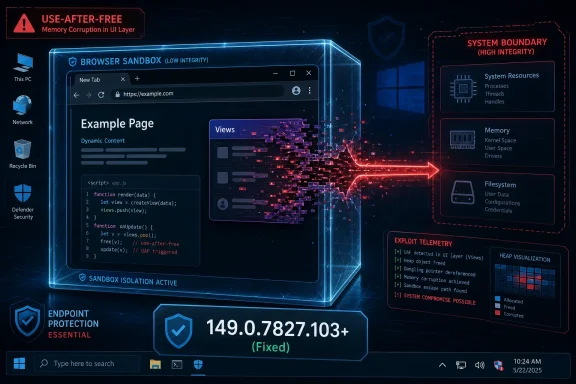 The Dangerous Word Is Not “Views” — It Is “Escape”
CVE-2026-11661 is easy to misread because the component name sounds almost mundane. “Views” is Chromium’s UI framework, the scaffolding behind windows, controls, dialogs, and the browser chrome around web content. It does not have the instant menace of V8, GPU, or WebRTC, but that is precisely why the bug matters: modern browser attack chains often succeed by finding weak seams between the web engine, the UI layer, and the sandbox boundary.The vulnerability is classified as a use-after-free, the memory-safety failure that occurs when software continues to use an object after it has been released. In practical exploit terms, that class of bug can become a way to steer program execution, corrupt state, or trick a privileged component into acting on attacker-controlled data. Google’s description says the attacker first needs to have compromised the renderer process, which means CVE-2026-11661 is not advertised as a one-click, one-bug takeover.
But that does not make it an academic defect. The renderer is where hostile HTML, JavaScript, images, and other web content are supposed to be trapped. A sandbox escape is the move that defeats that containment model. If the renderer compromise is the burglar getting into the lobby, the escape is the service elevator key.
This is why the CVSS vector assigned by CISA’s enrichment program lands at 8.3, despite high attack complexity and user interaction. The required click or page visit matters, and so does the need for a renderer foothold. Yet the impact values are high across confidentiality, integrity, and availability, because an escape from Chrome’s renderer sandbox changes the trust boundary of the entire event.
Chrome’s June Patch Was Not a Single-Bug Story
The June 8 Stable Channel update moved Chrome desktop to 149.0.7827.102/.103 for Windows and Mac and 149.0.7827.102 for Linux, with Google saying the rollout would continue over the coming days and weeks. The update included 74 security fixes, a number large enough to make any single CVE look smaller than it really is. CVE-2026-11661 sits inside that broader release, alongside many other high- and critical-severity issues.That context matters because defenders patch releases, not isolated CVE entries. A vulnerability management dashboard may highlight CVE-2026-11661 as the Windows sandbox-escape item of interest, while another team may be chasing the actively exploited V8 flaw in the same update. The operational answer is the same: get Chrome to the fixed build, verify it, and do not assume auto-update has already done the job everywhere.
Google also said an exploit existed in the wild for CVE-2026-11645, the V8 issue in the same release. That is not the same as saying CVE-2026-11661 was exploited in the wild. The distinction is important, especially for security teams triaging alerts and writing executive summaries. CVE-2026-11661 is dangerous because of what it enables in a chain; CVE-2026-11645 drew the explicit in-the-wild warning.
The lesson is not that every bug in the bundle is equally urgent. The lesson is that Chrome patch bundles often arrive as attack-chain disruptors. If one bug gets the headline because exploitation is confirmed, the less famous sandbox escape in the same build may still be exactly the sort of primitive an attacker would want next.
Windows Is Not an Incidental Detail
The NVD configuration for CVE-2026-11661 combines Google Chrome versions before 149.0.7827.103 with Microsoft Windows. That is not a cosmetic platform tag. Google’s own description narrows the vulnerability to Chrome on Windows, which means the affected attack surface is tied to how the browser’s Views layer behaves on that platform.For WindowsForum readers, this is the part worth pausing over. Chrome may be cross-platform, but security bugs often are not. UI code, graphics paths, file dialogs, accessibility hooks, window management, input methods, and OS integration points can differ sharply across Windows, macOS, and Linux. A bug that is invisible or unreachable on one platform may be exploitable on another because the plumbing is different.
This is also why CPE entries can look odd at first glance. The vulnerable product is Chrome, but the configuration includes Windows as the operating system condition. In CPE logic, that pairing expresses “Chrome in this Windows environment,” not “Windows itself contains the Chrome bug.” Administrators should not treat this as a Microsoft patching problem, but they also should not strip the OS condition away when building detection logic.
In practice, inventory systems need to answer two questions at once. They need to know which machines are running Chrome before the fixed build, and they need to know which of those machines are Windows endpoints. A Linux server with a Chromium package may deserve its own attention for other CVEs, but CVE-2026-11661 is specifically about the Windows Chrome exposure described by Google and NVD.
The Renderer Requirement Is a Speed Bump, Not a Wall
The phrase “attacker who had compromised the renderer process” can lull people into downgrading the risk. That would be a mistake. Renderer compromises are exactly what browser exploit developers seek, and the security model assumes they will sometimes happen. The renderer sandbox exists because Chrome’s architects know that web content is too large, too complex, and too hostile to trust absolutely.A sandbox escape vulnerability is therefore evaluated by its role in a chain. The chain might begin with a V8 bug, a type confusion issue, a malicious document rendered in the browser, a compromised extension context, or some other bug that gives code execution inside a constrained process. Once there, the attacker needs a way out. CVE-2026-11661’s description says it could potentially provide that move through a crafted HTML page.
That “potentially” is also doing important work. Public CVE descriptions are intentionally sparse, especially before most users are patched. Google restricts access to bug details for a reason: exploit developers read advisories too. The absence of a public proof-of-concept should not be mistaken for the absence of exploitability.
For enterprise defenders, the risk model should be simple. If a vulnerability helps bypass the browser sandbox, it belongs in the same priority bucket as other chain-completing primitives, even when it is not the first exploit in the sequence. The practical question is not whether an attacker can use CVE-2026-11661 alone; it is whether an attacker already has or can obtain the companion primitive needed to make it useful.
Use-After-Free Bugs Keep Surviving the Sanitizer Era
Google’s release notes again referenced the role of tools such as AddressSanitizer, MemorySanitizer, UndefinedBehaviorSanitizer, Control Flow Integrity, libFuzzer, and AFL in finding security bugs before they reach the stable channel. That is a quiet admission of scale. Chromium is one of the most heavily tested codebases in consumer software, and memory-safety flaws still reach production.This is not because the Chrome security team is asleep. It is because the browser is a gigantic C++ system at the intersection of untrusted input, legacy compatibility, GPU acceleration, UI frameworks, media parsing, extensions, and OS-specific integration. The number of states it can enter is enormous. Automated testing can burn down entire classes of bugs, but it does not make object lifetime problems disappear.
Views is a particularly interesting place for such a flaw because UI frameworks are full of object lifetimes that depend on user actions, asynchronous events, timers, animations, callbacks, and platform messages. Objects appear and disappear as windows open, prompts close, focus changes, tabs move, and controls redraw. If one part of the code believes an object still exists while another part has already freed it, the result can be more than a crash.
The industry keeps rediscovering this point. Memory safety is not an old problem confined to dusty parsers. It is a current problem in actively developed, aggressively fuzzed, widely deployed software. Every Chrome security release is both a patch note and a progress report on how hard it is to retrofit perfect safety onto a high-performance browser written largely in memory-unsafe languages.
The CPE Entry Is Awkward but Not Missing the Main Idea
The user-facing question around this CVE is whether the NVD entry is “missing a CPE.” Based on the public entry, the more accurate reading is that NVD used a configuration that ties vulnerable Chrome versions to Windows. The visible configuration expresses Chrome versions up to but excluding 149.0.7827.103, combined with a Microsoft Windows operating system condition.That is not the same thing as listing every Windows release, every Chrome channel, every derivative browser, or every enterprise installer package. CPE data often lags, compresses, or generalizes reality, and vulnerability scanners can disagree over how to represent platform-scoped application flaws. In this case, however, the essential CPE relationship is present: vulnerable Google Chrome before the fixed build, on Windows.
Where administrators can get tripped up is in assuming CPE data is a complete software bill of materials. It is not. CPE is a naming scheme and matching mechanism, not a perfect map of all install paths, channels, portable builds, embedded Chromium runtimes, or Chromium-derived browsers. Chrome Stable, Chrome Extended Stable, managed installations, and third-party Chromium browsers may require separate vendor guidance and separate detection logic.
So the answer is less “NVD forgot the CPE” than “do not let the CPE be your only source of truth.” If your scanner only keys on the application CPE and ignores the Windows platform condition, it may over-report. If it keys too narrowly on one installed product string, it may under-report. The right operational test remains the installed Chrome version on Windows endpoints.
Edge, Brave, and the Chromium Shadow
CVE-2026-11661 is assigned to Google Chrome, but Chromium bugs rarely stay conceptually confined to Chrome. Microsoft Edge, Brave, Vivaldi, Opera, and other browsers share large amounts of Chromium code, although they do not always ship the same component revisions, enable the same features, or expose the same platform paths at the same time. That means derivative-browser risk is a question for each vendor’s release channel, not a conclusion automatically supplied by the Chrome CVE.This distinction matters for Windows fleets because Edge is built into the platform strategy of many organizations, while Chrome remains widely deployed by user choice, app compatibility, or enterprise standardization. A sysadmin may patch Chrome and still need to verify Edge’s Chromium base version. Conversely, a Chrome-only CVE entry should not be pasted blindly into an Edge advisory without confirming Microsoft’s own release notes.
The broader issue is that Chromium has become browser infrastructure. When a vulnerability appears in a shared component, the security ecosystem has to wait for downstream packages to absorb, test, and ship the fix. Google’s advisory language about restricting details when third-party libraries or dependent projects are involved reflects that reality.
For administrators, the workflow should be boring: enumerate installed browsers, map them to their current vendor versions, and confirm that each vendor has shipped the corresponding Chromium security update. The exciting version of this story is an exploit chain. The successful defensive version is a spreadsheet that quietly turns red cells green.
Auto-Update Is a Policy, Not a Guarantee
Chrome’s auto-update machinery is one of the reasons browser security is not worse than it is. Most consumer users will receive the fixed build without understanding the CVE, reading the advisory, or manually downloading anything. That is good engineering. It is not a substitute for verification in managed environments.Enterprise Windows estates are full of reasons auto-update may not mean immediate update. Devices sleep. VDI images freeze. Users postpone restarts. Security products interfere. Network egress rules break update checks. Golden images lag behind production. Some organizations intentionally pin versions for compatibility testing, and then forget that the exception has become permanent.
The June update’s rollout language — days and weeks — is normal for Chrome, but it collides with the way attackers think about advisories. Once a security update ships, defenders and attackers both know where to look. Even without full bug details, patch diffs, component names, and CVE descriptions can narrow the search space. The patch itself becomes a map.
That is why “we use Chrome auto-update” should be the beginning of the conversation, not the end. A mature response checks the version at scale, forces browser restarts where needed, and treats stale browser processes as a real exposure. Chrome can download an update in the background, but the vulnerable code may remain alive until the browser restarts.
Patch Management Has to See the Browser as Part of Windows
Windows administrators have long understood Patch Tuesday as an operating-system ritual. Browser patching, however, now deserves the same operational seriousness. Chrome on Windows is not just another desktop app because it is the software most likely to parse hostile code from the public internet every hour of the business day.CVE-2026-11661 illustrates that the boundary between “browser issue” and “endpoint issue” is artificial. A sandbox escape is explicitly about crossing from the web content boundary into a more privileged context on the machine. If exploited as part of a chain, the resulting incident would not be filed emotionally as a browser nuisance. It would be an endpoint compromise.
This is especially true in organizations that allow browser-stored credentials, persistent sessions, single sign-on tokens, and cloud admin portals from general-purpose endpoints. The browser has become the front door to the enterprise. When that front door has a memory-safety flaw in the path out of confinement, patching it is identity security, data security, and endpoint security at the same time.
The practical response should include managed Chrome policies, forced relaunch windows, reporting from endpoint management tools, and exception handling for machines that cannot update. The goal is not to make every Chrome CVE an emergency bridge call. The goal is to make high-impact browser fixes routine enough that emergency is unnecessary.
Security Severity Still Needs Human Translation
Chromium labels CVE-2026-11661 as High. CISA’s ADP score gives it an 8.3. NVD had not supplied its own CVSS score at the time reflected in the entry. Those facts are useful, but they still require interpretation. A high-severity sandbox escape with high complexity and required user interaction is not the same operational animal as a remotely exploitable unauthenticated server bug.For a home user, the advice is simple: update Chrome and relaunch it. For a small business, the advice is nearly as simple: confirm the browser is at or beyond the fixed version on every Windows machine. For a large enterprise, the nuance matters more. The organization should correlate this update with browser exploit telemetry, endpoint detection coverage, privilege boundaries, and exposure of high-value users.
Security teams should also resist the temptation to rank this bug too low because the renderer must already be compromised. Modern exploit chains are modular. One vulnerability supplies the first foothold, another supplies the escape, and a third may elevate privileges or persist. A bug that is useless alone can be extremely valuable in a chain.
That is the core translation from CVSS to risk: CVE-2026-11661 is not the whole attack. It is the part of the attack that threatens Chrome’s promise that hostile web content remains trapped. In browser security, that promise is everything.
The June Chrome Build Leaves Administrators With a Short Checklist
The concrete work from this advisory is not exotic. It is version verification, browser relaunch enforcement, and platform-aware inventory. The only way to make this complicated is to treat the CVE entry as a complete remediation plan rather than a signal to validate the environment.- Chrome on Windows should be updated to 149.0.7827.103 or later, with attention to systems that have downloaded but not activated the update because the browser has not restarted.
- Vulnerability scanners should interpret the affected configuration as Chrome before the fixed build on Windows, not as a standalone Microsoft Windows vulnerability.
- Security teams should distinguish CVE-2026-11661 from CVE-2026-11645, because the latter had Google’s explicit in-the-wild exploitation warning while the former is the Windows sandbox-escape concern in the same release.
- Managed environments should verify Chrome Stable and any relevant extended or alternative channels rather than assuming a single consumer auto-update path covers every endpoint.
- Organizations using Chromium-based browsers other than Chrome should track each vendor’s corresponding release instead of assuming Chrome’s version number directly answers the derivative-browser question.
The forward-looking concern is not that this one Views bug will define Chrome security in 2026. It is that browser attack chains keep pushing through the same strategic corridor: compromise a renderer, escape the sandbox, and turn the web’s most exposed application into an endpoint beachhead. Chrome’s June update closes this route for Windows users who actually receive and activate the fix. The next test is whether enterprises can make that last clause automatic.
References
- Primary source: NVD / Chromium
Published: 2026-06-15T19:14:16-07:00
NVD - CVE-2026-11661
 nvd.nist.gov
- Security advisory: MSRC
Published: 2026-06-15T19:14:16-07:00
Original feed URL
Security Update Guide - Microsoft Security Response Center
 msrc.microsoft.com
