

CVE-2026-11662 is a high-severity Google Chrome vulnerability, published by NVD on June 8, 2026 and fixed in Chrome 149.0.7827.102/.103, where type confusion in Chromium’s Bindings layer could let a remote attacker run code inside Chrome’s sandbox through a crafted HTML page. That sentence is the administrator’s useful version of the story; the rest is about why it matters. This is not the headline-grabbing Chrome zero-day in the same update, but it sits in the same uncomfortable class of browser bugs: memory-safety failures reachable from the web. For Windows users and IT teams, the practical conclusion is blunt: Chrome’s auto-update machinery is part of the security perimeter now, not a convenience feature.
CVE-2026-11662 is described as a type confusion flaw in Bindings, which is Chromium’s plumbing between web-facing JavaScript APIs and the browser engine’s underlying native implementation. In plain English, type confusion happens when software treats one kind of object as if it were another. In memory-unsafe code, that mistake can become much more than a crash.
The published description says exploitation requires a crafted HTML page and user interaction. That does not mean the victim has to download a suspicious executable, approve a security prompt, or install an extension. In browser terms, “user interaction required” often means the victim visits or is redirected to a page that contains malicious content.
The CISA ADP scoring attached to the CVE lands at 8.8 under CVSS 3.1, with network attack vector, low attack complexity, no privileges required, and high impact across confidentiality, integrity, and availability. That is the scoring language behind the everyday risk: a malicious web page can potentially make the browser do something the browser was never supposed to allow.
The phrase “inside a sandbox” is important. This CVE, by itself, is not described as a complete device takeover or a Chrome sandbox escape. But code execution inside the renderer sandbox can still be valuable to attackers, especially when paired with a second vulnerability that escapes the sandbox or when the target data is already reachable from the compromised browser context.
That is partly why CVE-2026-11662 deserves separate attention. It was not the update’s famous active-exploitation item; Google separately said an exploit existed in the wild for CVE-2026-11645, an out-of-bounds memory access issue in V8. But security teams do not patch browser fleets one CVE at a time. They patch the release, because attackers read the same advisories and diff the same code.
For WindowsForum readers, the operational point is that Chrome version numbers matter. If a Windows endpoint is still running a build prior to 149.0.7827.103, it falls on the wrong side of this particular fix line. If it is at or above the patched Stable Channel build, CVE-2026-11662 should be considered remediated for Chrome itself.
The rollout phrasing also matters. Google commonly says desktop updates roll out over days or weeks, which is fine for consumer convenience but awkward for enterprises that need proof of exposure reduction. “It will update eventually” is not a patch-management strategy when the affected component is a browser used for mail, identity, SaaS admin consoles, password vaults, and remote management portals.
That makes Bindings a dangerous place for type confusion. The browser is constantly exposing structured capabilities to untrusted content while trying to ensure that untrusted content cannot reshape those capabilities into arbitrary memory access. The web platform’s promise is that hostile input remains data; memory corruption bugs are cases where hostile input starts becoming behavior.
Chrome’s sandbox is designed to contain that behavior. The renderer process is deliberately constrained so that a compromised tab cannot simply write files, inspect other processes, or seize the operating system. But sandboxing is a mitigation, not a magic eraser. If the attacker’s goal is to steal session material, manipulate page content, attack browser-exposed surfaces, or chain into another bug, renderer code execution can be the first meaningful foothold.
This is the uncomfortable bargain of modern browsers. Users experience Chrome as a single app. Defenders have to treat it as an operating environment with its own exploit surface, privilege model, patch cadence, and failure modes.
In NVD terms, CPE configurations often model a vulnerable application in combination with the platforms on which it runs. Here, the meaningful vulnerable product is Chrome before the fixed version. The listed operating systems describe the desktop platform context rather than three separate OS vulnerabilities.
So, are we missing a CPE? Based on the current NVD structure, the obvious Chrome desktop CPE is present. The more interesting question is whether Chromium-based downstream products should get their own separate vulnerability tracking, advisories, or CPE mappings as their maintainers ingest the upstream fix.
That distinction matters because CPE data drives scanners, dashboards, and compliance workflows. If a scanner only keys off Google Chrome’s CPE, it may not tell the full story for Chromium derivatives. If it overreads the OS CPEs, it may make Windows, Linux, or macOS appear intrinsically vulnerable when the actual vulnerable component is the browser build installed on top.
Microsoft Edge, Brave, Vivaldi, Opera, Electron-based desktop apps, embedded WebView runtimes, and vendor-bundled Chromium components all sit somewhere along the Chromium supply chain. Not every Chrome CVE maps cleanly to every derivative product, and not every derivative ships the fix on the same schedule. But when the affected area is shared Chromium code, administrators should assume there may be downstream exposure until the relevant vendor says otherwise.
For Windows shops, Edge deserves special attention because it is often treated differently from Chrome in management policy. Edge updates through Microsoft’s channels and enterprise controls, while Chrome may be governed through Google Update policies, third-party patching tools, or software distribution platforms. A fleet can be “patched” for one browser and still be stale for the other.
Electron is the quieter headache. Teams may update Chrome and Edge promptly while leaving collaboration tools, developer apps, or line-of-business software running older embedded Chromium versions. That does not mean CVE-2026-11662 automatically applies to every Electron application, but it does mean Chromium version visibility has become a serious inventory problem.
The browser is no longer just the browser. It is a shared runtime hiding in places asset inventories were not originally designed to see.
A renderer compromise can be used to attack same-origin assumptions, abuse browser state, manipulate what the user sees, or prepare a second-stage exploit. In high-value intrusions, the first exploit does not need to win the whole machine. It needs to create enough control to make the next step plausible.
This is why the presence of a separately exploited Chrome zero-day in the same update is relevant even if it is not CVE-2026-11662. It reminds defenders that Chrome exploitation is not theoretical. Browser bugs move from issue tracker to exploit kit faster than most organizations move from advisory to verified remediation.
For users, the action is simple. For administrators, the work is less glamorous: validate versions, force relaunches, watch for update failures, check stale profiles, and remember that an updated installer package does not prove that the running browser process has been replaced.
That last mile is where real-world exposure lives. Users keep tabs open for days. Remote workers suspend laptops. Kiosks, conference-room PCs, virtual desktops, and shared workstations may sit in long-lived sessions. A patched build on disk is not always the same as a patched browser process in memory.
On managed Windows systems, administrators can tighten this gap with Chrome policies that notify users, enforce relaunch windows, and control update behavior. Those policies are sometimes treated as user-experience annoyances until a browser CVE lands with exploitability from a crafted web page. Then they become the difference between “patched in theory” and “patched in production.”
There is a cultural problem here too. Users have been trained to think of browser restarts as interruptions rather than security events. Chrome’s fast update cadence made that attitude understandable, but memory-corruption bugs reachable from the public web make it increasingly untenable.
The NVD entry also had no NIST-provided CVSS vector at the time reflected in the submitted material, while CISA ADP had already supplied one. That is normal in the vulnerability-data pipeline. Enrichment often lags publication, and different systems may display slightly different completeness at different moments.
For defenders, that lag should not slow action. The vendor shipped the fix. The vulnerable version boundary is clear. The attack vector is remote web content. Waiting for every database field to be populated is a luxury that browser vulnerabilities rarely grant.
The better approach is to treat CVE metadata as routing information, not a final verdict. It tells you what queue the issue belongs in. It does not replace judgment about how much of your organization lives in the browser.
But “not known exploited” is not the same as “safe to ignore.” Chrome security fixes are heavily scrutinized after release. Once patches land, attackers can compare code changes, infer bug mechanics, and build exploits against unpatched systems. The disclosure window is also a race between update adoption and exploit development.
That is why enterprises should respond to this class of issue with disciplined urgency rather than theater. There is no need for performative all-hands panic. There is every reason to make sure browser updates are enforced, measured, and reported with the same seriousness as operating-system cumulative updates.
A mature response does not ask whether this one CVE is scary enough. It asks whether the organization can prove that high-risk browser fixes reach endpoints quickly, reliably, and completely.
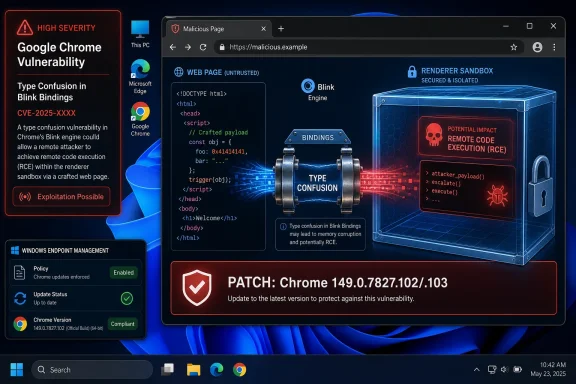 A Browser Bug That Starts With a Web Page and Ends in the Sandbox
CVE-2026-11662 is described as a type confusion flaw in Bindings, which is Chromium’s plumbing between web-facing JavaScript APIs and the browser engine’s underlying native implementation. In plain English, type confusion happens when software treats one kind of object as if it were another. In memory-unsafe code, that mistake can become much more than a crash.The published description says exploitation requires a crafted HTML page and user interaction. That does not mean the victim has to download a suspicious executable, approve a security prompt, or install an extension. In browser terms, “user interaction required” often means the victim visits or is redirected to a page that contains malicious content.
The CISA ADP scoring attached to the CVE lands at 8.8 under CVSS 3.1, with network attack vector, low attack complexity, no privileges required, and high impact across confidentiality, integrity, and availability. That is the scoring language behind the everyday risk: a malicious web page can potentially make the browser do something the browser was never supposed to allow.
The phrase “inside a sandbox” is important. This CVE, by itself, is not described as a complete device takeover or a Chrome sandbox escape. But code execution inside the renderer sandbox can still be valuable to attackers, especially when paired with a second vulnerability that escapes the sandbox or when the target data is already reachable from the compromised browser context.
The Patch Was One Part of a Much Larger Chrome Security Drop
Google’s June 8 Stable Channel update moved desktop Chrome to 149.0.7827.102/.103 for Windows and Mac, and 149.0.7827.102 for Linux. The same advisory lists 74 security fixes, a large enough batch that any single CVE can get lost in the roll-up.That is partly why CVE-2026-11662 deserves separate attention. It was not the update’s famous active-exploitation item; Google separately said an exploit existed in the wild for CVE-2026-11645, an out-of-bounds memory access issue in V8. But security teams do not patch browser fleets one CVE at a time. They patch the release, because attackers read the same advisories and diff the same code.
For WindowsForum readers, the operational point is that Chrome version numbers matter. If a Windows endpoint is still running a build prior to 149.0.7827.103, it falls on the wrong side of this particular fix line. If it is at or above the patched Stable Channel build, CVE-2026-11662 should be considered remediated for Chrome itself.
The rollout phrasing also matters. Google commonly says desktop updates roll out over days or weeks, which is fine for consumer convenience but awkward for enterprises that need proof of exposure reduction. “It will update eventually” is not a patch-management strategy when the affected component is a browser used for mail, identity, SaaS admin consoles, password vaults, and remote management portals.
Bindings Bugs Are Where Web Abstractions Meet Native Consequences
The word Bindings sounds innocuous, almost bureaucratic. In browser engineering, it is anything but. Bindings are the translation layer that lets JavaScript on a web page interact with browser-provided objects and APIs, while the implementation beneath may involve C++, garbage collection, object lifetimes, type metadata, security boundaries, and a vast amount of compatibility baggage.That makes Bindings a dangerous place for type confusion. The browser is constantly exposing structured capabilities to untrusted content while trying to ensure that untrusted content cannot reshape those capabilities into arbitrary memory access. The web platform’s promise is that hostile input remains data; memory corruption bugs are cases where hostile input starts becoming behavior.
Chrome’s sandbox is designed to contain that behavior. The renderer process is deliberately constrained so that a compromised tab cannot simply write files, inspect other processes, or seize the operating system. But sandboxing is a mitigation, not a magic eraser. If the attacker’s goal is to steal session material, manipulate page content, attack browser-exposed surfaces, or chain into another bug, renderer code execution can be the first meaningful foothold.
This is the uncomfortable bargain of modern browsers. Users experience Chrome as a single app. Defenders have to treat it as an operating environment with its own exploit surface, privilege model, patch cadence, and failure modes.
The CPE Entry Looks Odd Because Browser Vulnerability Metadata Is Odd
The user-facing NVD entry shows an affected Chrome application CPE up to, but excluding, 149.0.7827.103, combined with operating-system CPEs for Windows, Linux, and macOS. That can look strange if you are expecting a tidy “Google Chrome on Windows only” record.In NVD terms, CPE configurations often model a vulnerable application in combination with the platforms on which it runs. Here, the meaningful vulnerable product is Chrome before the fixed version. The listed operating systems describe the desktop platform context rather than three separate OS vulnerabilities.
So, are we missing a CPE? Based on the current NVD structure, the obvious Chrome desktop CPE is present. The more interesting question is whether Chromium-based downstream products should get their own separate vulnerability tracking, advisories, or CPE mappings as their maintainers ingest the upstream fix.
That distinction matters because CPE data drives scanners, dashboards, and compliance workflows. If a scanner only keys off Google Chrome’s CPE, it may not tell the full story for Chromium derivatives. If it overreads the OS CPEs, it may make Windows, Linux, or macOS appear intrinsically vulnerable when the actual vulnerable component is the browser build installed on top.
Edge, Electron, and the Chromium Supply Chain Complicate the Clean Story
The Chrome advisory is about Google Chrome. The underlying codebase is Chromium. That difference is where enterprise inventory becomes messy.Microsoft Edge, Brave, Vivaldi, Opera, Electron-based desktop apps, embedded WebView runtimes, and vendor-bundled Chromium components all sit somewhere along the Chromium supply chain. Not every Chrome CVE maps cleanly to every derivative product, and not every derivative ships the fix on the same schedule. But when the affected area is shared Chromium code, administrators should assume there may be downstream exposure until the relevant vendor says otherwise.
For Windows shops, Edge deserves special attention because it is often treated differently from Chrome in management policy. Edge updates through Microsoft’s channels and enterprise controls, while Chrome may be governed through Google Update policies, third-party patching tools, or software distribution platforms. A fleet can be “patched” for one browser and still be stale for the other.
Electron is the quieter headache. Teams may update Chrome and Edge promptly while leaving collaboration tools, developer apps, or line-of-business software running older embedded Chromium versions. That does not mean CVE-2026-11662 automatically applies to every Electron application, but it does mean Chromium version visibility has become a serious inventory problem.
The browser is no longer just the browser. It is a shared runtime hiding in places asset inventories were not originally designed to see.
The Sandbox Is the Middle of the Attack Chain, Not the End
Security advisories often use the phrase “execute arbitrary code inside a sandbox” as if that neatly bounds the risk. It does bound the risk, but it does not neutralize it. Attackers routinely build chains, and the renderer sandbox is one stop on the route.A renderer compromise can be used to attack same-origin assumptions, abuse browser state, manipulate what the user sees, or prepare a second-stage exploit. In high-value intrusions, the first exploit does not need to win the whole machine. It needs to create enough control to make the next step plausible.
This is why the presence of a separately exploited Chrome zero-day in the same update is relevant even if it is not CVE-2026-11662. It reminds defenders that Chrome exploitation is not theoretical. Browser bugs move from issue tracker to exploit kit faster than most organizations move from advisory to verified remediation.
For users, the action is simple. For administrators, the work is less glamorous: validate versions, force relaunches, watch for update failures, check stale profiles, and remember that an updated installer package does not prove that the running browser process has been replaced.
Windows Users Still Lose Time at the Relaunch Prompt
Chrome’s updater is generally one of the better consumer security mechanisms in the software world. It downloads quietly, stages updates automatically, and removes the user from most of the patch decision. But the last mile still often depends on a restart of the browser.That last mile is where real-world exposure lives. Users keep tabs open for days. Remote workers suspend laptops. Kiosks, conference-room PCs, virtual desktops, and shared workstations may sit in long-lived sessions. A patched build on disk is not always the same as a patched browser process in memory.
On managed Windows systems, administrators can tighten this gap with Chrome policies that notify users, enforce relaunch windows, and control update behavior. Those policies are sometimes treated as user-experience annoyances until a browser CVE lands with exploitability from a crafted web page. Then they become the difference between “patched in theory” and “patched in production.”
There is a cultural problem here too. Users have been trained to think of browser restarts as interruptions rather than security events. Chrome’s fast update cadence made that attitude understandable, but memory-corruption bugs reachable from the public web make it increasingly untenable.
Vulnerability Scores Tell You Severity, Not Your Exposure
The 8.8 CVSS score is useful, but it is not the whole risk model. CVSS says what the vulnerability can do under standard assumptions. It does not know whether your users browse from locked-down VDI sessions, whether Chrome is your default browser, whether sensitive admin work happens in browser tabs, or whether your patch tool is silently failing on a subset of laptops.The NVD entry also had no NIST-provided CVSS vector at the time reflected in the submitted material, while CISA ADP had already supplied one. That is normal in the vulnerability-data pipeline. Enrichment often lags publication, and different systems may display slightly different completeness at different moments.
For defenders, that lag should not slow action. The vendor shipped the fix. The vulnerable version boundary is clear. The attack vector is remote web content. Waiting for every database field to be populated is a luxury that browser vulnerabilities rarely grant.
The better approach is to treat CVE metadata as routing information, not a final verdict. It tells you what queue the issue belongs in. It does not replace judgment about how much of your organization lives in the browser.
The Real Lesson Is Version Governance, Not Panic
There is no public indication in the provided material that CVE-2026-11662 itself is being exploited in the wild. That sentence matters because security coverage should not inflate every high-severity browser bug into an emergency. The active-exploitation note in Google’s advisory applies to CVE-2026-11645, not to this Bindings type confusion issue.But “not known exploited” is not the same as “safe to ignore.” Chrome security fixes are heavily scrutinized after release. Once patches land, attackers can compare code changes, infer bug mechanics, and build exploits against unpatched systems. The disclosure window is also a race between update adoption and exploit development.
That is why enterprises should respond to this class of issue with disciplined urgency rather than theater. There is no need for performative all-hands panic. There is every reason to make sure browser updates are enforced, measured, and reported with the same seriousness as operating-system cumulative updates.
A mature response does not ask whether this one CVE is scary enough. It asks whether the organization can prove that high-risk browser fixes reach endpoints quickly, reliably, and completely.
The June Chrome Build Turns Inventory Into the Security Control
This incident leaves Windows admins with a familiar but still uncomfortable truth: the most important control may be knowing exactly what is running. The patched version line is clear enough; the hard part is finding every place where Chromium code is present and every machine where Chrome has not actually relaunched.- Chrome desktop installations should be updated to the 149.0.7827.102/.103 Stable Channel line or later, with special attention to Windows systems still below 149.0.7827.103.
- Administrators should verify the running browser version, not merely the installer version available in a deployment tool.
- Managed environments should enforce relaunch policies so users cannot indefinitely postpone a security update by keeping tabs open.
- Security teams should review Chromium-based browsers and embedded runtimes separately instead of assuming the Google Chrome advisory covers the entire Chromium ecosystem.
- Vulnerability scanners should be checked for CPE interpretation errors, especially where OS platform CPEs appear alongside the Chrome application CPE.
- CVE-2026-11662 should be prioritized as a high-severity web-reachable memory-safety bug, while avoiding the unsupported claim that this specific CVE is known to be exploited.
References
- Primary source: NVD / Chromium
Published: 2026-06-15T19:14:18-07:00
NVD - CVE-2026-11662
 nvd.nist.gov
- Security advisory: MSRC
Published: 2026-06-15T19:14:18-07:00
Original feed URL
Security Update Guide - Microsoft Security Response Center
 msrc.microsoft.com
