

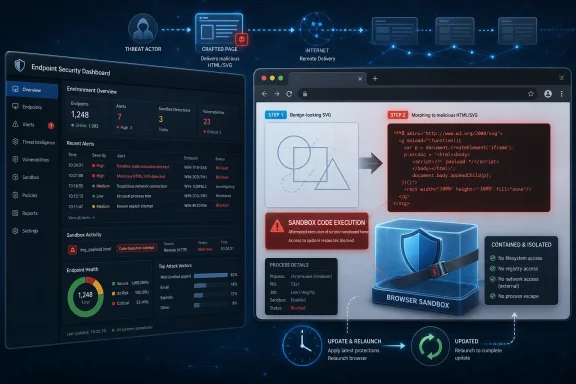
Google Chrome before version 149.0.7827.103 contains CVE-2026-11688, a high-severity SVG implementation flaw disclosed on June 8, 2026, that can let a remote attacker execute arbitrary code inside Chrome’s sandbox when a user opens a crafted HTML page. That is the plain answer; the more useful one is that this is exactly the kind of browser bug administrators should treat as urgent even when the public write-up looks thin. The vulnerability sits in a familiar danger zone: complex document rendering, attacker-controlled web content, and code paths designed to turn text and markup into live graphics. For Windows users and IT teams, the story is less about one CVE entry than about how browser security has become the front line of desktop patch management.
CVE-2026-11688 is not being described, at least publicly, as the week’s marquee zero-day. Google’s advisory language is spare, the Chromium issue tracker entry is access-restricted, and NVD had not assigned its own CVSS score at the time the entry was enriched. That can make the bug look like just another item in the long scroll of Chrome security fixes.
That would be the wrong read. The published description says the flaw is an “inappropriate implementation” in SVG and that exploitation requires only a crafted HTML page plus user interaction. In browser security terms, that means the attacker’s delivery vehicle can be the web itself: a malicious site, a compromised legitimate site, an injected ad, a phishing link, or any other route that causes a vulnerable browser to parse hostile content.
The phrase “inside a sandbox” is doing important work here. Chrome’s sandbox is designed to limit what compromised renderer code can touch. A bug that enables arbitrary code execution in that context is not automatically a full device takeover, but it is a serious foothold, especially when chained with a sandbox escape, credential theft technique, extension abuse, or data-access primitive already available to the renderer.
That is why the operational advice is simple even when the technical details are hidden: update first, analyze later. Chrome, Edge, Brave, Vivaldi, Opera, and other Chromium-derived browsers live on a security treadmill by design. When the treadmill moves, standing still is a decision.
That richness is why SVG bugs matter. A vulnerability in image handling sounds narrower than a JavaScript engine bug, but modern SVG is not a dumb bitmap. It is structured, interactive content that flows through some of the browser’s most complicated subsystems.
The CVE’s public description points to an object lifecycle issue in SVG. That phrase usually implies that objects are created, referenced, detached, destroyed, or reused in an unsafe order. In C++ browser code, lifecycle mistakes can become use-after-free conditions, stale pointer dereferences, type confusion, or other memory-safety problems that turn malformed content into controlled execution.
The public record does not give enough detail to responsibly declare the exact primitive. But the attacker model is clear enough: a remote attacker can craft HTML that reaches the vulnerable SVG implementation path, and successful exploitation can run code in the sandboxed process. That is a meaningful boundary crossing from “the browser parsed a page” to “attacker-controlled code is executing.”
A sandboxed renderer still sees things users care about. It can interact with web content, session state, browser-mediated APIs, and the data exposed to the page. Depending on the target, that can include authenticated web applications, sensitive documents open in cloud services, enterprise portals, or internal systems reachable from the user’s network.
Attackers also rarely stop at one bug when the target is valuable. Browser exploit chains often pair a renderer compromise with a second vulnerability that escapes the sandbox or abuses a weaker adjacent component. Even without a known public chain for CVE-2026-11688, the shape of the flaw makes it the kind of issue defenders should remove from their estate quickly.
This is especially true in enterprise environments where browsers are not just browsers. Chrome and Edge are the shells through which employees reach SaaS applications, identity providers, helpdesk tools, admin consoles, and internal dashboards. A renderer exploit may begin as a browser event, but the business impact depends on what the user was authenticated to when the page loaded.
The vulnerable software is not “Windows” in the sense of a Windows kernel or Win32 component. It is Chrome running on Windows, Linux, or macOS. The operating system CPEs are there to describe the platform context, not to imply that Microsoft, Apple, or the Linux kernel introduced the vulnerable SVG logic.
This distinction matters because CPE data often drives scanners, dashboards, risk scores, and executive reporting. A poorly interpreted entry can produce noise: Windows teams may see a Chrome vulnerability surfaced against their endpoints, Linux teams may see it against workstations, and macOS fleets may catch it through separate management tooling. The fix is still in the browser, not in an OS cumulative update.
There is also a subtle versioning wrinkle. Google’s desktop stable updates often show slightly different build numbers by platform. The CVE description uses “prior to 149.0.7827.103,” while advisory summaries around the same release have referred to 149.0.7827.102 or .103 depending on OS. For practical purposes, the defensive rule is not to split hairs over the last digit; it is to move every Chromium-based browser to the current stable build available for its platform and verify the result.
That vector captures the practical risk better than the sparse prose. The attacker does not need an account on the victim’s machine or network. The exploit can arrive over the network. The user must interact, but in browser-land “user interaction” can be as minimal as visiting a page or opening content that renders in the browser.
The “unchanged scope” part means the scoring does not assume a sandbox escape or privilege boundary jump beyond the vulnerable component’s security authority. That is important. The 8.8 score is not inflated by imagining a full chain; it is already high based on code execution inside the sandboxed Chrome context.
CISA’s CWE mapping to CWE-94, improper control of code generation, is less illuminating than the CVSS vector. CWE classifications can be broad and sometimes awkward for browser engine internals. The more actionable takeaway is that the vulnerability is exploitable through web content and has severe impact if reached successfully.
Once a memory-corruption bug is described in detail, exploit developers can move faster. The same information that helps defenders write detections can help attackers build proof-of-concept code. In the early days after a Chrome security release, the most important defensive control is usually patch adoption rather than perfect detection logic.
That does not mean security teams should ignore telemetry. Network logs, endpoint detection data, browser crash reports, and suspicious renderer-process behavior can all matter. But defenders should be honest about timing: by the time a reliable exploit signature exists, the cheaper and more comprehensive mitigation was already available through the update channel.
This is one reason browser auto-update is not a consumer convenience feature anymore. It is a security architecture choice. Organizations that disable or delay browser updates inherit the burden of rapid testing, staged deployment, and exception management—work many teams underestimate until a high-severity web-content bug appears.
That does not mean every Chromium-based product is automatically vulnerable in the same way on the same day. Vendors ship different branches, enable different features, and package different components. But the safe administrative posture is to treat a serious Chromium rendering flaw as a supply-chain event, not a single-browser event.
On Windows, that means checking more than the Chrome icon pinned to the taskbar. Microsoft Edge has its own update mechanism and enterprise controls. WebView2 Runtime may be present even on systems where users never launch Edge directly. Third-party browsers may lag or follow a different release cadence, and applications that embed Chromium may not update with the browser.
This is where asset inventory stops being a compliance chore and becomes practical defense. If the only browser version your team can see is the default browser reported by endpoint management, you may be blind to the copy of Chromium that actually renders a user’s risky content.
Users visit pages all day. They click search results, open links from chat, preview documents, read email in browser-based clients, and authenticate to cloud applications. The browser is the one application almost every user is trained to feed with untrusted input.
That makes browser bugs unlike many local vulnerabilities. An attacker does not need to convince the user to install software, enable macros, or run a binary. A well-placed link, a compromised web property, or an ad supply-chain compromise may be enough to bring the vulnerable parser and renderer into contact with attacker-controlled content.
User interaction is therefore a mitigating factor, but not a comforting one. In a modern workplace, asking a user not to encounter hostile web content is like asking them not to receive email. The realistic control is to keep the rendering engine current and to layer isolation, filtering, and detection around the cases where patching cannot be instantaneous.
SVG is a particularly attractive target surface because it straddles boundaries. It is image content, document structure, styleable markup, and sometimes script-adjacent behavior. It can be embedded inline in HTML, loaded as a separate resource, manipulated by CSS and DOM APIs, and passed through rendering pipelines that were built over many years of web compatibility compromises.
Object lifecycle bugs often emerge in precisely these boundary regions. One subsystem believes an object is still valid. Another has detached it. A third path schedules work asynchronously. A fourth optimization assumes a state transition cannot happen, until malicious input proves that it can.
None of this makes Chrome uniquely careless. It makes browsers uniquely difficult. The web platform is one of the largest compatibility contracts in software, and every major browser engine carries decades of edge cases because breaking the web is not an option users tolerate.
But “not known to be exploited” is not the same as “safe to defer.” Once a security update is released and a CVE is published, attackers can compare patched and unpatched code, inspect commits, fuzz nearby paths, and attempt to reconstruct the vulnerability. The disclosure clock cuts both ways.
The right posture is controlled urgency. Consumer users should let Chrome update immediately and relaunch the browser. Administrators should push the update through their normal browser-management channels, but with a faster service-level target than they would use for cosmetic or stability fixes.
Organizations with high-risk users should move faster still. Journalists, executives, finance staff, helpdesk personnel, developers with access to production systems, and administrators with privileged consoles are more valuable browser targets. Their browsers are not merely productivity tools; they are identity-bearing endpoints.
For CVE-2026-11688, that gap matters because the vulnerable code remains reachable until the running browser process is actually replaced. On Windows, that may require closing every Chrome window and background process. In some environments, extensions, web apps, and background tasks make the browser feel closed when it is not.
IT teams should therefore measure both update availability and browser restart compliance. A fleet at 95 percent package deployment may still have a meaningful number of users running vulnerable renderer processes. That is especially true in organizations that avoid forced restarts for fear of disrupting work.
The trade-off is real, but so is the risk. A clear relaunch prompt, a deadline, and a short grace period are more defensible than hoping users will eventually close the application that has become their workbench.
That does not make detection useless. Repeated Chrome renderer crashes after visits to unusual domains deserve attention. Browser processes attempting unexpected file, process, or network actions may be interesting, particularly in combination with exploit-kit-like browsing patterns. Proxy logs can help reconstruct user exposure when a suspicious domain later becomes known.
But detection should not become an excuse to slow patching. For this class of bug, the patch is the detection-independent control. If your response plan begins with “wait for indicators,” the attacker gets a generous head start.
Security teams should also resist the urge to overfit to SVG file extensions. SVG content can appear inline in HTML, be embedded through data URLs, arrive with misleading MIME types, or be generated by script. The vulnerable path is about parsing and rendering behavior, not a neat filename.
A Chrome CPE on Windows, macOS, and Linux captures the main product. It does not automatically enumerate every Chromium derivative, every embedded runtime, every portable browser, or every application that imported the vulnerable code. That is not a failure of NVD so much as a mismatch between component reuse and product-level vulnerability accounting.
For administrators, the answer is not to wait for perfect CPE coverage. It is to ask where Chromium code is actually present in the environment. Managed Chrome is one line item. Managed Edge is another. WebView2, Electron apps, kiosk browsers, developer tools, and bundled runtimes complicate the picture.
This is why software bills of materials are becoming more than procurement theater. When a serious bug lands in a widely reused component, the organizations that know where that component lives can act. The ones that know only which vendor logo users click are left guessing.
This distinction is easy to miss because users experience Chrome, Edge, and embedded web views as variations of “the browser.” Underneath, they are separate distribution and update channels. A fully patched Chrome installation does not prove Edge is fixed, and an updated Edge does not prove a third-party Electron app has absorbed the same Chromium changes.
The good news is that modern Microsoft-managed update paths are far better than the old Internet Explorer era of waiting for monthly operating system patches. The bad news is that inventory and verification still fall to administrators. Browser security has become faster, but also more fragmented.
For Windows shops, a sensible response is to check Chrome first, Edge second, WebView2 third, and then the high-risk Chromium-based applications that handle untrusted content. That order reflects exposure, not brand loyalty.
The most mature teams will also look at policy. Chrome enterprise controls can set update behavior, relaunch notifications, and target channels. Endpoint tools can report versions, but they need to be queried in a way that distinguishes installed binaries from running processes. Network controls can reduce exposure, but they cannot replace patching.
There is also a user-education angle, though it should be modest. Telling users not to click suspicious links is fine as background hygiene. Telling users that link caution is the primary defense against renderer exploitation is wishful thinking.
The browser is designed to render untrusted content safely. When a high-severity flaw undermines that assumption, the fix has to be technical. Culture helps; patching carries the load.
The same advice applies in spirit to Chromium-based alternatives, though the version numbers and release timing may differ by vendor. Users should check the browser’s update page rather than assume that a system reboot or Windows Update handled it. Chrome updates through Chrome; Edge updates through Edge and Microsoft’s channels; third-party browsers follow their own release mechanisms.
This is the quiet success of modern browser security. Most users do not need to download installers, parse advisories, or edit configuration files. The failure mode is not that updating is hard; it is that people postpone the relaunch because a browser session now feels like an operating system session.
That is why the best consumer advice is almost embarrassingly simple: save your work, relaunch the browser, and do not treat “Chrome is up to date” as meaningful until the running version reflects the patched build.
Administrators should focus on the concrete items that reduce exposure fastest:
 The Quiet Chrome Bug That Still Deserves a Loud Response
CVE-2026-11688 is not being described, at least publicly, as the week’s marquee zero-day. Google’s advisory language is spare, the Chromium issue tracker entry is access-restricted, and NVD had not assigned its own CVSS score at the time the entry was enriched. That can make the bug look like just another item in the long scroll of Chrome security fixes.That would be the wrong read. The published description says the flaw is an “inappropriate implementation” in SVG and that exploitation requires only a crafted HTML page plus user interaction. In browser security terms, that means the attacker’s delivery vehicle can be the web itself: a malicious site, a compromised legitimate site, an injected ad, a phishing link, or any other route that causes a vulnerable browser to parse hostile content.
The phrase “inside a sandbox” is doing important work here. Chrome’s sandbox is designed to limit what compromised renderer code can touch. A bug that enables arbitrary code execution in that context is not automatically a full device takeover, but it is a serious foothold, especially when chained with a sandbox escape, credential theft technique, extension abuse, or data-access primitive already available to the renderer.
That is why the operational advice is simple even when the technical details are hidden: update first, analyze later. Chrome, Edge, Brave, Vivaldi, Opera, and other Chromium-derived browsers live on a security treadmill by design. When the treadmill moves, standing still is a decision.
SVG Is Small on the Page and Huge in the Attack Surface
SVG has always been one of the web platform’s more deceptive technologies. To users, it is a crisp icon, a logo, a chart, or an animated graphic that scales cleanly from a smartwatch to a 5K monitor. To a browser engine, it is a dense mixture of XML parsing, styling, layout, filters, animation, scripting boundaries, external references, event handling, and memory-heavy rendering behavior.That richness is why SVG bugs matter. A vulnerability in image handling sounds narrower than a JavaScript engine bug, but modern SVG is not a dumb bitmap. It is structured, interactive content that flows through some of the browser’s most complicated subsystems.
The CVE’s public description points to an object lifecycle issue in SVG. That phrase usually implies that objects are created, referenced, detached, destroyed, or reused in an unsafe order. In C++ browser code, lifecycle mistakes can become use-after-free conditions, stale pointer dereferences, type confusion, or other memory-safety problems that turn malformed content into controlled execution.
The public record does not give enough detail to responsibly declare the exact primitive. But the attacker model is clear enough: a remote attacker can craft HTML that reaches the vulnerable SVG implementation path, and successful exploitation can run code in the sandboxed process. That is a meaningful boundary crossing from “the browser parsed a page” to “attacker-controlled code is executing.”
The Sandbox Is a Seatbelt, Not a Force Field
Chrome’s sandbox is one of the reasons the modern web is survivable. It isolates risky work, constrains renderer processes, and makes exploitation harder than it was in the era when a browser bug often meant immediate user-level code execution. But the word sandboxed can create a false sense of comfort.A sandboxed renderer still sees things users care about. It can interact with web content, session state, browser-mediated APIs, and the data exposed to the page. Depending on the target, that can include authenticated web applications, sensitive documents open in cloud services, enterprise portals, or internal systems reachable from the user’s network.
Attackers also rarely stop at one bug when the target is valuable. Browser exploit chains often pair a renderer compromise with a second vulnerability that escapes the sandbox or abuses a weaker adjacent component. Even without a known public chain for CVE-2026-11688, the shape of the flaw makes it the kind of issue defenders should remove from their estate quickly.
This is especially true in enterprise environments where browsers are not just browsers. Chrome and Edge are the shells through which employees reach SaaS applications, identity providers, helpdesk tools, admin consoles, and internal dashboards. A renderer exploit may begin as a browser event, but the business impact depends on what the user was authenticated to when the page loaded.
NVD’s CPE Line Tells a Patch-Management Story
The NVD change history for CVE-2026-11688 shows affected Chrome versions up to, but excluding, 149.0.7827.103, with platform entries for Windows, Linux, and macOS. That is ordinary for a cross-platform browser vulnerability, but it is worth pausing on what it means for administrators.The vulnerable software is not “Windows” in the sense of a Windows kernel or Win32 component. It is Chrome running on Windows, Linux, or macOS. The operating system CPEs are there to describe the platform context, not to imply that Microsoft, Apple, or the Linux kernel introduced the vulnerable SVG logic.
This distinction matters because CPE data often drives scanners, dashboards, risk scores, and executive reporting. A poorly interpreted entry can produce noise: Windows teams may see a Chrome vulnerability surfaced against their endpoints, Linux teams may see it against workstations, and macOS fleets may catch it through separate management tooling. The fix is still in the browser, not in an OS cumulative update.
There is also a subtle versioning wrinkle. Google’s desktop stable updates often show slightly different build numbers by platform. The CVE description uses “prior to 149.0.7827.103,” while advisory summaries around the same release have referred to 149.0.7827.102 or .103 depending on OS. For practical purposes, the defensive rule is not to split hairs over the last digit; it is to move every Chromium-based browser to the current stable build available for its platform and verify the result.
CISA’s 8.8 Score Is the Part Administrators Should Not Ignore
NVD had not supplied its own CVSS score when the entry appeared in the user-provided details, but CISA-ADP assigned CVSS 3.1 score 8.8, High. The vector is unsurprising: network attack vector, low attack complexity, no privileges required, user interaction required, unchanged scope, and high impact to confidentiality, integrity, and availability.That vector captures the practical risk better than the sparse prose. The attacker does not need an account on the victim’s machine or network. The exploit can arrive over the network. The user must interact, but in browser-land “user interaction” can be as minimal as visiting a page or opening content that renders in the browser.
The “unchanged scope” part means the scoring does not assume a sandbox escape or privilege boundary jump beyond the vulnerable component’s security authority. That is important. The 8.8 score is not inflated by imagining a full chain; it is already high based on code execution inside the sandboxed Chrome context.
CISA’s CWE mapping to CWE-94, improper control of code generation, is less illuminating than the CVSS vector. CWE classifications can be broad and sometimes awkward for browser engine internals. The more actionable takeaway is that the vulnerability is exploitable through web content and has severe impact if reached successfully.
Chrome’s Disclosure Model Favors Patching Over Curiosity
The Chromium issue linked from the CVE is restricted, which is normal. Google routinely limits access to bug details until a majority of users have received the fix. That policy frustrates researchers and defenders who want exploit mechanics quickly, but it reflects the uncomfortable economics of browser security.Once a memory-corruption bug is described in detail, exploit developers can move faster. The same information that helps defenders write detections can help attackers build proof-of-concept code. In the early days after a Chrome security release, the most important defensive control is usually patch adoption rather than perfect detection logic.
That does not mean security teams should ignore telemetry. Network logs, endpoint detection data, browser crash reports, and suspicious renderer-process behavior can all matter. But defenders should be honest about timing: by the time a reliable exploit signature exists, the cheaper and more comprehensive mitigation was already available through the update channel.
This is one reason browser auto-update is not a consumer convenience feature anymore. It is a security architecture choice. Organizations that disable or delay browser updates inherit the burden of rapid testing, staged deployment, and exception management—work many teams underestimate until a high-severity web-content bug appears.
The Windows Angle Runs Through Chrome, Edge, and the Chromium Supply Chain
For WindowsForum readers, the first instinct may be to ask whether Microsoft Edge is affected. The CVE is assigned to Google Chrome, but the underlying component is Chromium. Edge, Brave, Opera, Vivaldi, Electron-based applications, embedded WebView runtimes, and other Chromium consumers may need their own updates depending on whether they include the vulnerable code and when they pick up the upstream fix.That does not mean every Chromium-based product is automatically vulnerable in the same way on the same day. Vendors ship different branches, enable different features, and package different components. But the safe administrative posture is to treat a serious Chromium rendering flaw as a supply-chain event, not a single-browser event.
On Windows, that means checking more than the Chrome icon pinned to the taskbar. Microsoft Edge has its own update mechanism and enterprise controls. WebView2 Runtime may be present even on systems where users never launch Edge directly. Third-party browsers may lag or follow a different release cadence, and applications that embed Chromium may not update with the browser.
This is where asset inventory stops being a compliance chore and becomes practical defense. If the only browser version your team can see is the default browser reported by endpoint management, you may be blind to the copy of Chromium that actually renders a user’s risky content.
“Just Visit a Page” Remains the Most Durable Exploit Delivery Model
The most important phrase in the CVE description is “crafted HTML page.” It is easy to become numb to that language because it appears in so many browser advisories. But it describes one of the most reliable attack paths in computing.Users visit pages all day. They click search results, open links from chat, preview documents, read email in browser-based clients, and authenticate to cloud applications. The browser is the one application almost every user is trained to feed with untrusted input.
That makes browser bugs unlike many local vulnerabilities. An attacker does not need to convince the user to install software, enable macros, or run a binary. A well-placed link, a compromised web property, or an ad supply-chain compromise may be enough to bring the vulnerable parser and renderer into contact with attacker-controlled content.
User interaction is therefore a mitigating factor, but not a comforting one. In a modern workplace, asking a user not to encounter hostile web content is like asking them not to receive email. The realistic control is to keep the rendering engine current and to layer isolation, filtering, and detection around the cases where patching cannot be instantaneous.
Why Browser Bugs Keep Landing in Graphics and Layout Code
JavaScript engines get most of the attention because they are fast, complex, and historically rich exploit territory. But browser graphics and layout subsystems are just as tempting. They process attacker-controlled structures, maintain intricate object graphs, optimize aggressively, and interact with memory-management assumptions that can be difficult to reason about.SVG is a particularly attractive target surface because it straddles boundaries. It is image content, document structure, styleable markup, and sometimes script-adjacent behavior. It can be embedded inline in HTML, loaded as a separate resource, manipulated by CSS and DOM APIs, and passed through rendering pipelines that were built over many years of web compatibility compromises.
Object lifecycle bugs often emerge in precisely these boundary regions. One subsystem believes an object is still valid. Another has detached it. A third path schedules work asynchronously. A fourth optimization assumes a state transition cannot happen, until malicious input proves that it can.
None of this makes Chrome uniquely careless. It makes browsers uniquely difficult. The web platform is one of the largest compatibility contracts in software, and every major browser engine carries decades of edge cases because breaking the web is not an option users tolerate.
Patch Urgency Is Different From Panic
There is no public evidence in the provided CVE detail that CVE-2026-11688 is being exploited in the wild. That matters. It should not be described as a confirmed zero-day unless Google, CISA, or another reliable authority says so.But “not known to be exploited” is not the same as “safe to defer.” Once a security update is released and a CVE is published, attackers can compare patched and unpatched code, inspect commits, fuzz nearby paths, and attempt to reconstruct the vulnerability. The disclosure clock cuts both ways.
The right posture is controlled urgency. Consumer users should let Chrome update immediately and relaunch the browser. Administrators should push the update through their normal browser-management channels, but with a faster service-level target than they would use for cosmetic or stability fixes.
Organizations with high-risk users should move faster still. Journalists, executives, finance staff, helpdesk personnel, developers with access to production systems, and administrators with privileged consoles are more valuable browser targets. Their browsers are not merely productivity tools; they are identity-bearing endpoints.
The Enterprise Risk Is in the Delay Between “Updated” and “Relaunched”
Chrome’s auto-update mechanism is good, but it cannot fully protect a browser that has not restarted into the patched version. This is a chronic weak point in enterprise browser security. The update downloads, the version changes on disk, management consoles report progress, and users keep long-running sessions alive for days.For CVE-2026-11688, that gap matters because the vulnerable code remains reachable until the running browser process is actually replaced. On Windows, that may require closing every Chrome window and background process. In some environments, extensions, web apps, and background tasks make the browser feel closed when it is not.
IT teams should therefore measure both update availability and browser restart compliance. A fleet at 95 percent package deployment may still have a meaningful number of users running vulnerable renderer processes. That is especially true in organizations that avoid forced restarts for fear of disrupting work.
The trade-off is real, but so is the risk. A clear relaunch prompt, a deadline, and a short grace period are more defensible than hoping users will eventually close the application that has become their workbench.
Detection Will Be Thin Until the Details Emerge
Because the Chromium bug entry is restricted, defenders should not expect high-fidelity public detection logic immediately. There may be no reliable network signature for an exploit page, especially if the malicious SVG or HTML is obfuscated, generated dynamically, or delivered over encrypted traffic. Endpoint detection may see only a renderer crash, a suspicious child process attempt, or anomalous browser behavior.That does not make detection useless. Repeated Chrome renderer crashes after visits to unusual domains deserve attention. Browser processes attempting unexpected file, process, or network actions may be interesting, particularly in combination with exploit-kit-like browsing patterns. Proxy logs can help reconstruct user exposure when a suspicious domain later becomes known.
But detection should not become an excuse to slow patching. For this class of bug, the patch is the detection-independent control. If your response plan begins with “wait for indicators,” the attacker gets a generous head start.
Security teams should also resist the urge to overfit to SVG file extensions. SVG content can appear inline in HTML, be embedded through data URLs, arrive with misleading MIME types, or be generated by script. The vulnerable path is about parsing and rendering behavior, not a neat filename.
The CPE Question Is Really an Asset Question
The user-provided NVD text asks, “Are we missing a CPE here?” That line is a standard NVD invitation for affected-product corrections, but it raises a real operational issue. Vulnerability management systems depend on CPE mappings, and browser ecosystems do not map cleanly to old software-inventory models.A Chrome CPE on Windows, macOS, and Linux captures the main product. It does not automatically enumerate every Chromium derivative, every embedded runtime, every portable browser, or every application that imported the vulnerable code. That is not a failure of NVD so much as a mismatch between component reuse and product-level vulnerability accounting.
For administrators, the answer is not to wait for perfect CPE coverage. It is to ask where Chromium code is actually present in the environment. Managed Chrome is one line item. Managed Edge is another. WebView2, Electron apps, kiosk browsers, developer tools, and bundled runtimes complicate the picture.
This is why software bills of materials are becoming more than procurement theater. When a serious bug lands in a widely reused component, the organizations that know where that component lives can act. The ones that know only which vendor logo users click are left guessing.
Edge and WebView2 Make the Windows Story More Complicated
Microsoft Edge follows Chromium closely, but it is not patched by Google’s Chrome update package. Windows administrators need to verify Edge’s own stable build once Microsoft ships the corresponding fix. The same goes for WebView2 Runtime, which many Windows applications use to render web content inside desktop software.This distinction is easy to miss because users experience Chrome, Edge, and embedded web views as variations of “the browser.” Underneath, they are separate distribution and update channels. A fully patched Chrome installation does not prove Edge is fixed, and an updated Edge does not prove a third-party Electron app has absorbed the same Chromium changes.
The good news is that modern Microsoft-managed update paths are far better than the old Internet Explorer era of waiting for monthly operating system patches. The bad news is that inventory and verification still fall to administrators. Browser security has become faster, but also more fragmented.
For Windows shops, a sensible response is to check Chrome first, Edge second, WebView2 third, and then the high-risk Chromium-based applications that handle untrusted content. That order reflects exposure, not brand loyalty.
Security Teams Should Treat This as a Browser Hygiene Drill
CVE-2026-11688 is a useful test of whether browser patching is truly operationalized. If your organization can identify affected versions, push updates, force relaunches when needed, and verify remediation within a short window, this vulnerability becomes a routine high-severity event. If not, it exposes a gap that will matter more when the next browser bug is actively exploited.The most mature teams will also look at policy. Chrome enterprise controls can set update behavior, relaunch notifications, and target channels. Endpoint tools can report versions, but they need to be queried in a way that distinguishes installed binaries from running processes. Network controls can reduce exposure, but they cannot replace patching.
There is also a user-education angle, though it should be modest. Telling users not to click suspicious links is fine as background hygiene. Telling users that link caution is the primary defense against renderer exploitation is wishful thinking.
The browser is designed to render untrusted content safely. When a high-severity flaw undermines that assumption, the fix has to be technical. Culture helps; patching carries the load.
The Consumer Fix Is Boring, Which Is Exactly the Point
For home users, the fix is not complicated. Open Chrome’s About page, let it check for updates, and relaunch. If the browser is already current, the work is done.The same advice applies in spirit to Chromium-based alternatives, though the version numbers and release timing may differ by vendor. Users should check the browser’s update page rather than assume that a system reboot or Windows Update handled it. Chrome updates through Chrome; Edge updates through Edge and Microsoft’s channels; third-party browsers follow their own release mechanisms.
This is the quiet success of modern browser security. Most users do not need to download installers, parse advisories, or edit configuration files. The failure mode is not that updating is hard; it is that people postpone the relaunch because a browser session now feels like an operating system session.
That is why the best consumer advice is almost embarrassingly simple: save your work, relaunch the browser, and do not treat “Chrome is up to date” as meaningful until the running version reflects the patched build.
The Practical Lesson Hidden in One SVG Flaw
CVE-2026-11688 is narrow enough to patch quickly but broad enough to teach the right lesson about Chromium risk. It is a browser rendering vulnerability, it affects versions before Chrome 149.0.7827.103, it requires user interaction, and it can lead to arbitrary code execution inside the sandbox. That combination should trigger action without triggering panic.Administrators should focus on the concrete items that reduce exposure fastest:
- Every managed Chrome installation should be updated to the fixed stable build available for its platform, and the browser should be relaunched afterward.
- Enterprise teams should verify Microsoft Edge, WebView2 Runtime, and other Chromium-based browsers separately rather than assuming Chrome remediation covers them.
- Vulnerability scanners may surface the issue through Chrome and operating-system CPE combinations, but the remediation target is the browser or embedded Chromium runtime.
- Detection opportunities are likely to be limited until more technical details are public, so patch status matters more than signature coverage.
- High-risk users and systems that browse untrusted content should receive the shortest update and relaunch deadlines.
- The absence of a public exploitation claim for this specific CVE should not be treated as permission to wait.
References
- Primary source: NVD / Chromium
Published: 2026-06-15T19:14:52-07:00
NVD - CVE-2026-11688
 nvd.nist.gov
- Security advisory: MSRC
Published: 2026-06-15T19:14:52-07:00
Original feed URL
Security Update Guide - Microsoft Security Response Center
 msrc.microsoft.com
- Related coverage: vulnerability.circl.lu
Vulnerability-Lookup
Vulnerability-Lookup - Fast vulnerability lookup correlation from different sources.vulnerability.circl.lu - Related coverage: radar.offseq.com
CVE-2026-11688: Object lifecycle issue in Google Chrome - Live Threat Intelligence - Threat Radar | OffSeq.com
Detailed information about CVE-2026-11688: Object lifecycle issue in Google Chrome affecting Google Chrome. Get real-time updates, technical details, and mitigaradar.offseq.com
