Google published CVE-2026-11045 on June 4, 2026, for a medium-severity Google Chrome GPU vulnerability fixed before Chrome 149.0.7827.53, where a remote attacker who had already compromised the renderer process could potentially read sensitive process memory through a crafted HTML page. The important word is already: this is not described as a one-click browser takeover, but as a second-stage weakness that matters once another bug or exploit chain has put an attacker inside Chrome’s renderer. That makes it easy to underrate and just as easy to misunderstand. For Windows users and administrators, the practical answer is simple: Chrome 149 or later is the line to be on, and Chromium-based browser patch cadence is the real story.
CVE-2026-11045 sits in the uncomfortable middle of browser security: not dramatic enough to dominate headlines, but not trivial enough to ignore. Google and the CVE record describe it as insufficient validation of untrusted input in Chrome’s GPU component, with the resulting exposure being potential disclosure of sensitive information from process memory. CISA’s ADP enrichment gives it a CVSS 3.1 score of 6.5, squarely in “medium” territory.
That rating is defensible, but it is also a little deceptive. The vulnerability requires user interaction and, more importantly, assumes the attacker has already compromised the renderer process. In isolation, that reduces the immediate blast radius. In a real browser exploit chain, however, renderer compromise is often the first door rather than the end of the attack.
Modern Chrome security is built on layers: renderer sandboxing, site isolation, process boundaries, GPU process separation, exploit mitigations, and frequent update delivery. A bug like CVE-2026-11045 matters because it potentially weakens one of those layers after another has failed. It is the kind of flaw that helps explain why browser security advisories often look repetitive from the outside while remaining urgent from the inside.
The bug does not appear to be listed as exploited in the wild in the information provided. That distinction matters. There is a difference between a vulnerability that is theoretically chainable and one already being used by attackers. But administrators do not get to patch only the bugs that arrive with flashing red lights; browser hardening is cumulative, and attackers are patient collectors of primitives.
That is why Chrome’s security history contains a steady drumbeat of GPU, ANGLE, Dawn, Skia, WebGL, and media pipeline fixes. These components translate messy, attacker-controlled web content into commands and memory operations that must remain safe across operating systems, drivers, hardware vendors, and acceleration paths. Every abstraction boundary is a place where validation needs to be exact.
CVE-2026-11045 is classified under CWE-20, improper input validation. That sounds almost generic, and in a sense it is. But “improper validation” in a browser GPU context can mean the difference between treating hostile data as inert content and allowing it to influence memory access, object state, or cross-process behavior in ways the sandbox was supposed to contain.
For WindowsForum readers, the Windows angle is especially relevant because Chrome’s CPE configuration includes Windows, Linux, and macOS as affected platforms for vulnerable Chrome versions. This is not a Windows-only vulnerability, and it is not a Microsoft vulnerability. But Windows fleets are where Chrome’s enterprise footprint, endpoint agents, browser extensions, and patch deferrals often collide.
That assumption is what makes post-renderer bugs so important. If an attacker can execute code in a renderer but cannot escape the sandbox, steal cross-site data, or reach more privileged processes, the damage may be constrained. If another flaw lets that attacker read sensitive process memory or interact unsafely with a privileged component, the chain becomes more valuable.
The reported impact here is confidentiality rather than integrity or availability. CISA’s vector marks confidentiality as high while integrity and availability are not impacted. In plain English, the concern is not that this bug lets an attacker alter files or crash Chrome directly; it is that memory exposure may reveal something the attacker should not see.
That “something” is often the ambiguous part. Process memory can contain tokens, fragments of page content, internal state, object layouts, pointers, or other material useful for defeating mitigations. A memory disclosure vulnerability can be an intelligence-gathering tool inside an exploit chain, helping attackers stabilize a second step or extract information from a target context.
CVE-2026-11045 was one line in a long table of fixes, reported by Google on April 1, 2026 and marked medium severity. It was surrounded by a dense field of other medium GPU, ANGLE, Dawn, Skia, media, and WebRTC issues, plus critical and high-severity bugs earlier in the advisory. That context matters because defenders do not patch CVE-2026-11045 alone; they patch the release train that contains it.
The pattern is familiar. Google holds detailed bug information back until most users have updated, especially when a flaw may still affect third-party libraries or dependent projects. That restricted-access model frustrates researchers and administrators who want full technical clarity on day one, but it is a practical compromise in an ecosystem where exploit developers also read advisories.
The result is an asymmetry. Defenders often know the affected component, severity, version boundary, and rough impact before they know the technical mechanism. Attackers may be working from the same limited public clues, but they can diff code, inspect commits, and hunt for related patterns. This is why “wait for more details” is usually the wrong instinct for browser updates.
That gap is not unusual. NVD enrichment often trails vendor publication, and CVSS scoring can vary depending on interpretation. The practical problem for administrators is that many dashboards and scanners treat missing NVD scoring as uncertainty, while vendor advisories treat the fixed version as the answer.
The CPE configuration is also worth unpacking. The record lists vulnerable Google Chrome versions up to, but excluding, 149.0.7827.53, and associates them with Windows, Linux, and macOS operating system CPEs. That does not mean Windows itself is vulnerable in the way Chrome is. It means vulnerable Chrome builds on those operating systems are in scope for matching.
This distinction matters for asset management. A vulnerability scanner may show Windows devices as affected because Chrome is installed on Windows, not because the OS needs a Windows Update fix. Remediation belongs to the browser update channel, enterprise software deployment system, or third-party patch management platform.
That said, Edge administrators should read this kind of Chrome advisory as a prompt to verify Edge’s current stable version and update status. In enterprise environments, Edge updates can be governed by Microsoft Edge Update policies, Windows management tooling, update rings, and deferral settings. A browser that is “managed” is not automatically a browser that is current.
The same logic applies to Brave, Vivaldi, Opera, Electron-based applications, embedded Chromium runtimes, and Linux distribution Chromium packages. CVE records often begin with Chrome because Google is the CNA and Chrome is the reference consumer, but the vulnerable code may live in the broader Chromium project. Whether a downstream product is affected depends on whether it incorporated the code path and whether the fix has landed.
This is where vulnerability management gets less glamorous and more operational. The question is not merely “Do we have Chrome?” It is “Where do we have Chromium?” That includes browsers, kiosk shells, packaged desktop apps, internal tools, and vendor products that may lag upstream Chromium security releases.
But security teams should resist the opposite mistake, which is to dismiss any medium browser CVE as background noise. Browser attackers chain bugs precisely because modern browsers are hardened. A renderer flaw might provide execution, an information disclosure bug might expose memory layout or secrets, and a sandbox or broker bug might complete the escape.
The web delivery mechanism also matters. A crafted HTML page is not exotic. It can be delivered through a compromised website, malicious ad, phishing lure, injected content, or internal web app abuse. The user-interaction requirement in the CVSS vector does not necessarily mean a user must download and run an executable. Visiting or interacting with hostile web content may be enough in the right chain.
That is why browser patching occupies a strange place in enterprise risk. It is routine enough to be automated and boring, but exposed enough to be one of the fastest paths into a workstation. Every deferred browser update is a bet that attackers will not weaponize the gap before the organization closes it.
For unmanaged users, the basic advice remains boring and correct: restart Chrome after the update downloads, and verify the version. Chrome can download updates in the background, but the browser needs a restart to complete installation. A machine that has “updated” but not relaunched may still be running the old vulnerable code.
For administrators, the fix boundary is more precise. Chrome versions before 149.0.7827.53 are the vulnerable range described in the CVE, with Google’s stable advisory listing 149.0.7827.53 for Linux and 149.0.7827.53/54 for Windows and Mac in the initial Chrome 149 stable promotion. Later stable builds may also contain the fix, so the goal is not that exact number forever; the goal is to be at or beyond the fixed branch.
The most common enterprise failure mode is not ignorance of the advisory. It is friction: maintenance windows, application compatibility testing, VDI images, offline systems, packaging delays, update service failures, and users who never close the browser. Chrome’s security model assumes a living update channel. Enterprises that freeze the browser turn that model into a liability.
In modern exploit development, memory disclosure can be a bypass mechanism. Address space layout randomization, pointer authentication schemes, object hardening, and sandbox boundaries all depend on keeping certain information out of the attacker’s hands. A leak can turn a flaky exploit into a dependable one.
It can also become a direct privacy problem. Browser processes handle cookies, authentication flows, site data, form contents, documents, images, media buffers, and extension-mediated data. Not every memory disclosure exposes user secrets, and the CVE does not claim universal data theft. But the possible exposure of process memory is enough to justify urgency.
This is especially true on shared, high-value, or privileged systems. Developer workstations, administrator consoles, jump boxes, finance desktops, and executive laptops all turn “potentially sensitive information” into a phrase worth taking literally. If a browser session touches crown-jewel systems, browser memory becomes part of the security perimeter.
This is why scanner results for browser CVEs often oscillate between overmatching and undermatching. A device may be flagged because Chrome is present but unused. Another may be missed because the vulnerable Chromium runtime is inside an application directory the scanner does not inspect. Neither outcome is rare.
A mature response starts with inventory. Organizations need a reliable way to enumerate installed browsers, versions, update channels, user profiles, portable builds, and embedded runtimes. Endpoint detection and response tools may help, but software asset management usually needs tuning to see the browser ecosystem clearly.
The Windows desktop makes this mess both better and worse. Better, because Chrome and Edge have mature update mechanisms and policy controls. Worse, because Windows is also home to countless Chromium-wrapped applications that ship their own runtime and update on their own schedule, if they update at all.
CVE-2026-11045 will likely disappear into the long ledger of Chromium fixes, remembered mostly by scanners and patch notes. But its shape is the shape of the modern browser problem: complex graphics and media plumbing exposed to hostile content, layered defenses that assume partial compromise, and a patching race that never really ends. The organizations that do best here will not be the ones that dramatize every CVE; they will be the ones that make browser updates fast enough, broad enough, and measurable enough that a medium bug has very little time to become part of something larger.
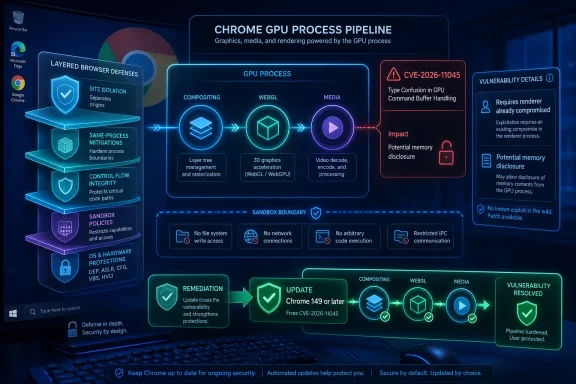 A Medium Chrome Bug Can Still Be a Serious Link in the Chain
CVE-2026-11045 sits in the uncomfortable middle of browser security: not dramatic enough to dominate headlines, but not trivial enough to ignore. Google and the CVE record describe it as insufficient validation of untrusted input in Chrome’s GPU component, with the resulting exposure being potential disclosure of sensitive information from process memory. CISA’s ADP enrichment gives it a CVSS 3.1 score of 6.5, squarely in “medium” territory.That rating is defensible, but it is also a little deceptive. The vulnerability requires user interaction and, more importantly, assumes the attacker has already compromised the renderer process. In isolation, that reduces the immediate blast radius. In a real browser exploit chain, however, renderer compromise is often the first door rather than the end of the attack.
Modern Chrome security is built on layers: renderer sandboxing, site isolation, process boundaries, GPU process separation, exploit mitigations, and frequent update delivery. A bug like CVE-2026-11045 matters because it potentially weakens one of those layers after another has failed. It is the kind of flaw that helps explain why browser security advisories often look repetitive from the outside while remaining urgent from the inside.
The bug does not appear to be listed as exploited in the wild in the information provided. That distinction matters. There is a difference between a vulnerability that is theoretically chainable and one already being used by attackers. But administrators do not get to patch only the bugs that arrive with flashing red lights; browser hardening is cumulative, and attackers are patient collectors of primitives.
The GPU Process Is No Longer a Side Character
The “GPU” label can make this sound like a graphics-driver curiosity, but in Chromium architecture the GPU stack is central infrastructure. It helps handle compositing, video, WebGL, Canvas, accelerated rendering, and increasingly complex workloads that websites assume are available by default. The web’s visual layer is now an attack surface.That is why Chrome’s security history contains a steady drumbeat of GPU, ANGLE, Dawn, Skia, WebGL, and media pipeline fixes. These components translate messy, attacker-controlled web content into commands and memory operations that must remain safe across operating systems, drivers, hardware vendors, and acceleration paths. Every abstraction boundary is a place where validation needs to be exact.
CVE-2026-11045 is classified under CWE-20, improper input validation. That sounds almost generic, and in a sense it is. But “improper validation” in a browser GPU context can mean the difference between treating hostile data as inert content and allowing it to influence memory access, object state, or cross-process behavior in ways the sandbox was supposed to contain.
For WindowsForum readers, the Windows angle is especially relevant because Chrome’s CPE configuration includes Windows, Linux, and macOS as affected platforms for vulnerable Chrome versions. This is not a Windows-only vulnerability, and it is not a Microsoft vulnerability. But Windows fleets are where Chrome’s enterprise footprint, endpoint agents, browser extensions, and patch deferrals often collide.
The Renderer Requirement Narrows the Door but Raises the Stakes
The CVE description says an attacker must have compromised the renderer process before CVE-2026-11045 becomes useful. In Chrome terms, the renderer is where web content is parsed, scripted, laid out, and executed under heavy sandbox restrictions. Compromising it is bad, but the browser is designed on the assumption that renderer bugs will happen.That assumption is what makes post-renderer bugs so important. If an attacker can execute code in a renderer but cannot escape the sandbox, steal cross-site data, or reach more privileged processes, the damage may be constrained. If another flaw lets that attacker read sensitive process memory or interact unsafely with a privileged component, the chain becomes more valuable.
The reported impact here is confidentiality rather than integrity or availability. CISA’s vector marks confidentiality as high while integrity and availability are not impacted. In plain English, the concern is not that this bug lets an attacker alter files or crash Chrome directly; it is that memory exposure may reveal something the attacker should not see.
That “something” is often the ambiguous part. Process memory can contain tokens, fragments of page content, internal state, object layouts, pointers, or other material useful for defeating mitigations. A memory disclosure vulnerability can be an intelligence-gathering tool inside an exploit chain, helping attackers stabilize a second step or extract information from a target context.
Chrome 149 Was a Security Release Disguised as a Routine Promotion
Google’s June 2, 2026 stable-channel post promoted Chrome 149 to stable for Windows, Mac, and Linux. The Windows and Mac builds were listed as 149.0.7827.53/54, while Linux was listed as 149.0.7827.53. The post also said the release included 429 security fixes, an unusually large-looking number even by Chrome’s aggressive maintenance standards.CVE-2026-11045 was one line in a long table of fixes, reported by Google on April 1, 2026 and marked medium severity. It was surrounded by a dense field of other medium GPU, ANGLE, Dawn, Skia, media, and WebRTC issues, plus critical and high-severity bugs earlier in the advisory. That context matters because defenders do not patch CVE-2026-11045 alone; they patch the release train that contains it.
The pattern is familiar. Google holds detailed bug information back until most users have updated, especially when a flaw may still affect third-party libraries or dependent projects. That restricted-access model frustrates researchers and administrators who want full technical clarity on day one, but it is a practical compromise in an ecosystem where exploit developers also read advisories.
The result is an asymmetry. Defenders often know the affected component, severity, version boundary, and rough impact before they know the technical mechanism. Attackers may be working from the same limited public clues, but they can diff code, inspect commits, and hunt for related patterns. This is why “wait for more details” is usually the wrong instinct for browser updates.
The NVD Entry Shows How Vulnerability Data Gets Messy Before It Gets Useful
The NVD record for CVE-2026-11045 tells a small story about how vulnerability intelligence is assembled after publication. The CVE was received from Chrome on June 4, modified by CISA-ADP on June 5, and given initial NIST analysis on June 8. At the time reflected in the supplied details, NVD had not yet provided its own CVSS score, while CISA-ADP had supplied a CVSS 3.1 vector and a 6.5 medium score.That gap is not unusual. NVD enrichment often trails vendor publication, and CVSS scoring can vary depending on interpretation. The practical problem for administrators is that many dashboards and scanners treat missing NVD scoring as uncertainty, while vendor advisories treat the fixed version as the answer.
The CPE configuration is also worth unpacking. The record lists vulnerable Google Chrome versions up to, but excluding, 149.0.7827.53, and associates them with Windows, Linux, and macOS operating system CPEs. That does not mean Windows itself is vulnerable in the way Chrome is. It means vulnerable Chrome builds on those operating systems are in scope for matching.
This distinction matters for asset management. A vulnerability scanner may show Windows devices as affected because Chrome is installed on Windows, not because the OS needs a Windows Update fix. Remediation belongs to the browser update channel, enterprise software deployment system, or third-party patch management platform.
Microsoft Edge Admins Should Treat This as a Chromium Signal, Not a Chrome-Only Curiosity
The user-supplied CVE record is about Google Chrome, not Microsoft Edge. But Edge is Chromium-based, and Chromium component vulnerabilities often have downstream implications for other browsers that consume Chromium code. The timing and version mapping are not always identical, so administrators should not assume one advisory mechanically proves another product’s exposure or fix status.That said, Edge administrators should read this kind of Chrome advisory as a prompt to verify Edge’s current stable version and update status. In enterprise environments, Edge updates can be governed by Microsoft Edge Update policies, Windows management tooling, update rings, and deferral settings. A browser that is “managed” is not automatically a browser that is current.
The same logic applies to Brave, Vivaldi, Opera, Electron-based applications, embedded Chromium runtimes, and Linux distribution Chromium packages. CVE records often begin with Chrome because Google is the CNA and Chrome is the reference consumer, but the vulnerable code may live in the broader Chromium project. Whether a downstream product is affected depends on whether it incorporated the code path and whether the fix has landed.
This is where vulnerability management gets less glamorous and more operational. The question is not merely “Do we have Chrome?” It is “Where do we have Chromium?” That includes browsers, kiosk shells, packaged desktop apps, internal tools, and vendor products that may lag upstream Chromium security releases.
The Exploit Story Is About Chaining, Not Panic
There is no need to inflate CVE-2026-11045 into a catastrophic standalone exploit. The published conditions are clear enough: a crafted HTML page, renderer compromise already achieved, and potential sensitive memory disclosure from the GPU-related process context. That is a serious ingredient, not necessarily a full recipe.But security teams should resist the opposite mistake, which is to dismiss any medium browser CVE as background noise. Browser attackers chain bugs precisely because modern browsers are hardened. A renderer flaw might provide execution, an information disclosure bug might expose memory layout or secrets, and a sandbox or broker bug might complete the escape.
The web delivery mechanism also matters. A crafted HTML page is not exotic. It can be delivered through a compromised website, malicious ad, phishing lure, injected content, or internal web app abuse. The user-interaction requirement in the CVSS vector does not necessarily mean a user must download and run an executable. Visiting or interacting with hostile web content may be enough in the right chain.
That is why browser patching occupies a strange place in enterprise risk. It is routine enough to be automated and boring, but exposed enough to be one of the fastest paths into a workstation. Every deferred browser update is a bet that attackers will not weaponize the gap before the organization closes it.
Patch Management Has to Beat the Browser Release Clock
Chrome’s stable-channel language says updates roll out over days or weeks. That is reasonable for a consumer population of billions, but it is not always acceptable for managed environments. Enterprises need to know when the update is available, when it is approved, when it is deployed, and when telemetry proves endpoints actually moved.For unmanaged users, the basic advice remains boring and correct: restart Chrome after the update downloads, and verify the version. Chrome can download updates in the background, but the browser needs a restart to complete installation. A machine that has “updated” but not relaunched may still be running the old vulnerable code.
For administrators, the fix boundary is more precise. Chrome versions before 149.0.7827.53 are the vulnerable range described in the CVE, with Google’s stable advisory listing 149.0.7827.53 for Linux and 149.0.7827.53/54 for Windows and Mac in the initial Chrome 149 stable promotion. Later stable builds may also contain the fix, so the goal is not that exact number forever; the goal is to be at or beyond the fixed branch.
The most common enterprise failure mode is not ignorance of the advisory. It is friction: maintenance windows, application compatibility testing, VDI images, offline systems, packaging delays, update service failures, and users who never close the browser. Chrome’s security model assumes a living update channel. Enterprises that freeze the browser turn that model into a liability.
Memory Disclosure Is the Quiet Class of Browser Risk
Remote code execution gets the headlines because it is easy to understand: the attacker runs code. Information disclosure is subtler. It may not produce a visible compromise by itself, but it can make other compromises more reliable or more damaging.In modern exploit development, memory disclosure can be a bypass mechanism. Address space layout randomization, pointer authentication schemes, object hardening, and sandbox boundaries all depend on keeping certain information out of the attacker’s hands. A leak can turn a flaky exploit into a dependable one.
It can also become a direct privacy problem. Browser processes handle cookies, authentication flows, site data, form contents, documents, images, media buffers, and extension-mediated data. Not every memory disclosure exposes user secrets, and the CVE does not claim universal data theft. But the possible exposure of process memory is enough to justify urgency.
This is especially true on shared, high-value, or privileged systems. Developer workstations, administrator consoles, jump boxes, finance desktops, and executive laptops all turn “potentially sensitive information” into a phrase worth taking literally. If a browser session touches crown-jewel systems, browser memory becomes part of the security perimeter.
The CPE Question Is a Symptom of a Larger Inventory Problem
The NVD page’s “Are we missing a CPE?” prompt is almost comic in its understatement. CPE data is useful, but it is rarely a complete map of real exposure. Chrome on Windows, Linux, and macOS is easy to model; Chromium embedded in a vendor app or repackaged by a distribution is not.This is why scanner results for browser CVEs often oscillate between overmatching and undermatching. A device may be flagged because Chrome is present but unused. Another may be missed because the vulnerable Chromium runtime is inside an application directory the scanner does not inspect. Neither outcome is rare.
A mature response starts with inventory. Organizations need a reliable way to enumerate installed browsers, versions, update channels, user profiles, portable builds, and embedded runtimes. Endpoint detection and response tools may help, but software asset management usually needs tuning to see the browser ecosystem clearly.
The Windows desktop makes this mess both better and worse. Better, because Chrome and Edge have mature update mechanisms and policy controls. Worse, because Windows is also home to countless Chromium-wrapped applications that ship their own runtime and update on their own schedule, if they update at all.
The Sensible Response Is Fast, Boring, and Verifiable
CVE-2026-11045 does not call for panic, but it does reward discipline. The right answer is not a special emergency ritual; it is the browser hygiene organizations claim to already have. This is a case where routine controls are the controls.- Users should run Chrome 149.0.7827.53 or later, and Windows and Mac users should not be alarmed if their fixed build shows as 149.0.7827.54 or a newer 149 build.
- Administrators should verify deployment through endpoint telemetry rather than relying on update policy settings alone.
- Edge and other Chromium-based browser owners should check their own vendor release channels instead of assuming Chrome’s fixed version maps exactly onto their product.
- Security teams should treat the renderer-compromise prerequisite as a sign of exploit-chain relevance, not as a reason to ignore the bug.
- Asset inventories should look for embedded Chromium runtimes and packaged apps, not just user-installed Chrome.
- Browser restart compliance should be measured, because downloaded updates do not protect users who keep old browser processes alive.
CVE-2026-11045 will likely disappear into the long ledger of Chromium fixes, remembered mostly by scanners and patch notes. But its shape is the shape of the modern browser problem: complex graphics and media plumbing exposed to hostile content, layered defenses that assume partial compromise, and a patching race that never really ends. The organizations that do best here will not be the ones that dramatize every CVE; they will be the ones that make browser updates fast enough, broad enough, and measurable enough that a medium bug has very little time to become part of something larger.
References
- Primary source: NVD / Chromium
Published: 2026-06-09T07:00:05-07:00

NVD - CVE-2026-11045
nvd.nist.gov
- Security advisory: MSRC
Published: 2026-06-09T07:00:05-07:00
Original feed URL

Security Update Guide - Microsoft Security Response Center
msrc.microsoft.com
- Related coverage: security.snyk.io
Snyk Vulnerability Database | Snyk
Improper Input Validation in chromium | CVE-2026-11045 security.snyk.io
- Related coverage: stack.watch
- Related coverage: radar.offseq.com
CVE-2026-11286: Insufficient validation of untrusted input in Google Chrome - Live Threat Intelligence - Threat Radar | OffSeq.com
Detailed information about CVE-2026-11286: Insufficient validation of untrusted input in Google Chrome affecting Google Chrome. Get real-time updates, technical radar.offseq.com