

The CPE Looks Strange Because the Vulnerability Is Not in Windows
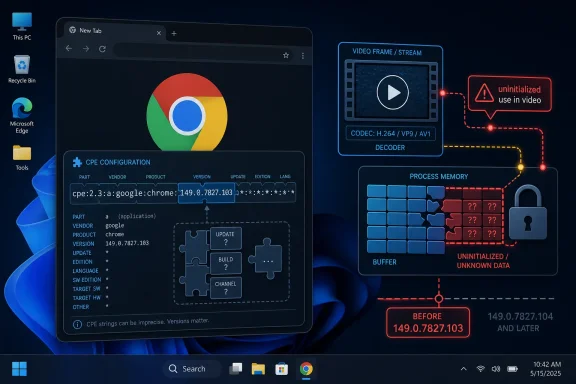
The CPE line in the NVD record is easy to misread. It places cpe:2.3:a:google:chrome:*:*:*:*:*:*:*:* up to but excluding 149.0.7827.103 in the vulnerable side of the configuration, and then pairs it with cpe:2.3:o:microsoft:windows:-:*:*:*:*:*:*:* as the operating-system context. In ordinary English, that says: vulnerable Chrome versions, when running on Windows.
That is not the same thing as saying Windows is vulnerable. The operating-system CPE is there because Google’s description scopes the issue to “Google Chrome on Windows,” not because Microsoft shipped the bug. In NVD’s CPE model, platform constraints often appear beside the affected application so vulnerability scanners can avoid flagging irrelevant installations on Linux, macOS, or ChromeOS.
The confusion comes from how vulnerability databases flatten reality. A bug in Chrome’s video pipeline may depend on Windows-specific allocation behavior, decoder integration, graphics paths, sandbox plumbing, or simply the code path exercised by the Windows build. CPE syntax has no elegant way to say “this application bug is reachable only on this OS under this browser build,” so the record becomes a small logic puzzle.
For asset owners, the practical reading is straightforward: if you manage Google Chrome on Windows and the version is older than 149.0.7827.103, treat the endpoint as exposed. If you manage Chrome on non-Windows platforms, this particular CVE should not be the finding that drives emergency action, though the same Chrome stable update carried other fixes that may still matter.
“Uninitialized Use” Is Bureaucratic Language for a Memory Disclosure Risk
The phrase uninitialized use in video sounds bloodless, but it describes a familiar class of memory-safety failure. Software allocates memory, assumes it contains safe or predictable data, and then uses or exposes it before it has been properly initialized. In a browser, that can turn a media feature into a side channel for fragments of process memory.
CVE-2026-11696 is not described as a direct arbitrary-code-execution bug. The published description says an attacker who had already compromised the renderer process could obtain potentially sensitive information from process memory by using a crafted HTML page. That prerequisite is important: the attacker is not merely sending a victim a video file and instantly reading secrets from the machine.
But modern browser exploitation is built in chains. A renderer compromise is often one stage, a memory disclosure is another, and a sandbox escape or logic abuse may follow. A bug that leaks memory can help defeat address-space layout randomization, expose tokens or document fragments, or give attackers the missing primitive needed to stabilize a larger exploit.
That is why Chrome can mark the bug as high severity while CISA’s ADP CVSS vector lands at 5.3, or medium. CVSS is trying to price the bug in isolation: network attack vector, high attack complexity, no privileges, required user interaction, unchanged scope, high confidentiality impact, no integrity or availability impact. Chrome’s severity system is looking at the browser exploit ecosystem, where information leaks can be disproportionately useful.
The Renderer Prerequisite Is a Warning, Not a Reassurance
The phrase “who had compromised the renderer process” will tempt some administrators to downgrade the issue in their minds. That would be a mistake. Chrome’s renderer is exactly where untrusted web content lives, and it is exactly the process attackers most often try to influence through malicious pages, JavaScript engines, WebAssembly, media parsing, graphics APIs, and document viewers.
Chrome’s multiprocess sandbox architecture exists to contain renderer compromise. If a malicious page gets code execution in a renderer, the browser is not automatically lost; the attacker still has to cross boundaries to reach higher-privilege browser processes, the operating system, files, credentials, or other tabs. A memory disclosure inside that environment can be useful because it helps attackers understand what is present inside the compromised process and how to aim the next step.
The vulnerability also sits in a dangerous neighborhood: video handling. Video is a complex intersection of codecs, GPU acceleration, platform media APIs, memory buffers, and performance shortcuts. Browser vendors have spent years hardening this territory, but it remains attractive because media content is common, automatic, and deeply optimized.
This does not mean every user who played a video in old Chrome was compromised. The description requires a crafted HTML page and an already compromised renderer. But security teams should read that as “chainable in realistic web attacks,” not “academic unless the endpoint is already owned.”
Chrome’s Windows-Specific Bugs Keep Testing Enterprise Patch Discipline
Windows shops have a particular reason to care about this CVE: Chrome is often treated as a self-updating consumer app even when it has become critical enterprise infrastructure. It is the front door to SaaS, identity providers, admin consoles, webmail, developer tools, and internal applications. A browser memory disclosure is therefore not just a desktop nuisance; it can become a route into the working session of the business.
The version threshold is the operational anchor. Chrome before 149.0.7827.103 on Windows is the vulnerable range described for CVE-2026-11696. Any asset inventory that cannot answer “which Chrome versions are installed on which Windows endpoints?” has a bigger problem than this one CVE.
There is also a subtle packaging issue. Public reporting around the same stable-channel update noted patched Chrome builds in the 149.0.7827.102/.103 range depending on platform, while the CVE entry uses “prior to 149.0.7827.103” for this Windows-specific issue. Administrators should avoid arguing themselves into complacency over the final digit. In managed environments, the defensible target is the current stable Chrome build available through the enterprise update channel, not the lowest number that appears in a single advisory sentence.
That matters for vulnerability management because scanners can lag behind vendor releases, and browser updates can be blocked by running sessions. Chrome may download an update but not apply it until the browser restarts. The difference between “update available,” “binary staged,” and “running patched code” is where many enterprises lose days.
The NVD Record Is Doing What CPE Allows, Not What Humans Wish It Did
The user’s central question — are we missing a CPE here? — gets at a real weakness in vulnerability metadata. The record does not appear to be missing the Chrome application CPE or the Windows platform CPE. It has both. What may be missing, depending on the needs of a given scanner or database, is richer product-family context.
For example, Chromium-based browsers other than Chrome may share underlying code but are not automatically covered by a Google Chrome CPE. Microsoft Edge, Brave, Vivaldi, Opera, Electron-based apps, and embedded Chromium runtimes all depend on Chromium to varying degrees, but their exposure depends on whether they incorporated the affected code, whether the vulnerable Windows video path is present, and whether their shipped build includes the fix.
That is not something NVD can safely infer from the Chrome CVE alone. A CPE for Microsoft Edge should not be added merely because Edge is Chromium-based. A CPE for Chromium as a project can also be misleading if the vendor advisory and affected-product statement are specifically for Google Chrome. Vulnerability records are supposed to be conservative; overbroad CPEs create false positives at scale.
The better mental model is that CVE-2026-11696 is a Chrome-on-Windows finding until downstream vendors say otherwise. If another Chromium-based product later publishes its own advisory or maps the same CVE to its release notes, then asset teams can expand their detection logic. Until then, adding speculative CPEs would be less accuracy and more wishful automation.
The Public Bug Link Is Restricted Because Patch Gaps Are Still Dangerous
The Chromium issue tracker reference for CVE-2026-11696 requires permission, which is normal for fresh browser security bugs. Vendors routinely restrict technical details until most users have received the fix. This is not mere secrecy for its own sake; the patch diff, bug report, proof-of-concept notes, and regression tests can all help attackers reconstruct the vulnerability.
That restriction leaves defenders in an uncomfortable middle ground. They have enough information to patch but not enough to deeply understand exploitability. The absence of a public exploit is not the same as evidence of safety, and the absence of detailed technical write-up is not evidence of triviality.
For Windows administrators, the right response is to treat the vendor’s version boundary as authoritative. Do not wait for a polished exploit analysis, a Metasploit module, or a threat-intelligence blog with screenshots. Browser bugs often become easier to exploit after the patch teaches attackers where to look.
This is especially true for memory-disclosure issues. They may not generate splashy headlines the way remote code execution or sandbox escape bugs do, but they can become enabling vulnerabilities inside a chain. Attackers do not need every CVE in the chain to be spectacular; they need the chain as a whole to work.
The Medium Score Hides a High-Value Browser Primitive
CISA’s ADP vector gives CVE-2026-11696 a 5.3 medium score, mainly because exploitation requires user interaction and high attack complexity, and because the stated impact is confidentiality only. That is reasonable from a scoring perspective. It is also incomplete from an operational one.
Confidentiality impact in a browser process can be messy. Depending on process isolation boundaries, site isolation behavior, timing, and what the renderer has touched, memory disclosure might reveal cross-origin data, session material, internal application content, or exploit-development clues. The CVE text does not claim all of those outcomes, but the class of bug is valuable precisely because browsers concentrate sensitive state.
The high attack complexity is also not a comfort blanket. Browser exploit writers are accustomed to complexity. They routinely combine type confusion, use-after-free, out-of-bounds access, information leaks, sandbox escapes, and social engineering into attacks that look simple to the victim: visit a page, click a link, open a document, or follow a redirect.
This is why vulnerability teams should avoid sorting browser CVEs by base score alone. A 5.3 browser memory leak may be more urgent than a higher-scoring bug buried in a rarely exposed internal service. Context is not a footnote; it is the difference between risk management and spreadsheet management.
The Windows Boundary Helps Prioritization, But It Does Not Shrink the Blast Radius Enough
The Windows-specific scope does help. Linux and macOS Chrome fleets should not be flagged for this particular CVE if the CPE logic is implemented correctly. That reduces noise and gives administrators a cleaner target.
But Windows remains the dominant enterprise desktop platform. Chrome on Windows is a high-volume, high-value target, and many organizations run multiple browser channels: stable, extended stable, beta for developers, unmanaged personal installs, portable builds, and copies embedded in virtual desktop images. Each variation creates a different patch path.
The biggest exposure is usually not the well-managed laptop enrolled in modern endpoint management. It is the stale gold image, the persistent VDI pool, the lab machine, the shared workstation, the kiosk, the contractor desktop, or the browser running under a service account for automation. Those are the places where “Chrome auto-updates” becomes an assumption rather than a verified state.
Security teams should also remember that browser updates often compete with user convenience. Restart prompts are deferred. Tabs are preserved forever. Machines sleep instead of rebooting. A patched installer in the background does not protect a process that has not restarted into the new code.
The Patch Is Simple; Proving the Patch Is the Work
For individual users, the remediation is boring in the best possible way: update Chrome and restart it. The About Chrome page should pull the current stable release, and a relaunch should move the running browser into the fixed version line. On Windows, administrators should verify the installed and running version rather than relying on user self-reporting.
For managed environments, the task is broader. Inventory Chrome versions, enforce update policies, shorten relaunch deferral windows, and pay attention to machines that have not checked in. If your endpoint tooling can distinguish installed version from active process version, use that distinction. If it cannot, assume you have a blind spot.
This is also a good moment to inspect whether vulnerability scanners are interpreting the CPE configuration correctly. The record should match Chrome versions before 149.0.7827.103 on Windows. It should not light up every Windows machine merely because Windows appears in the configuration, and it should not light up Chrome on non-Windows platforms for this CVE unless another source expands the affected range.
Where organizations use browser alternatives built on Chromium, they should watch those vendors’ own advisories. Do not manually add Chrome CPEs to Edge or Brave assets in an attempt to be “safe.” That may feel proactive, but it degrades the signal your vulnerability program depends on.
The CPE Answer Is a Lesson in Metadata Humility
The vulnerability-management industry wants clean machine-readable truth. CVE-2026-11696 shows how often it gets conditional truth instead. The affected product is Chrome, the platform is Windows, the component is video, the weakness is uninitialized use, the exploit condition includes a compromised renderer, and the outcome is memory disclosure. Every one of those qualifiers matters.
There is no obvious missing Windows CPE in the NVD configuration as described. The Windows CPE is present as the platform condition. There is also no automatic case for adding Microsoft Edge, generic Chromium, or other Chromium-family browsers without vendor confirmation. The record may be imperfect, but overfitting it would create more confusion.
The better critique is that CPE alone cannot express modern software supply chains very well. Browsers are not monoliths; they are bundles of rendering engines, JavaScript engines, GPU stacks, codec libraries, sandbox layers, OS integrations, and update systems. A vulnerability can be born upstream, manifest only on one platform, and be fixed downstream on different calendars.
That is why human review still matters. A scanner can flag the candidate machines. An administrator still has to ask whether the finding matches the product, version, platform, and running state. Metadata gets you to the door; it does not walk the patch all the way through production.
The Practical Reading for Chrome-on-Windows Fleets
The operational lesson is not that CVE-2026-11696 is the scariest browser bug of the year. It is that a medium-scored, Windows-scoped memory-disclosure bug can still be relevant because it lives inside the browser attack surface and because the remediation is readily available.
- The NVD CPE configuration already represents Google Chrome before 149.0.7827.103 running on Microsoft Windows.
- The Windows CPE should be read as a platform constraint, not as evidence that Windows itself contains the vulnerable code.
- The bug requires a compromised renderer process, but that condition fits the way browser exploit chains are commonly assembled.
- The CVSS 5.3 medium score should not be the only prioritization input for a browser memory-disclosure flaw.
- Security teams should verify that Chrome has both installed and relaunched into a fixed build, especially on managed Windows endpoints.
- Other Chromium-based browsers should be tracked through their own vendor advisories rather than assumed vulnerable through the Chrome CPE alone.
The answer, then, is less dramatic than the vulnerability name: no, the obvious CPE is not missing; the record is trying to say “Chrome on Windows” in the limited grammar that NVD has available. The larger challenge is making sure that grammar does not become a substitute for judgment, because browser security in 2026 is still a race between fast patch distribution, slow endpoint reality, and attackers who know exactly how to turn small memory mistakes into useful leverage.