

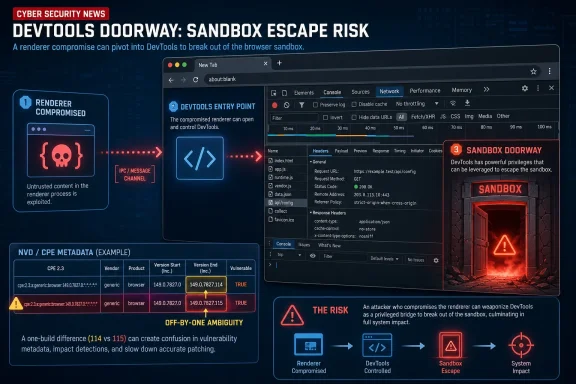
Google Chrome CVE-2026-12016, published by NVD on June 11, 2026 and modified on June 12, describes a high-severity DevTools flaw fixed in Chrome 149.0.7827.115 that could let a remote attacker escape the browser sandbox after compromising the renderer process. The important wrinkle is not just the sandbox-escape language, but the metadata around it: NVD’s CPE entry currently says versions up to, but excluding, 149.0.7827.114. That looks one build short of Chrome’s own description and creates exactly the sort of inventory ambiguity that makes browser patching harder than it should be. For WindowsForum readers, the practical answer is simple: treat 149.0.7827.115 as the safe target where available, and do not let a database boundary condition become your patch policy.
CVE-2026-12016 is not described as a one-click “own the machine” vulnerability. Google’s wording is more specific: an inappropriate implementation in Chrome DevTools could allow a remote attacker, after already compromising the renderer process, to potentially perform a sandbox escape through a crafted HTML page. That is a second-stage vulnerability, not a first-stage entry point.
That distinction matters because modern browser exploitation is rarely a single bug doing all the work. The browser renderer is supposed to be the blast chamber for hostile web content. If an attacker can first land code execution or serious memory corruption inside that renderer, a sandbox escape is the next prize: crossing from the tightly constrained web-content process into a more privileged browser or system context.
Chrome’s sandbox has spent years turning “visit a bad page” into “the attacker still needs another bug.” CVE-2026-12016 is interesting because it appears to live in a part of Chrome that many users think of as developer-only furniture. DevTools is where JavaScript gets debugged, network traffic gets inspected, and front-end mysteries get solved. It is not where most users expect the next browser escape story to begin.
But Chromium is not a neat stack of user-facing features and hidden internals. DevTools has deep hooks into page execution, debugging interfaces, protocol plumbing, storage inspection, rendering state, and browser instrumentation. If untrusted input crosses those boundaries without sufficient validation, a feature built to observe and manipulate web content can become a bridge out of the sandbox.
The likely explanation is mundane rather than conspiratorial. Google’s desktop Chrome releases often arrive with slightly different build numbers across platforms, and the June 11 stable update was reported as 149.0.7827.114/.115 for Windows and macOS and 149.0.7827.114 for Linux. NVD’s CPE logic may be trying to normalize a release train that is not perfectly uniform across operating systems.
Still, the description and the CPE do not line up cleanly. If a scanner consumes the CPE range literally, it may decide that 149.0.7827.114 is outside the vulnerable range even though the CVE prose says “prior to 149.0.7827.115.” If a security team reads the prose literally, it may mark .114 as suspect even where Google shipped .114 as the fixed Linux build. Both interpretations can be defensible depending on platform, but neither is ideal.
This is why CPEs are not just clerical decoration. They are the machine-readable bridge between a vulnerability record and an enterprise’s asset inventory. When that bridge is even slightly crooked, the remediation conversation shifts from “Are we patched?” to “What did the database mean?”
That is not unique to this CVE, and it is not unique to Google. Cross-platform products frequently ship with platform-specific packaging, build, signing, or rollout differences. The problem is that vulnerability management tools crave flat answers: affected or not affected, fixed or not fixed, pass or fail.
CVE-2026-12016 lands directly in that friction zone. NVD records a Chrome application CPE and then constrains it by operating system CPEs for Windows, Linux, and macOS. In theory, that is more precise than a single product-only CPE. In practice, the version cutoff still has to express a release reality that may differ by OS.
For Windows administrators, the safest reading is straightforward. If you see Chrome 149.0.7827.115 or later, you should be past this bug. If you see 149.0.7827.114 on Windows or macOS, you should verify whether that host has actually received the relevant stable-channel fix rather than relying on a scanner green light. If you see Linux at .114, the platform-specific release notes become more important than the generic CVE sentence.
DevTools has become a large subsystem because the web itself has become a large subsystem. It is a debugger, profiler, protocol client, performance laboratory, accessibility analyzer, network inspector, storage browser, and increasingly an integration point for automation and AI-assisted development workflows. The same depth that makes DevTools indispensable also makes it a meaningful attack surface.
The CVE’s “untrusted input” phrasing is especially telling. Browser security depends on assuming that web content is hostile by default. DevTools, by contrast, is full of features designed to introspect and reshape that content. If the boundary between observation and trust gets blurred, an attacker who already controls renderer behavior may be able to feed the browser something it treats with too much authority.
That does not mean casual users should panic about having DevTools present. It means security teams should stop treating developer-facing browser components as irrelevant to ordinary endpoint risk. In Chromium, the developer surface and the user surface run through the same process architecture, update channel, and enterprise policy universe.
Renderer compromise can come from a separate vulnerability, a malicious extension chain, a logic flaw, a just-in-time compiler bug, a type confusion issue, or another web-platform weakness. Once an attacker is executing inside the renderer, the sandbox is supposed to limit what can be touched. Files, credentials, browser internals, operating system resources, and cross-origin secrets should not simply become available because a tab went bad.
That is why sandbox escapes are disproportionately important. They do not always start the fire, but they can open the door between compartments. A high-severity DevTools escape therefore deserves more attention than a generic “inappropriate implementation” label might suggest.
The CISA-ADP CVSS 3.1 score of 8.3 reflects that shape: network attack vector, no privileges required, user interaction required, high impact to confidentiality, integrity, and availability, but high attack complexity. In ordinary language, this is not a mass exploitation layup, but it is the kind of bug that matters to exploit developers building chains.
CVE-2026-12016 sits beside other Chrome 149 vulnerabilities that include DevTools-adjacent and sandbox-relevant language. Another DevTools issue, CVE-2026-12024, was described as insufficient policy enforcement that could allow same-origin policy bypass via crafted HTML. Other entries in the same release train involved GPU, Views, Cast, and additional browser subsystems.
The week also followed a separate Chrome update for CVE-2026-11645, a V8 issue that Google said had an exploit in the wild. That earlier bug is not CVE-2026-12016, and conflating them would be sloppy. But the timing reinforces the operational reality: Chrome patching in 2026 is not a monthly ritual; it is a rolling security function.
For admins, this argues against vulnerability-by-vulnerability triage for mainstream browsers unless there is a compelling reason to delay. The browser is the endpoint’s most exposed application. If the vendor ships a stable-channel security update, the default posture should be deployment, not debate.
This is normal, but normal does not mean harmless. Many enterprise tools ingest NVD data quickly and then make it look more final than it is. A dashboard may render a vulnerability as cleanly scored, scoped, and mapped even when the upstream record is still settling.
The right response is not to distrust NVD. It is to understand what NVD is good at and where vendor advisories still carry the decisive weight. NVD is a normalization layer, not the build engineer for Chrome. When the CVE prose, vendor release notes, and CPE range do not perfectly agree, the security team has to reconcile them rather than outsourcing judgment to one field.
In this case, the reconciliation is simple enough: the bug is fixed in the June 11 stable-channel update, with fixed build numbers that vary by platform. For WindowsForum’s core audience, especially Windows desktop and enterprise admins, 149.0.7827.115 is the number to beat.
That is where browser patching differs from many Windows Update workflows. Installing the update package is not always the same as retiring vulnerable processes. Users can keep sessions open for days, and enterprise environments often tolerate that because browser state is now work state: dashboards, SaaS consoles, ticket queues, admin portals, and half-finished forms.
Administrators should verify both installed version and running version where their tooling allows it. Endpoint management systems, Chrome Browser Cloud Management, software inventory agents, and EDR telemetry may not all agree at the same moment. The more important the asset, the more valuable it is to confirm that Chrome has restarted into the fixed build.
Edge administrators should also pay attention, not because this CVE record names Edge, but because Microsoft Edge shares Chromium foundations. Microsoft typically ships its own security updates and advisories for Edge, with its own version numbers and release timing. The correct move is to check Edge’s current stable build separately rather than assume Chrome’s version number maps directly.
Good vulnerability operations build resilience around those imperfections. They track vendor release channels, not just CVE feeds. They understand how their scanners interpret CPEs. They have exception processes that require evidence, not vibes. They can answer whether a system is actually running the fixed browser, not merely whether a package database thinks it is installed.
The CPE mismatch here is probably not catastrophic. It is, however, a useful test case. If your process cannot handle a one-build discrepancy in the world’s most widely deployed browser family, it will struggle badly when the next ambiguity involves a VPN gateway, identity provider, hypervisor, or file transfer appliance.
There is also a communication lesson. Help desks and admins need plain-language guidance, not just CVSS vectors. “Update Chrome to the latest stable version and restart it” beats “remediate CVE-2026-12016 where CPE applicability indicates exposure.” Precision matters, but so does getting humans to do the thing that actually reduces risk.
For developers, the bug is a reminder that DevTools is powerful enough to deserve security attention in its own right. Teams building browser automation, debugging integrations, extensions, or internal tooling around DevTools protocols should treat those surfaces as privileged interfaces. Anything that accepts data shaped by a web page deserves skepticism.
For enterprise administrators, the correct target is less philosophical. Confirm Chrome stable has moved to the June 11 fixed channel or later. Verify the platform-specific build. Force or encourage relaunches where needed. Then monitor whether your scanner’s CPE logic changes as NVD reanalysis continues.
The more subtle move is to document the discrepancy. If an auditor later asks why .114 was accepted on one platform and rejected on another, “because we reconciled the vendor release with NVD’s evolving CPE metadata” is a better answer than “because the scanner was green.”
 The Bug Is in DevTools, but the Risk Is in the Chain
CVE-2026-12016 is not described as a one-click “own the machine” vulnerability. Google’s wording is more specific: an inappropriate implementation in Chrome DevTools could allow a remote attacker, after already compromising the renderer process, to potentially perform a sandbox escape through a crafted HTML page. That is a second-stage vulnerability, not a first-stage entry point.That distinction matters because modern browser exploitation is rarely a single bug doing all the work. The browser renderer is supposed to be the blast chamber for hostile web content. If an attacker can first land code execution or serious memory corruption inside that renderer, a sandbox escape is the next prize: crossing from the tightly constrained web-content process into a more privileged browser or system context.
Chrome’s sandbox has spent years turning “visit a bad page” into “the attacker still needs another bug.” CVE-2026-12016 is interesting because it appears to live in a part of Chrome that many users think of as developer-only furniture. DevTools is where JavaScript gets debugged, network traffic gets inspected, and front-end mysteries get solved. It is not where most users expect the next browser escape story to begin.
But Chromium is not a neat stack of user-facing features and hidden internals. DevTools has deep hooks into page execution, debugging interfaces, protocol plumbing, storage inspection, rendering state, and browser instrumentation. If untrusted input crosses those boundaries without sufficient validation, a feature built to observe and manipulate web content can become a bridge out of the sandbox.
The CPE Mismatch Is Small Enough to Ignore and Big Enough to Matter
The user-facing CVE text says Chrome prior to 149.0.7827.115 is affected. NVD’s initial CPE configuration, however, lists Google Chrome versions up to, but excluding, 149.0.7827.114. That is the kind of off-by-one metadata problem that will not confuse an experienced Chrome admin for long, but it can absolutely confuse automated scanners, dashboards, exception workflows, and compliance reports.The likely explanation is mundane rather than conspiratorial. Google’s desktop Chrome releases often arrive with slightly different build numbers across platforms, and the June 11 stable update was reported as 149.0.7827.114/.115 for Windows and macOS and 149.0.7827.114 for Linux. NVD’s CPE logic may be trying to normalize a release train that is not perfectly uniform across operating systems.
Still, the description and the CPE do not line up cleanly. If a scanner consumes the CPE range literally, it may decide that 149.0.7827.114 is outside the vulnerable range even though the CVE prose says “prior to 149.0.7827.115.” If a security team reads the prose literally, it may mark .114 as suspect even where Google shipped .114 as the fixed Linux build. Both interpretations can be defensible depending on platform, but neither is ideal.
This is why CPEs are not just clerical decoration. They are the machine-readable bridge between a vulnerability record and an enterprise’s asset inventory. When that bridge is even slightly crooked, the remediation conversation shifts from “Are we patched?” to “What did the database mean?”
Chrome’s Versioning Makes Precision Painful
Chrome’s rapid release machinery is excellent at getting fixes into the world quickly. It is less excellent at giving administrators a single, universal version number that maps perfectly across Windows, macOS, and Linux. A release can be current on one platform at .114 and current on another at .115, while the vulnerability description uses the highest or most visible fixed build as shorthand.That is not unique to this CVE, and it is not unique to Google. Cross-platform products frequently ship with platform-specific packaging, build, signing, or rollout differences. The problem is that vulnerability management tools crave flat answers: affected or not affected, fixed or not fixed, pass or fail.
CVE-2026-12016 lands directly in that friction zone. NVD records a Chrome application CPE and then constrains it by operating system CPEs for Windows, Linux, and macOS. In theory, that is more precise than a single product-only CPE. In practice, the version cutoff still has to express a release reality that may differ by OS.
For Windows administrators, the safest reading is straightforward. If you see Chrome 149.0.7827.115 or later, you should be past this bug. If you see 149.0.7827.114 on Windows or macOS, you should verify whether that host has actually received the relevant stable-channel fix rather than relying on a scanner green light. If you see Linux at .114, the platform-specific release notes become more important than the generic CVE sentence.
DevTools Is Not Just for Developers Anymore
Calling this a DevTools flaw can lead to the wrong instinct: disable developer tools, block F12, and move on. That may be useful in narrow managed environments, but it is not the core mitigation here. The relevant code is part of Chromium, and the fix is the browser update.DevTools has become a large subsystem because the web itself has become a large subsystem. It is a debugger, profiler, protocol client, performance laboratory, accessibility analyzer, network inspector, storage browser, and increasingly an integration point for automation and AI-assisted development workflows. The same depth that makes DevTools indispensable also makes it a meaningful attack surface.
The CVE’s “untrusted input” phrasing is especially telling. Browser security depends on assuming that web content is hostile by default. DevTools, by contrast, is full of features designed to introspect and reshape that content. If the boundary between observation and trust gets blurred, an attacker who already controls renderer behavior may be able to feed the browser something it treats with too much authority.
That does not mean casual users should panic about having DevTools present. It means security teams should stop treating developer-facing browser components as irrelevant to ordinary endpoint risk. In Chromium, the developer surface and the user surface run through the same process architecture, update channel, and enterprise policy universe.
The Sandbox Escape Clause Is the Story
The phrase “had compromised the renderer process” may sound reassuring because it adds a prerequisite. It should not. In browser exploitation, renderer compromise is often the opening act. A sandbox escape is what turns a serious browser bug into something more operationally useful for an attacker.Renderer compromise can come from a separate vulnerability, a malicious extension chain, a logic flaw, a just-in-time compiler bug, a type confusion issue, or another web-platform weakness. Once an attacker is executing inside the renderer, the sandbox is supposed to limit what can be touched. Files, credentials, browser internals, operating system resources, and cross-origin secrets should not simply become available because a tab went bad.
That is why sandbox escapes are disproportionately important. They do not always start the fire, but they can open the door between compartments. A high-severity DevTools escape therefore deserves more attention than a generic “inappropriate implementation” label might suggest.
The CISA-ADP CVSS 3.1 score of 8.3 reflects that shape: network attack vector, no privileges required, user interaction required, high impact to confidentiality, integrity, and availability, but high attack complexity. In ordinary language, this is not a mass exploitation layup, but it is the kind of bug that matters to exploit developers building chains.
This Was Not the Only Chrome 149 Fix Worth Watching
The June 11 Chrome 149 update fixed 28 critical and high-severity vulnerabilities, including several use-after-free issues and other flaws spread across browser components. SecurityWeek reported five critical-severity bugs in that batch and 23 high-severity issues. The broader patch set matters because attackers do not shop for CVEs one at a time; they assemble opportunities.CVE-2026-12016 sits beside other Chrome 149 vulnerabilities that include DevTools-adjacent and sandbox-relevant language. Another DevTools issue, CVE-2026-12024, was described as insufficient policy enforcement that could allow same-origin policy bypass via crafted HTML. Other entries in the same release train involved GPU, Views, Cast, and additional browser subsystems.
The week also followed a separate Chrome update for CVE-2026-11645, a V8 issue that Google said had an exploit in the wild. That earlier bug is not CVE-2026-12016, and conflating them would be sloppy. But the timing reinforces the operational reality: Chrome patching in 2026 is not a monthly ritual; it is a rolling security function.
For admins, this argues against vulnerability-by-vulnerability triage for mainstream browsers unless there is a compelling reason to delay. The browser is the endpoint’s most exposed application. If the vendor ships a stable-channel security update, the default posture should be deployment, not debate.
NVD Reanalysis Is a Warning Label, Not a Verdict
The NVD page marks CVE-2026-12016 as undergoing reanalysis. That should temper anyone’s confidence in the current metadata. NVD enrichment can update CVSS, CWE, references, CPE applicability, and other fields after initial publication, especially when the original vendor record is terse.This is normal, but normal does not mean harmless. Many enterprise tools ingest NVD data quickly and then make it look more final than it is. A dashboard may render a vulnerability as cleanly scored, scoped, and mapped even when the upstream record is still settling.
The right response is not to distrust NVD. It is to understand what NVD is good at and where vendor advisories still carry the decisive weight. NVD is a normalization layer, not the build engineer for Chrome. When the CVE prose, vendor release notes, and CPE range do not perfectly agree, the security team has to reconcile them rather than outsourcing judgment to one field.
In this case, the reconciliation is simple enough: the bug is fixed in the June 11 stable-channel update, with fixed build numbers that vary by platform. For WindowsForum’s core audience, especially Windows desktop and enterprise admins, 149.0.7827.115 is the number to beat.
Windows Shops Should Check the Browser, Not the Spreadsheet
On unmanaged PCs, Chrome’s updater will usually take care of the problem quietly, then wait for a browser restart. On managed Windows fleets, the problem is less about downloading the bits and more about closing the loop. A Chrome process that has not restarted is still running old code.That is where browser patching differs from many Windows Update workflows. Installing the update package is not always the same as retiring vulnerable processes. Users can keep sessions open for days, and enterprise environments often tolerate that because browser state is now work state: dashboards, SaaS consoles, ticket queues, admin portals, and half-finished forms.
Administrators should verify both installed version and running version where their tooling allows it. Endpoint management systems, Chrome Browser Cloud Management, software inventory agents, and EDR telemetry may not all agree at the same moment. The more important the asset, the more valuable it is to confirm that Chrome has restarted into the fixed build.
Edge administrators should also pay attention, not because this CVE record names Edge, but because Microsoft Edge shares Chromium foundations. Microsoft typically ships its own security updates and advisories for Edge, with its own version numbers and release timing. The correct move is to check Edge’s current stable build separately rather than assume Chrome’s version number maps directly.
The Enterprise Lesson Is About Metadata Resilience
Security teams often talk about patch velocity as if the only bottleneck is user inconvenience. CVE-2026-12016 shows another bottleneck: metadata uncertainty. If the asset inventory says one thing, the vulnerability scanner says another, the vendor advisory says a third, and the release channel has platform-specific builds, even a routine browser patch can generate unnecessary churn.Good vulnerability operations build resilience around those imperfections. They track vendor release channels, not just CVE feeds. They understand how their scanners interpret CPEs. They have exception processes that require evidence, not vibes. They can answer whether a system is actually running the fixed browser, not merely whether a package database thinks it is installed.
The CPE mismatch here is probably not catastrophic. It is, however, a useful test case. If your process cannot handle a one-build discrepancy in the world’s most widely deployed browser family, it will struggle badly when the next ambiguity involves a VPN gateway, identity provider, hypervisor, or file transfer appliance.
There is also a communication lesson. Help desks and admins need plain-language guidance, not just CVSS vectors. “Update Chrome to the latest stable version and restart it” beats “remediate CVE-2026-12016 where CPE applicability indicates exposure.” Precision matters, but so does getting humans to do the thing that actually reduces risk.
The Practical Read Is Boring, Which Is the Point
For individual users, the mitigation is the same as it usually is: open Chrome’s About page, let it check for updates, and relaunch when prompted. The absence of reported exploitation for this specific CVE does not make delaying sensible. High-severity sandbox-escape bugs are exactly the sort of issue that should disappear from your machine before exploit details mature.For developers, the bug is a reminder that DevTools is powerful enough to deserve security attention in its own right. Teams building browser automation, debugging integrations, extensions, or internal tooling around DevTools protocols should treat those surfaces as privileged interfaces. Anything that accepts data shaped by a web page deserves skepticism.
For enterprise administrators, the correct target is less philosophical. Confirm Chrome stable has moved to the June 11 fixed channel or later. Verify the platform-specific build. Force or encourage relaunches where needed. Then monitor whether your scanner’s CPE logic changes as NVD reanalysis continues.
The more subtle move is to document the discrepancy. If an auditor later asks why .114 was accepted on one platform and rejected on another, “because we reconciled the vendor release with NVD’s evolving CPE metadata” is a better answer than “because the scanner was green.”
Chrome’s June 11 Patch Leaves a Short Checklist for Real Defenders
The story of CVE-2026-12016 is not that DevTools suddenly became uniquely dangerous. The story is that modern browsers are sprawling operating environments, and the data that describes their vulnerabilities can be almost as messy as the code itself. Before this one fades into the next Chrome advisory, a few concrete points are worth carrying forward.- CVE-2026-12016 is a high-severity Chrome DevTools vulnerability that could enable a sandbox escape after renderer compromise through crafted HTML.
- The CVE description points to Chrome versions before 149.0.7827.115, while NVD’s initial CPE range currently excludes versions before 149.0.7827.114.
- Windows and macOS administrators should treat 149.0.7827.115 or later as the clean remediation target where that build is available.
- Linux administrators should verify against the platform-specific stable-channel release because Chrome’s fixed build numbering may differ by operating system.
- Browser updates should be paired with enforced or strongly prompted restarts, because a patched installation does not always mean the vulnerable process is gone.
- Scanner output should be checked against vendor release notes when NVD marks a CVE as undergoing reanalysis or when CPE data appears inconsistent.
References
- Primary source: NVD / Chromium
Published: 2026-06-15T07:00:36-07:00
NVD - CVE-2026-12016
 nvd.nist.gov
- Security advisory: MSRC
Published: 2026-06-15T07:00:36-07:00
Original feed URL
Security Update Guide - Microsoft Security Response Center
 msrc.microsoft.com
