

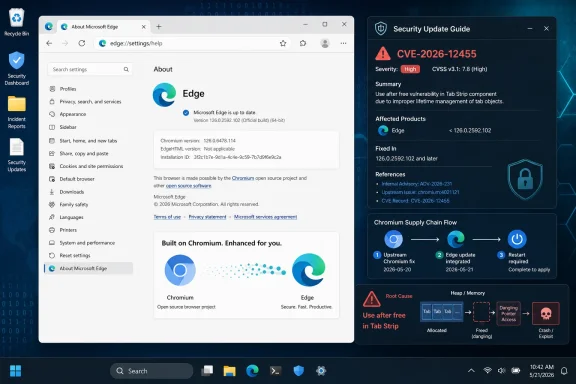
Microsoft lists CVE-2026-12455 in the Security Update Guide because the affected code lives in Chromium, the open-source browser engine Microsoft Edge consumes, and Microsoft’s June 2026 Edge updates document when Chromium-based Edge is no longer vulnerable. That makes the entry look like a Chrome bug at first glance, but it is also an Edge supply-chain security notice. The practical answer is simple: if you run Microsoft Edge, check that Edge has updated, not merely that Windows Update has run.
The awkward part is that this is now normal. Modern Edge is not a separate browser lineage with occasional borrowed code; it is a Microsoft product built atop Chromium, patched on a cadence that often follows Google’s disclosures, Chromium’s embargoes, and Microsoft’s own release machinery. CVE-2026-12455 is less a one-off curiosity than another reminder that browser security has become an ecosystem problem wearing a vendor logo.
The Security Update Guide is not limited to bugs Microsoft invented. It is a Microsoft risk ledger: if a supported Microsoft product includes vulnerable code, Microsoft has to tell customers how that product is affected and when it is fixed. In this case, the vulnerable component is Chromium open source software, and Chromium-based Microsoft Edge includes that code path.
That distinction matters because users often read “Chrome CVE” as “Google’s problem.” For Edge, Brave, Opera, Vivaldi, and other Chromium-family browsers, that shorthand is misleading. A vulnerability in a shared Chromium component may become a vulnerability in every downstream browser that ships the affected component, even if the exploit write-up, reporter credit, or original advisory names Google Chrome.
Microsoft’s entry for CVE-2026-12455 is therefore doing two things at once. It acknowledges the upstream Chromium issue and maps it onto Microsoft’s supported product surface. The phrase “latest version of Microsoft Edge (Chromium-based) is no longer vulnerable” is Microsoft’s way of saying: the fix has crossed the boundary from upstream Chromium into Edge’s release channel.
The Security Update Guide also gives enterprise defenders a familiar place to track the issue. Security teams do not want to chase one advisory from Google, a second release note from Microsoft, and a third inventory tool report before deciding whether their fleet is exposed. They want a Microsoft-maintained record they can feed into patch workflows, dashboards, exceptions, and audit evidence.
This is why the entry exists even if the root bug is not “Microsoft code” in the old sense. In 2026, browser ownership is not about who wrote every line. It is about who shipped the binary, who updates it, and who answers when customers ask whether their deployed product is vulnerable.
A use-after-free vulnerability is a memory safety bug. In plain English, software frees a chunk of memory and later tries to use it as if it still owns it. If an attacker can influence what occupies that freed memory, the bug can become more than a crash; it can become heap corruption, control-flow manipulation, sandboxed code execution, or one step in a larger exploit chain.
Browser vendors have spent years building sandboxes, site isolation, process boundaries, compiler hardening, and exploit mitigations precisely because memory bugs in browsers are so common and so valuable. A single use-after-free does not automatically mean full system compromise. But it is the class of defect security teams treat seriously because browsers sit at the boundary between arbitrary internet content and sensitive local state.
The “Tab Strip” label also illustrates why UI bugs are not low-risk by default. Browser UI is exposed to complicated user behavior: opening and closing tabs, dragging tabs between windows, grouping tabs, restoring sessions, moving focus, interacting with prompts, and handling web content that can shape timing and state. The attack surface is not limited to JavaScript engines and media parsers.
That is why Microsoft’s inclusion of the CVE is not bureaucratic overkill. If Chromium had a memory safety issue in a component Edge consumes, the fix belongs in Edge. The user-facing feature name may sound mundane, but the class of vulnerability is anything but.
Edge sits in the middle of that story because Microsoft deliberately made Chromium its browser foundation. That decision gave Edge compatibility, extension parity, performance improvements, and a seat at the Chromium engineering table. It also means Microsoft inherits a steady stream of Chromium security work, including flaws that arrive with Google-flavored descriptions but Microsoft customer impact.
For consumers, the result is mostly invisible when automatic updates work. Edge downloads an update in the background, the browser asks for a restart, and the user eventually relaunches. For administrators, however, the same event becomes a version compliance problem. Which channel is deployed? Stable or Extended Stable? Are updates blocked by policy? Are restart prompts being ignored? Are VDI images refreshed? Are offline systems missing browser updates because someone still thinks Windows cumulative updates cover everything?
That last assumption is especially dangerous. Edge has its own update path and cadence. Windows Update may service Edge in some managed scenarios, but the browser’s security posture is still governed by the Edge version actually installed and running. A patched installer on disk does not protect a user who has not restarted a vulnerable browser process.
The Microsoft guide entry exists partly to close that ambiguity. It tells defenders that Microsoft recognizes the Chromium CVE as relevant to Edge and that a current Edge release has incorporated the fix. The remaining question is whether your machines have actually reached that release.
In Microsoft Edge on Windows, open the browser menu, choose Help and feedback, then About Microsoft Edge. You can also type
For Google Chrome, the equivalent page is reached through Help, then About Google Chrome, or by typing
On managed Windows fleets, administrators should not rely on screenshots from About pages. They should verify deployed versions through Edge management policies, Microsoft Intune, Configuration Manager, Defender Vulnerability Management, endpoint inventory, or whatever asset system is authoritative in their environment. Browser update compliance belongs in the same operational bucket as VPN clients, remote access tools, PDF readers, and conferencing software: common, internet-facing, and frequently targeted.
There is also a subtle difference between “latest” and “fixed.” Microsoft’s Edge security release notes currently show the Stable channel moving through version 149.0.4022.x in mid-June 2026, with a June 18 Stable release listed as 149.0.4022.80. That does not mean every channel, platform, or mobile build has the same number at the same moment. It means administrators should map the CVE to the appropriate Edge channel they deploy and confirm that the installed build is at or beyond the fixed release Microsoft identifies.
This is where vulnerability scanners can be both helpful and maddening. A scanner may flag CVE-2026-12455 because it sees an affected Chromium baseline, an outdated Edge version, or stale application inventory. Before suppressing the finding as “just Chrome,” verify the Edge version. The label may be Chrome-shaped, but the exposure can be Edge-shaped.
When Microsoft says the CVE is “in Chromium Open Source Software consumed by Microsoft Edge,” it is making an attribution and impact statement. Attribution: the vulnerable code originates upstream. Impact: the code is present in a Microsoft product. Remediation: update Edge to the version that carries the Chromium fix.
This is not unique to Chromium. Windows, Azure services, developer tools, containers, runtimes, and enterprise applications increasingly contain open-source components, third-party libraries, and shared engines. The uncomfortable truth for IT is that vendor boundaries no longer match code boundaries. A Microsoft advisory may document a Google-originated Chromium bug; a Linux distribution may patch a library maintained by someone else; a commercial product may ship an embedded component whose CVE name points far away from the brand on the installer.
The upside is that downstream vendors can give customers product-specific guidance. Microsoft knows how Edge is packaged, which channels exist, which platforms are supported, and how its enterprise tooling reports version state. Google’s Chrome advisory cannot answer all of those questions for Edge customers. Microsoft’s guide can.
The downside is alert fatigue and label confusion. Security teams see “Chrome” in a scanner finding on an Edge-heavy fleet and wonder whether the alert is wrong. End users see “Microsoft” in the Security Update Guide and wonder why the description says Chromium. Both reactions are understandable. Neither changes the remediation: update the browser that contains the vulnerable Chromium code.
That treadmill is fast. Chromium security updates arrive outside the neat Patch Tuesday rhythm. Some are routine. Some follow reports of active exploitation. Some contain fixes whose details remain restricted until most users are updated. Enterprise change-control processes, by contrast, still tend to prefer predictability, test rings, maintenance windows, and rollback plans.
The tension is obvious. A browser is too exposed to wait weeks for a traditional desktop patch cycle, but too important to update recklessly in environments with line-of-business web apps, kiosk systems, regulated workflows, or brittle extensions. Microsoft’s Edge channels are designed to soften that tension, particularly with Stable and Extended Stable options. But a security bug in Chromium can compress decision time dramatically.
CVE-2026-12455 lands in that broader pattern. Even without treating it as a publicly exploited emergency, a memory safety bug in a browser UI component is not the kind of item administrators should let drift indefinitely. The web is the delivery mechanism for phishing, credential theft, malvertising, drive-by exploit chains, fake update lures, and session hijacking. Browser bugs turn that already hostile surface into a code execution problem.
The better operational stance is to treat browser patching as a continuous service, not a monthly chore. Test rings still matter, but they need to move quickly. Relaunch enforcement still matters, but it needs user communication. Inventory still matters, but it needs to distinguish installed version from running version.
There is no need for most users to decide whether CVE-2026-12455 is “really” a Chrome bug, a Chromium bug, or an Edge bug. Those categories matter for vendors and vulnerability managers, but the protection path is the same. The browser that opens links, renders pages, stores sessions, and handles your tabs needs the fixed Chromium code.
The confusion is understandable because Microsoft’s own wording is precise in a way that sounds evasive. “This CVE is in Chromium OSS” can read like Microsoft is distancing itself from the flaw. But in the same breath, Microsoft documents the issue in its own guide and says the latest Edge is no longer vulnerable. That is not distance; that is downstream ownership.
The more common user risk is not misunderstanding the advisory. It is postponing the relaunch. Browsers can sit open for days or weeks, especially on laptops that sleep instead of shutting down. An update that has downloaded but not restarted is a promise, not protection.
On Windows, the About page is the simplest forcing function because it both displays the version and initiates the update check. It is not glamorous, but it is the browser equivalent of checking whether the front door is actually locked rather than assuming the installer did its job.
Administrators should measure both version compliance and restart compliance. Edge policies can control update behavior and relaunch notifications, but organizational culture determines whether users treat those prompts as security instructions or background noise. A banner that says “restart your browser to finish updating” is easy to ignore until the help desk starts enforcing it or the browser is configured to relaunch within a defined window.
VDI, shared workstations, kiosks, and lab machines deserve special attention. These environments often freeze images, reset sessions, or block background update behavior in the name of consistency. That can produce exactly the kind of old browser version attackers love: widely deployed, rarely touched, and assumed safe because the underlying Windows image is patched.
Security teams should also expect scanner noise around Chromium CVEs. Some tools key off Chrome advisory text. Others map CVEs to Edge correctly but display the upstream product name. The right response is not to dismiss the finding because the label says Chrome. The right response is to validate whether Microsoft Edge, WebView2 runtimes, Chrome, or other Chromium-based applications in the environment are affected.
WebView2 is worth calling out even when a specific CVE entry focuses on Edge. Many Windows applications embed Chromium-based web rendering through Microsoft’s WebView2 runtime. Depending on the vulnerability and component, the exposure story may not stop at the standalone Edge browser. Administrators should make sure their inventory and patch workflows understand the difference between Edge, Edge Update, and WebView2 Runtime.
The better question is always version-specific. Which Edge channel are we on? Which version contains the fix? Which version is actually installed? Which version is running? Which devices are exceptions? Which users have deferred restart? Which unmanaged machines are outside policy?
This is also why Security Update Guide entries can appear to lag or look sparse. Chromium details may be restricted, CVE records may update after release, and Microsoft may publish release notes before individual CVE mapping is fully populated. In the June 18 Edge release notes, Microsoft even says CVEs will be added as soon as available. That is not ideal for defenders, but it reflects the reality of coordinated browser disclosure.
Security operations teams should build around that reality. Instead of waiting for every CVE detail to become perfectly annotated, treat Edge security releases as priority updates by default. If a release says it incorporates the latest Chromium security updates, it deserves attention even before every vulnerability page has caught up.
For smaller organizations, this can be as simple as enabling automatic Edge updates, allowing the Edge Update service to run, and periodically checking that users are not stuck on ancient builds. For larger organizations, it means formal browser patch SLAs that are faster than the general desktop patch cycle.
The awkward part is that this is now normal. Modern Edge is not a separate browser lineage with occasional borrowed code; it is a Microsoft product built atop Chromium, patched on a cadence that often follows Google’s disclosures, Chromium’s embargoes, and Microsoft’s own release machinery. CVE-2026-12455 is less a one-off curiosity than another reminder that browser security has become an ecosystem problem wearing a vendor logo.
 Microsoft Is Publishing a Chromium Problem Because Edge Ships Chromium
The Security Update Guide is not limited to bugs Microsoft invented. It is a Microsoft risk ledger: if a supported Microsoft product includes vulnerable code, Microsoft has to tell customers how that product is affected and when it is fixed. In this case, the vulnerable component is Chromium open source software, and Chromium-based Microsoft Edge includes that code path.That distinction matters because users often read “Chrome CVE” as “Google’s problem.” For Edge, Brave, Opera, Vivaldi, and other Chromium-family browsers, that shorthand is misleading. A vulnerability in a shared Chromium component may become a vulnerability in every downstream browser that ships the affected component, even if the exploit write-up, reporter credit, or original advisory names Google Chrome.
Microsoft’s entry for CVE-2026-12455 is therefore doing two things at once. It acknowledges the upstream Chromium issue and maps it onto Microsoft’s supported product surface. The phrase “latest version of Microsoft Edge (Chromium-based) is no longer vulnerable” is Microsoft’s way of saying: the fix has crossed the boundary from upstream Chromium into Edge’s release channel.
The Security Update Guide also gives enterprise defenders a familiar place to track the issue. Security teams do not want to chase one advisory from Google, a second release note from Microsoft, and a third inventory tool report before deciding whether their fleet is exposed. They want a Microsoft-maintained record they can feed into patch workflows, dashboards, exceptions, and audit evidence.
This is why the entry exists even if the root bug is not “Microsoft code” in the old sense. In 2026, browser ownership is not about who wrote every line. It is about who shipped the binary, who updates it, and who answers when customers ask whether their deployed product is vulnerable.
The Tab Strip Is Not Just Window Dressing
The phrase “Use after free in Tab Strip” sounds almost comic, as if attackers are rummaging around the part of the browser that draws the little rectangles at the top of the window. But the tab strip is not just decoration. It is part of the browser’s user interface machinery, tied to state, focus, drag-and-drop behavior, tab lifecycle management, windowing, profiles, groups, and in some cases gesture-driven interactions.A use-after-free vulnerability is a memory safety bug. In plain English, software frees a chunk of memory and later tries to use it as if it still owns it. If an attacker can influence what occupies that freed memory, the bug can become more than a crash; it can become heap corruption, control-flow manipulation, sandboxed code execution, or one step in a larger exploit chain.
Browser vendors have spent years building sandboxes, site isolation, process boundaries, compiler hardening, and exploit mitigations precisely because memory bugs in browsers are so common and so valuable. A single use-after-free does not automatically mean full system compromise. But it is the class of defect security teams treat seriously because browsers sit at the boundary between arbitrary internet content and sensitive local state.
The “Tab Strip” label also illustrates why UI bugs are not low-risk by default. Browser UI is exposed to complicated user behavior: opening and closing tabs, dragging tabs between windows, grouping tabs, restoring sessions, moving focus, interacting with prompts, and handling web content that can shape timing and state. The attack surface is not limited to JavaScript engines and media parsers.
That is why Microsoft’s inclusion of the CVE is not bureaucratic overkill. If Chromium had a memory safety issue in a component Edge consumes, the fix belongs in Edge. The user-facing feature name may sound mundane, but the class of vulnerability is anything but.
The Browser Supply Chain Has Collapsed Into One Patch Story
The old mental model of patching was product-by-product. Windows had Patch Tuesday, Office had its own patches, Chrome updated itself, and third-party apps lived somewhere in the inventory wilderness. Chromium weakened that neat separation. Today, a bug disclosed by the Chromium project can force action across Microsoft Edge, Google Chrome, Electron applications, embedded WebView components, Linux packages, mobile browsers, and managed desktop images.Edge sits in the middle of that story because Microsoft deliberately made Chromium its browser foundation. That decision gave Edge compatibility, extension parity, performance improvements, and a seat at the Chromium engineering table. It also means Microsoft inherits a steady stream of Chromium security work, including flaws that arrive with Google-flavored descriptions but Microsoft customer impact.
For consumers, the result is mostly invisible when automatic updates work. Edge downloads an update in the background, the browser asks for a restart, and the user eventually relaunches. For administrators, however, the same event becomes a version compliance problem. Which channel is deployed? Stable or Extended Stable? Are updates blocked by policy? Are restart prompts being ignored? Are VDI images refreshed? Are offline systems missing browser updates because someone still thinks Windows cumulative updates cover everything?
That last assumption is especially dangerous. Edge has its own update path and cadence. Windows Update may service Edge in some managed scenarios, but the browser’s security posture is still governed by the Edge version actually installed and running. A patched installer on disk does not protect a user who has not restarted a vulnerable browser process.
The Microsoft guide entry exists partly to close that ambiguity. It tells defenders that Microsoft recognizes the Chromium CVE as relevant to Edge and that a current Edge release has incorporated the fix. The remaining question is whether your machines have actually reached that release.
Version Numbers Are the New Patch Status
The user question buried under the CVE entry is the operational one: “How can I see the version of the browser?” That is the right question because, for Chromium-based browsers, version number is often the clearest proof of patch status.In Microsoft Edge on Windows, open the browser menu, choose Help and feedback, then About Microsoft Edge. You can also type
edge://settings/help into the address bar. Edge will display the installed version and usually trigger an update check from that page. If an update is downloaded, the browser must be restarted before the new version is actually running.For Google Chrome, the equivalent page is reached through Help, then About Google Chrome, or by typing
chrome://settings/help. Chrome will show its version, check for updates, and prompt for a relaunch when required. The important point is not the menu path; it is the restart. Until the browser process is relaunched, the vulnerable code may still be active in memory.On managed Windows fleets, administrators should not rely on screenshots from About pages. They should verify deployed versions through Edge management policies, Microsoft Intune, Configuration Manager, Defender Vulnerability Management, endpoint inventory, or whatever asset system is authoritative in their environment. Browser update compliance belongs in the same operational bucket as VPN clients, remote access tools, PDF readers, and conferencing software: common, internet-facing, and frequently targeted.
There is also a subtle difference between “latest” and “fixed.” Microsoft’s Edge security release notes currently show the Stable channel moving through version 149.0.4022.x in mid-June 2026, with a June 18 Stable release listed as 149.0.4022.80. That does not mean every channel, platform, or mobile build has the same number at the same moment. It means administrators should map the CVE to the appropriate Edge channel they deploy and confirm that the installed build is at or beyond the fixed release Microsoft identifies.
This is where vulnerability scanners can be both helpful and maddening. A scanner may flag CVE-2026-12455 because it sees an affected Chromium baseline, an outdated Edge version, or stale application inventory. Before suppressing the finding as “just Chrome,” verify the Edge version. The label may be Chrome-shaped, but the exposure can be Edge-shaped.
The Security Update Guide Is Becoming a Translation Layer
Microsoft’s Security Update Guide used to feel like a Windows and Office patch index with a few extras. In the Chromium era, it has become something more like a translation layer between upstream open-source vulnerability disclosure and Microsoft’s product universe. That is useful, but it also creates entries that confuse casual readers.When Microsoft says the CVE is “in Chromium Open Source Software consumed by Microsoft Edge,” it is making an attribution and impact statement. Attribution: the vulnerable code originates upstream. Impact: the code is present in a Microsoft product. Remediation: update Edge to the version that carries the Chromium fix.
This is not unique to Chromium. Windows, Azure services, developer tools, containers, runtimes, and enterprise applications increasingly contain open-source components, third-party libraries, and shared engines. The uncomfortable truth for IT is that vendor boundaries no longer match code boundaries. A Microsoft advisory may document a Google-originated Chromium bug; a Linux distribution may patch a library maintained by someone else; a commercial product may ship an embedded component whose CVE name points far away from the brand on the installer.
The upside is that downstream vendors can give customers product-specific guidance. Microsoft knows how Edge is packaged, which channels exist, which platforms are supported, and how its enterprise tooling reports version state. Google’s Chrome advisory cannot answer all of those questions for Edge customers. Microsoft’s guide can.
The downside is alert fatigue and label confusion. Security teams see “Chrome” in a scanner finding on an Edge-heavy fleet and wonder whether the alert is wrong. End users see “Microsoft” in the Security Update Guide and wonder why the description says Chromium. Both reactions are understandable. Neither changes the remediation: update the browser that contains the vulnerable Chromium code.
Edge’s Chromium Deal Pays Dividends and Sends Bills
Microsoft’s move to Chromium was a strategic retreat from browser-engine independence, but it was not a retreat from browser responsibility. Edge gained compatibility with the web as it actually exists, not the web Microsoft wished developers would target. That was the dividend. The bill is that Microsoft now lives on Chromium’s vulnerability treadmill.That treadmill is fast. Chromium security updates arrive outside the neat Patch Tuesday rhythm. Some are routine. Some follow reports of active exploitation. Some contain fixes whose details remain restricted until most users are updated. Enterprise change-control processes, by contrast, still tend to prefer predictability, test rings, maintenance windows, and rollback plans.
The tension is obvious. A browser is too exposed to wait weeks for a traditional desktop patch cycle, but too important to update recklessly in environments with line-of-business web apps, kiosk systems, regulated workflows, or brittle extensions. Microsoft’s Edge channels are designed to soften that tension, particularly with Stable and Extended Stable options. But a security bug in Chromium can compress decision time dramatically.
CVE-2026-12455 lands in that broader pattern. Even without treating it as a publicly exploited emergency, a memory safety bug in a browser UI component is not the kind of item administrators should let drift indefinitely. The web is the delivery mechanism for phishing, credential theft, malvertising, drive-by exploit chains, fake update lures, and session hijacking. Browser bugs turn that already hostile surface into a code execution problem.
The better operational stance is to treat browser patching as a continuous service, not a monthly chore. Test rings still matter, but they need to move quickly. Relaunch enforcement still matters, but it needs user communication. Inventory still matters, but it needs to distinguish installed version from running version.
Users Should Check Edge, Not Decode the CVE Taxonomy
For an individual Windows user, the answer is refreshingly practical. Open Edge, go to About Microsoft Edge, let it check for updates, and relaunch when prompted. If the About page says Edge is up to date and the version is current for the channel you are on, you have done the relevant user-level work.There is no need for most users to decide whether CVE-2026-12455 is “really” a Chrome bug, a Chromium bug, or an Edge bug. Those categories matter for vendors and vulnerability managers, but the protection path is the same. The browser that opens links, renders pages, stores sessions, and handles your tabs needs the fixed Chromium code.
The confusion is understandable because Microsoft’s own wording is precise in a way that sounds evasive. “This CVE is in Chromium OSS” can read like Microsoft is distancing itself from the flaw. But in the same breath, Microsoft documents the issue in its own guide and says the latest Edge is no longer vulnerable. That is not distance; that is downstream ownership.
The more common user risk is not misunderstanding the advisory. It is postponing the relaunch. Browsers can sit open for days or weeks, especially on laptops that sleep instead of shutting down. An update that has downloaded but not restarted is a promise, not protection.
On Windows, the About page is the simplest forcing function because it both displays the version and initiates the update check. It is not glamorous, but it is the browser equivalent of checking whether the front door is actually locked rather than assuming the installer did its job.
Administrators Need to Follow the Running Process
In enterprise environments, the CVE raises a more specific problem: what does “updated” mean? If Edge’s updater has staged a new version but users have 47 tabs open and have ignored relaunch prompts for a week, the installed state and the running state may diverge. That matters for a browser memory corruption vulnerability.Administrators should measure both version compliance and restart compliance. Edge policies can control update behavior and relaunch notifications, but organizational culture determines whether users treat those prompts as security instructions or background noise. A banner that says “restart your browser to finish updating” is easy to ignore until the help desk starts enforcing it or the browser is configured to relaunch within a defined window.
VDI, shared workstations, kiosks, and lab machines deserve special attention. These environments often freeze images, reset sessions, or block background update behavior in the name of consistency. That can produce exactly the kind of old browser version attackers love: widely deployed, rarely touched, and assumed safe because the underlying Windows image is patched.
Security teams should also expect scanner noise around Chromium CVEs. Some tools key off Chrome advisory text. Others map CVEs to Edge correctly but display the upstream product name. The right response is not to dismiss the finding because the label says Chrome. The right response is to validate whether Microsoft Edge, WebView2 runtimes, Chrome, or other Chromium-based applications in the environment are affected.
WebView2 is worth calling out even when a specific CVE entry focuses on Edge. Many Windows applications embed Chromium-based web rendering through Microsoft’s WebView2 runtime. Depending on the vulnerability and component, the exposure story may not stop at the standalone Edge browser. Administrators should make sure their inventory and patch workflows understand the difference between Edge, Edge Update, and WebView2 Runtime.
“Latest” Is a Moving Target, Not a Compliance Strategy
Microsoft’s June 2026 Edge release notes show how quickly the browser train moves: Stable channel releases appeared repeatedly through early and mid-June, with version 149.0.4022.80 published on June 18. That kind of cadence is healthy for security, but it punishes static documentation and casual compliance language. “We updated Edge recently” is not the same as “we are on the fixed build for this CVE.”The better question is always version-specific. Which Edge channel are we on? Which version contains the fix? Which version is actually installed? Which version is running? Which devices are exceptions? Which users have deferred restart? Which unmanaged machines are outside policy?
This is also why Security Update Guide entries can appear to lag or look sparse. Chromium details may be restricted, CVE records may update after release, and Microsoft may publish release notes before individual CVE mapping is fully populated. In the June 18 Edge release notes, Microsoft even says CVEs will be added as soon as available. That is not ideal for defenders, but it reflects the reality of coordinated browser disclosure.
Security operations teams should build around that reality. Instead of waiting for every CVE detail to become perfectly annotated, treat Edge security releases as priority updates by default. If a release says it incorporates the latest Chromium security updates, it deserves attention even before every vulnerability page has caught up.
For smaller organizations, this can be as simple as enabling automatic Edge updates, allowing the Edge Update service to run, and periodically checking that users are not stuck on ancient builds. For larger organizations, it means formal browser patch SLAs that are faster than the general desktop patch cycle.
The Small Version Check That Carries the Whole Story
The concrete guidance from CVE-2026-12455 is narrow, but it points to a broader discipline. Users and administrators do not need to become Chromium vulnerability historians; they need to know where the browser version lives, how updates are applied, and whether the running browser has restarted into the fixed code.- Open Microsoft Edge’s About page by using the Help and feedback menu or by entering
edge://settings/helpin the address bar. - Let Edge complete its update check, then relaunch the browser if it asks to restart.
- Treat a Chromium CVE in Microsoft’s Security Update Guide as relevant to Edge when Microsoft says Edge consumes the affected Chromium code.
- Do not assume Windows Update alone proves Edge is protected; verify the Edge version actually installed and running.
- In managed environments, report browser version compliance through endpoint inventory and enforce relaunch behavior after security updates.
- Remember that Chrome, Edge, and other Chromium-based browsers may need separate verification even when the underlying CVE description sounds identical.
References
- Primary source: MSRC
Published: 2026-06-19T13:52:34-07:00
Security Update Guide - Microsoft Security Response Center
 msrc.microsoft.com
- Related coverage: sentinelone.com
CVE-2026-4458: Google Chrome Use After Free Vulnerability
CVE-2026-4458 is a use after free vulnerability in Google Chrome Extensions. Learn about its impact, affected versions, and mitigation methods.www.sentinelone.com
- Related coverage: windowsforum.com
CVE-2026-7356 Use-After-Free in Chrome Navigation: Patch Chrome 147, Update Edge | Windows Forum
Google disclosed CVE-2026-7356 on April 28, 2026, as a high-severity use-after-free flaw in Chrome’s Navigation component, fixed in Chrome 147.0.7727.138...windowsforum.com - Related coverage: radar.offseq.com
- Related coverage: notebookcheck.net
Chrome 145 update fixes critical CVE-2026-2441 zero-day vulnerability - Notebookcheck News
Google has released an emergency security update for Chrome Desktop to address CVE-2026-2441, a high-severity use-after-free vulnerability in the browser's CSS component. www.notebookcheck.net
- Related coverage: zeropath.com
Google Chrome Dawn WebGPU Use After Free: Brief Summary of CVE-2026-6310 and Its Sandbox Escape Potential - ZeroPath Blog | ZeroPath
A brief summary of CVE-2026-6310, a high severity use after free vulnerability in Chrome's Dawn WebGPU implementation that could enable sandbox escape from a compromised renderer process. Includes patch details and mitigation guidance.zeropath.com
- Related coverage: aha.org
h isac tlp white microsoft edge addresses exploited zero day vulnerability cve 2024 7971 8 23 2024
PDF documentwww.aha.org
