
Microsoft documents CVE-2026-12462 in the Security Update Guide because the bug lives in Chromium open-source code used by Microsoft Edge, and the June 2026 Edge update notice tells Windows administrators that current Chromium-based Edge builds are no longer vulnerable. That distinction matters: this is not “a Chrome-only bug” in the practical sense. It is a browser-engine bug in shared code that multiple products consume, and Microsoft’s job is to tell its customers when its product inherited the risk and when its product received the fix.
The awkward phrasing in Microsoft’s advisory is doing a lot of work. “Chromium Open Source Software consumed by Microsoft Edge” sounds like vendor boilerplate, but it is the core reason the CVE appears in Microsoft’s Security Update Guide at all.
Microsoft Edge is no longer the old EdgeHTML browser that shipped as a Windows-only platform component. The modern Edge is built on Chromium, the same open-source browser project that underpins Google Chrome and a long list of other browsers. That gives Microsoft a faster, more compatible browser, but it also means Edge inherits a large part of Chromium’s security surface.
So when Chromium’s Media component has a use-after-free vulnerability, Microsoft does not get to shrug and say, “That is Google’s CVE.” If Edge includes the affected Chromium code, Edge customers need to know whether their browser is vulnerable, what version fixes it, and whether enterprise patching systems should treat it as relevant.
That is why CVE-2026-12462 appears in the Microsoft Security Update Guide. The guide is not saying the flaw was created by Microsoft or uniquely affects Edge. It is saying that Microsoft Edge consumed the affected OSS component and that Microsoft is documenting the fixed Edge release for its own customers.
The better mental model is dependency inheritance. Chromium is upstream. Chrome and Edge are downstream consumers. A flaw in shared Chromium code can be reported, assigned, and initially described through the Chrome security process while still affecting Edge if Edge shipped with the vulnerable code.
This is not unusual in modern software. Windows applications routinely bundle third-party libraries, Linux distributions track vulnerabilities in upstream packages, and cloud services consume open-source components that vendors did not write themselves. The affected party for risk management purposes is not only the author of the vulnerable code; it is also the vendor shipping that code to users.
That is especially true for browsers. The browser is now an operating-system-adjacent runtime for email, identity, productivity suites, line-of-business applications, and privileged admin portals. A memory-safety bug in media handling is not an academic edge case when the attack surface is the web page sitting in front of every user.
The Media component is a particularly plausible place for such bugs because browsers parse and process a wide variety of audio and video formats, playback states, device interactions, codecs, streams, and web APIs. Modern media handling is not simply “play this file.” It is a pile of asynchronous events, hardware acceleration paths, sandboxed processes, permissions, and cross-platform abstractions.
That does not mean every use-after-free bug is instantly exploitable in the wild. Exploitability depends on the reachable code path, sandbox boundaries, mitigations, timing, and whether an attacker already has renderer-process control. But the class is serious enough that browser vendors generally treat it as high-priority patch material.
For ordinary users, the practical translation is simpler: if the browser version is older than the fixed release, update it. For administrators, the translation is more operational: confirm your Edge fleet actually moved to the fixed Stable or Extended Stable version, and do not assume Windows Update compliance alone proves browser compliance.
Edge creates a special case because its security cadence is tied to Chromium more than to the traditional Patch Tuesday rhythm. Chromium vulnerabilities can arrive outside the monthly Windows servicing cycle, and browser updates often need to move faster than the rest of the estate. Microsoft’s guide helps bring those browser updates back into the security-management universe that enterprises already monitor.
That is the subtle importance of the CVE entry. It is not there to rebrand a Chrome bug as a Microsoft bug. It is there to put Edge administrators on notice: this Chromium issue intersects with Microsoft’s browser, and the current Edge update is the remediation path.
In enterprise environments, that distinction matters for reporting and audit. A vulnerability scanner, SIEM workflow, or compliance dashboard may ask whether CVE-2026-12462 is relevant to Microsoft Edge. The answer is yes if the deployed Edge build contains the affected Chromium code, and no once the browser is updated to Microsoft’s fixed version.
In Microsoft Edge on Windows, open Edge, select the three-dot menu, choose Help and feedback, then choose About Microsoft Edge. You can also type
In Google Chrome, the equivalent path is the three-dot menu, Help, then About Google Chrome, or the direct address
The important part is not merely reading the number. The browser often downloads the update while you are on that page, but the fix usually does not take effect until the browser restarts. A machine can appear “updated” in the sense that an update is staged while still running old browser processes until the user relaunches.
That gap is where many enterprise browser patches get messy. Users leave browsers open for days. Kiosks and shared devices run long sessions. Virtual desktop pools revert to golden images. Servers with Edge installed for administrative workflows may not be used interactively often enough to trigger the update behavior administrators expect.
For managed fleets, automatic update is only the beginning. Group Policy, Intune, Configuration Manager, WSUS habits, network controls, update rings, and browser relaunch policies can all change how quickly a fixed Edge build reaches real users. A security bulletin may say the latest version is no longer vulnerable while a large organization still has thousands of open sessions on the old build.
That is not a Microsoft-only problem. It is the browser version of the oldest patch-management problem in IT: publishing a fix is not the same as deploying it, and deploying it is not the same as activating it. Browsers make the last step particularly visible because the process boundary matters. The running executable has to be replaced, and that usually means a relaunch.
The uncomfortable lesson of CVE-2026-12462 is that “Chrome CVE” and “Edge CVE” are not cleanly separate categories anymore. Administrators need inventory at the browser-build level, not just at the application-name level. If the vulnerable code is in Chromium, the products built from Chromium all deserve scrutiny.
But security does not wait politely for an enterprise release calendar. Extended Stable still receives security updates, and Chromium-origin CVEs can require attention even when feature changes are deferred. That is the bargain: fewer feature shifts, not a vacation from emergency browser patching.
CVE-2026-12462 fits that model. The question for administrators is not only whether the mainstream Stable channel has been fixed. It is whether every channel deployed in the organization has received the relevant security update and whether policy allows those updates to install promptly.
The risk is highest where organizations treat browsers as static desktop furniture. Edge, Chrome, WebView2, extensions, and embedded browser runtimes form a fast-moving platform. They need the same operational attention as operating systems, even when their update UI looks friendlier.
That does not mean CVE-2026-12462 automatically affects every WebView2 scenario in the same way. The exploit path matters, and Microsoft’s product-specific guidance is the authority for what is covered by a given release. But from an administrator’s standpoint, it is a reminder that Chromium is not only a browser dependency; it is also an application-platform dependency.
Modern Windows desktops increasingly blur the line between native apps and web-rendered interfaces. Teams, Outlook components, management consoles, sign-in flows, and third-party business applications may use embedded web technology. When the shared browser engine gets patched, the inventory conversation should include runtimes as well as icons on the taskbar.
This is where vulnerability management tools often lag reality. They may detect Chrome and Edge versions easily but miss embedded runtimes, stale application bundles, or per-user installs. The more software depends on Chromium, the more browser security becomes a supply-chain discipline.
Still, the brevity can leave readers with the wrong impression. Some may think Microsoft is padding its Security Update Guide with irrelevant Chrome issues. Others may think Edge is somehow uniquely affected because it appears in a Microsoft portal. Both readings miss the point.
The correct reading is more prosaic and more important. Microsoft is acknowledging a shared upstream vulnerability and mapping it to a Microsoft-supported product. That helps defenders who organize work by vendor portal rather than by upstream open-source project.
In practice, a CVE entry like this is a coordination artifact. Google, Chromium, Microsoft, downstream vendors, vulnerability databases, scanners, and enterprise patch systems all need a common identifier. The CVE is the thread that lets different parts of the ecosystem talk about the same flaw without pretending the software supply chain is simpler than it is.
For IT teams, the same action has to scale into evidence. They need to know which devices are running which Edge build, which devices have pending relaunches, which policies delay updates, and which machines are offline or unmanaged. That is a different job from clicking through a menu.
The fix version is the line in the sand. Machines below it remain candidates for exposure. Machines at or above it are the intended safe state, assuming the installed build is actually running and no other affected runtime remains unpatched.
This is why browser relaunch policies matter. A polite “restart to update” banner may be acceptable for consumer convenience, but high-severity browser vulnerabilities push organizations toward firmer controls. The question is not whether users like forced relaunches; it is whether the business can justify leaving a known browser memory-safety bug active for days because tabs were precious.
The more interesting story is not that this happened. It is that the modern Windows security perimeter now includes a constantly updating cross-vendor browser engine. Patch Tuesday remains important, but it no longer captures the full tempo of endpoint risk.
That creates a cultural challenge for administrators trained around monthly maintenance windows. Browser vulnerabilities are often disclosed and patched on a faster rhythm, and exploitation pressure can move quickly. Waiting for the next comfortable cycle may be operationally convenient, but it is not always aligned with browser threat reality.
Microsoft’s documentation is therefore both a notice and a nudge. It tells customers the latest Edge is fixed, but it also implicitly asks whether their update process is capable of making that statement true across the fleet.
For WindowsForum readers, the useful takeaways are concrete:
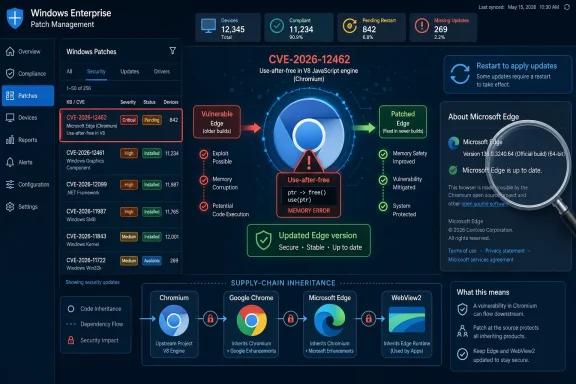 Chromium Turned Browser Security Into a Shared Supply Chain
The awkward phrasing in Microsoft’s advisory is doing a lot of work. “Chromium Open Source Software consumed by Microsoft Edge” sounds like vendor boilerplate, but it is the core reason the CVE appears in Microsoft’s Security Update Guide at all.Microsoft Edge is no longer the old EdgeHTML browser that shipped as a Windows-only platform component. The modern Edge is built on Chromium, the same open-source browser project that underpins Google Chrome and a long list of other browsers. That gives Microsoft a faster, more compatible browser, but it also means Edge inherits a large part of Chromium’s security surface.
So when Chromium’s Media component has a use-after-free vulnerability, Microsoft does not get to shrug and say, “That is Google’s CVE.” If Edge includes the affected Chromium code, Edge customers need to know whether their browser is vulnerable, what version fixes it, and whether enterprise patching systems should treat it as relevant.
That is why CVE-2026-12462 appears in the Microsoft Security Update Guide. The guide is not saying the flaw was created by Microsoft or uniquely affects Edge. It is saying that Microsoft Edge consumed the affected OSS component and that Microsoft is documenting the fixed Edge release for its own customers.
The CVE Name Says Chrome, but the Risk Follows the Code
The vulnerability description identifies CVE-2026-12462 as a use-after-free issue in Media in Google Chrome prior to a fixed Chrome version. That wording can confuse administrators who live inside Microsoft tooling, because “Google Chrome” appears to be the affected product while Microsoft’s portal is the place surfacing the item.The better mental model is dependency inheritance. Chromium is upstream. Chrome and Edge are downstream consumers. A flaw in shared Chromium code can be reported, assigned, and initially described through the Chrome security process while still affecting Edge if Edge shipped with the vulnerable code.
This is not unusual in modern software. Windows applications routinely bundle third-party libraries, Linux distributions track vulnerabilities in upstream packages, and cloud services consume open-source components that vendors did not write themselves. The affected party for risk management purposes is not only the author of the vulnerable code; it is also the vendor shipping that code to users.
That is especially true for browsers. The browser is now an operating-system-adjacent runtime for email, identity, productivity suites, line-of-business applications, and privileged admin portals. A memory-safety bug in media handling is not an academic edge case when the attack surface is the web page sitting in front of every user.
“Use After Free” Is a Small Phrase for a Large Class of Browser Bugs
A use-after-free vulnerability occurs when software continues to use memory after it has been released. In a complex C++ codebase such as a browser engine, that can turn a logic error into memory corruption, and memory corruption is where browser exploit chains often begin.The Media component is a particularly plausible place for such bugs because browsers parse and process a wide variety of audio and video formats, playback states, device interactions, codecs, streams, and web APIs. Modern media handling is not simply “play this file.” It is a pile of asynchronous events, hardware acceleration paths, sandboxed processes, permissions, and cross-platform abstractions.
That does not mean every use-after-free bug is instantly exploitable in the wild. Exploitability depends on the reachable code path, sandbox boundaries, mitigations, timing, and whether an attacker already has renderer-process control. But the class is serious enough that browser vendors generally treat it as high-priority patch material.
For ordinary users, the practical translation is simpler: if the browser version is older than the fixed release, update it. For administrators, the translation is more operational: confirm your Edge fleet actually moved to the fixed Stable or Extended Stable version, and do not assume Windows Update compliance alone proves browser compliance.
Microsoft’s Security Update Guide Is Also a Customer Contract
The Security Update Guide is not merely a list of bugs. It is Microsoft’s formal channel for telling customers what the company considers security-relevant across its supported products. That includes Windows, Office, Azure-related components, developer tools, and Edge.Edge creates a special case because its security cadence is tied to Chromium more than to the traditional Patch Tuesday rhythm. Chromium vulnerabilities can arrive outside the monthly Windows servicing cycle, and browser updates often need to move faster than the rest of the estate. Microsoft’s guide helps bring those browser updates back into the security-management universe that enterprises already monitor.
That is the subtle importance of the CVE entry. It is not there to rebrand a Chrome bug as a Microsoft bug. It is there to put Edge administrators on notice: this Chromium issue intersects with Microsoft’s browser, and the current Edge update is the remediation path.
In enterprise environments, that distinction matters for reporting and audit. A vulnerability scanner, SIEM workflow, or compliance dashboard may ask whether CVE-2026-12462 is relevant to Microsoft Edge. The answer is yes if the deployed Edge build contains the affected Chromium code, and no once the browser is updated to Microsoft’s fixed version.
The Browser Version Is the Patch Boundary
The user-facing question attached to Microsoft’s advisory is deceptively mundane: how can I see the version of the browser? That is the right question because browser security is version security.In Microsoft Edge on Windows, open Edge, select the three-dot menu, choose Help and feedback, then choose About Microsoft Edge. You can also type
edge://settings/help into the address bar and press Enter. The About page displays the installed version and normally triggers an update check.In Google Chrome, the equivalent path is the three-dot menu, Help, then About Google Chrome, or the direct address
chrome://settings/help. As with Edge, the page shows the installed version and usually starts checking for updates automatically.The important part is not merely reading the number. The browser often downloads the update while you are on that page, but the fix usually does not take effect until the browser restarts. A machine can appear “updated” in the sense that an update is staged while still running old browser processes until the user relaunches.
That gap is where many enterprise browser patches get messy. Users leave browsers open for days. Kiosks and shared devices run long sessions. Virtual desktop pools revert to golden images. Servers with Edge installed for administrative workflows may not be used interactively often enough to trigger the update behavior administrators expect.
Edge Updates Are Fast, but Fleets Are Slow
Microsoft Edge generally updates automatically, and for unmanaged consumer PCs that is usually good enough. The browser checks for updates, downloads them in the background, and applies them when Edge restarts. For a home user, the advice is boring but effective: open the About page, let the update complete, and restart the browser.For managed fleets, automatic update is only the beginning. Group Policy, Intune, Configuration Manager, WSUS habits, network controls, update rings, and browser relaunch policies can all change how quickly a fixed Edge build reaches real users. A security bulletin may say the latest version is no longer vulnerable while a large organization still has thousands of open sessions on the old build.
That is not a Microsoft-only problem. It is the browser version of the oldest patch-management problem in IT: publishing a fix is not the same as deploying it, and deploying it is not the same as activating it. Browsers make the last step particularly visible because the process boundary matters. The running executable has to be replaced, and that usually means a relaunch.
The uncomfortable lesson of CVE-2026-12462 is that “Chrome CVE” and “Edge CVE” are not cleanly separate categories anymore. Administrators need inventory at the browser-build level, not just at the application-name level. If the vulnerable code is in Chromium, the products built from Chromium all deserve scrutiny.
Extended Stable Is a Trade-Off, Not a Security Escape Hatch
Edge’s Stable and Extended Stable channels exist because enterprise IT needs predictability. Some organizations cannot absorb browser feature churn at consumer speed, especially when web applications, extensions, identity plug-ins, or regulated workflows depend on known behavior. Extended Stable is meant to reduce disruptive feature movement.But security does not wait politely for an enterprise release calendar. Extended Stable still receives security updates, and Chromium-origin CVEs can require attention even when feature changes are deferred. That is the bargain: fewer feature shifts, not a vacation from emergency browser patching.
CVE-2026-12462 fits that model. The question for administrators is not only whether the mainstream Stable channel has been fixed. It is whether every channel deployed in the organization has received the relevant security update and whether policy allows those updates to install promptly.
The risk is highest where organizations treat browsers as static desktop furniture. Edge, Chrome, WebView2, extensions, and embedded browser runtimes form a fast-moving platform. They need the same operational attention as operating systems, even when their update UI looks friendlier.
WebView2 Is the Quiet Companion Risk
Edge is the visible browser, but Microsoft’s Chromium story also includes WebView2, the runtime many Windows applications use to embed web content. Depending on the vulnerability and component exposure, a Chromium flaw can raise questions beyond the main Edge browser window.That does not mean CVE-2026-12462 automatically affects every WebView2 scenario in the same way. The exploit path matters, and Microsoft’s product-specific guidance is the authority for what is covered by a given release. But from an administrator’s standpoint, it is a reminder that Chromium is not only a browser dependency; it is also an application-platform dependency.
Modern Windows desktops increasingly blur the line between native apps and web-rendered interfaces. Teams, Outlook components, management consoles, sign-in flows, and third-party business applications may use embedded web technology. When the shared browser engine gets patched, the inventory conversation should include runtimes as well as icons on the taskbar.
This is where vulnerability management tools often lag reality. They may detect Chrome and Edge versions easily but miss embedded runtimes, stale application bundles, or per-user installs. The more software depends on Chromium, the more browser security becomes a supply-chain discipline.
The Advisory’s Bland Wording Is Doing Sensible Risk Communication
Microsoft’s answer to “Why is this Chrome CVE included?” is short because the reasoning is now routine. Chromium OSS is consumed by Edge; Microsoft documents the CVE to announce that the latest Edge is no longer vulnerable. That is exactly what a vendor should say.Still, the brevity can leave readers with the wrong impression. Some may think Microsoft is padding its Security Update Guide with irrelevant Chrome issues. Others may think Edge is somehow uniquely affected because it appears in a Microsoft portal. Both readings miss the point.
The correct reading is more prosaic and more important. Microsoft is acknowledging a shared upstream vulnerability and mapping it to a Microsoft-supported product. That helps defenders who organize work by vendor portal rather than by upstream open-source project.
In practice, a CVE entry like this is a coordination artifact. Google, Chromium, Microsoft, downstream vendors, vulnerability databases, scanners, and enterprise patch systems all need a common identifier. The CVE is the thread that lets different parts of the ecosystem talk about the same flaw without pretending the software supply chain is simpler than it is.
Checking the Version Is Easy; Proving Coverage Is Harder
For an individual Windows user, the remediation workflow is straightforward. Open Edge’s About page, verify the browser updates, relaunch when prompted, and confirm the version shown after restart. If the About page reports that Edge is up to date, the user has done the practical thing Microsoft expects.For IT teams, the same action has to scale into evidence. They need to know which devices are running which Edge build, which devices have pending relaunches, which policies delay updates, and which machines are offline or unmanaged. That is a different job from clicking through a menu.
The fix version is the line in the sand. Machines below it remain candidates for exposure. Machines at or above it are the intended safe state, assuming the installed build is actually running and no other affected runtime remains unpatched.
This is why browser relaunch policies matter. A polite “restart to update” banner may be acceptable for consumer convenience, but high-severity browser vulnerabilities push organizations toward firmer controls. The question is not whether users like forced relaunches; it is whether the business can justify leaving a known browser memory-safety bug active for days because tabs were precious.
The Security Guide Is Warning About a Process, Not Just a Bug
CVE-2026-12462 is one vulnerability, but the pattern will repeat. Chromium will continue to produce security fixes. Microsoft Edge will continue to consume Chromium. The Security Update Guide will continue to list CVEs that look like Chrome issues because Edge ships the affected code.The more interesting story is not that this happened. It is that the modern Windows security perimeter now includes a constantly updating cross-vendor browser engine. Patch Tuesday remains important, but it no longer captures the full tempo of endpoint risk.
That creates a cultural challenge for administrators trained around monthly maintenance windows. Browser vulnerabilities are often disclosed and patched on a faster rhythm, and exploitation pressure can move quickly. Waiting for the next comfortable cycle may be operationally convenient, but it is not always aligned with browser threat reality.
Microsoft’s documentation is therefore both a notice and a nudge. It tells customers the latest Edge is fixed, but it also implicitly asks whether their update process is capable of making that statement true across the fleet.
The Practical Reading of CVE-2026-12462
The important facts are narrower than the anxiety a CVE can generate, and broader than the phrase “Chrome vulnerability” suggests. This is a Chromium-origin issue that matters to Edge because Edge is Chromium-based. The response is to verify the installed browser version and ensure Edge has moved to a fixed build.For WindowsForum readers, the useful takeaways are concrete:
- CVE-2026-12462 appears in Microsoft’s Security Update Guide because Microsoft Edge uses Chromium code that was affected by the vulnerability.
- The presence of the CVE in Microsoft’s guide does not mean Microsoft originally wrote the vulnerable component; it means Microsoft’s supported browser needed a documented fix.
- Edge users can check their version by opening the three-dot menu, selecting Help and feedback, and then selecting About Microsoft Edge.
- Typing
edge://settings/helpinto the Edge address bar is the fastest direct route to the same version and update page. - Administrators should verify deployed Edge builds and pending browser restarts rather than assuming that automatic updates have already completed everywhere.
- Chrome users should use
chrome://settings/helpor Help > About Google Chrome, because the upstream Chromium issue also tracks through Google’s browser release process.
References
- Primary source: MSRC
Published: 2026-06-19T13:52:42-07:00
Security Update Guide - Microsoft Security Response Center
 msrc.microsoft.com
- Official source: learn.microsoft.com
Microsoft Edge release notes for Stable Channel | Microsoft Learn
Microsoft Edge release note for the Stable Channellearn.microsoft.com - Related coverage: vulnerability.circl.lu
Vulnerability-Lookup
Vulnerability-Lookup - Fast vulnerability lookup correlation from different sources.vulnerability.circl.lu - Official source: blogs.windows.com
Faster updates, enterprise-friendly schedule: the new Microsoft Edge release cycle
Microsoft Edge is moving to a two-week release cycle, bringing new features and improvements to users and organizations faster than ever. This is great news for teams that thrive on innovation: instead of waiting a full month for the next update, youblogs.windows.com - Related coverage: windowsforum.com
CVE-2026-5866 Chrome Media Use-After-Free: Patch to 147.0.7727.55 | Windows Forum
Google has published CVE-2026-5866, a use-after-free in Chrome’s Media component that can let a remote attacker execute code inside the browser sandbox...windowsforum.com - Related coverage: sentinelone.com
CVE-2026-7929: Google Chrome Use After Free Vulnerability
CVE-2026-7929 is a use after free vulnerability in Google Chrome. Learn about its impact, affected versions, and mitigation methods.www.sentinelone.com
- Related coverage: cyber.gc.ca
Microsoft Edge security advisory (AV26-591) - Canadian Centre for Cyber Security
Microsoft Edge security advisory (AV26-591)www.cyber.gc.ca - Related coverage: www2.gov.bc.ca
- Related coverage: mphasis.com
- Official source: support.microsoft.com
Microsoft Edge update settings | Microsoft Support
Microsoft Edge update settingssupport.microsoft.com - Related coverage: windowscentral.com
Major Microsoft Edge versions will now ship every two weeks: Microsoft confirms plans to ship new Edge features and changes twice a month | Windows Central
Microsoft has announced that Edge will be moving to a two-week release cycle for major versions of the browser, matching Chrome.www.windowscentral.com - Official source: download.microsoft.com
