

CVE-2026-13875 is a medium-severity Google Chrome vulnerability fixed in Chrome 150.0.7871.47 for Windows on June 30, 2026, involving insufficient validation of untrusted input in the GPU component that could expose process memory after a renderer compromise via a crafted HTML page. That phrasing sounds narrow, and in one sense it is: this is not being described as a one-click full system takeover. But for Windows users and administrators, the bug is a useful reminder that modern browser risk is no longer confined to the tab, the JavaScript engine, or the obvious memory-corruption headline. The browser’s graphics stack has become part of the attack surface, and Chrome 150’s security train shows just how crowded that surface now is.
Google listed CVE-2026-13875 in its June 30 Stable Channel Update for Desktop, the release that promoted Chrome 150 to stable for Windows, macOS, and Linux. The Chrome Releases post says the update rolls out over the coming days and weeks, with Windows and Mac receiving 150.0.7871.46/.47 and Linux receiving 150.0.7871.46. The National Vulnerability Database entry, sourced from Chrome and later enriched by CISA’s ADP data, identifies the Windows build prior to 150.0.7871.47 as affected.
The vulnerability’s description is dense but important. It says a remote attacker who had already compromised the renderer process could obtain potentially sensitive information from process memory through a crafted HTML page. That means the bug is best understood as a post-renderer-compromise information disclosure, not as a standalone remote code execution bug.
That distinction should not make administrators shrug. Chrome’s security model is built around layers: renderer sandboxing, process isolation, site isolation, memory safety work, brokered access to privileged services, and a long tail of platform-specific mitigations. A flaw that leaks memory after one layer has already failed can still become the missing link in a chain.
CISA’s ADP scoring gives the issue a CVSS 3.1 base score of 5.3, with attack vector over the network, high attack complexity, no privileges required, user interaction required, unchanged scope, high confidentiality impact, and no integrity or availability impact. That score is almost a perfect summary of the bug’s role: it is not easy mode for attackers, but if they get the setup right, the payoff is information.
The GPU process sits at one of the more awkward intersections in that architecture. It exists because rendering modern web content is computationally expensive, and because the web now expects animation, video, canvas, WebGL, WebGPU-adjacent technologies, and hardware acceleration to work smoothly across wildly different machines. That performance bargain gives the browser a route into graphics drivers, shader translation layers, command buffers, textures, surfaces, and shared memory.
CVE-2026-13875’s name — insufficient validation of untrusted input in GPU — is therefore not a throwaway category label. It points to the central tension of browser graphics: the browser must accept complex, attacker-supplied content from the web, translate it into forms the graphics stack can process, and prevent that translation layer from becoming a confidentiality breach.
On Windows, that boundary is especially consequential because Chrome’s GPU path interacts with a vast hardware and driver ecosystem. Enterprise fleets rarely run one graphics configuration. They run Intel laptops, AMD desktops, NVIDIA workstations, virtual GPUs, docking-station oddities, remote desktop edge cases, and OEM images with driver histories nobody wants to reconstruct after an incident.
The Chrome team’s advisory does not disclose the technical details of CVE-2026-13875, and Google routinely restricts bug links until most users have updated. That restraint is not cosmetic. A medium bug with a reproducible proof of concept can become much more interesting when paired with a renderer exploit, a sandbox weakness, or a target environment where sensitive data is sitting in predictable memory.
That is why some readers will instinctively downgrade CVE-2026-13875 in their heads. If the attacker already has a renderer compromise, then isn’t the hard part done? Not necessarily. In modern browser exploitation, the renderer compromise is often only the first act.
A renderer foothold may let an attacker run code inside a heavily constrained process, but the sandbox is meant to limit file access, OS interaction, credential theft, and cross-origin reach. To turn that into a meaningful intrusion, attackers often need additional primitives: memory disclosure, type confusion, use-after-free reliability, sandbox escape, logic bypass, or a way to defeat address-space randomization.
Information disclosure bugs are valuable because they can make the rest of the chain reliable. If a crafted page can expose process memory, it may reveal pointers, layout details, tokens, secrets, cross-origin data, or other material that helps an attacker navigate protections. Not every memory leak yields gold, but the class is dangerous because it turns uncertainty into knowledge.
That is why the confidentiality impact in CISA’s vector is marked high while integrity and availability are not. The bug is not described as corrupting data or crashing Chrome. It is described as allowing sensitive information to be read. For defenders, that means the risk is less about visible breakage and more about invisible exposure.
That breadth matters more than the exact count. Chrome is not a single application in the old desktop sense; it is a platform runtime. When Google ships hundreds of fixes in one stable promotion, it is patching not merely “the browser” but a miniature operating environment that millions of users leave open all day.
The Chrome 150 list also shows that graphics-adjacent components remain a recurring pressure point. The advisory includes critical and high-severity issues in GPU, ANGLE, Dawn, Tint, and Skia, alongside this medium GPU information disclosure. Even if CVE-2026-13875 is not the scariest item in the release, it sits in a neighborhood administrators should recognize.
ANGLE translates graphics APIs. Dawn is tied to WebGPU implementation work. Skia is Chrome’s 2D graphics library. Tint handles shader translation. These are not obscure corners anymore; they are part of how web content becomes pixels on Windows machines. The more capable the browser becomes, the more these subsystems must digest complex inputs from untrusted sources.
Google’s advisory also notes that access to bug details may remain restricted until a majority of users are updated. That is standard Chrome practice, but it leaves enterprise defenders in an awkward middle state. They know enough to patch, but not enough to write a precise compensating control for the individual flaw.
That mismatch is the kind of thing vulnerability management teams trip over in the real world. One field says one thing, another field implies another, and scanners downstream may encode whichever version boundary their vendor ingests first. In a tidy world, Chrome on Windows before 150.0.7871.47 is vulnerable, because that is the plain-language description and the Chrome stable build line for Windows includes the .47 variant.
But the NVD CPE snippet using an exclusion of 150.0.7871.46 creates ambiguity. If a tool interprets “up to excluding 150.0.7871.46” literally, it could miss 150.0.7871.46 on Windows even though the CVE text says versions prior to 150.0.7871.47 are affected. Conversely, if it keys off the description, it may correctly flag .46 as vulnerable on Windows.
This is not an academic complaint about metadata hygiene. Enterprises increasingly automate exposure management from CVE feeds, CPE mappings, vendor advisories, and scanner plugins. When those records disagree, the disagreement propagates into dashboards, exception workflows, patch SLAs, and executive risk summaries.
For WindowsForum readers running small fleets, the practical answer is simple: make sure Chrome reports 150.0.7871.47 or later on Windows. For teams managing thousands of endpoints, the better answer is to validate what your vulnerability scanner is actually detecting, especially if it has already imported the NVD configuration line rather than the richer Chrome advisory context.
The CVSS vector says user interaction is required, which in browser terms usually means the victim has to visit or interact with a malicious page. That is not a high bar. Phishing, malvertising, poisoned search results, compromised legitimate sites, and messaging-platform links all exist to solve exactly that problem for attackers.
The vector also says attack complexity is high. That matters, and it is one reason this bug is not in the same urgency class as a known exploited zero-day with a simple exploit path. But high complexity does not mean impossible. It often means the exploit depends on conditions, sequencing, heap state, a companion vulnerability, or target-specific behavior.
CISA’s SSVC enrichment says exploitation is “none,” automatable is “no,” and technical impact is “partial.” In plain English, there is no public sign in that data that CVE-2026-13875 is being exploited in the wild, it is not a trivial wormable condition, and the direct impact is limited. That is reassuring, but it is not a reason to leave Chrome behind.
Browser patching is one of the few areas where most users and administrators can move quickly without waiting for a monthly operating-system cadence. Chrome updates are generally routine, relaunch-driven, and well understood. If an organization is still debating a medium Chrome update days after release, the problem is not the CVE score; it is the patch process.
That makes Chrome a tier-one application even when asset inventories treat it as commodity software. A vulnerability that can leak process memory from a crafted page may not sound like ransomware, but it touches the same user sessions where valuable work happens. The browser is where tokens, cookies, documents, admin consoles, and password managers converge.
For managed Windows environments, the control plane matters. Chrome Enterprise policies, update channels, relaunch notifications, and reporting integrations should be configured so security updates do not depend on users noticing the three-dot menu. If Chrome is installed outside the managed channel, the browser may still update itself, but administrators lose visibility and assurance.
The relaunch requirement remains the perennial weak point. Chrome can download an update, but the running process remains the old version until the browser restarts. On machines with weeks-long browser sessions, that creates a false sense of coverage: the updater has done its part, but the vulnerable code may still be resident.
That is where policy should be more opinionated. Enterprises can set relaunch notification periods and enforce restarts after a grace window. The goal is not to interrupt users for sport. The goal is to prevent “updated but not relaunched” from becoming the browser equivalent of “patched but not rebooted.”
GPU acceleration once felt like an implementation detail. Today, graphics features are inseparable from video conferencing, design tools, maps, gaming, machine-learning experiments, visual collaboration, and rich dashboards. Disabling hardware acceleration may reduce exposure in specific troubleshooting or high-risk contexts, but it is not a serious universal answer for modern fleets.
The better approach is defense in depth. Keep Chrome current, keep graphics drivers current, reduce extension sprawl, isolate high-risk browsing, and watch for suspicious renderer crashes or exploit-kit behavior. None of those controls specifically “fixes” CVE-2026-13875, but together they reduce the odds that a medium memory disclosure becomes part of a successful intrusion.
This is also where Microsoft’s own platform posture matters. Windows security features such as memory protections, virtualization-based security, exploit mitigations, and hardened enterprise configurations can raise the cost of chaining browser bugs into system compromise. They do not eliminate browser risk, but they influence whether a browser exploit remains trapped or turns into a workstation incident.
Administrators should resist the temptation to treat Chrome vulnerabilities as Google’s problem alone. On Windows, Chrome is a major application riding on Microsoft’s OS, OEM drivers, enterprise configuration, identity infrastructure, and user workflows. Browser security is a shared operating environment problem, even when the CVE is assigned to Chrome.
But the same practice forces defenders to operate with incomplete information. CVE-2026-13875 tells us the component, the weakness class, the platform, the prerequisite renderer compromise, the potential memory disclosure, and the fixed version. It does not tell us exactly what input path is affected, what data may leak, whether the issue is deterministic, or how it behaves under different GPU drivers.
That uncertainty changes how good security teams respond. They should not overstate the bug as an active zero-day unless evidence emerges. They should not understate it as harmless because it is medium. The correct stance is more boring and more mature: patch promptly, confirm rollout, monitor for scanner accuracy, and avoid making claims the advisory does not support.
The NVD record itself is still incomplete from NIST’s side, with no NVD-provided CVSS 4.0, CVSS 3.x, or CVSS 2.0 score at the time reflected in the entry. The visible scoring comes from CISA-ADP. That is another reminder that vulnerability records are living documents, not tablets from the mountain.
For administrators, the living-document nature of CVEs means the first alert is not always the final truth. Version ranges can be corrected, CPEs can change, exploit status can evolve, and scanner plugins may lag. Treat the vendor advisory as the primary source for patch action, then use NVD and CISA enrichment to prioritize and document risk.
For administrators, the verification question is more important than the installation question. It is easy to assume that Chrome’s auto-update mechanism has done its work. It is harder to prove that every active browser process across the fleet has crossed the fixed-version line.
That proof can come from endpoint management inventory, Chrome Browser Cloud Management, EDR software inventory, vulnerability scanners, or custom telemetry. The specific tool matters less than the discipline of checking the running version rather than trusting the presence of an installer or scheduled task.
Edge deserves a note here as well, because it is Chromium-based but not Google Chrome. CVE-2026-13875 is described against Google Chrome on Windows, and administrators should follow Microsoft’s Edge security release notes and update channels for Edge-specific exposure and fixed builds. Chromium lineage often means shared code risk, but the affected-product record here is Chrome, and vendor-specific advisories decide the patch boundary.
Other Chromium-based browsers should be handled the same way. Brave, Vivaldi, Opera, and similar browsers may pick up upstream fixes on their own schedules. If those browsers are permitted in an enterprise environment, they need the same inventory and update scrutiny as Chrome, not a vague assumption that “Chromium patched it.”
Chrome 150’s hundreds of fixes make that point forcefully. Security releases are now big enough that focusing on one CVE can obscure the totality of what changed. A single medium GPU disclosure may be the prompt for this article, but the responsible action is to take the whole Chrome 150 update seriously.
The CPE/version wrinkle should also push teams to audit their tooling. If your scanner says there is no exposure but your Windows endpoints are still on Chrome 150.0.7871.46 or earlier, verify the logic. Vulnerability management systems are only as good as the advisory interpretation they encode.
And the GPU component should push security conversations beyond old browser clichés. The web platform is hardware-accelerated, media-rich, graphics-heavy, and deeply integrated with operating systems. That is why a crafted HTML page can be relevant to process memory in a GPU component in the first place.
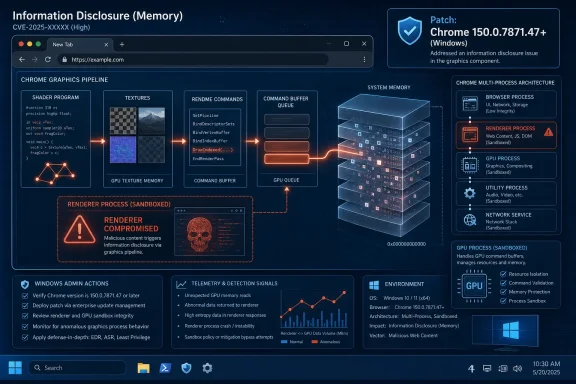 A Medium Bug With a Very Modern Shape
Google listed CVE-2026-13875 in its June 30 Stable Channel Update for Desktop, the release that promoted Chrome 150 to stable for Windows, macOS, and Linux. The Chrome Releases post says the update rolls out over the coming days and weeks, with Windows and Mac receiving 150.0.7871.46/.47 and Linux receiving 150.0.7871.46. The National Vulnerability Database entry, sourced from Chrome and later enriched by CISA’s ADP data, identifies the Windows build prior to 150.0.7871.47 as affected.The vulnerability’s description is dense but important. It says a remote attacker who had already compromised the renderer process could obtain potentially sensitive information from process memory through a crafted HTML page. That means the bug is best understood as a post-renderer-compromise information disclosure, not as a standalone remote code execution bug.
That distinction should not make administrators shrug. Chrome’s security model is built around layers: renderer sandboxing, process isolation, site isolation, memory safety work, brokered access to privileged services, and a long tail of platform-specific mitigations. A flaw that leaks memory after one layer has already failed can still become the missing link in a chain.
CISA’s ADP scoring gives the issue a CVSS 3.1 base score of 5.3, with attack vector over the network, high attack complexity, no privileges required, user interaction required, unchanged scope, high confidentiality impact, and no integrity or availability impact. That score is almost a perfect summary of the bug’s role: it is not easy mode for attackers, but if they get the setup right, the payoff is information.
The GPU Is No Longer Just a Performance Feature
The casual mental model of a browser still puts “the web” in one box and “the operating system” in another. That model has been obsolete for years. Chrome is a collection of cooperating processes, parsers, sandboxes, compilers, media handlers, graphics translators, extension systems, and platform integration layers that together make web apps feel native.The GPU process sits at one of the more awkward intersections in that architecture. It exists because rendering modern web content is computationally expensive, and because the web now expects animation, video, canvas, WebGL, WebGPU-adjacent technologies, and hardware acceleration to work smoothly across wildly different machines. That performance bargain gives the browser a route into graphics drivers, shader translation layers, command buffers, textures, surfaces, and shared memory.
CVE-2026-13875’s name — insufficient validation of untrusted input in GPU — is therefore not a throwaway category label. It points to the central tension of browser graphics: the browser must accept complex, attacker-supplied content from the web, translate it into forms the graphics stack can process, and prevent that translation layer from becoming a confidentiality breach.
On Windows, that boundary is especially consequential because Chrome’s GPU path interacts with a vast hardware and driver ecosystem. Enterprise fleets rarely run one graphics configuration. They run Intel laptops, AMD desktops, NVIDIA workstations, virtual GPUs, docking-station oddities, remote desktop edge cases, and OEM images with driver histories nobody wants to reconstruct after an incident.
The Chrome team’s advisory does not disclose the technical details of CVE-2026-13875, and Google routinely restricts bug links until most users have updated. That restraint is not cosmetic. A medium bug with a reproducible proof of concept can become much more interesting when paired with a renderer exploit, a sandbox weakness, or a target environment where sensitive data is sitting in predictable memory.
Renderer Compromise Is the Clause That Matters
The key phrase in the CVE description is “who had compromised the renderer process.” Chrome’s renderer is where untrusted web content lives. It is supposed to be hostile territory. If a site manages to exploit a bug inside the renderer, Chrome’s sandboxing architecture is designed to keep that compromise from turning into broad system access.That is why some readers will instinctively downgrade CVE-2026-13875 in their heads. If the attacker already has a renderer compromise, then isn’t the hard part done? Not necessarily. In modern browser exploitation, the renderer compromise is often only the first act.
A renderer foothold may let an attacker run code inside a heavily constrained process, but the sandbox is meant to limit file access, OS interaction, credential theft, and cross-origin reach. To turn that into a meaningful intrusion, attackers often need additional primitives: memory disclosure, type confusion, use-after-free reliability, sandbox escape, logic bypass, or a way to defeat address-space randomization.
Information disclosure bugs are valuable because they can make the rest of the chain reliable. If a crafted page can expose process memory, it may reveal pointers, layout details, tokens, secrets, cross-origin data, or other material that helps an attacker navigate protections. Not every memory leak yields gold, but the class is dangerous because it turns uncertainty into knowledge.
That is why the confidentiality impact in CISA’s vector is marked high while integrity and availability are not. The bug is not described as corrupting data or crashing Chrome. It is described as allowing sensitive information to be read. For defenders, that means the risk is less about visible breakage and more about invisible exposure.
Chrome 150 Was a Security Flood, Not a Surgical Patch
CVE-2026-13875 arrived inside a much larger Chrome 150 security release. Google’s Stable Channel Update says the release includes 433 security fixes, a number that should stop anyone from treating this as a one-CVE story. Chrome 150’s advisory is crowded with critical, high, medium, and low entries spanning Extensions, GPU, ANGLE, Dawn, Skia, Bluetooth, V8, WebUSB, Views, Chromoting, and many other components.That breadth matters more than the exact count. Chrome is not a single application in the old desktop sense; it is a platform runtime. When Google ships hundreds of fixes in one stable promotion, it is patching not merely “the browser” but a miniature operating environment that millions of users leave open all day.
The Chrome 150 list also shows that graphics-adjacent components remain a recurring pressure point. The advisory includes critical and high-severity issues in GPU, ANGLE, Dawn, Tint, and Skia, alongside this medium GPU information disclosure. Even if CVE-2026-13875 is not the scariest item in the release, it sits in a neighborhood administrators should recognize.
ANGLE translates graphics APIs. Dawn is tied to WebGPU implementation work. Skia is Chrome’s 2D graphics library. Tint handles shader translation. These are not obscure corners anymore; they are part of how web content becomes pixels on Windows machines. The more capable the browser becomes, the more these subsystems must digest complex inputs from untrusted sources.
Google’s advisory also notes that access to bug details may remain restricted until a majority of users are updated. That is standard Chrome practice, but it leaves enterprise defenders in an awkward middle state. They know enough to patch, but not enough to write a precise compensating control for the individual flaw.
The CPE Oddity Is More Than Database Trivia
The NVD change history supplied with the vulnerability is unusually interesting because it includes a CPE configuration that appears to combine Google Chrome versions up to, but excluding, 150.0.7871.46 with Microsoft Windows. Yet the CVE description says Google Chrome on Windows prior to 150.0.7871.47, and the affected version language in the record points to 150.0.7871.47 as the fixed threshold.That mismatch is the kind of thing vulnerability management teams trip over in the real world. One field says one thing, another field implies another, and scanners downstream may encode whichever version boundary their vendor ingests first. In a tidy world, Chrome on Windows before 150.0.7871.47 is vulnerable, because that is the plain-language description and the Chrome stable build line for Windows includes the .47 variant.
But the NVD CPE snippet using an exclusion of 150.0.7871.46 creates ambiguity. If a tool interprets “up to excluding 150.0.7871.46” literally, it could miss 150.0.7871.46 on Windows even though the CVE text says versions prior to 150.0.7871.47 are affected. Conversely, if it keys off the description, it may correctly flag .46 as vulnerable on Windows.
This is not an academic complaint about metadata hygiene. Enterprises increasingly automate exposure management from CVE feeds, CPE mappings, vendor advisories, and scanner plugins. When those records disagree, the disagreement propagates into dashboards, exception workflows, patch SLAs, and executive risk summaries.
For WindowsForum readers running small fleets, the practical answer is simple: make sure Chrome reports 150.0.7871.47 or later on Windows. For teams managing thousands of endpoints, the better answer is to validate what your vulnerability scanner is actually detecting, especially if it has already imported the NVD configuration line rather than the richer Chrome advisory context.
Medium Severity Does Not Mean Middle Priority
Security teams have spent years teaching users not to panic over every CVE. That discipline is good. But “medium” can become a dangerous comfort word when the affected software is a browser, the attack vector is the web, and the fix is already available.The CVSS vector says user interaction is required, which in browser terms usually means the victim has to visit or interact with a malicious page. That is not a high bar. Phishing, malvertising, poisoned search results, compromised legitimate sites, and messaging-platform links all exist to solve exactly that problem for attackers.
The vector also says attack complexity is high. That matters, and it is one reason this bug is not in the same urgency class as a known exploited zero-day with a simple exploit path. But high complexity does not mean impossible. It often means the exploit depends on conditions, sequencing, heap state, a companion vulnerability, or target-specific behavior.
CISA’s SSVC enrichment says exploitation is “none,” automatable is “no,” and technical impact is “partial.” In plain English, there is no public sign in that data that CVE-2026-13875 is being exploited in the wild, it is not a trivial wormable condition, and the direct impact is limited. That is reassuring, but it is not a reason to leave Chrome behind.
Browser patching is one of the few areas where most users and administrators can move quickly without waiting for a monthly operating-system cadence. Chrome updates are generally routine, relaunch-driven, and well understood. If an organization is still debating a medium Chrome update days after release, the problem is not the CVE score; it is the patch process.
Windows Administrators Should Treat the Browser as Tier-One Infrastructure
Chrome’s position on Windows is strange. It is not the operating system browser, but in many organizations it is the default browser by policy, habit, or application compatibility. It is the front door for SaaS, identity providers, admin portals, cloud consoles, CRM systems, document platforms, video meetings, and internal web apps.That makes Chrome a tier-one application even when asset inventories treat it as commodity software. A vulnerability that can leak process memory from a crafted page may not sound like ransomware, but it touches the same user sessions where valuable work happens. The browser is where tokens, cookies, documents, admin consoles, and password managers converge.
For managed Windows environments, the control plane matters. Chrome Enterprise policies, update channels, relaunch notifications, and reporting integrations should be configured so security updates do not depend on users noticing the three-dot menu. If Chrome is installed outside the managed channel, the browser may still update itself, but administrators lose visibility and assurance.
The relaunch requirement remains the perennial weak point. Chrome can download an update, but the running process remains the old version until the browser restarts. On machines with weeks-long browser sessions, that creates a false sense of coverage: the updater has done its part, but the vulnerable code may still be resident.
That is where policy should be more opinionated. Enterprises can set relaunch notification periods and enforce restarts after a grace window. The goal is not to interrupt users for sport. The goal is to prevent “updated but not relaunched” from becoming the browser equivalent of “patched but not rebooted.”
The Graphics Stack Keeps Expanding the Web’s Blast Radius
The broader lesson from CVE-2026-13875 is that the browser’s attack surface follows the web’s ambitions. Every time the web platform absorbs another native-like capability, the browser inherits another parser, broker, permission model, translation layer, or hardware interface. Users experience this as convenience. Attackers experience it as terrain.GPU acceleration once felt like an implementation detail. Today, graphics features are inseparable from video conferencing, design tools, maps, gaming, machine-learning experiments, visual collaboration, and rich dashboards. Disabling hardware acceleration may reduce exposure in specific troubleshooting or high-risk contexts, but it is not a serious universal answer for modern fleets.
The better approach is defense in depth. Keep Chrome current, keep graphics drivers current, reduce extension sprawl, isolate high-risk browsing, and watch for suspicious renderer crashes or exploit-kit behavior. None of those controls specifically “fixes” CVE-2026-13875, but together they reduce the odds that a medium memory disclosure becomes part of a successful intrusion.
This is also where Microsoft’s own platform posture matters. Windows security features such as memory protections, virtualization-based security, exploit mitigations, and hardened enterprise configurations can raise the cost of chaining browser bugs into system compromise. They do not eliminate browser risk, but they influence whether a browser exploit remains trapped or turns into a workstation incident.
Administrators should resist the temptation to treat Chrome vulnerabilities as Google’s problem alone. On Windows, Chrome is a major application riding on Microsoft’s OS, OEM drivers, enterprise configuration, identity infrastructure, and user workflows. Browser security is a shared operating environment problem, even when the CVE is assigned to Chrome.
The Disclosure Model Still Leaves Defenders Reading Between the Lines
Google’s restricted-bug practice is sensible from an ecosystem perspective. If the technical details of a vulnerability are published before the update reaches most users, the advisory itself can become an exploit roadmap. For a browser with billions of installations across consumer and enterprise devices, that caution is hard to argue with.But the same practice forces defenders to operate with incomplete information. CVE-2026-13875 tells us the component, the weakness class, the platform, the prerequisite renderer compromise, the potential memory disclosure, and the fixed version. It does not tell us exactly what input path is affected, what data may leak, whether the issue is deterministic, or how it behaves under different GPU drivers.
That uncertainty changes how good security teams respond. They should not overstate the bug as an active zero-day unless evidence emerges. They should not understate it as harmless because it is medium. The correct stance is more boring and more mature: patch promptly, confirm rollout, monitor for scanner accuracy, and avoid making claims the advisory does not support.
The NVD record itself is still incomplete from NIST’s side, with no NVD-provided CVSS 4.0, CVSS 3.x, or CVSS 2.0 score at the time reflected in the entry. The visible scoring comes from CISA-ADP. That is another reminder that vulnerability records are living documents, not tablets from the mountain.
For administrators, the living-document nature of CVEs means the first alert is not always the final truth. Version ranges can be corrected, CPEs can change, exploit status can evolve, and scanner plugins may lag. Treat the vendor advisory as the primary source for patch action, then use NVD and CISA enrichment to prioritize and document risk.
The Real Patch Test Is Whether Version 150.0.7871.47 Is Actually Running
For individual Windows users, the fix path is straightforward. Open Chrome’s About page, let it check for updates, and relaunch so the running browser becomes 150.0.7871.47 or later. Merely having the update downloaded is not enough if the browser has not restarted.For administrators, the verification question is more important than the installation question. It is easy to assume that Chrome’s auto-update mechanism has done its work. It is harder to prove that every active browser process across the fleet has crossed the fixed-version line.
That proof can come from endpoint management inventory, Chrome Browser Cloud Management, EDR software inventory, vulnerability scanners, or custom telemetry. The specific tool matters less than the discipline of checking the running version rather than trusting the presence of an installer or scheduled task.
Edge deserves a note here as well, because it is Chromium-based but not Google Chrome. CVE-2026-13875 is described against Google Chrome on Windows, and administrators should follow Microsoft’s Edge security release notes and update channels for Edge-specific exposure and fixed builds. Chromium lineage often means shared code risk, but the affected-product record here is Chrome, and vendor-specific advisories decide the patch boundary.
Other Chromium-based browsers should be handled the same way. Brave, Vivaldi, Opera, and similar browsers may pick up upstream fixes on their own schedules. If those browsers are permitted in an enterprise environment, they need the same inventory and update scrutiny as Chrome, not a vague assumption that “Chromium patched it.”
Chrome 150 Turns a Single CVE Into an Operations Check
The lesson for WindowsForum readers is not that CVE-2026-13875 is the most dramatic Chrome bug of the year. It is not being presented as actively exploited, it carries medium severity, and it requires a renderer compromise first. The lesson is that browser patching has become an operational muscle that must work even when the headline is modest.Chrome 150’s hundreds of fixes make that point forcefully. Security releases are now big enough that focusing on one CVE can obscure the totality of what changed. A single medium GPU disclosure may be the prompt for this article, but the responsible action is to take the whole Chrome 150 update seriously.
The CPE/version wrinkle should also push teams to audit their tooling. If your scanner says there is no exposure but your Windows endpoints are still on Chrome 150.0.7871.46 or earlier, verify the logic. Vulnerability management systems are only as good as the advisory interpretation they encode.
And the GPU component should push security conversations beyond old browser clichés. The web platform is hardware-accelerated, media-rich, graphics-heavy, and deeply integrated with operating systems. That is why a crafted HTML page can be relevant to process memory in a GPU component in the first place.
The Practical Reading of This Chrome Advisory
CVE-2026-13875 is a contained but credible browser risk: a medium-severity Windows Chrome GPU information disclosure that becomes meaningful after a renderer compromise. The fix is available, the exploit status is not currently flagged as active in the supplied CISA enrichment, and the operational path is to update and verify rather than speculate.- Chrome on Windows should be updated to 150.0.7871.47 or later, with a relaunch required to make the running browser use the fixed code.
- The vulnerability should be treated as a possible exploit-chain helper, because memory disclosure can improve reliability after a renderer compromise.
- The NVD CPE/version language should be checked against vendor guidance, because the supplied record contains a version-boundary ambiguity around 150.0.7871.46 and 150.0.7871.47.
- Enterprise teams should confirm running browser versions through management telemetry rather than assuming auto-update has completed everywhere.
- Other Chromium-based browsers should be reviewed through their own vendor advisories and update channels rather than assumed safe by association.
- The Chrome 150 release should be considered a broad security update, not merely the vehicle for one medium-severity CVE.
References
- Primary source: NVD / Chromium
Published: 2026-07-03T07:00:00-07:00
NVD - CVE-2026-13875
 nvd.nist.gov
- Security advisory: MSRC
Published: 2026-07-03T07:00:00-07:00
Original feed URL
Security Update Guide - Microsoft Security Response Center
 msrc.microsoft.com
- Related coverage: cvefeed.io
CVE-2026-13875 - Google Chrome GPU Information Disclosure
Insufficient validation of untrusted input in GPU in Google Chrome on Windows prior to 150.0.7871.47 allowed a remote attacker who had compromised the renderer process to obtain potentially sensitive information from process memory via a crafted HTML page. (Chromium security severity: Medium)cvefeed.io - Official source: nist.gov
National Vulnerability Database
NIST maintains the National Vulnerability Database (NVD), a repository of information on software and hardware flaws that can compromise computer security. This is a key piece of the nation’s cybersecurity infrastructure.www.nist.gov
