

Google disclosed CVE-2026-13962 on June 30, 2026, as a medium-severity Chrome PDF input-validation flaw fixed in desktop Chrome 150.0.7871.47, allowing an attacker who had already compromised the renderer process to bypass navigation restrictions with a crafted HTML page. The National Vulnerability Database entry, updated July 2, fills in the institutional framing: CWE-20, CISA-ADP scoring, and affected Chrome versions prior to the patched build. This is not the scariest Chrome bug of the summer, but it is a useful reminder that browser security is now less about single catastrophic defects than about the seams between sandbox layers. The PDF viewer, long treated by users as a convenience feature, remains part of the browser’s attack surface.
CVE-2026-13962 is easy to understate because the public description includes a major qualifier: the attacker must already have compromised the renderer process. That means this vulnerability is not, by itself, the classic “visit a page and lose the machine” nightmare. It is instead the kind of flaw that becomes more interesting when paired with another bug.
That distinction matters. Modern Chrome security is built around containment: renderers process web content under heavy restrictions, while more privileged browser processes enforce navigation, file, device, and site-isolation rules. A renderer compromise is bad, but it is not supposed to be enough to break out of the browser’s policy cage.
The NVD description says the vulnerable component is PDF handling, and the weakness class assigned by CISA-ADP is CWE-20, improper input validation. In plain English, Chrome accepted or processed something in the PDF-related path without validating it tightly enough, creating a way to bypass navigation restrictions after the renderer was already under attacker control.
That makes the bug less like a front-door break-in and more like a failure in an internal checkpoint. The first exploit gets the attacker into a constrained room; CVE-2026-13962 may help them move through a door that was supposed to stay locked.
PDF is not a passive format in practice. It is a sprawling document container with fonts, images, forms, scripting history, embedded metadata, links, navigation behavior, and decades of compatibility baggage. Browser vendors have spent years trying to render PDFs safely without recreating the old plug-in era’s worst security habits.
Google’s public Chrome Releases note for the 150.0.7871.47 desktop update is the vendor anchor here, while the Chromium issue tracker entry remains permission-restricted, as is common for security bugs until enough users have updated. That leaves defenders with the usual sparse public record: component, severity, affected version range, and a short vulnerability sentence.
Sparse does not mean unimportant. In browser security, a one-line CVE can describe a small validation mistake with big implications for exploit chains. The most useful reading of this bug is not “PDFs are broken,” but “Chrome’s PDF pathway had a policy-enforcement edge case that Google considered worth patching promptly.”
That is the modern browser battlefield. Attackers often need multiple weaknesses: one to gain code execution in a renderer, one to bypass a sandbox or policy restriction, one to escalate privileges, and sometimes another to persist or steal data outside the browser’s intended boundaries. Each bug may look modest alone; together, they form the exploit.
CISA-ADP’s CVSS 3.1 vector assigns a medium 6.5 score, with network attack vector, low attack complexity, no privileges required, user interaction required, unchanged scope, no confidentiality impact, high integrity impact, and no availability impact. That scoring lines up with a vulnerability that is reachable through web content but constrained by the need for user interaction and a prior renderer compromise.
The high integrity impact is the tell. Navigation restrictions exist to prevent compromised or malicious content from steering the browser into places it should not go. If an attacker can bypass those restrictions, the consequence is not necessarily data theft by itself, but unauthorized control over browser behavior.
In ordinary browsing, navigation is supposed to feel simple. You click a link, submit a form, open a PDF, or get redirected. Underneath, Chrome is checking origin relationships, frame policies, sandbox attributes, opener behavior, user activation, and process boundaries.
A compromised renderer trying to bypass those checks is not just “opening a page.” It may be trying to move a user into an attacker-controlled flow, confuse site isolation assumptions, interfere with embedded content, or trigger behavior that would normally require a stronger trust relationship. The public CVE text does not tell us which exact restriction was bypassed, and Google’s restricted issue means responsible analysts should avoid pretending otherwise.
But the general class is familiar. Browser vendors keep tightening navigation semantics because attackers keep finding situations where the browser’s visible behavior and its internal trust model diverge. CVE-2026-13962 appears to be one more patch in that long campaign.
For enterprise administrators, the work is less tidy. Managed Chrome environments may use update rings, testing windows, Extended Stable channels, third-party packaging, virtual desktop images, or application-control policies that slow deployment. Those controls are legitimate, but they become risk multipliers when security fixes accumulate.
Google’s own enterprise update guidance has long encouraged organizations to balance stability and security across Stable, Extended Stable, Beta, and Dev channels. That balance is especially visible with a bug like CVE-2026-13962. A medium-severity chainable issue may not justify emergency disruption on its own, but it should not sit unpatched just because it lacks the glamour of an actively exploited zero-day.
The right operational posture is to treat browser updates as infrastructure updates. Chrome is not merely an app; it is a runtime for mail, identity, SaaS administration, document review, internal dashboards, and privileged workflows. When the browser’s policy enforcement changes, the enterprise attack surface changes with it.
That does not mean every downstream browser is automatically vulnerable in the same way at the same time. Vendors may compile features differently, backport patches, disable components, or ship updates with their own versioning. But for practical security management, Chromium CVEs are a fleet-wide signal, not a single-product curiosity.
Edge is particularly important in Windows shops because it is present by default and deeply integrated into Microsoft’s management story. Even organizations that standardize on Chrome may still have Edge available for system components, user fallback, embedded web views, or unmanaged browsing. A Chrome patch day should therefore trigger a broader browser inventory review.
The same logic applies to Electron applications and embedded Chromium runtimes, though CVE applicability can be murkier there. If an application includes a PDF-capable Chromium surface, the question is not whether the product is called Chrome. The question is whether the vulnerable code path exists and whether the vendor has shipped an updated runtime.
This matters because many scanners and dashboards depend on CPE matching. If a CPE entry is incomplete, delayed, or oddly expressed, vulnerability management systems can miss assets or generate confusing results. The NVD page’s own “Are we missing a CPE here?” prompt is a reminder that public vulnerability metadata is part of the security supply chain, and it is not always perfect on day one.
But administrators should not confuse metadata maturity with patch relevance. The authoritative product signal is Google’s release advisory and Chrome’s fixed version. If your scanner has not yet caught up, that is a scanner problem, not a reason to leave browsers exposed.
In practice, the best organizations use CVE feeds, vendor advisories, endpoint inventory, and update telemetry together. CVE data tells you what exists. Vendor release notes tell you what changed. Fleet telemetry tells you whether the fix is actually present. None of those sources is sufficient alone.
Still, “not exploited” is not the same as “not useful.” Browser exploit chains are often assembled from bugs that looked individually manageable when they were disclosed. A renderer bug from one release, a policy bypass from another, and a platform-specific escape from a third can become a working chain once enough details leak or are reverse-engineered.
Google’s habit of restricting bug details until users are updated is designed to slow that process. The public issue link for CVE-2026-13962 requires permissions, which means defenders cannot yet inspect the full technical anatomy. Attackers, however, can diff patches, study behavior changes, and look for related test cases once updated builds are available.
The sane response is not alarmism. It is disciplined patching. Medium-severity browser bugs with chain potential belong in the “prompt update” category, particularly for users who handle untrusted PDFs or browse from privileged administrative workstations.
Chrome’s built-in viewer reduced dependence on older external PDF plug-ins, which was a security win. But moving the viewer into the browser also moved PDF complexity into one of the most exposed applications on the machine. Every improvement in isolation reduces risk, but the attack surface remains.
The tricky part is that users do not think of browser-rendered PDFs as browser content. A PDF may look like a document, but in Chrome it participates in browser navigation, origin handling, embedding behavior, download prompts, and user-interface decisions. The CVE description’s pairing of “PDF” and “navigation restrictions” is therefore not odd; it is exactly where document rendering meets browser policy.
Security teams should use this as a training point. The risky act is not only downloading an attachment. Opening a document in the browser is still opening attacker-controlled content in a complex parser and renderer. The browser may be safer than many alternatives, but “safer” is not “outside the threat model.”
Patch fatigue is dangerous because browsers are unusually exposed and unusually privileged in daily work. They hold sessions for identity providers, admin consoles, cloud dashboards, password managers, customer records, source repositories, and collaboration tools. The browser is often where the user’s strongest authentication state lives.
A medium-severity PDF validation flaw may not win attention next to critical memory corruption bugs. But the vulnerability-management task is not to rank CVEs for drama; it is to reduce the number of exploitable paths through the environment. CVE-2026-13962 closes one such path.
The best defense is to make browser updates boring. If Chrome, Edge, and other Chromium-based browsers update reliably within a short window, no single medium CVE needs to become a crisis. If updates depend on manual action, exception-laden packaging, or users who never restart, even medium bugs become strategic debt.
That is exactly the kind of vulnerability that reveals whether an organization has a mature process or only a panic button. Mature programs know which browsers are installed, which versions are running, which devices are stuck, which business units defer restarts, and which high-risk users need faster rings. Immature programs wait for a headline that says “zero-day.”
Administrators should also check whether security tools properly represent the affected version range. The NVD change history indicates affected Chrome versions prior to 150.0.7871.47, but scanner logic can lag or mis-handle CPE data. A direct version query from endpoint management may be more reliable than waiting for a vulnerability dashboard to turn red.
For Windows environments, the practical checks are straightforward: verify Chrome’s version, confirm Edge’s Chromium base is updated where applicable, inspect any packaged Chromium applications, and enforce restart policies that actually complete browser updates. The unglamorous step — closing and reopening the browser — is often the difference between patched and merely downloaded.
A sandbox is not a wall. It is a system of walls, doors, guards, passes, and procedures. Navigation restrictions are one of those procedures, and PDF rendering is one of the places where content crosses from document semantics into browser behavior.
When Google patches a medium-severity flaw in that boundary, it is repairing part of the enforcement system. Users may never notice. Administrators may see only another version number. Attackers, however, care deeply about the small cracks between layers.
That is why the right response is neither complacency nor panic. The vulnerability’s precondition lowers immediate risk, but its placement inside the browser security architecture raises its importance. It is a chain component, and chain components are how serious browser compromises are built.
That opacity is frustrating, but it is also part of coordinated browser defense. Full details too early can help attackers target users who have not yet received or applied the update. Browser vendors therefore publish just enough to justify patching while holding back exploit-ready specifics.
In this case, the public facts are sufficient. The affected product is Google Chrome. The affected versions are prior to 150.0.7871.47. The component is PDF. The weakness is insufficient data validation. The result is a navigation restriction bypass after renderer compromise. The severity is medium, with CISA-ADP scoring it 6.5 under CVSS 3.1.
That is enough for action. Waiting for a proof of concept would invert the purpose of a security update.
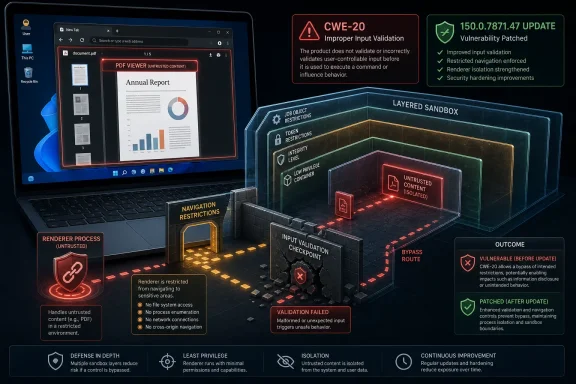 The Medium-Severity Label Hides a Chainable Browser Boundary Bug
CVE-2026-13962 is easy to understate because the public description includes a major qualifier: the attacker must already have compromised the renderer process. That means this vulnerability is not, by itself, the classic “visit a page and lose the machine” nightmare. It is instead the kind of flaw that becomes more interesting when paired with another bug.That distinction matters. Modern Chrome security is built around containment: renderers process web content under heavy restrictions, while more privileged browser processes enforce navigation, file, device, and site-isolation rules. A renderer compromise is bad, but it is not supposed to be enough to break out of the browser’s policy cage.
The NVD description says the vulnerable component is PDF handling, and the weakness class assigned by CISA-ADP is CWE-20, improper input validation. In plain English, Chrome accepted or processed something in the PDF-related path without validating it tightly enough, creating a way to bypass navigation restrictions after the renderer was already under attacker control.
That makes the bug less like a front-door break-in and more like a failure in an internal checkpoint. The first exploit gets the attacker into a constrained room; CVE-2026-13962 may help them move through a door that was supposed to stay locked.
Chrome’s Built-In PDF Viewer Is Not Just a Document Feature
For most users, Chrome’s PDF support is invisible infrastructure. Click a tax form, an invoice, a manual, or a download link, and the document opens inside the browser rather than in a separate application. That convenience is exactly why PDF handling deserves the same scrutiny as JavaScript engines, graphics stacks, media codecs, and extension APIs.PDF is not a passive format in practice. It is a sprawling document container with fonts, images, forms, scripting history, embedded metadata, links, navigation behavior, and decades of compatibility baggage. Browser vendors have spent years trying to render PDFs safely without recreating the old plug-in era’s worst security habits.
Google’s public Chrome Releases note for the 150.0.7871.47 desktop update is the vendor anchor here, while the Chromium issue tracker entry remains permission-restricted, as is common for security bugs until enough users have updated. That leaves defenders with the usual sparse public record: component, severity, affected version range, and a short vulnerability sentence.
Sparse does not mean unimportant. In browser security, a one-line CVE can describe a small validation mistake with big implications for exploit chains. The most useful reading of this bug is not “PDFs are broken,” but “Chrome’s PDF pathway had a policy-enforcement edge case that Google considered worth patching promptly.”
The Prerequisite Is the Story, Not a Footnote
The phrase “who had compromised the renderer process” is doing a lot of work. It tells administrators not to treat CVE-2026-13962 as a standalone remote code execution panic, but it also tells exploit writers exactly where the bug fits. It is a post-renderer-compromise navigation restriction bypass.That is the modern browser battlefield. Attackers often need multiple weaknesses: one to gain code execution in a renderer, one to bypass a sandbox or policy restriction, one to escalate privileges, and sometimes another to persist or steal data outside the browser’s intended boundaries. Each bug may look modest alone; together, they form the exploit.
CISA-ADP’s CVSS 3.1 vector assigns a medium 6.5 score, with network attack vector, low attack complexity, no privileges required, user interaction required, unchanged scope, no confidentiality impact, high integrity impact, and no availability impact. That scoring lines up with a vulnerability that is reachable through web content but constrained by the need for user interaction and a prior renderer compromise.
The high integrity impact is the tell. Navigation restrictions exist to prevent compromised or malicious content from steering the browser into places it should not go. If an attacker can bypass those restrictions, the consequence is not necessarily data theft by itself, but unauthorized control over browser behavior.
Navigation Restrictions Are a Security Boundary by Another Name
“Bypass navigation restrictions” sounds less dramatic than “sandbox escape,” but it should still make security teams sit up. Navigation rules are how browsers decide whether one frame, document, origin, or process can cause another browsing context to go somewhere else. They are part of the machinery that prevents web content from turning the browser into an unwilling deputy.In ordinary browsing, navigation is supposed to feel simple. You click a link, submit a form, open a PDF, or get redirected. Underneath, Chrome is checking origin relationships, frame policies, sandbox attributes, opener behavior, user activation, and process boundaries.
A compromised renderer trying to bypass those checks is not just “opening a page.” It may be trying to move a user into an attacker-controlled flow, confuse site isolation assumptions, interfere with embedded content, or trigger behavior that would normally require a stronger trust relationship. The public CVE text does not tell us which exact restriction was bypassed, and Google’s restricted issue means responsible analysts should avoid pretending otherwise.
But the general class is familiar. Browser vendors keep tightening navigation semantics because attackers keep finding situations where the browser’s visible behavior and its internal trust model diverge. CVE-2026-13962 appears to be one more patch in that long campaign.
The Patch Is Simple; the Fleet Reality Is Not
For individual users, the practical answer is blunt: update Chrome to 150.0.7871.47 or later on desktop. Chrome’s automatic update system will handle this for many people, but the final step often still requires a browser restart. The vulnerable state is the familiar one: Chrome has downloaded an update, but the user keeps a long-running session alive for days.For enterprise administrators, the work is less tidy. Managed Chrome environments may use update rings, testing windows, Extended Stable channels, third-party packaging, virtual desktop images, or application-control policies that slow deployment. Those controls are legitimate, but they become risk multipliers when security fixes accumulate.
Google’s own enterprise update guidance has long encouraged organizations to balance stability and security across Stable, Extended Stable, Beta, and Dev channels. That balance is especially visible with a bug like CVE-2026-13962. A medium-severity chainable issue may not justify emergency disruption on its own, but it should not sit unpatched just because it lacks the glamour of an actively exploited zero-day.
The right operational posture is to treat browser updates as infrastructure updates. Chrome is not merely an app; it is a runtime for mail, identity, SaaS administration, document review, internal dashboards, and privileged workflows. When the browser’s policy enforcement changes, the enterprise attack surface changes with it.
Microsoft’s Edge Users Should Watch the Chromium Clock Too
WindowsForum readers know the punchline: Chrome vulnerabilities rarely stay a Chrome-only concern. Microsoft Edge, Brave, Vivaldi, Opera, and other Chromium-based browsers inherit large parts of the Chromium codebase, though patches land on each vendor’s own schedule. A Chromium PDF flaw fixed in Chrome should prompt administrators to check every Chromium-derived browser in their fleet.That does not mean every downstream browser is automatically vulnerable in the same way at the same time. Vendors may compile features differently, backport patches, disable components, or ship updates with their own versioning. But for practical security management, Chromium CVEs are a fleet-wide signal, not a single-product curiosity.
Edge is particularly important in Windows shops because it is present by default and deeply integrated into Microsoft’s management story. Even organizations that standardize on Chrome may still have Edge available for system components, user fallback, embedded web views, or unmanaged browsing. A Chrome patch day should therefore trigger a broader browser inventory review.
The same logic applies to Electron applications and embedded Chromium runtimes, though CVE applicability can be murkier there. If an application includes a PDF-capable Chromium surface, the question is not whether the product is called Chrome. The question is whether the vulnerable code path exists and whether the vendor has shipped an updated runtime.
NVD’s CPE Lag Is Annoying, But Not a Reason to Wait
The user-facing NVD page includes the familiar machinery of vulnerability administration: publication date, modification date, references, CVSS status, CWE assignment, and affected software configuration. The change history says NIST added a CPE configuration for Google Chrome versions up to, but excluding, 150.0.7871.47. It also shows CISA-ADP adding the CVSS vector, CWE-20, and SSVC information.This matters because many scanners and dashboards depend on CPE matching. If a CPE entry is incomplete, delayed, or oddly expressed, vulnerability management systems can miss assets or generate confusing results. The NVD page’s own “Are we missing a CPE here?” prompt is a reminder that public vulnerability metadata is part of the security supply chain, and it is not always perfect on day one.
But administrators should not confuse metadata maturity with patch relevance. The authoritative product signal is Google’s release advisory and Chrome’s fixed version. If your scanner has not yet caught up, that is a scanner problem, not a reason to leave browsers exposed.
In practice, the best organizations use CVE feeds, vendor advisories, endpoint inventory, and update telemetry together. CVE data tells you what exists. Vendor release notes tell you what changed. Fleet telemetry tells you whether the fix is actually present. None of those sources is sufficient alone.
The SSVC Signal Says “Do the Work,” Not “Drop Everything”
CISA-ADP’s SSVC entry lists exploitation as “none,” automatable as “no,” and technical impact as “partial.” That is a useful counterweight to the reflexive panic that sometimes follows any browser CVE. There is no public indication in the provided NVD record that CVE-2026-13962 is being exploited in the wild.Still, “not exploited” is not the same as “not useful.” Browser exploit chains are often assembled from bugs that looked individually manageable when they were disclosed. A renderer bug from one release, a policy bypass from another, and a platform-specific escape from a third can become a working chain once enough details leak or are reverse-engineered.
Google’s habit of restricting bug details until users are updated is designed to slow that process. The public issue link for CVE-2026-13962 requires permissions, which means defenders cannot yet inspect the full technical anatomy. Attackers, however, can diff patches, study behavior changes, and look for related test cases once updated builds are available.
The sane response is not alarmism. It is disciplined patching. Medium-severity browser bugs with chain potential belong in the “prompt update” category, particularly for users who handle untrusted PDFs or browse from privileged administrative workstations.
PDF Handling Keeps Reappearing Because Documents Cross Trust Boundaries
PDFs are everywhere because organizations use them to move information across boundaries. They arrive by email, customer portals, help desks, procurement systems, HR workflows, legal exchanges, and public websites. That ubiquity makes PDF parsing and rendering a permanently attractive target.Chrome’s built-in viewer reduced dependence on older external PDF plug-ins, which was a security win. But moving the viewer into the browser also moved PDF complexity into one of the most exposed applications on the machine. Every improvement in isolation reduces risk, but the attack surface remains.
The tricky part is that users do not think of browser-rendered PDFs as browser content. A PDF may look like a document, but in Chrome it participates in browser navigation, origin handling, embedding behavior, download prompts, and user-interface decisions. The CVE description’s pairing of “PDF” and “navigation restrictions” is therefore not odd; it is exactly where document rendering meets browser policy.
Security teams should use this as a training point. The risky act is not only downloading an attachment. Opening a document in the browser is still opening attacker-controlled content in a complex parser and renderer. The browser may be safer than many alternatives, but “safer” is not “outside the threat model.”
The Chrome 150 Context Makes Patch Fatigue the Real Enemy
Chrome 150 arrived amid a heavy security-fix cadence, with third-party vulnerability databases and security outlets noting a large number of fixes in the release family. That volume creates a familiar problem for defenders: when every browser update fixes dozens or hundreds of issues, individual CVEs blur together. The result is patch fatigue.Patch fatigue is dangerous because browsers are unusually exposed and unusually privileged in daily work. They hold sessions for identity providers, admin consoles, cloud dashboards, password managers, customer records, source repositories, and collaboration tools. The browser is often where the user’s strongest authentication state lives.
A medium-severity PDF validation flaw may not win attention next to critical memory corruption bugs. But the vulnerability-management task is not to rank CVEs for drama; it is to reduce the number of exploitable paths through the environment. CVE-2026-13962 closes one such path.
The best defense is to make browser updates boring. If Chrome, Edge, and other Chromium-based browsers update reliably within a short window, no single medium CVE needs to become a crisis. If updates depend on manual action, exception-laden packaging, or users who never restart, even medium bugs become strategic debt.
Security Teams Should Read This as a Browser Governance Test
CVE-2026-13962 is a useful test of browser governance because it sits in the gray zone. It is not publicly exploited, not critical, and not a standalone system compromise. Yet it affects a ubiquitous component, has a clear fixed version, and can matter in exploit chaining.That is exactly the kind of vulnerability that reveals whether an organization has a mature process or only a panic button. Mature programs know which browsers are installed, which versions are running, which devices are stuck, which business units defer restarts, and which high-risk users need faster rings. Immature programs wait for a headline that says “zero-day.”
Administrators should also check whether security tools properly represent the affected version range. The NVD change history indicates affected Chrome versions prior to 150.0.7871.47, but scanner logic can lag or mis-handle CPE data. A direct version query from endpoint management may be more reliable than waiting for a vulnerability dashboard to turn red.
For Windows environments, the practical checks are straightforward: verify Chrome’s version, confirm Edge’s Chromium base is updated where applicable, inspect any packaged Chromium applications, and enforce restart policies that actually complete browser updates. The unglamorous step — closing and reopening the browser — is often the difference between patched and merely downloaded.
The Real Lesson Is That Sandboxes Need Maintenance
Chrome’s sandbox model is one of the reasons the modern web is survivable. It assumes that complex parsers and renderers will have bugs, then tries to contain the damage when they do. CVE-2026-13962 does not disprove that model; it reinforces why the model requires constant maintenance.A sandbox is not a wall. It is a system of walls, doors, guards, passes, and procedures. Navigation restrictions are one of those procedures, and PDF rendering is one of the places where content crosses from document semantics into browser behavior.
When Google patches a medium-severity flaw in that boundary, it is repairing part of the enforcement system. Users may never notice. Administrators may see only another version number. Attackers, however, care deeply about the small cracks between layers.
That is why the right response is neither complacency nor panic. The vulnerability’s precondition lowers immediate risk, but its placement inside the browser security architecture raises its importance. It is a chain component, and chain components are how serious browser compromises are built.
The Patch Notes Say Less Than Defenders Need, But Enough to Act
Security professionals often dislike Chrome’s terse vulnerability disclosures. The public entry for CVE-2026-13962 does not explain the exact PDF object, validation failure, navigation path, or exploit technique. The Chromium issue remains restricted. The NVD record has no NIST CVSS score yet, though CISA-ADP has provided one.That opacity is frustrating, but it is also part of coordinated browser defense. Full details too early can help attackers target users who have not yet received or applied the update. Browser vendors therefore publish just enough to justify patching while holding back exploit-ready specifics.
In this case, the public facts are sufficient. The affected product is Google Chrome. The affected versions are prior to 150.0.7871.47. The component is PDF. The weakness is insufficient data validation. The result is a navigation restriction bypass after renderer compromise. The severity is medium, with CISA-ADP scoring it 6.5 under CVSS 3.1.
That is enough for action. Waiting for a proof of concept would invert the purpose of a security update.
The July 2026 Browser Checklist Is Short and Unforgiving
This bug should leave administrators with a narrow set of concrete tasks, not a sprawling research project. The uncertainty sits in the exploit details, not in the mitigation.- Organizations should update Google Chrome desktop installations to 150.0.7871.47 or later and verify that users have restarted the browser after the update is installed.
- Security teams should treat CVE-2026-13962 as a chainable browser-boundary flaw rather than a standalone remote takeover.
- Windows administrators should check Microsoft Edge and other Chromium-based browsers separately, because Chrome’s fixed version does not prove downstream products are current.
- Vulnerability managers should not wait for perfect NVD enrichment if endpoint inventory already shows outdated Chrome builds.
- High-risk users who handle untrusted PDFs, administer cloud services, or maintain privileged browser sessions should be prioritized for faster browser update enforcement.
- Scanner findings should be validated against actual browser versions, especially while CPE and CVSS metadata is still settling.
References
- Primary source: NVD / Chromium
Published: 2026-07-03T07:00:07-07:00
NVD - CVE-2026-13962
 nvd.nist.gov
- Security advisory: MSRC
Published: 2026-07-03T07:00:07-07:00
Original feed URL
Security Update Guide - Microsoft Security Response Center
 msrc.microsoft.com
- Related coverage: cvefeed.io
CVE-2026-13962 - Google Chrome PDF Navigation Restriction Bypass
Insufficient data validation in PDF in Google Chrome prior to 150.0.7871.47 allowed a remote attacker who had compromised the renderer process to bypass navigation restrictions via a crafted HTML page. (Chromium security severity: Medium)cvefeed.io - Related coverage: radar.offseq.com
CVE-2026-13781: Insufficient validation of untrusted input in Google Chrome - Live Threat Intelligence - Threat Radar | OffSeq.com
Detailed information about CVE-2026-13781: Insufficient validation of untrusted input in Google Chrome affecting Google Chrome. Get real-time updates, technicalradar.offseq.com
