

CVE-2026-14030 is a Google Chrome for Linux vulnerability published by NVD on June 30, 2026, in which Chrome versions before 150.0.7871.47 could let a crafted page spoof the Omnibox after specific user interface gestures. The bug is not a browser apocalypse, and Google itself rates the Chromium severity as low. But it is a useful reminder that the most important security boundary in a browser is not always memory safety, sandboxing, or JavaScript policy. Sometimes it is the user’s confidence that the address bar is telling the truth.
As documented in the National Vulnerability Database entry and tied back to Google’s Chrome Releases advisory for the late-June desktop stable update, CVE-2026-14030 lives in Chrome’s SplitView implementation on Linux. CISA’s enrichment assigns it CWE-451, the weakness class for user interface misrepresentation of critical information, and gives it a CVSS 3.1 score of 4.2, medium. The exploit path requires a remote attacker to convince a user to perform specific UI gestures, which is why this is not being treated like a drive-by code execution flaw. Still, for anyone who has ever told users to “just check the URL bar,” this is the sort of bug that should make that advice feel less complete than it used to.
The Omnibox is not just a navigation field. In modern Chrome, it is a status display, a search box, an identity indicator, and the place where ordinary users are trained to look before deciding whether a page is real. If that surface can be spoofed, even in a constrained way, the browser has lost one of its clearest human-readable security signals.
That is why CVE-2026-14030 is more interesting than its “low” Chromium severity suggests. The issue does not appear to grant arbitrary code execution, credential theft by itself, or sandbox escape. It instead attacks the interface layer where users make trust decisions.
Security teams tend to rank bugs by exploitability and technical blast radius, and that is usually the right instinct. But phishing and session theft live in the gap between technical correctness and human interpretation. A URL-bar spoofing flaw does not need kernel privileges to be useful if it helps a malicious page impersonate a trusted destination at the decisive moment.
Google’s description is narrow: Chrome on Linux before 150.0.7871.47, SplitView, crafted HTML, user gestures, Omnibox spoofing. That narrowness matters. It also makes the bug easier to underestimate.
That is fertile territory for UI spoofing. Browser security has long depended on hard separation between web content and browser-owned interface. The page may draw anything it wants inside the viewport, but it must not convincingly forge the address bar, permission prompts, lock icon, tab identity, or other privileged browser surfaces.
CVE-2026-14030 suggests that Chrome’s Linux SplitView behavior created a moment where that separation could be blurred. The public description does not reveal the full mechanics, and Google’s underlying Chromium issue is marked as requiring permission, which is normal for recently fixed security bugs. But the broad shape is clear enough: a crafted page plus specific gestures could result in misleading Omnibox contents.
That is not a mere cosmetic flaw. Browser UI is part of the security model. When browser interface state can be made to disagree with reality in a way a user might believe, the browser has failed at communicating trust.
Those details should calm panic, not end the discussion. Many real-world phishing attacks already require user interaction; convincing someone to click, drag, focus, switch, or follow an on-page instruction is not an exotic requirement. The difference between a weak phishing page and a convincing one can be a single trusted signal appearing where the victim expects it.
That is especially true for Linux desktop users in technical environments. Linux Chrome may be common among developers, administrators, security researchers, and engineering teams. Those users are often more skeptical than the average consumer, but they also handle more valuable sessions: source control, cloud consoles, internal dashboards, package registries, and administrative panels.
A flaw that helps spoof the URL bar on a developer workstation is not equivalent to a generic consumer nuisance. It is a small lever that can be combined with social engineering, OAuth consent tricks, fake SSO flows, or lookalike internal tooling. The CVSS score captures the bug in isolation; attackers rarely use bugs in isolation.
Linux-only browser UI flaws often point to platform integration details: window managers, compositor behavior, toolkit differences, display server quirks, or code paths that only exist on a particular desktop stack. The public CVE text does not say which of those is involved here, and we should not pretend otherwise. But the fact that the bug is Linux-specific reinforces that security behavior is not always uniform across Chrome’s supported platforms.
That matters for enterprise IT because Linux desktops are often managed differently from Windows fleets. Windows endpoints may be tied into Intune, Configuration Manager, Group Policy, or commercial endpoint management. Linux workstations, by contrast, can be a patchwork of distribution repositories, direct Google packages, developer-managed machines, lab images, and containers with GUI browsers installed for testing.
If the Chrome version on Linux lags because it is “just a dev box,” CVE-2026-14030 is exactly the sort of bug that can slip through prioritization. It is not scary enough to trigger an emergency change window, but it is relevant enough to matter on machines used to authenticate into high-value systems.
This is where automated vulnerability management can get messy. CPEs are useful for matching product inventories to CVEs, but they are often blunt instruments for platform-specific application flaws. A browser bug that affects “Chrome on Linux” does not map as cleanly as a vulnerability in one application package across all operating systems.
So, are we missing a CPE? Based on the NVD text you provided, the essential application CPE is present:
The more practical concern is whether scanners and asset tools interpret that AND correctly. A weak implementation might flag Linux itself, miss Chrome because of package naming differences, or fail to match Google’s direct Chrome package on a distribution where Chromium and Chrome are tracked separately. For administrators, the answer is not to hunt for a kernel patch. It is to verify the Chrome build installed on Linux endpoints.
For vulnerability management, the safe operational reading is simple: update Chrome through the official channel and confirm the installed build is at or beyond the fixed version offered for that platform. If your Linux fleet reports 150.0.7871.47 or later, this CVE should be closed. If a distribution or management console reports a nearby build, administrators should check the vendor package changelog rather than assume equivalence.
This is one reason browser patching should not be reduced to copying CVE version strings into a spreadsheet. Chrome ships rapidly, vendors sometimes backport fixes, and distribution packaging can alter how version numbers appear. A scanner finding is useful, but the authoritative question is whether the package installed on the machine contains Google’s fix for CVE-2026-14030.
The same caution applies to Chromium-derived browsers. The CVE is assigned to Google Chrome, but the affected code originates in Chromium. Whether Edge, Brave, Vivaldi, Opera, ungoogled-chromium, or distribution-packaged Chromium are affected depends on whether they included the relevant SplitView code and when they pulled the fix. Administrators should check each vendor’s own release notes instead of assuming Chrome’s version number maps one-to-one.
CWE-451 captures this category well: the user interface misrepresents critical information. In browser terms, “critical information” includes origin, identity, permission state, and navigation context. The Omnibox is the most visible expression of that information.
The uncomfortable truth is that decades of user training have condensed browser safety into a few visible rituals. Check the address. Look for HTTPS. Watch for the lock icon. Do not enter credentials if the URL looks wrong. Those rules were always incomplete, but they are still part of the shared defensive vocabulary for enterprises and consumers alike.
A bug like CVE-2026-14030 does not invalidate that training, but it narrows its margin of safety. If an attacker can influence what the user thinks the address bar says, even temporarily and with interaction requirements, the user’s best-known verification step becomes less reliable. That is why UI bugs deserve more respect than their scores often receive.
The bad news is also that Chrome moves quickly. In managed environments, the browser is no longer a sleepy desktop application. It is an authentication surface, an application runtime, a policy target, a PDF viewer, a password manager front end, an extension platform, and a cloud-console shell. Patching it is operationally simple until it collides with extension compatibility, kiosk use cases, testing windows, or packaged application dependencies.
That tension shows up in almost every Chrome security release. Administrators know they should update immediately, but they also know that forced restarts can disrupt work and that some business-critical extensions or web apps lag behind browser changes. The result is often a short deferral that feels reasonable on Monday and becomes a blind spot by Friday.
For CVE-2026-14030 specifically, a limited rollout delay may not be catastrophic. But the broader Chrome 150 update contains many fixes, and attackers do not grade on the same curve as change managers. Treating the browser as a fast-moving security component means having a plan to move quickly without improvising every time Google posts another stable-channel advisory.
A developer who updates kernels diligently may still leave a browser open for weeks. A lab machine may run a Chrome build pinned for automation. A privileged admin workstation may be excluded from standard desktop tooling because it does not fit the Windows endpoint template. None of these cases is exotic.
The correct response to CVE-2026-14030 is not a special crusade against one UI spoofing bug. It is to make sure Linux browser inventory is visible. IT should know which Chrome and Chromium-family browsers exist, which update channel they use, whether automatic updates are working, and how quickly a forced remediation can be applied when a browser CVE matters.
That is especially important because browser vulnerabilities increasingly blur the line between consumer and enterprise risk. The same user who visits ordinary web pages may also administer cloud infrastructure, approve device enrollments, access secrets, or publish code. The browser session has become the perimeter for many workflows that used to require a VPN and a thick client.
The better advice is layered. Users should update Chrome, restart it, and be suspicious of pages that ask them to perform unusual window, split-view, drag, or focus actions before signing in. They should prefer password managers that bind credentials to real origins, because a good password manager can refuse to autofill on the wrong site even when a page looks convincing. They should use phishing-resistant MFA where available, because origin-bound authentication reduces the damage from visual deception.
Administrators should do the same at fleet scale. Browser patch compliance is the first control. Password manager enforcement, extension policy, SSO hardening, and FIDO2/WebAuthn adoption are the controls that make UI spoofing less useful. Training still matters, but it should not carry the whole burden.
The hardest habit to break is treating the user as the final firewall. CVE-2026-14030 is a reminder that the user’s judgment is mediated by software, and software can lie unintentionally. Good security architecture assumes that at least some interface signals will fail.
But dismissing it outright would miss the larger point. Browser UI is security-critical infrastructure. Split views, tab groups, side panels, web apps, installed PWAs, profile switchers, and permission chips all add useful capability while increasing the number of states the browser must represent accurately.
For WindowsForum.com readers, the Linux scope may seem at first like somebody else’s problem. It is not. Chromium is the substrate for much of the modern browser ecosystem, and UI-security lessons rarely stay confined to one platform forever. A bug in Chrome on Linux today is a design warning for every browser that blends complex windowing features with high-stakes identity signals.
The right posture is measured urgency. Patch the affected browser. Confirm the fleet state. Watch Chromium-derived vendors. Then use the incident to reexamine whether your organization’s phishing defenses still depend too heavily on users visually interpreting browser chrome under pressure.
As documented in the National Vulnerability Database entry and tied back to Google’s Chrome Releases advisory for the late-June desktop stable update, CVE-2026-14030 lives in Chrome’s SplitView implementation on Linux. CISA’s enrichment assigns it CWE-451, the weakness class for user interface misrepresentation of critical information, and gives it a CVSS 3.1 score of 4.2, medium. The exploit path requires a remote attacker to convince a user to perform specific UI gestures, which is why this is not being treated like a drive-by code execution flaw. Still, for anyone who has ever told users to “just check the URL bar,” this is the sort of bug that should make that advice feel less complete than it used to.
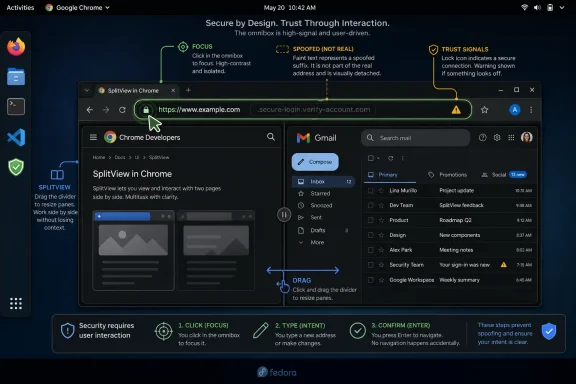 The Address Bar Is the Browser’s Last Line of Trust
The Omnibox is not just a navigation field. In modern Chrome, it is a status display, a search box, an identity indicator, and the place where ordinary users are trained to look before deciding whether a page is real. If that surface can be spoofed, even in a constrained way, the browser has lost one of its clearest human-readable security signals.That is why CVE-2026-14030 is more interesting than its “low” Chromium severity suggests. The issue does not appear to grant arbitrary code execution, credential theft by itself, or sandbox escape. It instead attacks the interface layer where users make trust decisions.
Security teams tend to rank bugs by exploitability and technical blast radius, and that is usually the right instinct. But phishing and session theft live in the gap between technical correctness and human interpretation. A URL-bar spoofing flaw does not need kernel privileges to be useful if it helps a malicious page impersonate a trusted destination at the decisive moment.
Google’s description is narrow: Chrome on Linux before 150.0.7871.47, SplitView, crafted HTML, user gestures, Omnibox spoofing. That narrowness matters. It also makes the bug easier to underestimate.
SplitView Turns a Layout Feature Into a Security Boundary
SplitView-style browser features are convenient because they let users compare pages, multitask, or keep related web content visible in one window. The tradeoff is that browser chrome and page content become more spatially complex. The user has to understand not only which page is loaded, but which pane, tab, or view the browser’s trusted interface is currently representing.That is fertile territory for UI spoofing. Browser security has long depended on hard separation between web content and browser-owned interface. The page may draw anything it wants inside the viewport, but it must not convincingly forge the address bar, permission prompts, lock icon, tab identity, or other privileged browser surfaces.
CVE-2026-14030 suggests that Chrome’s Linux SplitView behavior created a moment where that separation could be blurred. The public description does not reveal the full mechanics, and Google’s underlying Chromium issue is marked as requiring permission, which is normal for recently fixed security bugs. But the broad shape is clear enough: a crafted page plus specific gestures could result in misleading Omnibox contents.
That is not a mere cosmetic flaw. Browser UI is part of the security model. When browser interface state can be made to disagree with reality in a way a user might believe, the browser has failed at communicating trust.
“Low Severity” Does Not Mean “Low Value” to an Attacker
Google’s low severity rating is understandable. The attacker needs user interaction. The bug is platform-specific. The available public description does not suggest remote code execution or silent compromise. CISA’s SSVC assessment says exploitation is currently “none,” that the issue is not automatable, and that technical impact is partial.Those details should calm panic, not end the discussion. Many real-world phishing attacks already require user interaction; convincing someone to click, drag, focus, switch, or follow an on-page instruction is not an exotic requirement. The difference between a weak phishing page and a convincing one can be a single trusted signal appearing where the victim expects it.
That is especially true for Linux desktop users in technical environments. Linux Chrome may be common among developers, administrators, security researchers, and engineering teams. Those users are often more skeptical than the average consumer, but they also handle more valuable sessions: source control, cloud consoles, internal dashboards, package registries, and administrative panels.
A flaw that helps spoof the URL bar on a developer workstation is not equivalent to a generic consumer nuisance. It is a small lever that can be combined with social engineering, OAuth consent tricks, fake SSO flows, or lookalike internal tooling. The CVSS score captures the bug in isolation; attackers rarely use bugs in isolation.
The Linux-Only Scope Is a Clue, Not a Comfort Blanket
The NVD description identifies the affected software as Google Chrome on Linux before 150.0.7871.47. That platform limitation is important because it reduces the exposed population compared with an all-desktop Chrome bug. Windows and macOS users should still take the broader Chrome 150 update seriously, but this specific CVE is framed around Linux.Linux-only browser UI flaws often point to platform integration details: window managers, compositor behavior, toolkit differences, display server quirks, or code paths that only exist on a particular desktop stack. The public CVE text does not say which of those is involved here, and we should not pretend otherwise. But the fact that the bug is Linux-specific reinforces that security behavior is not always uniform across Chrome’s supported platforms.
That matters for enterprise IT because Linux desktops are often managed differently from Windows fleets. Windows endpoints may be tied into Intune, Configuration Manager, Group Policy, or commercial endpoint management. Linux workstations, by contrast, can be a patchwork of distribution repositories, direct Google packages, developer-managed machines, lab images, and containers with GUI browsers installed for testing.
If the Chrome version on Linux lags because it is “just a dev box,” CVE-2026-14030 is exactly the sort of bug that can slip through prioritization. It is not scary enough to trigger an emergency change window, but it is relevant enough to matter on machines used to authenticate into high-value systems.
The CPE Record Is Awkward Because the Vulnerability Is Awkward
The NVD change history shows a CPE configuration that combines Google Chrome versions before 150.0.7871.47 with Linux kernel as an operating-system condition. That is not the same thing as saying the Linux kernel is vulnerable. It is NVD’s way of expressing that this Chrome vulnerability is scoped to Chrome running on Linux.This is where automated vulnerability management can get messy. CPEs are useful for matching product inventories to CVEs, but they are often blunt instruments for platform-specific application flaws. A browser bug that affects “Chrome on Linux” does not map as cleanly as a vulnerability in one application package across all operating systems.
So, are we missing a CPE? Based on the NVD text you provided, the essential application CPE is present:
cpe:2.3:a:google:chrome:*:*:*:*:*:*:*:* with versions up to, but excluding, 150.0.7871.47. The Linux kernel CPE appears as the environmental qualifier in an AND configuration, not as a separate vulnerable product in the ordinary sense.The more practical concern is whether scanners and asset tools interpret that AND correctly. A weak implementation might flag Linux itself, miss Chrome because of package naming differences, or fail to match Google’s direct Chrome package on a distribution where Chromium and Chrome are tracked separately. For administrators, the answer is not to hunt for a kernel patch. It is to verify the Chrome build installed on Linux endpoints.
The Version Number Deserves a Second Look
There is a subtle wrinkle in the public data: the CVE description says Chrome on Linux prior to 150.0.7871.47 is affected, while some summaries of Google’s June 30 stable-channel update describe Linux moving to a 150.0.7871.46 build and Windows/macOS receiving 150.0.7871.46/.47 variants. That kind of version skew is common in Chrome releases, but it can create confusion when CVE records name a single fixed threshold.For vulnerability management, the safe operational reading is simple: update Chrome through the official channel and confirm the installed build is at or beyond the fixed version offered for that platform. If your Linux fleet reports 150.0.7871.47 or later, this CVE should be closed. If a distribution or management console reports a nearby build, administrators should check the vendor package changelog rather than assume equivalence.
This is one reason browser patching should not be reduced to copying CVE version strings into a spreadsheet. Chrome ships rapidly, vendors sometimes backport fixes, and distribution packaging can alter how version numbers appear. A scanner finding is useful, but the authoritative question is whether the package installed on the machine contains Google’s fix for CVE-2026-14030.
The same caution applies to Chromium-derived browsers. The CVE is assigned to Google Chrome, but the affected code originates in Chromium. Whether Edge, Brave, Vivaldi, Opera, ungoogled-chromium, or distribution-packaged Chromium are affected depends on whether they included the relevant SplitView code and when they pulled the fix. Administrators should check each vendor’s own release notes instead of assuming Chrome’s version number maps one-to-one.
UI Spoofing Is the Security Problem Users Actually Experience
Security professionals often separate “real” exploitation from “mere” spoofing. Users do not experience the web that way. If a browser shows the wrong trust signal at the wrong moment, the resulting credential entry, file upload, token grant, or payment approval is very real.CWE-451 captures this category well: the user interface misrepresents critical information. In browser terms, “critical information” includes origin, identity, permission state, and navigation context. The Omnibox is the most visible expression of that information.
The uncomfortable truth is that decades of user training have condensed browser safety into a few visible rituals. Check the address. Look for HTTPS. Watch for the lock icon. Do not enter credentials if the URL looks wrong. Those rules were always incomplete, but they are still part of the shared defensive vocabulary for enterprises and consumers alike.
A bug like CVE-2026-14030 does not invalidate that training, but it narrows its margin of safety. If an attacker can influence what the user thinks the address bar says, even temporarily and with interaction requirements, the user’s best-known verification step becomes less reliable. That is why UI bugs deserve more respect than their scores often receive.
Chrome’s Patch Cadence Is Both the Cure and the Challenge
The good news is that Chrome’s stable channel moves quickly. Google disclosed the issue through the Chrome security update process, NVD published the CVE on June 30, and the fix is tied to the Chrome 150.0.7871.47 threshold. For users on normal auto-update channels, the practical remediation is ordinary: let Chrome update and restart the browser.The bad news is also that Chrome moves quickly. In managed environments, the browser is no longer a sleepy desktop application. It is an authentication surface, an application runtime, a policy target, a PDF viewer, a password manager front end, an extension platform, and a cloud-console shell. Patching it is operationally simple until it collides with extension compatibility, kiosk use cases, testing windows, or packaged application dependencies.
That tension shows up in almost every Chrome security release. Administrators know they should update immediately, but they also know that forced restarts can disrupt work and that some business-critical extensions or web apps lag behind browser changes. The result is often a short deferral that feels reasonable on Monday and becomes a blind spot by Friday.
For CVE-2026-14030 specifically, a limited rollout delay may not be catastrophic. But the broader Chrome 150 update contains many fixes, and attackers do not grade on the same curve as change managers. Treating the browser as a fast-moving security component means having a plan to move quickly without improvising every time Google posts another stable-channel advisory.
Enterprise Linux Desktops Need Browser Governance, Not Good Intentions
Linux workstations occupy an odd place in many organizations. They are often used by the people most capable of managing their own systems, which can lead management teams to assume that patching will happen naturally. That assumption is convenient and dangerous.A developer who updates kernels diligently may still leave a browser open for weeks. A lab machine may run a Chrome build pinned for automation. A privileged admin workstation may be excluded from standard desktop tooling because it does not fit the Windows endpoint template. None of these cases is exotic.
The correct response to CVE-2026-14030 is not a special crusade against one UI spoofing bug. It is to make sure Linux browser inventory is visible. IT should know which Chrome and Chromium-family browsers exist, which update channel they use, whether automatic updates are working, and how quickly a forced remediation can be applied when a browser CVE matters.
That is especially important because browser vulnerabilities increasingly blur the line between consumer and enterprise risk. The same user who visits ordinary web pages may also administer cloud infrastructure, approve device enrollments, access secrets, or publish code. The browser session has become the perimeter for many workflows that used to require a VPN and a thick client.
Users Should Still Check the URL, but IT Should Stop Pretending That Is Enough
The natural user-facing advice after an Omnibox spoofing bug is awkward. We cannot tell users not to trust the address bar; the address bar remains one of the best signals they have. But we also cannot pretend that “check the URL” is a complete defense against a browser UI flaw.The better advice is layered. Users should update Chrome, restart it, and be suspicious of pages that ask them to perform unusual window, split-view, drag, or focus actions before signing in. They should prefer password managers that bind credentials to real origins, because a good password manager can refuse to autofill on the wrong site even when a page looks convincing. They should use phishing-resistant MFA where available, because origin-bound authentication reduces the damage from visual deception.
Administrators should do the same at fleet scale. Browser patch compliance is the first control. Password manager enforcement, extension policy, SSO hardening, and FIDO2/WebAuthn adoption are the controls that make UI spoofing less useful. Training still matters, but it should not carry the whole burden.
The hardest habit to break is treating the user as the final firewall. CVE-2026-14030 is a reminder that the user’s judgment is mediated by software, and software can lie unintentionally. Good security architecture assumes that at least some interface signals will fail.
The Chrome 150 Fix Is Small, but the Lesson Is Larger
CVE-2026-14030 should not trigger emergency-room theatrics. It is not publicly described as exploited in the wild, CISA’s enrichment says exploitation is none, and the attack requires user interaction. Most users simply need to update Chrome and restart.But dismissing it outright would miss the larger point. Browser UI is security-critical infrastructure. Split views, tab groups, side panels, web apps, installed PWAs, profile switchers, and permission chips all add useful capability while increasing the number of states the browser must represent accurately.
For WindowsForum.com readers, the Linux scope may seem at first like somebody else’s problem. It is not. Chromium is the substrate for much of the modern browser ecosystem, and UI-security lessons rarely stay confined to one platform forever. A bug in Chrome on Linux today is a design warning for every browser that blends complex windowing features with high-stakes identity signals.
The right posture is measured urgency. Patch the affected browser. Confirm the fleet state. Watch Chromium-derived vendors. Then use the incident to reexamine whether your organization’s phishing defenses still depend too heavily on users visually interpreting browser chrome under pressure.
The Practical Read on CVE-2026-14030
CVE-2026-14030 is small enough to patch quietly but specific enough to teach a useful lesson. The immediate fix is version hygiene; the strategic fix is reducing dependence on visual trust cues that attackers can manipulate.- Chrome on Linux versions before 150.0.7871.47 are the affected target described in the public CVE record.
- The vulnerability involves SplitView and could allow a crafted HTML page to spoof Omnibox contents after specific user gestures.
- Google rates the Chromium severity as low, while CISA’s CVSS 3.1 enrichment scores it 4.2, medium.
- The NVD CPE entry appears to include the Chrome application CPE with Linux as an environmental condition, so administrators should focus on Chrome package versions rather than looking for a Linux kernel fix.
- Linux desktop fleets, developer workstations, and Chromium-derived browsers deserve explicit verification because browser patching is often less centralized there than on managed Windows endpoints.
- Password managers, phishing-resistant MFA, and origin-bound authentication reduce the practical value of UI spoofing when visual browser signals fail.
References
- Primary source: NVD / Chromium
Published: 2026-07-03T07:00:09-07:00
NVD - CVE-2026-14030
 nvd.nist.gov
- Security advisory: MSRC
Published: 2026-07-03T07:00:09-07:00
Original feed URL
Security Update Guide - Microsoft Security Response Center
 msrc.microsoft.com
- Related coverage: cvefeed.io
CVE-2026-14030 - Google Chrome SplitView Omnibox Spoofing Vulnerability
Inappropriate implementation in SplitView in Google Chrome on Linux prior to 150.0.7871.47 allowed a remote attacker who convinced a user to engage in specific UI gestures to spoof the contents of the Omnibox (URL bar) via a crafted HTML page. (Chromium security severity: Low)cvefeed.io - Related coverage: ubuntu.com
- Related coverage: techradar.com
Update Chrome now — Google patches new zero-day flaw already being exploited | TechRadar
A new bug could allow crooks to execute arbitrary code in Chromewww.techradar.com
