

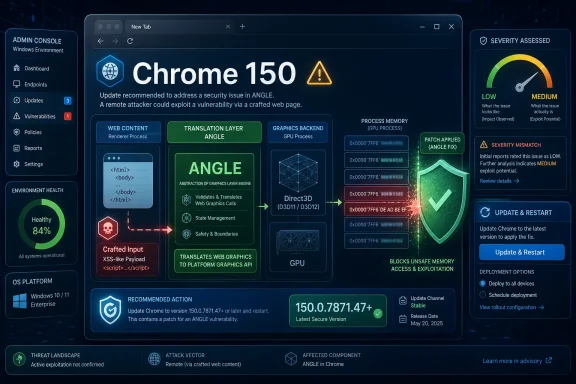
Google disclosed CVE-2026-14125 on June 30, 2026, as an uninitialized-use flaw in ANGLE affecting Google Chrome before version 150.0.7871.47, allowing a remote attacker to read potentially sensitive process memory through a crafted HTML page. The bug arrived in the National Vulnerability Database with Chromium’s own security severity marked Low, while CISA’s ADP enrichment scored it as a Medium 6.5 under CVSS 3.1. That mismatch is the story: not because the sky is falling, but because browser risk is increasingly measured less by a single label than by where the bug sits in the stack.
CVE-2026-14125 is not the kind of Chrome vulnerability that normally sets off emergency sirens. Google’s Chrome Releases blog listed it in the stable desktop update for Chrome 150, and NVD’s entry describes no known exploitation in the wild. CISA’s SSVC data likewise marked exploitation as “none” and automation as “no.” For most users, the practical answer is simple: update Chrome, restart it, and move on.
But for Windows admins, browser hardening teams, and anyone responsible for fleets of Chromium-based software, this is another reminder that “Low” in the Chrome advisory does not always mean “irrelevant.” ANGLE is not a decorative subsystem. It is the translation layer that helps Chrome and other Chromium-based browsers speak to underlying graphics APIs, and that places it on the boundary between web content, GPU acceleration, drivers, sandboxing, and cross-platform compatibility. When memory disclosure bugs appear there, the right reaction is not panic. It is disciplined patching.
The basic shape of CVE-2026-14125 is straightforward. The vulnerability is an uninitialized-use issue, mapped to CWE-457, meaning software may read from a variable or memory region before it has been properly initialized. In Chrome’s case, the reported effect is information disclosure: a malicious web page could cause Chrome to expose data from process memory that should not have been observable to the attacker.
That does not automatically mean passwords, cookies, private documents, or tokens are neatly spilled into an attacker’s lap. Memory disclosure vulnerabilities are often messy, context-dependent, and constrained by browser process boundaries. The public NVD description uses the careful phrase “potentially sensitive information,” which is exactly the right language for a bug class where the consequence depends on what happens to be in memory, how reliably it can be sampled, and whether the attacker can combine it with something else.
The more interesting part is the component: ANGLE. Originally developed to translate OpenGL ES calls to Direct3D on Windows, ANGLE has become a key piece of Chromium’s cross-platform graphics plumbing. Chrome’s web-facing graphics features, including paths used by WebGL and related rendering workloads, rely on layers like ANGLE to hide the differences between Windows, macOS, Linux, GPUs, and drivers.
That abstraction is immensely useful. It is also why security researchers keep looking there. Modern browsers are not just document viewers; they are distributed application runtimes with JIT compilers, video pipelines, GPU acceleration, IPC boundaries, PDF viewers, extension frameworks, and hardware interfaces. A bug in graphics handling can begin with a web page but brush up against parts of the system that look much closer to native application territory than old-fashioned HTML ever did.
CVE-2026-14125 sits on the less dramatic end of that spectrum. It is not described as remote code execution. It is not listed as actively exploited. It requires user interaction in the ordinary browser sense: the victim must visit or be directed to a crafted page. Still, the placement of the flaw matters, because information disclosure is frequently the supporting actor in more serious exploit chains.
That spread is not necessarily a contradiction. Vendor severity and CVSS are different instruments. Google’s internal Chrome severity reflects Chromium’s own view of exploitability, impact, sandboxing, and bug class in the context of the browser. CVSS, by contrast, is a more generalized scoring framework that can give substantial weight to confidentiality loss even when a vendor views the practical exploit value as limited.
This is where administrators often get burned by dashboards. A vulnerability scanner may elevate CVE-2026-14125 as Medium because of the CVSS vector, while Chrome’s release notes may make it look routine. Neither view is fake. The scanner is telling you that remote memory disclosure from a browser process is a real security condition. Google is telling you that, within Chrome’s security model and based on the known details, this is not one of the urgent, weaponized, critical-class bugs.
The responsible reading is to avoid both extremes. It is not sensible to treat every Chrome memory disclosure as a crisis that justifies breaking change-control policy. It is equally unwise to dismiss it because the Chromium line says Low. The browser is now the default execution environment for enterprise work, identity flows, SaaS administration, password managers, and internal tools. Even low-severity browser flaws deserve fast, boring remediation.
For WindowsForum readers, the most important operational distinction is between emergency patching and routine accelerated patching. CVE-2026-14125 does not currently justify the former on its own. It absolutely supports the latter, especially because the fix is part of a larger Chrome 150 stable update that addressed many other security issues.
Security trouble follows complexity. Graphics code parses attacker-influenced inputs, manages buffers, crosses process boundaries, touches drivers, and optimizes aggressively for performance. The web made images and rendering universal; GPU acceleration made them fast; browser isolation tried to make them safe. The seams between those goals are where bugs tend to appear.
An uninitialized-use flaw is especially mundane in description and annoying in practice. The software asks memory for a value and receives whatever happened to be there because nobody set it first. In a benign application, that may cause a visual glitch or unpredictable behavior. In a browser, where hostile input is the default operating assumption, that same class of mistake can become a disclosure primitive.
The public description of CVE-2026-14125 does not give exploit mechanics, and the linked Chromium issue requires permissions. That is normal. Google often restricts bug details until enough users have received updates, and disclosure around browser vulnerabilities is deliberately paced to avoid giving attackers a ready-made recipe. The lack of public technical detail should not be mistaken for lack of seriousness; it simply means defenders have to work from the impact statement and the fixed version.
The Windows angle is particularly relevant because ANGLE’s history and much of its value are tied to translating web graphics workloads onto Windows graphics infrastructure. A crafted page is still “just a website” from the user’s perspective. Under the hood, however, that page may exercise a stack that includes JavaScript, rendering engines, GPU command serialization, graphics translation, and hardware driver behavior. This is why browser updates matter even to users who think they do not do anything risky online.
That sort of mismatch is not unusual in browser vulnerability tracking, but it matters. Chrome stable releases often ship as slightly different build numbers across operating systems, and metadata systems sometimes compress those realities into a single affected-version expression. Vulnerability databases then have to map a fast-moving browser release train into CPE syntax that was never elegant for modern auto-updating software.
The user-facing answer is less ambiguous than the database entry. If Chrome reports version 150.0.7871.47 or later on desktop, this specific vulnerability should be fixed according to the CVE description and Google’s release. If a scanner flags a system at 150.0.7871.46, administrators should validate the platform, channel, and vendor release note rather than assuming the scanner is either perfectly right or obviously wrong.
This is also why Microsoft Edge, Brave, Vivaldi, Opera, Electron apps, and embedded Chromium runtimes complicate the story. CVE names may originate in Chrome, but the vulnerable code often lives in Chromium components shared far beyond Google’s browser. A Chrome advisory is frequently the first public flare, not the last operational task.
The NVD prompt asking whether a CPE is missing is therefore not just database housekeeping. It reflects a real challenge for defenders: the vulnerable code may exist in places that do not identify themselves neatly as Google Chrome. In enterprise environments, the inventory question is often harder than the patch itself.
But modern exploit chains are modular. One bug reveals an address, another corrupts memory, another escapes a sandbox, and another establishes persistence. Memory disclosure can be the piece that defeats address space layout randomization or reveals data needed to make a separate exploit reliable. That is why confidentiality-only browser bugs can matter more in practice than their short descriptions suggest.
CISA’s CVSS vector for CVE-2026-14125 marks confidentiality impact as high while leaving integrity and availability untouched. That is a useful framing. The flaw is not publicly described as allowing page content to modify browser state or crash systems at scale. It is about reading data that should remain hidden.
For consumers, the likely risk is opportunistic and web-driven. A malicious link, compromised website, or hostile ad path could theoretically deliver a crafted page. For enterprises, the concern is more about targeted browsing contexts: administrators using privileged SaaS consoles, developers accessing internal dashboards, help desk staff working inside identity tools, or executives living in browser-based email and collaboration suites.
The right mitigation is not user training theater. Telling people “do not visit bad pages” has never been a complete browser security strategy. The mitigation is to keep the browser updated, reduce unnecessary extension exposure, maintain site isolation and sandbox defaults, and ensure endpoint controls can see browser version drift quickly.
For unmanaged home users, the update path is familiar: Chrome downloads updates in the background, but the fix generally does not take effect until the browser restarts. That restart gap is the soft underbelly of automatic updating. Users can keep a vulnerable browser process alive for days or weeks because their tabs are a second desktop and their browser session feels too important to close.
For managed Windows environments, the problem is less psychological and more procedural. Enterprises may pin versions, stage rollouts, test line-of-business apps, or rely on browser management policies that slow deployment. Those controls exist for good reasons. A broken browser update can disrupt authentication, extensions, internal apps, printing workflows, video playback, or web-based management consoles.
Still, Chrome security updates are a place where change-control culture has to be realistic. A low-severity memory disclosure in ANGLE does not demand reckless deployment. But because it arrives as part of a larger security release, waiting weeks for perfect confidence may create more risk than it removes. The better model is a tight pilot ring, rapid telemetry, and broad deployment once obvious regressions fail to appear.
Administrators should also distinguish Chrome-the-product from Chromium-the-supply-chain. Updating Google Chrome does not update every Chromium-based browser. It does not update every Electron application. It does not necessarily update embedded webviews inside third-party products. CVE-2026-14125 may be a Chrome CVE in the record, but the underlying class of issue belongs to a wider software family.
The second action is restart enforcement. Many organizations successfully download browser updates but fail to close the loop because users postpone relaunches indefinitely. Chrome and enterprise policy tooling can nudge or require relaunch after an update age threshold. That control is often more important than the patch approval itself.
The third action is ecosystem review. Microsoft Edge follows its own release process despite sharing Chromium roots. Other Chromium browsers and applications may lag or apply patches differently. If an organization permits multiple browsers, security teams need visibility into all of them, not just the default corporate standard.
The fourth action is scanner interpretation. CVE-2026-14125’s version metadata may produce edge cases around 150.0.7871.46 versus 150.0.7871.47, depending on platform and scanner logic. When findings appear inconsistent, compare the installed browser version, channel, operating system, and vendor advisory before closing or escalating the ticket.
The fifth action is risk communication. This is not the vulnerability to use for a dramatic all-hands warning. It is the vulnerability to use as evidence that browser patch SLAs should be short, restart policies should be enforced, and Chromium inventory should be complete.
That can feel unsatisfying because security teams want richer answers. Was it exploitable across all platforms? Could it leak cross-origin data? Did sandboxing reduce impact? Could it aid a renderer escape? Are Edge and other Chromium browsers affected in the same way? Public records do not answer all of those questions, and the Chromium issue is restricted.
But defenders rarely get perfect information on day one. The mature response is to patch against the known fixed version while tracking whether vendors revise impact statements later. NVD’s entry was still evolving on July 1, and that is normal for newly published CVEs. CISA ADP enrichment, vendor advisories, scanner logic, and downstream distro trackers often settle over several days.
For Windows users, the browser has become the highest-frequency patching surface on the machine. Windows Update still matters enormously, but Chrome and Edge updates often close the window on vulnerabilities that can be reached with nothing more exotic than a web page. That reality should shape how organizations write policy.
A monthly desktop patch rhythm is not enough for browsers. A quarterly application certification process is absurd for browsers. Even a two-week delay can be too long when a Chrome bug is known to be exploited, and while CVE-2026-14125 is not in that category, it lives in the same ecosystem that produces those emergencies.
CVE-2026-14125 is not the kind of Chrome vulnerability that normally sets off emergency sirens. Google’s Chrome Releases blog listed it in the stable desktop update for Chrome 150, and NVD’s entry describes no known exploitation in the wild. CISA’s SSVC data likewise marked exploitation as “none” and automation as “no.” For most users, the practical answer is simple: update Chrome, restart it, and move on.
But for Windows admins, browser hardening teams, and anyone responsible for fleets of Chromium-based software, this is another reminder that “Low” in the Chrome advisory does not always mean “irrelevant.” ANGLE is not a decorative subsystem. It is the translation layer that helps Chrome and other Chromium-based browsers speak to underlying graphics APIs, and that places it on the boundary between web content, GPU acceleration, drivers, sandboxing, and cross-platform compatibility. When memory disclosure bugs appear there, the right reaction is not panic. It is disciplined patching.
 A Low-Severity Bug Landed in a High-Value Neighborhood
The basic shape of CVE-2026-14125 is straightforward. The vulnerability is an uninitialized-use issue, mapped to CWE-457, meaning software may read from a variable or memory region before it has been properly initialized. In Chrome’s case, the reported effect is information disclosure: a malicious web page could cause Chrome to expose data from process memory that should not have been observable to the attacker.That does not automatically mean passwords, cookies, private documents, or tokens are neatly spilled into an attacker’s lap. Memory disclosure vulnerabilities are often messy, context-dependent, and constrained by browser process boundaries. The public NVD description uses the careful phrase “potentially sensitive information,” which is exactly the right language for a bug class where the consequence depends on what happens to be in memory, how reliably it can be sampled, and whether the attacker can combine it with something else.
The more interesting part is the component: ANGLE. Originally developed to translate OpenGL ES calls to Direct3D on Windows, ANGLE has become a key piece of Chromium’s cross-platform graphics plumbing. Chrome’s web-facing graphics features, including paths used by WebGL and related rendering workloads, rely on layers like ANGLE to hide the differences between Windows, macOS, Linux, GPUs, and drivers.
That abstraction is immensely useful. It is also why security researchers keep looking there. Modern browsers are not just document viewers; they are distributed application runtimes with JIT compilers, video pipelines, GPU acceleration, IPC boundaries, PDF viewers, extension frameworks, and hardware interfaces. A bug in graphics handling can begin with a web page but brush up against parts of the system that look much closer to native application territory than old-fashioned HTML ever did.
CVE-2026-14125 sits on the less dramatic end of that spectrum. It is not described as remote code execution. It is not listed as actively exploited. It requires user interaction in the ordinary browser sense: the victim must visit or be directed to a crafted page. Still, the placement of the flaw matters, because information disclosure is frequently the supporting actor in more serious exploit chains.
The Severity Split Says More About Scoring Than About Safety
Google’s Chromium severity rating for CVE-2026-14125 is Low. CISA’s ADP enrichment gives it a CVSS 3.1 base score of 6.5, which lands in Medium territory, with a vector indicating network attackability, low attack complexity, no privileges required, required user interaction, unchanged scope, high confidentiality impact, and no integrity or availability impact. NVD itself had not yet provided its own CVSS assessment when the entry was last modified on July 1, 2026.That spread is not necessarily a contradiction. Vendor severity and CVSS are different instruments. Google’s internal Chrome severity reflects Chromium’s own view of exploitability, impact, sandboxing, and bug class in the context of the browser. CVSS, by contrast, is a more generalized scoring framework that can give substantial weight to confidentiality loss even when a vendor views the practical exploit value as limited.
This is where administrators often get burned by dashboards. A vulnerability scanner may elevate CVE-2026-14125 as Medium because of the CVSS vector, while Chrome’s release notes may make it look routine. Neither view is fake. The scanner is telling you that remote memory disclosure from a browser process is a real security condition. Google is telling you that, within Chrome’s security model and based on the known details, this is not one of the urgent, weaponized, critical-class bugs.
The responsible reading is to avoid both extremes. It is not sensible to treat every Chrome memory disclosure as a crisis that justifies breaking change-control policy. It is equally unwise to dismiss it because the Chromium line says Low. The browser is now the default execution environment for enterprise work, identity flows, SaaS administration, password managers, and internal tools. Even low-severity browser flaws deserve fast, boring remediation.
For WindowsForum readers, the most important operational distinction is between emergency patching and routine accelerated patching. CVE-2026-14125 does not currently justify the former on its own. It absolutely supports the latter, especially because the fix is part of a larger Chrome 150 stable update that addressed many other security issues.
ANGLE Keeps Showing Why Browser Graphics Is Security-Critical
ANGLE’s job is to make web graphics work consistently despite the chaos underneath. Windows systems may route graphics through Direct3D, macOS has its own graphics stack, Linux has another set of driver and API realities, and Chrome has to make web applications behave as if this is all one coherent platform. ANGLE is one of the layers that makes that possible.Security trouble follows complexity. Graphics code parses attacker-influenced inputs, manages buffers, crosses process boundaries, touches drivers, and optimizes aggressively for performance. The web made images and rendering universal; GPU acceleration made them fast; browser isolation tried to make them safe. The seams between those goals are where bugs tend to appear.
An uninitialized-use flaw is especially mundane in description and annoying in practice. The software asks memory for a value and receives whatever happened to be there because nobody set it first. In a benign application, that may cause a visual glitch or unpredictable behavior. In a browser, where hostile input is the default operating assumption, that same class of mistake can become a disclosure primitive.
The public description of CVE-2026-14125 does not give exploit mechanics, and the linked Chromium issue requires permissions. That is normal. Google often restricts bug details until enough users have received updates, and disclosure around browser vulnerabilities is deliberately paced to avoid giving attackers a ready-made recipe. The lack of public technical detail should not be mistaken for lack of seriousness; it simply means defenders have to work from the impact statement and the fixed version.
The Windows angle is particularly relevant because ANGLE’s history and much of its value are tied to translating web graphics workloads onto Windows graphics infrastructure. A crafted page is still “just a website” from the user’s perspective. Under the hood, however, that page may exercise a stack that includes JavaScript, rendering engines, GPU command serialization, graphics translation, and hardware driver behavior. This is why browser updates matter even to users who think they do not do anything risky online.
The CPE Confusion Is a Symptom of a Messy Ecosystem
The NVD change history for CVE-2026-14125 shows CPE configuration being added for Google Chrome versions up to, but excluding, 150.0.7871.46, with Windows, Linux kernel, and macOS listed as platform context. The description, however, says Chrome prior to 150.0.7871.47. The CVE record’s affected data also references 150.0.7871.47 as the fixed boundary, while Google’s desktop release appears to have used closely related build numbers across platforms.That sort of mismatch is not unusual in browser vulnerability tracking, but it matters. Chrome stable releases often ship as slightly different build numbers across operating systems, and metadata systems sometimes compress those realities into a single affected-version expression. Vulnerability databases then have to map a fast-moving browser release train into CPE syntax that was never elegant for modern auto-updating software.
The user-facing answer is less ambiguous than the database entry. If Chrome reports version 150.0.7871.47 or later on desktop, this specific vulnerability should be fixed according to the CVE description and Google’s release. If a scanner flags a system at 150.0.7871.46, administrators should validate the platform, channel, and vendor release note rather than assuming the scanner is either perfectly right or obviously wrong.
This is also why Microsoft Edge, Brave, Vivaldi, Opera, Electron apps, and embedded Chromium runtimes complicate the story. CVE names may originate in Chrome, but the vulnerable code often lives in Chromium components shared far beyond Google’s browser. A Chrome advisory is frequently the first public flare, not the last operational task.
The NVD prompt asking whether a CPE is missing is therefore not just database housekeeping. It reflects a real challenge for defenders: the vulnerable code may exist in places that do not identify themselves neatly as Google Chrome. In enterprise environments, the inventory question is often harder than the patch itself.
Memory Disclosure Is the Exploit Chain’s Quiet Enabler
On its own, an information disclosure bug is usually less severe than code execution, sandbox escape, or privilege escalation. Attackers generally prefer vulnerabilities that let them run code, escape containment, or persist. A memory leak does not automatically provide that.But modern exploit chains are modular. One bug reveals an address, another corrupts memory, another escapes a sandbox, and another establishes persistence. Memory disclosure can be the piece that defeats address space layout randomization or reveals data needed to make a separate exploit reliable. That is why confidentiality-only browser bugs can matter more in practice than their short descriptions suggest.
CISA’s CVSS vector for CVE-2026-14125 marks confidentiality impact as high while leaving integrity and availability untouched. That is a useful framing. The flaw is not publicly described as allowing page content to modify browser state or crash systems at scale. It is about reading data that should remain hidden.
For consumers, the likely risk is opportunistic and web-driven. A malicious link, compromised website, or hostile ad path could theoretically deliver a crafted page. For enterprises, the concern is more about targeted browsing contexts: administrators using privileged SaaS consoles, developers accessing internal dashboards, help desk staff working inside identity tools, or executives living in browser-based email and collaboration suites.
The right mitigation is not user training theater. Telling people “do not visit bad pages” has never been a complete browser security strategy. The mitigation is to keep the browser updated, reduce unnecessary extension exposure, maintain site isolation and sandbox defaults, and ensure endpoint controls can see browser version drift quickly.
Chrome’s Update Machinery Is the Defense, Until It Isn’t
Chrome’s security model assumes frequent updates. That has been true for years, but the stakes keep rising because browsers now patch hundreds of vulnerabilities in major cycles and dozens more in point releases. The desktop browser is one of the most aggressively maintained pieces of software on a Windows machine, and it needs to be.For unmanaged home users, the update path is familiar: Chrome downloads updates in the background, but the fix generally does not take effect until the browser restarts. That restart gap is the soft underbelly of automatic updating. Users can keep a vulnerable browser process alive for days or weeks because their tabs are a second desktop and their browser session feels too important to close.
For managed Windows environments, the problem is less psychological and more procedural. Enterprises may pin versions, stage rollouts, test line-of-business apps, or rely on browser management policies that slow deployment. Those controls exist for good reasons. A broken browser update can disrupt authentication, extensions, internal apps, printing workflows, video playback, or web-based management consoles.
Still, Chrome security updates are a place where change-control culture has to be realistic. A low-severity memory disclosure in ANGLE does not demand reckless deployment. But because it arrives as part of a larger security release, waiting weeks for perfect confidence may create more risk than it removes. The better model is a tight pilot ring, rapid telemetry, and broad deployment once obvious regressions fail to appear.
Administrators should also distinguish Chrome-the-product from Chromium-the-supply-chain. Updating Google Chrome does not update every Chromium-based browser. It does not update every Electron application. It does not necessarily update embedded webviews inside third-party products. CVE-2026-14125 may be a Chrome CVE in the record, but the underlying class of issue belongs to a wider software family.
The Windows Admin Playbook Is Boring by Design
The immediate action is version validation. On individual machines, Chrome’s About page is enough: if the browser is below the fixed Chrome 150 build line, update and restart. In managed environments, browser version reporting should come from endpoint management, vulnerability management, or software inventory tooling rather than a help desk campaign asking users to check manually.The second action is restart enforcement. Many organizations successfully download browser updates but fail to close the loop because users postpone relaunches indefinitely. Chrome and enterprise policy tooling can nudge or require relaunch after an update age threshold. That control is often more important than the patch approval itself.
The third action is ecosystem review. Microsoft Edge follows its own release process despite sharing Chromium roots. Other Chromium browsers and applications may lag or apply patches differently. If an organization permits multiple browsers, security teams need visibility into all of them, not just the default corporate standard.
The fourth action is scanner interpretation. CVE-2026-14125’s version metadata may produce edge cases around 150.0.7871.46 versus 150.0.7871.47, depending on platform and scanner logic. When findings appear inconsistent, compare the installed browser version, channel, operating system, and vendor advisory before closing or escalating the ticket.
The fifth action is risk communication. This is not the vulnerability to use for a dramatic all-hands warning. It is the vulnerability to use as evidence that browser patch SLAs should be short, restart policies should be enforced, and Chromium inventory should be complete.
The Real Lesson Is Hidden in the Version Number
The most telling detail in CVE-2026-14125 is not the CVSS score. It is the phrase “prior to 150.0.7871.47.” In modern browser security, the fixed version is the operational fact that matters most. Severity labels guide triage, but version numbers determine exposure.That can feel unsatisfying because security teams want richer answers. Was it exploitable across all platforms? Could it leak cross-origin data? Did sandboxing reduce impact? Could it aid a renderer escape? Are Edge and other Chromium browsers affected in the same way? Public records do not answer all of those questions, and the Chromium issue is restricted.
But defenders rarely get perfect information on day one. The mature response is to patch against the known fixed version while tracking whether vendors revise impact statements later. NVD’s entry was still evolving on July 1, and that is normal for newly published CVEs. CISA ADP enrichment, vendor advisories, scanner logic, and downstream distro trackers often settle over several days.
For Windows users, the browser has become the highest-frequency patching surface on the machine. Windows Update still matters enormously, but Chrome and Edge updates often close the window on vulnerabilities that can be reached with nothing more exotic than a web page. That reality should shape how organizations write policy.
A monthly desktop patch rhythm is not enough for browsers. A quarterly application certification process is absurd for browsers. Even a two-week delay can be too long when a Chrome bug is known to be exploited, and while CVE-2026-14125 is not in that category, it lives in the same ecosystem that produces those emergencies.
The Practical Read for CVE-2026-14125 Is Faster Hygiene, Not Fear
CVE-2026-14125 is best understood as a hygiene test. It asks whether your systems can identify outdated Chrome builds, deliver an update, force a relaunch, and verify the result without turning a routine browser fix into a committee project. If the answer is yes, this vulnerability is a small event. If the answer is no, the next Chrome zero-day will expose the same weakness under less forgiving conditions.- Chrome versions before 150.0.7871.47 are the relevant exposure point named in the CVE description, and users should update to that build or later.
- The flaw is an ANGLE uninitialized-use issue that could allow a crafted HTML page to disclose potentially sensitive process memory.
- Google rated the Chromium security severity as Low, while CISA’s ADP enrichment assigned a Medium CVSS 3.1 score of 6.5 based on confidentiality impact.
- Public data does not indicate active exploitation, and CISA’s SSVC enrichment marked exploitation as none.
- Administrators should verify browser restarts after update deployment, because downloaded browser patches do not help if vulnerable processes remain running.
- Security teams should check Chromium-based browsers and embedded runtimes separately rather than assuming a Google Chrome update closes every downstream exposure.
References
- Primary source: NVD / Chromium
Published: 2026-07-03T07:00:54-07:00
NVD - CVE-2026-14125
 nvd.nist.gov
- Security advisory: MSRC
Published: 2026-07-03T07:00:54-07:00
Original feed URL
Security Update Guide - Microsoft Security Response Center
 msrc.microsoft.com
