

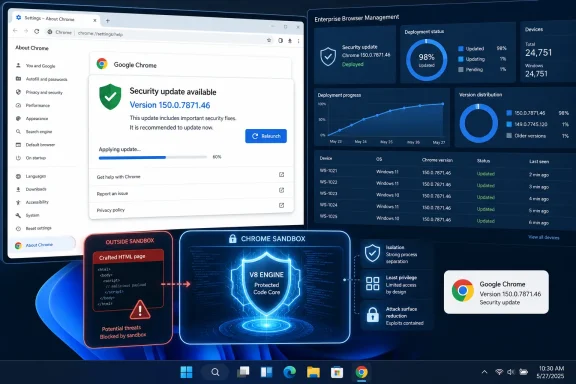
CVE-2026-14395 is an out-of-bounds write vulnerability in Chrome’s V8 component that affects Google Chrome versions before 150.0.7871.46. According to the supplied CVE record, a remote attacker can use a crafted HTML page to achieve arbitrary code execution inside the browser sandbox, with user interaction required. Chromium rates the issue Low, while the NVD record displays a CISA-ADP CVSS v3.1 score of 8.8 HIGH. The immediate response is straightforward: update Google Chrome to version 150.0.7871.46 or later, relaunch it, and verify the installed version.
On an individual Windows PC, open Chrome and enter
The supplied record identifies CVE-2026-14395 as CWE-787, an out-of-bounds write affecting V8 in Google Chrome. The documented result is arbitrary code execution inside the sandbox when Chrome processes a crafted HTML page.
The qualifier matters: the record supports sandboxed renderer code execution, not an unrestricted compromise of Windows. It does not establish a sandbox escape, operating-system-level privileges, persistence, credential theft, or full control of the endpoint. Those outcomes should not be added to the advisory without separate evidence.
The record also does not establish a specific delivery scenario. CISA-ADP’s CVSS vector marks the attack vector as network-based, requires user interaction, requires no privileges, and rates attack complexity as low. The supplied SSVC data lists exploitation as none and automatable as no. Those fields should be reported as written rather than expanded into an unsupported scenario involving particular messages, sites, senders, or exploit chains.
An out-of-bounds write is a memory-safety error in which software writes beyond an intended memory boundary. In this case, the Chrome description states that exploitation can result in arbitrary code execution, but it explicitly places that execution inside the browser sandbox. That is the supported technical consequence and the correct language for security notices, scanner annotations, and executive summaries.
Chromium’s rating reflects the documented sandbox boundary. The CISA-ADP vector models high impact if exploitation succeeds. Neither assessment establishes a sandbox escape or full Windows takeover.
The 8.8 score must be attributed precisely. The NVD record displays a CISA-ADP CVSS v3.1 score of 8.8 HIGH; it should not be described as an independent NVD score. In the supplied record, NVD had not provided its own CVSS 3.x, CVSS 4.0, or CVSS 2.0 assessment.
The CISA-ADP vector is
These fields explain the numerical result without changing the vulnerability description. A high generic CVSS score and a Low product rating can coexist when the assessments emphasize different contexts. For remediation, the fixed-version boundary is more actionable than debating which label should dominate.
The structured affected-version data may appear awkward when individual fields are viewed in isolation. The accompanying description and CPE configuration provide the practical interpretation: Chrome versions before 150.0.7871.46 are affected, and the range excludes 150.0.7871.46 itself.
Administrators should therefore use a direct numeric comparison:
The affected product named in the supplied record is Google Chrome. The record should not be generalized into a claim that every Chromium-based browser is affected. Other browser products require their own vendor determinations, release information, and version checks.
For managed environments, the equivalent control is an installed-version inventory collected after deployment. A successful configuration change, update command, or management-policy report does not by itself prove that every endpoint is running the fixed version.
Use the organization’s existing Chrome Enterprise management channel to deploy the fixed or later release. The supplied record does not justify prescribing a different management product or installation method. Existing enterprise controls remain the appropriate route for staged deployment, exception handling, and reporting.
Post-deployment verification should produce at least three groups:
Administrators should also distinguish update availability from update completion. The goal is not merely to approve or offer a Chrome release; it is to confirm that the installed and active browser version has crossed the fixed boundary.
“Exploitation: none” means no known exploitation is recorded in the supplied SSVC information. It does not establish that exploitation is impossible, and it does not guarantee that the status will never change. It should be presented as a current property of the supplied record, not as a permanent assurance.
“Automatable: no” should likewise remain narrow. It does not mean that the vulnerability cannot be exploited. It means the supplied SSVC assessment does not classify exploitation as automatable. The record does not provide enough detail to replace that designation with a specific theory about delivery, environmental requirements, or attacker workflow.
The required-user-interaction metric is also clear but limited. The CISA-ADP vector includes
These factors support prompt routine remediation rather than claims of an active emergency. There is a fixed version, there is no known exploitation in the supplied SSVC record, and affected systems can be identified through a direct version check.
The same restraint applies to update troubleshooting. If a Windows device remains below the fixed version, administrators should investigate it through their established management and support processes. The record does not document the cause of any particular update failure, so a news brief should not present a list of possible causes as though they were findings tied to this vulnerability.
That sequence is useful mainly as an attribution reminder. Vulnerability pages can display information supplied by several organizations, and the institution displaying a field is not necessarily the institution that produced it.
For CVE-2026-14395, the correct formulation is that the NVD record displays a CISA-ADP CVSS v3.1 score of 8.8 HIGH. NVD had not supplied its own CVSS assessments in the provided record. Likewise, the exploitation, automation, and technical-impact fields come from the displayed CISA SSVC contribution.
The unsupported calendar dates previously attached to publication and modification events should not be repeated without a confirmed source. They are unnecessary to the remediation decision, which depends on the affected product, fixed version, documented sandbox boundary, and supplied exploitation status.
The Low-versus-High mismatch does not change the remediation:
Affected: Google Chrome below 150.0.7871.46. Fixed: 150.0.7871.46 and later. Known exploitation: none in the supplied SSVC record. Action: update Chrome, relaunch it, and verify the installed version.
On an individual Windows PC, open Chrome and enter
chrome://settings/help in the address bar. Chrome will check for and apply available updates. When prompted, select Relaunch, return to the same page, and confirm that the displayed version is 150.0.7871.46 or later. For managed fleets, administrators should deploy the update through their existing Chrome Enterprise management channel and then verify installed-version inventory across the fleet rather than relying only on policy or deployment status.
 What CVE-2026-14395 Establishes
The supplied record identifies CVE-2026-14395 as CWE-787, an out-of-bounds write affecting V8 in Google Chrome. The documented result is arbitrary code execution inside the sandbox when Chrome processes a crafted HTML page.The qualifier matters: the record supports sandboxed renderer code execution, not an unrestricted compromise of Windows. It does not establish a sandbox escape, operating-system-level privileges, persistence, credential theft, or full control of the endpoint. Those outcomes should not be added to the advisory without separate evidence.
The record also does not establish a specific delivery scenario. CISA-ADP’s CVSS vector marks the attack vector as network-based, requires user interaction, requires no privileges, and rates attack complexity as low. The supplied SSVC data lists exploitation as none and automatable as no. Those fields should be reported as written rather than expanded into an unsupported scenario involving particular messages, sites, senders, or exploit chains.
An out-of-bounds write is a memory-safety error in which software writes beyond an intended memory boundary. In this case, the Chrome description states that exploitation can result in arbitrary code execution, but it explicitly places that execution inside the browser sandbox. That is the supported technical consequence and the correct language for security notices, scanner annotations, and executive summaries.
Why Chromium Says Low While CISA-ADP Shows 8.8 HIGH
The distinctive feature of the record is the gap between Chromium’s Low rating and the CISA-ADP assessment displayed by NVD.| Assessment source | Rating or status | Direct conclusion |
|---|---|---|
| Chromium | Low | The documented code execution remains inside the Chrome sandbox |
| CISA-ADP CVSS v3.1 | 8.8 HIGH | The vector models network access, low complexity, no privileges, required user interaction, and high confidentiality, integrity, and availability impacts |
| NVD CVSS assessments | Not provided in the supplied record | NVD displays the contributed CISA-ADP score but had not supplied its own CVSS assessment |
| CISA SSVC | Exploitation: none; Automatable: no | The supplied record does not report known exploitation or classify the issue as automatable |
The 8.8 score must be attributed precisely. The NVD record displays a CISA-ADP CVSS v3.1 score of 8.8 HIGH; it should not be described as an independent NVD score. In the supplied record, NVD had not provided its own CVSS 3.x, CVSS 4.0, or CVSS 2.0 assessment.
The CISA-ADP vector is
CVSS:3.1/AV:N/AC:L/PR:N/UI:R/S:U/C:H/I:H/A:H. It describes a network attack requiring no existing privileges but requiring user interaction. Scope remains unchanged, while potential confidentiality, integrity, and availability impacts are rated high.These fields explain the numerical result without changing the vulnerability description. A high generic CVSS score and a Low product rating can coexist when the assessments emphasize different contexts. For remediation, the fixed-version boundary is more actionable than debating which label should dominate.
The Fixed-Version Boundary
Google Chrome versions below 150.0.7871.46 are within the affected range supplied for CVE-2026-14395. Version 150.0.7871.46 and later meets the stated remediation threshold.The structured affected-version data may appear awkward when individual fields are viewed in isolation. The accompanying description and CPE configuration provide the practical interpretation: Chrome versions before 150.0.7871.46 are affected, and the range excludes 150.0.7871.46 itself.
Administrators should therefore use a direct numeric comparison:
- A displayed Chrome version lower than 150.0.7871.46 requires remediation.
- A displayed Chrome version equal to 150.0.7871.46 meets the supplied fixed boundary.
- A displayed Chrome version higher than 150.0.7871.46 is also outside the supplied affected range.
150, then 0, then 7871, and finally 46. Any earlier component that is lower makes the installed version lower overall.The affected product named in the supplied record is Google Chrome. The record should not be generalized into a claim that every Chromium-based browser is affected. Other browser products require their own vendor determinations, release information, and version checks.
What to Do Now
Relaunching is part of the procedure because the version running before the relaunch may not be the newly installed build. Confirmation must occur after Chrome reopens. A message indicating that an update was downloaded is not a substitute for checking the final displayed version.Windows end users
- Open Google Chrome.
- Enter
chrome://settings/helpin the address bar and press Enter.- Allow Chrome to check for and apply the available update.
- Select Relaunch when Chrome presents that option. Save work in active browser sessions first if necessary.
- After Chrome reopens, return to
chrome://settings/help.- Read the full displayed version number.
- Treat the device as remediated only if the version is 150.0.7871.46 or later.
Version-comparison rule
- Below 150.0.7871.46: affected and not yet remediated.
- 150.0.7871.46: meets the supplied fixed boundary.
- Later than 150.0.7871.46: outside the supplied affected range.
Exception workflow
If Chrome remains below 150.0.7871.46 after the update check and relaunch, do not mark the device compliant. Record the device and installed version as an exception, repeat the update check, and refer the case to the organization’s help desk or endpoint-management team. Managed-device users should not bypass organizational controls or install software from an unofficial source. Administrators should investigate the exception through the existing Chrome Enterprise management process and verify the version again after corrective action.
For managed environments, the equivalent control is an installed-version inventory collected after deployment. A successful configuration change, update command, or management-policy report does not by itself prove that every endpoint is running the fixed version.
Windows Fleet Guidance
Windows administrators should identify every managed Google Chrome installation and compare its installed version with 150.0.7871.46. The inventory should cover systems on which Chrome is present even when another browser is configured as the default.Use the organization’s existing Chrome Enterprise management channel to deploy the fixed or later release. The supplied record does not justify prescribing a different management product or installation method. Existing enterprise controls remain the appropriate route for staged deployment, exception handling, and reporting.
Post-deployment verification should produce at least three groups:
- Compliant devices: Chrome reports 150.0.7871.46 or later.
- Affected devices: Chrome reports a version below 150.0.7871.46.
- Unknown devices: The installed version could not be confirmed.
Administrators should also distinguish update availability from update completion. The goal is not merely to approve or offer a Chrome release; it is to confirm that the installed and active browser version has crossed the fixed boundary.
Administrator checklist
- Inventory Google Chrome installations on managed Windows devices.
- Identify every installed version below 150.0.7871.46.
- Deploy Chrome 150.0.7871.46 or later through the existing Chrome Enterprise management channel.
- Ensure users relaunch Chrome where required.
- Collect installed-version inventory after deployment.
- Keep devices below the fixed boundary in an explicit exception queue.
- Investigate devices whose versions are unavailable or remain unchanged.
- Verify corrected exceptions before closing remediation tickets.
- Track Chrome separately from other browsers.
- Use vendor-specific information before assigning CVE-2026-14395 to another Chromium-based product.
- Monitor the supplied vulnerability record for a later change in exploitation status or affected-version guidance.
Interpreting “Exploitation: None”
The supplied CISA SSVC record lists exploitation as none. The same SSVC data marks the issue as not automatable and assigns total technical impact.“Exploitation: none” means no known exploitation is recorded in the supplied SSVC information. It does not establish that exploitation is impossible, and it does not guarantee that the status will never change. It should be presented as a current property of the supplied record, not as a permanent assurance.
“Automatable: no” should likewise remain narrow. It does not mean that the vulnerability cannot be exploited. It means the supplied SSVC assessment does not classify exploitation as automatable. The record does not provide enough detail to replace that designation with a specific theory about delivery, environmental requirements, or attacker workflow.
The required-user-interaction metric is also clear but limited. The CISA-ADP vector includes
UI:R, meaning exploitation requires user interaction under that assessment. The record does not define a more detailed interaction sequence, so operational notices should avoid asserting one.These factors support prompt routine remediation rather than claims of an active emergency. There is a fixed version, there is no known exploitation in the supplied SSVC record, and affected systems can be identified through a direct version check.
What the Record Does Not Prove
Security reporting should stop at the documented boundary. The supplied record does not prove that CVE-2026-14395:- Escapes the Chrome sandbox.
- Grants operating-system-level control.
- Provides persistence on Windows.
- Evades endpoint-protection products.
- Extracts user credentials or files.
- Has been combined with another vulnerability.
- Is being actively exploited.
- Is automatically exploitable at scale.
- Affects Microsoft Edge or every Chromium-based browser.
- Uses a specific delivery source or social-engineering method.
- Follows a defined multistage exploit sequence.
The same restraint applies to update troubleshooting. If a Windows device remains below the fixed version, administrators should investigate it through their established management and support processes. The record does not document the cause of any particular update failure, so a news brief should not present a list of possible causes as though they were findings tied to this vulnerability.
Record Maturation and Attribution
The supplied change history shows the record being enriched after its initial publication: Chrome provided the CVE information, CISA-ADP contributed CVSS and SSVC data, and NIST added affected-product configuration and reference classifications.That sequence is useful mainly as an attribution reminder. Vulnerability pages can display information supplied by several organizations, and the institution displaying a field is not necessarily the institution that produced it.
For CVE-2026-14395, the correct formulation is that the NVD record displays a CISA-ADP CVSS v3.1 score of 8.8 HIGH. NVD had not supplied its own CVSS assessments in the provided record. Likewise, the exploitation, automation, and technical-impact fields come from the displayed CISA SSVC contribution.
The unsupported calendar dates previously attached to publication and modification events should not be repeated without a confirmed source. They are unnecessary to the remediation decision, which depends on the affected product, fixed version, documented sandbox boundary, and supplied exploitation status.
A Direct Operational Reading
CVE-2026-14395 is serious enough to require action because the supplied record documents arbitrary code execution inside Chrome’s sandbox. It should not be inflated into a confirmed full-machine compromise because the same record does not establish a sandbox escape.The Low-versus-High mismatch does not change the remediation:
- Chromium’s Low rating reflects the documented sandbox boundary.
- The CISA-ADP 8.8 HIGH vector models high technical impact if exploitation succeeds.
- The supplied SSVC record reports no known exploitation and says the issue is not automatable.
- The affected-version cutoff is explicit.
- Chrome users can trigger the update, relaunch, and verify the result from the browser’s Help page.
- Enterprise administrators can deploy through their existing Chrome Enterprise management channel and confirm the installed version afterward.
Affected: Google Chrome below 150.0.7871.46. Fixed: 150.0.7871.46 and later. Known exploitation: none in the supplied SSVC record. Action: update Chrome, relaunch it, and verify the installed version.
References
- Primary source: NVD / Chromium
Published: 2026-07-11T15:37:40-07:00
NVD - CVE-2026-14395
 nvd.nist.gov
- Security advisory: MSRC
Published: 2026-07-11T15:37:40-07:00
Original feed URL
Security Update Guide - Microsoft Security Response Center
 msrc.microsoft.com
- Related coverage: security.snyk.io