

Update Chrome on Windows to 150.0.7871.46 or later; earlier versions are affected by a High-severity ANGLE information-disclosure flaw.
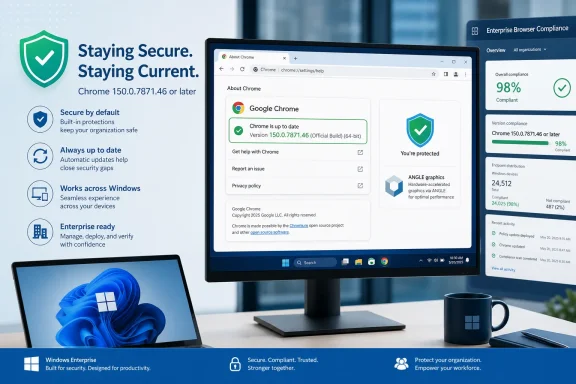
Open Chrome and select Menu (⋮) > Help > About Google Chrome. Allow the update to finish, click Relaunch, return to the About page, and confirm that the complete displayed version is 150.0.7871.46 or later.
For enterprises, deployment activity alone does not close remediation. Closure requires current, trustworthy post-update inventory showing 150.0.7871.46 or later on each in-scope Windows endpoint, with unresolved devices explicitly tracked as exceptions.
According to the National Vulnerability Database entry for CVE-2026-14402, the vulnerability is an uninitialized use in ANGLE affecting Google Chrome on Windows before version 150.0.7871.46. A remote attacker could potentially use a crafted HTML page to obtain sensitive information from process memory. Google lists the flaw as High severity in its Stable Channel Update for Desktop.
CVE-2026-14402 is assigned CWE-457, Use of Uninitialized Variable. At a general software level, this weakness occurs when software uses a variable or associated storage before it has been assigned a defined value.
The public description identifies ANGLE as the affected Chrome component but does not disclose the exact variable, object, buffer, function, or execution sequence involved. Reporting should therefore avoid constructing a speculative exploit narrative from general knowledge of ANGLE or Chrome architecture.
The documented security consequence is information disclosure. Specifically, crafted HTML could potentially expose sensitive information from process memory on an affected Chrome installation. The public material does not identify the precise categories of information that might be disclosed, and it does not provide a proof of concept, behavioral signature, network indicator, Windows event, file artifact, or reliable crash pattern.
The crafted-HTML condition establishes web content as the documented attack input. CISA-ADP’s scoring describes a network attack vector, low attack complexity, no privileges required, and required user interaction. The available description does not define the exact user action or a particular delivery method, so notices should not add unsupported details about how a victim would encounter the content.
The CISA-ADP vector is CVSS:3.1/AV:N/AC:L/PR:N/UI:R/S:U/C:H/I:N/A:N. In plain language, it models a network-reachable issue with low assessed attack complexity, no privileges required, required user interaction, High confidentiality impact, and no assigned integrity or availability impact.
Chrome’s High rating and CISA-ADP’s 6.5 Medium score are separate assessments, not contradictory versions of the same rating. The important operational facts are that Google treats the flaw as High severity, corrected software is available, user interaction is required in the contributed CVSS assessment, and no known exploitation is recorded in the displayed SSVC information.
Editor’s note: “Exploitation: none” is a status recorded in an assessment, not a guarantee that exploitation is impossible or that the status will never change. Administrators should continue to monitor vendor and vulnerability records while completing remediation.
The structured NVD configuration uses an OR expression. It should not be overread as a definitive logical pairing that independently proves every product-and-platform relationship. Structured CPE data can support vulnerability management, but it does not replace careful reading of the vulnerability description and vendor advisory.
For this issue, the defensible operational conclusion is narrow: locate Google Chrome installations on Windows that report a version earlier than 150.0.7871.46.
Do not automatically assign CVE-2026-14402 to Microsoft Edge or every other Chromium-derived browser. Shared Chromium ancestry does not prove that another browser contains the affected code in the same configuration, exposes it under the same conditions, or uses Chrome’s fixed-version numbering.
Administrators evaluating Edge or another Chromium-based product should consult that product vendor’s own security advisory and affected-version guidance. Chrome’s threshold should not be copied into another browser’s compliance rule without vendor confirmation.
Use the complete four-part version number. A report that says only “Chrome 150” is insufficient because builds within the same major release can fall on different sides of the fixed-version threshold.
Version values should be compared numerically by component: 150, then 0, then 7871, and finally 46. Truncated inventory, product-family labels, deployment-package names, and generic “current” statuses do not provide CVE-specific verification.
The public advisory does not identify a complete configuration workaround. Because ANGLE is involved, users or administrators may consider changing graphics settings, disabling hardware acceleration, or modifying experimental flags. Those actions should not be represented as validated remediation for CVE-2026-14402.
Avoiding a suspected page, clearing browser data, resetting the Chrome profile, or installing a third-party repair utility also does not move the installation beyond the documented affected range. The reliable action is to install a corrected Chrome version and confirm the result after relaunch.
The final verification must occur after installation and relaunch. An update notification, downloaded package, approved release, deployment attempt, or pending restart does not prove that the running browser has crossed the fixed-version boundary.
If Chrome continues to report a version earlier than 150.0.7871.46 after the update attempt and relaunch, the endpoint remains within the documented affected range. Users on managed systems should provide the displayed four-part version to their help desk or endpoint-management team rather than installing software from an unapproved source.
A browser crash, rendering problem, graphics anomaly, or unusual webpage should not be labeled exploitation of CVE-2026-14402 without corroborating evidence. Conversely, the absence of visible errors does not show that an outdated installation is safe. Version verification is the dependable control available from the published information.
The following enterprise practices are WindowsForum operational guidance, not facts asserted by the CVE record:
A management console may show that a deployment task completed successfully while the browser remains pending relaunch, an older installation remains active, inventory has not refreshed, or the endpoint has not recently checked in. Those are general software-management possibilities, not special behaviors attributed to CVE-2026-14402, but they explain why deployment status should not be used as the sole closure criterion.
A useful fleet report should classify endpoints as follows:
An organization may use its normal exception process for systems that cannot immediately be verified. However, an unknown endpoint should not be counted as compliant merely because an update was assigned to it.
For an individual Windows user, the response is simple: open Menu (⋮) > Help > About Google Chrome, complete the update, relaunch the browser, and verify 150.0.7871.46 or later.
For an enterprise, the same version boundary applies at fleet scale. Deploying the update is necessary, but closure depends on current post-update inventory. Systems reporting an earlier version remain affected, systems reporting 150.0.7871.46 or later meet the documented boundary, and systems without trustworthy current version data remain unresolved.
That evidence-based approach keeps the response proportionate: remediate the browser promptly, verify the outcome, avoid extending Chrome-specific facts to other browsers, and reserve compromise claims or broader incident-response actions for cases supported by additional evidence.
Open Chrome and select Menu (⋮) > Help > About Google Chrome. Allow the update to finish, click Relaunch, return to the About page, and confirm that the complete displayed version is 150.0.7871.46 or later.
For enterprises, deployment activity alone does not close remediation. Closure requires current, trustworthy post-update inventory showing 150.0.7871.46 or later on each in-scope Windows endpoint, with unresolved devices explicitly tracked as exceptions.
According to the National Vulnerability Database entry for CVE-2026-14402, the vulnerability is an uninitialized use in ANGLE affecting Google Chrome on Windows before version 150.0.7871.46. A remote attacker could potentially use a crafted HTML page to obtain sensitive information from process memory. Google lists the flaw as High severity in its Stable Channel Update for Desktop.
At a glance
- Affected product: Google Chrome on Windows
- Affected versions: Earlier than 150.0.7871.46
- Weakness: Uninitialized use in ANGLE
- Documented input: Crafted HTML
- Potential consequence: Disclosure of sensitive information from process memory
- Chrome severity: High
- CISA-ADP score: CVSS 3.1, 6.5 Medium
- User interaction: Required
- Known exploitation recorded: None
- Required action: Update, relaunch, and verify the complete version
 What CVE-2026-14402 Means
CVE-2026-14402 is assigned CWE-457, Use of Uninitialized Variable. At a general software level, this weakness occurs when software uses a variable or associated storage before it has been assigned a defined value.The public description identifies ANGLE as the affected Chrome component but does not disclose the exact variable, object, buffer, function, or execution sequence involved. Reporting should therefore avoid constructing a speculative exploit narrative from general knowledge of ANGLE or Chrome architecture.
The documented security consequence is information disclosure. Specifically, crafted HTML could potentially expose sensitive information from process memory on an affected Chrome installation. The public material does not identify the precise categories of information that might be disclosed, and it does not provide a proof of concept, behavioral signature, network indicator, Windows event, file artifact, or reliable crash pattern.
The crafted-HTML condition establishes web content as the documented attack input. CISA-ADP’s scoring describes a network attack vector, low attack complexity, no privileges required, and required user interaction. The available description does not define the exact user action or a particular delivery method, so notices should not add unsupported details about how a victim would encounter the content.
That distinction should guide both user communications and incident handling. The vulnerability warrants prompt browser remediation, but the presence of an affected version alone does not justify claims that information was actually extracted. Password resets, endpoint reimaging, account recovery, or other incident-response measures should depend on additional evidence rather than version exposure by itself.What this does not mean
CVE-2026-14402 is not publicly described as arbitrary code execution, a sandbox escape, persistence, or a path to control of Windows. An affected Chrome version establishes exposure to the vulnerability; it does not establish that the device was attacked or compromised.
Severity in One View
Chrome and CISA-ADP provide different assessment layers:| Assessment layer | Rating or status | Practical interpretation |
|---|---|---|
| Chrome severity | High | Google classifies the ANGLE vulnerability as a high-severity Chrome security issue |
| CISA-ADP CVSS 3.1 | 6.5 Medium | The contributed vector models a network-reachable confidentiality issue requiring user interaction |
| CISA SSVC | Exploitation: none; Automatable: no; Technical impact: partial | No known exploitation was recorded in that assessment |
| NVD CVSS | No separate NVD score displayed | The 6.5 score should be attributed to CISA-ADP, not presented as an NVD-authored score |
Chrome’s High rating and CISA-ADP’s 6.5 Medium score are separate assessments, not contradictory versions of the same rating. The important operational facts are that Google treats the flaw as High severity, corrected software is available, user interaction is required in the contributed CVSS assessment, and no known exploitation is recorded in the displayed SSVC information.
Editor’s note: “Exploitation: none” is a status recorded in an assessment, not a guarantee that exploitation is impossible or that the status will never change. Administrators should continue to monitor vendor and vulnerability records while completing remediation.
The Windows and Product Boundaries Matter
The CVE description expressly identifies Google Chrome on Windows. That prose description is the appropriate basis for the platform scope.The structured NVD configuration uses an OR expression. It should not be overread as a definitive logical pairing that independently proves every product-and-platform relationship. Structured CPE data can support vulnerability management, but it does not replace careful reading of the vulnerability description and vendor advisory.
For this issue, the defensible operational conclusion is narrow: locate Google Chrome installations on Windows that report a version earlier than 150.0.7871.46.
Do not automatically assign CVE-2026-14402 to Microsoft Edge or every other Chromium-derived browser. Shared Chromium ancestry does not prove that another browser contains the affected code in the same configuration, exposes it under the same conditions, or uses Chrome’s fixed-version numbering.
Administrators evaluating Edge or another Chromium-based product should consult that product vendor’s own security advisory and affected-version guidance. Chrome’s threshold should not be copied into another browser’s compliance rule without vendor confirmation.
The Fixed-Version Boundary
The remediation comparison is straightforward:| Displayed Chrome version | CVE-2026-14402 status |
|---|---|
| Earlier than 150.0.7871.46 | Within the documented affected range |
| Exactly 150.0.7871.46 | Meets the documented remediation boundary |
| Later than 150.0.7871.46 | Outside the documented affected range |
Version values should be compared numerically by component: 150, then 0, then 7871, and finally 46. Truncated inventory, product-family labels, deployment-package names, and generic “current” statuses do not provide CVE-specific verification.
The public advisory does not identify a complete configuration workaround. Because ANGLE is involved, users or administrators may consider changing graphics settings, disabling hardware acceleration, or modifying experimental flags. Those actions should not be represented as validated remediation for CVE-2026-14402.
Avoiding a suspected page, clearing browser data, resetting the Chrome profile, or installing a third-party repair utility also does not move the installation beyond the documented affected range. The reliable action is to install a corrected Chrome version and confirm the result after relaunch.
Exact Update and Verification Steps
Users can also enterUpdate Chrome on Windows
- Open Google Chrome.
- Select the three-dot menu (⋮).
- Select Help.
- Select About Google Chrome.
- Allow Chrome’s update check and installation to finish.
- Click Relaunch when Chrome presents that option.
- After Chrome reopens, return to Menu (⋮) > Help > About Google Chrome.
- Confirm that the complete displayed version is 150.0.7871.46 or later.
chrome://settings/help in the address bar to open the same About page.The final verification must occur after installation and relaunch. An update notification, downloaded package, approved release, deployment attempt, or pending restart does not prove that the running browser has crossed the fixed-version boundary.
If Chrome continues to report a version earlier than 150.0.7871.46 after the update attempt and relaunch, the endpoint remains within the documented affected range. Users on managed systems should provide the displayed four-part version to their help desk or endpoint-management team rather than installing software from an unapproved source.
Evidence Boundary and WindowsForum Operational Guidance
The public vulnerability information supports version-based remediation. It does not provide a CVE-specific detection rule or enough technical detail to determine from ordinary browser behavior whether the flaw was triggered.A browser crash, rendering problem, graphics anomaly, or unusual webpage should not be labeled exploitation of CVE-2026-14402 without corroborating evidence. Conversely, the absence of visible errors does not show that an outdated installation is safe. Version verification is the dependable control available from the published information.
The following enterprise practices are WindowsForum operational guidance, not facts asserted by the CVE record:
- Deploy the corrected release through the organization’s established software-management process.
- Collect the complete installed Chrome version after deployment.
- Refresh stale inventory before treating a device as compliant.
- Keep devices with missing or unverifiable results in an unresolved category.
- Assign owners and follow-up actions to exceptions.
- Preserve enough endpoint and version information to demonstrate remediation.
- Investigate suspected compromise only when separate telemetry, reports, or forensic evidence support that conclusion.
Deployment Is Not Verification
Enterprise teams should separate two activities:- Deployment activity: approving, assigning, downloading, or attempting to install the corrected Chrome release.
- Post-update verification: collecting current endpoint data showing that Chrome now reports 150.0.7871.46 or later.
A management console may show that a deployment task completed successfully while the browser remains pending relaunch, an older installation remains active, inventory has not refreshed, or the endpoint has not recently checked in. Those are general software-management possibilities, not special behaviors attributed to CVE-2026-14402, but they explain why deployment status should not be used as the sole closure criterion.
A useful fleet report should classify endpoints as follows:
| Fleet group | Definition | Next action |
|---|---|---|
| Compliant | Current inventory reports Chrome 150.0.7871.46 or later | Close the CVE-specific remediation item for that endpoint |
| Affected | Current inventory reports Chrome earlier than 150.0.7871.46 | Update, relaunch, and verify again |
| Unknown | The current complete Chrome version cannot be confirmed | Investigate and retain as unresolved |
Administrator Checklist
- Inventory Google Chrome installations on in-scope Windows systems.
- Collect the complete four-part installed version.
- Flag installations earlier than 150.0.7871.46.
- Deploy 150.0.7871.46 or a later supported version using the organization’s established management process.
- Ensure Chrome is relaunched where required.
- Re-query installed versions after deployment and relaunch.
- Classify each endpoint as compliant, affected, or unknown.
- Do not treat an approved package, deployment attempt, or pending update as proof of remediation.
- Refresh stale or incomplete inventory before closure.
- Track unresolved endpoints through the organization’s normal exception process.
- Evaluate Edge and other Chromium-derived browsers only against their own vendors’ advisories.
- Avoid presenting graphics-setting changes or other unvalidated workarounds as complete mitigation.
- Do not equate an affected version with confirmed exploitation or compromise.
- Monitor the NVD entry and Google’s Chrome release information for material changes.
The Practical Conclusion
CVE-2026-14402 is a High-severity Chrome vulnerability involving an uninitialized use in ANGLE on Windows. Crafted HTML could potentially expose sensitive information from process memory, and the documented affected range ends at Chrome 150.0.7871.46.For an individual Windows user, the response is simple: open Menu (⋮) > Help > About Google Chrome, complete the update, relaunch the browser, and verify 150.0.7871.46 or later.
For an enterprise, the same version boundary applies at fleet scale. Deploying the update is necessary, but closure depends on current post-update inventory. Systems reporting an earlier version remain affected, systems reporting 150.0.7871.46 or later meet the documented boundary, and systems without trustworthy current version data remain unresolved.
That evidence-based approach keeps the response proportionate: remediate the browser promptly, verify the outcome, avoid extending Chrome-specific facts to other browsers, and reserve compromise claims or broader incident-response actions for cases supported by additional evidence.
References
- Primary source: NVD / Chromium
Published: 2026-07-11T15:37:45-07:00
Loading…
nvd.nist.gov - Security advisory: MSRC
Published: 2026-07-11T15:37:45-07:00
Original feed URL
Loading…
msrc.microsoft.com - Related coverage: security.snyk.io
Loading…
security.snyk.io - Related coverage: vulnerability.circl.lu
Loading…
vulnerability.circl.lu - Related coverage: chromium.org
Loading…
www.chromium.org