

Google fixed CVE-2026-14422 in Chrome 150.0.7871.46, addressing a High-severity Tint vulnerability that can cause out-of-bounds reads and writes through a crafted HTML page. NVD identifies Google Chrome versions before 150.0.7871.46 as affected. Windows users should update immediately, relaunch the browser, and confirm that the version now running is 150.0.7871.46 or later.
For consumers, the procedure is:
The actionable version boundary is straightforward. NVD identifies Google Chrome versions before 150.0.7871.46 as affected.
The distinction between installing an update and verifying the running version is important. An endpoint-management console may report that a release was deployed, but that status alone is not the same as direct evidence that users are now operating the corrected browser version.
For individual users, the version displayed at Menu (⋮) > Help > About Google Chrome provides the clearest check. The process is not complete until Chrome has been relaunched and that page shows 150.0.7871.46 or later.
For managed Windows environments, administrators should likewise distinguish between deployment records and version verification. That is general operational guidance rather than a claim about any special behavior of CVE-2026-14422. The objective is to establish that managed Chrome installations have crossed the published affected-version boundary.
CISA-ADP associates the vulnerability with two weakness categories:
In particular, the record does not justify claims about a specific compiler stage, shader transformation, graphics hardware path, browser process boundary, or operating-system compromise sequence. It also does not establish that every trigger produces the same result or that a complete code-execution chain has been publicly demonstrated.
The appropriate formulation is narrower: a crafted HTML page can cause out-of-bounds memory access in Tint, and the contributed severity assessment models potentially serious consequences if exploitation succeeds.
The linked Chromium issue reference requires permissions. That permission requirement is the only supported conclusion about the restricted issue. It does not, by itself, establish what technical details the issue contains, why access is limited, or what specific information has been withheld.
This evidence also applies to Google Chrome generally. The vulnerability should not be described as something triggered only “when a Windows user” opens the page. The Windows relevance is operational: Windows users and administrators running affected Chrome versions should update, relaunch, and verify the corrected version.
That vector describes a network-reachable vulnerability with low attack complexity, no required attacker privileges, required user interaction, unchanged scope, and High modeled impacts to confidentiality, integrity, and availability.
The user-interaction value,
At the same time, required user interaction does not remove the need to patch. Browsers routinely process remote web content, and the affected range is already known. Updating to the corrected version is more reliable than trying to predict whether a particular user will encounter malicious content.
The High confidentiality, integrity, and availability values describe modeled impact. They do not independently prove a specific real-world result such as full control of a Windows computer. A CVSS score is a structured severity assessment, not a substitute for a published exploit chain.
The SSVC record provides a separate set of decision-support fields:
Likewise, “automatable: no” is an SSVC classification rather than proof that attacks could never be scaled. “Technical impact: total” reflects the decision record’s impact judgment, but it does not add technical details beyond those in the supplied vulnerability description.
Taken together, these values support a balanced response: the record does not carry an SSVC exploitation signal, yet it describes a High-severity browser vulnerability with potentially substantial impact. Administrators have enough information to remediate without overstating what has been publicly demonstrated.
The supplied facts confirm potential out-of-bounds reads and writes. They do not describe:
It is equally important not to overcorrect in the other direction. The public description does not support dismissing the vulnerability as “only a crash.” Out-of-bounds reads and writes can have effects beyond reliability problems, and CISA-ADP’s impact metrics are High across confidentiality, integrity, and availability.
The defensible conclusion remains simple: the vulnerable code should be removed from use by updating Chrome to version 150.0.7871.46 or later and verifying that version after relaunch.
This does not mean every deployment report is unreliable. It means administrators should define exactly what each report proves. Package delivery, installation status, and current application version are different measurements, and vulnerability closure should be based on a measurement tied to the affected-version boundary.
For consumers, the proof step is compact: open Menu (⋮) > Help > About Google Chrome, relaunch when prompted, and confirm the displayed version.
For organizations, the equivalent process may involve management inventory or another approved version-reporting method. The details will vary by environment, so no CVE-specific claim should be made about a particular management platform, virtual desktop design, kiosk configuration, packaging system, or telemetry source without corresponding evidence.
General operational questions are still worth asking:
The supplied record confirms Google Chrome and identifies Chrome versions before 150.0.7871.46 as affected. It does not supply corresponding affected-version ranges for Microsoft Edge, other Chromium-derived browsers, or applications that incorporate Chromium components.
This is a scope limitation, not a declaration that those products are either vulnerable or safe.
Administrators should therefore avoid two unsupported conclusions:
This distinction also matters when interpreting scanner output. A finding based only on the presence of a Chromium-derived product may not prove that the product contains the affected code in the affected form. Conversely, the absence of a Google Chrome product match does not constitute an assessment of every other browser.
For Windows administrators, the immediate task is to remediate confirmed Chrome exposure first. Questions about Edge or another product should remain open until product-specific evidence is available.
The most useful evidence is therefore not a green deployment dashboard by itself. It is a verified Chrome version of 150.0.7871.46 or later after relaunch.
Consumers can obtain that proof through Menu (⋮) > Help > About Google Chrome. Enterprises should obtain equivalent version evidence through their approved management and inventory processes while keeping deployment status and verified version status separate.
The broader technical record should be reported with restraint. The vulnerability involves out-of-bounds reads and writes in Tint through a crafted HTML page. CISA-ADP scores it 8.8, with user interaction required, no privileges required, and High modeled impact across confidentiality, integrity, and availability. The SSVC exploitation option is “none,” but that field should not be converted into a universal assertion about all possible exploitation evidence.
Finally, the product scope must remain precise. The record confirms Google Chrome, not Microsoft Edge and not every browser or application derived from Chromium. Other products require their own vendor confirmation.
For Windows users and administrators, the forward-looking lesson is operational rather than speculative: establish a minimum browser version, make relaunch and verification part of remediation, and measure the version actually in use. For this vulnerability, anything below 150.0.7871.46 remains inside NVD’s identified affected range; the defensible endpoint is a verified running version at or above that threshold.
For consumers, the procedure is:
- In Chrome, open Menu (⋮) > Help > About Google Chrome.
- Allow Chrome to complete the available update.
- Select Relaunch.
- Return to the same page and verify that the version shown is 150.0.7871.46 or later.
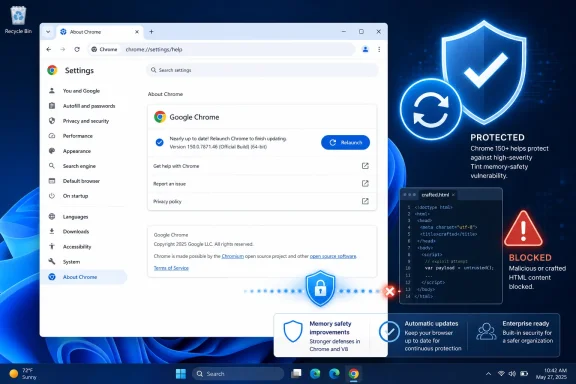 Chrome Draws a Hard Line at 150.0.7871.46
The actionable version boundary is straightforward. NVD identifies Google Chrome versions before 150.0.7871.46 as affected.| Chrome version state | CVE-2026-14422 status | Required response |
|---|---|---|
| Before 150.0.7871.46 | Affected according to NVD | Update, relaunch, and verify |
| 150.0.7871.46 or later | Outside NVD’s identified affected range | Confirm that this is the version currently running |
For individual users, the version displayed at Menu (⋮) > Help > About Google Chrome provides the clearest check. The process is not complete until Chrome has been relaunched and that page shows 150.0.7871.46 or later.
For managed Windows environments, administrators should likewise distinguish between deployment records and version verification. That is general operational guidance rather than a claim about any special behavior of CVE-2026-14422. The objective is to establish that managed Chrome installations have crossed the published affected-version boundary.
Short enterprise checklist
- Identify managed Google Chrome installations reporting versions before 150.0.7871.46.
- Deploy an approved Chrome release at or above 150.0.7871.46.
- Instruct users to relaunch Chrome after the update.
- Recheck the browser version after relaunch.
- Investigate systems that continue to report a version below the threshold.
- Record separately which devices received the update and which devices have a verified corrected version running.
- Apply product-specific guidance before assigning this Chrome CVE to Edge or another Chromium-derived browser.
What the Public Record Confirms
The available record supports a concise technical description: CVE-2026-14422 is an out-of-bounds read-and-write vulnerability in Tint that can be reached through a crafted HTML page.CISA-ADP associates the vulnerability with two weakness categories:
- CWE-125: Out-of-bounds read
- CWE-787: Out-of-bounds write
In particular, the record does not justify claims about a specific compiler stage, shader transformation, graphics hardware path, browser process boundary, or operating-system compromise sequence. It also does not establish that every trigger produces the same result or that a complete code-execution chain has been publicly demonstrated.
The appropriate formulation is narrower: a crafted HTML page can cause out-of-bounds memory access in Tint, and the contributed severity assessment models potentially serious consequences if exploitation succeeds.
The linked Chromium issue reference requires permissions. That permission requirement is the only supported conclusion about the restricted issue. It does not, by itself, establish what technical details the issue contains, why access is limited, or what specific information has been withheld.
This evidence also applies to Google Chrome generally. The vulnerability should not be described as something triggered only “when a Windows user” opens the page. The Windows relevance is operational: Windows users and administrators running affected Chrome versions should update, relaunch, and verify the corrected version.
One Score, One Concise Interpretation
CISA-ADP assigns CVE-2026-14422 a CVSS 3.1 base score of 8.8, with the vector:AV:N/AC:L/PR:N/UI:R/S:U/C:H/I:H/A:HThat vector describes a network-reachable vulnerability with low attack complexity, no required attacker privileges, required user interaction, unchanged scope, and High modeled impacts to confidentiality, integrity, and availability.
The user-interaction value,
UI:R, is significant. The available description identifies a crafted HTML page, so some user interaction is part of the scored scenario. The vulnerability therefore should not be characterized as a no-click flaw on the supplied evidence.At the same time, required user interaction does not remove the need to patch. Browsers routinely process remote web content, and the affected range is already known. Updating to the corrected version is more reliable than trying to predict whether a particular user will encounter malicious content.
The High confidentiality, integrity, and availability values describe modeled impact. They do not independently prove a specific real-world result such as full control of a Windows computer. A CVSS score is a structured severity assessment, not a substitute for a published exploit chain.
The SSVC record provides a separate set of decision-support fields:
- Exploitation: none
- Automatable: no
- Technical impact: total
Likewise, “automatable: no” is an SSVC classification rather than proof that attacks could never be scaled. “Technical impact: total” reflects the decision record’s impact judgment, but it does not add technical details beyond those in the supplied vulnerability description.
Taken together, these values support a balanced response: the record does not carry an SSVC exploitation signal, yet it describes a High-severity browser vulnerability with potentially substantial impact. Administrators have enough information to remediate without overstating what has been publicly demonstrated.
A Crafted Page Is the Documented Entry Point
The phrase “crafted HTML page” describes the input used to reach the vulnerable Tint code. It should be treated as the documented entry point, not as proof of every later stage that might be needed for a broader compromise.The supplied facts confirm potential out-of-bounds reads and writes. They do not describe:
- The exact HTML or embedded content required to trigger the flaw
- The specific Tint operation that mishandles memory
- The reliability of the trigger
- A method for gaining code execution
- A method for escaping browser isolation
- A method for obtaining broader Windows privileges
- Differences among graphics hardware or software back ends
It is equally important not to overcorrect in the other direction. The public description does not support dismissing the vulnerability as “only a crash.” Out-of-bounds reads and writes can have effects beyond reliability problems, and CISA-ADP’s impact metrics are High across confidentiality, integrity, and availability.
The defensible conclusion remains simple: the vulnerable code should be removed from use by updating Chrome to version 150.0.7871.46 or later and verifying that version after relaunch.
Installed, Deployed, and Verified Are Different States
CVE-2026-14422 provides a useful test of browser-update reporting. Security teams commonly encounter several related but nonidentical states:- An update has been approved.
- An update has been offered to a device.
- A deployment system reports success.
- Chrome has been relaunched.
- The version currently shown by Chrome is 150.0.7871.46 or later.
This does not mean every deployment report is unreliable. It means administrators should define exactly what each report proves. Package delivery, installation status, and current application version are different measurements, and vulnerability closure should be based on a measurement tied to the affected-version boundary.
For consumers, the proof step is compact: open Menu (⋮) > Help > About Google Chrome, relaunch when prompted, and confirm the displayed version.
For organizations, the equivalent process may involve management inventory or another approved version-reporting method. The details will vary by environment, so no CVE-specific claim should be made about a particular management platform, virtual desktop design, kiosk configuration, packaging system, or telemetry source without corresponding evidence.
General operational questions are still worth asking:
- Does the inventory identify the Google Chrome product rather than only a generic Chromium family?
- Does the report show the installed or current application version?
- How recently did the endpoint provide its version data?
- Is a device below 150.0.7871.46 awaiting action, offline, or failing remediation?
- Can the organization distinguish update deployment from post-update verification?
- Is there a documented exception process for systems that cannot reach the corrected version promptly?
Scope Limitation: The Record Confirms Google Chrome
Windows estates often contain Microsoft Edge and other browsers built from Chromium code. That shared foundation is not enough to assign this CVE automatically to every Chromium-derived product.The supplied record confirms Google Chrome and identifies Chrome versions before 150.0.7871.46 as affected. It does not supply corresponding affected-version ranges for Microsoft Edge, other Chromium-derived browsers, or applications that incorporate Chromium components.
This is a scope limitation, not a declaration that those products are either vulnerable or safe.
Administrators should therefore avoid two unsupported conclusions:
- “Every Chromium browser is affected because Chrome is affected.”
- “Every other Chromium browser is safe because the CVE record names Chrome.”
This distinction also matters when interpreting scanner output. A finding based only on the presence of a Chromium-derived product may not prove that the product contains the affected code in the affected form. Conversely, the absence of a Google Chrome product match does not constitute an assessment of every other browser.
For Windows administrators, the immediate task is to remediate confirmed Chrome exposure first. Questions about Edge or another product should remain open until product-specific evidence is available.
Public-Record Timeline
The unsupported July 1 and July 2, 2026 timestamps should not be used as milestones without the underlying dated records. The evidence-supported sequence can be stated without assigning unverified calendar dates:- The CVE record identifies an out-of-bounds read-and-write vulnerability in Tint reachable through a crafted HTML page.
- NVD identifies Google Chrome versions before 150.0.7871.46 as affected.
- CISA-ADP supplies a CVSS 3.1 score of 8.8 and the vector
AV:N/AC:L/PR:N/UI:R/S:U/C:H/I:H/A:H. - CISA-ADP associates the vulnerability with CWE-125 and CWE-787.
- The SSVC fields list exploitation as “none,” automatable as “no,” and technical impact as “total.”
- The Chromium issue reference is available only to users with the necessary permissions.
- Remediation consists of moving Chrome to version 150.0.7871.46 or later, relaunching, and verifying the resulting version.
Windows Response Priorities
Windows users do not need a detailed understanding of Tint to act. They need a reliable way to identify the browser version and move it beyond the affected range.For individual users
- Open Google Chrome.
- Select Menu (⋮) > Help > About Google Chrome.
- Wait while Chrome checks for and applies the available update.
- Select Relaunch.
- Return to About Google Chrome.
- Confirm that the version shown is 150.0.7871.46 or later.
For administrators
- Define the target. Set 150.0.7871.46 as the minimum acceptable Chrome version for this vulnerability, or use a later approved release.
- Find affected systems. Identify managed Chrome installations below that target.
- Deploy the update. Use the organization’s established browser-management process.
- Require relaunch. Communicate that users must relaunch Chrome to complete the consumer-facing procedure.
- Verify the result. Confirm that Chrome reports version 150.0.7871.46 or later.
- Separate status categories. Distinguish deployment attempted, deployment reported successful, and corrected version verified.
- Handle exceptions. Investigate devices that remain below the threshold rather than automatically accepting a successful deployment status.
- Respect product scope. Do not use this Chrome record as sole proof about Edge or every other Chromium-derived browser.
What Defenders Should Not Claim
Accurate reporting is particularly important when the public technical description is short. Based on the supplied evidence, defenders should avoid presenting any of the following as established facts:- That a working exploit provides full control of Windows
- That the vulnerability is being actively exploited
- That no exploitation evidence exists outside the SSVC record
- That the flaw is Windows-specific
- That a particular hardware back end changes exploitability
- That the defect crosses a specific Chrome process or sandbox boundary
- That the issue is limited to browser crashes
- That all Chromium-derived browsers are affected
- That Microsoft Edge is affected
- That the permission-required Chromium issue contains or omits a particular technical detail
- That update deployment by itself proves the corrected version is running
- That unsupported July 2026 dates define the disclosure or analysis timeline
The Practical Test Is the Running Version
CVE-2026-14422 does not require an elaborate response strategy. NVD identifies Chrome versions before 150.0.7871.46 as affected, and the corrective action is to move beyond that range.The most useful evidence is therefore not a green deployment dashboard by itself. It is a verified Chrome version of 150.0.7871.46 or later after relaunch.
Consumers can obtain that proof through Menu (⋮) > Help > About Google Chrome. Enterprises should obtain equivalent version evidence through their approved management and inventory processes while keeping deployment status and verified version status separate.
The broader technical record should be reported with restraint. The vulnerability involves out-of-bounds reads and writes in Tint through a crafted HTML page. CISA-ADP scores it 8.8, with user interaction required, no privileges required, and High modeled impact across confidentiality, integrity, and availability. The SSVC exploitation option is “none,” but that field should not be converted into a universal assertion about all possible exploitation evidence.
Finally, the product scope must remain precise. The record confirms Google Chrome, not Microsoft Edge and not every browser or application derived from Chromium. Other products require their own vendor confirmation.
For Windows users and administrators, the forward-looking lesson is operational rather than speculative: establish a minimum browser version, make relaunch and verification part of remediation, and measure the version actually in use. For this vulnerability, anything below 150.0.7871.46 remains inside NVD’s identified affected range; the defensible endpoint is a verified running version at or above that threshold.
References
- Primary source: NVD / Chromium
Published: 2026-07-11T15:39:55-07:00
NVD - CVE-2026-14422
 nvd.nist.gov
- Security advisory: MSRC
Published: 2026-07-11T15:39:55-07:00
Original feed URL
Security Update Guide - Microsoft Security Response Center
 msrc.microsoft.com
- Related coverage: chromium.googlesource.com
