

Microsoft’s advisory for CVE-2026-26110 labels the defect as a “Remote Code Execution” (RCE) vulnerability in Microsoft Office, yet the published CVSS Attack Vector is listed as Local (AV:L) — this apparent contradiction is deliberate and explains two different questions about risk: who can cause the damage, and where the vulnerable code actually runs.
Microsoft’s short advisory phrasing uses the familiar, high‑level class “Remote Code Execution” to communicate impact: an attacker who is not sitting at the victim’s keyboard can ultimately cause arbitrary code to run on a targeted workstation if certain actions occur. By contrast, the CVSS Attack Vector (AV) metric answers a narrow technical question: where must the exploit be triggered to reach the vulnerable code? For many modern Office document parsing and object‑handling bugs, the vulnerable component is reached only when a local process (the Office application on the endpoint) parses a crafted file. That means the final exploitation step happens on the local host, and CVSS correctly records that execution context as AV:L.
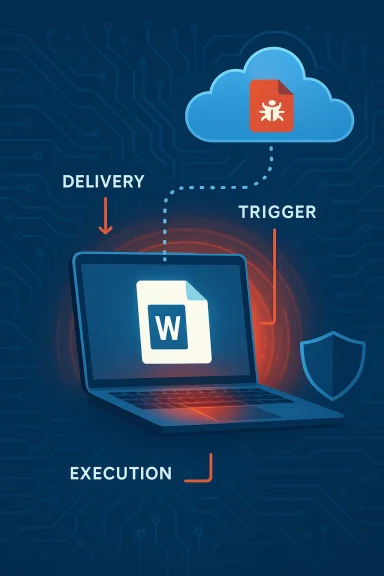
Put another way: an attacker can be remote (able to deliver a malicious Office file over email, a website, or a file share), but the vulnerable code that allows arbitrary execution is invoked locally when the recipient opens or previews that file. This pattern — remote delivery, local execution — is the reason vendors commonly use the RCE label in headlines while CVSS assigns AV:L.
The RCE label therefore communicates attacker capability and operational risk, while CVSS AV:L records exploitation mechanics. Both are correct; they simply describe different slices of the attack surface.
For organizations, the operational takeaway is simple and urgent: patch quickly, harden delivery and parsing paths, instrument the local execution point for detection, and avoid letting a nuanced scoring metric become an excuse to delay remediation. The fastest route from advisory to reduced risk is coordinated action across patch management, email/file gateway controls, endpoint hardening, and hunting for anomalous Office behavior.
Source: MSRC Security Update Guide - Microsoft Security Response Center
 Background / Overview
Microsoft’s short advisory phrasing uses the familiar, high‑level class “Remote Code Execution” to communicate impact: an attacker who is not sitting at the victim’s keyboard can ultimately cause arbitrary code to run on a targeted workstation if certain actions occur. By contrast, the CVSS Attack Vector (AV) metric answers a narrow technical question: where must the exploit be triggered to reach the vulnerable code? For many modern Office document parsing and object‑handling bugs, the vulnerable component is reached only when a local process (the Office application on the endpoint) parses a crafted file. That means the final exploitation step happens on the local host, and CVSS correctly records that execution context as AV:L.Put another way: an attacker can be remote (able to deliver a malicious Office file over email, a website, or a file share), but the vulnerable code that allows arbitrary execution is invoked locally when the recipient opens or previews that file. This pattern — remote delivery, local execution — is the reason vendors commonly use the RCE label in headlines while CVSS assigns AV:L.
What CVSS is actually measuring (and what it is not)
CVSS Attack Vector explained in plain terms
CVSS’s Attack Vector metric is deliberately literal. It classifies the technical location where the exploit payload must be in order to trigger the vulnerability:- AV:N (Network) — exploit can be launched across network boundaries (internet, remote sockets) without local access.
- AV:A (Adjacent Network) — attacker must be on the same subnet or local broadcast domain.
- AV:L (Local) — exploit requires local access to the machine or a local process to call into the vulnerable component.
- AV
 (Physical) — attacker needs physical access to the device to exploit.
Why vendors still call these “Remote Code Execution”
Vendors use “Remote Code Execution” as a shorthand to communicate consequences: adversaries can cause code to run on a victim machine from a remote location by getting the victim to accept or open malicious content. This shorthand is meaningful for defenders — it communicates that attackers do not need prior local access or valid credentials to cause a compromise if successful delivery and user interaction happen.The RCE label therefore communicates attacker capability and operational risk, while CVSS AV:L records exploitation mechanics. Both are correct; they simply describe different slices of the attack surface.
The technical anatomy of the “remote delivery, local execution” pattern
How a typical Office document RCE works
- Craft — Attacker crafts a specially malformed Office document (Word, Excel, PowerPoint) or embedded object (OLE, embedded ActiveX, Equation Editor payload, etc.) which, when parsed by Office, will corrupt memory or invoke an unintended code path (type confusion, use-after-free, out‑of‑bounds read/write, unsafe deserialization, etc.).
- Deliver — The attacker delivers that file remotely: email attachment, link to a download, shared cloud storage, or a malicious web page that causes a file to be previewed or opened.
- Trigger — The victim opens, previews, or otherwise causes Office to parse the malicious content on the local machine. Protected View or previews may still trigger parsing in some contexts; attackers sometimes craft payloads to survive preview handlers.
- Exploit — The vulnerable code path inside the Office process executes locally, corrupting memory or abusing an insecure API, enabling the attacker to run arbitrary code inside the context of the Office process.
- Post‑exploitation — If the Office process runs with user privileges, attacker code executes as that user and can attempt persistence, credential theft, or lateral movement.
Why CVSS picks AV:L for these cases
From a scoring perspective, CVSS must classify the direct technical vector required to reach the vulnerable code. If exploitation requires the victim’s Office application to parse a locally present file, then AV:L is the accurate CVSS selection even when the malicious file was delivered from an off‑host source. CVSS does not capture the broader supply chain of delivery (email, cloud) in the AV metric; instead, AV describes the exploitable context, not the distribution channel.Why this distinction matters to defenders and risk managers
- Operational prioritization: Some teams mistakenly deprioritize AV:L issues because they believe local vector implies lower exposure. That is dangerous when the vendor’s headline indicates a remote-origin attacker can cause code execution via common delivery methods.
- Patch triage: RCE class vulnerabilities in Office should be treated as high priority even when CVSS AV=L. The delivery mechanisms for Office documents (email, SharePoint, OneDrive, web) are ubiquitous.
- Detection design: EDR detection and hunting rules should focus on the moment of local execution — process creation and parent/child relationships, Office spawning suspicious child processes, and anomalous memory behavior — rather than just network indicators.
- Communications: Security teams should align their incident response playbooks to treat “remote delivery, local execution” bugs as immediate patch-and-hunt items, because attacker-origin is remote even if the exploit trigger is local.
Practical mitigation guidance (what to do now)
Below are prioritized, actionable steps for sysadmins, security engineers, and SOC teams to reduce risk from CVE‑class Office document vulnerabilities.Immediate actions (apply within days)
- Apply vendor updates — Deploy the Microsoft Office security update for CVE‑2026‑26110 to all impacted builds. Patching eliminates the underlying vulnerability and is the canonical fix.
- Block dangerous file types at the perimeter — Adjust mail filters and gateway policies to quarantine or block Office document types from untrusted senders when possible.
- Enforce Protected View and attachment sanitization — Ensure Office Protected View is enabled and mail clients are configured to open attachments in a restricted context.
- Disable automatic preview where appropriate — If previewing reduces your risk surface, disable automatic preview handlers in Outlook and file servers for high-risk user groups.
Short-term compensations (apply within weeks)
- Enable Attack Surface Reduction (ASR) rules and Office hardening — Use Microsoft Defender for Endpoint ASR rules to block risky behaviors (e.g., Office apps creating child processes, script execution from Office).
- Application control — Implement AppLocker or Windows Defender Application Control (WDAC) to limit execution to approved binaries or prevent Office from launching unsigned executables.
- Macro controls — Block macros from the internet and enforce strict signing policies for allowed macros.
- Email attachment re-writing / file conversion — Convert inbound Office files to safer formats or strip active content before delivery in high-risk environments.
Longer-term controls (policy & architecture)
- Least privilege & credential hygiene — Ensure users do not run with unnecessary admin rights; deploy credential isolation (LSA protections, credential guard).
- Network segmentation — Restrict lateral movement opportunities that could follow a successful local compromise.
- User training & phishing resilience — Continuous phishing awareness work reduces success rate of initial delivery.
- Red-team testing — Validate mitigations by testing document-based delivery methods in a controlled lab.
Detection and hunting advice for SOC teams
Detecting exploitation of Office parsing vulnerabilities focuses on behavior at the moment Office spawns or executes unusual actions.- Instrument process creation events — Collect detailed process creation telemetry (Sysmon ProcessCreate, Windows Event 4688) and alert on Office processes (winword.exe, excel.exe, powerpoint.exe, outlook.exe) that spawn command-line interpreters, PowerShell, wscript/cscript, rundll32, or other uncommon children.
- Monitor for unusual parent/child relationships — Office processes launching cmd/powershell with encoded scripts, or loading suspicious DLLs, are high‑value indicators.
- Memory behavior and injection detection — Look for anomalous memory allocations and remote thread creation inside Office processes (ETW/EDR signals).
- Credential harvesting patterns — Post‑exploit activity often includes LSASS access, credential dumping tools, or abnormal network scanning; hunt for those sequences following Office anomalies.
- Network egress anomalies — C2 connections or file uploads immediately following Office process abnormalities should be flagged.
- Query process creation logs for parent process in (winword.exe, excel.exe, powerpoint.exe, outlook.exe).
- Filter results where child process matches (powershell.exe, cmd.exe, cscript.exe, mshta.exe, rundll32.exe).
- Investigate any matches for remote IPs, unusual command-lines, or base64/encoded scripts.
- Cross-reference with file ingestion events — map the originating file, sender, or download source.
Why vendor phrasing and CVSS can confuse — a critical appraisal
Strengths of the current approach
- Vendor headlines are blunt and useful — Using “Remote Code Execution” in the advisory title succinctly communicates risk to a broad operational audience. It triggers priority actions from administrators who understand that remote‑origin attackers can cause endpoint compromise through typical user interactions.
- CVSS provides precision — The Attack Vector metric offers the technical precision needed for scoring and automated risk systems, enabling vulnerability management platforms to reason about exploit mechanics and composition.
Weaknesses and risks
- Mixed messaging creates triage errors — When high-level advisory language and technical scoring are read in isolation, defenders can misinterpret exposure and deprioritize urgent patches. A CVSS AV:L score may lull teams into thinking only local threat actors matter, which is incorrect for document‑delivery scenarios.
- Automated feeds and ticketing — Vulnerability management systems that consume only the CVSS vector might automatically lower priority without examining the advisory text or delivery channels.
- Information gaps in vendor pages — Some vendor update pages intentionally redact exploit details early in disclosure, leaving defenders to infer delivery patterns; without explicit “remote delivery” language, teams must parse advisories carefully.
Recommendation for better practice
- Vendors should include both the CVSS vector and an explicit plain‑English note in each advisory: e.g., “Although this CVE is scored as AV:L, the vulnerability can be exploited by a remote attacker who convinces a user to open a malicious file (remote delivery, local execution).” That sentence removes ambiguity for triage and operations.
What defenders should not assume
- Do not assume AV:L equals "requires physical access" — Local can mean any local process invocation, including a user opening an emailed file.
- Do not assume Office preview is safe — Some previews parse enough content that parsing bugs can be triggered without a full application window.
- Do not assume lack of public exploit code equals low risk — Document parsing bugs are commonly weaponized quickly because the delivery vectors (email, cloud) are abundant.
Quick incident response checklist for suspected exploitation
- Isolate the endpoint — If exploitation is suspected, isolate to prevent lateral movement.
- Collect forensic artifacts — Preserve memory, process lists, event logs, and network captures.
- Hunt related indicators — Search for Office process anomalies, child process creations, and network egress occurring near the time of suspected exploitation.
- Apply patches globally — Patch affected Office installations immediately.
- Reset secrets if necessary — If lateral movement or credential theft is confirmed, rotate credentials and ensure forensic validation before rejoining systems.
- Report & share telemetry — Share IOCs and TTPs with upstream SOC, threat intel, and vendors.
A short primer for non‑technical stakeholders (CISO / IT leadership)
- The headline “Remote Code Execution” means attackers can cause malicious code to run on company devices from external locations via common channels like email or shared documents.
- The CVSS “Local” label describes how the bug is triggered (inside the local Office process), not how the malicious file is delivered.
- Treat these Office RCE advisories as urgent even if the CVSS Attack Vector is Local — attackers can and do deliver weaponized documents at scale.
- Prioritize patching, tighten email/file intake controls, and ensure endpoint protection and application‑control are in place.
Final analysis: how to read CVEs more accurately
When reading a vendor bulletin or CVE entry, combine three checks to form a defensible triage decision:- Advisory headline and vendor note — Does the vendor say “Remote Code Execution” or note delivery options (email, web, cloud)? If yes, assume remote-origin access.
- CVSS Attack Vector — Understand that AV:L indicates the exploit trigger is local; use this to design detection around the local application.
- Delivery surface & exposure — Map where users receive Office files (email, cloud, file servers) and assign risk based on frequency of exposure and criticality of affected users.
Conclusion — clear language reduces risk
CVE‑class labels and scoring systems answer different questions. The RCE term in a Microsoft advisory signals what an attacker can achieve and from where they can operate. The CVSS Attack Vector (AV:L) describes where the vulnerable code runs when exploitation occurs. Treat both as complementary: a remote attacker can deliver a file that triggers a local execution vulnerability.For organizations, the operational takeaway is simple and urgent: patch quickly, harden delivery and parsing paths, instrument the local execution point for detection, and avoid letting a nuanced scoring metric become an excuse to delay remediation. The fastest route from advisory to reduced risk is coordinated action across patch management, email/file gateway controls, endpoint hardening, and hunting for anomalous Office behavior.
Source: MSRC Security Update Guide - Microsoft Security Response Center
