

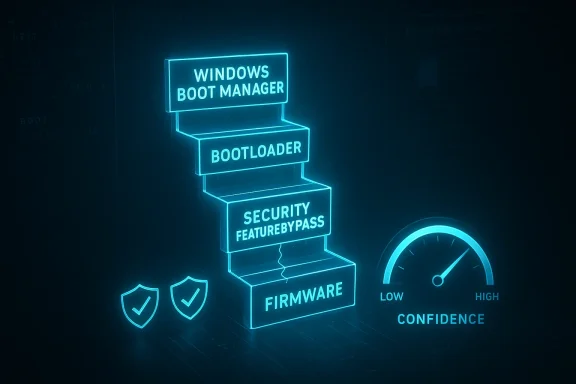
Microsoft’s CVE-2026-26175 is best understood through the same lens that has made past Windows Boot Manager issues so consequential: this is not just a bug in startup code, but a potential weakening of the trust model that protects the earliest stage of the boot chain. Microsoft’s own confidence metric is explicitly about how certain the company is that the vulnerability exists and how credible the technical details are, which means the advisory is doing more than labeling severity — it is signaling how much defenders can rely on the current technical picture atters because boot-chain and security-feature-bypass flaws are often enablers rather than standalone compromise paths, and their value to attackers comes from what they let a more serious exploit do next.
That framing also fits the broader history of Windows boot security. Microsoft has repeatedly had to revoke or blacklist vulnerable boot components, because once a signed boot manager or related early-boot artifact remains trusted for too long, it can be used as a trampoline around Secure Boot and related protections . The public descript suggests that this issue belongs to that same family: a security feature bypass in Windows Boot Manager, with enough technical confidence behind it to warrant defensive attention even before every implementation detail is public. For defenders, that is the important signal. The question is not only “can the system be attacked?” but also “what layer of trust is being undermined, and what else becomes easier once that layer is gone?”
Windows boot security has always depended on a chain of trust that starts before the operating system loads. Firmware checks signatures, trusted boot components are allowed to run, and the system is supposed to prevent malicious or tampered code from taking over before Windows itself can defend the endpoint. That design is powerful, but it also creates a narrow point of failure: if a trusted boot component is flawed, the trust inherited by everything that follows can be exploited.
Microsoft has spent years explaining why these flaws are so dangerous. Its Secure Boot guidance for earlier boot manager and DBX revocation issues makes clear that attackers often do not need to “break” signatures in a cryptographic sense. Instead, they rely on a still-signed component that should no longer be trusted, then use that component to defeat later protections or load untrusted code . That pattern has shown up repeatedly in lder boot manager bypasses to the BlackLotus-era revocation work, and it is exactly why boot-chain advisories generate disproportionate concern in enterprise environments.
The same logic helps explain why the Windows Security Update Guide’s confidence language matters so much. Microsoft says the metric is about the degree of confidence in the existence of the vulnerability and the credibility of the known technical details. That means the advisory is not just a warning label; it is a statement about how much structure there is behind the claim, and how much value an attacker could extract from that structure if the flaw is real and reproducible . A high-confidence feature bypass is more actionable than a vae it reduces the uncertainty that normally slows both exploit development and remediation prioritization.
For Windows Boot Manager specifically, the stakes are high because it sits in a pre-OS position where the usual endpoint defenses are not yet fully active. Microsoft’s own boot-security documentation has repeatedly stressed that these early-boot layers can influence whether BitLocker, Defender, credential isolation, and code-integrity controls actually do their jobs . If a vulnerability allows an attacker to bypass a boot-stage protection, the practoader than the CVE title suggests. The “bypass” can become a force multiplier for persistence, stealth, and post-compromise control.
That is why CVE-2026-26175 should be read in the context of Microsoft’s larger boot-security migration. The company has been moving the ecosystem away from long-lived 2011-era Secure Boot trust anchors and toward newer certificate material, while also warning that devices that miss the transition may lose future boot-chain servicing and revocation capability . In other words, the advisory is landing in a period when boot trust is already being reworked at scale,ional security-feature bypass more important than it might look in isolation.
That distinction matters because defenders tend to prioritize obvious events: crashes, worms, or internet-facing code execut always announce itself that way. But once it is chained, the result can be much worse than the advisory title sounds. A system whose boot trust has been weakened may be easier to persist on, harder to clean, and less reliable as a protected endpoint.
The strongest way to think about CVE-2026-26175 is therefore as a trust-integrity issue. If the boot manager no longer enforces the expected barrier, then the rest of the Windows hardening stack has less leverage. That is why a feature-bypass vulnerability in startup code can have consequences that look out of proportion to the apparent simplicity of the label.
This is why the confidence metric is so valuable for patch prioritization. It gives defenders a better sense of whether they are looking at a fuzzy theory, a credible proof point, or something approaching a confirmed exploitation path. The more confidence Microsoft has, the less room there is to treat the issue as hypothetical.
From an attacker’s perspective, confidence matters too. A vulnerability with credible technical detail is easier to validate, easier to chain, and easier to operationalize. That is why Microsoft’s phrasing is not just bureaucratic nuance; it is a useful proxy for the amount of useful knowledge now available around the flaw.
For organizations, that means looking beyond the headline and asking a more important question: what security assumptions depend on Boot Manager behaving correctly? In many fleets, the answer includes more than one protection layer.
That is why revocation is such a delicate part of the fix or an OEM revokes too aggressively, systems can lose the ability to boot from recovery media or legacy images. If revocation is delayed, vulnerable components remain useful to attackers. The result is a slow, careful rollout rather than a clean one-click resolution.
Microsoft’s recent Secure Boot certificate migration work shows this tension clearly. The company says the original 2011 certificates begin expiring in June 2026, and that devices need to transition to newer certificate material to keep receiving boot-chain protections . That means boot security is now a living operational program, not a static setting.
That is especially true in enterprise fleets with mixed hardware generations. One model may accept new boot trust material automatically, while another needs firmware support or manual remediation. A vulnerability like CVE-2026-26175 therefore has to be understood not just as a code issue, but as a deployment and governance issue.
That is why this kind of advisory can affect compliance as much as operatiorganization claims to use VBS-backed or boot-integrity protections as part of its baseline, a bypass raises a broader question: are those protections actually working as intended on every device, or only on paper? That gap can matter in audits, risk reviews, and incident response.
The most likely enterprise failure mode is not a single dramatic exploit. It is a silent erosion of trust across the endpoint fleet. That kind of issue can persist unnoticed until a separate breach makes it visible, which is exactly why boot-chain security deserves more attention than it often gets.
A practical triage sequence looks like this:
The practical risk is that a consumer machine can become progressively lesus symptoms. There may be no crash, no warning dialog, and no obvious slowdown. Yet the endpoint can still become easier to compromise later, especially if it is used for banking, remote work, or password management.
That makes the consumer story less dramatic but not less important. Even if a home device is not targeted by advanced bootkit operators, the endpoint still stores credentials, session tokens, and access to services that matter. In other words, the value of the device is often higher than the user realizes.
The real danger is not just stealth. It is durability. A bootkit can survive routine OS reinstallation if th remains intact, and that makes incident response much harder. Cleanup is no longer a matter of removing a process or deleting a file; it can require restoring the whole boot trust state.
This is also why early-boot flaws matter even when exploit conditions are narrow. If an attacker needs local access or elevated rights, the impact still may be severe because the reward is a foothold below normal endpoint defenses. That kind of foothold is often exactly what sophisticated operators want.
Microsoft has also tried to improve user and administrator visibility. Its newer Secure Boot status indicators are meant to show whether a device is fully updad, or unable to receive the needed boot-chain changes automatically . That may not solve the problem, but it makes the risk harder to ignore.
This is the right strategic direction. Hidden boot trust problems are hard to manage because they are invisible until something breaks. Visibility gives organizations a chance to act before the breakage ident.
For defenders, the takeaway is to treat the advisory as part of a larger hardening cycle. Patch the flaw, yes — but also ask whether the affected environment is ready for the next phase of Secure Boot and boot-chain maintenance. Those two efforts are increasingly linked.
The other thing to watch is whether any public research or exploitation guidance appears that shows how the bypass is used in practice. In boot-chain vulnerabilities, the difference between “possible” and “operationally useful” often comes down to whether attackers can chain the flaw with an older signed component, an admin foothold, or incomplete revocation coverage. Microsoft has made clear in past guidance that those details matter because they determine how the vulnerability is exploited, not just whether it exists .
Source: MSRC Security Update Guide - Microsoft Security Response Center
That framing also fits the broader history of Windows boot security. Microsoft has repeatedly had to revoke or blacklist vulnerable boot components, because once a signed boot manager or related early-boot artifact remains trusted for too long, it can be used as a trampoline around Secure Boot and related protections . The public descript suggests that this issue belongs to that same family: a security feature bypass in Windows Boot Manager, with enough technical confidence behind it to warrant defensive attention even before every implementation detail is public. For defenders, that is the important signal. The question is not only “can the system be attacked?” but also “what layer of trust is being undermined, and what else becomes easier once that layer is gone?”
 Background
Windows boot security has always depended on a chain of trust that starts before the operating system loads. Firmware checks signatures, trusted boot components are allowed to run, and the system is supposed to prevent malicious or tampered code from taking over before Windows itself can defend the endpoint. That design is powerful, but it also creates a narrow point of failure: if a trusted boot component is flawed, the trust inherited by everything that follows can be exploited.Microsoft has spent years explaining why these flaws are so dangerous. Its Secure Boot guidance for earlier boot manager and DBX revocation issues makes clear that attackers often do not need to “break” signatures in a cryptographic sense. Instead, they rely on a still-signed component that should no longer be trusted, then use that component to defeat later protections or load untrusted code . That pattern has shown up repeatedly in lder boot manager bypasses to the BlackLotus-era revocation work, and it is exactly why boot-chain advisories generate disproportionate concern in enterprise environments.
The same logic helps explain why the Windows Security Update Guide’s confidence language matters so much. Microsoft says the metric is about the degree of confidence in the existence of the vulnerability and the credibility of the known technical details. That means the advisory is not just a warning label; it is a statement about how much structure there is behind the claim, and how much value an attacker could extract from that structure if the flaw is real and reproducible . A high-confidence feature bypass is more actionable than a vae it reduces the uncertainty that normally slows both exploit development and remediation prioritization.
For Windows Boot Manager specifically, the stakes are high because it sits in a pre-OS position where the usual endpoint defenses are not yet fully active. Microsoft’s own boot-security documentation has repeatedly stressed that these early-boot layers can influence whether BitLocker, Defender, credential isolation, and code-integrity controls actually do their jobs . If a vulnerability allows an attacker to bypass a boot-stage protection, the practoader than the CVE title suggests. The “bypass” can become a force multiplier for persistence, stealth, and post-compromise control.
That is why CVE-2026-26175 should be read in the context of Microsoft’s larger boot-security migration. The company has been moving the ecosystem away from long-lived 2011-era Secure Boot trust anchors and toward newer certificate material, while also warning that devices that miss the transition may lose future boot-chain servicing and revocation capability . In other words, the advisory is landing in a period when boot trust is already being reworked at scale,ional security-feature bypass more important than it might look in isolation.
Overview
At a high level, a Windows Boot Manager Security Feature Bypass suggests an issue that changes what the platform will trust during startup. That is different from a classic remote-code-execution bug. It is usually quieter, less visible, and more operationally awkward — but it can still be far more damaging in the real world because it removes a barrier that other attacks rely on being present.Why the word “bypass” matters
In Microsoft’s own historical treatment, a bypass rarely means direct takeover by itself. Instead, it means the attacker can slip around a control that is supposed to block or constrain another action. Microsoft has used this pattern for years in discussions of ASLR, Secure Boot, and other defense-in-depth technologies, where the bypass is often chained with a separate exploit to create a practical intrusion path .That distinction matters because defenders tend to prioritize obvious events: crashes, worms, or internet-facing code execut always announce itself that way. But once it is chained, the result can be much worse than the advisory title sounds. A system whose boot trust has been weakened may be easier to persist on, harder to clean, and less reliable as a protected endpoint.
The strongest way to think about CVE-2026-26175 is therefore as a trust-integrity issue. If the boot manager no longer enforces the expected barrier, then the rest of the Windows hardening stack has less leverage. That is why a feature-bypass vulnerability in startup code can have consequences that look out of proportion to the apparent simplicity of the label.
- It may enable later-stage malware rather than directly being malware.
- It may weaken boot integrity without leaving obvious user-facing symptoms.
- It may support persistence across reboots.
- It may undermine encryption or identity protections that assume clean startup.
- It may be chained with other local or physical-access attacks.
What Microsoft’s confidence metric really signals
Microsoft’s confidence framework is one of the most useful parts of this advisory category because it tells defenders how much weight to give the current public description. A bug that is merely suspected, but not technically well supported, is a different planning problem from a bug that is confirmed and sufficiently detailed to support remediation decisions.Confidence is not the same as severity
A high-confidence bypass is not automatically the most severe bug in the monthly patch set. But it can still be strategically important because it tells organizations that the issue is not speculative. In the boot-chain world, that is often enough to justify action, especially if the affected control is foundational to enterprise hardening.This is why the confidence metric is so valuable for patch prioritization. It gives defenders a better sense of whether they are looking at a fuzzy theory, a credible proof point, or something approaching a confirmed exploitation path. The more confidence Microsoft has, the less room there is to treat the issue as hypothetical.
From an attacker’s perspective, confidence matters too. A vulnerability with credible technical detail is easier to validate, easier to chain, and easier to operationalize. That is why Microsoft’s phrasing is not just bureaucratic nuance; it is a useful proxy for the amount of useful knowledge now available around the flaw.
What defenders should infer
The practical rule is simple: treat a high-confidence Boot Manager bypass as a real control-break issue, not a curiosity. Even if the exact exploitation conditions are not all public, the combination of Microsoft’s advisory language and the broader boot-security context should be enough to drive review, inventory, and patch planning.For organizations, that means looking beyond the headline and asking a more important question: what security assumptions depend on Boot Manager behaving correctly? In many fleets, the answer includes more than one protection layer.
- Secure Boot trust enforcement
- BitLocker integrity assumptions
- Early-boot code integrity
- Recovery and imaging workflows
- Enterprise baseline hardening
Why Boot Manager issues keep resurfacing
Boot Manager vulnerabilities keep coming back because the ecosystem is built around long-lived trust. Once a signed component is accepted by firmware, it can remain part of the attack surface until it is explicitly revoked or replaced. That makes boot-chain security fundamentally a lifecycle-management problem, not just a patch problem.Signed does not mean permanently safe
The most important lesson from Microsoft’s prior Secure Boot work is that signed boot code can still be exploitable. The company’s own revocation guidance around earlier issues explains that attackers may use a vulnerable but legitimate boot component as a launch pad, rather than trying to forge anything . In that sense, the vulnerability is often in the trust model, not the signature itself.That is why revocation is such a delicate part of the fix or an OEM revokes too aggressively, systems can lose the ability to boot from recovery media or legacy images. If revocation is delayed, vulnerable components remain useful to attackers. The result is a slow, careful rollout rather than a clean one-click resolution.
Microsoft’s recent Secure Boot certificate migration work shows this tension clearly. The company says the original 2011 certificates begin expiring in June 2026, and that devices need to transition to newer certificate material to keep receiving boot-chain protections . That means boot security is now a living operational program, not a static setting.
Why the ecosystem is hard to fix cleanly
Boot security is also difficult becauendors, operating-system servicing, recovery tools, and sometimes third-party operating systems. A patch that looks straightforward in Windows Update can still create compatibility problems if the boot chain on a given device depends on older assumptions.That is especially true in enterprise fleets with mixed hardware generations. One model may accept new boot trust material automatically, while another needs firmware support or manual remediation. A vulnerability like CVE-2026-26175 therefore has to be understood not just as a code issue, but as a deployment and governance issue.
- Firmware diversity slows remediation.
- Recovery media can break if trust assumptions change.
- Old boot artifacts may remain trusted too long.
- Revocation requires careful staging.
- Enterprise fleets may end up with split trust states.
Enterprise impact
For enterprises, a Windows Boot Manager bypass is rarely just about whether a single machine is “patched.” The bigger issue is whether the organization can still trust its boot baseline, especially on systems that protect credentials, sensitive data, or privileged administrative workflows.Why enterprise risk is amplified
Microsoft’s documentation has repeatedly emphasized that boot-chain and virtualization-backed security features support protections like Credential Guard and Memory integrity. Those protections exist to reduce credential theft and kernel tampering, which are exactly the kinds of post-compromise activities that make enterprise breaches so expensive . If the boot chain is weakened, those downstream controls may become less dependable than policy documents suggest.That is why this kind of advisory can affect compliance as much as operatiorganization claims to use VBS-backed or boot-integrity protections as part of its baseline, a bypass raises a broader question: are those protections actually working as intended on every device, or only on paper? That gap can matter in audits, risk reviews, and incident response.
The most likely enterprise failure mode is not a single dramatic exploit. It is a silent erosion of trust across the endpoint fleet. That kind of issue can persist unnoticed until a separate breach makes it visible, which is exactly why boot-chain security deserves more attention than it often gets.
What administrators should check
Administrators should treat CVE-2026-26175 as an inventory and validation event, not just a patch ticket. The first job is to identify which systems rely on the affected boot path and whether those systems also depend on other boot-stage hardening features.A practical triage sequence looks like this:
- Identify affected device classes and firmware families.
- Confirm whether the latest Microsoft boot-related updates are installed.
- Verify Secure Boot and boot-chain state on high-value endpoints.
- Check whether recovery media and imaging tools still work after updates.
- Validate that credential-protection and memory-integrity features are actually active.
- Document exceptions for legacy hardware or unusual boot configurations.
Enterprise priorities
- Privileged user endpoints should be first in line.
- Admin workstations deserve tighter validation.
- Recovery workflows should be tested, not assumed.
- Legacy hardware needs special attention.
- Compliance claims should match actual boot state.
- Split-baseline environments should be avoided.
Consumer impact
Consumers are less likely to think about Boot Manager at all, and that is exactly what makes these issues dangerous at the home-user level. The machine may still appear to work normally, even if the trust chain has been weakened in ways the user cannot see.Why home users should still care
Most consumers do not manage boot certificates or revocation lists manually, and in many cases they should not have to. Microsoft’s broader boot-security rollout is designed to push updates automatically to most supported systems . But that leaves a long tail of older systems, unusual configurations, and firmware-limited devices that may fall outside the easy path.The practical risk is that a consumer machine can become progressively lesus symptoms. There may be no crash, no warning dialog, and no obvious slowdown. Yet the endpoint can still become easier to compromise later, especially if it is used for banking, remote work, or password management.
That makes the consumer story less dramatic but not less important. Even if a home device is not targeted by advanced bootkit operators, the endpoint still stores credentials, session tokens, and access to services that matter. In other words, the value of the device is often higher than the user realizes.
Where consumer risk is highest
Home users should pay the most attention if they use a device for sensitive accounts, work-from-home tasks, or high-trust authentication. A boot-chain bypass on a machine that stores password vaults or remote-access tokens can have consequences that spread far beyond the PC itself.- Password managers become more valuable targets.
- Banking sessions may be exposed to persistence attacks.
- Work accounts can become entry points to employer systems.
- Older systems may miss the needed trust updates.
- Recovery after compromise becomes more difficult.
How attackers benefit from early-boot bypasses
Attackers like boot-chain bypasses because they attack before the most visible defenses are awake. If the boot manager can be persuaded to trust the wrong thing, the attacker may gain persistence that survives normal cleanup and resists standard remediation tools.Why bootkits are so feared
Microsoft’s own guidance around UEFI bootkits makes the threat model clear: attacks at this layer can interfere with tools like Defender, BitLocker, and HVCI before those controls are fully engaged . That is a major reason Secure Boot and boot-manager revocation issues are treated differently from ordinary application bugs.The real danger is not just stealth. It is durability. A bootkit can survive routine OS reinstallation if th remains intact, and that makes incident response much harder. Cleanup is no longer a matter of removing a process or deleting a file; it can require restoring the whole boot trust state.
This is also why early-boot flaws matter even when exploit conditions are narrow. If an attacker needs local access or elevated rights, the impact still may be severe because the reward is a foothold below normal endpoint defenses. That kind of foothold is often exactly what sophisticated operators want.
The most likely chaining scenarios
Boot Manager bypasses are most dangerous when combined with one of three things: local privilege escalation, physical access, or an already-established administrative foothold. In those cases, the bypass can turn a temporary compromise into a durable one.- Local access plus vulnerable boot media
- Admin access plus tampered boot components
- Physical access plus legacy trust material
- Stolen credentials plus persistence tooling
- Post-exploitation movement through a trusted endpoint
Microsoft’s response pattern
Microsoft’s response to boot-chain issues has evolved from simple patching into a broader program of revocation, certificate migration, and visibility. That reflects the reality that boot trust cannot be fixed once and forgotten.From patching to platform migration
The company has increasingly treated Secure Boot and boot-manager fixes as ecosystem transitions. It is not just about shipping a corrective update; it is about shifting the trust anchor, revoking old components, and making sure devices can still boot and recover afterward . That is a more complex process, but it is the only one that addresses the actual threat model.Microsoft has also tried to improve user and administrator visibility. Its newer Secure Boot status indicators are meant to show whether a device is fully updad, or unable to receive the needed boot-chain changes automatically . That may not solve the problem, but it makes the risk harder to ignore.
This is the right strategic direction. Hidden boot trust problems are hard to manage because they are invisible until something breaks. Visibility gives organizations a chance to act before the breakage ident.
What this says about CVE-2026-26175
The likely implication of CVE-2026-26175 is that Microsoft sees a meaningful enough trust issue in Boot Manager to warrant an advisory even in a period of broader boot-security migration. That suggests the company believes the flaw is credible and operationally relevant, not merely theoretical.For defenders, the takeaway is to treat the advisory as part of a larger hardening cycle. Patch the flaw, yes — but also ask whether the affected environment is ready for the next phase of Secure Boot and boot-chain maintenance. Those two efforts are increasingly linked.
Strengths and Opportunities
The upside of Microsoft’s current approach is that it gives defenders a clearer architectural map of what is being protected and why. That creates opportunities for better fleet hygiene, better validation, and more realistic boot-chain management. It also gives security teams a chance to move beyond checkbox compliance and toward verifiable endpoint trust.- Microsoft is making boot security more visible.
- Confidence language helps prioritize real issues.
- The boot-chain migration forces better inventory discipline.
- Enterprises can validate trust state more rigorously.
- Consumers benefit from automatic servicing on supported devices.
- Revocation improves long-term resilience when deployed well.
- The advisory reinforces the value of defense in depth.
Risks and Concerns
The biggest concern is that a Boot Manager bypass can be quiet, durable, and easy to underestimate. A machine may remain functional while becoming less trustworthy at a layer users rarely inspect. That combination — invisible impact, delayed consequences, and high chaining value — is exactly why boot security deserves sustained attention.- Silent weakening may go unnoticed for months.
- Chaining can turn a bypass into a major compromise.
- Misconfigured fleets may not share a consistent baseline.
- Recovery media can fail after trust changes.
- Legacy hardware may lag behind security updates.
- Attackers may gain persistence before standard defenses load.
- Audit assumptions may diverge from real boot state.
Looking Ahead
The next important milestone will be how Microsoft clarifies remediation details for CVE-2026-26175, and whether the company ties the issue into its broader Secure Boot migration guidance. If the advisory is connected to revocation, certificate updates, or boot-chain status changes, then administrators should treat it as part of that larger lifecycle shift rather than a stand-alone patch event.The other thing to watch is whether any public research or exploitation guidance appears that shows how the bypass is used in practice. In boot-chain vulnerabilities, the difference between “possible” and “operationally useful” often comes down to whether attackers can chain the flaw with an older signed component, an admin foothold, or incomplete revocation coverage. Microsoft has made clear in past guidance that those details matter because they determine how the vulnerability is exploited, not just whether it exists .
- Watch for updated Microsoft guidance on affected boot paths.
- Watch for any revocation or DBX-related follow-up.
- Watch for enterprise notes about recovery-media compatibility.
- Watch for firmware or OEM advisories tied to the same issue.
- Watch for signs of chaining with local privilege orE-2026-26175 is a reminder that Windows security is only as strong as the trust chain beneath it. A boot-stage bypass is not always loud, but it can be foundationally important, and that makes it one of the kinds of Windows vulnerabilities defenders should treat with the greatest seriousness.
Source: MSRC Security Update Guide - Microsoft Security Response Center
Last edited:
