

CVE-2026-42975, a heap-based buffer overflow in the Windows Bluetooth Port Driver, can let an unauthenticated attacker execute code by reaching a vulnerable PC over an adjacent network. Microsoft fixed the high-severity flaw in its July 14, 2026 security updates, making prompt installation the clearest action for Windows laptops, desktops, and Bluetooth-equipped servers.
Detailed in Microsoft’s Security Update Guide and published through the CVE program, the vulnerability carries a CVSS 3.1 score of 8.0 and is classified as CWE-122, heap-based buffer overflow. The available record describes the technical finding as confirmed rather than speculative: Microsoft acknowledges the affected component, identifies the memory-corruption class, and provides precise fixed-build boundaries across supported Windows releases.
The “remote” part of the title requires context. CVE-2026-42975 is reachable over an adjacent network, not indiscriminately across the public internet. In practical terms, an attacker would need to be within the relevant Bluetooth or local wireless proximity of the target rather than operating from an arbitrary internet host.
The vulnerable component is the Windows Bluetooth Port Driver, part of the operating system’s Bluetooth communications stack. According to the CVE description published from Microsoft’s record, improper handling of data can cause a heap-based buffer overflow and permit an unauthorized attacker to execute code.
That puts the bug in a more serious category than a Bluetooth denial-of-service flaw that merely crashes a driver or temporarily disables a peripheral. Remote code execution means successful exploitation could cause attacker-controlled instructions to run on the affected computer, although Microsoft’s public description does not provide enough detail to establish the resulting execution context, reliability, or a complete attack chain.
The adjacent attack vector reduces reach but does not eliminate enterprise risk. Bluetooth is routinely enabled on corporate laptops for keyboards, mice, headsets, phones, conference-room equipment, barcode scanners, medical peripherals, and industrial devices. An attacker positioned in an office, airport lounge, hotel, shared workspace, classroom, hospital, or other dense environment could potentially get within range without first compromising the organization’s routed network.
The CVSS score also indicates that exploitation is not necessarily trivial. A score of 8.0 is high rather than critical, and the assessment reflects constraints that make the issue less broadly exploitable than a low-complexity, internet-reachable service flaw. Those constraints should guide prioritization, but they are not a reason to leave mobile endpoints unpatched.
Affected client releases include:
Server Core installations are also listed as affected. That matters because the absence of a desktop interface does not automatically remove low-level operating-system components from a Windows image. Administrators should use Microsoft’s applicability data and their update-management tools rather than assuming a headless server is safe because nobody pairs a headset with it.
Some listed Windows 10 and Windows Server versions are maintained only through particular servicing programs or specialized channels. Organizations retaining them should verify that they possess the necessary Extended Security Updates entitlement and that July 2026 packages are actually being offered and installed.
For managed environments, the practical response is to deploy the July 14 security updates through Windows Update for Business, Microsoft Intune, Windows Server Update Services, Configuration Manager, or the organization’s normal patching platform. Administrators should then confirm that endpoints have reached or exceeded the corrected builds instead of treating a successful deployment job as proof that every machine rebooted and completed installation.
Temporary reduction of the attack surface may be appropriate where immediate patching is blocked. Disabling Bluetooth on exposed laptops or systems in sensitive facilities can reduce the opportunity for an adjacent attacker, particularly on devices that do not require wireless peripherals. Enterprises should enforce that change through supported device-management policy where possible rather than relying on users to click a Settings toggle.
Disabling Bluetooth is still a compensating control, not a substitute for the update. Hardware inventories can be incomplete, USB Bluetooth adapters can be introduced later, services can be re-enabled, and a device may leave a controlled location with its original vulnerable binaries intact.
Security teams should pay particular attention to endpoints that spend time outside monitored offices. Executive laptops, field-service computers, shared workstations, healthcare carts, retail systems, and portable engineering devices combine physical accessibility with inconsistent update windows. CVE-2026-42975 gives those machines a different risk profile from a rack server in a restricted data center, even when both appear in Microsoft’s affected list.
It does not follow that every element of a working exploit is public. Microsoft’s concise advisory does not expose the malformed Bluetooth traffic, vulnerable routine, memory layout, or techniques needed to turn corruption into dependable code execution. There is also no basis in the published material supplied with the advisory to claim that CVE-2026-42975 is being actively exploited.
That distinction affects urgency without changing the core recommendation. Confirmed vendor details give defenders reliable information for inventory and remediation, while the lack of public exploit mechanics can slow opportunistic abuse. It can also be temporary: attackers routinely compare pre-update and post-update Windows binaries to identify the change and reconstruct the underlying bug.
The July cumulative updates therefore start a clock. Once corrected driver code is widely available, researchers and attackers can study the differences, and proximity-based vulnerabilities are especially relevant to targeted operations where an adversary can choose the location and timing.
For most Windows estates, installing the July 14, 2026 update and verifying the fixed build is the durable response. Systems that cannot yet be patched should have Bluetooth disabled or tightly controlled until servicing is complete, with mobile and publicly accessible endpoints moved to the front of the deployment queue.
Detailed in Microsoft’s Security Update Guide and published through the CVE program, the vulnerability carries a CVSS 3.1 score of 8.0 and is classified as CWE-122, heap-based buffer overflow. The available record describes the technical finding as confirmed rather than speculative: Microsoft acknowledges the affected component, identifies the memory-corruption class, and provides precise fixed-build boundaries across supported Windows releases.
The “remote” part of the title requires context. CVE-2026-42975 is reachable over an adjacent network, not indiscriminately across the public internet. In practical terms, an attacker would need to be within the relevant Bluetooth or local wireless proximity of the target rather than operating from an arbitrary internet host.
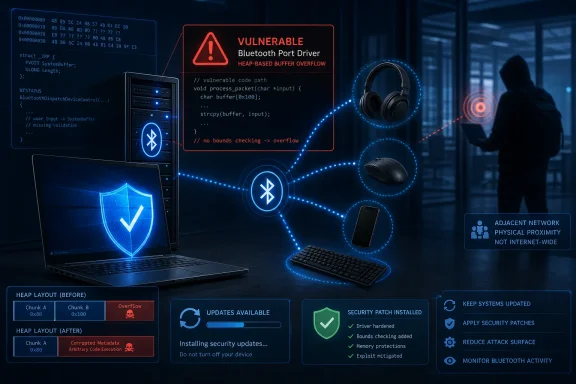 Bluetooth Turns Physical Proximity Into an Attack Surface
The vulnerable component is the Windows Bluetooth Port Driver, part of the operating system’s Bluetooth communications stack. According to the CVE description published from Microsoft’s record, improper handling of data can cause a heap-based buffer overflow and permit an unauthorized attacker to execute code.That puts the bug in a more serious category than a Bluetooth denial-of-service flaw that merely crashes a driver or temporarily disables a peripheral. Remote code execution means successful exploitation could cause attacker-controlled instructions to run on the affected computer, although Microsoft’s public description does not provide enough detail to establish the resulting execution context, reliability, or a complete attack chain.
The adjacent attack vector reduces reach but does not eliminate enterprise risk. Bluetooth is routinely enabled on corporate laptops for keyboards, mice, headsets, phones, conference-room equipment, barcode scanners, medical peripherals, and industrial devices. An attacker positioned in an office, airport lounge, hotel, shared workspace, classroom, hospital, or other dense environment could potentially get within range without first compromising the organization’s routed network.
The CVSS score also indicates that exploitation is not necessarily trivial. A score of 8.0 is high rather than critical, and the assessment reflects constraints that make the issue less broadly exploitable than a low-complexity, internet-reachable service flaw. Those constraints should guide prioritization, but they are not a reason to leave mobile endpoints unpatched.
The Affected List Spans Modern and Legacy Windows
Microsoft’s affected-product data covers current Windows 11 branches as well as older Windows 10 and Windows Server deployments. The corrected build numbers provide a direct way for administrators to determine whether July’s servicing update has reached each device.Affected client releases include:
- Windows 10 Version 1607 builds earlier than 14393.9339.
- Windows 10 Version 1809 builds earlier than 17763.9020.
- Windows 10 Version 21H2 builds earlier than 19044.7548.
- Windows 10 Version 22H2 builds earlier than 19045.7548.
- Windows 11 Version 24H2 builds earlier than 26100.8875.
- Windows 11 Version 25H2 builds earlier than 26200.8875.
- Windows 11 Version 26H1 builds earlier than 28000.2269.
Server Core installations are also listed as affected. That matters because the absence of a desktop interface does not automatically remove low-level operating-system components from a Windows image. Administrators should use Microsoft’s applicability data and their update-management tools rather than assuming a headless server is safe because nobody pairs a headset with it.
Some listed Windows 10 and Windows Server versions are maintained only through particular servicing programs or specialized channels. Organizations retaining them should verify that they possess the necessary Extended Security Updates entitlement and that July 2026 packages are actually being offered and installed.
Patch State Matters More Than Bluetooth Device State
Checking whether a keyboard or headset is currently connected is not an adequate vulnerability test. The defect resides in Windows code, and exposure should be assessed from the operating-system version, installed cumulative update, build number, and whether Bluetooth hardware and services are available.For managed environments, the practical response is to deploy the July 14 security updates through Windows Update for Business, Microsoft Intune, Windows Server Update Services, Configuration Manager, or the organization’s normal patching platform. Administrators should then confirm that endpoints have reached or exceeded the corrected builds instead of treating a successful deployment job as proof that every machine rebooted and completed installation.
Temporary reduction of the attack surface may be appropriate where immediate patching is blocked. Disabling Bluetooth on exposed laptops or systems in sensitive facilities can reduce the opportunity for an adjacent attacker, particularly on devices that do not require wireless peripherals. Enterprises should enforce that change through supported device-management policy where possible rather than relying on users to click a Settings toggle.
Disabling Bluetooth is still a compensating control, not a substitute for the update. Hardware inventories can be incomplete, USB Bluetooth adapters can be introduced later, services can be re-enabled, and a device may leave a controlled location with its original vulnerable binaries intact.
Security teams should pay particular attention to endpoints that spend time outside monitored offices. Executive laptops, field-service computers, shared workstations, healthcare carts, retail systems, and portable engineering devices combine physical accessibility with inconsistent update windows. CVE-2026-42975 gives those machines a different risk profile from a rack server in a restricted data center, even when both appear in Microsoft’s affected list.
Confirmed Technical Detail Raises Confidence, Not Certainty About Exploitation
The vulnerability record provides strong confidence that the flaw exists. Microsoft is the vendor responsible for the Windows Bluetooth Port Driver, has assigned concrete affected-version ranges, identifies the root cause as a heap overflow, and has shipped corrected builds. That is materially different from an early report that names only an unexplained crash or suspected security impact.It does not follow that every element of a working exploit is public. Microsoft’s concise advisory does not expose the malformed Bluetooth traffic, vulnerable routine, memory layout, or techniques needed to turn corruption into dependable code execution. There is also no basis in the published material supplied with the advisory to claim that CVE-2026-42975 is being actively exploited.
That distinction affects urgency without changing the core recommendation. Confirmed vendor details give defenders reliable information for inventory and remediation, while the lack of public exploit mechanics can slow opportunistic abuse. It can also be temporary: attackers routinely compare pre-update and post-update Windows binaries to identify the change and reconstruct the underlying bug.
The July cumulative updates therefore start a clock. Once corrected driver code is widely available, researchers and attackers can study the differences, and proximity-based vulnerabilities are especially relevant to targeted operations where an adversary can choose the location and timing.
For most Windows estates, installing the July 14, 2026 update and verifying the fixed build is the durable response. Systems that cannot yet be patched should have Bluetooth disabled or tightly controlled until servicing is complete, with mobile and publicly accessible endpoints moved to the front of the deployment queue.
References
- Primary source: MSRC
Published: 2026-07-14T07:00:00-07:00
Security Update Guide - Microsoft Security Response Center
 msrc.microsoft.com
