

Microsoft Word Remains the Perfectly Boring Attack Surface
Word is not glamorous infrastructure. It is not an exposed VPN appliance, a domain controller, or a cloud identity service. Yet that is exactly why Word vulnerabilities continue to matter: the application sits at the intersection of human trust, file exchange, email, document workflows, and legacy compatibility.
An information disclosure vulnerability in Word does not carry the immediate alarm bell of remote code execution. It does not automatically mean an attacker can take over a workstation by sending a document. But confidentiality flaws in Office applications have a habit of becoming useful in larger chains, particularly when they reveal local paths, authentication material, document metadata, memory contents, or network-accessible resources that help an attacker move from curiosity to compromise.
That distinction matters because many patch dashboards flatten risk into color-coded severity. A remote code execution bug becomes “drop everything,” while an information disclosure bug becomes “next maintenance window.” CVE-2026-45466 is a reminder that the second category deserves more thought than that, especially in environments where Word documents still traverse boundaries between vendors, legal teams, HR departments, finance groups, and outside customers every day.
The file format history behind Word also works against complacency. Word must handle modern DOCX files, older Office formats, embedded objects, templates, remote references, preview behaviors, add-ins, protected view decisions, and enterprise policy controls. That compatibility is a business requirement, but it also means Word is not merely a text editor. It is a complex interpreter of documents created by people and systems the user may not fully trust.
The Metric Is Not Trivia; It Is the Argument
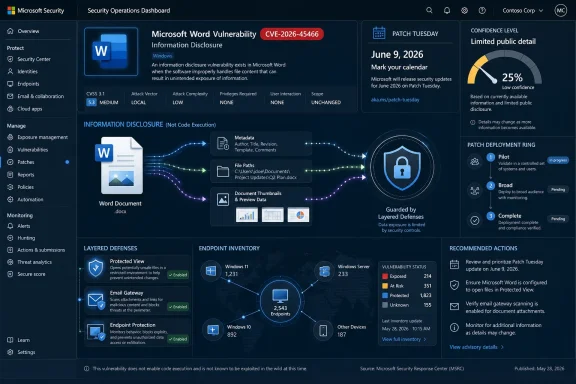
The user-supplied MSRC language describes a metric that measures confidence in the existence of a vulnerability and the credibility of known technical details. That is not decorative scoring boilerplate. It is one of the few signals administrators get when a CVE arrives with limited public explanation.
In vulnerability management, confidence changes the shape of urgency. A bug that is rumored, weakly characterized, or based on incomplete research creates a different operational problem than a bug acknowledged by the vendor with a tested fix path. The former may justify monitoring and preparation; the latter starts the clock for remediation.
For CVE-2026-45466, the important editorial reading is that Microsoft has attached a formal CVE entry to the issue and published it through MSRC. That gives defenders a solid basis to treat the vulnerability as real, even if the public advisory does not hand over a root-cause walkthrough. The absence of juicy technical detail should not be mistaken for the absence of risk.
It also cuts the other way. Sparse details can reduce opportunistic exploitation in the short term because attackers have less public material to copy, fuzz around, or weaponize. But defenders cannot build policy on the hope that attackers are waiting for a blog post. Once an update exists, adversaries can compare patched and unpatched binaries, hunt for changed code paths, and infer the shape of the bug from the fix.
That is the uncomfortable middle ground of modern Patch Tuesday: Microsoft withholds enough detail to avoid publishing an exploit recipe, while defenders still need to make decisions before reverse engineers have had their coffee.
Information Disclosure Is Often the First Domino, Not the Final Blow
Security teams tend to classify vulnerabilities by the most dramatic end state. Remote code execution steals the room. Elevation of privilege gets attention because it turns a foothold into control. Information disclosure sounds administrative, almost clerical, as if the worst possible outcome is an embarrassing leak.
That is too narrow. Information disclosure vulnerabilities are valuable because attackers rarely need one perfect bug. They need leverage. A Word flaw that reveals something about the local system, the user’s environment, the document processing path, or a network resource can help defeat assumptions elsewhere.
In a Windows enterprise, confidentiality is full of small secrets. File paths can reveal usernames, project names, internal share structures, and software layout. Network callbacks can expose authentication behavior. Document parsing quirks can disclose content that was not meant to leave the machine. Even metadata that looks harmless can help an attacker tailor a later phishing attempt or decide which target is worth more effort.
The Office threat model is especially sensitive because documents are supposed to be shared. A firewall can restrict inbound traffic to a server. Conditional Access can challenge a risky sign-in. But a Word document sent to a user is an ordinary part of business. If the vulnerability can be reached through document handling, preview, indexing, or some adjacent workflow, defenders must think about where Word content is processed, not merely where Word is actively used.
That includes endpoints, virtual desktops, remote app sessions, document management systems, email gateways with attachment detonation, and any automated process that opens or converts Office documents. A vulnerability in Word may have a desktop brand name, but its footprint can stretch into server-side workflows that administrators forget are running Office components at all.
Patch Tuesday Rewards the Teams That Already Know Their Office Estate
The hardest part of responding to a Word CVE is rarely understanding that Word should be patched. The hard part is knowing where Word exists, which channel it follows, which update mechanism governs it, and which devices are lagging behind because they have been off-network, pinned to a delayed channel, or trapped behind brittle line-of-business dependencies.
Microsoft 365 Apps changed the old Office patching model, but it did not make it effortless. Enterprises may run Current Channel, Monthly Enterprise Channel, Semi-Annual Enterprise Channel, LTSC builds, volume-licensed Office, or a mix inherited from years of migrations. Each of those choices can affect how quickly a fix lands and how administrators prove coverage.
That proof matters more than ever. A vulnerability like CVE-2026-45466 may not trigger emergency boardroom calls, but it will still appear in vulnerability scanners, endpoint management dashboards, and audit conversations. Security teams will ask whether the estate is patched. Desktop teams will ask which ring should receive updates first. Business owners will ask whether Word behavior changed. The answer cannot be “probably.”
This is where the boring work pays off. Organizations that maintain accurate software inventory, update rings, rollback plans, and pilot groups can treat CVE-2026-45466 as a controlled deployment problem. Organizations that do not will spend the next several days rediscovering which machines still run old Office builds and which users have local admin rights they should never have had.
Patch Tuesday is not a monthly surprise; it is a recurring test of operational memory.
Protected View Helps, but It Is Not a Strategy
Whenever Office vulnerabilities appear, defenders instinctively reach for Protected View, attachment blocking, macro controls, and cloud detonation. Those are useful layers. They are not substitutes for patching.
Protected View exists because Microsoft understands that documents are risky content. Opening files from the internet, email, or other potentially unsafe locations in a restricted mode reduces exposure to many attack paths. But the protection model is not absolute, and it depends on file origin, policy configuration, user behavior, and the specific code path involved.
A vulnerability categorized as information disclosure can also sit in places where users do not consciously click “Enable Editing.” Preview panes, indexing services, conversion workflows, thumbnail generation, and automated scanning have all been relevant in past document-related threat models across the industry. Without a detailed technical advisory, administrators should avoid assuming that their preferred control fully neutralizes the issue.
The correct posture is layered and unsentimental. Apply the update. Keep risky document origins isolated. Limit automatic handling where possible. Enforce modern Office security baselines. Reduce the ability of documents to reach out to untrusted network locations. Monitor for unusual Office child processes or network behavior if your tooling supports it.
Those controls are not theatrical. They are the practical expression of an assumption every Windows administrator should hold: documents are executable enough to deserve suspicion.
The Vendor’s Silence Is Part of the Security Model
There is a familiar complaint after many MSRC advisories: the entry does not say enough. Security teams want affected builds, exploitation conditions, attack complexity, user interaction requirements, mitigations, workarounds, and a root-cause summary. Researchers want technical precision. Attackers want the same thing, for less noble reasons.
Microsoft’s security guidance has increasingly leaned toward structured, minimal disclosure: enough for customers to identify and patch, not enough to provide a turnkey exploit path. That frustrates defenders because it shifts work onto them. But the alternative, especially for client-side document bugs, can be worse.
A Word vulnerability is unusually sensitive to disclosure detail because the attack surface is ubiquitous and user-mediated. A precise description of the malformed structure, parser behavior, or external reference mechanism could accelerate weaponization. Even a seemingly bland note about file type or feature area can narrow the search space for adversaries diffing the update.
That does not mean vendors deserve a free pass for vagueness. Customers need actionable information, and “apply updates” is not a full risk management program. But with CVE-2026-45466, the public scarcity of details should be read as a deliberate tradeoff, not as proof that the bug is insignificant.
The better criticism is not that Microsoft withholds exploit details. It is that administrators still lack a clean, universally adopted way to translate sparse vendor advisories into business-specific priority. CVSS helps. Exploitability notes help. Known exploitation flags help. But none of them knows whether your legal department opens hundreds of external Word documents a day or whether your finance team processes supplier attachments on unmanaged laptops.
Attackers Do Not Need a Critical Rating to Care
Security programs often reserve their fastest response lanes for critical vulnerabilities. That is understandable; teams are drowning in CVEs. But attackers are not bound by the same severity taxonomy. They care about usefulness.
An information disclosure vulnerability in Word can be useful if it reveals information that makes another attack easier. It can be useful if it works reliably across many targets. It can be useful if it triggers through common workflows. It can be useful if the patch diff is readable and the unpatched population is large.
This is why the confidence metric described in the prompt matters. A vulnerability whose existence is uncertain may be noise. A vulnerability acknowledged through a vendor advisory is inventory. Attackers can put it on a board, assign reverse-engineering time, and decide whether the return is worth the effort.
For defenders, the right question is not “Is this as bad as remote code execution?” It is “Does this flaw reduce the cost of compromise in our environment?” In document-heavy organizations, the answer can easily be yes, even when the impact label says information disclosure.
That is especially true for high-value users. Executives, legal staff, finance teams, procurement departments, incident responders, and administrators routinely handle sensitive documents. They also sit in workflows where refusing to open external files is not always realistic. If Word leaks information from those endpoints, the business context can amplify the technical severity.
Home Users Should Not Overthink the Patch, but They Should Respect the Vector
For consumers and enthusiasts, the advice is simpler. Keep Office updated, avoid opening unexpected documents, and treat files from email, messaging apps, and download sites as untrusted until proven otherwise. That sounds repetitive because it is one of the few pieces of security advice that has survived decades of platform change.
Microsoft 365 consumer installations generally update more quietly than old boxed Office releases, but “quietly” does not always mean “immediately.” Users who leave PCs asleep, defer updates, or run older perpetual Office versions should check that updates are actually being applied. A patched Windows machine is not necessarily a patched Office installation if the update mechanisms differ.
The more interesting consumer risk is behavioral. Word documents still carry an aura of legitimacy. People are wary of executable files but comfortable with resumes, invoices, forms, contracts, and school attachments. Attackers know that, which is why document-based lures remain durable even as macros become less convenient.
CVE-2026-45466 does not mean every Word document is a trap. It does mean that document trust should be earned, not assumed. If the sender is unexpected, the file asks for unusual action, or the document arrives in a context designed to create urgency, skepticism is still the cheapest control.
Administrators Should Treat Office as Endpoint Infrastructure
The old mental model treats Office as user software. The better model treats it as endpoint infrastructure with a massive parsing surface and privileged access to business data. That shift changes how CVE-2026-45466 should be handled.
If Office is infrastructure, then patch compliance is not merely a desktop hygiene task. It belongs in vulnerability management, detection engineering, incident response, and procurement policy. It affects how organizations choose update channels, how they manage add-ins, how they isolate high-risk users, and how they handle external document flows.
It also affects exception handling. Every enterprise has machines that cannot update immediately: regulated workstations, lab systems, shared kiosks, production-adjacent PCs, VDI pools, or devices tied to finicky plugins. Those exceptions need compensating controls, not just spreadsheet notes. If a Word information disclosure vulnerability remains unpatched on a system that opens external documents, the risk has not disappeared because the business owner signed a waiver.
Administrators should also look beyond the obvious executable. Word can be invoked by users, shell previews, third-party integrations, document management platforms, and automation scripts. Even if Microsoft’s advisory does not spell out every exploitation path, defenders should inventory where Word document handling occurs and whether those systems receive the same update attention as laptops.
The quiet lesson is that Office is too important to be managed as an afterthought.
The Real Race Begins After the Patch Drops
Once Microsoft releases a fix, defenders and attackers both gain new information. Defenders gain an update to deploy. Attackers gain before-and-after binaries to compare. That race is why timely patching matters even when the public advisory is restrained.
Patch diffing is not magic, but it is a mature discipline. If a security update changes a Word component, researchers can inspect what changed, identify suspicious bounds checks or logic adjustments, and build hypotheses about the vulnerable path. Sometimes that leads nowhere. Sometimes it leads to a working proof of concept.
This does not mean every Word CVE becomes weaponized. Most do not become headline events. But the economics are different for Office than for obscure enterprise software. The installed base is enormous, the document delivery channel is natural, and the potential targets include nearly every industry.
The defensive window is therefore not defined solely by whether exploitation is known on publication day. It is defined by how quickly credible technical details can emerge after the fix. The confidence metric described in the prompt tells us the vulnerability is not vapor. The patch tells adversaries where to look. The gap between those two facts is where risk lives.
For organizations with mature deployment rings, the answer is to compress that gap without breaking the business. Pilot quickly. Watch for Office regressions. Expand deployment. Verify installation. Then close exceptions aggressively.
CVE-2026-45466 Is a Test of Triage Discipline
The temptation with a sparse advisory is to wait for someone else to explain whether it matters. That is a dangerous habit. By the time public analysis, exploit code, scanner plugins, and vendor blogs converge, the easiest remediation window may already be gone.
A better triage process starts with product exposure. If Word is broadly installed, externally sourced documents are common, and high-value users depend on Office workflows, the organization should treat the vulnerability as operationally meaningful even if the impact category is not catastrophic. If Word is absent, isolated, or tightly controlled, the priority may fall accordingly.
Next comes update feasibility. If the fix is available through the normal Office update channel and does not require architectural change, the threshold for delay should be high. Information disclosure vulnerabilities can sometimes be patched with less disruption than deep Windows kernel fixes or server application upgrades, which weakens the argument for postponement.
Finally, security teams should document the decision. Not every CVE deserves a war room, but every widely deployed client-side vulnerability deserves a record of who assessed it, what exposure existed, what update path was chosen, and what exceptions remain. That record becomes invaluable when auditors, incident responders, or executives ask why a known vulnerability persisted.
Triage is not about panic. It is about replacing vibes with accountable decisions.
The Word Bug That Rewards the Prepared Shop
The practical response to CVE-2026-45466 is not exotic, but it is specific. The organizations that handle it well will be the ones that already understand Office as a managed attack surface, not a productivity suite that happens to receive patches.
- Organizations should confirm which Office and Microsoft 365 Apps update channels are deployed before assuming the Word fix has reached all users.
- Security teams should prioritize systems and users that routinely open external Word documents, especially legal, finance, HR, procurement, and executive workflows.
- Administrators should verify patch installation through endpoint management or vulnerability tooling rather than relying on user-facing update status alone.
- Exceptions for machines that cannot update quickly should receive compensating controls around document handling, network access, and user exposure.
- Detection teams should continue watching Office process behavior and document-origin telemetry, because sparse advisories can become clearer after patch diffing and external research.
- Home users should let Office update promptly and avoid treating unsolicited Word documents as safe merely because they are not executable files.
CVE-2026-45466 will probably not be remembered as the defining Microsoft security event of 2026. Most vulnerabilities are not. But it captures the reality of Windows security in miniature: a ubiquitous application, a modest-sounding impact, limited public detail, and a race between routine patch management and adversarial curiosity. The teams that win that race will not be the ones waiting for perfect information; they will be the ones that built enough discipline to act responsibly when the advisory gives them only what they need, not everything they want.