

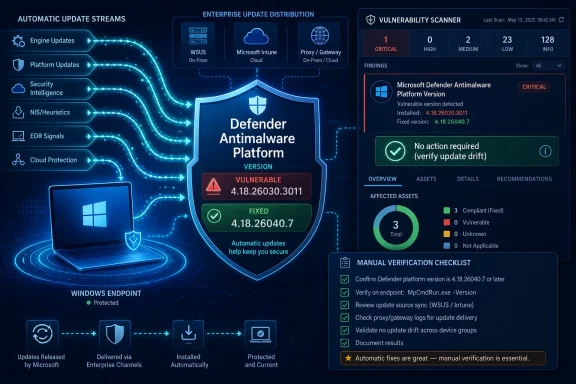
Microsoft disclosed CVE-2026-45498 in May 2026 as a denial-of-service vulnerability in the Microsoft Defender Antimalware Platform, affecting platform version 4.18.26030.3011 and earlier and addressed first in version 4.18.26040.7, which is delivered through Defender’s normal update machinery. The important part is not that Defender has a bug; all security software does. The important part is that the bug lives in the component many Windows estates assume will silently keep itself current. That makes this less a classic Patch Tuesday story than a test of whether an organization actually understands the state of the security agent sitting on every endpoint.
Microsoft’s guidance for CVE-2026-45498 is deceptively calm: no special action is required to install the fix under the default configuration. Defender platform updates are normally distributed automatically, alongside the engine and security intelligence updates that Windows endpoints receive routinely. In consumer Windows, that generally means the machine should drift into safety without anyone opening a browser, downloading an installer, or approving a one-off hotfix.
That default is both the strength and the weakness of Microsoft’s endpoint protection model. Defender is not just an application a user launches; it is part of the operating system’s defensive plumbing, with user-mode binaries and kernel-mode drivers that need to keep pace with the threat landscape. Microsoft’s model assumes that the update pipeline itself is healthy, reachable, trusted, and not being second-guessed by a patching regime designed for slower-moving software.
For home users and unmanaged small-business machines, this is mostly good news. If Windows Update and Defender protection updates are functioning normally, version 4.18.26040.7 should arrive in the background. The user’s job is less “install this patch manually” and more “do not break the thing that installs it.”
For enterprises, the same sentence has a sharper edge. “No action required” is true only in environments where automatic Defender platform updates are actually happening. If an estate routes updates through WSUS, Configuration Manager, Intune rings, disconnected update repositories, proxy allow lists, maintenance windows, or change-control gates, the automatic fix becomes another assumption that has to be verified.
This distinction matters because it separates inventory from exposure. A scanner that sees an old copy of Defender’s Antimalware Platform is doing its job by flagging the version. But the scanner may not know whether the vulnerable component is active, reachable, loaded, or capable of being triggered in the machine’s current configuration.
Microsoft’s position is that systems with Microsoft Defender disabled are not in an exploitable state for this issue. That does not make the scanner wrong; it means the scanner is answering a narrower question. It has found an affected version on disk, not necessarily a live attack path.
Security teams should resist the temptation to “fix” this by suppressing the alert everywhere. The right response is to enrich it. A useful triage view should show the Defender platform version, Defender operating mode, update source, last successful platform update, and whether the endpoint is protected by another active antimalware product. Without that context, a vulnerability dashboard becomes a machine for turning stale files into panic.
If an attacker can crash, stall, or otherwise disrupt Defender components at the right moment, the impact is not merely that a Windows service has a bad day. It may create a window in which malicious activity faces less inspection, less telemetry, or delayed response. That is why denial-of-service bugs in defensive tools deserve a different threat model than denial-of-service bugs in convenience software.
The advisory also lands in the shadow of another Defender-related issue, CVE-2026-41091, an elevation-of-privilege flaw in the Microsoft Malware Protection Engine that was discussed alongside this one in security reporting. The two should not be conflated: one concerns privilege escalation in the engine, the other denial of service in the platform. But their proximity reinforces the same operational lesson. Defender’s internal components are part of the attack surface, not just the shield.
This is uncomfortable but not surprising. Endpoint protection runs with privileged access, watches sensitive system activity, parses hostile content, and integrates deeply with the operating system. Attackers have every incentive to study it. Defenders have every incentive to ensure it is not stuck two platform releases behind because a software update point is misconfigured.
That messy reality is why vulnerability scanners often generate noisy findings. They tend to prefer deterministic checks: this file exists, this version is older than 4.18.26040.7, therefore this host matches the plugin. Administrators, meanwhile, think in operational terms: this machine uses a third-party EDR, Defender Antivirus is off, therefore the risk is not exploitable.
Both perspectives are incomplete on their own. The file-version check is useful because it can reveal update drift across a fleet. The operational-state check is necessary because risk depends on what is actually running. Treating either as the whole truth leads to bad decisions.
The better enterprise posture is to keep Defender’s platform current even where Defender is not the primary antivirus, unless there is a documented reason not to. Stale security components are rarely beneficial. They confuse vulnerability management, complicate incident response, and leave administrators arguing with dashboards when they should be proving control.
The fix for CVE-2026-45498 is the platform version, not merely a signature update. Administrators should be looking for Microsoft Defender Antimalware Platform 4.18.26040.7 or later. Seeing fresh malware definitions alone is not enough proof that this particular issue is remediated.
This is where many organizations get caught. Their patch compliance dashboard may show Windows cumulative updates in good shape. Their security intelligence versions may look current. But the platform folder under Defender can tell a different story, especially in estates with staged rings, disconnected networks, blocked Microsoft update endpoints, or third-party tooling that approves definition updates but not platform packages.
For IT pros, the practical check is straightforward in concept: verify the actual Defender platform version reported on endpoints, not just whether Windows Update ran recently. In Microsoft-managed environments, that means inventorying Defender component versions through the tools already used for endpoint management and vulnerability management. In smaller estates, it can be as simple as checking Windows Security, PowerShell output, or the Defender platform directory.
CVE-2026-45498 exposes that seam. A security team sees a scanner finding and asks for remediation. A desktop team says Defender is disabled. An endpoint team says a third-party agent is active. A patching team says the cumulative update baseline is compliant. Everyone may be telling the truth, and the machine may still have an old Defender platform sitting on disk.
The fix is not to convene a war room for every Defender CVE. The fix is to define the platform as an asset with an expected update state. If Defender files are present, their versions should be known. If Defender is disabled, that state should be deliberate and documented. If a scanner flags old binaries, the response should be based on both version and runtime state.
Air-gapped and restricted networks deserve special attention. Microsoft’s cloud-first update cadence assumes endpoints can reach approved update sources often enough to receive urgent security content. In disconnected environments, administrators must import and distribute Defender updates intentionally. “Automatic” does not help a machine that is not allowed to talk to the place where automatic updates live.
Microsoft’s own documentation has long emphasized keeping Defender Antivirus updated even when it is not the active antivirus engine. That advice is pragmatic. Windows security components do not become irrelevant just because a different tray icon owns the user-facing malware alerts.
The same logic applies to vulnerability management. A passive or disabled Defender instance may not be exploitable for this specific denial-of-service issue, according to Microsoft’s advisory language. But if the files remain present, stale, and repeatedly flagged, the organization has created an avoidable ambiguity. Ambiguity is expensive during incident response.
The cleanest answer is not always removal, because Defender is deeply integrated into Windows and may be required for other Microsoft security scenarios. The cleanest answer is version hygiene. Keep the platform current, know the mode it is running in, and make scanner exceptions only where they reflect verified non-exploitability rather than dashboard fatigue.
The asterisk is simple: no manual installation is required if the normal update mechanism is working. That is materially different from saying no verification is required. In managed Windows environments, verification is the job.
This is especially true because platform updates may be governed separately from security intelligence updates. Organizations that built automatic deployment rules years ago may discover that their rules include definition updates but omit platform updates. Others may find that Defender updates are delayed by cautious rings that made sense for stability but now slow a security fix that Microsoft considers necessary.
There is also a human factor. Because the affected component is Defender, some administrators assume Microsoft will handle the entire lifecycle. That assumption is mostly true on unmanaged machines. It is less true once the enterprise inserts its own infrastructure into the update path.
Severity scores and exploit chatter are useful for prioritization, but version numbers close tickets. A machine is not remediated because someone believes Defender updates are automatic. It is remediated when the platform version proves it is at or above the fixed build, or when the organization has documented why the vulnerable component is not exploitable in that configuration.
That distinction also helps with scanner disputes. If a scanner reports the old version but Defender is disabled, the finding may be a false positive in exploitability terms. If the scanner reports the old version and Defender is active, the finding is a real remediation item. If the scanner reports the old version and nobody can say whether Defender is active, the problem is not the scanner.
The best vulnerability programs do not merely chase CVEs. They improve the quality of asset truth. This Defender issue is a useful audit of whether the organization can answer a basic endpoint question quickly: what version of the security platform is actually installed, and is it running?
 Defender’s Quiet Update Channel Becomes the Security Boundary
Microsoft’s guidance for CVE-2026-45498 is deceptively calm: no special action is required to install the fix under the default configuration. Defender platform updates are normally distributed automatically, alongside the engine and security intelligence updates that Windows endpoints receive routinely. In consumer Windows, that generally means the machine should drift into safety without anyone opening a browser, downloading an installer, or approving a one-off hotfix.That default is both the strength and the weakness of Microsoft’s endpoint protection model. Defender is not just an application a user launches; it is part of the operating system’s defensive plumbing, with user-mode binaries and kernel-mode drivers that need to keep pace with the threat landscape. Microsoft’s model assumes that the update pipeline itself is healthy, reachable, trusted, and not being second-guessed by a patching regime designed for slower-moving software.
For home users and unmanaged small-business machines, this is mostly good news. If Windows Update and Defender protection updates are functioning normally, version 4.18.26040.7 should arrive in the background. The user’s job is less “install this patch manually” and more “do not break the thing that installs it.”
For enterprises, the same sentence has a sharper edge. “No action required” is true only in environments where automatic Defender platform updates are actually happening. If an estate routes updates through WSUS, Configuration Manager, Intune rings, disconnected update repositories, proxy allow lists, maintenance windows, or change-control gates, the automatic fix becomes another assumption that has to be verified.
The Scanner Alert Is Not Always the Exploit Story
One of the more confusing parts of Microsoft’s advisory is also one of the most practical: vulnerability scanners may report systems as vulnerable even when Microsoft Defender is disabled. That is because many scanners look for binaries and version numbers on disk, not for the live exploitability of the service. Defender files can remain present even when Defender Antivirus is disabled, running in passive mode, or displaced by a third-party endpoint product.This distinction matters because it separates inventory from exposure. A scanner that sees an old copy of Defender’s Antimalware Platform is doing its job by flagging the version. But the scanner may not know whether the vulnerable component is active, reachable, loaded, or capable of being triggered in the machine’s current configuration.
Microsoft’s position is that systems with Microsoft Defender disabled are not in an exploitable state for this issue. That does not make the scanner wrong; it means the scanner is answering a narrower question. It has found an affected version on disk, not necessarily a live attack path.
Security teams should resist the temptation to “fix” this by suppressing the alert everywhere. The right response is to enrich it. A useful triage view should show the Defender platform version, Defender operating mode, update source, last successful platform update, and whether the endpoint is protected by another active antimalware product. Without that context, a vulnerability dashboard becomes a machine for turning stale files into panic.
Denial of Service Still Counts When the Target Is Your Antivirus
CVE-2026-45498 is described as a denial-of-service vulnerability, and that label can cause administrators to underreact. In ordinary server software, denial of service often means degraded availability. In endpoint security software, availability is part of the protection promise.If an attacker can crash, stall, or otherwise disrupt Defender components at the right moment, the impact is not merely that a Windows service has a bad day. It may create a window in which malicious activity faces less inspection, less telemetry, or delayed response. That is why denial-of-service bugs in defensive tools deserve a different threat model than denial-of-service bugs in convenience software.
The advisory also lands in the shadow of another Defender-related issue, CVE-2026-41091, an elevation-of-privilege flaw in the Microsoft Malware Protection Engine that was discussed alongside this one in security reporting. The two should not be conflated: one concerns privilege escalation in the engine, the other denial of service in the platform. But their proximity reinforces the same operational lesson. Defender’s internal components are part of the attack surface, not just the shield.
This is uncomfortable but not surprising. Endpoint protection runs with privileged access, watches sensitive system activity, parses hostile content, and integrates deeply with the operating system. Attackers have every incentive to study it. Defenders have every incentive to ensure it is not stuck two platform releases behind because a software update point is misconfigured.
“Disabled” Does Not Mean “Gone”
The most persistent misunderstanding around Defender in enterprise environments is that replacing it removes it. On modern Windows, Defender components can remain on disk even when another antivirus product takes over primary protection duties. Depending on configuration, Defender may be disabled, passive, partially active, or still contributing capabilities around endpoint detection and response.That messy reality is why vulnerability scanners often generate noisy findings. They tend to prefer deterministic checks: this file exists, this version is older than 4.18.26040.7, therefore this host matches the plugin. Administrators, meanwhile, think in operational terms: this machine uses a third-party EDR, Defender Antivirus is off, therefore the risk is not exploitable.
Both perspectives are incomplete on their own. The file-version check is useful because it can reveal update drift across a fleet. The operational-state check is necessary because risk depends on what is actually running. Treating either as the whole truth leads to bad decisions.
The better enterprise posture is to keep Defender’s platform current even where Defender is not the primary antivirus, unless there is a documented reason not to. Stale security components are rarely beneficial. They confuse vulnerability management, complicate incident response, and leave administrators arguing with dashboards when they should be proving control.
The Patch Is Automatic, but Assurance Is Manual
Microsoft says Defender platform updates typically ship monthly or as needed, while malware definitions can update multiple times per day. That cadence is a reminder that Defender does not fit neatly into the old monthly patching mental model. The Antimalware Platform, engine, and security intelligence updates move on different schedules, with different distribution paths and different operational failure modes.The fix for CVE-2026-45498 is the platform version, not merely a signature update. Administrators should be looking for Microsoft Defender Antimalware Platform 4.18.26040.7 or later. Seeing fresh malware definitions alone is not enough proof that this particular issue is remediated.
This is where many organizations get caught. Their patch compliance dashboard may show Windows cumulative updates in good shape. Their security intelligence versions may look current. But the platform folder under Defender can tell a different story, especially in estates with staged rings, disconnected networks, blocked Microsoft update endpoints, or third-party tooling that approves definition updates but not platform packages.
For IT pros, the practical check is straightforward in concept: verify the actual Defender platform version reported on endpoints, not just whether Windows Update ran recently. In Microsoft-managed environments, that means inventorying Defender component versions through the tools already used for endpoint management and vulnerability management. In smaller estates, it can be as simple as checking Windows Security, PowerShell output, or the Defender platform directory.
The Enterprise Risk Is Update Drift, Not User Confusion
For consumers, Microsoft’s automatic update model generally reduces risk. For enterprises, it creates a governance problem: who owns the update path for a security component that is part of Windows but may not be managed like Windows? The answer is often split across desktop engineering, security operations, endpoint management, and vulnerability management teams.CVE-2026-45498 exposes that seam. A security team sees a scanner finding and asks for remediation. A desktop team says Defender is disabled. An endpoint team says a third-party agent is active. A patching team says the cumulative update baseline is compliant. Everyone may be telling the truth, and the machine may still have an old Defender platform sitting on disk.
The fix is not to convene a war room for every Defender CVE. The fix is to define the platform as an asset with an expected update state. If Defender files are present, their versions should be known. If Defender is disabled, that state should be deliberate and documented. If a scanner flags old binaries, the response should be based on both version and runtime state.
Air-gapped and restricted networks deserve special attention. Microsoft’s cloud-first update cadence assumes endpoints can reach approved update sources often enough to receive urgent security content. In disconnected environments, administrators must import and distribute Defender updates intentionally. “Automatic” does not help a machine that is not allowed to talk to the place where automatic updates live.
Passive Mode Is Not a Loophole
Many organizations run Defender in passive mode because another product provides primary antivirus protection. That can be a perfectly valid architecture, particularly with Microsoft Defender for Endpoint still collecting telemetry and contributing EDR capabilities. But passive mode should not become an excuse for neglecting Defender product updates.Microsoft’s own documentation has long emphasized keeping Defender Antivirus updated even when it is not the active antivirus engine. That advice is pragmatic. Windows security components do not become irrelevant just because a different tray icon owns the user-facing malware alerts.
The same logic applies to vulnerability management. A passive or disabled Defender instance may not be exploitable for this specific denial-of-service issue, according to Microsoft’s advisory language. But if the files remain present, stale, and repeatedly flagged, the organization has created an avoidable ambiguity. Ambiguity is expensive during incident response.
The cleanest answer is not always removal, because Defender is deeply integrated into Windows and may be required for other Microsoft security scenarios. The cleanest answer is version hygiene. Keep the platform current, know the mode it is running in, and make scanner exceptions only where they reflect verified non-exploitability rather than dashboard fatigue.
Microsoft’s “No Action” Message Needs an Asterisk
There is a familiar tension in Microsoft security advisories between consumer clarity and enterprise precision. “No action required” is an excellent message for a home user who would otherwise search for dubious installers. It is a less complete message for an administrator responsible for thousands of endpoints spread across update rings, VPN boundaries, virtual desktop pools, and server segments.The asterisk is simple: no manual installation is required if the normal update mechanism is working. That is materially different from saying no verification is required. In managed Windows environments, verification is the job.
This is especially true because platform updates may be governed separately from security intelligence updates. Organizations that built automatic deployment rules years ago may discover that their rules include definition updates but omit platform updates. Others may find that Defender updates are delayed by cautious rings that made sense for stability but now slow a security fix that Microsoft considers necessary.
There is also a human factor. Because the affected component is Defender, some administrators assume Microsoft will handle the entire lifecycle. That assumption is mostly true on unmanaged machines. It is less true once the enterprise inserts its own infrastructure into the update path.
Version Numbers Are the Only Safe Common Language
For CVE-2026-45498, the dividing line is clear enough: 4.18.26030.3011 is the last affected Microsoft Defender Antimalware Platform version identified in the advisory material, and 4.18.26040.7 is the first version with the vulnerability addressed. Those numbers should become the common language between security teams, patch teams, and help desks.Severity scores and exploit chatter are useful for prioritization, but version numbers close tickets. A machine is not remediated because someone believes Defender updates are automatic. It is remediated when the platform version proves it is at or above the fixed build, or when the organization has documented why the vulnerable component is not exploitable in that configuration.
That distinction also helps with scanner disputes. If a scanner reports the old version but Defender is disabled, the finding may be a false positive in exploitability terms. If the scanner reports the old version and Defender is active, the finding is a real remediation item. If the scanner reports the old version and nobody can say whether Defender is active, the problem is not the scanner.
The best vulnerability programs do not merely chase CVEs. They improve the quality of asset truth. This Defender issue is a useful audit of whether the organization can answer a basic endpoint question quickly: what version of the security platform is actually installed, and is it running?
The Concrete Moves Windows Admins Should Make This Week
CVE-2026-45498 is not a reason to rip out Defender or distrust automatic updates. It is a reason to verify the assumptions that automatic updates depend on. The useful response is narrow, measurable, and boring in the best possible way.- Confirm that endpoints with Microsoft Defender active are running Antimalware Platform version 4.18.26040.7 or later.
- Treat stale Defender binaries on disabled systems as an inventory and hygiene issue, while documenting Microsoft’s position that disabled Defender systems are not exploitable for this vulnerability.
- Check that enterprise update tooling distributes Defender platform updates, not only security intelligence or definition updates.
- Pay special attention to disconnected, proxy-restricted, or WSUS-managed environments where Defender’s normal update cadence can silently fall behind.
- Avoid blanket scanner suppressions unless they are tied to verified Defender operating mode, replacement controls, and a plan to keep on-disk components current.
- Use this incident to define ownership for Defender component versions across security operations, desktop engineering, and endpoint management teams.
References
- Primary source: MSRC
Published: 2026-05-26T07:00:00-07:00
Security Update Guide - Microsoft Security Response Center
 msrc.microsoft.com
- Related coverage: techradar.com
Microsoft confirms two major Defender security issues — so update now or face possible attack
CISA confirms two bugs being actively exploited in the wild, as Microsoft releases patches.www.techradar.com
- Related coverage: sentinelone.com
CVE-2026-45498: Microsoft Defender Antimalware DoS Flaw
CVE-2026-45498 is a denial of service vulnerability in Microsoft Defender Antimalware Platform. Learn about its impact, affected versions, and mitigation methods.www.sentinelone.com
- Related coverage: blog.gridinsoft.com
Microsoft Defender CVE-2026-41091 and CVE-2026-45498 Exploited
Microsoft confirmed exploitation of two Defender flaws. Check Malware Protection Engine and Antimalware Platform versions against fixed builds. blog.gridinsoft.com
- Related coverage: isec.news
Microsoft says two Defender flaws are under active exploitation – iSec News
Microsoft said two Defender vulnerabilities, including one that could lead to SYSTEM privileges, are under active exploitation. CISA has added both flaws to its known exploited list and set a June 3 deadline for federal agencies.www.isec.news - Related coverage: threataft.com
Microsoft Defender Zero‑Days: LPE & DoS Actively Exploited | ThreatAft
CVE-2026-41091 & CVE-2026-45498: two actively exploited Microsoft Defender zero-days. LPE to SYSTEM + DoS disables protection. CISA deadline June 3.threataft.com
- Related coverage: secure-iss.com
Microsoft Defender Actively Exploited Vulnerabilities | Secure ISS
Microsoft has patched two actively exploited Defender flaws enabling privilege escalation and denial of service. Apply updates now. www.secure-iss.com
- Related coverage: notebookcheck.com
Microsoft reagiert auf Defender-Angriffe und schließt kritische Sicherheitslücken - Notebookcheck News
Microsoft hat Notfall-Patches für zwei aktiv ausgenutzte Zero-Day-Schwachstellen in Defender, „RedSun“ und „UnDefend“, veröffentlicht, nachdem Huntress deren Einsatz in realen Angriffen bestätigt hatte. www.notebookcheck.com
- Official source: microsoft.com
- Official source: download.microsoft.com
- Related coverage: bd.com
Whitelisted Microsoft and Third Party Patches BD Alaris Products August 2022
PDF documentwww.bd.com
- Related coverage: helpnetsecurity.com
Microsoft Defender vulnerabilities exploited in the wild (CVE-2026-41091, CVE-2026-45498) - Help Net Security
Attackers are actively exploiting two Microsoft Defender vulnerabilities (CVE-2026-41091 and CVE-2026-45498), Microsoft acknowledged.www.helpnetsecurity.com - Related coverage: lyrie.ai
CISA: CVE-2026-45498 added to Known Exploited Vulnerabilities — Microsoft Defender | Lyrie Research | Lyrie Research
Microsoft Defender contains an unspecified vulnerability that allows for denial of service. lyrie.ai
- Related coverage: op-c.net
Microsoft Defender Vulnerabilities Added to CISA KEV (CVE-2026-41091, CVE-2026-45498) - OP INNOVATE
CISA added two actively exploited Microsoft Defender vulnerabilities, CVE-2026-41091 and CVE-2026-45498, to its KEV catalog. Learn the risks and recommended actions.op-c.net - Related coverage: patchsiren.com
CVE-2026-45498: Microsoft Defender Denial of Service Vulnerability Added to CISA
CVE-2026-45498 is a Microsoft Defender denial-of-service vulnerability rated medium and added to CISA’s Known Exploited Vulnerabilities catalog on 2026-05-20. Apatchsiren.com - Related coverage: cvefeed.io
CISA Known Exploited Vulnerabilities (KEV) – CVEFeed Catalog
Explore verified exploited vulnerabilities from the CISA KEV catalog. CVEFeed helps you track and prioritize critical cyber risks.cvefeed.io - Related coverage: labs.cloudsecurityalliance.org
CISA KEV Alert: Fortinet, Adobe, and Microsoft Under Attack
PDF documentlabs.cloudsecurityalliance.org
