

Microsoft disclosed CVE-2026-45584 on May 19, 2026, as a critical remote code execution flaw in the Microsoft Malware Protection Engine, affecting engine versions through 1.1.26030.3008 and fixed in version 1.1.26040.8 across Defender-backed antimalware products. The bug is a reminder that Defender is not merely an app with a shield icon; it is a scanning engine woven through Windows’ security plumbing. Microsoft says default automatic updating should deliver the fix without administrator action, but the operational story is messier. The real test for enterprises is not whether Microsoft shipped a new engine, but whether every endpoint actually received it.
CVE-2026-45584 sits in
That is particularly uncomfortable because antimalware engines are designed to inspect hostile content. They touch files users have not opened, attachments users should not trust, and downloads the rest of the system is trying to evaluate before letting them near anything important. A bug in that inspection path flips the defender’s advantage: the thing meant to neutralize dangerous objects becomes part of the attack surface.
Microsoft’s CVSS vector tells a nuanced story. The base score is 8.1, with network attack vector, no privileges required, and no user interaction in the formal scoring. At the same time, Microsoft marks attack complexity as high and says successful exploitation requires additional steps to prepare the target environment.
That tension matters. This is not the cartoon version of a wormable Windows bug where every exposed host falls over the moment a packet arrives. But it is also not a sleepy local bug buried behind admin rights. The vulnerable component is widely deployed, it processes untrusted content by design, and the fix depends on a separate update channel that many organizations do not monitor with the same intensity as Patch Tuesday.
For many Windows administrators, that is the first trap. Defender engine updates are part of the ongoing antimalware update stream, not the traditional monthly OS servicing cycle. Microsoft typically updates the engine monthly or as needed, while malware definitions are normally updated multiple times per day. In the default configuration, that machinery should keep both consumers and enterprise deployments current.
“Should” is doing a lot of work. Environments with disconnected networks, controlled update rings, third-party endpoint protection, gold images, VDI pools, or tightly managed software distribution can drift away from Microsoft’s happy path. The fact that Defender can update itself automatically does not prove that it did update itself automatically on the machines a scanner is flagging.
That is why the practical remediation is boring but essential: verify the engine version actually present on disk and in use. Security teams should treat 1.1.26040.8 as the minimum clean line for this CVE. If systems remain on 1.1.26030.3008 or earlier, the automatic update story has failed somewhere between policy, connectivity, distribution, or telemetry.
But enterprises do not live in the ordinary case. They pin baselines, stage rings, block direct internet access, proxy update channels, run endpoint detection platforms alongside Defender, and sometimes disable Defender after deploying another security product. Those decisions may be sensible, but they create precisely the ambiguity that turns a vendor’s “automatic” into an administrator’s “prove it.”
The correct posture is not panic; it is verification. If an organization has Microsoft Defender Antivirus active, Microsoft Defender for Endpoint in passive or active modes, System Center Endpoint Protection, or older Microsoft antimalware products still present in a managed estate, it needs a way to inventory engine versions at scale. That inventory should not depend solely on whether a monthly Windows update was installed.
The deeper lesson is that modern Windows security has multiple servicing lanes. The OS has one lane, browser components another, Store-delivered apps another, Microsoft 365 Apps another, and Defender’s intelligence and engine updates yet another. CVE-2026-45584 lives in that last lane, and mature operations teams need to monitor it as a first-class patch surface.
That distinction will not satisfy every dashboard. Scanners often look for specific binaries and version numbers. If
This is a classic gap between asset detection and risk determination. The scanner is not necessarily wrong to notice an outdated vulnerable binary. But it is incomplete if it treats every copy of that binary as reachable attack surface. A disabled engine on disk is not the same thing as an active scanning engine processing files.
For IT teams, the response should be more disciplined than simply closing tickets as false positives. A good exception record should document whether Defender is active, disabled, passive, or merely present; which product owns real-time scanning; whether the vulnerable engine can be invoked by scheduled scans, command-line tools, cloud-delivered protection, or maintenance tasks; and whether the engine will still be updated even when Defender is not the primary antivirus.
There is also a policy choice. Some organizations may decide that dormant vulnerable binaries are still unacceptable and should be updated or removed where supported. Others may accept Microsoft’s exploitability statement and suppress scanner findings when Defender is demonstrably disabled. What they should not do is let thousands of red scanner rows obscure the smaller number of systems where Defender is both vulnerable and active.
That persistence is intentional. Windows needs a baseline security platform, and Microsoft has spent years turning Defender from a fallback antivirus into a broad endpoint security substrate. Microsoft Defender Antivirus, Defender for Endpoint, cloud-delivered protection, attack surface reduction rules, controlled folder access, and other controls overlap in ways that are helpful when deployed intentionally and confusing when inherited accidentally.
CVE-2026-45584 exposes the administrative cost of that architecture. A component can be present everywhere, active somewhere, and exploitable only under certain conditions. A scanner that sees “old engine binary” does not know enough by itself; an administrator who sees “Defender disabled” may not know enough either.
The safest middle ground is to treat presence as a prompt for investigation and activity as the prioritization signal. If Defender is active and the engine is old, update immediately. If Defender is disabled but the engine is old, verify that it truly cannot scan content and decide whether updating it anyway is cheaper than arguing with the scanner every week.
The “quarantined file” detail is especially interesting because quarantine is supposed to be a safety boundary. Users and administrators inspect quarantined items precisely because something has already gone wrong or been blocked. A vulnerability in the scanning path means the evaluation process itself becomes a possible route to code execution.
High attack complexity should temper the response, not neutralize it. Attackers are very good at shaping user behavior around security prompts, help-desk workflows, and “please restore this blocked file” social engineering. A bug that requires multiple local actions may still be useful in a targeted intrusion, especially against environments where help desks, analysts, or power users regularly handle suspicious artifacts.
The CVSS fields also show why Microsoft still landed on critical severity. Network reach, no privileges required, no formal user interaction, and high confidentiality, integrity, and availability impact are serious attributes. The complexity caveat lowers exploitability, but it does not make the vulnerable engine a mere compliance blemish.
Legacy endpoint tools persist because migrations are hard, disconnected systems are inconvenient, and forgotten servers often keep doing their quiet jobs until a vulnerability scan notices them. CVE-2026-45584 is the sort of bug that can turn those forgotten corners into emergency work, not because the exploit is necessarily easy, but because the affected component is shared across generations of Microsoft protection products.
The shared engine model is a strength when Microsoft can patch once and protect broadly. It is a weakness when organizations lose track of where that engine lives. The same version number may appear on endpoints, servers, lab machines, VDI images, offline recovery systems, and old management baselines.
This is where software inventory matters more than product names. Administrators should not ask only “Do we run Defender?” They should ask “Where is the Microsoft Malware Protection Engine installed, which copies are active, which copies are serviced, and which copies are stale?” The answer may not match the procurement spreadsheet.
The timing also highlights a broader issue with security advisories as living documents. Organizations often ingest an advisory once, create tickets, and move on. But MSRC pages can change after publication, sometimes in ways that materially alter urgency and sometimes in ways that simply make the guidance clearer.
Here, the meaningful technical facts remain stable: the vulnerable engine line ends at 1.1.26030.3008, the fixed engine begins at 1.1.26040.8, the impact is remote code execution, and Microsoft says the issue was not publicly disclosed or exploited at original publication. The later update did not turn this into an actively exploited emergency. It did, however, make the update documentation easier to follow.
That distinction is worth preserving. Security teams burn credibility when every advisory update becomes a new alarm. They also create risk when they ignore advisory revisions entirely. The right response is to monitor changes, classify whether they alter risk, and update remediation guidance only when the facts demand it.
But velocity without observability creates a blind spot. A patch that is “already installed automatically” is only useful if administrators can prove when and where it arrived. Otherwise, the organization has outsourced not just remediation, but assurance.
For smaller environments, checking the Defender security intelligence page or local Defender version information may be enough. For larger estates, the answer should come from endpoint management, EDR telemetry, PowerShell inventory, Intune reporting, Configuration Manager, or whatever asset system the organization trusts. The key is that the source of truth must capture the engine version, not merely the OS patch level.
This is also a good moment to test update failure paths. If a device cannot reach Microsoft update services, does it fall back to an internal share? If it is on an isolated network, who imports security intelligence packages? If a VDI image is reverted nightly, does the engine update persist? If Defender is passive behind another antivirus, does the engine still receive updates? CVE-2026-45584 is a vulnerability, but it is also a systems test.
The danger is that scanner logic can flatten nuance. A device with an active vulnerable engine and a device with a disabled stale binary may look identical in a report. A laptop that updated two hours after a scan and a server stranded behind a broken update proxy may sit in the same remediation bucket.
The fix is not to distrust scanners. It is to enrich their findings. Pair file-version detection with service state, Defender status, engine update telemetry, last successful security intelligence update time, and endpoint protection ownership. The more context the scanner has, the less time administrators waste fighting ghosts.
Security teams should also be careful with suppressions. If Microsoft says disabled Defender systems are not exploitable, that supports a risk-based exception. But the exception should be conditional, not global. If Defender is later re-enabled, if a device moves policy groups, or if another product hands scanning back to Microsoft’s engine, the old stale binary can become relevant again.
Still, the lesson is larger than this one CVE. Microsoft Defender is now a default security layer across Windows estates, and its engine updates are security updates in every meaningful sense. Treating them as mere antivirus housekeeping is outdated.
The fix also includes defense-in-depth changes beyond the named vulnerability. Microsoft often bundles such hardening into engine releases, and while that phrase can be vague, it reinforces the same operational point. Staying current on the engine is not only about checking off one CVE; it is about staying aligned with the threat model Microsoft is actively updating against.
For Windows enthusiasts, this is another example of the invisible maintenance that keeps a modern PC safe. For sysadmins, it is a reminder that the default is only reliable until enterprise customization gets involved. For security teams, it is a case study in separating detected vulnerable file from real exploitable condition without dismissing either.
That sounds simple, and in a well-run environment it should be. But Defender’s ubiquity means the population of systems to check may be larger than the population of systems administrators think of as “Defender machines.” Servers with third-party antivirus, offline images, build templates, dormant laptops, and recovery environments can all complicate the picture.
The smart response is to make this a short-lived incident and a long-lived control improvement. Close the immediate gap by confirming engine versions and update flow. Then ensure future Defender engine CVEs are handled through the same inventory and compliance machinery as traditional Windows patches.
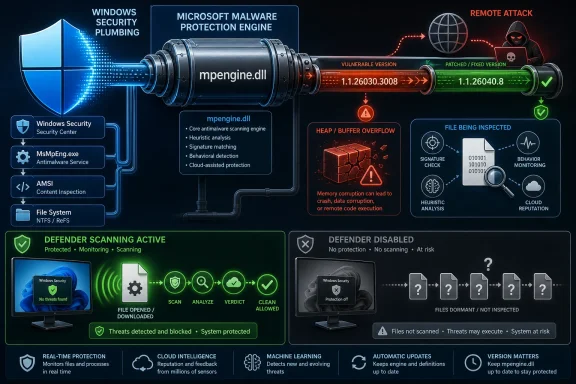 Defender’s Quietest Component Just Became the Loudest Patch
CVE-2026-45584 sits in mpengine.dll, the Microsoft Malware Protection Engine that performs scanning, detection, and cleaning for Microsoft’s antivirus and antispyware stack. Microsoft classifies the vulnerability as remote code execution with critical severity, tied to a heap-based buffer overflow. In plainer English, crafted input can push the scanning engine into unsafe memory handling, with code execution as the feared outcome.That is particularly uncomfortable because antimalware engines are designed to inspect hostile content. They touch files users have not opened, attachments users should not trust, and downloads the rest of the system is trying to evaluate before letting them near anything important. A bug in that inspection path flips the defender’s advantage: the thing meant to neutralize dangerous objects becomes part of the attack surface.
Microsoft’s CVSS vector tells a nuanced story. The base score is 8.1, with network attack vector, no privileges required, and no user interaction in the formal scoring. At the same time, Microsoft marks attack complexity as high and says successful exploitation requires additional steps to prepare the target environment.
That tension matters. This is not the cartoon version of a wormable Windows bug where every exposed host falls over the moment a packet arrives. But it is also not a sleepy local bug buried behind admin rights. The vulnerable component is widely deployed, it processes untrusted content by design, and the fix depends on a separate update channel that many organizations do not monitor with the same intensity as Patch Tuesday.
The Patch Is an Engine Version, Not a Windows Cumulative Update
The fixed version is Microsoft Malware Protection Engine 1.1.26040.8. The last listed affected engine version is 1.1.26030.3008. That makes this one of those Microsoft security issues where the most important number is not the Windows build number, the monthly cumulative update, or the KB installed in Programs and Features.For many Windows administrators, that is the first trap. Defender engine updates are part of the ongoing antimalware update stream, not the traditional monthly OS servicing cycle. Microsoft typically updates the engine monthly or as needed, while malware definitions are normally updated multiple times per day. In the default configuration, that machinery should keep both consumers and enterprise deployments current.
“Should” is doing a lot of work. Environments with disconnected networks, controlled update rings, third-party endpoint protection, gold images, VDI pools, or tightly managed software distribution can drift away from Microsoft’s happy path. The fact that Defender can update itself automatically does not prove that it did update itself automatically on the machines a scanner is flagging.
That is why the practical remediation is boring but essential: verify the engine version actually present on disk and in use. Security teams should treat 1.1.26040.8 as the minimum clean line for this CVE. If systems remain on 1.1.26030.3008 or earlier, the automatic update story has failed somewhere between policy, connectivity, distribution, or telemetry.
“No Action Required” Is a Consumer Promise, Not an Enterprise Control
Microsoft’s advisory says no action is required to install the update because supported Microsoft antimalware products are configured by default to receive engine and definition updates automatically. That is true in the ordinary case, and it is one of Defender’s strengths. The engine can be updated quickly outside the lumbering cadence of full Windows servicing.But enterprises do not live in the ordinary case. They pin baselines, stage rings, block direct internet access, proxy update channels, run endpoint detection platforms alongside Defender, and sometimes disable Defender after deploying another security product. Those decisions may be sensible, but they create precisely the ambiguity that turns a vendor’s “automatic” into an administrator’s “prove it.”
The correct posture is not panic; it is verification. If an organization has Microsoft Defender Antivirus active, Microsoft Defender for Endpoint in passive or active modes, System Center Endpoint Protection, or older Microsoft antimalware products still present in a managed estate, it needs a way to inventory engine versions at scale. That inventory should not depend solely on whether a monthly Windows update was installed.
The deeper lesson is that modern Windows security has multiple servicing lanes. The OS has one lane, browser components another, Store-delivered apps another, Microsoft 365 Apps another, and Defender’s intelligence and engine updates yet another. CVE-2026-45584 lives in that last lane, and mature operations teams need to monitor it as a first-class patch surface.
Vulnerability Scanners Are Finding Files, Not Proving Exploitability
One of the most important clarifications in Microsoft’s advisory is aimed directly at the noise now hitting ticket queues: vulnerability scanners may flag systems where Defender is disabled because Defender files remain on disk. Microsoft says those systems are not in an exploitable state if Defender is disabled.That distinction will not satisfy every dashboard. Scanners often look for specific binaries and version numbers. If
mpengine.dll exists and its version falls below the fixed threshold, the scanner may raise the finding even if the service is disabled, passive, or superseded by another endpoint protection product.This is a classic gap between asset detection and risk determination. The scanner is not necessarily wrong to notice an outdated vulnerable binary. But it is incomplete if it treats every copy of that binary as reachable attack surface. A disabled engine on disk is not the same thing as an active scanning engine processing files.
For IT teams, the response should be more disciplined than simply closing tickets as false positives. A good exception record should document whether Defender is active, disabled, passive, or merely present; which product owns real-time scanning; whether the vulnerable engine can be invoked by scheduled scans, command-line tools, cloud-delivered protection, or maintenance tasks; and whether the engine will still be updated even when Defender is not the primary antivirus.
There is also a policy choice. Some organizations may decide that dormant vulnerable binaries are still unacceptable and should be updated or removed where supported. Others may accept Microsoft’s exploitability statement and suppress scanner findings when Defender is demonstrably disabled. What they should not do is let thousands of red scanner rows obscure the smaller number of systems where Defender is both vulnerable and active.
Disabled Defender Is Not the Same as Absent Defender
The confusion exists because Defender is part of Windows in a way that older third-party antivirus products were not. On supported Windows versions, Microsoft Defender is installed as a built-in security capability, even if it is later disabled, placed into passive mode, or superseded by another product. The files do not vanish just because the Security app no longer shows Defender as the primary line of defense.That persistence is intentional. Windows needs a baseline security platform, and Microsoft has spent years turning Defender from a fallback antivirus into a broad endpoint security substrate. Microsoft Defender Antivirus, Defender for Endpoint, cloud-delivered protection, attack surface reduction rules, controlled folder access, and other controls overlap in ways that are helpful when deployed intentionally and confusing when inherited accidentally.
CVE-2026-45584 exposes the administrative cost of that architecture. A component can be present everywhere, active somewhere, and exploitable only under certain conditions. A scanner that sees “old engine binary” does not know enough by itself; an administrator who sees “Defender disabled” may not know enough either.
The safest middle ground is to treat presence as a prompt for investigation and activity as the prioritization signal. If Defender is active and the engine is old, update immediately. If Defender is disabled but the engine is old, verify that it truly cannot scan content and decide whether updating it anyway is cheaper than arguing with the scanner every week.
The Attack Path Runs Through Trust in the Scanner
Microsoft says exploitation would require a remote, unauthenticated attacker to entice a local user to take multiple actions resulting in Defender scanning a malicious file that has been quarantined. That language sounds narrower than the headline “remote code execution,” but it still deserves attention. Security tools routinely touch suspicious files, and users are often involved in the awkward middle ground between “received” and “executed.”The “quarantined file” detail is especially interesting because quarantine is supposed to be a safety boundary. Users and administrators inspect quarantined items precisely because something has already gone wrong or been blocked. A vulnerability in the scanning path means the evaluation process itself becomes a possible route to code execution.
High attack complexity should temper the response, not neutralize it. Attackers are very good at shaping user behavior around security prompts, help-desk workflows, and “please restore this blocked file” social engineering. A bug that requires multiple local actions may still be useful in a targeted intrusion, especially against environments where help desks, analysts, or power users regularly handle suspicious artifacts.
The CVSS fields also show why Microsoft still landed on critical severity. Network reach, no privileges required, no formal user interaction, and high confidentiality, integrity, and availability impact are serious attributes. The complexity caveat lowers exploitability, but it does not make the vulnerable engine a mere compliance blemish.
The Old Defender Product Family Still Haunts Modern Estates
The advisory names Microsoft Malware Protection Engine as the affected component and notes that products beyond Windows Defender use it, including System Center Endpoint Protection, System Center 2012 R2 Endpoint Protection, System Center 2012 Endpoint Protection, and Microsoft Security Essentials. That list is a museum of Microsoft endpoint security branding, but many enterprises have museums running in production.Legacy endpoint tools persist because migrations are hard, disconnected systems are inconvenient, and forgotten servers often keep doing their quiet jobs until a vulnerability scan notices them. CVE-2026-45584 is the sort of bug that can turn those forgotten corners into emergency work, not because the exploit is necessarily easy, but because the affected component is shared across generations of Microsoft protection products.
The shared engine model is a strength when Microsoft can patch once and protect broadly. It is a weakness when organizations lose track of where that engine lives. The same version number may appear on endpoints, servers, lab machines, VDI images, offline recovery systems, and old management baselines.
This is where software inventory matters more than product names. Administrators should not ask only “Do we run Defender?” They should ask “Where is the Microsoft Malware Protection Engine installed, which copies are active, which copies are serviced, and which copies are stale?” The answer may not match the procurement spreadsheet.
The Revision Date Tells Its Own Small Story
Microsoft released the CVE on May 19, 2026, and updated the advisory on May 26, 2026. The revision noted an informational change: links to release notes were added in the security updates table. That is not a change in severity, exploitability, or the fixed build number, but it does matter for administrators trying to trace what changed after initial publication.The timing also highlights a broader issue with security advisories as living documents. Organizations often ingest an advisory once, create tickets, and move on. But MSRC pages can change after publication, sometimes in ways that materially alter urgency and sometimes in ways that simply make the guidance clearer.
Here, the meaningful technical facts remain stable: the vulnerable engine line ends at 1.1.26030.3008, the fixed engine begins at 1.1.26040.8, the impact is remote code execution, and Microsoft says the issue was not publicly disclosed or exploited at original publication. The later update did not turn this into an actively exploited emergency. It did, however, make the update documentation easier to follow.
That distinction is worth preserving. Security teams burn credibility when every advisory update becomes a new alarm. They also create risk when they ignore advisory revisions entirely. The right response is to monitor changes, classify whether they alter risk, and update remediation guidance only when the facts demand it.
Defender’s Update Model Is Fast, but Fast Is Not the Same as Observable
Microsoft’s antimalware update pipeline is one of the most agile parts of the Windows ecosystem. Definitions can move several times per day, and engine updates can arrive outside the monthly patch ritual. That agility is necessary because malware changes faster than enterprise patch windows.But velocity without observability creates a blind spot. A patch that is “already installed automatically” is only useful if administrators can prove when and where it arrived. Otherwise, the organization has outsourced not just remediation, but assurance.
For smaller environments, checking the Defender security intelligence page or local Defender version information may be enough. For larger estates, the answer should come from endpoint management, EDR telemetry, PowerShell inventory, Intune reporting, Configuration Manager, or whatever asset system the organization trusts. The key is that the source of truth must capture the engine version, not merely the OS patch level.
This is also a good moment to test update failure paths. If a device cannot reach Microsoft update services, does it fall back to an internal share? If it is on an isolated network, who imports security intelligence packages? If a VDI image is reverted nightly, does the engine update persist? If Defender is passive behind another antivirus, does the engine still receive updates? CVE-2026-45584 is a vulnerability, but it is also a systems test.
The Scanner Ticket Should Start a Better Conversation
Many administrators will first meet CVE-2026-45584 as a scanner finding, not as an MSRC advisory. That is normal now. Vulnerability management platforms often become the front door for security reality, converting vendor advisories into prioritized rows with due dates, owners, and angry colors.The danger is that scanner logic can flatten nuance. A device with an active vulnerable engine and a device with a disabled stale binary may look identical in a report. A laptop that updated two hours after a scan and a server stranded behind a broken update proxy may sit in the same remediation bucket.
The fix is not to distrust scanners. It is to enrich their findings. Pair file-version detection with service state, Defender status, engine update telemetry, last successful security intelligence update time, and endpoint protection ownership. The more context the scanner has, the less time administrators waste fighting ghosts.
Security teams should also be careful with suppressions. If Microsoft says disabled Defender systems are not exploitable, that supports a risk-based exception. But the exception should be conditional, not global. If Defender is later re-enabled, if a device moves policy groups, or if another product hands scanning back to Microsoft’s engine, the old stale binary can become relevant again.
Microsoft’s Language Narrows the Threat, but It Does Not Shrink the Lesson
The advisory’s exploitability section says the vulnerability was not publicly disclosed and not exploited at the time of original publication. It also marks exploit code maturity as unproven. Those are meaningful de-escalators, especially in a year when “Defender vulnerability” headlines can trigger disproportionate anxiety.Still, the lesson is larger than this one CVE. Microsoft Defender is now a default security layer across Windows estates, and its engine updates are security updates in every meaningful sense. Treating them as mere antivirus housekeeping is outdated.
The fix also includes defense-in-depth changes beyond the named vulnerability. Microsoft often bundles such hardening into engine releases, and while that phrase can be vague, it reinforces the same operational point. Staying current on the engine is not only about checking off one CVE; it is about staying aligned with the threat model Microsoft is actively updating against.
For Windows enthusiasts, this is another example of the invisible maintenance that keeps a modern PC safe. For sysadmins, it is a reminder that the default is only reliable until enterprise customization gets involved. For security teams, it is a case study in separating detected vulnerable file from real exploitable condition without dismissing either.
The Version Number That Should End the Noise
The most concrete line in the advisory is the fixed engine number: 1.1.26040.8. Everything else flows from that. Machines at or above that version should be considered addressed for CVE-2026-45584; machines below it need context and, where active, remediation.That sounds simple, and in a well-run environment it should be. But Defender’s ubiquity means the population of systems to check may be larger than the population of systems administrators think of as “Defender machines.” Servers with third-party antivirus, offline images, build templates, dormant laptops, and recovery environments can all complicate the picture.
The smart response is to make this a short-lived incident and a long-lived control improvement. Close the immediate gap by confirming engine versions and update flow. Then ensure future Defender engine CVEs are handled through the same inventory and compliance machinery as traditional Windows patches.
This Defender Bug Leaves Administrators With a Smaller, Sharper Checklist
CVE-2026-45584 is not a reason to distrust Defender, and it is not proof that every scanner finding equals exploitable risk. It is a reason to make the Defender engine visible in patch operations, especially where Microsoft’s defaults have been modified by enterprise policy. The work is less dramatic than the phrase “remote code execution” suggests, but it is also more precise than clicking “ignore” on every disabled-Defender finding.- Confirm that active Microsoft Malware Protection Engine installations are running version 1.1.26040.8 or later.
- Treat engine version inventory as separate from Windows cumulative update compliance.
- Investigate scanner findings on disabled Defender systems by validating service state, scanning capability, and endpoint protection ownership.
- Avoid broad suppressions that could hide systems where Defender is later re-enabled or still invoked by scheduled or manual scanning paths.
- Check disconnected, legacy, VDI, and gold-image environments for stale Defender engine files that automatic updating may not have reached.
- Use this incident to verify that antimalware engine and security intelligence updates are observable, reportable, and failing loudly when blocked.
References
- Primary source: MSRC
Published: 2026-05-26T07:00:00-07:00
Security Update Guide - Microsoft Security Response Center
 msrc.microsoft.com
