

Microsoft disclosed CVE-2026-47289 on June 9, 2026, as a Remote Desktop Client remote code execution vulnerability in its Security Update Guide, giving Windows administrators another client-side RDP flaw to treat as a patch-management priority rather than a theoretical protocol footnote. The important word is client. This is not the classic internet-exposed RDP server nightmare; it is the quieter but still dangerous scenario in which a Windows machine becomes vulnerable because a user or administrator connects outward to something hostile. That distinction should shape the response, not soften it.
Remote Desktop vulnerabilities tend to trigger a familiar reflex in Windows shops: look for exposed TCP 3389, check VPN rules, audit firewall policies, and make sure servers are not naked on the internet. That reflex is still useful, but it does not fully describe CVE-2026-47289. Microsoft’s naming places the flaw in the Remote Desktop Client, which means the risk follows the endpoint that initiates the connection.
That matters because Remote Desktop is no longer just a server administration tool. It is embedded in help desk workflows, MSP support routines, lab access, developer environments, cloud management, jump-box habits, and the daily muscle memory of Windows power users. A vulnerability in the client turns a trusted administrative habit into a possible execution path.
The uncomfortable scenario is simple: a target connects to a malicious or compromised RDP endpoint, and the client processes something it should not. Microsoft has not published deep technical root-cause detail in the public advisory, so defenders should resist filling in the blanks with guesswork. But the broad operational implication is clear enough: patch the machines that initiate RDP sessions, not merely the machines that receive them.
That is where many inventories are weakest. Servers tend to be tracked, categorized, and patched by policy. Admin workstations, contractor laptops, lab PCs, and “temporary” support machines often live in a messier reality.
That is a crucial distinction for patch teams. Sparse public detail does not mean low risk. It often means the opposite: defenders have a confirmed problem but limited public information about the mechanics, while attackers can begin diffing patches, studying changed binaries, and testing client behavior.
For Windows administrators, the lack of a public exploit recipe should not become a reason to wait. Microsoft’s monthly security cycle has trained too many organizations to triage only the vulnerabilities with dramatic writeups, proof-of-concept code, or social-media heat. CVE-2026-47289 is a good example of why that model is inadequate.
Remote code execution in a widely deployed Windows client component is exactly the kind of issue that can become more valuable after disclosure. The advisory is the starting gun for defenders, but it is also a map pin for researchers and adversaries.
That is the uncomfortable asymmetry of client-side RDP vulnerabilities. The people most likely to connect to unfamiliar, broken, newly built, compromised, or poorly maintained remote machines are often the people with elevated access. Sysadmins connect to recovery consoles. MSP technicians connect to client infrastructure. Security teams connect to suspect environments. Developers connect to test boxes and cloud-hosted Windows images.
If an attacker can place a malicious RDP service in the path of one of those workflows, the prize is not merely code execution on a random endpoint. It may be execution on a machine loaded with credentials, management tools, VPN access, saved connection profiles, privileged browser sessions, SSH keys, scripts, and cached administrative context.
That is why “user interaction required” should not be read as “low urgency” in this class of bug. In enterprise security, many dangerous attacks begin with a user doing something normal. RDP connections are normal. Administrative connections are normal. Help desk troubleshooting is normal. The exploitability question is not whether someone would ever connect to a remote desktop; the question is how often they already do.
The most mature response is to treat Remote Desktop Client as part of the privileged access surface. If an organization has hardened domain controllers but lets admins RDP from unmanaged daily-driver laptops, the risk model is already broken.
A server inventory may tell you where Remote Desktop Services is enabled. It may not tell you which laptops use the Remote Desktop client every day. It may not reveal which admins keep old connection shortcuts on their desktops, which vendors use RDP for support, or which lab machines are intentionally excluded from aggressive patch rings because “they’re not production.”
That blind spot is where CVE-2026-47289 becomes operationally interesting. The vulnerable asset is not necessarily the machine with an open inbound port. The vulnerable asset may be any Windows endpoint whose user can be induced to connect outward.
Patch teams should therefore avoid a server-only response. Workstations, privileged access workstations, help desk machines, VDI images, golden images, offline laptops, and remote contractor devices all belong in the remediation population. If an endpoint can run Microsoft’s Remote Desktop Client, it deserves attention.
There is also a sequencing issue. Many enterprises prioritize servers because downtime is visible and politically expensive. For this vulnerability class, the more urgent first ring may be administrative workstations and IT support endpoints. Those devices are where a successful client-side RCE can become a broader domain problem.
The Remote Desktop Client is a parser, renderer, broker, credential interface, device redirection negotiator, and user-facing doorway into another machine. It handles complex data from a remote system. Complexity is not automatically insecurity, but in vulnerability management it is a familiar warning sign.
Modern RDP sessions can involve graphics, clipboard sharing, drive redirection, printer redirection, audio, smart cards, multiple monitors, gateways, saved credentials, and policy-controlled resources. Each feature exists because users asked remote sessions to feel less remote. Each feature also expands the amount of state and input the client must safely handle.
That does not mean administrators should abandon RDP. It does mean they should stop treating the client as a harmless viewer. A remote desktop client is not a pane of glass; it is active software interpreting untrusted remote behavior.
The security posture should reflect that. Disable unnecessary redirection features where practical. Use hardened administrative workstations. Avoid connecting from privileged endpoints to untrusted machines. Treat RDP files and connection prompts with the same skepticism applied to documents and links.
That gap between architecture and behavior is where attackers often live. A malicious RDP endpoint does not need to be globally famous if it can be made relevant to one target. A lure might be a support request, a fake lab environment, a compromised vendor host, or an internal machine already under attacker control.
The risk becomes sharper in outsourced IT and managed service provider environments. MSP technicians routinely connect across customer boundaries, often under time pressure and with powerful tools close at hand. A client-side RDP exploit in that setting could turn one compromised environment into a staging point against another.
The same is true inside large enterprises. Security teams often investigate suspicious systems from machines that also have access to ticketing systems, file shares, identity portals, and endpoint management consoles. If those investigation workflows rely on RDP from general-purpose workstations, the organization has quietly created a high-value client-side attack path.
This is the case for privilege separation not as a compliance slogan but as a practical control. The device used to browse email should not be the device used to administer domain infrastructure. The device used to inspect a potentially hostile machine should not be overflowing with standing credentials.
Report confidence, in that context, is not a measure of how much fun a blog post is to read. It is a measure of whether the vulnerability’s existence and technical basis should be taken seriously. For CVE-2026-47289, Microsoft’s acknowledgement is the key fact.
That leaves administrators in a familiar but frustrating posture. They must act without perfect information. They may not know the precise vulnerable function, the exploit constraints, or whether mitigations short of patching are complete. They may not know how quickly weaponization will happen, if it happens at all.
But security operations often works this way. Patch decisions are made under uncertainty. The right question is not whether every detail is public; it is whether the credible downside is large enough and the remediation path clear enough to justify action. For a Microsoft-confirmed Remote Desktop Client RCE, the answer is yes.
The first layer is endpoint hygiene. Devices that initiate RDP sessions should be current, managed, monitored, and covered by endpoint detection and response tooling. They should not be forgotten laptops with local admin sprawl and a backlog of deferred updates.
The second layer is access discipline. Administrative RDP should originate from controlled devices, ideally privileged access workstations or equivalent hardened environments. If admins can connect to sensitive servers from any corporate laptop, a client-side RCE has a much easier path to matter.
The third layer is feature reduction. Clipboard, drive, printer, and device redirection are convenient, but convenience should be weighed against exposure. In high-security contexts, reducing redirection features can make exploitation and post-exploitation less useful even when it does not eliminate the underlying vulnerability.
The fourth layer is monitoring. Look for unusual RDP destinations, unexpected outbound connections, new connection patterns from privileged users, and post-connection process behavior on admin endpoints. A client exploit may not look like a brute-force login attempt against a server. It may look like a trusted user connecting outward and then spawning activity locally.
This is where defenders should be careful not to overfit to the last RDP incident. BlueKeep taught one set of lessons. Ransomware crews taught another. A Remote Desktop Client RCE teaches a quieter lesson: sometimes the dangerous edge is not the port you exposed, but the tool you trusted.
Enthusiasts, homelab users, gamers managing Windows servers, students using remote lab machines, and small-business owners often blur the line between consumer and administrator. They may download RDP files, connect to cloud instances, or help relatives and clients troubleshoot machines. Those habits create exposure even outside a formal enterprise.
The small-business case deserves special attention. Many small organizations rely on ad hoc remote access patterns because they lack the staff or budget for a polished privileged access architecture. A vulnerability like CVE-2026-47289 is a reminder that “it’s just RDP” is not a security policy.
For these users, the best advice is boring because boring advice works. Update Windows. Avoid connecting to systems you do not trust. Do not open unsolicited connection files. Turn off redirection features you do not need. Keep administrative tasks separated from everyday browsing and email when possible.
Administrators should be able to answer several concrete questions within hours of a vulnerability like this entering the MSRC guide. Which endpoints have the Remote Desktop Client installed or available? Which users initiate RDP sessions? Which devices are used by domain admins, help desk staff, and infrastructure teams? Which of those devices are missing the relevant June 2026 security updates?
If those answers require three teams, two spreadsheets, and a week of guesswork, the organization has found a process vulnerability alongside the software vulnerability. CVE-2026-47289 becomes a forcing function for better asset intelligence.
Patch compliance dashboards can also be misleading if they report broad fleet percentages without separating high-value endpoints. A 95 percent compliance number sounds excellent until the missing 5 percent includes the jump boxes, admin laptops, and contractor devices most likely to use RDP. Risk is not evenly distributed.
The better approach is to build a priority group for remote administration clients. That group should receive faster patch rings, stricter monitoring, and tighter configuration baselines than ordinary endpoints. If Remote Desktop is part of the administrative nervous system, its clients should be treated accordingly.
That sparseness has benefits. Overly detailed advisories can accelerate weaponization. But it also pushes more interpretive work onto IT and security teams, who must translate a terse vulnerability entry into concrete action across messy environments.
For CVE-2026-47289, the translation is not especially mysterious: prioritize Windows endpoints that use Remote Desktop Client, especially privileged ones, and deploy the relevant security update. The nuance lies in scope. A server team alone cannot own the fix. Endpoint management, identity teams, help desk leadership, MSP coordinators, and security operations all have a stake.
The advisory also illustrates why CVSS alone is never enough. A vulnerability’s score can guide triage, but the business context determines urgency. A client-side RCE on a rarely used component may be moderate in one environment and urgent in another where administrators live inside RDP sessions all day.
That is the kind of judgment mature security programs are paid to make. They do not wait for a perfect exploitability label to tell them that code execution on admin workstations is bad.
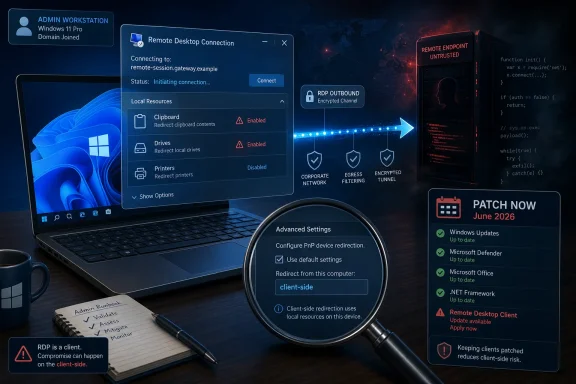 Microsoft’s RDP Risk Has Moved to the Person Holding the Mouse
Remote Desktop vulnerabilities tend to trigger a familiar reflex in Windows shops: look for exposed TCP 3389, check VPN rules, audit firewall policies, and make sure servers are not naked on the internet. That reflex is still useful, but it does not fully describe CVE-2026-47289. Microsoft’s naming places the flaw in the Remote Desktop Client, which means the risk follows the endpoint that initiates the connection.That matters because Remote Desktop is no longer just a server administration tool. It is embedded in help desk workflows, MSP support routines, lab access, developer environments, cloud management, jump-box habits, and the daily muscle memory of Windows power users. A vulnerability in the client turns a trusted administrative habit into a possible execution path.
The uncomfortable scenario is simple: a target connects to a malicious or compromised RDP endpoint, and the client processes something it should not. Microsoft has not published deep technical root-cause detail in the public advisory, so defenders should resist filling in the blanks with guesswork. But the broad operational implication is clear enough: patch the machines that initiate RDP sessions, not merely the machines that receive them.
That is where many inventories are weakest. Servers tend to be tracked, categorized, and patched by policy. Admin workstations, contractor laptops, lab PCs, and “temporary” support machines often live in a messier reality.
The Advisory Says Less Than Attackers Would Like, But Enough for Defenders
The user-supplied MSRC language around the metric is a reminder that vulnerability severity is not just about impact. It is also about confidence: how certain the industry is that the bug exists, how credible the technical details are, and whether the vendor has acknowledged it. A vendor-confirmed CVE from Microsoft sits at the high-confidence end of that spectrum even when public exploit details are sparse.That is a crucial distinction for patch teams. Sparse public detail does not mean low risk. It often means the opposite: defenders have a confirmed problem but limited public information about the mechanics, while attackers can begin diffing patches, studying changed binaries, and testing client behavior.
For Windows administrators, the lack of a public exploit recipe should not become a reason to wait. Microsoft’s monthly security cycle has trained too many organizations to triage only the vulnerabilities with dramatic writeups, proof-of-concept code, or social-media heat. CVE-2026-47289 is a good example of why that model is inadequate.
Remote code execution in a widely deployed Windows client component is exactly the kind of issue that can become more valuable after disclosure. The advisory is the starting gun for defenders, but it is also a map pin for researchers and adversaries.
Client-Side RDP Bugs Punish the Most Trusted Workstations
The most exposed machines may not be ordinary user laptops. They may be administrator workstations.That is the uncomfortable asymmetry of client-side RDP vulnerabilities. The people most likely to connect to unfamiliar, broken, newly built, compromised, or poorly maintained remote machines are often the people with elevated access. Sysadmins connect to recovery consoles. MSP technicians connect to client infrastructure. Security teams connect to suspect environments. Developers connect to test boxes and cloud-hosted Windows images.
If an attacker can place a malicious RDP service in the path of one of those workflows, the prize is not merely code execution on a random endpoint. It may be execution on a machine loaded with credentials, management tools, VPN access, saved connection profiles, privileged browser sessions, SSH keys, scripts, and cached administrative context.
That is why “user interaction required” should not be read as “low urgency” in this class of bug. In enterprise security, many dangerous attacks begin with a user doing something normal. RDP connections are normal. Administrative connections are normal. Help desk troubleshooting is normal. The exploitability question is not whether someone would ever connect to a remote desktop; the question is how often they already do.
The most mature response is to treat Remote Desktop Client as part of the privileged access surface. If an organization has hardened domain controllers but lets admins RDP from unmanaged daily-driver laptops, the risk model is already broken.
Patch Tuesday Still Works, But Only If the Inventory Is Honest
Microsoft’s security update machinery is built for scale. Windows Update, WSUS, Microsoft Intune, Configuration Manager, and third-party patching platforms can move fixes quickly when devices are enrolled, reachable, and correctly classified. The problem is that RDP client exposure does not map neatly to server roles.A server inventory may tell you where Remote Desktop Services is enabled. It may not tell you which laptops use the Remote Desktop client every day. It may not reveal which admins keep old connection shortcuts on their desktops, which vendors use RDP for support, or which lab machines are intentionally excluded from aggressive patch rings because “they’re not production.”
That blind spot is where CVE-2026-47289 becomes operationally interesting. The vulnerable asset is not necessarily the machine with an open inbound port. The vulnerable asset may be any Windows endpoint whose user can be induced to connect outward.
Patch teams should therefore avoid a server-only response. Workstations, privileged access workstations, help desk machines, VDI images, golden images, offline laptops, and remote contractor devices all belong in the remediation population. If an endpoint can run Microsoft’s Remote Desktop Client, it deserves attention.
There is also a sequencing issue. Many enterprises prioritize servers because downtime is visible and politically expensive. For this vulnerability class, the more urgent first ring may be administrative workstations and IT support endpoints. Those devices are where a successful client-side RCE can become a broader domain problem.
The Old RDP Mental Model Is Too Narrow
RDP’s reputation was forged by server-side disasters: exposed remote access, brute-force campaigns, ransomware operators walking through weak perimeter controls, and historic protocol bugs that made defenders fear wormable conditions. That history is real, but it can obscure the client-side story.The Remote Desktop Client is a parser, renderer, broker, credential interface, device redirection negotiator, and user-facing doorway into another machine. It handles complex data from a remote system. Complexity is not automatically insecurity, but in vulnerability management it is a familiar warning sign.
Modern RDP sessions can involve graphics, clipboard sharing, drive redirection, printer redirection, audio, smart cards, multiple monitors, gateways, saved credentials, and policy-controlled resources. Each feature exists because users asked remote sessions to feel less remote. Each feature also expands the amount of state and input the client must safely handle.
That does not mean administrators should abandon RDP. It does mean they should stop treating the client as a harmless viewer. A remote desktop client is not a pane of glass; it is active software interpreting untrusted remote behavior.
The security posture should reflect that. Disable unnecessary redirection features where practical. Use hardened administrative workstations. Avoid connecting from privileged endpoints to untrusted machines. Treat RDP files and connection prompts with the same skepticism applied to documents and links.
The Real Attack Surface Is Workflow
One reason client-side vulnerabilities are hard to manage is that they exploit trust relationships rather than just network topology. A firewall diagram can show which servers accept inbound RDP. It cannot easily show which technician will connect to a third-party machine during an outage at 2 a.m.That gap between architecture and behavior is where attackers often live. A malicious RDP endpoint does not need to be globally famous if it can be made relevant to one target. A lure might be a support request, a fake lab environment, a compromised vendor host, or an internal machine already under attacker control.
The risk becomes sharper in outsourced IT and managed service provider environments. MSP technicians routinely connect across customer boundaries, often under time pressure and with powerful tools close at hand. A client-side RDP exploit in that setting could turn one compromised environment into a staging point against another.
The same is true inside large enterprises. Security teams often investigate suspicious systems from machines that also have access to ticketing systems, file shares, identity portals, and endpoint management consoles. If those investigation workflows rely on RDP from general-purpose workstations, the organization has quietly created a high-value client-side attack path.
This is the case for privilege separation not as a compliance slogan but as a practical control. The device used to browse email should not be the device used to administer domain infrastructure. The device used to inspect a potentially hostile machine should not be overflowing with standing credentials.
“Confirmed” Does Not Mean “Explained”
The metric language supplied with the advisory is worth dwelling on because it captures a common tension in modern vulnerability disclosure. Defenders want details. Vendors often publish enough to drive patching but not enough to hand attackers a recipe. Researchers may know more than the public advisory says. Attackers may learn by reverse engineering.Report confidence, in that context, is not a measure of how much fun a blog post is to read. It is a measure of whether the vulnerability’s existence and technical basis should be taken seriously. For CVE-2026-47289, Microsoft’s acknowledgement is the key fact.
That leaves administrators in a familiar but frustrating posture. They must act without perfect information. They may not know the precise vulnerable function, the exploit constraints, or whether mitigations short of patching are complete. They may not know how quickly weaponization will happen, if it happens at all.
But security operations often works this way. Patch decisions are made under uncertainty. The right question is not whether every detail is public; it is whether the credible downside is large enough and the remediation path clear enough to justify action. For a Microsoft-confirmed Remote Desktop Client RCE, the answer is yes.
Enterprises Should Shrink the Blast Radius, Not Just Install the Fix
Patching is the center of the response, but it should not be the whole response. Client-side RDP vulnerabilities are a useful test of whether an organization has built layered controls around privileged remote access.The first layer is endpoint hygiene. Devices that initiate RDP sessions should be current, managed, monitored, and covered by endpoint detection and response tooling. They should not be forgotten laptops with local admin sprawl and a backlog of deferred updates.
The second layer is access discipline. Administrative RDP should originate from controlled devices, ideally privileged access workstations or equivalent hardened environments. If admins can connect to sensitive servers from any corporate laptop, a client-side RCE has a much easier path to matter.
The third layer is feature reduction. Clipboard, drive, printer, and device redirection are convenient, but convenience should be weighed against exposure. In high-security contexts, reducing redirection features can make exploitation and post-exploitation less useful even when it does not eliminate the underlying vulnerability.
The fourth layer is monitoring. Look for unusual RDP destinations, unexpected outbound connections, new connection patterns from privileged users, and post-connection process behavior on admin endpoints. A client exploit may not look like a brute-force login attempt against a server. It may look like a trusted user connecting outward and then spawning activity locally.
This is where defenders should be careful not to overfit to the last RDP incident. BlueKeep taught one set of lessons. Ransomware crews taught another. A Remote Desktop Client RCE teaches a quieter lesson: sometimes the dangerous edge is not the port you exposed, but the tool you trusted.
Home Users Are Not the Main Target, But They Are Not Immune
For most home users, the practical answer is straightforward: install Windows updates promptly and be cautious about connecting to unfamiliar remote desktops. The average consumer is less likely to use RDP every day, and many Windows Home configurations do not act as Remote Desktop hosts. But the client story still matters because the risk follows the act of connecting.Enthusiasts, homelab users, gamers managing Windows servers, students using remote lab machines, and small-business owners often blur the line between consumer and administrator. They may download RDP files, connect to cloud instances, or help relatives and clients troubleshoot machines. Those habits create exposure even outside a formal enterprise.
The small-business case deserves special attention. Many small organizations rely on ad hoc remote access patterns because they lack the staff or budget for a polished privileged access architecture. A vulnerability like CVE-2026-47289 is a reminder that “it’s just RDP” is not a security policy.
For these users, the best advice is boring because boring advice works. Update Windows. Avoid connecting to systems you do not trust. Do not open unsolicited connection files. Turn off redirection features you do not need. Keep administrative tasks separated from everyday browsing and email when possible.
The Patch Is the Easy Part; Proving Coverage Is Harder
The practical challenge after disclosure is not understanding that updates matter. It is proving that the right machines got them.Administrators should be able to answer several concrete questions within hours of a vulnerability like this entering the MSRC guide. Which endpoints have the Remote Desktop Client installed or available? Which users initiate RDP sessions? Which devices are used by domain admins, help desk staff, and infrastructure teams? Which of those devices are missing the relevant June 2026 security updates?
If those answers require three teams, two spreadsheets, and a week of guesswork, the organization has found a process vulnerability alongside the software vulnerability. CVE-2026-47289 becomes a forcing function for better asset intelligence.
Patch compliance dashboards can also be misleading if they report broad fleet percentages without separating high-value endpoints. A 95 percent compliance number sounds excellent until the missing 5 percent includes the jump boxes, admin laptops, and contractor devices most likely to use RDP. Risk is not evenly distributed.
The better approach is to build a priority group for remote administration clients. That group should receive faster patch rings, stricter monitoring, and tighter configuration baselines than ordinary endpoints. If Remote Desktop is part of the administrative nervous system, its clients should be treated accordingly.
Microsoft’s Sparse Advisories Put More Burden on Defenders
Microsoft’s Security Update Guide is designed to be operational rather than literary. It gives administrators identifiers, affected products, severity information, exploitability signals, and remediation direction. It does not always give the narrative defenders want.That sparseness has benefits. Overly detailed advisories can accelerate weaponization. But it also pushes more interpretive work onto IT and security teams, who must translate a terse vulnerability entry into concrete action across messy environments.
For CVE-2026-47289, the translation is not especially mysterious: prioritize Windows endpoints that use Remote Desktop Client, especially privileged ones, and deploy the relevant security update. The nuance lies in scope. A server team alone cannot own the fix. Endpoint management, identity teams, help desk leadership, MSP coordinators, and security operations all have a stake.
The advisory also illustrates why CVSS alone is never enough. A vulnerability’s score can guide triage, but the business context determines urgency. A client-side RCE on a rarely used component may be moderate in one environment and urgent in another where administrators live inside RDP sessions all day.
That is the kind of judgment mature security programs are paid to make. They do not wait for a perfect exploitability label to tell them that code execution on admin workstations is bad.
The June RDP Client Warning Belongs on the Admin Workstation Checklist
The concrete response to CVE-2026-47289 is not dramatic, but it is specific. Treat this as a client-side remote access risk, push the security update broadly, and verify coverage where Remote Desktop usage overlaps with privilege.- Organizations should patch Windows endpoints that run or use Remote Desktop Client, not only servers that accept inbound RDP.
- Privileged access workstations, help desk machines, MSP technician devices, and jump-box images should be placed at the front of the remediation queue.
- Administrators should review RDP redirection settings and disable clipboard, drive, printer, or device sharing where those conveniences are not required.
- Security teams should monitor unusual outbound RDP patterns and suspicious post-connection behavior on privileged endpoints.
- Home users and small offices should install the June 2026 Windows security updates promptly and avoid unsolicited or untrusted RDP connection files.
- Asset owners should use this disclosure to test whether they can identify who uses RDP, from which devices, and under what patch status.
References
- Primary source: MSRC
Published: 2026-06-09T07:00:00-07:00
Security Update Guide - Microsoft Security Response Center
 msrc.microsoft.com
- Related coverage: sentinelone.com
CVE-2025-27487: Remote Desktop Client RCE Vulnerability
CVE-2025-27487 is a remote code execution vulnerability in Microsoft Remote Desktop Client. Learn about its impact, affected versions, and mitigation methods.www.sentinelone.com
