

Microsoft’s Thin Advisory Still Says Plenty
The sparse public record around CVE-2026-47653 is not unusual for Microsoft security advisories, especially near Patch Tuesday publication. MSRC often gives defenders the minimum viable decision package: affected product, impact, severity, exploitability expectations, and update availability. That can frustrate researchers, but it is also a deliberate form of disclosure control.
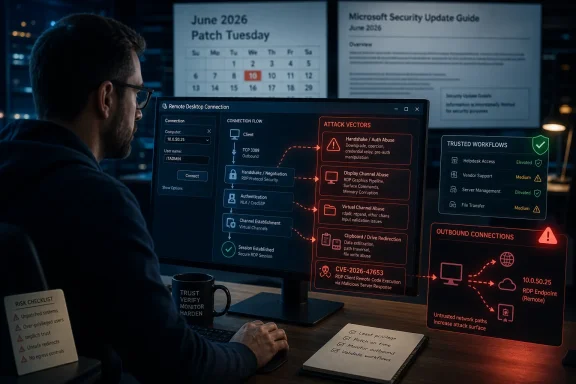
The label “Remote Desktop Client Remote Code Execution Vulnerability” already narrows the shape of the risk. This is not a classic exposed-server RDP flaw in the BlueKeep mold, where an attacker scans for listening systems and fires packets at port 3389. It points instead toward the software used by a Windows machine to connect outward to a remote desktop endpoint.
That distinction changes the threat model. The vulnerable asset is the workstation, jump box, help desk laptop, admin PC, contractor machine, or management VM that initiates the connection. In practical terms, exploitation would likely require steering a user or automated workflow toward a malicious or compromised Remote Desktop endpoint, then abusing how the client parses, negotiates, renders, redirects, or otherwise handles data from that endpoint.
That does not make the flaw benign. It makes it socially and operationally dangerous. Remote Desktop is a trusted workflow, and trusted workflows are where many organizations are weakest.
The Client Is an Attack Surface, Not a Passive Viewer
Windows administrators often think about RDP risk from the server side: whether Remote Desktop is enabled, whether Network Level Authentication is required, whether port forwarding is exposed, whether account lockout policy is sane, and whether MFA protects remote access brokers. Those controls still matter. But a client RCE asks a different question: what happens when the machine doing the connecting is the target?
The Remote Desktop client is not a dumb screen-sharing window. It negotiates authentication, display channels, clipboard behavior, drive redirection, printer redirection, audio, smart cards, graphics acceleration, and multiple virtual channels. The richer the remote experience becomes, the larger the parsing surface on both ends of the session.
That richness is what makes modern remote work tolerable. It is also what creates bug classes that feel counterintuitive to non-specialists. A malicious server does not necessarily need to “log in” to the client in the way users understand the term. It needs the client to process crafted session data in a vulnerable path.
This is why client-side RDP vulnerabilities deserve more attention than their naming convention sometimes gets. The phrase “Remote Desktop Client” can sound like the safer half of the protocol. In reality, the client is frequently the more privileged and more strategically valuable endpoint.
Report Confidence Turns Ambiguity Into a Signal
The user-facing text around the confidence metric is important because it explains what defenders are actually being asked to trust. A vulnerability can be known only in outline, supported by partial research, or fully confirmed by the vendor or author of the affected technology. The more confidence there is in the vulnerability’s existence and technical contours, the more urgently defenders should treat it.
For CVE-2026-47653, Microsoft’s acknowledgement is the central fact. Vendor confirmation moves the issue out of rumor territory, even if exploit mechanics remain unpublished. That is not the same as saying the public has a proof of concept, a crash trace, or a weaponized exploit chain. It means the affected party has enough validated information to assign a CVE and issue guidance.
This is the uncomfortable middle ground where many enterprise patch decisions actually happen. The internet wants binary labels: exploited or not exploited, critical or not critical, public PoC or no PoC. Security operations teams live in the gray zone between those labels, where a confirmed flaw with limited details may still demand rapid action because the affected workflow is high value.
The confidence metric also hints at attacker economics. When public details are thin, opportunistic attackers have less to copy. But sophisticated groups do not require blog-post-level disclosure to begin variant hunting, patch diffing, or fuzzing adjacent code paths. Once the advisory exists and updates are available, the race shifts from “is there a bug?” to “who can understand the patch fastest?”
Remote Desktop’s Real Risk Is the Administrator’s Habit
The most plausible danger from a client-side RDP RCE is not a random home user casually connecting to a fake desktop. It is an administrator, support engineer, developer, or vendor technician connecting to something they believe is routine. The workflow itself supplies the attacker with credibility.
Consider the common enterprise patterns. A help desk technician connects to a user’s workstation. A sysadmin connects to a staging server after a ticket. A contractor connects to a hosted desktop. A managed service provider pivots between customer environments. A developer connects to a build machine, lab VM, or cloud-hosted test box.
Each of those actions feels normal. That is the problem. Security training spends enormous energy teaching users not to open suspicious attachments, but far less time teaching privileged users to treat a remote desktop endpoint as potentially hostile.
If CVE-2026-47653 follows the broad pattern of prior client-side remote access flaws, the attacker’s challenge would be to get the victim to connect to an endpoint under attacker control or one the attacker has already compromised. That can happen through phishing, poisoned documentation, support impersonation, compromised DNS or bookmarks, malicious RDP files, or abuse of legitimate remote access portals.
The old perimeter model never handled this well. If the attacker can make the connection look like ordinary administration, the firewall sees outbound activity, the user sees a familiar prompt, and the SOC may see nothing more dramatic than an RDP session being established.
Patch Tuesday Is a Deadline, Not a Suggestion
For WindowsForum readers, the practical advice is boring in the best possible way: install the security update that addresses CVE-2026-47653 as part of the June 2026 servicing cycle. The absence of public exploit details should not become an excuse for deferral. Microsoft does not need to publish a root-cause walkthrough for defenders to know that remote code execution in a remote administration client belongs near the front of the queue.
The machines to prioritize are not necessarily the most numerous. They are the most consequential. Admin workstations, privileged access workstations, bastion hosts, help desk machines, engineering jump boxes, and systems used to manage cloud or datacenter infrastructure should move first.
There is a familiar trap here. Organizations sometimes prioritize internet-facing servers and domain controllers while leaving admin clients in slower workstation rings. That makes sense for many vulnerabilities, but a client RCE in a management tool cuts across that model. A compromised admin client can become a bridge into everything that admin can touch.
The update should be treated as both a software fix and a policy audit trigger. If your environment allows broad outbound RDP to arbitrary hosts, this is a good moment to ask why. If administrators routinely download and open .rdp files from tickets, email, chat, or vendor portals without validation, this is a good moment to tighten the workflow.
Mitigation Lives Outside the Patch, Too
Patching is the primary control, but it is not the only control. Client-side flaws are often where hygiene pays off because exploitation depends on getting the vulnerable client into the wrong conversation. Reducing who can initiate RDP, where they can initiate it, and what resources can be redirected lowers the blast radius.
The obvious move is to restrict outbound RDP from sensitive workstations to approved destinations. In many organizations, that sounds radical only because years of convenience have normalized “any admin can RDP anywhere.” A better design forces administrative access through gateways, bastions, VPNs, privileged access tooling, or allow-listed management networks.
Clipboard, drive, printer, and device redirection deserve special attention. These features are productivity wins, but they also create data movement paths and parsing complexity. Even when they are not the vulnerable component in a specific CVE, they are the kind of capability that turns a remote session into a two-way trust relationship.
Credential discipline matters as well. A client exploit that lands code execution on a privileged workstation may inherit access to tokens, cached credentials, browser sessions, SSH keys, management consoles, and VPN clients. Windows hardening features, least privilege, Credential Guard where appropriate, and separation of admin and daily-driver accounts all become part of the same story.
This is where enterprise rhetoric often collapses into checklists. The real goal is simpler: do not let “connect to this desktop” become a one-click path from an attacker-controlled machine to your administrative plane.
The Windows App Transition Complicates the Inventory
Microsoft’s remote access ecosystem is in a transitional period. The classic Remote Desktop Connection client, MSTSC, remains deeply embedded in Windows administration. At the same time, Microsoft has been pushing the newer Windows App as a cross-platform front end for Windows 365, Azure Virtual Desktop, Dev Box, Remote Desktop Services, and remote PC connections.
That creates an inventory problem. When an advisory says “Remote Desktop Client,” administrators need to know which client binaries, app packages, operating system builds, and servicing channels are actually in use. A mature Windows estate may include MSTSC, the Microsoft Store Remote Desktop app, the Windows App, third-party RDP clients, HTML5 web clients, and vendor-wrapped remote access tools.
CVE-2026-47653 is therefore a reminder that asset inventory cannot stop at server roles. Client applications used by administrators are infrastructure. If they connect to production, hold privileged credentials, or sit in the path of incident response, they deserve the same visibility as servers.
This is especially relevant for hybrid shops. A sysadmin may use a Windows 11 laptop, a Windows Server jump host, an Azure Virtual Desktop session, and a macOS device with Microsoft’s remote client installed. If the vulnerable component spans platforms, patch management becomes more than Windows Update. If it is Windows-only, organizations still need proof that the affected Windows clients actually received the fix.
The safest operational posture is to assume the advisory is a prompt for discovery. Find the clients. Find the privileged workflows. Find the exceptions that have been grandfathered for years because “that’s how the team connects after hours.”
Exploitability Is Not the Same as Exposure
Security teams often ask whether a vulnerability is “exploitable in the wild,” but that phrase hides several different questions. Is there public exploit code? Has Microsoft observed exploitation? Is the attack reliable? Does it require authentication? Does it require user interaction? Does it work across default configurations? Does it bypass mitigations?
A client-side RDP flaw can score as serious even if it requires user interaction because the interaction is believable. The victim’s action is not opening a strange executable; it is connecting to a remote system. For administrators, that is the job.
This is why exploitability assessments should inform prioritization without replacing judgment. If Microsoft says exploitation is less likely, that reduces urgency relative to a known exploited zero-day. It does not make the issue ignorable. Less likely does not mean impossible, and it certainly does not mean irrelevant for high-value users.
The presence of a confirmed vulnerability with limited details can also create a short window of defender advantage. Attackers may need time to reverse patches and build a working exploit. Defenders can use that same window to patch privileged clients, restrict outbound access, and review remote desktop trust boundaries.
That window closes quickly in environments where workstation patch rings run on relaxed schedules. The longer the delay, the more the balance shifts away from “the details are not public” and toward “the patch has been public long enough to study.”
Home Users Should Patch, But Enterprises Should Rethink Trust
For individual Windows users, the advice is straightforward: apply Windows updates, avoid connecting to unknown Remote Desktop hosts, and be skeptical of unsolicited instructions that ask you to open an RDP connection. Most home users do not initiate RDP sessions often, and many Windows Home systems cannot host Remote Desktop even though they can still act as clients in some contexts or use related apps.
For enthusiasts and homelab operators, the risk is more real. Homelabs frequently blend personal machines, exposed services, reused credentials, and remote access shortcuts. If a lab RDP host is compromised, or if a user is lured into connecting to a fake host, the client machine may be the prize.
For enterprises, CVE-2026-47653 belongs in the privileged access conversation. The right comparison is not only to browser bugs or Office document bugs, though those analogies help. It is also comparable to flaws in VPN clients, management consoles, SSH clients, and remote support tools. These are applications that initiate trust relationships into sensitive environments.
That means controls should follow the sensitivity of the workflow. A Remote Desktop client on a receptionist’s PC and a Remote Desktop client on a domain admin’s privileged workstation are not equivalent assets. Patch policy should reflect that difference.
The RDP File Deserves More Suspicion Than It Gets
One overlooked part of the Remote Desktop ecosystem is the humble connection file. Administrators trade .rdp files because they are convenient. Vendors provide them. Internal portals generate them. Documentation pages link to them. Teams store them in shared drives.
That convenience can become dangerous if users treat connection files as harmless bookmarks. An RDP file can encode destination information and connection settings, and historically remote access clients have supported a long tail of options that many users never inspect. Even when a given vulnerability is not specifically in file parsing, the file can be the delivery mechanism that points the client toward a malicious destination.
Organizations should treat RDP connection artifacts more like scripts than shortcuts. They should come from trusted systems, be distributed through controlled channels, and be reviewed when used for privileged access. “It came from a ticket” is not a security boundary.
The same logic applies to documentation and chat. If an attacker compromises a wiki page, support thread, or Teams conversation and swaps a destination name, the resulting RDP session may still look routine to the user. In modern enterprise attacks, manipulating the workflow can be easier than defeating the protocol.
CVE-2026-47653 should therefore push defenders to look at the human routing layer around Remote Desktop. Who tells admins where to connect? How are destinations verified? What happens when a server name changes? Can an attacker create a plausible path to a malicious endpoint without tripping an alert?
The Patch Is the Beginning of the Investigation
The concrete action item is to deploy Microsoft’s fix. But the better security outcome comes from using the patch as a forcing function. A vulnerability like this exposes assumptions that are easy to ignore until an advisory names the component.
Start with admin endpoints. Are they patched faster than ordinary workstations, or slower because they are “too important to reboot”? Are privileged users allowed to browse the web, read email, and run remote administration tools from the same desktop? Are RDP sessions logged in a way that distinguishes approved destinations from unusual ones?
Then examine network policy. Outbound RDP should not be universally available from every workstation to every internal and external address. If your environment needs broad remote desktop access, it should be mediated, monitored, and justified by role.
Finally, review response plans. If a privileged workstation is suspected of compromise through a client-side remote access flaw, the response is not just malware cleanup. It is credential rotation, token invalidation, session review, lateral movement hunting, and verification of systems touched from that client.
This is the difference between patch management and security operations. Patch management closes the known hole. Security operations asks what the hole says about the shape of the environment.
The June RDP Warning Fits in One Admin Checklist
CVE-2026-47653 is narrow enough to patch, but broad enough to expose bad habits. The advisory’s limited technical detail should not distract from the operational pattern it describes: a trusted Windows client connecting to a potentially untrusted remote endpoint.
- Organizations should prioritize updates for systems that initiate privileged Remote Desktop sessions, including admin workstations, help desk machines, jump boxes, and bastion hosts.
- Security teams should restrict outbound RDP from sensitive clients to approved destinations instead of allowing arbitrary connections by default.
- Administrators should treat RDP files, saved connection profiles, and remote desktop links as trust-bearing artifacts rather than harmless shortcuts.
- Enterprises should inventory every Microsoft remote access client in use, including classic MSTSC, Store-delivered clients, Windows App deployments, and remote desktop clients on non-Windows platforms.
- Incident responders should regard a suspected client-side RDP compromise as a privileged endpoint event, not merely as a workstation infection.
- Home users and homelab operators should patch promptly and avoid connecting to Remote Desktop hosts they cannot independently verify.
CVE-2026-47653 may never become the next famous RDP disaster, and that is exactly the point of handling it seriously now. The best outcome for a vulnerability like this is not a dramatic exploit chain dissected weeks later; it is a quiet round of updates, tighter remote access rules, and fewer assumptions about which side of a Remote Desktop session deserves distrust. Microsoft’s advisory gives defenders enough to act, even if it withholds the satisfying technical anatomy, and the organizations that move fastest will be the ones that understand Remote Desktop as a two-way risk rather than a familiar window into somewhere else.