

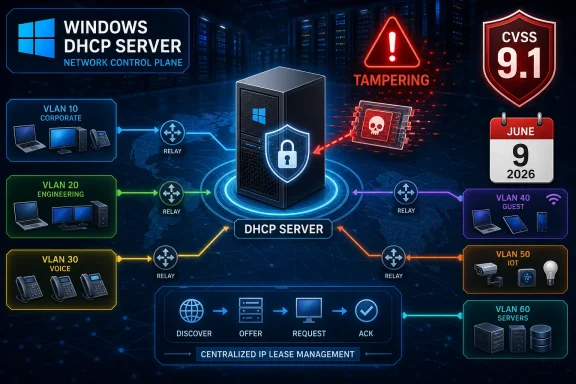
Microsoft’s “Important” Label Undersells the Shape of the Risk
Microsoft classifies CVE-2026-45602 as “Important,” not “Critical,” and that distinction will shape how many organizations triage it. In a large patch queue, “Critical” gets the emergency bridge call, “Important” gets a ticket, and “Moderate” gets buried under printer drivers and change-control theater. That reflex is understandable, but it is not always rational.
The CVSS vector is doing the shouting that the severity label is not. CVE-2026-45602 is scored as network exploitable, low complexity, requiring no privileges and no user interaction, with high confidentiality and integrity impact and no availability impact. That combination is not subtle. It says the vulnerable component is reachable over the network, exploitation is not expected to need exotic preconditions, and successful exploitation could meaningfully alter or expose protected information without necessarily crashing the box.
The “tampering” impact category also deserves more attention than it usually gets. Remote code execution is the headline magnet, denial of service is the help desk nightmare, and privilege escalation is the red-team favorite. Tampering sits in the middle: less cinematic, often more operationally dangerous, because it attacks trust in what systems believe to be true.
DHCP is, by design, a trust-distribution mechanism. It tells machines what address they should use, where their gateway is, which DNS servers to ask, how long to keep a lease, and sometimes what boot or vendor-specific options matter. If a DHCP server can be manipulated, the blast radius is not measured only in the server’s own files or process memory. It is measured in the downstream clients that accept network identity and routing instructions as a fact of life.
That is why this advisory should not be treated as another line item in the June rollup. Microsoft says exploitation is less likely and no exploitation was known at publication. Good. But the vulnerability is confirmed, officially patched, and described in enough technical scoring detail to make clear that exposed or poorly segmented DHCP infrastructure deserves prompt attention.
DHCP Is the Boring Protocol That Decides Where Everyone Goes
DHCP is one of those technologies that disappears when it works. Users do not log into it, executives do not ask for dashboards about it, and most endpoint owners only discover it when their laptop falls back to a self-assigned address and the internet vanishes. In Windows shops, however, DHCP is often deeply entangled with domain infrastructure, branch networking, IP address management, DNS registration, PXE booting, and legacy device fleets that nobody wants to rediscover under pressure.
That quiet centrality is the problem. DHCP is often treated as plumbing, and plumbing rarely gets the same threat modeling attention as identity systems or public-facing web apps. Yet DHCP sits at a privileged network position: it participates in the earliest stage of a host’s network life, before the host can do much else.
A tampering flaw in Windows DHCP Server is therefore more interesting than the word “tampering” makes it sound. Microsoft’s short summary says an unauthorized attacker can perform tampering over a network. Its exploitation note says an authenticated user could send specially crafted network traffic to a server configured for use as a DHCP Server. Those two phrasings are not perfectly satisfying, and security teams should read them conservatively rather than optimistically.
The tension between “unauthorized attacker” in the summary and “authenticated user” in the exploitation text may reflect advisory boilerplate, a subtle requirement, or simply Microsoft’s occasionally compressed vulnerability language. The CVSS vector lists privileges required as none. That is the metric most defenders will plug into risk scoring systems, and it should be treated as a major signal unless Microsoft revises the advisory.
The affected products are broad. Microsoft lists Windows 10, Windows 11, and Windows Server releases including Server 2012, 2012 R2, 2016, 2019, 2022, and 2025, along with Server Core variants where applicable. Client SKUs appear in the affected table too, but the practical exposure concentrates on systems actually configured to run the DHCP Server role or otherwise hosting the vulnerable component in a reachable way.
The Client Listings Are a Trap for Lazy Triage
One of the most common mistakes in Windows vulnerability management is assuming that every affected product row implies equal exposure. CVE-2026-45602 is a good example of why that assumption fails. The advisory lists many Windows client versions, but Microsoft’s own exploitation language centers on a server configured as a DHCP Server.
That distinction matters. A Windows 11 laptop appearing in the affected table is not automatically the same operational risk as a domain-joined Windows Server running production DHCP scopes for a campus network. Patch both, of course, because the supported update path is the cleanest fix. But if an organization has to sequence emergency work, DHCP servers and Server Core installations carrying the role should be treated as first-class assets.
This is where inventory quality becomes the difference between disciplined response and improvised panic. Many environments can tell you how many Windows servers they have. Fewer can immediately tell you which of them are authorized DHCP servers, which are failover partners, which serve isolated VLANs, which are still alive only for legacy lab equipment, and which have firewall exceptions that made sense during a migration four years ago.
The Windows Server rows also reach into the awkward reality of long-lived infrastructure. Server 2012 and 2012 R2 remain in Microsoft’s update universe here through applicable servicing channels, even though many organizations have spent years trying to push them out of production. DHCP is precisely the kind of role that lingers on older servers because it appears stable, has low CPU needs, and only becomes visible when someone touches it.
That makes CVE-2026-45602 a test of asset truth. If the patch team cannot quickly identify authoritative DHCP servers, the issue is larger than this CVE. It means the network’s address assignment layer is being run on institutional memory rather than current control.
The CVSS Vector Says “Patch Soon,” Even Without Exploit Code
Microsoft’s exploitability assessment says exploitation is less likely, exploit code maturity is unproven, and the vulnerability was not publicly disclosed or exploited at the time of original publication. Those are meaningful mitigators. They argue against panic, not against action.
The base score of 9.1 is the counterweight. CVSS base scores describe intrinsic technical severity, while temporal metrics adjust for what is known right now about exploitation and remediation. In this case, the temporal score drops to 7.9 because Microsoft says an official fix exists and exploit maturity is unproven. That is still not a sleepy number.
Security teams should resist the false binary of “being exploited” versus “not important.” Vulnerability management has spent the last several years moving toward exploit-informed prioritization, and rightly so. But exploit-informed does not mean exploit-only. A bug that is network reachable, low complexity, unauthenticated by CVSS, and confirmed by the vendor is exactly the kind of issue that can move quickly if technical details leak, proof-of-concept code appears, or attackers reverse-engineer the patch.
The report confidence metric is also easy to overlook. Microsoft marks it as confirmed. That means this is not a rumor, a disputed researcher claim, or a vague advisory built around an undesirable impact with unknown root cause. The vendor is acknowledging that the vulnerability exists, and the remediation has shipped.
There is a subtle information asymmetry here. Defenders usually get a short advisory, a CVSS vector, an affected products table, and a patch. Attackers get the patch too. For a protocol-facing service like DHCP, diffing the fix can sometimes reveal the shape of the bug faster than enterprise change boards can approve a restart window.
That is not an argument for reckless patching. DHCP is not a service you casually break during business hours in a hospital, factory, school district, or large enterprise campus. It is an argument for treating the update as operationally important, testing it quickly, and scheduling deployment with the same seriousness normally reserved for flashier vulnerability classes.
Tampering Is a Control-Plane Problem, Not Just a Server Problem
The word “tampering” can make a vulnerability feel contained: someone changes something they should not. In DHCP, that framing is too small. DHCP is part of the network control plane for ordinary endpoints, which means tampering can affect how clients interpret their environment.
A DHCP server does not merely hand out an IP address. It can shape routing, DNS resolution, lease duration, and boot behavior. In enterprise networks, it may interact with reservations, split scopes, failover relationships, IP helper configurations, and DNS updates. In operational technology and lab environments, it may be the thin line between orderly device onboarding and a room full of confused controllers.
Microsoft does not disclose enough detail to claim a specific attack outcome beyond tampering, high confidentiality impact, and high integrity impact. That restraint matters. It would be irresponsible to invent a packet-level exploit narrative from the public advisory alone. But defenders do not need that narrative to understand the risk class.
The basic concern is that a trusted service could be made to process crafted network traffic in a way that compromises the integrity of information under its control. Depending on the bug, that could mean corrupting configuration state, manipulating lease data, influencing what the server returns, or exposing sensitive information. The advisory does not say which of those applies, and that uncertainty should keep speculation in check.
Even so, DHCP’s position in the network makes the integrity component especially sensitive. If a web server returns a bad page, users may notice. If DHCP hands clients a bad network truth, the symptoms may look like DNS failure, intermittent routing trouble, authentication weirdness, VPN breakage, or endpoint misconfiguration. In other words, the impact can masquerade as ordinary network drift.
For Windows administrators, that is the operational sting. A tampering flaw in DHCP can create conditions that are hard to diagnose because the compromised layer is the one that helps everything else find its way.
The Patch Table Is Really an Infrastructure Map
The affected update list reads like a cross-section of the modern Windows estate. Windows 11 23H2, 24H2, 25H2, and 26H1 appear alongside Windows 10 21H2, 22H2, and older LTSC-era releases. On the server side, Microsoft lists Server 2012 through Server 2025, including Server Core installation options for several generations.
For current Windows Server releases, the key fixed builds include Server 2025 at 10.0.26100.32995 and Server 2022 at 10.0.20348.5256. Windows Server 2019 moves to 10.0.17763.8880, while Server 2016 moves to 10.0.14393.9234. Older Server 2012 R2 and Server 2012 builds are also listed with their respective monthly rollup channels.
On the client side, Windows 11 24H2 is listed at build 10.0.26100.8655, Windows 11 25H2 at 10.0.26200.8655, Windows 11 23H2 at 10.0.22631.7219, and Windows 10 22H2 at 10.0.19045.7417. Windows 11 26H1 appears with build 10.0.28000.2269. Those build numbers are useful not because every endpoint is a DHCP server, but because they help administrators verify patch compliance across mixed fleets.
The update identifiers vary by product branch. Examples include KB5094125 for Windows Server 2025, KB5094128 for Server 2022, KB5094123 for Server 2019 and Windows 10 1809-family systems, KB5094122 for Server 2016 and Windows 10 1607-family systems, KB5094126 for Windows 11 24H2 and 25H2, KB5093998 for Windows 11 23H2, and KB5094127 for Windows 10 21H2 and 22H2. Older Server 2012-family systems use KB5094041 and KB5094042 monthly rollups.
This is the part of the advisory where enterprise readers should slow down. A single CVE row can map to many servicing channels, and mixed environments often fail not because they ignore a vulnerability outright, but because one branch or one legacy role slips through the cracks. Server Core systems are especially easy to miss if compliance reporting is built around desktop-style assumptions.
The patch table also reinforces a broader Windows reality: Microsoft has standardized the monthly cumulative update model, but operational risk still varies by role. The same KB may be routine on a laptop and sensitive on a DHCP failover partner. Patch management cannot be reduced to “install everywhere immediately” or “wait for the monthly window.” It needs role-aware sequencing.
The Real Exposure Starts at the Network Boundary You Forgot
Because DHCP traffic is normally local-link traffic mediated by relays and IP helper addresses, many administrators may instinctively assume the attack surface is naturally contained. That is partially true and dangerously comforting. DHCP is not typically a public internet service, but “not internet-facing” is not the same as “hard to reach.”
In enterprise networks, DHCP requests from many VLANs are forwarded to centralized servers. That means the reachable population is often wider than the physical segment where the server sits. A compromised endpoint, rogue device, malicious insider, or foothold in a poorly segmented subnet may be able to send traffic toward the DHCP service path, especially in environments where relay controls and access lists are permissive.
This is why exposure management should accompany patching. Administrators should know which UDP paths are allowed to the DHCP service, which relays can forward requests, and whether only expected network devices can talk to the server role. A vulnerability with “network” as the attack vector rewards basic segmentation hygiene.
There is also a difference between authorized DHCP service and accidental DHCP service. Windows Server roles have a way of surviving migrations. Lab servers become temporary infrastructure, temporary infrastructure becomes permanent, and nobody wants to touch it because every lease renewal still works. CVE-2026-45602 is a reminder to look for DHCP servers that should not exist.
That includes branch offices and acquisitions. The most vulnerable DHCP server is often not the one in the well-documented data center cluster; it is the aging regional box under a desk, the forgotten VM tied to a deprecated VLAN, or the Server Core installation that never made it into the new CMDB taxonomy.
Microsoft’s advisory gives no workaround beyond applying the official fix. That makes compensating controls less elegant but still useful. Restrict who can reach DHCP servers at the network layer, verify DHCP relay configurations, confirm that only authorized servers are active, and monitor for anomalous DHCP traffic patterns while the patch rollout proceeds.
Windows Shops Should Treat DHCP Like Tiered Infrastructure
Identity teams have learned to think in tiers. Domain controllers, certificate authorities, privileged access workstations, and identity synchronization services are treated as crown-jewel systems because compromising them changes the rules for everyone else. DHCP rarely gets that treatment, but it probably should sit closer to that category than to generic file-and-print plumbing.
The reason is not that DHCP is equivalent to Active Directory. It is not. The reason is that DHCP can influence the environment in which clients attempt to authenticate, resolve names, reach gateways, and discover services. In a Windows estate, those are not trivial levers.
A practical response starts with role discovery. Query server inventories for the DHCP Server role, check management consoles and PowerShell outputs, compare with network-device relay settings, and reconcile the list against what administrators believe is authoritative. If those lists disagree, fix the inventory problem while fixing the vulnerability.
Next comes patch sequencing. In a failover pair, patch one partner, verify service health, then patch the other. In a split-scope or highly available design, confirm lease availability and failover state before and after maintenance. In branch networks, schedule around local business requirements but avoid using “remote site” as a synonym for “later this quarter.”
Monitoring should not wait for the patch to finish. Watch for unusual DHCP request volumes, malformed traffic indicators where available, unexpected changes to scopes or options, and lease anomalies that do not match normal device churn. Network detection for DHCP is not as mature in many environments as DNS or HTTP monitoring, but even basic visibility can reduce the chance that a tampering attempt is mistaken for routine noise.
Finally, document the rollback plan without turning it into a reason to delay. DHCP rollback is not only an OS patch concern; it includes backup copies of DHCP configuration, exported scopes, failover relationship notes, and clear ownership for network relay changes if troubleshooting requires isolation. The goal is to make the patch boring.
The Advisory’s Ambiguities Are Themselves a Signal
Microsoft’s public vulnerability write-ups have become more structured over time, but they remain terse. CVE-2026-45602 is a case study in how much administrators must infer from fields rather than prose. The summary says there is no CWE assigned. The FAQ-style exploitation note mentions an authenticated user. The CVSS vector says no privileges are required. The impact says tampering. The score says 9.1.
That is not a contradiction that defenders can resolve from the outside. It is a set of signals that should be weighted. The safest interpretation is that Microsoft has confirmed a serious, network-reachable flaw in Windows DHCP Server, that exploitation was not known in the wild at release, and that the vendor has issued updates across supported Windows branches.
The lack of a CWE also matters less than it may appear. CWE assignments are useful for classification and trend analysis, but the absence of one does not weaken the underlying advisory. It merely tells us that Microsoft is not publicly mapping the issue to a specific weakness category. That may reflect disclosure restraint, complexity in the root cause, or ordinary advisory process.
The absence of public exploitation is more useful, but it has a short shelf life. On Patch Tuesday, “not exploited” is a point-in-time statement. By the time slow-moving organizations finish testing, attackers may have had weeks to study changed binaries, build network probes, and search for exposed services. The window between patch release and exploit commoditization is where disciplined operations earns its keep.
This is especially true for server-side protocol vulnerabilities. Client-side bugs often require a lure, a document, a browser path, or some form of user participation. CVE-2026-45602’s scoring says no user interaction. That moves the burden away from awareness training and toward service hardening, segmentation, and timely patching.
The ambiguity should not create paralysis. It should create conservative prioritization.
The June DHCP Fix Belongs in the First Maintenance Wave
For WindowsForum readers running home labs, small business networks, or enterprise server estates, the right answer is proportional urgency. Do not tear down production DHCP in the middle of the day because a CVSS number looks scary. Do not leave a confirmed network-facing DHCP Server tampering flaw for the “when we get around to it” pile either.
The highest priority systems are Windows servers actually configured as DHCP servers, especially those reachable through relays from many subnets, those serving sensitive networks, and those running older Windows Server versions. Next are DHCP failover partners, branch DHCP servers, and Server Core installations that may not show up cleanly in desktop-oriented patch dashboards. Client systems should receive the relevant cumulative updates through normal managed channels, but they are not the center of the operational risk unless they are performing server-like duties.
The home and enthusiast angle is narrower but still real. Many Windows users rely on routers or dedicated appliances for DHCP, not Windows Server. But lab builders, certification students, and small-office administrators often run Windows DHCP because it integrates cleanly with Active Directory and DNS. If that describes your setup, patch the server role and verify the fixed build rather than assuming “server vulnerability” means “not me.”
The bigger lesson is that Windows infrastructure risk is not always where the branding is. Attackers do not care whether a service has a modern admin portal or a product team with a keynote slot. They care whether it is trusted, reachable, and under-monitored. DHCP qualifies.
The Lease-Renewal Checklist for a Bug Microsoft Says Is Confirmed
The practical response to CVE-2026-45602 is shorter than the advisory table but broader than simply clicking “install.” Treat the fix as a server-role priority, then use the moment to improve DHCP visibility before the next protocol-layer bug arrives.
- Administrators should identify every Windows system running the DHCP Server role before relying on general Windows update compliance numbers.
- DHCP servers on Windows Server 2025, 2022, 2019, 2016, 2012 R2, and 2012 should be patched according to their corresponding June 9, 2026 servicing channel and verified by build number.
- Environments using DHCP failover or split-scope designs should patch in a staged sequence that preserves lease availability and confirms partner health after each update.
- Network teams should verify that only expected relays, subnets, and management paths can reach Windows DHCP servers.
- Security teams should monitor for abnormal DHCP traffic, unexpected scope or option changes, and lease behavior that does not match normal client activity.
- Client Windows updates still matter for fleet hygiene, but the exposure priority should focus on systems configured to provide DHCP service.
CVE-2026-45602 is the kind of Windows vulnerability that rewards mature operations rather than dramatic reaction. Microsoft has shipped the fix, says exploitation is less likely, and reports no known public exploitation at release; that buys administrators time to patch carefully, not permission to ignore a confirmed network-reachable flaw in a service that quietly tells every machine where the network begins. The next serious Windows infrastructure bug may arrive in a more fashionable component, but this one is a useful reminder that the boring protocols still carry the keys to the building.