

Microsoft disclosed CVE-2026-45604 on June 9, 2026, as an Important-rated Windows Managed Installer information disclosure vulnerability in the Windows Application Identity subsystem, shipping it inside a very large June Patch Tuesday release that addressed roughly 200 Microsoft flaws. The bug is not the loudest item in the month’s security pile, and that is precisely why it deserves attention. Managed Installer sits in the machinery enterprises use to decide which software deserves trust, and an information disclosure in that machinery is rarely just about one leaked value. It is about how much an attacker can learn from a system that was supposed to make application control simpler, safer, and less brittle.
June 2026 Patch Tuesday is not short on headline bait. Critical Office remote-code-execution bugs, Remote Desktop client issues, DHCP and Kerberos problems, Hyper-V flaws, and Secure Boot bypasses all compete for the first hour of a security team’s attention. Against that backdrop, CVE-2026-45604 looks like a small entry: Windows Application Identity, Managed Installer, information disclosure, Important.
That classification matters, but it can also mislead. “Information disclosure” often reads to non-specialists like a privacy problem rather than an attack-chain problem. In Windows hardening, leaked information can be a map: a policy decision, a trust marker, a memory address, a path, a tag, a relationship between installer and child process, or another clue that helps an attacker move from guesswork to reliable exploitation.
Managed Installer is not a consumer-facing Windows feature in the way Start menu ads or Copilot toggles are. It is part of the administrative scaffolding behind App Control for Business, formerly known to many administrators as Windows Defender Application Control. That means its most relevant audience is not the average home user wondering whether to click “Check for updates,” but the fleet administrator trying to keep unauthorized code from running across hundreds or thousands of machines.
Microsoft’s own public framing of the exploitability-confidence metric is a useful lens here. The company describes the metric as a measure of confidence in the vulnerability’s existence and in the credibility of known technical details. That is bureaucratic language, but the implication is blunt: defenders should care not only whether a bug exists, but how much the public now knows about how it works.
Microsoft’s answer is to let trusted deployment systems confer trust. When Intune or Configuration Manager installs an application under a properly configured Managed Installer policy, Windows can tag files written by that trusted installer. App Control policies can then treat those tagged files as approved without requiring administrators to pre-author every hash or publisher rule.
That is a sensible design tradeoff. It lets organizations keep application control from becoming a full-time archaeology project. It also shifts part of the security boundary from “what is this file?” to “how did this file arrive here?” In other words, provenance becomes policy.
That provenance model is powerful, but it is also delicate. If attackers can learn too much about how Managed Installer tagging is represented, how AppID decisions are made, or where enforcement boundaries sit, they may not immediately gain code execution. They may, however, gain the kind of environmental knowledge that makes a later bypass, privilege escalation, or persistence attempt easier to engineer.
That is a mistake in hardened Windows environments. Modern exploit chains are rarely a single bug fired from a cannon. They are assembled from smaller advantages: a leak that defeats address randomization, a local flaw that reveals policy state, a bypass that makes a malicious payload look less suspicious, and a final execution primitive that would have been unreliable without the earlier reconnaissance.
CVE-2026-45604’s public title does not say that it breaks Managed Installer trust, bypasses App Control, or allows arbitrary code to run. Responsible coverage should not pretend otherwise. But the component name tells administrators where to look: Windows Application Identity, the same family of machinery involved in identifying applications, applying policy, and supporting trust decisions used by AppLocker and App Control scenarios.
That makes this a bug of interest for enterprises that have gone beyond baseline antivirus and into application control. The more you depend on Windows to distinguish trusted deployment from untrusted execution, the more you should care when Microsoft patches an information leak in that trust pipeline.
A bug known only by a vendor and a reporting researcher presents one kind of risk. A bug with a vague advisory but no technical detail presents another. A bug with public root-cause analysis, proof-of-concept code, or confirmed exploitation is more urgent because attackers no longer need to rediscover the path themselves.
That is why exploitability confidence is not trivia. It is a proxy for how much attacker research has already been done for them. If a vulnerability is confirmed by the vendor, defenders can stop debating whether it is real. If technical details remain thin, defenders still have to reason from affected component, exposure, privilege requirements, and business impact.
For CVE-2026-45604, the public signal is currently more about existence and component than about a published attack recipe. That should keep the response measured. It should not keep it slow.
Managed Installer is the convenience valve in that model. Without it, organizations can drown in allow-list maintenance. With it, they can say that software deployed through their management plane inherits trust. That is not a compromise so much as an admission that manageability is part of security.
But every convenience valve is also a place to inspect carefully. The trust tag has to be created correctly. Child processes have to be tracked correctly. AppLocker policy interactions have to be understood. WDAC policies have to consume the trust signal correctly. Logging has to be rich enough to diagnose failure without exposing unnecessary internals.
Microsoft’s own documentation has long warned administrators that Managed Installer is not a one-checkbox cure. It depends on AppLocker policy plumbing, App Control policy assignment, and careful deployment sequencing. Apps installed before Managed Installer is enabled are not retroactively tagged, and policy merges can have unintended consequences if old AppLocker configurations are messy. Those are operational warnings, but they also show how many moving parts sit beneath the friendly Intune UI.
The narrower audience does not make the bug unimportant. It makes it more specialized. A flaw in a consumer shell component may touch more endpoints in an obvious way; a flaw in Managed Installer may touch fewer endpoints but sit closer to the policy assumptions administrators use to secure high-value fleets.
This is where patch triage needs context. If your organization does not use Managed Installer, the component may still be present, but the business relevance is lower. If you do use it to support application allow-listing, the update should sit closer to the front of your validation queue, especially on pilot rings representing the machines where App Control enforcement is active rather than merely audited.
The practical question is not “Is this the worst bug of June?” It almost certainly is not. The better question is “Does this bug affect a control we rely on to make other attacks harder?” For some WindowsForum readers, the answer will be yes.
An organization with no Hyper-V footprint can treat Hyper-V remote-code-execution bugs differently from one running dense virtualization infrastructure. A shop that lives inside Remote Desktop and published apps will read the Remote Desktop client list with particular dread. A company that has spent a year rolling out App Control should read CVE-2026-45604 differently from one still operating in the default-allow world.
That is the uncomfortable truth of mature patch management: the “most important” vulnerability is not always the one with the scariest generic label. It is the one that intersects with your architecture, your compensating controls, and your attacker model. Managed Installer is a control-plane feature; bugs in control-plane features deserve a different kind of attention.
For administrators, the immediate work is conventional but not trivial. Deploy the June Windows security updates through the normal rings. Watch for AppLocker and App Control event noise after rollout. Confirm that Managed Installer-tagged deployments still behave as expected. Re-check audit-mode data before shifting enforcement policies. In highly controlled environments, test both installation and execution paths, because the feature’s value sits precisely at that boundary.
There are good reasons for withholding detail at release. Microsoft does not want to hand exploit developers a guided tour before customers have patched. But the gap between safe disclosure and useful defensive guidance is still too wide, especially for enterprise features that require configuration-specific risk assessment.
Administrators do not necessarily need exploit code. They need to know whether a vulnerability is local or remote, authenticated or unauthenticated, tied to a configured feature or a default service, relevant to audit mode or enforcement mode, and whether mitigations exist short of full patch deployment. When that information is sparse, teams fall back on generic severity, and generic severity is a blunt instrument.
This is not a Microsoft-only problem. The vulnerability ecosystem is full of titles that flatten nuance and scores that imply precision. But Windows is the platform where millions of enterprise machines live, and Microsoft has the telemetry, documentation, and customer channels to do better. CVE-2026-45604 is a small example of a large pattern: defenders are asked to move quickly while still guessing too much.
That shift is overdue. User training cannot carry the burden of modern endpoint defense. Email filtering cannot catch every malicious attachment. Reputation systems cannot make every local execution decision perfectly. Application control offers a harder boundary: code that is not trusted does not run.
But harder boundaries attract pressure. Attackers study the seams: installers, updaters, policy merges, signed-but-abusable binaries, script interpreters, management agents, and local services that translate policy into runtime decisions. Managed Installer belongs squarely in that seam space, because it bridges administrative intent and file-system reality.
That does not mean CVE-2026-45604 is a known bypass of App Control. It means defenders should understand why attackers would care about information leakage in this area. In a world where enterprises increasingly depend on policy-defined trust, knowing how trust is assigned can be valuable even before it becomes directly exploitable.
Control-plane bugs deserve disciplined testing. A rushed patch that breaks application deployment can trigger business pain; a delayed patch in a trust component can leave a quiet advantage for attackers. Neither extreme is attractive, which is why ring-based deployment exists.
Start with representative devices. Include machines with App Control in audit mode, machines with enforcement enabled, devices using Intune Management Extension as a Managed Installer, and any co-managed devices where Configuration Manager and Intune split responsibilities. The point is to test the policy combinations you actually run, not an idealized lab image.
After installation, look at AppLocker and App Control logs for changed behavior. Confirm newly deployed Win32 apps receive expected trust treatment. Confirm previously installed apps behave according to policy rather than accidental tag assumptions. If your security team hunts across Microsoft Defender for Endpoint telemetry, use this moment to review whether your queries distinguish blocked execution, audited execution, and Managed Installer trust events clearly enough.
Managed Installer can make allow-listing manageable, but it can also hide policy drift. If every app deployed through a management channel becomes easier to trust, then the security of that channel matters enormously. Who can package apps? Who can assign deployments? Who can alter detection rules? Who can deploy scripts? Which groups receive Managed Installer policy? Which legacy AppLocker rules still merge on endpoints?
Those questions are not theoretical. Application control is only as strong as the administrative process around it. If an attacker compromises a software deployment workflow, “trusted installer” can become a liability. If a vulnerability leaks information about that workflow, it may help them choose a better path.
The right response is not to abandon Managed Installer. The right response is to treat it like a privileged security mechanism. Limit who can manage it. Monitor it. Test it. Patch it. Assume that its convenience comes with responsibility.
For WindowsForum’s audience, the lesson is that modern Windows security is increasingly policy-mediated. The old question was whether a machine had antivirus and current patches. The newer question is whether identity, device management, application control, reputation, script enforcement, and telemetry all agree about what should be allowed to run. A vulnerability in one of those agreement layers deserves attention because the layer itself is becoming more important.
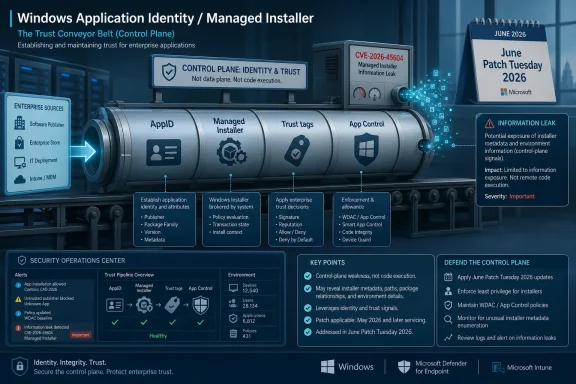
That is also why Microsoft’s terminology matters. “Managed Installer” sounds like deployment plumbing. In reality, it is a trust conveyor belt. The belt may carry approved business apps, but defenders need confidence that it is not leaking information useful to anyone trying to place something else on it.
 Microsoft’s Quiet Bug Lands in a Noisy Patch Tuesday
June 2026 Patch Tuesday is not short on headline bait. Critical Office remote-code-execution bugs, Remote Desktop client issues, DHCP and Kerberos problems, Hyper-V flaws, and Secure Boot bypasses all compete for the first hour of a security team’s attention. Against that backdrop, CVE-2026-45604 looks like a small entry: Windows Application Identity, Managed Installer, information disclosure, Important.That classification matters, but it can also mislead. “Information disclosure” often reads to non-specialists like a privacy problem rather than an attack-chain problem. In Windows hardening, leaked information can be a map: a policy decision, a trust marker, a memory address, a path, a tag, a relationship between installer and child process, or another clue that helps an attacker move from guesswork to reliable exploitation.
Managed Installer is not a consumer-facing Windows feature in the way Start menu ads or Copilot toggles are. It is part of the administrative scaffolding behind App Control for Business, formerly known to many administrators as Windows Defender Application Control. That means its most relevant audience is not the average home user wondering whether to click “Check for updates,” but the fleet administrator trying to keep unauthorized code from running across hundreds or thousands of machines.
Microsoft’s own public framing of the exploitability-confidence metric is a useful lens here. The company describes the metric as a measure of confidence in the vulnerability’s existence and in the credibility of known technical details. That is bureaucratic language, but the implication is blunt: defenders should care not only whether a bug exists, but how much the public now knows about how it works.
Managed Installer Is a Trust Shortcut, Not a Magic Wand
Managed Installer exists because application control is hard. A strict allow-listing program sounds elegant in a policy deck: only approved software runs, unknown binaries are blocked, malware loses the easiest path to execution. In practice, Windows estates are full of line-of-business apps, updaters, plugins, scripts, self-extracting packages, vendor tools, and legacy installers that make static allow lists a constant maintenance chore.Microsoft’s answer is to let trusted deployment systems confer trust. When Intune or Configuration Manager installs an application under a properly configured Managed Installer policy, Windows can tag files written by that trusted installer. App Control policies can then treat those tagged files as approved without requiring administrators to pre-author every hash or publisher rule.
That is a sensible design tradeoff. It lets organizations keep application control from becoming a full-time archaeology project. It also shifts part of the security boundary from “what is this file?” to “how did this file arrive here?” In other words, provenance becomes policy.
That provenance model is powerful, but it is also delicate. If attackers can learn too much about how Managed Installer tagging is represented, how AppID decisions are made, or where enforcement boundaries sit, they may not immediately gain code execution. They may, however, gain the kind of environmental knowledge that makes a later bypass, privilege escalation, or persistence attempt easier to engineer.
Information Disclosure Is the Underestimated Middle of the Kill Chain
The industry still tends to rank vulnerabilities by cinematic value. Remote code execution gets the red banner. Elevation of privilege gets the serious admin thread. Denial of service gets weighed against availability requirements. Information disclosure, especially when rated Important rather than Critical, often becomes the patch-management equivalent of background noise.That is a mistake in hardened Windows environments. Modern exploit chains are rarely a single bug fired from a cannon. They are assembled from smaller advantages: a leak that defeats address randomization, a local flaw that reveals policy state, a bypass that makes a malicious payload look less suspicious, and a final execution primitive that would have been unreliable without the earlier reconnaissance.
CVE-2026-45604’s public title does not say that it breaks Managed Installer trust, bypasses App Control, or allows arbitrary code to run. Responsible coverage should not pretend otherwise. But the component name tells administrators where to look: Windows Application Identity, the same family of machinery involved in identifying applications, applying policy, and supporting trust decisions used by AppLocker and App Control scenarios.
That makes this a bug of interest for enterprises that have gone beyond baseline antivirus and into application control. The more you depend on Windows to distinguish trusted deployment from untrusted execution, the more you should care when Microsoft patches an information leak in that trust pipeline.
The Confidence Metric Is a Warning About Attacker Knowledge
The user-supplied MSRC language about confidence sounds abstract because it is part of the Common Vulnerability Scoring System’s temporal vocabulary. It tries to capture a reality every incident responder already understands: a vulnerability’s danger changes as knowledge spreads.A bug known only by a vendor and a reporting researcher presents one kind of risk. A bug with a vague advisory but no technical detail presents another. A bug with public root-cause analysis, proof-of-concept code, or confirmed exploitation is more urgent because attackers no longer need to rediscover the path themselves.
That is why exploitability confidence is not trivia. It is a proxy for how much attacker research has already been done for them. If a vulnerability is confirmed by the vendor, defenders can stop debating whether it is real. If technical details remain thin, defenders still have to reason from affected component, exposure, privilege requirements, and business impact.
For CVE-2026-45604, the public signal is currently more about existence and component than about a published attack recipe. That should keep the response measured. It should not keep it slow.
Application Control Raises the Stakes of Small Windows Bugs
App Control for Business is one of Microsoft’s most important enterprise hardening stories because it aims at a brutally practical problem: users and attackers can introduce code faster than administrators can review it. If Windows can enforce a rule that only trusted, signed, reputable, or properly deployed applications run, then many common malware paths get narrower.Managed Installer is the convenience valve in that model. Without it, organizations can drown in allow-list maintenance. With it, they can say that software deployed through their management plane inherits trust. That is not a compromise so much as an admission that manageability is part of security.
But every convenience valve is also a place to inspect carefully. The trust tag has to be created correctly. Child processes have to be tracked correctly. AppLocker policy interactions have to be understood. WDAC policies have to consume the trust signal correctly. Logging has to be rich enough to diagnose failure without exposing unnecessary internals.
Microsoft’s own documentation has long warned administrators that Managed Installer is not a one-checkbox cure. It depends on AppLocker policy plumbing, App Control policy assignment, and careful deployment sequencing. Apps installed before Managed Installer is enabled are not retroactively tagged, and policy merges can have unintended consequences if old AppLocker configurations are messy. Those are operational warnings, but they also show how many moving parts sit beneath the friendly Intune UI.
The Enterprise Blast Radius Is Narrower Than Windows, but Deeper Than It Looks
Home Windows users should still install the June cumulative updates, but CVE-2026-45604 is not primarily a kitchen-table panic item. The affected feature matters most in managed environments that use, test, or plan to use App Control with Managed Installer trust. That includes enterprises leaning into Intune, co-managed Configuration Manager estates, regulated environments, and security teams trying to reduce executable malware risk.The narrower audience does not make the bug unimportant. It makes it more specialized. A flaw in a consumer shell component may touch more endpoints in an obvious way; a flaw in Managed Installer may touch fewer endpoints but sit closer to the policy assumptions administrators use to secure high-value fleets.
This is where patch triage needs context. If your organization does not use Managed Installer, the component may still be present, but the business relevance is lower. If you do use it to support application allow-listing, the update should sit closer to the front of your validation queue, especially on pilot rings representing the machines where App Control enforcement is active rather than merely audited.
The practical question is not “Is this the worst bug of June?” It almost certainly is not. The better question is “Does this bug affect a control we rely on to make other attacks harder?” For some WindowsForum readers, the answer will be yes.
Patch Management Needs More Than Severity Sorting
The June release demonstrates once again why CVSS-inspired severity sorting is necessary but insufficient. Security teams need a way to identify Critical remote attacks quickly, but a flat queue built only around severity can bury component-specific risks that matter deeply to a given environment.An organization with no Hyper-V footprint can treat Hyper-V remote-code-execution bugs differently from one running dense virtualization infrastructure. A shop that lives inside Remote Desktop and published apps will read the Remote Desktop client list with particular dread. A company that has spent a year rolling out App Control should read CVE-2026-45604 differently from one still operating in the default-allow world.
That is the uncomfortable truth of mature patch management: the “most important” vulnerability is not always the one with the scariest generic label. It is the one that intersects with your architecture, your compensating controls, and your attacker model. Managed Installer is a control-plane feature; bugs in control-plane features deserve a different kind of attention.
For administrators, the immediate work is conventional but not trivial. Deploy the June Windows security updates through the normal rings. Watch for AppLocker and App Control event noise after rollout. Confirm that Managed Installer-tagged deployments still behave as expected. Re-check audit-mode data before shifting enforcement policies. In highly controlled environments, test both installation and execution paths, because the feature’s value sits precisely at that boundary.
Microsoft’s Security UX Still Hides Too Much in Plain Sight
One reason bugs like CVE-2026-45604 are easy to under-discuss is that Microsoft’s security naming remains unfriendly to human prioritization. “Windows Managed Installer Information Disclosure Vulnerability” is accurate enough, but it does not tell an administrator whether the leak involves policy state, memory, metadata, tags, credentials, paths, or another kind of sensitive information. The advisory title names the room, not the broken pipe.There are good reasons for withholding detail at release. Microsoft does not want to hand exploit developers a guided tour before customers have patched. But the gap between safe disclosure and useful defensive guidance is still too wide, especially for enterprise features that require configuration-specific risk assessment.
Administrators do not necessarily need exploit code. They need to know whether a vulnerability is local or remote, authenticated or unauthenticated, tied to a configured feature or a default service, relevant to audit mode or enforcement mode, and whether mitigations exist short of full patch deployment. When that information is sparse, teams fall back on generic severity, and generic severity is a blunt instrument.
This is not a Microsoft-only problem. The vulnerability ecosystem is full of titles that flatten nuance and scores that imply precision. But Windows is the platform where millions of enterprise machines live, and Microsoft has the telemetry, documentation, and customer channels to do better. CVE-2026-45604 is a small example of a large pattern: defenders are asked to move quickly while still guessing too much.
The AppID Subsystem Is Old Plumbing With New Importance
Windows Application Identity has been around in one form or another for years, but its strategic importance has grown as Microsoft pushes organizations toward stronger application control, least privilege, and cloud-managed endpoint security. AppLocker, WDAC, Intune policy, and App Control for Business all sit inside a broader effort to make Windows less dependent on user judgment and more dependent on enforceable trust.That shift is overdue. User training cannot carry the burden of modern endpoint defense. Email filtering cannot catch every malicious attachment. Reputation systems cannot make every local execution decision perfectly. Application control offers a harder boundary: code that is not trusted does not run.
But harder boundaries attract pressure. Attackers study the seams: installers, updaters, policy merges, signed-but-abusable binaries, script interpreters, management agents, and local services that translate policy into runtime decisions. Managed Installer belongs squarely in that seam space, because it bridges administrative intent and file-system reality.
That does not mean CVE-2026-45604 is a known bypass of App Control. It means defenders should understand why attackers would care about information leakage in this area. In a world where enterprises increasingly depend on policy-defined trust, knowing how trust is assigned can be valuable even before it becomes directly exploitable.
Windows Admins Should Treat This as a Control-Plane Patch
The most useful mental model for CVE-2026-45604 is not “data leak” but control-plane exposure. The vulnerability is in the machinery that helps Windows identify and trust applications installed through approved channels. That makes it part of the administrative substrate rather than just another endpoint component.Control-plane bugs deserve disciplined testing. A rushed patch that breaks application deployment can trigger business pain; a delayed patch in a trust component can leave a quiet advantage for attackers. Neither extreme is attractive, which is why ring-based deployment exists.
Start with representative devices. Include machines with App Control in audit mode, machines with enforcement enabled, devices using Intune Management Extension as a Managed Installer, and any co-managed devices where Configuration Manager and Intune split responsibilities. The point is to test the policy combinations you actually run, not an idealized lab image.
After installation, look at AppLocker and App Control logs for changed behavior. Confirm newly deployed Win32 apps receive expected trust treatment. Confirm previously installed apps behave according to policy rather than accidental tag assumptions. If your security team hunts across Microsoft Defender for Endpoint telemetry, use this moment to review whether your queries distinguish blocked execution, audited execution, and Managed Installer trust events clearly enough.
The June Patch Is Also a Reminder to Audit Your Assumptions
CVE-2026-45604 arrives at an awkward but useful time for organizations modernizing Windows endpoint control. Many teams have enabled bits of App Control, piloted policies in audit mode, or toggled Managed Installer because Microsoft made it more accessible through Intune. Fewer have completed the less glamorous work of documenting what is trusted, why it is trusted, and how that trust is verified over time.Managed Installer can make allow-listing manageable, but it can also hide policy drift. If every app deployed through a management channel becomes easier to trust, then the security of that channel matters enormously. Who can package apps? Who can assign deployments? Who can alter detection rules? Who can deploy scripts? Which groups receive Managed Installer policy? Which legacy AppLocker rules still merge on endpoints?
Those questions are not theoretical. Application control is only as strong as the administrative process around it. If an attacker compromises a software deployment workflow, “trusted installer” can become a liability. If a vulnerability leaks information about that workflow, it may help them choose a better path.
The right response is not to abandon Managed Installer. The right response is to treat it like a privileged security mechanism. Limit who can manage it. Monitor it. Test it. Patch it. Assume that its convenience comes with responsibility.
The Signal Buried in Microsoft’s June Noise
CVE-2026-45604 will probably not be the vulnerability most remembered from June 2026. It is not the flashiest item in the update list, and unless Microsoft or researchers later publish more detail, it may remain a quiet line in a very long Patch Tuesday table. Still, quiet lines are where many enterprise lessons live.For WindowsForum’s audience, the lesson is that modern Windows security is increasingly policy-mediated. The old question was whether a machine had antivirus and current patches. The newer question is whether identity, device management, application control, reputation, script enforcement, and telemetry all agree about what should be allowed to run. A vulnerability in one of those agreement layers deserves attention because the layer itself is becoming more important.
That is also why Microsoft’s terminology matters. “Managed Installer” sounds like deployment plumbing. In reality, it is a trust conveyor belt. The belt may carry approved business apps, but defenders need confidence that it is not leaking information useful to anyone trying to place something else on it.
The June Managed Installer Patch Belongs in the First Serious Ring
Treat CVE-2026-45604 as a prompt to validate the way your Windows estate assigns software trust, not as a reason to panic about every endpoint. The most concrete actions are straightforward, but they should be tied to your actual App Control deployment rather than handled as a generic monthly reboot chore.- Organizations using App Control for Business with Managed Installer should prioritize June Windows security updates for pilot groups that represent those policy configurations.
- Administrators should confirm after patching that Intune-deployed or Configuration Manager-deployed applications still receive the expected trust behavior.
- Security teams should review AppLocker and App Control event collection, because Managed Installer deployments can increase log volume and expose gaps in existing monitoring.
- Environments still running App Control in audit mode should use the patch cycle to compare pre-update and post-update execution events before moving policies into enforcement.
- Teams that do not use Managed Installer should still deploy the cumulative update, but they can reasonably prioritize this CVE below remotely reachable Critical flaws that match their exposure.
- Anyone with delegated Intune or application-packaging workflows should re-check role assignments, because Managed Installer trust is only as safe as the people and processes allowed to feed it.
References
- Primary source: MSRC
Published: 2026-06-09T07:00:00-07:00
Security Update Guide - Microsoft Security Response Center
 msrc.microsoft.com
- Official source: microsoft.com
MSRC - Microsoft Security Response Center
The Microsoft Security Response Center is part of the defender community and on the front line of security response evolution. For over twenty years, we have been engaged with security researchers working to protect customers and the broader ecosystem.www.microsoft.com
- Related coverage: rapid7.com
Rapid7 Vulnerability Database
Rapid7's VulnDB is curated repository of vetted computer software exploits and exploitable vulnerabilities.www.rapid7.com - Related coverage: sra.io
- Related coverage: api.urlscan.io

api.msrc.microsoft.com - urlscan.io
urlscan.io - Website scanner for suspicious and malicious URLs
api.urlscan.io
- Related coverage: deepwiki.com
MSRC API Reference | microsoft/MSRC-Microsoft-Security-Updates-API | DeepWiki
This document provides technical reference information for the Microsoft Security Response Center (MSRC) CVRF API that underlies the MsrcSecurityUpdates PowerShell module. This covers the REST API enddeepwiki.com
- Related coverage: datacomm.com
- Related coverage: stackoverflow.com
security - Microsoft CVRF API - Stack Overflow
It has come to my attention that, starting from February 9, 2021,
Microsoft Security Response Center has removed registrations requirements to their CVRF API.
That could be a nice way tostackoverflow.com
- Related coverage: howtofix.guide
Microsoft Defender CVE-2026-41091 and CVE-2026-45498 Exploited
Microsoft Defender CVE-2026-41091 and CVE-2026-45498 are exploited. Verify Engine 1.1.26040.8, Platform 4.18.26040.7, and update endpoints.howtofix.guide - Related coverage: threats.kaspersky.com
Kaspersky Threats — KLA90966
threats.kaspersky.com
- Official source: learn.microsoft.com
Microsoft January 2026 Security Updates (FYI) - Microsoft Q&A
January 2026 Security Updates This release consists of the following 112 Microsoft CVEs: Tag CVE Base Score CVSS Vector Exploitability FAQs? Workarounds? Mitigations? Windows Deployment Services CVE-2026-0386 SQL Server CVE-2026-20803 Windows Hello…learn.microsoft.com - Official source: github.com
"cvrf" data of JSON fomat is not found on "https://api.msrc.microsoft.com/cvrf/v3.0/cvrf/yyyy-mmm". · Issue #143 · microsoft/MSRC-Microsoft-Security-Updates-API · GitHub
I have been retrieving monthly JSON format "cvrf" data via the API below by specifying "application/json" for the "Content-Type" header. However, from this month, I cannot seem to find the JSON format data, and only XML format seems to b... github.com
- Related coverage: cez.gov.pl
- Related coverage: bleepingcomputer.com
Microsoft June 2026 Patch Tuesday fixes 6 zero-days, 200 flaws
Today is Microsoft's June 2026 Patch Tuesday, with security updates for 200 flaws, including five publicly disclosed zero-day vulnerabilities and one actively exploited in attacks.www.bleepingcomputer.com - Related coverage: techradar.com
Microsoft confirms two major Defender security issues — so update now or face possible attack | TechRadar
CISA confirms two bugs being actively exploited in the wildwww.techradar.com - Related coverage: heise.de
Patch Tuesday Microsoft: Critical DNS client vulnerability threatens Windows | heise online
Microsoft has released important security updates for Azure, Edge, Office, and Windows, among others. Many vulnerabilities were discovered with AI agents. www.heise.de
- Related coverage: blog.qualys.com
Microsoft and Adobe Patch Tuesday, May 2026 Security Update Review | Qualys
May 2026’s Patch Tuesday arrives with Microsoft addressing a fresh set of vulnerabilities across its ecosystem, reinforcing the ongoing need for timely patching…blog.qualys.com
