

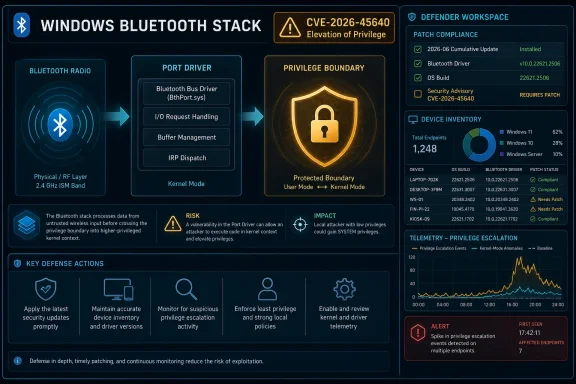
Microsoft’s Sparse Advisory Still Says More Than It Appears
The phrase “Windows Bluetooth Port Driver Elevation of Privilege Vulnerability” looks bland enough to disappear inside a Patch Tuesday spreadsheet. That is part of the problem. Modern Windows security advisories increasingly compress meaningful operational risk into tightly controlled metadata: affected products, severity, exploitability assessment, CVSS vector, remediation state, and a few vendor-selected sentences.
For administrators, that format is both useful and frustrating. It is useful because it makes vulnerabilities machine-readable and patch workflows automatable. It is frustrating because the difference between “a theoretical local bug” and “a practical post-exploitation building block” often lives in the details Microsoft does not publish immediately.
The user-supplied MSRC language is especially revealing because it describes the confidence dimension of vulnerability scoring. This is not the same thing as severity. A bug can be severe but poorly understood in public, or modest in impact but technically well documented. Report confidence tries to answer a different question: how certain are we that this flaw exists, and how much validated technical detail is available to attackers and defenders?
That distinction matters for CVE-2026-45640 because Bluetooth sits at a messy intersection of consumer convenience, kernel-adjacent driver complexity, radio proximity, enterprise endpoint policy, and post-compromise privilege escalation. A Windows Bluetooth driver bug is rarely just about headsets.
Elevation of Privilege Is the Quiet Middle of the Attack Chain
Remote code execution gets the headlines because it suggests instant compromise. Elevation of privilege, by contrast, tends to sound like a second-order concern. That is a dangerous simplification.
Most real intrusions are chains. A phishing document, malicious browser session, stolen token, sideloaded application, abused remote management tool, or low-privilege foothold gets the attacker onto a system. From there, local privilege escalation is what turns access into control. It is the step that lets an attacker tamper with security tools, harvest secrets, install persistent services, dump credentials, move laterally, or survive reboots.
That is why Windows driver vulnerabilities remain so attractive. Drivers exist close to the operating system’s most trusted layers, and they often expose interfaces to user-mode callers that must accept input from less trusted code. When those interfaces mishandle memory, synchronization, object lifetimes, or access checks, the result can be a path from ordinary user context toward SYSTEM-level capability.
Bluetooth adds another wrinkle. The word “Bluetooth” makes many people think of pairing dialogs and earbuds, but Windows’ Bluetooth support is an operating-system subsystem with drivers, protocol layers, services, device enumeration paths, and interaction with power management, Plug and Play, and hardware abstraction. Even if exploitation requires local access or prior authorization, the driver’s position in the stack can make the payoff significant.
The right mental model is not “Can someone hack me from across the room with a speaker?” The better model is “If someone already has a beachhead on this endpoint, does this bug give them a stronger grip?”
The Confidence Metric Is a Signal About the Public Attack Surface
The MSRC text supplied with the vulnerability describes a metric that measures confidence in both the existence of the vulnerability and the credibility of public technical details. That language maps to a critical reality in vulnerability management: disclosure is not binary.
Some vulnerabilities arrive with vendor confirmation, a patch, and a terse description. Others arrive with proof-of-concept code, exploit write-ups, crash traces, reverse-engineering notes, conference slides, or public pull requests. Still others are known only through a CVE entry and a vendor’s acknowledgement. Each state creates a different risk environment.
When report confidence is high, defenders should assume the issue is real and that enough facts exist to justify action. But high confidence does not automatically mean public exploit code exists. It means the vulnerability has moved beyond rumor. For patch prioritization, that is important because defenders are not merely betting on whether a bug is real; they are betting on how quickly adversaries can understand and operationalize it.
The metric also cuts both ways. A sparse advisory may lower the amount of information available to casual attackers, but it also lowers the amount of information available to defenders trying to build compensating controls. If Microsoft does not disclose the exact vulnerable code path, administrators cannot easily write precise detections or decide whether disabling a narrow feature is enough. They are left with broader mitigations: patch, disable Bluetooth where unnecessary, restrict local access, watch for suspicious privilege escalation behavior, and rely on endpoint telemetry.
That is the trade-off at the heart of modern coordinated disclosure. Less detail can slow copycat exploitation. Less detail can also make defenders more dependent on vendor patching cadence.
Bluetooth Has Become Infrastructure, Not a Peripheral Feature
A decade ago, disabling Bluetooth on corporate desktops felt like a minor hardening step. Today, Bluetooth is woven into authentication workflows, conferencing gear, mobile-device integration, accessibility devices, asset tracking, proximity experiences, wireless keyboards, and hybrid-work habits. That makes blanket disablement less attractive, especially on laptops.
Windows reflects that shift. Bluetooth is no longer an optional novelty bolted onto the edge of the operating system. It is part of the expected endpoint experience, and that means its attack surface has become normalized. Normalized attack surface is the hardest kind to govern because it hides behind user expectations.
The name “Port Driver” suggests a low-level component, and low-level components are precisely where ordinary administrative controls become blunt. Group Policy may manage device installation and radio state. MDM may enforce Bluetooth restrictions. Endpoint security tools may observe process behavior. But a vulnerability in a driver layer cannot be fully neutralized by asking users to be careful.
This is where consumer and enterprise Windows diverge. A home user wants the headset to connect. An administrator wants predictable device state, auditable configuration, and a patch compliance report. Microsoft has to serve both audiences, and security advisories often expose the tension: the same bug may be a routine monthly patch for one user and a change-control event for another.
For high-security environments, Bluetooth remains a policy decision, not merely a feature toggle. If there is no business need for wireless peripherals, leaving the radio enabled expands the system’s complexity for little benefit. If there is a business need, the focus shifts to inventory, update discipline, and configuration enforcement.
The Real Risk Is Local Access Plus Kernel-Adjacent Opportunity
Elevation-of-privilege vulnerabilities are often dismissed because they require some existing level of access. That dismissal misunderstands how endpoint attacks work. Attackers frequently arrive with limited privileges; the expensive part is turning that foothold into durable control.
A Windows Bluetooth Port Driver flaw is especially relevant in that middle stage. If exploitation requires a local authenticated attacker, it may not be the first move in an intrusion. But it can be the move that changes the attacker’s options. A low-privilege process that can trigger a driver bug may be able to escape the constraints that normally protect the system.
That is why the phrase “authorized attacker” in Microsoft-style vulnerability language should not be overly reassuring. In CVSS terminology, “privileges required” does not mean the attacker is a legitimate insider acting at a keyboard. It can mean malware running as a standard user after a successful phishing lure. It can mean a compromised account. It can mean code executing in a constrained context that still has enough access to reach the vulnerable interface.
The difference between remote compromise and local privilege escalation is operational, not moral. Once malware is running locally, a driver-level elevation bug can become the difference between cleanup and full incident response.
This is also where Bluetooth’s reputation creates risk. Organizations may spend serious time reviewing exposed services, VPN appliances, browsers, identity providers, and Office macros, while treating device subsystems as background noise. Attackers do not share that hierarchy. They care about reliable transitions from low privilege to high privilege, and Windows drivers have historically provided many such transitions.
Patch Prioritization Should Not Wait for Exploit Code
The security industry has trained administrators to look for three words: “exploited in the wild.” That is understandable. Patch queues are overloaded, maintenance windows are scarce, and not every CVE deserves emergency treatment. But waiting for exploitation can be a losing strategy with privilege escalation bugs.
The first reason is timing. Once a vendor ships a patch, attackers can compare old and new binaries to identify the changed code. This process, often called patch diffing, can turn a vague advisory into a practical research roadmap. The less detail Microsoft publishes, the more the patch itself becomes the disclosure.
The second reason is reuse. Local privilege escalation techniques are modular. Once attackers have a working exploit for a Windows build or driver family, they can plug it into broader toolchains. The bug does not need to be spectacular on its own. It only needs to be reliable enough after initial access.
The third reason is fleet heterogeneity. Enterprises rarely run one Windows version on one hardware profile with one update cadence. They run laptops, desktops, virtual machines, kiosks, rugged devices, conference-room PCs, lab machines, and servers with uneven policies. A Bluetooth-related driver issue may seem irrelevant to some systems, but assumptions about hardware presence and driver availability should be checked, not guessed.
Patch urgency should therefore be based on role, exposure, exploitability, and compensating controls. A laptop fleet used by traveling employees deserves different treatment from a locked-down server core deployment. A privileged admin workstation deserves different treatment from a disposable test VM. But the existence of a confirmed elevation path in a Windows driver should move the issue out of the “eventually” bucket.
Microsoft’s Minimalism Leaves Admins Reading Between the Lines
Microsoft’s security guidance has become a language of constrained disclosure. Words like “local,” “authorized,” “exploitation less likely,” “exploitation detected,” “important,” and “high” do a lot of work. They are not prose; they are signals in a risk-management protocol.
The problem is that those signals can be easy to misread. “Local” does not mean harmless. “Requires privileges” does not mean requires an administrator. “No public exploit” does not mean no exploit will exist. “Bluetooth” does not mean the bug only matters to people actively pairing devices.
The confidence metric described in the MSRC text is one of the more subtle signals because it separates knowledge from impact. If confidence is confirmed, the vendor is effectively saying the vulnerability is not speculative. If the available public details remain thin, defenders should not mistake silence for safety. They should treat the advisory as a credible warning with an intentionally narrow technical aperture.
That dynamic is uncomfortable for security teams because it asks them to act without full understanding. But that is increasingly normal in Windows patch management. The public advisory is not a whitepaper; it is a trigger for a process.
A mature process should already know which systems have Bluetooth enabled, which Windows versions are lagging, which endpoints carry privileged credentials, which users are exposed to high-risk workflows, and which deployment rings can absorb a faster patch. If a single CVE forces an organization to discover those facts from scratch, the problem is not just the CVE.
The Bluetooth Stack Deserves the Same Governance as Network Services
There is an old habit of treating radios as hardware and treating hardware as procurement. That habit is obsolete. Bluetooth is policy-relevant software behavior, and Windows administrators should manage it accordingly.
The first step is inventory. Organizations should know whether Bluetooth adapters are present, enabled, and in use. This sounds simple, but endpoint fleets often surprise their owners. Docking stations, internal adapters, USB dongles, and replacement hardware can quietly expand capability outside the original baseline.
The second step is purpose. If Bluetooth is used only for convenience, disabling it on sensitive systems may be a reasonable trade. If it supports accessibility, clinical devices, field operations, or conference workflows, the answer is not disablement but tighter lifecycle control. Security policy that breaks real work will be bypassed; security policy that understands real work can be enforced.
The third step is telemetry. Driver exploitation is hard to observe directly, but the surrounding behaviors are not invisible. Sudden privilege changes, suspicious service creation, unexpected driver interactions, endpoint protection tampering, anomalous child processes, and post-exploitation credential access can all provide signals. The defender may not know the exact CVE being used, but they can still detect the shape of exploitation.
The final step is update hygiene. Bluetooth vulnerabilities often arrive as part of the normal Windows cumulative update stream. That is good for operational simplicity, but it can also bury important fixes under the familiar monthly ritual. The more routine the patch, the easier it is to underestimate.
Consumers Should Patch; Power Users Should Also Prune
For individual Windows users, the guidance is less bureaucratic but not less important. Install the security update when it becomes available for your supported Windows version. Do not assume that a Bluetooth vulnerability is irrelevant because you do not currently have a device paired.
Many laptops ship with Bluetooth hardware enabled by default. Many desktops now include Wi-Fi and Bluetooth combo adapters. USB Bluetooth dongles are cheap and common. The attack surface may be present even when the user thinks of Bluetooth as dormant.
Power users should also review their paired devices. Old headphones, keyboards, game controllers, phones, and accessories often remain trusted long after they disappear into drawers. Removing stale pairings is basic hygiene. It is not a replacement for patching, but it reduces unnecessary trust relationships and makes the system’s wireless posture easier to reason about.
There is also a privacy angle. Bluetooth features can interact with location-like proximity signals, device discovery, and identity-adjacent metadata. CVE-2026-45640 is framed as elevation of privilege, not tracking or disclosure, but the broader lesson is the same: radios are part of the system’s security boundary.
The home-user answer is therefore straightforward. Patch promptly, disable Bluetooth if you never use it, and avoid treating wireless convenience as free.
Enterprise Risk Lives in the Exceptions
Every security team has a patching policy. The real risk lives in the exceptions to that policy. The lab machine that cannot reboot this week. The kiosk with a frozen image. The executive laptop that misses maintenance windows. The server with a GUI install and unexpected hardware support. The test ring that quietly became production.
A Windows Bluetooth Port Driver elevation-of-privilege vulnerability is the sort of issue that finds those exceptions. It may not justify panic across every system, but it does justify asking where the organization’s patch discipline is weakest. Attackers often do not need the average endpoint to be vulnerable; they need one useful endpoint to be vulnerable.
Privileged access workstations deserve special attention. If administrators log into sensitive systems from devices that also carry broad peripheral support, conferencing tools, and daily-driver user activity, the blast radius of a local escalation bug increases. The same is true for developer workstations with signing keys, build access, cloud credentials, or production secrets.
Servers are a more nuanced case. Many servers will not expose meaningful Bluetooth functionality, and some Windows Server deployments will not have relevant hardware or roles. But server patching should still be based on confirmed applicability, not the comforting assumption that “servers do not use Bluetooth.” Windows component presence, driver packages, and installed features can be less obvious than the hardware front panel suggests.
The practical enterprise response is to combine patch deployment with a quick exposure review. The vulnerability may be remediated by the cumulative update, but the policy questions it raises will outlive the patch cycle.
The Public Detail Gap Is a Feature and a Burden
Vendors have good reasons to avoid publishing exploit-ready details. The Windows ecosystem is enormous, and even a moderately reliable local elevation technique can be valuable to ransomware crews, access brokers, and state-aligned operators. A terse advisory can buy defenders time.
But this restraint also transfers work to administrators. Without root-cause details, they cannot easily determine whether a workaround is complete. Without function names, call patterns, or proof-of-concept behavior, detection engineers must hunt around the edges. Without a narrative, executives may underestimate the issue because it lacks drama.
This is why security teams should not use advisory detail as a proxy for importance. A detailed blog post may accompany a low-severity bug because a researcher wants to teach. A sparse vendor entry may describe a serious flaw because the vendor wants to avoid arming attackers. Publication style is not severity.
The confidence metric helps restore some balance. It tells readers whether the vulnerability is a credible, acknowledged defect rather than an unverified claim. For CVE-2026-45640, the existence of an MSRC entry is itself operationally meaningful. Microsoft has placed the issue in the update-guide machinery, and that is enough for defenders to treat remediation as real work.
The absence of public exploit details should shape response, not delay it. It argues for disciplined patching and broad behavioral monitoring rather than bespoke signatures and theatrical emergency meetings.
The Patch Is the Fix, but Policy Is the Lesson
The concrete fix for a Microsoft-tracked Windows driver vulnerability is almost always the relevant security update. That is the easy sentence to write and the hard process to execute at scale. The more important lesson is that endpoint attack surface now includes layers users barely understand and administrators often inherit by default.
CVE-2026-45640 is not a referendum on Bluetooth as a technology. It is a reminder that convenience subsystems become security subsystems once they are installed on millions of endpoints. The Windows driver model gives the operating system its hardware breadth, but that breadth carries a security cost.
Microsoft’s job is to patch the defect. The administrator’s job is to decide how quickly the patch moves, where Bluetooth belongs in the fleet, and which systems deserve stricter treatment. The user’s job is to accept that monthly updates are not merely annoyance bundles; they are the mechanism by which invisible local attack paths are closed.
That division of labor is imperfect but real. The Windows ecosystem is too large for perfect foresight, so the practical question becomes how quickly trust can be repaired after a defect is found.
The Signal Hidden Inside CVE-2026-45640
The useful reading of CVE-2026-45640 is not “Bluetooth is dangerous.” It is “a low-level Windows component has a confirmed privilege-boundary problem, and the public advisory may not provide enough detail to support clever workarounds.” That should focus defenders on patching, exposure reduction, and privilege hygiene.
The vulnerability also highlights why CVSS-adjacent metrics deserve more attention than they usually get. Severity scores are easy to sort. Confidence, exploit maturity, privileges required, attack complexity, and remediation level are harder to communicate but often more useful in the real world. They tell administrators whether a bug is plausible, reachable, weaponizable, and fixable.
For WindowsForum readers, the lesson is especially pointed. Enthusiasts often understand the platform more deeply than ordinary users, but that familiarity can breed a false sense of control. You can know Device Manager inside out and still be dependent on Microsoft’s patch for a driver flaw whose root cause is not fully public.
The most serious Windows vulnerabilities are not always the ones with the scariest names. Sometimes they are the ones that sit quietly in the update guide, waiting for someone to connect the advisory metadata to the way attacks actually unfold.
What Windows Defenders Should Do Before This Becomes Just Another CVE
CVE-2026-45640 should push Windows shops to make a few concrete moves now, while the issue is still framed as a manageable patching and exposure problem rather than an incident-response surprise.
- Install the relevant Microsoft security update for every supported Windows build that is in scope for the vulnerability.
- Verify Bluetooth exposure rather than assuming desktops, servers, or managed laptops are unaffected.
- Disable Bluetooth on systems where there is no operational need for wireless peripherals or proximity features.
- Prioritize privileged workstations, administrator laptops, developer machines, and high-risk mobile endpoints ahead of low-value systems.
- Monitor for post-exploitation behavior such as unexpected privilege changes, service creation, credential access, or security-tool tampering.
- Remove stale paired devices and fold Bluetooth state into normal endpoint compliance reporting.
The practical story of CVE-2026-45640 will not be settled by its advisory page alone. It will be settled by how quickly Windows fleets absorb the patch, how honestly organizations assess their Bluetooth exposure, and whether defenders treat local privilege escalation as a central part of the attack chain rather than an afterthought. Microsoft can close the specific driver flaw, but the broader lesson remains: every convenience layer in Windows eventually becomes part of the security boundary, and the next quiet CVE will test whether we learned that before the exploit code arrives.