

CVE-2026-46483 is a Vim command-injection vulnerability disclosed in May 2026 that affects versions before 9.2.0479, where Vim’s tar archive helper can mishandle specially crafted
The interesting part is not that Vim had a bug. Large, mature software accumulates strange edge cases in the seams between features. The interesting part is that this bug sits exactly where modern security teams often under-invest: in trusted local tools, archive handling, and user-assisted execution paths that do not look dangerous until they are chained into a workflow.
At the center of CVE-2026-46483 is
That is a narrow bug, but narrow does not mean trivial. The vulnerability requires user interaction: someone has to open or process a maliciously named archive through the affected Vim path. It also carries high attack complexity in some scoring interpretations, because the attacker cannot simply hit a listening service from across the internet and expect code execution.
Still, that is exactly why security teams should avoid dismissing it. Many real compromises do not begin with a clean remote exploit. They begin with a developer, administrator, analyst, or support engineer opening an artifact that came from a ticket, a repository, a build log, a customer reproduction case, or a supposedly harmless archive.
The patch is straightforward in operational terms: update Vim to 9.2.0479 or later. The lesson is less tidy. Unix tooling has always blurred the line between data and commands, and editors like Vim sit in that blurred zone more often than many users realize.
From a vendor or project maintainer’s perspective, this is a local, user-assisted flaw with prerequisites. The attacker needs to deliver a specially crafted archive name and persuade or position a user to open it with vulnerable Vim behavior. That looks very different from an unauthenticated network exploit against a default-exposed service.
From an enterprise risk perspective, however, the picture changes. If the affected user is a developer with access to source code, signing keys, production secrets, SSH agents, cloud credentials, or privileged automation, “local command execution in the user’s context” can be enough. The blast radius depends less on Vim and more on what kind of human is running it.
This is the weakness of treating CVSS as a decision engine rather than an input. A low score can still matter in the wrong workflow, and a high score can be practically irrelevant in a locked-down environment. CVE-2026-46483 falls into the category administrators should triage by exposure pattern, not by score alone.
A malicious
That makes Vim’s role interesting. Vim is not just an editor; for many technical users, it is a reflex. It opens text, config, logs, diffs, archives, remote files, plugin-managed content, and filetypes with decades of compatibility logic attached. The more seamlessly a tool handles “just open this,” the more dangerous it becomes when a file format helper crosses into shell execution.
None of this means CVE-2026-46483 should be treated like a catastrophic zero-click server vulnerability. It means the user-interaction requirement should be read accurately: exploitation needs cooperation or workflow placement, not necessarily gullibility.
Vim’s
That is the kind of bug mature software is prone to. The code may look defensive. The function name may even say “escape.” But escaping is contextual; a string safe for one parser can be unsafe for another. In this case, the dangerous journey appears to involve Vim command-line special expansion before the external command is invoked.
For WindowsForum readers, this is not merely a Linux curiosity. Windows administrators increasingly live in mixed estates: WSL, Git Bash, Cygwin-like environments, remote Linux hosts, container build systems, CI runners, and cross-platform developer laptops. A vulnerability that is Unix-like in execution path can still matter to a Windows-heavy organization if its engineers and automation touch Unix tooling every day.
Archives bundle ambiguity. They hide filenames until inspection. They can include paths, symlinks, metadata, odd encodings, platform-specific behavior, and nested structures. They are also socially normal: no one raises an eyebrow when a bug report includes a tarball or a source package arrives as
CVE-2026-46483 fits that pattern. The payload is not necessarily in the contents of the archive; the filename itself is part of the attack surface. That detail matters because many controls focus on scanning file contents while treating names as inert labels. In a world of command-line tooling, filenames can be active ingredients.
The obvious advice is to update Vim, but the broader operational advice is to treat archives from untrusted sources as executable-adjacent material. They may not be binaries, but they regularly trigger parsers, decompressors, hooks, viewers, previewers, indexers, and editor plugins. Any one of those layers can transform passive data into active behavior.
That reality changes the risk calculus. If an attacker can induce a developer to open a malicious archive in a vulnerable editor path, command execution as that user can be the first step toward credential theft or source-code tampering. Even without administrative privileges, a developer account often has enough access to matter.
The same applies to system administrators. A local shell command under an admin’s user context may reach scripts, saved credentials, management consoles, configuration stores, and remote sessions. The vulnerability itself does not grant domain admin rights, but it may provide a foothold on a machine where those rights are only one cached token or one SSH agent away.
This is why endpoint hardening for technical staff should not stop at antivirus and OS patching. Editors, package managers, archive tools, terminals, shells, language runtimes, and plugins all belong on the inventory. The old distinction between “applications” and “developer tools” is increasingly artificial.
Windows developers use WSL to build Linux software. Security teams use Linux command-line tools from Windows laptops. Administrators SSH into Linux servers from Windows terminals. CI systems may run Linux jobs triggered by commits authored on Windows workstations. The environment boundary is porous.
Vim itself is also cross-platform, and many users carry habits and configuration across systems. Even if a Windows build is not affected by the same execution path, the vulnerable workflow may exist one terminal tab away inside WSL or on a remote host. For organizations, the question is not “Do we run Linux desktops?” but “Where do our users open untrusted tarballs with Vim?”
That distinction is especially important for software companies, universities, research labs, MSPs, and infrastructure teams. Their Windows fleet may be the visible endpoint estate, while Linux tools do the actual build, deployment, and incident-response work behind the scenes.
Vim often arrives through multiple routes. It may be installed by a Linux distribution package manager, bundled into container images, included in developer environments, embedded in appliances, shipped with Git-related tooling, or manually built from source. Some users run full Vim, some run minimal variants, and some rely on whatever the base image provides.
That sprawl matters because vulnerability scanners can miss the copy that gets used in practice. A scanner may inventory the host package but not a container image. It may detect a system Vim but not a user-local build. It may flag a package that is present but unused while missing the one inside a CI runner.
Administrators should resist turning this into an emergency treasure hunt unless their exposure justifies it. But they should use the event as a prompt to improve visibility into technical tooling. If you cannot answer where Vim runs in your environment, the next editor or CLI vulnerability will produce the same uncertainty.
The boringness is the point. Most user-assisted command-execution bugs are reduced by compartmentalization. A disposable VM, container, sandboxed user, or low-privilege analysis account can turn a scary command execution path into a contained nuisance.
There is also a policy lesson here. Security guidance often tells users not to open suspicious attachments, but technical work frequently requires doing exactly that. A better rule is not “never open untrusted files.” It is “open untrusted files in places designed to be burned down.”
That is particularly true for help desks, malware analysts, developers triaging external bug reports, and sysadmins handling vendor-provided diagnostic bundles. If opening strange files is part of the job, the environment should assume those files sometimes fight back.
That reflects the reality of modern Windows administration. A Windows endpoint may host Linux shells. A Visual Studio Code workflow may invoke Unix tools. An Azure build pipeline may depend on open-source packages. A Windows sysadmin may spend half the day managing Linux services. Vulnerability management has to follow usage, not branding.
For WindowsForum’s audience, this is the practical framing: do not ask only whether a CVE is “in Windows.” Ask whether it is in the Windows-centered work your organization performs. If the answer is yes, it belongs in your patch and risk conversation.
This is also why CVE feeds feel noisier than ever. They increasingly capture a software supply chain rather than a single vendor’s product line. That can be frustrating, but it is more honest than the old world, where local tools and bundled dependencies quietly escaped notice.
The difference is workflow. Who receives tarballs? Who opens them? Which editor handles them? Which machines have credentials? Which users run Vim inside WSL, remote Linux shells, or CI environments? Those answers determine whether this is background noise or a meaningful exposure.
That is also where many vulnerability management programs remain weakest. Asset inventories usually know operating systems and major applications. They are less reliable at mapping habits: the tools developers actually use, the shortcuts admins rely on, and the ways files move through an organization.
A mature response to this CVE is therefore not panic. It is targeted curiosity. Find the communities of users for whom Vim and
.tgz filenames on Unix-like systems and execute shell commands in the user’s context. The flaw is not a remote worm, and it is not a Windows kernel emergency. But it is a sharp reminder that developer tooling remains part of the attack surface, especially when “opening a file” quietly means invoking shell commands behind the curtain.The interesting part is not that Vim had a bug. Large, mature software accumulates strange edge cases in the seams between features. The interesting part is that this bug sits exactly where modern security teams often under-invest: in trusted local tools, archive handling, and user-assisted execution paths that do not look dangerous until they are chained into a workflow.
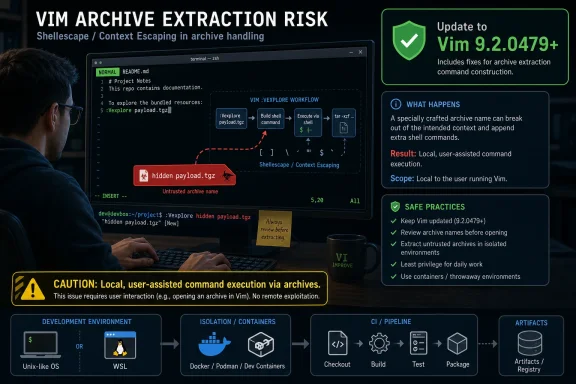 Vim’s Small Archive Helper Carries a Bigger Lesson
At the center of CVE-2026-46483 is tar#Vimuntar(), part of Vim’s runtime support for working with tar archives. The vulnerable path concerns .tgz handling on Unix-like systems, where Vim builds shell commands such as gunzip or gzip -d while processing an archive. The reported issue is that the filename is passed through shellescape() without the {special} flag, leaving room for Vim command-line special expansion in a way that can turn a crafted archive filename into command execution.That is a narrow bug, but narrow does not mean trivial. The vulnerability requires user interaction: someone has to open or process a maliciously named archive through the affected Vim path. It also carries high attack complexity in some scoring interpretations, because the attacker cannot simply hit a listening service from across the internet and expect code execution.
Still, that is exactly why security teams should avoid dismissing it. Many real compromises do not begin with a clean remote exploit. They begin with a developer, administrator, analyst, or support engineer opening an artifact that came from a ticket, a repository, a build log, a customer reproduction case, or a supposedly harmless archive.
The patch is straightforward in operational terms: update Vim to 9.2.0479 or later. The lesson is less tidy. Unix tooling has always blurred the line between data and commands, and editors like Vim sit in that blurred zone more often than many users realize.
The Score Disagreement Is the Story, Not a Clerical Error
One of the more revealing details around CVE-2026-46483 is the split between severity interpretations. GitHub’s CNA scoring reportedly places the issue in low-severity territory, while NVD analysis has shown a higher CVSS 3.1 score. That gap is not merely bureaucratic noise; it reflects a recurring tension in vulnerability management.From a vendor or project maintainer’s perspective, this is a local, user-assisted flaw with prerequisites. The attacker needs to deliver a specially crafted archive name and persuade or position a user to open it with vulnerable Vim behavior. That looks very different from an unauthenticated network exploit against a default-exposed service.
From an enterprise risk perspective, however, the picture changes. If the affected user is a developer with access to source code, signing keys, production secrets, SSH agents, cloud credentials, or privileged automation, “local command execution in the user’s context” can be enough. The blast radius depends less on Vim and more on what kind of human is running it.
This is the weakness of treating CVSS as a decision engine rather than an input. A low score can still matter in the wrong workflow, and a high score can be practically irrelevant in a locked-down environment. CVE-2026-46483 falls into the category administrators should triage by exposure pattern, not by score alone.
User Interaction Is Not a Comfort Blanket
The phrase user interaction required has become a sedative in vulnerability triage. It implies friction, and friction reduces exploitability. But the last two decades of phishing, malicious documents, poisoned repositories, dependency confusion, and supply-chain attacks have shown that attackers are very good at converting user interaction into execution.A malicious
.tgz file is not exotic in developer and operations environments. Tarballs move through bug reports, source releases, proof-of-concept packages, Linux build systems, container contexts, and vendor support exchanges. A sysadmin may unpack one while troubleshooting. A developer may inspect one before importing code. A security researcher may open one precisely because it looks suspicious.That makes Vim’s role interesting. Vim is not just an editor; for many technical users, it is a reflex. It opens text, config, logs, diffs, archives, remote files, plugin-managed content, and filetypes with decades of compatibility logic attached. The more seamlessly a tool handles “just open this,” the more dangerous it becomes when a file format helper crosses into shell execution.
None of this means CVE-2026-46483 should be treated like a catastrophic zero-click server vulnerability. It means the user-interaction requirement should be read accurately: exploitation needs cooperation or workflow placement, not necessarily gullibility.
The Unix Boundary Between Filename and Command Is Still Too Thin
The technical root of this bug is familiar to anyone who has spent time with shell-escaping failures. Filenames are data, but shells are interpreters. Any time software constructs a shell command from user-controlled or attacker-influenced strings, the code is living close to a cliff edge.Vim’s
shellescape() exists precisely to reduce that risk. The problem described here is subtler: the missing {special} flag matters because Vim has its own command-line expansion behavior layered into the path. Escaping for the shell alone is not always the same as escaping for the full interpreter pipeline that a string travels through.That is the kind of bug mature software is prone to. The code may look defensive. The function name may even say “escape.” But escaping is contextual; a string safe for one parser can be unsafe for another. In this case, the dangerous journey appears to involve Vim command-line special expansion before the external command is invoked.
For WindowsForum readers, this is not merely a Linux curiosity. Windows administrators increasingly live in mixed estates: WSL, Git Bash, Cygwin-like environments, remote Linux hosts, container build systems, CI runners, and cross-platform developer laptops. A vulnerability that is Unix-like in execution path can still matter to a Windows-heavy organization if its engineers and automation touch Unix tooling every day.
Archive Handling Remains a Supply-Chain Soft Spot
Security teams have spent years hardening browsers, Office macros, endpoint detection, and exposed services. Archive handling often receives less attention because it feels mundane. Yet compressed files are among the oldest and most persistent carriers of trust problems.Archives bundle ambiguity. They hide filenames until inspection. They can include paths, symlinks, metadata, odd encodings, platform-specific behavior, and nested structures. They are also socially normal: no one raises an eyebrow when a bug report includes a tarball or a source package arrives as
.tgz.CVE-2026-46483 fits that pattern. The payload is not necessarily in the contents of the archive; the filename itself is part of the attack surface. That detail matters because many controls focus on scanning file contents while treating names as inert labels. In a world of command-line tooling, filenames can be active ingredients.
The obvious advice is to update Vim, but the broader operational advice is to treat archives from untrusted sources as executable-adjacent material. They may not be binaries, but they regularly trigger parsers, decompressors, hooks, viewers, previewers, indexers, and editor plugins. Any one of those layers can transform passive data into active behavior.
Developer Machines Are High-Value Endpoints Wearing Casual Clothes
A flaw like this becomes more consequential when it lands on a developer workstation. Developers routinely run tools with access to private repositories, package registries, cloud CLIs, Kubernetes contexts, SSH keys, signing material, and local secrets. Their machines are not just endpoints; they are control planes with keyboards.That reality changes the risk calculus. If an attacker can induce a developer to open a malicious archive in a vulnerable editor path, command execution as that user can be the first step toward credential theft or source-code tampering. Even without administrative privileges, a developer account often has enough access to matter.
The same applies to system administrators. A local shell command under an admin’s user context may reach scripts, saved credentials, management consoles, configuration stores, and remote sessions. The vulnerability itself does not grant domain admin rights, but it may provide a foothold on a machine where those rights are only one cached token or one SSH agent away.
This is why endpoint hardening for technical staff should not stop at antivirus and OS patching. Editors, package managers, archive tools, terminals, shells, language runtimes, and plugins all belong on the inventory. The old distinction between “applications” and “developer tools” is increasingly artificial.
Windows Shops Should Not File This Under “Linux Problem”
The specific vulnerable behavior is described for Unix-like systems, and that matters. A default Windows desktop running a non-Unix path may not be exposed in the same way. But modern Windows estates are rarely pure Windows in practice.Windows developers use WSL to build Linux software. Security teams use Linux command-line tools from Windows laptops. Administrators SSH into Linux servers from Windows terminals. CI systems may run Linux jobs triggered by commits authored on Windows workstations. The environment boundary is porous.
Vim itself is also cross-platform, and many users carry habits and configuration across systems. Even if a Windows build is not affected by the same execution path, the vulnerable workflow may exist one terminal tab away inside WSL or on a remote host. For organizations, the question is not “Do we run Linux desktops?” but “Where do our users open untrusted tarballs with Vim?”
That distinction is especially important for software companies, universities, research labs, MSPs, and infrastructure teams. Their Windows fleet may be the visible endpoint estate, while Linux tools do the actual build, deployment, and incident-response work behind the scenes.
The Patch Is Easy; Finding Every Copy Is Not
Updating to Vim 9.2.0479 or later is the clean fix. On a single workstation, that may be as simple as updating the package through the operating system’s normal channel or installing a newer upstream build. In a fleet, the challenge is knowing how many Vims you actually have.Vim often arrives through multiple routes. It may be installed by a Linux distribution package manager, bundled into container images, included in developer environments, embedded in appliances, shipped with Git-related tooling, or manually built from source. Some users run full Vim, some run minimal variants, and some rely on whatever the base image provides.
That sprawl matters because vulnerability scanners can miss the copy that gets used in practice. A scanner may inventory the host package but not a container image. It may detect a system Vim but not a user-local build. It may flag a package that is present but unused while missing the one inside a CI runner.
Administrators should resist turning this into an emergency treasure hunt unless their exposure justifies it. But they should use the event as a prompt to improve visibility into technical tooling. If you cannot answer where Vim runs in your environment, the next editor or CLI vulnerability will produce the same uncertainty.
The Mitigations Are Boring Because They Work
For organizations that cannot immediately update every instance, the practical mitigations are familiar. Avoid opening untrusted.tgz files directly in vulnerable Vim versions. Inspect suspicious archives in disposable environments. Prefer standard decompression tools in controlled directories rather than editor-integrated archive handling for untrusted samples.The boringness is the point. Most user-assisted command-execution bugs are reduced by compartmentalization. A disposable VM, container, sandboxed user, or low-privilege analysis account can turn a scary command execution path into a contained nuisance.
There is also a policy lesson here. Security guidance often tells users not to open suspicious attachments, but technical work frequently requires doing exactly that. A better rule is not “never open untrusted files.” It is “open untrusted files in places designed to be burned down.”
That is particularly true for help desks, malware analysts, developers triaging external bug reports, and sysadmins handling vendor-provided diagnostic bundles. If opening strange files is part of the job, the environment should assume those files sometimes fight back.
Microsoft’s Listing Shows How Broad the Windows Security Perimeter Has Become
The presence of CVE-2026-46483 in Microsoft’s security update ecosystem may look odd at first. Vim is not a Microsoft-authored Windows component in the way that the kernel, Edge, Defender, or Exchange are. But Microsoft’s security perimeter has expanded with developer tooling, Linux interoperability, cloud workflows, open-source dependencies, and supply-chain visibility.That reflects the reality of modern Windows administration. A Windows endpoint may host Linux shells. A Visual Studio Code workflow may invoke Unix tools. An Azure build pipeline may depend on open-source packages. A Windows sysadmin may spend half the day managing Linux services. Vulnerability management has to follow usage, not branding.
For WindowsForum’s audience, this is the practical framing: do not ask only whether a CVE is “in Windows.” Ask whether it is in the Windows-centered work your organization performs. If the answer is yes, it belongs in your patch and risk conversation.
This is also why CVE feeds feel noisier than ever. They increasingly capture a software supply chain rather than a single vendor’s product line. That can be frustrating, but it is more honest than the old world, where local tools and bundled dependencies quietly escaped notice.
The Real Risk Lives in the Workflow, Not the CVE Entry
CVE-2026-46483 is a good example of a vulnerability whose risk cannot be read straight from its identifier. In one environment, it is a low-priority patch item on a rarely used editor. In another, it is a credible path to code execution on machines that touch source code, secrets, and production systems.The difference is workflow. Who receives tarballs? Who opens them? Which editor handles them? Which machines have credentials? Which users run Vim inside WSL, remote Linux shells, or CI environments? Those answers determine whether this is background noise or a meaningful exposure.
That is also where many vulnerability management programs remain weakest. Asset inventories usually know operating systems and major applications. They are less reliable at mapping habits: the tools developers actually use, the shortcuts admins rely on, and the ways files move through an organization.
A mature response to this CVE is therefore not panic. It is targeted curiosity. Find the communities of users for whom Vim and
.tgz files are normal, patch their tooling, and reinforce safe handling for untrusted archives. Everyone else can follow normal update cadence.The Vim Bug Leaves a Short, Useful Checklist
CVE-2026-46483 should not dominate the week for most Windows administrators, but it deserves a clean pass through the environments where Vim is part of daily work. The right response is neither alarmism nor dismissal; it is a small patch with a larger reminder attached.- Update Vim to version 9.2.0479 or later wherever users may open
.tgzarchives from untrusted or semi-trusted sources. - Treat developer workstations, admin jump boxes, WSL environments, CI runners, and Linux containers as likely places where affected Vim versions may hide.
- Avoid opening untrusted compressed archives directly through editor-integrated archive handlers when a disposable environment is available.
- Prioritize users with access to source code, production credentials, signing keys, cloud consoles, or privileged automation.
- Do not rely on the lower severity interpretation alone if the affected workflow involves high-value users or sensitive systems.
References
- Primary source: MSRC
Published: 2026-05-20T01:40:07-07:00
Security Update Guide - Microsoft Security Response Center
 msrc.microsoft.com
- Related coverage: dbugs.ptsecurity.com
CVE-2026-46483 — OS Command Injection in Vim+2 Vim+2 | dbugs
Details on CVE-2026-46483: OS Command Injection in Vim+2 Vim+2. Includes CVSS score, affected versions, and references.dbugs.ptsecurity.com - Related coverage: docs.libraesva.com
Security advisory: command injection vulnerability (CVE-2025-59689)
Libraesva Docsdocs.libraesva.com
- Related coverage: indusface.com
