

Microsoft disclosed CVE-2026-47281 on June 9, 2026, as an Important Visual Studio Code elevation-of-privilege vulnerability that can let an unauthenticated network attacker gain SYSTEM privileges if a user opens a malicious
Microsoft rates CVE-2026-47281 as Important, not Critical, and that distinction will cause some patch dashboards to file it below the screaming red items. That would be a mistake. The CVSS base score is 9.6, the vector is network-accessible, attack complexity is low, no privileges are required, scope changes, and the impact to confidentiality, integrity, and availability is high.
The reason this does not land cleanly as a “remote code execution from the internet” headline is the user-interaction requirement. Microsoft says the victim must be enticed to open a malicious
The disclosure also says exploitation is currently unlikely, not publicly disclosed, and not known to be exploited. Those are useful signals for triage, but they are not a permission slip to wait. Microsoft also marks report confidence as confirmed, which means this is not rumorware, not a speculative write-up, and not a vague “possible issue” waiting for proof.
The most important sentence in the advisory is the one that says a successful attacker could gain SYSTEM privileges. On Windows, SYSTEM is not “a bit more than administrator” in any practical enterprise sense. It is the security context malware dreams about, because it can turn a developer workstation from a productivity endpoint into a launchpad.
A
The trick is that developers are conditioned to treat workspace setup as part of collaboration. A repository may include recommended settings. A sample project may arrive with a suggested workspace. A contractor may send a workspace to reproduce a bug. A support engineer may ask someone to open a project exactly as provided.
Attackers love file types that feel native to a job role. Finance gets weaponized spreadsheets. HR gets weaponized résumés. Developers get weaponized projects. CVE-2026-47281 belongs to that last category, where the malicious object looks less like malware and more like work.
This is why an elevation-of-privilege flaw in VS Code feels different from one in a consumer utility. A developer workstation often contains the keys to the kingdom in messy, practical forms: access tokens,
The CVSS scope-change metric captures that architectural problem. Microsoft says a successful attack is not limited to Visual Studio Code itself but can affect the user’s local system, including files and settings. In other words, the editor is not the final boundary; it is the doorway.
That is exactly why this vulnerability deserves attention from sysadmins, not just developers. The risk is not “someone’s editor behaves badly.” The risk is that a trusted development workstation becomes a privileged foothold.
In this case, the required interaction is opening a malicious
The modern software supply chain is built on trust shortcuts. Developers test projects quickly. They clone proof-of-concept repositories. They review submissions from people they do not know. They download sample code from issues, chats, forums, vendor support portals, and AI-generated snippets. That work culture is efficient, but it also normalizes opening unfamiliar development artifacts.
This is where enterprise guidance should become more specific than “don’t open untrusted files.” That phrase is correct and nearly useless by itself. Administrators need to treat workspace files as executable-adjacent content: not always executable in the narrow technical sense, but capable of influencing an environment powerful enough to execute, authenticate, and persist.
A confirmed vulnerability is not the same thing as an exploited vulnerability. Microsoft says there is no known exploitation and no public disclosure at the time of publication. But confirmed means defenders should not waste time debating whether the bug is real.
This matters because vulnerability queues are full of noise. Security teams live with duplicate CVEs, disputed severity, partial write-ups, vendor-silent claims, proof-of-concept drama, and breathless social media threads. A confirmed Microsoft advisory cuts through that fog. It says: treat this as a real defect in a real product with a real fix.
The temporal score also shows why this should be patched without panic. Exploit code maturity is unproven and Microsoft’s exploitability assessment says exploitation is unlikely. But the remediation level is official fix, and the affected product row points to VS Code build 1.123.1. When the fix exists and the product updates quickly, delay becomes harder to justify.
VS Code’s update story is usually less painful than Windows itself. Many installations update automatically, and developers often move faster than traditional desktop software fleets. But that assumption breaks down in enterprise environments, where VS Code may be packaged through Intune, Configuration Manager, winget, Chocolatey, Jamf for Mac fleets, golden images, virtual desktops, developer containers, or offline build environments.
The hard cases are the machines that do not look managed until something goes wrong. Contractors may install VS Code themselves. Developers may run portable copies. Build engineers may freeze versions to avoid extension regressions. Lab machines may sit outside the standard endpoint inventory. Virtual developer workstations may be cloned from old images.
For WindowsForum readers running mixed environments, the lesson is boring but necessary: inventory beats hope. If VS Code exists on a machine that can reach source code, credentials, build systems, or production-adjacent networks, it belongs in vulnerability management.
A compromised developer machine can poison repositories, steal tokens, tamper with build scripts, alter dependencies, implant backdoors, or pivot into CI/CD systems. It can also harvest the soft underbelly of modern engineering: local test credentials, internal service endpoints, package registry tokens, and one-off scripts that were never meant to withstand hostile inspection.
The threat model has changed because software delivery has changed. A developer’s editor is now attached to GitHub, Azure DevOps, npm, PyPI, Docker registries, Kubernetes contexts, remote SSH hosts, and cloud shells. That makes the editor an interface to infrastructure.
This is why SYSTEM-level compromise via VS Code is more than a local endpoint event. It can become a supply-chain event if the compromised user has the right permissions or the wrong secrets nearby. The responsible response is not theatrical lockdown; it is disciplined reduction of what a single workstation can access, store, and silently change.
The extension marketplace model works because it lets developers shape the editor around their stack. Python teams install Python tooling. Web teams install preview servers, linters, formatters, snippets, framework helpers, and AI assistants. DevOps teams add Kubernetes, Terraform, Docker, YAML, and cloud tooling. A bare editor becomes a customized cockpit.
But every cockpit has switches, and attackers prefer environments where users trust switches they do not fully inspect. Extension recommendations, workspace settings, tasks, launch configurations, and local servers all blur the line between “opening a project” and “executing a project.” That is not a condemnation of VS Code; it is the cost of building a powerful development platform.
The fix for this class of risk is not to tell developers to use Notepad. The fix is to make trust boundaries visible, enforceable, and auditable. Workspace trust, extension restrictions, signed internal extensions, allow-listed publishers, and better endpoint telemetry are not bureaucratic ornaments. They are the scaffolding around an editor that has become part of the production pipeline.
Administrators need to decide what “trusted workspace” means. Is a workspace file from a public GitHub repository trusted? Is one from a customer ticket trusted? Is one attached to a Teams message trusted? Is one generated by a contractor trusted? If the answer is “it depends,” then the organization needs a process that acknowledges the dependency instead of pretending the user will infer it under deadline pressure.
This is where security teams often collide with developer productivity. Developers do not want a help-desk ticket every time they open a sample project. Security teams do not want arbitrary project configuration files treated as harmless. The compromise is risk-tiering: stronger restrictions on privileged developers, production-adjacent workstations, and machines with access to signing keys or deployment systems; lighter guardrails for disposable sandboxes and isolated test environments.
There is also an opportunity here for better internal hygiene. Encourage developers to open unknown projects in disposable environments. Keep secrets out of project folders. Limit long-lived local credentials. Use least-privilege cloud roles. Separate browsing, testing, and production access. These are old ideas, but vulnerabilities like this one make them feel less theoretical.
Exploitability assessments are snapshots. They reflect what Microsoft knows at publication time, including public exploit availability and observed exploitation. They do not guarantee that a technique will remain obscure, that researchers will not publish details later, or that attackers will not reverse-engineer the patch.
The fixed build number is now public. The affected component is public. The CVSS vector is public. The requirement for a malicious
The sane response is neither panic nor shrugging. Patch quickly, verify coverage, and reduce the chance that developers open untrusted workspace files on high-value machines. In security operations, that is what a good day looks like: a serious bug, a vendor fix, no known exploitation, and a window to close the gap before the situation changes.
That is why defenders should read the shape of the vulnerability, not just the label. The shape here is dangerous but constrained: a high-impact privilege escalation through VS Code, requiring user interaction, with an official fix, no known exploitation, and confirmed technical validity. That is exactly the kind of issue that gets mishandled when patching programs rely on a single column in a dashboard.
The “Important” label probably reflects the interaction requirement and exploitability judgment. The CVSS score reflects the potential impact if exploitation succeeds. The enterprise priority should reflect both, plus local exposure: how widely VS Code is deployed, who uses it, what privileges those users have, and what secrets or systems their machines can reach.
A developer laptop with no privileged access is one thing. A release engineer’s workstation with signing access, production deployment rights, and cached cloud credentials is another. Vulnerability management that treats those machines identically is doing arithmetic, not risk management.
This is the pattern defenders should watch across developer tooling. Editors, terminals, package managers, build systems, local web servers, test runners, and AI coding assistants all sit at the boundary between content and action. They process files, interpret configuration, invoke commands, and make network requests. The more seamless the workflow becomes, the more invisible the security boundary becomes.
Workspace files are especially tricky because they are collaboration artifacts. They do not look like binaries. They do not carry the cultural warning signs of an executable installer. They are small, readable, and convenient. That makes them perfect candidates for underestimation.
The answer is not to frighten developers away from collaboration. It is to restore friction where the action becomes dangerous. Opening a workspace from an unknown source should feel more like opening a macro-enabled document and less like opening a README.
Some organizations package VS Code as part of a standard developer image. Others let users self-install. Some block auto-updates to preserve reproducible environments. Some run VS Code Server, remote development setups, or dev containers where the local and remote pieces are not obvious to non-developer IT staff. Each variation complicates the simple question: “Are we patched?”
The answer should come from inventory and telemetry, not a Slack poll. Endpoint management should report installed versions. Software inventory should identify portable copies where possible. Developer platform teams should publish an internal notice that names the fixed build and the risky file type. Security teams should look for suspicious
It is also worth checking whether internal security guidance treats workspace files as risky content. If the file type is not covered by mail filtering, attachment warnings, or safe-handling guidance, this vulnerability is a good reason to update those assumptions.
The concrete moves are not exotic. They are the fundamentals applied to a developer tool that too often escapes endpoint policy because it is beloved, useful, and cross-platform.
The lesson of CVE-2026-47281 is that developer experience and endpoint security are no longer separate disciplines. Visual Studio Code sits where source code, credentials, automation, and infrastructure meet, which means its vulnerabilities deserve the same operational seriousness once reserved for servers and domain infrastructure. If Microsoft and the wider ecosystem keep tightening the trust model around workspaces, extensions, and project configuration, this June disclosure can be remembered as a well-handled warning shot rather than the first paragraph of a larger incident.
.code-workspace file in VS Code. The awkward part is not that Microsoft’s editor has a bug; all large software does. The awkward part is that the editor has become a privileged command center for modern development, and the security model around workspaces, extensions, local files, and developer trust is still catching up. This is a developer-tool vulnerability, but the blast radius belongs squarely in enterprise IT.
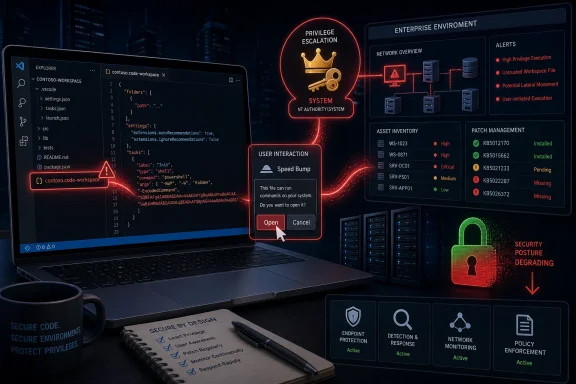 Microsoft’s “Important” Label Hides a Very Serious Shape
Microsoft rates CVE-2026-47281 as Important, not Critical, and that distinction will cause some patch dashboards to file it below the screaming red items. That would be a mistake. The CVSS base score is 9.6, the vector is network-accessible, attack complexity is low, no privileges are required, scope changes, and the impact to confidentiality, integrity, and availability is high.The reason this does not land cleanly as a “remote code execution from the internet” headline is the user-interaction requirement. Microsoft says the victim must be enticed to open a malicious
.code-workspace file in Visual Studio Code. That condition matters, but in the real world it is not a high wall; developers open repositories, sample projects, lab environments, extension demos, and workspace files as part of normal work.The disclosure also says exploitation is currently unlikely, not publicly disclosed, and not known to be exploited. Those are useful signals for triage, but they are not a permission slip to wait. Microsoft also marks report confidence as confirmed, which means this is not rumorware, not a speculative write-up, and not a vague “possible issue” waiting for proof.
The most important sentence in the advisory is the one that says a successful attacker could gain SYSTEM privileges. On Windows, SYSTEM is not “a bit more than administrator” in any practical enterprise sense. It is the security context malware dreams about, because it can turn a developer workstation from a productivity endpoint into a launchpad.
The Workspace File Is the New Attachment
For years, security training taught users not to open suspicious Office documents, ZIP files, macros, installers, and email attachments. Developers learned a slightly different version of that lesson: do not run unknown scripts, do not paste shell commands blindly, and do not install random packages. CVE-2026-47281 pushes that same old problem into a more modern container: the workspace file.A
.code-workspace file is not just a passive document in the way a text file is passive. It is configuration material for an editor that can bind folders together, influence settings, trigger extension behavior, and shape how the development environment behaves. That makes it productive. It also makes it security-sensitive.The trick is that developers are conditioned to treat workspace setup as part of collaboration. A repository may include recommended settings. A sample project may arrive with a suggested workspace. A contractor may send a workspace to reproduce a bug. A support engineer may ask someone to open a project exactly as provided.
Attackers love file types that feel native to a job role. Finance gets weaponized spreadsheets. HR gets weaponized résumés. Developers get weaponized projects. CVE-2026-47281 belongs to that last category, where the malicious object looks less like malware and more like work.
VS Code Is No Longer Just an Editor
Visual Studio Code’s security importance comes from what it has become: not merely a text editor, but a development operating environment. It touches source code, credentials, build systems, terminals, debuggers, containers, SSH sessions, cloud CLIs, local secrets, package managers, Git identities, and extension ecosystems. When VS Code is compromised, the attacker is not merely inside an app window.This is why an elevation-of-privilege flaw in VS Code feels different from one in a consumer utility. A developer workstation often contains the keys to the kingdom in messy, practical forms: access tokens,
.env files, SSH keys, cloud profiles, package registry credentials, local database strings, deployment scripts, and cloned private repositories. Enterprises can preach vault hygiene forever, but anyone who has administered developer endpoints knows the truth is more complicated.The CVSS scope-change metric captures that architectural problem. Microsoft says a successful attack is not limited to Visual Studio Code itself but can affect the user’s local system, including files and settings. In other words, the editor is not the final boundary; it is the doorway.
That is exactly why this vulnerability deserves attention from sysadmins, not just developers. The risk is not “someone’s editor behaves badly.” The risk is that a trusted development workstation becomes a privileged foothold.
User Interaction Is a Speed Bump, Not a Seat Belt
Security teams often breathe easier when an advisory says “user interaction required.” That is understandable, but the phrase can be dangerously comforting. It tells us the attacker cannot simply spray packets at a target and win. It does not tell us the exploit is impractical.In this case, the required interaction is opening a malicious
.code-workspace file. That is a plausible phishing path, a plausible supply-chain path, and a plausible social-engineering path. The attacker does not need the victim to disable antivirus, install a sketchy executable, or approve a browser warning; the attacker needs the victim to do something VS Code users already do.The modern software supply chain is built on trust shortcuts. Developers test projects quickly. They clone proof-of-concept repositories. They review submissions from people they do not know. They download sample code from issues, chats, forums, vendor support portals, and AI-generated snippets. That work culture is efficient, but it also normalizes opening unfamiliar development artifacts.
This is where enterprise guidance should become more specific than “don’t open untrusted files.” That phrase is correct and nearly useless by itself. Administrators need to treat workspace files as executable-adjacent content: not always executable in the narrow technical sense, but capable of influencing an environment powerful enough to execute, authenticate, and persist.
The “Confirmed” Metric Is the Quiet Alarm
The user-provided excerpt describes Microsoft’s report-confidence metric, and for this vulnerability the value is Confirmed. That means the vulnerability’s existence and technical credibility have crossed Microsoft’s threshold. In vulnerability management, that is a meaningful distinction.A confirmed vulnerability is not the same thing as an exploited vulnerability. Microsoft says there is no known exploitation and no public disclosure at the time of publication. But confirmed means defenders should not waste time debating whether the bug is real.
This matters because vulnerability queues are full of noise. Security teams live with duplicate CVEs, disputed severity, partial write-ups, vendor-silent claims, proof-of-concept drama, and breathless social media threads. A confirmed Microsoft advisory cuts through that fog. It says: treat this as a real defect in a real product with a real fix.
The temporal score also shows why this should be patched without panic. Exploit code maturity is unproven and Microsoft’s exploitability assessment says exploitation is unlikely. But the remediation level is official fix, and the affected product row points to VS Code build 1.123.1. When the fix exists and the product updates quickly, delay becomes harder to justify.
Build 1.123.1 Becomes the Line Administrators Can Audit
The clean operational fact is that Microsoft lists Visual Studio Code build 1.123.1 as the fixed build for this vulnerability. That gives IT teams something concrete to measure. The advisory’s publication date is June 9, 2026, and any managed VS Code fleet should now be checked against that line.VS Code’s update story is usually less painful than Windows itself. Many installations update automatically, and developers often move faster than traditional desktop software fleets. But that assumption breaks down in enterprise environments, where VS Code may be packaged through Intune, Configuration Manager, winget, Chocolatey, Jamf for Mac fleets, golden images, virtual desktops, developer containers, or offline build environments.
The hard cases are the machines that do not look managed until something goes wrong. Contractors may install VS Code themselves. Developers may run portable copies. Build engineers may freeze versions to avoid extension regressions. Lab machines may sit outside the standard endpoint inventory. Virtual developer workstations may be cloned from old images.
For WindowsForum readers running mixed environments, the lesson is boring but necessary: inventory beats hope. If VS Code exists on a machine that can reach source code, credentials, build systems, or production-adjacent networks, it belongs in vulnerability management.
Developer Machines Are Tier-Zero Adjacent Now
The industry has spent years learning to protect domain controllers, identity providers, and cloud control planes as privileged infrastructure. Developer endpoints are still catching up to that mental model. CVE-2026-47281 is a useful reminder that the workstation used to write and ship code may be closer to tier-zero than the org chart suggests.A compromised developer machine can poison repositories, steal tokens, tamper with build scripts, alter dependencies, implant backdoors, or pivot into CI/CD systems. It can also harvest the soft underbelly of modern engineering: local test credentials, internal service endpoints, package registry tokens, and one-off scripts that were never meant to withstand hostile inspection.
The threat model has changed because software delivery has changed. A developer’s editor is now attached to GitHub, Azure DevOps, npm, PyPI, Docker registries, Kubernetes contexts, remote SSH hosts, and cloud shells. That makes the editor an interface to infrastructure.
This is why SYSTEM-level compromise via VS Code is more than a local endpoint event. It can become a supply-chain event if the compromised user has the right permissions or the wrong secrets nearby. The responsible response is not theatrical lockdown; it is disciplined reduction of what a single workstation can access, store, and silently change.
Extensions Made the Editor Powerful, and Power Made It Risky
Although CVE-2026-47281 is a Visual Studio Code vulnerability rather than an extension CVE, it lands in a year when VS Code extension security has already been under scrutiny. Security researchers have repeatedly warned that IDE extensions can create paths to file exfiltration, code execution, and lateral movement. That broader context matters because VS Code’s value comes partly from its extensibility, and extensibility is always a bargain with risk.The extension marketplace model works because it lets developers shape the editor around their stack. Python teams install Python tooling. Web teams install preview servers, linters, formatters, snippets, framework helpers, and AI assistants. DevOps teams add Kubernetes, Terraform, Docker, YAML, and cloud tooling. A bare editor becomes a customized cockpit.
But every cockpit has switches, and attackers prefer environments where users trust switches they do not fully inspect. Extension recommendations, workspace settings, tasks, launch configurations, and local servers all blur the line between “opening a project” and “executing a project.” That is not a condemnation of VS Code; it is the cost of building a powerful development platform.
The fix for this class of risk is not to tell developers to use Notepad. The fix is to make trust boundaries visible, enforceable, and auditable. Workspace trust, extension restrictions, signed internal extensions, allow-listed publishers, and better endpoint telemetry are not bureaucratic ornaments. They are the scaffolding around an editor that has become part of the production pipeline.
The Patch Is Simple; the Policy Is Not
For individual users, the practical answer is straightforward: update VS Code to the fixed build or later, and do not open.code-workspace files from sources you do not know and trust. That advice is not glamorous, but it is correct. The more interesting problem belongs to organizations.Administrators need to decide what “trusted workspace” means. Is a workspace file from a public GitHub repository trusted? Is one from a customer ticket trusted? Is one attached to a Teams message trusted? Is one generated by a contractor trusted? If the answer is “it depends,” then the organization needs a process that acknowledges the dependency instead of pretending the user will infer it under deadline pressure.
This is where security teams often collide with developer productivity. Developers do not want a help-desk ticket every time they open a sample project. Security teams do not want arbitrary project configuration files treated as harmless. The compromise is risk-tiering: stronger restrictions on privileged developers, production-adjacent workstations, and machines with access to signing keys or deployment systems; lighter guardrails for disposable sandboxes and isolated test environments.
There is also an opportunity here for better internal hygiene. Encourage developers to open unknown projects in disposable environments. Keep secrets out of project folders. Limit long-lived local credentials. Use least-privilege cloud roles. Separate browsing, testing, and production access. These are old ideas, but vulnerabilities like this one make them feel less theoretical.
The Exploitability Rating Should Calm Panic, Not Delay Action
Microsoft’s exploitability assessment says exploitation is unlikely. That should prevent overreaction. It should not become an excuse for inaction.Exploitability assessments are snapshots. They reflect what Microsoft knows at publication time, including public exploit availability and observed exploitation. They do not guarantee that a technique will remain obscure, that researchers will not publish details later, or that attackers will not reverse-engineer the patch.
The fixed build number is now public. The affected component is public. The CVSS vector is public. The requirement for a malicious
.code-workspace file is public. That is enough information for defenders to prioritize and enough information for attackers to start looking.The sane response is neither panic nor shrugging. Patch quickly, verify coverage, and reduce the chance that developers open untrusted workspace files on high-value machines. In security operations, that is what a good day looks like: a serious bug, a vendor fix, no known exploitation, and a window to close the gap before the situation changes.
Microsoft’s Disclosure Shows the Limits of Severity Labels
CVE-2026-47281 exposes a familiar problem in vulnerability communication: severity labels compress too much meaning into too little space. “Important” sounds moderate. CVSS 9.6 sounds severe. “Exploitation unlikely” sounds reassuring. “SYSTEM privileges” sounds dire. All of these statements can be true at the same time.That is why defenders should read the shape of the vulnerability, not just the label. The shape here is dangerous but constrained: a high-impact privilege escalation through VS Code, requiring user interaction, with an official fix, no known exploitation, and confirmed technical validity. That is exactly the kind of issue that gets mishandled when patching programs rely on a single column in a dashboard.
The “Important” label probably reflects the interaction requirement and exploitability judgment. The CVSS score reflects the potential impact if exploitation succeeds. The enterprise priority should reflect both, plus local exposure: how widely VS Code is deployed, who uses it, what privileges those users have, and what secrets or systems their machines can reach.
A developer laptop with no privileged access is one thing. A release engineer’s workstation with signing access, production deployment rights, and cached cloud credentials is another. Vulnerability management that treats those machines identically is doing arithmetic, not risk management.
The Real Boundary Is Trust, Not the Application Window
Microsoft’s FAQ says the scope change means a successful attack is not limited to Visual Studio Code but can affect the user’s local system, including files and settings. That should be the conceptual center of the advisory. The vulnerable component is the editor, but the impacted component is the broader system.This is the pattern defenders should watch across developer tooling. Editors, terminals, package managers, build systems, local web servers, test runners, and AI coding assistants all sit at the boundary between content and action. They process files, interpret configuration, invoke commands, and make network requests. The more seamless the workflow becomes, the more invisible the security boundary becomes.
Workspace files are especially tricky because they are collaboration artifacts. They do not look like binaries. They do not carry the cultural warning signs of an executable installer. They are small, readable, and convenient. That makes them perfect candidates for underestimation.
The answer is not to frighten developers away from collaboration. It is to restore friction where the action becomes dangerous. Opening a workspace from an unknown source should feel more like opening a macro-enabled document and less like opening a README.
Administrators Need to Look Beyond the Default Update Channel
The easiest remediation path is the official VS Code update. But enterprise administrators should assume there are exceptions until proven otherwise. The machines that miss editor updates are often the same machines where developer work is unusual, privileged, or operationally sensitive.Some organizations package VS Code as part of a standard developer image. Others let users self-install. Some block auto-updates to preserve reproducible environments. Some run VS Code Server, remote development setups, or dev containers where the local and remote pieces are not obvious to non-developer IT staff. Each variation complicates the simple question: “Are we patched?”
The answer should come from inventory and telemetry, not a Slack poll. Endpoint management should report installed versions. Software inventory should identify portable copies where possible. Developer platform teams should publish an internal notice that names the fixed build and the risky file type. Security teams should look for suspicious
.code-workspace delivery patterns in email, chat, and downloads, especially if targeted at developers.It is also worth checking whether internal security guidance treats workspace files as risky content. If the file type is not covered by mail filtering, attachment warnings, or safe-handling guidance, this vulnerability is a good reason to update those assumptions.
The June VS Code Fix Draws a Practical Line for Defenders
This vulnerability is not a reason to distrust VS Code wholesale. It is a reason to treat VS Code as the powerful platform it has become. The distinction matters because developers will rightly resist advice that sounds like security theater, but they will usually accept controls that map to a real workflow risk.The concrete moves are not exotic. They are the fundamentals applied to a developer tool that too often escapes endpoint policy because it is beloved, useful, and cross-platform.
- Organizations should verify that Visual Studio Code installations have been updated to build 1.123.1 or later.
- Developers should avoid opening
.code-workspacefiles received from unknown repositories, unsolicited messages, support threads, or untrusted third parties. - Security teams should treat workspace files as potentially dangerous development artifacts rather than harmless editor preferences.
- Administrators should pay special attention to developer workstations with deployment rights, signing access, production credentials, or broad source-code access.
- Teams should prefer disposable sandboxes or isolated development environments when inspecting unfamiliar projects or reproducing issues from outside contributors.
- Endpoint and messaging controls should be reviewed to determine whether
.code-workspacefiles are visible in inventory, logging, attachment handling, and threat hunting.
The lesson of CVE-2026-47281 is that developer experience and endpoint security are no longer separate disciplines. Visual Studio Code sits where source code, credentials, automation, and infrastructure meet, which means its vulnerabilities deserve the same operational seriousness once reserved for servers and domain infrastructure. If Microsoft and the wider ecosystem keep tightening the trust model around workspaces, extensions, and project configuration, this June disclosure can be remembered as a well-handled warning shot rather than the first paragraph of a larger incident.
References
- Primary source: MSRC
Published: 2026-06-09T07:00:00-07:00
Security Update Guide - Microsoft Security Response Center
 msrc.microsoft.com
