

Microsoft has published CVE-2026-47292 as a remote code execution vulnerability in the Visual Studio Code MSSQL extension, placing a developer-facing database tool on the June 2026 security radar rather than the usual Windows endpoint or server patch list. The important part is not merely that another RCE exists; it is where it lives. A VS Code extension that talks to SQL Server, Azure SQL, and local developer workspaces sits at the awkward junction of source code, credentials, database access, and automation. That makes the advisory less like a routine patch note and more like a reminder that the modern IDE has become part of the attack surface.
Remote code execution is a phrase security teams are trained to treat seriously, sometimes too mechanically. In Windows patch cycles, RCE often conjures images of exposed services, malformed packets, or malicious documents. CVE-2026-47292 is different because the affected component is not the operating system itself but the MSSQL extension for Visual Studio Code, a tool many developers and database administrators use precisely because it brings database work into the editor they already live in.
That distinction matters. VS Code is not just a text editor anymore; it is a host for extensions that run code, open terminals, authenticate to services, parse project files, invoke language servers, and sometimes download companion services. The MSSQL extension, in particular, is designed to connect developers to SQL Server, Azure SQL Database, Azure SQL Managed Instance, SQL databases in Microsoft Fabric, and related data tooling. In practice, it often runs on machines that also hold connection strings, local secrets, cloud identities, source repositories, and saved database profiles.
Microsoft’s advisory language identifies the vulnerability as remote code execution, but the publicly visible technical detail appears restrained. That is normal for freshly disclosed Microsoft vulnerabilities, especially when the vendor is trying to give defenders enough information to patch without giving attackers a ready-made exploit recipe. The tradeoff is that administrators are left reading between fields: affected product, impact, exploitability assessment, remediation path, and whatever CVSS or metadata Microsoft chooses to expose.
The user-facing confusion around this class of advisory is understandable. Security pages often include explanatory text about metrics such as confidence, exploitability, or technical detail availability, and those definitions can look like the story itself. The real story is simpler: Microsoft has acknowledged a real vulnerability in a Microsoft-published VS Code extension, and the affected population is not limited to people who think of themselves as “running SQL Server.” It includes anyone whose developer workstation has become the control plane for database work.
The MSSQL extension is not a toy add-on. Microsoft’s own documentation positions it as the supported path for modern SQL development in VS Code, with features for connecting to databases, browsing objects, running T-SQL, viewing results, managing schema workflows, and integrating newer productivity features. Microsoft has also been nudging database developers toward VS Code as Azure Data Studio reaches retirement, making the extension more strategically important than it might have been a few years ago.
That migration context is important. When a tool becomes the default replacement path, its security posture becomes more consequential. A vulnerability in a niche extension is a cleanup task; a vulnerability in the extension that inherits a retired product’s workflow is an enterprise exposure question.
The advisory’s “remote code execution” classification also deserves careful parsing. It does not automatically mean an unauthenticated attacker on the internet can pop a developer laptop from across the planet. In developer tooling, RCE can depend on user interaction, malicious workspaces, crafted files, compromised repositories, poisoned extension assets, manipulated server responses, or other preconditions. But it does mean Microsoft believes the impact can cross the line from “data exposure” or “crash” into code running where it should not.
That is the threshold that matters. Developer machines are high-value targets because they bridge identities and environments. They often hold Git credentials, package publishing tokens, database access, SSH keys, Azure sessions, and local copies of proprietary code. If an attacker can run code through a trusted extension context, the compromise may begin in the editor but rarely stays there.
Extensions can contribute commands, language services, webviews, debuggers, task providers, authentication flows, file-system watchers, and terminals. They can react to a workspace being opened. They can parse configuration files. They can call external binaries. They can communicate with local services. That flexibility is the reason VS Code became dominant; it is also why extension vulnerabilities can have outsized impact.
The MSSQL extension adds another layer because database tooling tends to normalize contact with remote systems. A developer expects it to talk to servers, fetch metadata, render results, handle credentials, and process SQL-related project artifacts. That means suspicious network and file activity can blend into normal use more easily than it would in a simpler editor plugin.
Security teams have already spent years learning this lesson through the broader software supply chain. Malicious npm packages, poisoned CI scripts, dependency confusion, and compromised build systems all exploit the same organizational blind spot: developers are powerful users whose tools are trusted to automate dangerous tasks. VS Code extensions belong in that same threat model.
The uncomfortable point is that many enterprises still manage VS Code like a personal productivity app rather than a privileged development platform. They inventory Windows versions, browser versions, Office channels, EDR agents, and server roles, but extension versions often remain self-managed. That gap is exactly where CVE-2026-47292 should get attention.
Attackers do not need every compromised developer to have production admin rights. They need footholds. A machine with read access to internal repositories, database migration scripts, connection profiles, and environment files can provide enough context for follow-on attacks. Schema names, stored procedure logic, test credentials, API keys, and deployment conventions are intelligence.
Database tools are also attractive because they sit close to data movement. Query results may include customer-like records. Exported data may land in local folders. Notebooks, scratch files, and SQL scripts may contain secrets pasted during debugging. This is not ideal practice, but it is common enough that defenders should assume it happens.
The extension’s supported footprint also spans Windows, macOS, and Linux. That cross-platform reach is part of VS Code’s appeal, but it complicates enterprise response. A Windows admin may patch the managed fleet while missing developer Macs. A Linux workstation used by a data engineer may never appear in the same software inventory. The exposure is organized around workflows, not operating systems.
That is why the response should begin with the extension inventory rather than the Windows patch dashboard. The question is not “Are our Windows machines patched?” It is “Where is the MSSQL extension installed, what version is it on, and can we force or verify the fixed build?”
Consolidation has benefits. A single editor means one ecosystem, one marketplace, one extension model, and a faster feature pipeline. Developers like it because they can keep code, notebooks, SQL scripts, terminals, and Git operations in one place. Microsoft likes it because VS Code is already the gravitational center of its developer tooling.
But consolidation also concentrates risk. When the supported path for SQL development runs through an extension, the extension inherits expectations normally reserved for a full product. Enterprises will expect security servicing, predictable update behavior, documentation, compatibility guarantees, and administrative control. CVE-2026-47292 is an early test of how seriously organizations treat that model.
The practical concern is not that Microsoft cannot patch extensions. It can, and the VS Code marketplace can distribute updates quickly. The concern is that enterprise governance around extensions is often weaker than governance around installed applications. Many organizations can tell you exactly which build of Microsoft 365 Apps is deployed but cannot tell you which version of
That asymmetry is no longer defensible. If VS Code is the replacement shell for data tooling, then its extensions need the same asset management and patch discipline as conventional desktop software. Otherwise, the convenience story becomes a security debt story.
For enterprises, the story is messier. Some organizations disable automatic extension updates to preserve build reproducibility or prevent unreviewed changes. Others allow developers to install extensions freely but lack central reporting. Remote development setups, containerized environments, offline workstations, and locked-down networks can all create pockets of stale extension versions.
Offline installation is especially relevant for the MSSQL extension because Microsoft documents VSIX-based installation paths for machines without internet access, including bundled releases that include required service components. That is useful operationally, but it also means defenders cannot assume marketplace auto-update will reach every installation. The very environments with stricter network controls may require manual packaging and redeployment.
This is where security teams should resist the urge to treat “developer tools” as somebody else’s problem. Desktop engineering, application security, database administration, and identity teams all have a stake. A vulnerable database extension on a developer machine can become an identity incident, a source-code incident, or a data exposure incident depending on what the attacker reaches next.
The best response is boring but effective: identify installations, update them, confirm versions, and document an extension governance process. The point is not to panic over this single CVE. The point is to stop being surprised when a developer extension shows up in the security update guide.
A developer-tool RCE can be operationally dangerous even when it requires user interaction. Developers open repositories from outside the company. They clone proofs of concept. They inspect customer samples. They review partner code. They run local services. They test database scripts. The line between trusted and untrusted input is much blurrier than in a typical office workflow.
The threat model also includes social engineering that looks normal to technical users. “Can you reproduce this database issue?” “Here is a sample repo.” “Open this workspace and run the query.” “Review this migration script.” These are plausible developer interactions, not cartoon phishing. If a vulnerability can be triggered through crafted project content or malicious responses during normal extension use, user interaction is not much comfort.
Even without public exploit details, defenders should assume attackers understand this pattern. The last several years of supply-chain attacks have shown that development environments are attractive precisely because they are trusted and under-monitored. An EDR alert from a compiler, editor, terminal, or language server may be easier to dismiss than the same behavior from a random executable.
That does not mean every RCE in a VS Code extension should cause an emergency bridge. It does mean the risk conversation should include business context. A developer with access to payment systems, database migrations, production credentials, or release signing workflows is not the same as a student using the extension on a lab machine.
That distinction matters because confirmed vendor acknowledgment changes the defensive calculus. A rumor about a possible flaw in a package is one thing. A CVE entry in Microsoft’s Security Update Guide is another. It means the vendor has accepted the issue into its security response process and is publishing remediation guidance under a stable identifier.
At the same time, confidence in existence is not the same as exploit maturity. A vulnerability can be confirmed while no public exploit is known. It can also be poorly described publicly while attackers privately work from patches, diffs, or crash reports. Microsoft’s restrained advisory model is designed to reduce attacker handholding, but it cannot prevent patch diffing or independent rediscovery.
For administrators, the right conclusion is balanced urgency. Do not oversell CVE-2026-47292 as an internet-scale catastrophe unless evidence emerges to support that. Do not undersell it because the advisory does not hand you a full exploit chain. Treat it as a confirmed RCE in a sensitive developer extension and patch accordingly.
The MSSQL extension adds database authentication to that mix. Depending on configuration, users may authenticate through Microsoft Entra ID, SQL authentication, integrated auth, or other connection methods. Even if passwords are not stored in plain text, tokens, cached sessions, configuration metadata, and connection histories can help an attacker move.
This is why “least privilege” for developers has moved from compliance slogan to practical containment strategy. If a compromised extension context can reach only development databases and non-production subscriptions, the incident is smaller. If the same context can reach production data, release infrastructure, and secrets, the workstation becomes a launchpad.
Organizations should also revisit how they handle database access from local machines. VPN access, conditional access, just-in-time permissions, privileged access workstations, and separate admin identities are not glamorous controls, but they matter. The lesson of CVE-2026-47292 is not that every developer should lose useful tooling. It is that useful tooling should not automatically inherit broad, persistent access.
Security teams sometimes talk about developer experience and security as if they are opposing forces. In reality, predictable controls can improve both. A well-managed extension baseline, clear update policy, and sane identity boundaries are less disruptive than emergency lockdowns after a compromise.
Any sufficiently powerful extension can contain vulnerabilities. Official origin reduces some risks, such as outright malicious publishing, but it does not eliminate parsing bugs, command injection paths, unsafe file handling, flawed webviews, dependency vulnerabilities, or mistakes in companion services. In fact, official extensions may be more attractive targets because they are widely installed and rarely questioned.
The ecosystem problem is broader than Microsoft. VS Code’s success has produced an enormous extension marketplace where code quality, maintenance practices, and security response vary widely. Researchers have repeatedly warned that IDE extensions can exfiltrate files, abuse local servers, or exploit trust boundaries. CVE-2026-47292 sits within that larger trend even though it involves a Microsoft extension rather than a random marketplace package.
For enterprises, the answer is not to ban extensions wholesale. That would be unrealistic and counterproductive. The answer is to treat extensions like software dependencies with privileges: approve them, inventory them, update them, and remove what is no longer needed.
That last point is underrated. Many developers accumulate extensions over years. A tool installed for one project remains active long after the project ends. Attack surface expands by sediment. Periodic cleanup is not busywork; it is exposure reduction.
Some of this already exists in pieces through VS Code settings, enterprise deployment methods, endpoint management, and marketplace controls. But the experience is not as mature or universal as Windows Update for Business, Microsoft 365 Apps servicing, or Defender security baselines. The more critical VS Code becomes, the less acceptable that gap becomes.
There is also a communications challenge. Patch Tuesday culture is built around operating system and server products. Developer extension advisories can get lost because they do not always arrive as a familiar KB install or cumulative update. If a security team’s workflow begins and ends with Windows Update compliance, extension CVEs may slip through.
Microsoft can help by making extension security updates more visible to administrators, not just to developers inside the editor. The ideal state is simple: an admin should be able to ask which machines have a vulnerable extension version and get an answer without writing a custom script. Until that is normal, organizations need their own compensating processes.
The bigger philosophical shift is that developer tooling is now infrastructure. It may not sit in a rack, but it shapes what gets built, deployed, and connected. Security programs that fail to govern it are governing only part of the environment.
For smaller teams, the response may be as simple as telling developers to update the MSSQL extension and verify the version. For larger enterprises, it should trigger inventory checks and perhaps a broader review of database-tooling access. For regulated environments, it may need evidence collection: affected assets, remediation timestamp, validation method, and exception handling.
The important point is to avoid treating the IDE as invisible. If a browser extension with RCE potential would trigger concern, a VS Code database extension should too. The editor may look like a local productivity tool, but it often has a better map of your engineering environment than many security products do.
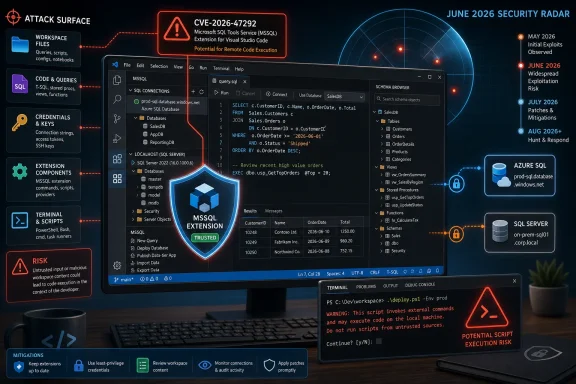 The RCE Label Lands Inside the Developer Workbench
Remote code execution is a phrase security teams are trained to treat seriously, sometimes too mechanically. In Windows patch cycles, RCE often conjures images of exposed services, malformed packets, or malicious documents. CVE-2026-47292 is different because the affected component is not the operating system itself but the MSSQL extension for Visual Studio Code, a tool many developers and database administrators use precisely because it brings database work into the editor they already live in.That distinction matters. VS Code is not just a text editor anymore; it is a host for extensions that run code, open terminals, authenticate to services, parse project files, invoke language servers, and sometimes download companion services. The MSSQL extension, in particular, is designed to connect developers to SQL Server, Azure SQL Database, Azure SQL Managed Instance, SQL databases in Microsoft Fabric, and related data tooling. In practice, it often runs on machines that also hold connection strings, local secrets, cloud identities, source repositories, and saved database profiles.
Microsoft’s advisory language identifies the vulnerability as remote code execution, but the publicly visible technical detail appears restrained. That is normal for freshly disclosed Microsoft vulnerabilities, especially when the vendor is trying to give defenders enough information to patch without giving attackers a ready-made exploit recipe. The tradeoff is that administrators are left reading between fields: affected product, impact, exploitability assessment, remediation path, and whatever CVSS or metadata Microsoft chooses to expose.
The user-facing confusion around this class of advisory is understandable. Security pages often include explanatory text about metrics such as confidence, exploitability, or technical detail availability, and those definitions can look like the story itself. The real story is simpler: Microsoft has acknowledged a real vulnerability in a Microsoft-published VS Code extension, and the affected population is not limited to people who think of themselves as “running SQL Server.” It includes anyone whose developer workstation has become the control plane for database work.
Microsoft’s Sparse Detail Is a Signal, Not an All-Clear
There is a temptation to downgrade any advisory that does not arrive with exploit code, active exploitation claims, or a breathless vendor blog. That is a mistake with developer tooling. Sparse disclosure does not mean low risk; it usually means defenders must prioritize based on product placement and plausible blast radius rather than on a fully public root-cause analysis.The MSSQL extension is not a toy add-on. Microsoft’s own documentation positions it as the supported path for modern SQL development in VS Code, with features for connecting to databases, browsing objects, running T-SQL, viewing results, managing schema workflows, and integrating newer productivity features. Microsoft has also been nudging database developers toward VS Code as Azure Data Studio reaches retirement, making the extension more strategically important than it might have been a few years ago.
That migration context is important. When a tool becomes the default replacement path, its security posture becomes more consequential. A vulnerability in a niche extension is a cleanup task; a vulnerability in the extension that inherits a retired product’s workflow is an enterprise exposure question.
The advisory’s “remote code execution” classification also deserves careful parsing. It does not automatically mean an unauthenticated attacker on the internet can pop a developer laptop from across the planet. In developer tooling, RCE can depend on user interaction, malicious workspaces, crafted files, compromised repositories, poisoned extension assets, manipulated server responses, or other preconditions. But it does mean Microsoft believes the impact can cross the line from “data exposure” or “crash” into code running where it should not.
That is the threshold that matters. Developer machines are high-value targets because they bridge identities and environments. They often hold Git credentials, package publishing tokens, database access, SSH keys, Azure sessions, and local copies of proprietary code. If an attacker can run code through a trusted extension context, the compromise may begin in the editor but rarely stays there.
VS Code Extensions Have Become the New Office Macros
For two decades, Windows defenders learned to fear Office documents because they combined trusted user workflows, automation, scripting, and sensitive business context. VS Code extensions now occupy a similar role for engineering organizations. They are installed casually, trusted deeply, and updated frequently.Extensions can contribute commands, language services, webviews, debuggers, task providers, authentication flows, file-system watchers, and terminals. They can react to a workspace being opened. They can parse configuration files. They can call external binaries. They can communicate with local services. That flexibility is the reason VS Code became dominant; it is also why extension vulnerabilities can have outsized impact.
The MSSQL extension adds another layer because database tooling tends to normalize contact with remote systems. A developer expects it to talk to servers, fetch metadata, render results, handle credentials, and process SQL-related project artifacts. That means suspicious network and file activity can blend into normal use more easily than it would in a simpler editor plugin.
Security teams have already spent years learning this lesson through the broader software supply chain. Malicious npm packages, poisoned CI scripts, dependency confusion, and compromised build systems all exploit the same organizational blind spot: developers are powerful users whose tools are trusted to automate dangerous tasks. VS Code extensions belong in that same threat model.
The uncomfortable point is that many enterprises still manage VS Code like a personal productivity app rather than a privileged development platform. They inventory Windows versions, browser versions, Office channels, EDR agents, and server roles, but extension versions often remain self-managed. That gap is exactly where CVE-2026-47292 should get attention.
The Database Angle Raises the Stakes
A vulnerability in a theme extension is annoying. A vulnerability in an extension that brokers database access is more serious. The MSSQL extension is often configured in environments where developers connect to production-like systems, staging databases, local SQL Server instances, Azure SQL resources, or shared development servers. Even if direct production access is prohibited, the credentials and schemas available from a developer workstation can be valuable.Attackers do not need every compromised developer to have production admin rights. They need footholds. A machine with read access to internal repositories, database migration scripts, connection profiles, and environment files can provide enough context for follow-on attacks. Schema names, stored procedure logic, test credentials, API keys, and deployment conventions are intelligence.
Database tools are also attractive because they sit close to data movement. Query results may include customer-like records. Exported data may land in local folders. Notebooks, scratch files, and SQL scripts may contain secrets pasted during debugging. This is not ideal practice, but it is common enough that defenders should assume it happens.
The extension’s supported footprint also spans Windows, macOS, and Linux. That cross-platform reach is part of VS Code’s appeal, but it complicates enterprise response. A Windows admin may patch the managed fleet while missing developer Macs. A Linux workstation used by a data engineer may never appear in the same software inventory. The exposure is organized around workflows, not operating systems.
That is why the response should begin with the extension inventory rather than the Windows patch dashboard. The question is not “Are our Windows machines patched?” It is “Where is the MSSQL extension installed, what version is it on, and can we force or verify the fixed build?”
Azure Data Studio’s Retirement Makes This More Than an Extension Bug
Microsoft’s database tooling strategy has been shifting. Azure Data Studio’s retirement in 2026 pushes users toward Visual Studio Code with the MSSQL extension for continued support. That makes the extension a consolidation point for database development, not merely an optional add-on.Consolidation has benefits. A single editor means one ecosystem, one marketplace, one extension model, and a faster feature pipeline. Developers like it because they can keep code, notebooks, SQL scripts, terminals, and Git operations in one place. Microsoft likes it because VS Code is already the gravitational center of its developer tooling.
But consolidation also concentrates risk. When the supported path for SQL development runs through an extension, the extension inherits expectations normally reserved for a full product. Enterprises will expect security servicing, predictable update behavior, documentation, compatibility guarantees, and administrative control. CVE-2026-47292 is an early test of how seriously organizations treat that model.
The practical concern is not that Microsoft cannot patch extensions. It can, and the VS Code marketplace can distribute updates quickly. The concern is that enterprise governance around extensions is often weaker than governance around installed applications. Many organizations can tell you exactly which build of Microsoft 365 Apps is deployed but cannot tell you which version of
ms-mssql.mssql is installed across developer laptops.That asymmetry is no longer defensible. If VS Code is the replacement shell for data tooling, then its extensions need the same asset management and patch discipline as conventional desktop software. Otherwise, the convenience story becomes a security debt story.
The Patch Path Is Easy for Individuals and Messy for Fleets
For an individual developer, the likely remediation path is straightforward: update the MSSQL extension from the VS Code extensions view, restart the editor if required, and confirm that the installed version is current. VS Code’s extension update model is generally painless, especially for users who leave automatic extension updates enabled.For enterprises, the story is messier. Some organizations disable automatic extension updates to preserve build reproducibility or prevent unreviewed changes. Others allow developers to install extensions freely but lack central reporting. Remote development setups, containerized environments, offline workstations, and locked-down networks can all create pockets of stale extension versions.
Offline installation is especially relevant for the MSSQL extension because Microsoft documents VSIX-based installation paths for machines without internet access, including bundled releases that include required service components. That is useful operationally, but it also means defenders cannot assume marketplace auto-update will reach every installation. The very environments with stricter network controls may require manual packaging and redeployment.
This is where security teams should resist the urge to treat “developer tools” as somebody else’s problem. Desktop engineering, application security, database administration, and identity teams all have a stake. A vulnerable database extension on a developer machine can become an identity incident, a source-code incident, or a data exposure incident depending on what the attacker reaches next.
The best response is boring but effective: identify installations, update them, confirm versions, and document an extension governance process. The point is not to panic over this single CVE. The point is to stop being surprised when a developer extension shows up in the security update guide.
RCE Does Not Need a Worm to Be Dangerous
The Windows community has a deeply ingrained severity reflex: if a vulnerability is wormable, internet-facing, or actively exploited, it is urgent; if not, it can wait. That model works for some infrastructure bugs. It is less reliable for developer workstation bugs.A developer-tool RCE can be operationally dangerous even when it requires user interaction. Developers open repositories from outside the company. They clone proofs of concept. They inspect customer samples. They review partner code. They run local services. They test database scripts. The line between trusted and untrusted input is much blurrier than in a typical office workflow.
The threat model also includes social engineering that looks normal to technical users. “Can you reproduce this database issue?” “Here is a sample repo.” “Open this workspace and run the query.” “Review this migration script.” These are plausible developer interactions, not cartoon phishing. If a vulnerability can be triggered through crafted project content or malicious responses during normal extension use, user interaction is not much comfort.
Even without public exploit details, defenders should assume attackers understand this pattern. The last several years of supply-chain attacks have shown that development environments are attractive precisely because they are trusted and under-monitored. An EDR alert from a compiler, editor, terminal, or language server may be easier to dismiss than the same behavior from a random executable.
That does not mean every RCE in a VS Code extension should cause an emergency bridge. It does mean the risk conversation should include business context. A developer with access to payment systems, database migrations, production credentials, or release signing workflows is not the same as a student using the extension on a lab machine.
Confidence Metrics Are About Evidence, Not Comfort
The text attached to Microsoft’s advisory describes a metric for confidence in the existence and technical understanding of a vulnerability. This kind of metric is often misunderstood. It does not measure whether defenders should care emotionally. It measures how certain the ecosystem is that the vulnerability is real and how much technical detail is available.That distinction matters because confirmed vendor acknowledgment changes the defensive calculus. A rumor about a possible flaw in a package is one thing. A CVE entry in Microsoft’s Security Update Guide is another. It means the vendor has accepted the issue into its security response process and is publishing remediation guidance under a stable identifier.
At the same time, confidence in existence is not the same as exploit maturity. A vulnerability can be confirmed while no public exploit is known. It can also be poorly described publicly while attackers privately work from patches, diffs, or crash reports. Microsoft’s restrained advisory model is designed to reduce attacker handholding, but it cannot prevent patch diffing or independent rediscovery.
For administrators, the right conclusion is balanced urgency. Do not oversell CVE-2026-47292 as an internet-scale catastrophe unless evidence emerges to support that. Do not undersell it because the advisory does not hand you a full exploit chain. Treat it as a confirmed RCE in a sensitive developer extension and patch accordingly.
The Real Exposure Is the Developer Identity
The most valuable asset on a developer workstation is often not the code stored on disk. It is the identity context. A signed-in VS Code session can be tied to GitHub, Azure, Microsoft accounts, SSH remotes, remote tunnels, package registries, and internal services. The editor becomes a hub where local files and cloud permissions meet.The MSSQL extension adds database authentication to that mix. Depending on configuration, users may authenticate through Microsoft Entra ID, SQL authentication, integrated auth, or other connection methods. Even if passwords are not stored in plain text, tokens, cached sessions, configuration metadata, and connection histories can help an attacker move.
This is why “least privilege” for developers has moved from compliance slogan to practical containment strategy. If a compromised extension context can reach only development databases and non-production subscriptions, the incident is smaller. If the same context can reach production data, release infrastructure, and secrets, the workstation becomes a launchpad.
Organizations should also revisit how they handle database access from local machines. VPN access, conditional access, just-in-time permissions, privileged access workstations, and separate admin identities are not glamorous controls, but they matter. The lesson of CVE-2026-47292 is not that every developer should lose useful tooling. It is that useful tooling should not automatically inherit broad, persistent access.
Security teams sometimes talk about developer experience and security as if they are opposing forces. In reality, predictable controls can improve both. A well-managed extension baseline, clear update policy, and sane identity boundaries are less disruptive than emergency lockdowns after a compromise.
Marketplace Trust Is Not the Same as Runtime Safety
The Visual Studio Marketplace gives extensions a distribution channel, discoverability, and some measure of publisher accountability. Microsoft-published extensions carry extra implicit trust because users assume they are maintained, reviewed, and serviced. That trust is reasonable, but it is not a substitute for runtime safety.Any sufficiently powerful extension can contain vulnerabilities. Official origin reduces some risks, such as outright malicious publishing, but it does not eliminate parsing bugs, command injection paths, unsafe file handling, flawed webviews, dependency vulnerabilities, or mistakes in companion services. In fact, official extensions may be more attractive targets because they are widely installed and rarely questioned.
The ecosystem problem is broader than Microsoft. VS Code’s success has produced an enormous extension marketplace where code quality, maintenance practices, and security response vary widely. Researchers have repeatedly warned that IDE extensions can exfiltrate files, abuse local servers, or exploit trust boundaries. CVE-2026-47292 sits within that larger trend even though it involves a Microsoft extension rather than a random marketplace package.
For enterprises, the answer is not to ban extensions wholesale. That would be unrealistic and counterproductive. The answer is to treat extensions like software dependencies with privileges: approve them, inventory them, update them, and remove what is no longer needed.
That last point is underrated. Many developers accumulate extensions over years. A tool installed for one project remains active long after the project ends. Attack surface expands by sediment. Periodic cleanup is not busywork; it is exposure reduction.
Microsoft’s Developer Tooling Needs Enterprise-Grade Admin Controls
If Microsoft wants VS Code to absorb more professional workflows, including database development after Azure Data Studio’s retirement, it must keep improving the administrative story. Enterprises need more than marketplace convenience. They need policy, reporting, update channels, extension allowlists, version pinning where necessary, and security visibility that fits existing management tools.Some of this already exists in pieces through VS Code settings, enterprise deployment methods, endpoint management, and marketplace controls. But the experience is not as mature or universal as Windows Update for Business, Microsoft 365 Apps servicing, or Defender security baselines. The more critical VS Code becomes, the less acceptable that gap becomes.
There is also a communications challenge. Patch Tuesday culture is built around operating system and server products. Developer extension advisories can get lost because they do not always arrive as a familiar KB install or cumulative update. If a security team’s workflow begins and ends with Windows Update compliance, extension CVEs may slip through.
Microsoft can help by making extension security updates more visible to administrators, not just to developers inside the editor. The ideal state is simple: an admin should be able to ask which machines have a vulnerable extension version and get an answer without writing a custom script. Until that is normal, organizations need their own compensating processes.
The bigger philosophical shift is that developer tooling is now infrastructure. It may not sit in a rack, but it shapes what gets built, deployed, and connected. Security programs that fail to govern it are governing only part of the environment.
The Immediate Playbook Is Small but Non-Negotiable
CVE-2026-47292 does not require a theatrical response. It requires a disciplined one. The organizations that handle it well will be the ones that already know where VS Code is installed, which extensions are permitted, and how quickly extension updates propagate.For smaller teams, the response may be as simple as telling developers to update the MSSQL extension and verify the version. For larger enterprises, it should trigger inventory checks and perhaps a broader review of database-tooling access. For regulated environments, it may need evidence collection: affected assets, remediation timestamp, validation method, and exception handling.
The important point is to avoid treating the IDE as invisible. If a browser extension with RCE potential would trigger concern, a VS Code database extension should too. The editor may look like a local productivity tool, but it often has a better map of your engineering environment than many security products do.
The MSSQL Extension Advisory Draws a New Boundary Line
This is the practical readout for WindowsForum readers: the vulnerability is less about one extension and more about where enterprises draw the boundary of managed risk.- CVE-2026-47292 is a Microsoft-acknowledged remote code execution vulnerability in the Visual Studio Code MSSQL extension, not a generic SQL Server engine flaw.
- The affected workflow matters because the extension commonly sits near source code, database credentials, cloud identities, and local developer automation.
- Updating the extension should be the first response, but verifying extension versions across managed and unmanaged developer machines is the harder enterprise task.
- Azure Data Studio’s retirement makes the MSSQL extension more strategically important, so organizations should treat it as supported database tooling rather than an optional convenience.
- Security teams should review VS Code extension governance, including allowlisting, inventory, automatic update policy, offline VSIX deployment, and stale extension cleanup.
- The absence of public exploit details should not be mistaken for low impact, because confirmed RCE in developer tooling can become a supply-chain or identity incident.
References
- Primary source: MSRC
Published: 2026-06-09T07:00:00-07:00
Security Update Guide - Microsoft Security Response Center
 msrc.microsoft.com
- Related coverage: threats.kaspersky.com
Kaspersky Threats — KLA85526
threats.kaspersky.com
- Official source: github.com
Visual Studio Code for Linux Remote Code Execution Vulnerability · Advisory · microsoft/vscode · GitHub
GitHub is where people build software. More than 150 million people use GitHub to discover, fork, and contribute to over 420 million projects. github.com
- Related coverage: sentinelone.com
CVE-2026-21518: Visual Studio Code Auth Bypass Vulnerability
CVE-2026-21518 is an authentication bypass vulnerability in Microsoft Visual Studio Code. Learn about its impact, affected versions, and mitigation methods.www.sentinelone.com
- Related coverage: cve.circl.lu
Vulnerability-Lookup
Vulnerability-Lookup - Fast vulnerability lookup correlation from different sources.cve.circl.lu - Related coverage: itpro.com
Millions of developers could be impacted by flaws in Visual Studio Code extensions – here's what you need to know, and how to protect yourself | IT Pro
Three newly discovered flaws in Visual Studio Code (VS Code) extensions enable local file exfiltration and remote code execution, researchers have warned.www.itpro.com
- Related coverage: support.bull.com
- Related coverage: aha.org
- Official source: microsoft.com
MSRC - Microsoft Security Response Center
The Microsoft Security Response Center is part of the defender community and on the front line of security response evolution. For over twenty years, we have been engaged with security researchers working to protect customers and the broader ecosystem.www.microsoft.com
- Official source: learn.microsoft.com
Security Advisories and Bulletins | Microsoft Learn
learn.microsoft.com - Related coverage: howtofix.guide
Microsoft Defender CVE-2026-41091 and CVE-2026-45498 Exploited
Microsoft Defender CVE-2026-41091 and CVE-2026-45498 are exploited. Verify Engine 1.1.26040.8, Platform 4.18.26040.7, and update endpoints.howtofix.guide - Official source: support.microsoft.com
- Related coverage: sra.io
- Related coverage: osv.dev

OSV - Open Source Vulnerabilities
Comprehensive vulnerability database for your open source projects and dependencies.
osv.dev
- Related coverage: marketplace.visualstudio.com
SQL Server (mssql) - Visual Studio Marketplace
Extension for Visual Studio Code - Design and optimize schemas for SQL Server, Azure SQL, and SQL Database in Fabric using a modern, lightweight extension built for developersmarketplace.visualstudio.com - Official source: devblogs.microsoft.com
MSSQL Extension for VS Code: Azure SQL Database Provisioning and More - Azure SQL Dev Corner
The MSSQL extension for VS Code v1.43 expands what’s possible inside Visual Studio Code with the General Availability of Schema Designer with GitHubdevblogs.microsoft.com - Related coverage: documentation.red-gate.com
- Related coverage: docs.redhat.com
migration toolkit for applications 8.0 Configuring and using the Visual Studio Code Extension for MTA
PDF documentdocs.redhat.com

