

CVE-2026-57979 is an RDP information-disclosure vulnerability published July 14, 2026, but Microsoft has not yet established affected products or update KBs in the verified information. Do not guess a patch; inventory RDP exposure and apply the product-specific KB listed by the Microsoft Security Response Center when available.
This is not yet a deploy-now advisory. No affected Windows versions, KB mappings, severity rating, or exploitation status have been established in the information available for this article. Windows administrators should monitor the MSRC entry for CVE-2026-57979 while preparing an accurate inventory of Windows product identities and inbound RDP exposure.
The MSRC entry is the authority for deciding whether a particular Windows product is affected and which update applies. Until its Security Updates table contains product rows and KB mappings, there is no responsible basis for selecting a patch by month, product family, or similarity to another RDP vulnerability.
When Microsoft publishes the table, this article should be updated with the exact affected-product list, KB mappings, severity, and exploitability assessment. Those fields should be transcribed without extending them to products Microsoft does not list.
Do not assume that every system capable of using Remote Desktop is affected. Likewise, do not assume that a system is unaffected merely because it does not ordinarily accept inbound Remote Desktop sessions. The title does not provide enough detail to determine which protocol role, Windows component, or connection direction is relevant.
The affected-product section should be populated only from the MSRC product table. At that point, preserve Microsoft’s product naming closely enough to distinguish releases, servicing branches, architectures, and server products where Microsoft makes those distinctions.
A KB associated with the same month, another Windows release, or a different RDP issue is not a safe substitute for a missing CVE mapping. Administrators should not create deployment logic around a placeholder number. Once MSRC provides product rows, copy each product and its corresponding KB into the change record and preserve the time of retrieval because Microsoft may revise the entry.
The inventory should distinguish at least the following categories:
The “later cumulative update” row requires particular care. Whether a later package covers an earlier security fix is a servicing question that must be resolved from Microsoft’s product-specific information. This article does not assume universal supersedence behavior, and administrators should not declare compliance based only on a higher KB number, a later date, or a newer-looking build.
That action must be described accurately. The verified CVE facts do not show that inbound RDP exposure is a prerequisite, that a particular port reaches the vulnerable component, or that disabling inbound access fully addresses the issue. The title also does not establish whether an RDP client, an RDP host, or shared protocol processing is affected.
For that reason, the exposure review should answer business and configuration questions rather than attempting to reverse-engineer the vulnerability:
The same limitation applies to broader claims about gateways, VPNs, multifactor authentication, segmentation, cloud network rules, update-management products, and package-inspection tools. Those technologies may be relevant to an organization’s general security architecture, but the verified CVE information does not establish them as fixes or mitigations for CVE-2026-57979.
Common false positives include:
The immediate task is preparation rather than speculative deployment: establish exact operating-system identities, determine where inbound RDP is enabled, and remove access that has no approved business purpose. This creates a clean mapping set for the MSRC Security Updates table without claiming that inbound RDP is a proven prerequisite or that disabling it is a complete CVE fix.
When Microsoft adds product and update information, the response becomes straightforward. Match each device to the exact MSRC product row, deploy the exact KB listed for that product through the approved servicing channel, and verify installation with trusted evidence. If a later cumulative update is used as the compliance basis, preserve Microsoft’s product-specific servicing evidence. Unsupported or unpatchable systems should remain visible and enter a documented exception, upgrade, replacement, isolation, or retirement process.
Future MSRC revisions may establish affected products, severity, exploitability, technical prerequisites, mitigations, or servicing details. Windows teams should incorporate those facts when Microsoft publishes them—not before. Until then, the defensible course is concise: do not guess a patch, prepare accurate inventory, reduce unnecessary inbound RDP exposure, and keep the response open for the authoritative product-to-KB mapping.
This is not yet a deploy-now advisory. No affected Windows versions, KB mappings, severity rating, or exploitation status have been established in the information available for this article. Windows administrators should monitor the MSRC entry for CVE-2026-57979 while preparing an accurate inventory of Windows product identities and inbound RDP exposure.
Verified status and current unknowns
The vulnerability title alone does not establish whether the affected behavior is client-side or server-side, whether inbound RDP must be enabled, whether authentication or user interaction is required, or whether a particular network path reaches the vulnerable component.
- CVE: CVE-2026-57979
- Microsoft title: Windows Remote Desktop Protocol (RDP) Information Disclosure Vulnerability
- Published: July 14, 2026, at 7:00 a.m. Pacific time
- Technology: Windows Remote Desktop Protocol
- Impact: Information disclosure
- Affected products: Not established in the verified information
- Security-update KBs: Not established
- Severity and CVSS details: Not established
- Exploitability or public-disclosure status: Not established
- Technical prerequisites, authentication requirements, affected component, and information exposed: Not established
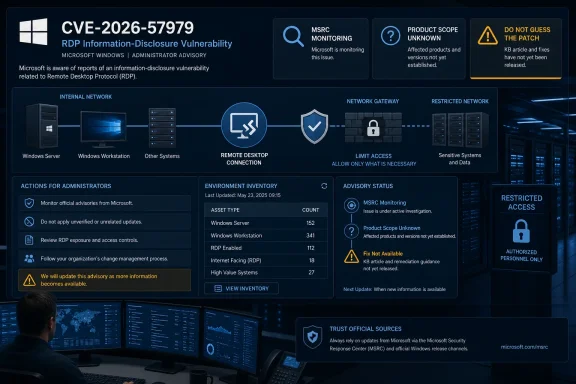 Start With the MSRC Security Updates Table
The MSRC entry is the authority for deciding whether a particular Windows product is affected and which update applies. Until its Security Updates table contains product rows and KB mappings, there is no responsible basis for selecting a patch by month, product family, or similarity to another RDP vulnerability.When Microsoft publishes the table, this article should be updated with the exact affected-product list, KB mappings, severity, and exploitability assessment. Those fields should be transcribed without extending them to products Microsoft does not list.
MSRC Security Updates status
| MSRC field | Current verified status | Required administrator action |
|---|---|---|
| Affected products | Not yet established | Inventory exact Windows product, release, architecture, and build; do not infer applicability |
| Security-update KBs | Not yet established | Do not guess a KB or approve an unrelated update as the CVE fix |
| Severity | Not yet established | Use the rating Microsoft publishes rather than assigning an informal label |
| Exploitability assessment | Not yet established | Monitor the MSRC entry and record the assessment and check time when available |
| Public disclosure | Not yet established | Do not describe the vulnerability as publicly disclosed without an authoritative update |
| Active exploitation | Not yet established | Do not describe attacks as observed or confirmed without authoritative evidence |
| Mitigations or workarounds | Not yet established | Treat exposure reduction as prudent administration, not as a Microsoft-validated CVE workaround |
| Technical prerequisites | Not yet established | Avoid claims about authentication, user interaction, attack direction, ports, or reachability |
| Revision history | Monitor for changes | Recheck before deployment approval and before closing remediation records |
Affected-product list
No affected-product list is established in the verified information available for this article.Do not assume that every system capable of using Remote Desktop is affected. Likewise, do not assume that a system is unaffected merely because it does not ordinarily accept inbound Remote Desktop sessions. The title does not provide enough detail to determine which protocol role, Windows component, or connection direction is relevant.
The affected-product section should be populated only from the MSRC product table. At that point, preserve Microsoft’s product naming closely enough to distinguish releases, servicing branches, architectures, and server products where Microsoft makes those distinctions.
Product-to-KB mapping
No product-to-KB mappings are established yet.| Microsoft product row | Applicable security KB | Severity | Exploitability | Article status |
|---|---|---|---|---|
| Not yet published in verified information | Not available | Not available | Not available | Monitor MSRC |
What to Do Now
The useful pre-patch task is to establish which devices could require action and where avoidable RDP exposure exists. Keep this procedure narrow:- Inventory the exact operating-system identity. Record each device’s full Windows product, release, architecture, and current build using the organization’s approved inventory source.
- Determine whether inbound RDP is enabled. Use the organization’s approved endpoint-management or configuration-audit method. Do not equate the presence of an RDP client, an open port, or a generic “Windows” label with confirmed CVE applicability.
- Restrict or disable unneeded inbound RDP through approved policy. Confirm the business owner and an alternate administration path before changing remote-access settings. Record the action as exposure reduction, not as proof that the CVE is mitigated.
- Prepare to map every device to MSRC. When the product table appears, compare the exact inventory identity with the exact Microsoft product row and assign only the KB listed for that row.
The inventory should distinguish at least the following categories:
- Devices that accept inbound RDP for an approved business purpose
- Devices that accept inbound RDP without a documented requirement
- Devices whose RDP state is unknown or cannot be reliably assessed
- Devices that do not accept inbound RDP under the organization’s approved configuration
- Devices with incomplete operating-system identity or stale inventory
- Devices that may be unsupported or outside normal servicing
- Devices that cannot be changed because of operational, safety, or availability constraints
What to Do When MSRC Adds Updates
When the MSRC entry provides affected products and security updates, move from preparation to product-specific remediation:- Record the MSRC revision date and the time at which the entry was reviewed.
- Export or transcribe every affected-product row relevant to the environment.
- Match each device to an exact product row using its product, release, architecture, and build.
- Record the specific KB Microsoft maps to that product.
- Review Microsoft’s update notes for any prerequisites, restart information, known issues, or special deployment instructions that Microsoft actually publishes.
- Test the applicable update on representative systems using the organization’s established change process.
- Deploy it through the organization’s approved Windows servicing channel.
- Verify that each in-scope device installed the required update or a later update that Microsoft documents as covering it.
- Separate failed, pending, stale, unsupported, and unknown devices from confirmed compliant devices.
- Recheck the CVE revision history before closing the remediation action.
Update mapping worksheet
| Inventory field | What to record | Decision use |
|---|---|---|
| Device identity | Asset name, owner, purpose, and management status | Establish accountability and find unmanaged exceptions |
| Operating system | Exact product, release, architecture, and build | Match the device to an MSRC product row |
| Inbound RDP state | Required, unneeded, disabled, restricted, or unknown | Prioritize exposure review while applicability is unresolved |
| MSRC applicability | Affected, not listed, or unresolved | Determine whether the CVE update is required |
| Required update | Exact KB listed by MSRC for that product | Prevent cross-product or month-based guessing |
| Installed state | Required KB, documented later update, pending, failed, or unknown | Determine remediation status |
| Support status | Supported, extended/special servicing, unsupported, or unknown | Identify devices needing separate treatment |
| Exception record | Reason, owner, interim restriction, review date, and target resolution | Keep unpatched or unverified systems visible |
| Evidence time | Time MSRC and endpoint state were checked | Account for later advisory revisions or delayed reporting |
WindowsForum Decision Matrix
This matrix converts the sparse advisory into a practical decision without pretending that unpublished details are known.| Situation | Decision | Immediate action | Closure condition |
|---|---|---|---|
| MSRC has no KB yet | Do not guess or deploy a supposed CVE fix | Inventory exact OS identity and inbound RDP state; disable or restrict unneeded inbound RDP through approved policy; monitor MSRC | Keep the item open until Microsoft supplies applicability and update information or states that no update is required |
| Device is listed and a KB is available | Treat the exact MSRC row as the deployment authority | Test and deploy that product-specific KB through the approved servicing channel; follow any Microsoft-published prerequisites | Confirm installation on the correct product and complete any Microsoft-required post-installation action |
| A later cumulative update is installed | Do not rely on the date or word “cumulative” alone | Confirm through Microsoft’s servicing information that the later update covers or replaces the listed security update for that exact product | Record the later update and the Microsoft basis for treating it as compliant |
| Device is unsupported or cannot patch | Do not mark it compliant and do not silently exclude it | Escalate to the system owner and risk process; remove unnecessary RDP exposure where feasible; isolate, replace, upgrade, or otherwise handle it under an approved exception | Supported remediation, retirement, replacement, or a time-limited accepted exception with an owner and review date |
| Device product identity is incomplete | Applicability cannot be determined | Correct the inventory before assigning a KB | Exact product identity is available and mapped to MSRC |
| Device is not listed by MSRC | Do not deploy another product’s KB for this CVE | Preserve the product evidence and monitor later revisions | The latest reviewed MSRC revision still does not list the product, or Microsoft otherwise clarifies its status |
| Update was assigned but installation is unknown | Treat the device as unresolved | Obtain reliable endpoint or management evidence and investigate stale reporting | Installation or documented non-applicability is confirmed |
| Inbound RDP is enabled but not required | Reduce avoidable exposure now | Disable or restrict it through approved policy after confirming an alternate administration path | The managed configuration is enforced and the owner record is updated |
Exposure Reduction Without Unsupported Claims
Disabling or restricting unneeded inbound RDP is a reasonable administrative action while the product scope remains unknown. It reduces unnecessary remote-access surface and gives administrators a smaller, better-documented set of systems to evaluate when the MSRC table becomes available.That action must be described accurately. The verified CVE facts do not show that inbound RDP exposure is a prerequisite, that a particular port reaches the vulnerable component, or that disabling inbound access fully addresses the issue. The title also does not establish whether an RDP client, an RDP host, or shared protocol processing is affected.
For that reason, the exposure review should answer business and configuration questions rather than attempting to reverse-engineer the vulnerability:
- Does the device have an approved requirement to receive RDP connections?
- Is the requirement current, documented, and assigned to an owner?
- Is the configured access narrower than necessary, broader than necessary, or unknown?
- Can inbound RDP be disabled without disrupting the only available administration path?
- If it must remain enabled, is the system included in the priority inventory for immediate MSRC mapping?
- Can the organization reliably verify and enforce the intended state through its approved policy system?
- Is the device unsupported, unmanaged, intermittently connected, or otherwise likely to miss the eventual update?
The same limitation applies to broader claims about gateways, VPNs, multifactor authentication, segmentation, cloud network rules, update-management products, and package-inspection tools. Those technologies may be relevant to an organization’s general security architecture, but the verified CVE information does not establish them as fixes or mitigations for CVE-2026-57979.
Avoid False Positives and False Closure
Sparse advisories create pressure to produce a quick yes-or-no compliance result. In this case, the responsible interim result may be “applicability unresolved.” That is preferable to a confident but unsupported answer.Common false positives include:
- Labeling every Windows device as affected because it includes RDP-related functionality
- Treating every device with inbound RDP enabled as confirmed vulnerable
- Selecting a KB from the publication month without an MSRC product mapping
- Importing a KB associated with another Windows release or another vulnerability
- Calling generic remote-access hardening a Microsoft-provided CVE mitigation
- Describing the issue as pre-authentication, remote, unauthenticated, client-side, or server-side without supporting details
- Marking a device fixed because an update was approved or assigned
- Treating “no status” or stale management data as successful installation
- Treating any later-dated update as automatically covering the CVE
- Closing unsupported devices because no applicable KB was found
- Assuming that disabled inbound RDP proves the vulnerable component cannot be reached
- Failing to revisit the case after Microsoft revises the product table or exploitability assessment
- Applicability: Does Microsoft list the exact product?
- Remediation: What exact update does Microsoft map to that product?
- Verification: What evidence shows the device received the required update or a Microsoft-documented replacement?
- Exposure: Is unneeded inbound RDP enabled, and has it been restricted through approved policy?
Publication and Response Timeline
| Point in time | Established information | Administrator response |
|---|---|---|
| July 14, 2026, 7:00 a.m. Pacific | Microsoft publication time supplied for CVE-2026-57979; title identifies an RDP information-disclosure vulnerability | Open tracking, preserve the verified facts, and avoid unsupported technical conclusions |
| Before an MSRC product/KB table is available | Affected products and applicable updates remain unresolved | Inventory exact Windows identities and inbound RDP state; remove unneeded inbound RDP through approved policy |
| When MSRC adds affected products and KBs | Product-specific applicability and remediation become actionable | Map devices to exact rows, test, deploy, and verify the listed updates |
| If MSRC revises the entry | Scope, assessment, or deployment information may change | Reconcile the revision against inventory, deployment groups, and previously closed records |
| After deployment | Assignment alone does not establish endpoint remediation | Preserve product mapping, installation evidence, exception status, and review time |
| During continuing monitoring | Exploitability or public-disclosure information may be updated | Reassess urgency and exception handling using Microsoft’s current assessment |
Admin Checklist
What to do now
- [ ] Record CVE-2026-57979 as an RDP information-disclosure vulnerability published July 14, 2026.
- [ ] Record that affected products, KBs, severity, and exploitability are not yet established in the verified information.
- [ ] Assign an owner to monitor the MSRC entry and its revision history.
- [ ] Inventory the exact Windows product, release, architecture, and build for managed devices.
- [ ] Identify systems with missing, stale, or ambiguous operating-system inventory.
- [ ] Determine whether inbound RDP is enabled using approved organizational methods.
- [ ] Confirm which systems have a documented requirement to receive RDP connections.
- [ ] Restrict or disable unneeded inbound RDP through approved policy after confirming an alternate management path.
- [ ] Flag unsupported, unmanaged, isolated, and operationally constrained devices.
- [ ] Do not guess a KB, severity, exploitability status, attack path, or affected product range.
What to do when MSRC adds updates
- [ ] Record the MSRC revision date and review time.
- [ ] Capture the affected-product list exactly as Microsoft publishes it.
- [ ] Capture each product-to-KB mapping.
- [ ] Record Microsoft’s severity and exploitability assessment without embellishment.
- [ ] Review any Microsoft-published prerequisites, known issues, mitigations, or restart instructions.
- [ ] Match each device to an exact MSRC product row.
- [ ] Test and deploy the corresponding update through the approved servicing channel.
- [ ] Verify endpoint installation rather than relying only on assignment or approval.
- [ ] Validate any claim that a later cumulative update covers the listed KB.
- [ ] Separate confirmed compliant devices from pending, failed, stale, unsupported, and unknown devices.
- [ ] Escalate devices that cannot patch into a documented exception, upgrade, replacement, isolation, or retirement process.
- [ ] Recheck the MSRC revision history before closing the response.
- [ ] Reopen affected records if Microsoft later expands the product list or changes the update mapping.
What Windows Teams Should Carry Forward
CVE-2026-57979 should currently be handled as a newly published Windows RDP information-disclosure issue with incomplete operational detail. The verified information does not yet support a list of affected Windows versions, product-specific KBs, a severity label, an exploitability statement, or a technical attack narrative.The immediate task is preparation rather than speculative deployment: establish exact operating-system identities, determine where inbound RDP is enabled, and remove access that has no approved business purpose. This creates a clean mapping set for the MSRC Security Updates table without claiming that inbound RDP is a proven prerequisite or that disabling it is a complete CVE fix.
When Microsoft adds product and update information, the response becomes straightforward. Match each device to the exact MSRC product row, deploy the exact KB listed for that product through the approved servicing channel, and verify installation with trusted evidence. If a later cumulative update is used as the compliance basis, preserve Microsoft’s product-specific servicing evidence. Unsupported or unpatchable systems should remain visible and enter a documented exception, upgrade, replacement, isolation, or retirement process.
Future MSRC revisions may establish affected products, severity, exploitability, technical prerequisites, mitigations, or servicing details. Windows teams should incorporate those facts when Microsoft publishes them—not before. Until then, the defensible course is concise: do not guess a patch, prepare accurate inventory, reduce unnecessary inbound RDP exposure, and keep the response open for the authoritative product-to-KB mapping.
References
- Primary source: MSRC
Published: 2026-07-14T07:00:00-07:00
Security Update Guide - Microsoft Security Response Center
 msrc.microsoft.com
- Official source: learn.microsoft.com
Understanding security warnings when opening Remote Desktop (RDP) files | Microsoft Learn
Learn how to interpret and respond to security warnings in the Remote Desktop Connection app.learn.microsoft.com - Official source: microsoft.com
Security guidance for remote desktop adoption | Microsoft Security Blog
As the volume of remote workers quickly increased over the past two to three months, IT teams in many companies have been scrambling to figure out how their infrastructures and technologies will be able to handle the increase in remote connections.www.microsoft.com
