

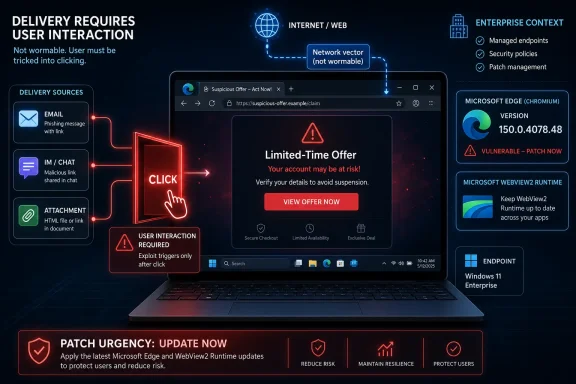
An attacker could exploit CVE-2026-57981 over the network by hosting a specially crafted website that targets Microsoft Edge’s Chromium code path and persuading a user, typically through email, instant messaging, or a malicious attachment, to open that attacker-controlled content in the browser. That is the important part hidden inside the dry MSRC language: this is “network” exploitation, but not wormable exploitation. The attacker needs the web, the browser, and a user action to meet in the same place. For Windows administrators, that makes the vulnerability less like EternalBlue and more like the modern browser threat model in miniature: patch quickly, reduce exposure, and assume persuasion is part of the exploit chain.
Microsoft’s Security Response Center describes CVE-2026-57981 as a Microsoft Edge Chromium-based remote code execution vulnerability, and the user-facing exploitation scenario is familiar: an attacker hosts a crafted site, then convinces someone to view it. Microsoft’s Edge security release notes also show that Edge Stable version 150.0.4078.48 was released on July 2, 2026, incorporating the latest Chromium project security updates, with CVEs to be added as they become available. That chronology matters because Edge vulnerabilities often arrive as part of Chromium’s rapid patch cadence rather than as a traditional Windows Patch Tuesday event.
The phrase “via the Network” can sound more dramatic than the mechanics justify. In CVSS language, a network attack vector means the vulnerable component can be reached through a network path, including the internet. It does not necessarily mean the attacker can scan an IP address, send a packet, and seize control of the machine without the victim doing anything.
For CVE-2026-57981, Microsoft’s own exploitation description puts user interaction at the center of the attack. The victim has to view attacker-controlled content in Edge. That interaction may be as mundane as clicking a link in a phishing email, opening a Teams or instant-message lure, following a poisoned search result, or opening an attachment that leads the browser to hostile web content.
That distinction is not a comfort blanket. Browser RCE bugs are dangerous precisely because user interaction is easy to manufacture at scale. The internet has spent three decades training users to click links, preview documents, open portals, and trust browser-mediated workflows.
A browser RCE flips the direction of contact. The vulnerable machine does not have to expose a service to the internet. Instead, the user’s browser reaches out to a site the attacker controls, parses hostile content, and triggers the bug locally.
That is why CVE-2026-57981 belongs in the same operational category as other modern browser flaws: it is remote because the malicious input comes from outside the system, but it is mediated through browsing behavior. The exploit surface is HTML, JavaScript, WebAssembly, media parsing, font rendering, graphics, IPC, sandbox boundaries, or some other browser-adjacent subsystem depending on the underlying Chromium issue.
Microsoft’s public wording does not provide exploit code or low-level internals, and that is by design. Security advisories are written to help defenders prioritize without handing attackers a cookbook. But the shape of the attack is clear enough: the adversary creates content Edge mishandles, then drives a target toward that content.
But “convince” is not a high bar in the real world. It can mean a fake shipping notice, an invoice portal, a login warning, a shared document, a security update prompt, a poisoned ad placement, or a compromised legitimate website. In enterprise environments, the lure often borrows the vocabulary of the organization: HR forms, benefits enrollment, procurement systems, password resets, collaboration links, or internal knowledge-base pages.
That is why browser vulnerabilities are so valuable to attackers. The browser is both a productivity tool and a trust engine. It renders the company intranet, the SaaS estate, identity prompts, administrative consoles, and the public web in the same visual language.
The exploit path for CVE-2026-57981 is therefore social and technical at once. The attacker needs a delivery mechanism that gets the user to the page, and a crafted page that causes Edge to do something unsafe once it is loaded.
That does not make it harmless. Code execution inside the browser process can expose session data, page contents, credentials in transit, local files reachable through browser permissions, and corporate web apps already authenticated in open tabs. In stronger attack chains, a browser RCE is paired with a sandbox escape or privilege escalation flaw to move from “code in the browser context” to broader system compromise.
This is why defenders should resist both extremes. It is wrong to treat every browser RCE as instant domain compromise. It is equally wrong to dismiss a user-interaction browser RCE as “just phishing.” The vulnerability gives the phishing lure teeth.
In practical terms, the attacker’s first objective may be to run arbitrary code in the context available to the vulnerable Edge component. From there, the value depends on the target’s browser state, operating system hardening, identity posture, endpoint detection, and whether the exploit chain includes additional vulnerabilities.
Microsoft’s July 2, 2026 Edge Stable release, version 150.0.4078.48, is a useful reminder of that pipeline. Microsoft’s own release notes say the update incorporates the latest security updates from the Chromium project. That language appears again and again in Edge security releases because Edge is not an island; it is Microsoft’s browser product layered over a shared Chromium engine.
For administrators, the upside is that Edge updates are frequent and usually automatic. The downside is that “usually” is where risk lives. Frozen VDI images, offline systems, kiosk machines, tightly controlled enterprise channels, broken update services, and unmanaged bring-your-own devices can all lag behind the fix.
The vulnerability also lands in a release that includes enterprise-relevant changes beyond security. Microsoft’s Edge 150 notes mention policy updates, WebView2 downgrade controls for managed devices, and security update alerts in the Edge management service. That broader management context matters because browser patching is no longer a consumer convenience feature; it is an enterprise control plane.
Line-of-business applications, Microsoft 365 components, third-party clients, updaters, help systems, dashboards, and embedded login flows may depend on the Edge WebView2 Runtime. If hostile web content can be rendered inside an application using the vulnerable runtime, the practical exposure may include app workflows that users do not think of as browsing.
Microsoft’s Edge 150 release notes specifically call out enterprise WebView2 runtime downgrade policy as a way for managed organizations to roll back targeted applications temporarily when critical regressions occur. That is a useful feature, but it also creates a governance problem: rollback is not a patching strategy. A downgrade that avoids a business-breaking regression may also reintroduce exposure to browser-engine vulnerabilities if left in place too long.
That tension is now part of the Windows admin job. The browser engine is a shared dependency. Treating it like a standalone app misses where the platform has gone.
User interaction is one of the most abundant resources attackers have. Phishing crews, initial access brokers, malvertising operators, and ransomware affiliates already maintain the infrastructure needed to drive victims to web content. A browser RCE gives that infrastructure a more powerful payload.
The risk also varies by target population. A software developer browsing package documentation, an IT admin signed into privileged cloud consoles, a finance user handling invoices, or an executive assistant processing external attachments may be more valuable than the average endpoint. The same CVE can be routine on one machine and high-impact on another because of who uses it and what sessions are active.
That is why patch priority should be context-aware. Edge should update quickly everywhere, but privileged workstations, admin jump boxes, help-desk systems, and devices used for external document intake deserve special scrutiny.
That matters because the defensive controls before the browser are just as important as the browser patch. Secure email gateways, link detonation, attachment sandboxing, reputation filtering, DNS filtering, browser isolation, and identity-aware conditional access can all reduce the chance that a user reaches the exploit page in the first place. None of those controls should be treated as a substitute for patching, but layered defense is exactly what user-interaction bugs demand.
The second step is content execution. The user lands on a crafted page, and Edge processes the malicious material. Depending on the bug class, the trigger may be immediate page load, a media element, a script path, a WebAssembly module, a font, a canvas operation, a GPU call, a file preview, or a user gesture inside the page.
The third step is post-exploitation. If the exploit works, the attacker needs to do something useful before the browser crashes, the endpoint security stack intervenes, or the process is terminated. That may include fetching a second-stage payload, stealing browser data, probing the local environment, abusing tokens, or chaining to another exploit.
This is the uncomfortable truth of modern browser exploitation: the CVE is one link, not the whole chain. The public advisory tells defenders where the weak link is. The attacker’s campaign decides whether that weak link becomes an incident.
For enterprises, the harder task is verification. Administrators need to know which devices have Edge 150.0.4078.48 or later, which are pinned to older channels, which are running Extended Stable, and which WebView2 runtimes are present. They also need to account for devices that are off VPN, asleep, retired-but-not-removed, or managed by a different tool chain.
Microsoft’s Edge management service and update reporting can help, but inventory quality remains the foundation. A vulnerability like CVE-2026-57981 exposes the gap between “we deploy updates automatically” and “we can prove every high-risk endpoint has applied this specific browser fix.”
The restart problem is particularly stubborn. Browser updates often stage quietly, waiting for process termination. In an enterprise where Edge is the front end for SaaS work, users may resist closing it. That makes communication part of the patch: tell users why a restart matters, not merely that an update exists.
Useful telemetry may include suspicious browser crashes, unusual child processes spawned from Edge, blocked exploit behavior, unexpected script or WebAssembly activity, visits to newly registered domains, redirects from email links, and endpoint alerts tied to msedge.exe or WebView2 host processes. Proxy logs, DNS logs, EDR traces, and mail security events become more valuable when correlated.
The absence of public exploit reports in an advisory should not be overread. Many browser vulnerabilities are patched before defenders see broad exploitation, and some never become practical mass-exploit bugs. Others move quickly from patch diffing to working exploits because attackers compare the fixed and unfixed code paths.
That race is especially sharp in Chromium-based products. The patch becomes a map. Once a fix lands in public source or binaries, skilled researchers and attackers can sometimes infer the vulnerable condition. The safest assumption is that the window between disclosure and weaponization may be short, even when the advisory does not say exploitation is active.
Enterprises should first confirm Edge update status across managed Windows, macOS, and mobile fleets where applicable. They should then check WebView2 runtime versions, especially on systems running embedded web applications or privileged tools. Where Edge updates are controlled by policy, administrators should verify that policy is not unintentionally delaying the Stable channel.
User communications should be short and operational. Ask users to restart Edge. Warn them about unexpected links and attachments. Make clear that a browser restart is not cosmetic; it is how the fix becomes active in the process they are actually using.
Security teams should also review recent alerts involving Edge crashes or suspicious browsing from high-value users. If there are signs of exploitation, response should expand beyond patch deployment into endpoint isolation, credential review, session revocation, and forensic collection.
The browser is where identity tokens live, where administrators access cloud consoles, where password managers autofill secrets, where help desks reset accounts, and where developers copy commands from documentation. A browser RCE on the wrong endpoint can punch far above its CVSS line item.
That is the argument CVE-2026-57981 should force inside IT departments. Browser patching is not desktop hygiene. It is identity protection, SaaS protection, and endpoint containment rolled into one recurring maintenance task.
The practical response is not to ban browsing from every privileged machine, though some environments should sharply restrict it. The practical response is to segment roles, harden admin workstations, use phishing-resistant MFA, reduce persistent privileged sessions, isolate risky browsing, and ensure browser updates are treated with the same seriousness as operating-system updates.
That is a welcome direction, but tooling cannot remove accountability. Alerts are only useful if someone owns them. Version dashboards are only useful if stale devices are chased down. Rollback policies are only safe if they expire before becoming technical debt.
For many organizations, the hardest part will be unmanaged Edge. A domain-joined Windows laptop is one thing. Contractors, BYOD machines, personal devices used for work email, and forgotten kiosk systems are another. If those devices can authenticate to business systems, their browser patch state matters.
CVE-2026-57981 therefore becomes a governance question. Which browsers are allowed to access sensitive apps? How quickly must they update? What happens when they do not? Conditional access policies can answer those questions technically, but only if the organization has decided that browser version is part of trust.
That should lower concern about self-propagating network attacks. It should not lower concern about targeted intrusion, phishing campaigns, malvertising, or watering-hole attacks. Those are the natural habitats of browser exploitation.
The vulnerability’s network vector tells defenders where the malicious input comes from. The user-interaction requirement tells defenders where prevention can interrupt the chain. The remote-code-execution impact tells defenders why patching should not wait for a monthly maintenance window.
Good security operations live in those distinctions. They do not flatten every RCE into catastrophe, and they do not wave away browser bugs because a user must click something. They ask how an attacker would operationalize the advisory against their users, their workflows, and their weakest patching pockets.
 Microsoft’s “Network” Label Does Not Mean the Attacker Gets a Free Shot
Microsoft’s Security Response Center describes CVE-2026-57981 as a Microsoft Edge Chromium-based remote code execution vulnerability, and the user-facing exploitation scenario is familiar: an attacker hosts a crafted site, then convinces someone to view it. Microsoft’s Edge security release notes also show that Edge Stable version 150.0.4078.48 was released on July 2, 2026, incorporating the latest Chromium project security updates, with CVEs to be added as they become available. That chronology matters because Edge vulnerabilities often arrive as part of Chromium’s rapid patch cadence rather than as a traditional Windows Patch Tuesday event.The phrase “via the Network” can sound more dramatic than the mechanics justify. In CVSS language, a network attack vector means the vulnerable component can be reached through a network path, including the internet. It does not necessarily mean the attacker can scan an IP address, send a packet, and seize control of the machine without the victim doing anything.
For CVE-2026-57981, Microsoft’s own exploitation description puts user interaction at the center of the attack. The victim has to view attacker-controlled content in Edge. That interaction may be as mundane as clicking a link in a phishing email, opening a Teams or instant-message lure, following a poisoned search result, or opening an attachment that leads the browser to hostile web content.
That distinction is not a comfort blanket. Browser RCE bugs are dangerous precisely because user interaction is easy to manufacture at scale. The internet has spent three decades training users to click links, preview documents, open portals, and trust browser-mediated workflows.
The Browser Has Become the New Remote Desktop
The old mental model of remote code execution was a listening service waiting on a port. A server exposed SMB, RDP, HTTP, Exchange, or VPN software to the world, and an attacker hammered it until code ran. That model still exists, but it is no longer the whole story.A browser RCE flips the direction of contact. The vulnerable machine does not have to expose a service to the internet. Instead, the user’s browser reaches out to a site the attacker controls, parses hostile content, and triggers the bug locally.
That is why CVE-2026-57981 belongs in the same operational category as other modern browser flaws: it is remote because the malicious input comes from outside the system, but it is mediated through browsing behavior. The exploit surface is HTML, JavaScript, WebAssembly, media parsing, font rendering, graphics, IPC, sandbox boundaries, or some other browser-adjacent subsystem depending on the underlying Chromium issue.
Microsoft’s public wording does not provide exploit code or low-level internals, and that is by design. Security advisories are written to help defenders prioritize without handing attackers a cookbook. But the shape of the attack is clear enough: the adversary creates content Edge mishandles, then drives a target toward that content.
The Most Important Word Is “Convince”
Microsoft says the attacker would have no way to force a user to view the attacker-controlled content. That sentence is doing real work. It means this is not, based on the advisory language, an unauthenticated no-click network exploit.But “convince” is not a high bar in the real world. It can mean a fake shipping notice, an invoice portal, a login warning, a shared document, a security update prompt, a poisoned ad placement, or a compromised legitimate website. In enterprise environments, the lure often borrows the vocabulary of the organization: HR forms, benefits enrollment, procurement systems, password resets, collaboration links, or internal knowledge-base pages.
That is why browser vulnerabilities are so valuable to attackers. The browser is both a productivity tool and a trust engine. It renders the company intranet, the SaaS estate, identity prompts, administrative consoles, and the public web in the same visual language.
The exploit path for CVE-2026-57981 is therefore social and technical at once. The attacker needs a delivery mechanism that gets the user to the page, and a crafted page that causes Edge to do something unsafe once it is loaded.
Remote Code Execution Is the Prize, But the Sandbox Is the Battlefield
The phrase remote code execution often suggests total machine compromise, but browsers complicate that picture. Modern Edge runs Chromium’s multi-process architecture, with sandboxing designed to limit what renderer code can do after exploitation. A successful exploit against a renderer bug may not immediately grant full user-level control of the Windows host.That does not make it harmless. Code execution inside the browser process can expose session data, page contents, credentials in transit, local files reachable through browser permissions, and corporate web apps already authenticated in open tabs. In stronger attack chains, a browser RCE is paired with a sandbox escape or privilege escalation flaw to move from “code in the browser context” to broader system compromise.
This is why defenders should resist both extremes. It is wrong to treat every browser RCE as instant domain compromise. It is equally wrong to dismiss a user-interaction browser RCE as “just phishing.” The vulnerability gives the phishing lure teeth.
In practical terms, the attacker’s first objective may be to run arbitrary code in the context available to the vulnerable Edge component. From there, the value depends on the target’s browser state, operating system hardening, identity posture, endpoint detection, and whether the exploit chain includes additional vulnerabilities.
Edge’s Chromium Foundation Is Both a Strength and a Liability
Microsoft Edge’s move to Chromium gave Windows users a browser with a fast security pipeline and compatibility with the dominant web platform. It also tied Edge’s security rhythm to Chromium’s enormous attack surface. When Chromium ships security fixes, Edge must move quickly because the same classes of bugs often affect multiple Chromium-based browsers.Microsoft’s July 2, 2026 Edge Stable release, version 150.0.4078.48, is a useful reminder of that pipeline. Microsoft’s own release notes say the update incorporates the latest security updates from the Chromium project. That language appears again and again in Edge security releases because Edge is not an island; it is Microsoft’s browser product layered over a shared Chromium engine.
For administrators, the upside is that Edge updates are frequent and usually automatic. The downside is that “usually” is where risk lives. Frozen VDI images, offline systems, kiosk machines, tightly controlled enterprise channels, broken update services, and unmanaged bring-your-own devices can all lag behind the fix.
The vulnerability also lands in a release that includes enterprise-relevant changes beyond security. Microsoft’s Edge 150 notes mention policy updates, WebView2 downgrade controls for managed devices, and security update alerts in the Edge management service. That broader management context matters because browser patching is no longer a consumer convenience feature; it is an enterprise control plane.
The WebView2 Shadow Extends the Blast Radius
Edge is not just a browser icon on the taskbar. Chromium-based Edge also underpins WebView2, the runtime used by Windows applications to embed web content. That does not automatically mean every Edge CVE applies identically to every WebView2 application, but it does mean defenders should think beyond “which users clicked the blue-green swirl today?”Line-of-business applications, Microsoft 365 components, third-party clients, updaters, help systems, dashboards, and embedded login flows may depend on the Edge WebView2 Runtime. If hostile web content can be rendered inside an application using the vulnerable runtime, the practical exposure may include app workflows that users do not think of as browsing.
Microsoft’s Edge 150 release notes specifically call out enterprise WebView2 runtime downgrade policy as a way for managed organizations to roll back targeted applications temporarily when critical regressions occur. That is a useful feature, but it also creates a governance problem: rollback is not a patching strategy. A downgrade that avoids a business-breaking regression may also reintroduce exposure to browser-engine vulnerabilities if left in place too long.
That tension is now part of the Windows admin job. The browser engine is a shared dependency. Treating it like a standalone app misses where the platform has gone.
Why “User Interaction Required” Still Deserves Fast Patching
Security teams are often forced to triage by exploitability. A vulnerability requiring user interaction usually ranks below a no-click server-side RCE. That is rational. It is also incomplete.User interaction is one of the most abundant resources attackers have. Phishing crews, initial access brokers, malvertising operators, and ransomware affiliates already maintain the infrastructure needed to drive victims to web content. A browser RCE gives that infrastructure a more powerful payload.
The risk also varies by target population. A software developer browsing package documentation, an IT admin signed into privileged cloud consoles, a finance user handling invoices, or an executive assistant processing external attachments may be more valuable than the average endpoint. The same CVE can be routine on one machine and high-impact on another because of who uses it and what sessions are active.
That is why patch priority should be context-aware. Edge should update quickly everywhere, but privileged workstations, admin jump boxes, help-desk systems, and devices used for external document intake deserve special scrutiny.
The Exploit Chain Starts Before Edge Parses Anything
The attacker’s first step is not the vulnerability. It is delivery. For CVE-2026-57981, Microsoft’s scenario points to email, instant messages, or attachments as common enticements.That matters because the defensive controls before the browser are just as important as the browser patch. Secure email gateways, link detonation, attachment sandboxing, reputation filtering, DNS filtering, browser isolation, and identity-aware conditional access can all reduce the chance that a user reaches the exploit page in the first place. None of those controls should be treated as a substitute for patching, but layered defense is exactly what user-interaction bugs demand.
The second step is content execution. The user lands on a crafted page, and Edge processes the malicious material. Depending on the bug class, the trigger may be immediate page load, a media element, a script path, a WebAssembly module, a font, a canvas operation, a GPU call, a file preview, or a user gesture inside the page.
The third step is post-exploitation. If the exploit works, the attacker needs to do something useful before the browser crashes, the endpoint security stack intervenes, or the process is terminated. That may include fetching a second-stage payload, stealing browser data, probing the local environment, abusing tokens, or chaining to another exploit.
This is the uncomfortable truth of modern browser exploitation: the CVE is one link, not the whole chain. The public advisory tells defenders where the weak link is. The attacker’s campaign decides whether that weak link becomes an incident.
The Patch Is Simple; Proving Coverage Is Not
For individual users, the answer is straightforward: update Edge and restart the browser. Edge’s auto-update mechanism is generally reliable, but the update is not truly applied until the browser restarts. Users who keep hundreds of tabs open for weeks are often running a patched installer alongside an unpatched browser session.For enterprises, the harder task is verification. Administrators need to know which devices have Edge 150.0.4078.48 or later, which are pinned to older channels, which are running Extended Stable, and which WebView2 runtimes are present. They also need to account for devices that are off VPN, asleep, retired-but-not-removed, or managed by a different tool chain.
Microsoft’s Edge management service and update reporting can help, but inventory quality remains the foundation. A vulnerability like CVE-2026-57981 exposes the gap between “we deploy updates automatically” and “we can prove every high-risk endpoint has applied this specific browser fix.”
The restart problem is particularly stubborn. Browser updates often stage quietly, waiting for process termination. In an enterprise where Edge is the front end for SaaS work, users may resist closing it. That makes communication part of the patch: tell users why a restart matters, not merely that an update exists.
Detection Will Look More Like Phishing Response Than Port Scanning
Because the exploitation path involves luring users to crafted content, defenders should not expect traditional perimeter scanning to tell the story. There may be no inbound connection to the victim at all. The endpoint initiates outbound web traffic, just as it does all day.Useful telemetry may include suspicious browser crashes, unusual child processes spawned from Edge, blocked exploit behavior, unexpected script or WebAssembly activity, visits to newly registered domains, redirects from email links, and endpoint alerts tied to msedge.exe or WebView2 host processes. Proxy logs, DNS logs, EDR traces, and mail security events become more valuable when correlated.
The absence of public exploit reports in an advisory should not be overread. Many browser vulnerabilities are patched before defenders see broad exploitation, and some never become practical mass-exploit bugs. Others move quickly from patch diffing to working exploits because attackers compare the fixed and unfixed code paths.
That race is especially sharp in Chromium-based products. The patch becomes a map. Once a fix lands in public source or binaries, skilled researchers and attackers can sometimes infer the vulnerable condition. The safest assumption is that the window between disclosure and weaponization may be short, even when the advisory does not say exploitation is active.
Administrators Should Treat Browser Updates as Security Incidents in Miniature
The right response to CVE-2026-57981 is not panic. It is disciplined urgency. Browser RCEs are exactly the kind of vulnerability where delayed patching creates avoidable exposure, but where measured controls can substantially reduce risk.Enterprises should first confirm Edge update status across managed Windows, macOS, and mobile fleets where applicable. They should then check WebView2 runtime versions, especially on systems running embedded web applications or privileged tools. Where Edge updates are controlled by policy, administrators should verify that policy is not unintentionally delaying the Stable channel.
User communications should be short and operational. Ask users to restart Edge. Warn them about unexpected links and attachments. Make clear that a browser restart is not cosmetic; it is how the fix becomes active in the process they are actually using.
Security teams should also review recent alerts involving Edge crashes or suspicious browsing from high-value users. If there are signs of exploitation, response should expand beyond patch deployment into endpoint isolation, credential review, session revocation, and forensic collection.
The Real Lesson Is That Browsers Are Tier-Zero Adjacent
Windows administrators have long used the idea of “tier zero” to describe domain controllers, identity systems, and other assets whose compromise can compromise everything else. Browsers do not belong in that category in the formal Active Directory sense. But operationally, they are getting closer.The browser is where identity tokens live, where administrators access cloud consoles, where password managers autofill secrets, where help desks reset accounts, and where developers copy commands from documentation. A browser RCE on the wrong endpoint can punch far above its CVSS line item.
That is the argument CVE-2026-57981 should force inside IT departments. Browser patching is not desktop hygiene. It is identity protection, SaaS protection, and endpoint containment rolled into one recurring maintenance task.
The practical response is not to ban browsing from every privileged machine, though some environments should sharply restrict it. The practical response is to segment roles, harden admin workstations, use phishing-resistant MFA, reduce persistent privileged sessions, isolate risky browsing, and ensure browser updates are treated with the same seriousness as operating-system updates.
Edge 150 Turns a CVE Into a Management Test
Microsoft’s Edge 150 release is not just a vehicle for Chromium fixes. It also brings policy changes and management capabilities that show where Microsoft thinks enterprise browser administration is headed. Security update alerts in the Edge management service, even in preview, reflect the reality that browser security has become too fast-moving for passive patch awareness.That is a welcome direction, but tooling cannot remove accountability. Alerts are only useful if someone owns them. Version dashboards are only useful if stale devices are chased down. Rollback policies are only safe if they expire before becoming technical debt.
For many organizations, the hardest part will be unmanaged Edge. A domain-joined Windows laptop is one thing. Contractors, BYOD machines, personal devices used for work email, and forgotten kiosk systems are another. If those devices can authenticate to business systems, their browser patch state matters.
CVE-2026-57981 therefore becomes a governance question. Which browsers are allowed to access sensitive apps? How quickly must they update? What happens when they do not? Conditional access policies can answer those questions technically, but only if the organization has decided that browser version is part of trust.
The Useful Reading of Microsoft’s Advisory Is Narrow but Serious
Microsoft’s exploitation note is easy to paraphrase badly. The accurate reading is narrower and more useful. An attacker cannot force exploitation merely by being on the same network or reaching the target over the internet. The victim must be induced to open attacker-controlled content in Microsoft Edge.That should lower concern about self-propagating network attacks. It should not lower concern about targeted intrusion, phishing campaigns, malvertising, or watering-hole attacks. Those are the natural habitats of browser exploitation.
The vulnerability’s network vector tells defenders where the malicious input comes from. The user-interaction requirement tells defenders where prevention can interrupt the chain. The remote-code-execution impact tells defenders why patching should not wait for a monthly maintenance window.
Good security operations live in those distinctions. They do not flatten every RCE into catastrophe, and they do not wave away browser bugs because a user must click something. They ask how an attacker would operationalize the advisory against their users, their workflows, and their weakest patching pockets.
The Click Is the Door, Not the Whole Attack
CVE-2026-57981 is best understood as a malicious-web-content vulnerability with a social delivery requirement and potentially serious execution consequences. The fix is to update Edge, but the defense is broader: reduce the odds of the click, limit what the browser can expose, and shorten the time that vulnerable builds remain in production.- An attacker would exploit the vulnerability by hosting crafted web content and persuading a user to open it in Microsoft Edge.
- The “Network” attack vector means the exploit can be delivered remotely over web infrastructure, not that the attacker can force exploitation without user action.
- The user-interaction requirement makes phishing, instant-message lures, malicious attachments, malvertising, and compromised sites the most plausible delivery paths.
- Edge Stable version 150.0.4078.48, released on July 2, 2026, is the relevant Microsoft release train to verify against unless Microsoft later updates the advisory with different fixed-build guidance.
- Administrators should verify Edge and WebView2 runtime versions, restart status, update policy behavior, and exposure on privileged or high-risk endpoints.
- Detection should focus on suspicious Edge behavior, browser crashes, unusual child processes, outbound web telemetry, and the email or messaging events that may have delivered the lure.
References
- Primary source: MSRC
Published: 2026-07-03T07:00:00-07:00
Security Update Guide - Microsoft Security Response Center
 msrc.microsoft.com
- Related coverage: securityvulnerability.io
CVE-2026-57986 : Remote Code Execution Vulnerability in Microsoft Edge by Microsoft
Discover the remote code execution vulnerability in Microsoft Edge affecting various versions. Stay informed about CVE-2026-57986.securityvulnerability.io - Related coverage: sentinelone.com
CVE-2026-45495: Microsoft Edge Chromium RCE Vulnerability
CVE-2026-45495 is a remote code execution vulnerability in Microsoft Edge Chromium. Learn about its impact, affected versions, and mitigation methods.www.sentinelone.com
- Related coverage: threats.kaspersky.com
Kaspersky Threats — KLA91012
threats.kaspersky.com
- Official source: learn.microsoft.com
Release notes for Microsoft Edge Security Updates | Microsoft Learn
Release notes for Microsoft Edge Security Updateslearn.microsoft.com - Related coverage: cve.circl.lu
Vulnerability-Lookup
Vulnerability-Lookup - Fast vulnerability lookup correlation from different sources.cve.circl.lu
- Related coverage: hkcert.org
Microsoft Edge Multiple Vulnerabilities
Multiple vulnerabilities were identified in Microsoft Edge. A remote attacker could exploit some of these vulnerabilities to trigger remote code execution, denial of service condition, security restriction bypass and sensitive information disclosure on thwww.hkcert.org - Official source: microsoft.com
MSRC - Microsoft Security Response Center
The Microsoft Security Response Center is part of the defender community and on the front line of security response evolution. For over twenty years, we have been engaged with security researchers working to protect customers and the broader ecosystem.www.microsoft.com
- Related coverage: www2.gov.bc.ca
