

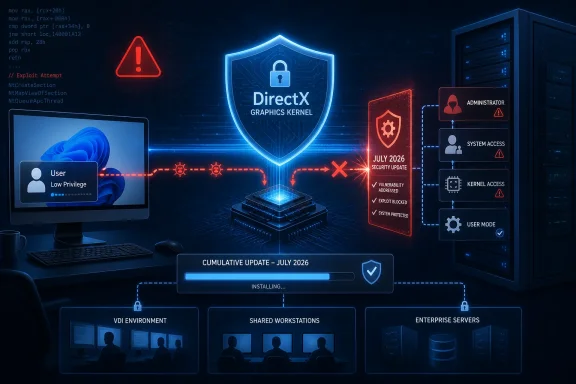
Microsoft rates the issue Important, while its CVSS 3.1 score is 7.0 High. The vendor’s July Security Update Guide describes the underlying weakness as a use-after-free condition in Windows DirectX. The National Vulnerability Database has published the same core description and identifies it as CWE-416, the standard classification for use-after-free memory-safety bugs.
The important practical point is that this is not a drive-by browser or email vulnerability by itself. An attacker must first be able to run code locally under an authorized, low-privilege account. But that is precisely why elevation-of-privilege flaws matter in real intrusions: they can become the second stage after phishing, malware execution, credential theft, a malicious installer, or access obtained through a constrained user session.
Microsoft’s exploitability assessment currently says exploitation is unlikely on the latest software release, and the company reports that the vulnerability was neither publicly disclosed nor known to be exploited as of the July 14 publication. That lowers the immediate emergency level, but it should not be mistaken for a reason to defer normal Patch Tuesday deployment.
A Memory Bug in a Privileged Graphics Path
A use-after-free vulnerability occurs when software continues to access memory after that memory has been released for reuse. In a kernel-adjacent graphics component, a successful exploit can potentially turn a controlled memory condition into code execution or privileged actions outside the limits of the original user account.
The CVSS vector explains Microsoft’s assessment in more concrete terms. CVE-2026-58629 is rated local attack vector, requires low privileges, requires no user interaction, and has high attack complexity. Confidentiality, integrity, and availability impacts are all rated High if exploitation succeeds.
That combination produces a more nuanced operational risk picture than the headline score alone. There is no indication that an unauthenticated internet attacker can directly hit the flaw. There is also no requirement for a second user to click through a warning or open a crafted document once a local attacker has the right starting position. The high-complexity rating signals that reliable exploitation is expected to be difficult, which is consistent with Microsoft’s “Exploitation Unlikely” assessment.
Still, local privilege escalation is a valuable capability. A standard user who can become an administrator or gain kernel-level control can disable security tooling, tamper with credentials and scheduled tasks, access data owned by other users, or establish a more durable foothold on the system. On servers, even a low-privilege account reached through a separate application flaw can become a materially more serious incident if the host is unpatched.
July’s Cumulative Updates Carry the Fix
The remedy is Microsoft’s July 2026 cumulative update for the applicable operating system. There is no published workaround or mitigation for CVE-2026-58629, so patching is the corrective action.
Microsoft’s affected-software data includes the following Windows families:
- Windows 10 version 1607 and Windows Server 2016 are protected at OS build 14393.9339 or later through KB5099535.
- Windows 10 version 1809 and Windows Server 2019 are protected at OS build 17763.9020 or later through KB5099538.
- Windows 10 versions 21H2 and 22H2 are protected at OS builds 19044.7548 and 19045.7548 through KB5099539.
- Windows 11 version 23H2 is protected at OS build 22631.7376 through KB5099414.
- Windows 11 versions 24H2, 25H2, and 26H1 are listed as affected, alongside Windows Server 2025.
- Windows Server 2012, Windows Server 2012 R2, Windows Server 2022, and Server Core variants are also in scope where they remain covered by the applicable servicing program.
The breadth of that list matters. DirectX Graphics Kernel bugs are not limited to gaming PCs or desktops with high-end GPUs. Windows graphics components are foundational operating-system code, and the affected list includes Server Core installations. Administrators should therefore avoid using “this server has no desktop users” as an exclusion criterion.
For Windows 11 version 23H2, Microsoft’s KB5099414 release notes say the package is available through Windows Update, Windows Update for Business, the Microsoft Update Catalog, and Windows Server Update Services. It also bundles the usual cumulative-update mix of security changes and prior quality improvements.
Patch Validation Should Focus on the Servicing Branch
Enterprise teams should deploy the July update through their established Windows Update for Business, WSUS, Configuration Manager, or endpoint-management rings, then confirm installation by KB number and OS build. That is preferable to attempting to validate the DirectX component in isolation; Microsoft ships the fix within cumulative servicing packages.
A sensible deployment sequence is to prioritize systems where local code execution is most realistic: shared-access desktops, developer workstations, jump boxes, application servers with non-admin service accounts, VDI pools, and endpoints whose users can install or execute untrusted software. Systems exposed to other currently known attack paths deserve the earliest maintenance window because an elevation-of-privilege vulnerability becomes more useful when paired with initial-access bugs.
Administrators should also account for restart behavior. The affected-update tables identify a restart requirement, which is expected for a kernel and graphics-stack change. Machines that have installed the package but have not completed the restart should not be counted as fully remediated.
Microsoft’s July release notes for KB5099414 state that it is not currently aware of known issues with that Windows 11 23H2 update. That is helpful, but it does not remove the need for a normal pilot ring, particularly in environments with specialized GPU drivers, virtual GPU configurations, CAD workloads, remote graphics tooling, or third-party network software. The same package introduces a separate transport-driver hardening change that can affect applications using unregistered third-party TDI transports, so testing should consider the whole cumulative update rather than CVE-2026-58629 alone.
“Exploitation Unlikely” Is a Scheduling Signal, Not an Exemption
The exploitability language supplied with Microsoft’s advisory is often misunderstood. It is a vendor assessment of available technical details and the anticipated difficulty of building a reliable exploit; it is not a declaration that the vulnerability cannot be exploited. As researchers reverse-engineer patched Windows binaries and compare changed code paths, the public understanding of a bug can change.
For now, the available evidence supports handling CVE-2026-58629 as a high-impact local escalation bug without signs of active exploitation. It belongs in the normal accelerated Patch Tuesday cycle rather than an all-hands out-of-band response.
The immediate milestone is straightforward: ensure July 2026 cumulative updates are installed and systems have restarted. For environments that cannot patch promptly, the remaining risk is not a special DirectX configuration to disable—it is the continued presence of a kernel-relevant privilege-escalation path on any Windows device where an attacker can first obtain local code execution.
References
- CVE-2026-58629 DirectX Graphics Kernel Elevation of Privilege Vulnerability MSRC · 2026-07-14T07:00:00-07:00