

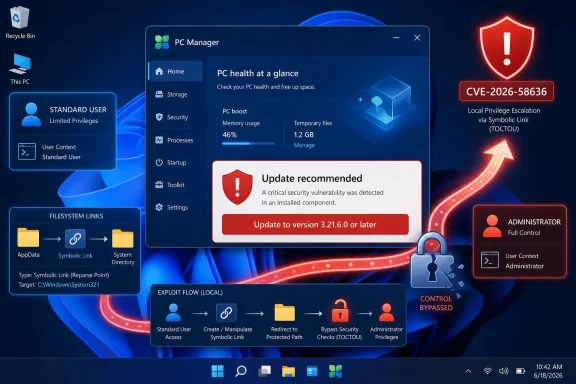
Detailed in Microsoft’s Security Update Guide and CVE record, the flaw stems from improper link resolution before file access, a weakness categorized as CWE-59. Administrators and users running PC Manager should update the app to version 3.21.6.0 or later rather than assuming the July Windows cumulative update covers it.
The vulnerability was not listed as publicly disclosed or exploited in attacks when Microsoft released the advisory. The Zero Day Initiative’s July security update review likewise recorded no known public disclosure or active exploitation for CVE-2026-58636.
A Local Account Can Become a Much Bigger Problem
CVE-2026-58636 is not a drive-by vulnerability and cannot be exploited directly over a network. Microsoft’s CVSS vector specifies local access, low attack complexity, low privileges, and no user interaction: AV:L/AC:L/PR:L/UI:N/S:U/C:H/I:H/A:H.
In practical terms, an attacker must already be able to execute code or operate through an authorized account on the target PC. That requirement limits the initial attack surface, but it does not make the flaw harmless. Malware, a compromised standard-user account, a malicious insider, or an attacker who gained limited access through another vulnerability could potentially use CVE-2026-58636 as the second stage of an intrusion.
Microsoft’s assessment gives the vulnerability high potential impact across confidentiality, integrity, and availability. A successful elevation could therefore expose protected information, permit unauthorized system changes, and enable disruption beyond what a standard account would normally allow.
This distinction matters for endpoint defense. User-level restrictions are frequently expected to contain an initial compromise, especially on shared workstations, help-desk systems, classroom PCs, and machines where employees lack administrator rights. A reliable path from an ordinary account to elevated privileges weakens that containment boundary.
CISA’s initial SSVC data reported no known exploitation and described the attack as not readily automatable, while assigning it a potential total technical impact. That combination points to a vulnerability that may not be suitable for broad remote scanning but could be valuable after an attacker has established a foothold.
Link Following Turns File Operations Against the System
Microsoft describes the root cause as improper link resolution before file access, commonly called link following. Windows supports several mechanisms that can redirect one filesystem path to another, including symbolic links, junctions, mount points, and hard links under permitted conditions.
A privileged application must validate the final object it is about to read, write, move, or delete—not merely the path originally supplied to it. If an attacker can replace or redirect a trusted path between validation and access, the privileged process may act on a protected file chosen by the attacker.
Microsoft has not published a proof of concept or a step-by-step exploit chain for CVE-2026-58636. It is therefore not yet clear which PC Manager operation is exposed, which type of link is involved, or whether exploitation depends on a particular cleanup, storage-management, health-check, or maintenance workflow.
The available classification does establish the security boundary that failed. Microsoft PC Manager performs maintenance operations that can require elevated access, and an attacker able to manipulate its file handling could potentially make those privileged operations target an unintended location.
The low-complexity rating suggests Microsoft does not believe specialized race conditions or unusual environmental preparation are necessarily required. No user interaction is listed, meaning the CVSS assessment does not depend on convincing another person to open a file, approve a prompt, or click a malicious link.
That still does not mean exploitation is automatic. The attacker needs local privileges and some way to trigger or take advantage of the vulnerable behavior. Until Microsoft or the reporting researcher releases more technical information, defenders should avoid treating speculative descriptions of the exact exploit process as confirmed.
PC Manager Needs Its Own Update Check
The affected version range begins at Microsoft PC Manager 1.0.0 and includes every release below 3.21.6.0. Version 3.21.6.0 is the minimum corrected release identified in the CVE data.
Microsoft PC Manager is a separate application rather than an integral Windows servicing component. It provides storage cleanup, health checks, performance tools, pop-up management, and shortcuts to other Windows utilities on supported Windows 10 and Windows 11 PCs.
That packaging distinction creates the main operational trap. Installing the July 2026 Windows security cumulative update does not by itself prove that PC Manager has been updated. Store applications have their own servicing channel and version inventory, even when they are published by Microsoft.
Microsoft Store apps normally update automatically, but administrators should verify the result instead of relying solely on that default. On an individual PC, open Microsoft Store, select Library, and run Get updates, then confirm that PC Manager is at 3.21.6.0 or newer.
Environments that block the visible Microsoft Store interface may still permit managed Store application updates through Microsoft Intune. Conversely, organizations using offline application packages, restricted Store policies, golden images, or tightly controlled deployment rings may have older PC Manager builds that remain installed indefinitely.
IT teams should inventory PC Manager separately from Windows build and KB compliance. A device can report successful installation of July’s Windows patches while retaining an affected application version.
Useful remediation steps include:
- Update every installed copy of Microsoft PC Manager to version 3.21.6.0 or later.
- Confirm the installed version after deployment rather than checking only whether the application is present.
- Review Intune, Configuration Manager, or other software-inventory reports for older PC Manager packages.
- Remove PC Manager from systems where it is not required and cannot be updated promptly.
- Continue monitoring Microsoft’s advisory for revisions, exploitability changes, or additional technical details.
Uninstalling the application is a reasonable temporary risk-reduction measure where immediate updating is impossible. PC Manager is optional, and Windows includes native tools such as Storage Sense, Windows Security, Task Manager, and the Settings app for many of the functions it aggregates.
One of Two PC Manager Fixes in July
CVE-2026-58636 was not the only Microsoft PC Manager elevation-of-privilege issue disclosed in the July 2026 security release. Microsoft also addressed CVE-2026-50438, another Important-rated PC Manager vulnerability associated with improper link handling and carrying a higher CVSS score of 8.8.
The presence of two privilege-escalation fixes in the same application and update cycle makes version verification more important. It also gives enterprise defenders a reason to reconsider whether a consumer-oriented cleanup utility belongs in standardized corporate images, particularly if its update lifecycle is not already covered by endpoint-management policy.
BleepingComputer included both PC Manager issues in its July Patch Tuesday inventory, although CVE-2026-58636 was not among the month’s actively exploited or publicly disclosed zero-days. That lower immediate urgency should influence patch sequencing, but it should not turn into an indefinite deferral.
Privilege-escalation vulnerabilities are often combined with phishing, browser compromise, malicious documents, stolen credentials, or remote-code-execution flaws. They become especially useful once an attacker discovers that the compromised account lacks administrative rights.
For managed Windows estates, the concrete task is straightforward: locate Microsoft PC Manager, compare its version against 3.21.6.0, and update or remove anything older. The unresolved question is whether further research will reveal an easily reusable exploit technique, but defenders do not need to wait for that answer before closing the affected local privilege boundary.
References
- CVE-2026-58636 Microsoft PC Manager Elevation of Privilege Vulnerability MSRC · 2026-07-14T07:00:00-07:00