

CVE-2026-7348 is a high-severity use-after-free flaw in Chromium’s Codecs component, disclosed April 28, 2026, fixed in Google Chrome 147.0.7727.138 for desktop, and tracked by Microsoft because Chromium-based Edge inherits the underlying browser engine risk. That dry sentence is the whole reason this bug matters to WindowsForum readers: it is not “just a Chrome problem” in the old sense, because Chromium is now a platform dependency scattered across the modern Windows estate. The exploit description is narrow — a crafted HTML page, user interaction required, code execution inside the sandbox — but the operational blast radius is broad. For IT, the right response is not panic; it is to treat browser patching as endpoint patching, because that is what it has become.
CVE-2026-7348 sits in the Codecs component, the part of Chromium’s sprawling media stack that helps process the web’s constant stream of compressed audio and video. That location matters because media parsing is one of the browser’s highest-friction jobs: it takes untrusted data from the network, interprets complex formats, and does so at speed. When memory safety goes wrong there, the result is rarely reassuring.
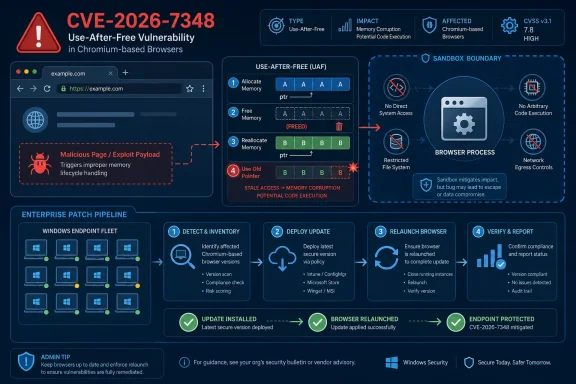
The vulnerability is categorized as a use-after-free, a class of bug that occurs when software continues to use memory after it has already been released. In ordinary desktop software, that can mean a crash. In a browser engine, it can become a primitive for memory corruption, and memory corruption is the foundation on which many serious exploitation chains are built.
Google’s own Chromium severity is High, while CISA’s ADP scoring gives it a CVSS 3.1 base score of 8.8. The vector is the familiar one for browser compromise: network reachable, low attack complexity, no privileges required, but requiring the user to interact with malicious content. In plain English, the attacker does not need an account on the machine; they need a victim to load the wrong page.
The phrase “inside a sandbox” is important, but it should not lull anyone into complacency. Chrome and Edge rely heavily on sandboxing to contain renderer and content-process exploitation, and that containment has made browsers much harder targets than they were a decade ago. But attackers do not read “sandbox” as “dead end”; they read it as “stage one.”
A crafted page does not need to look like a shady download site. It can be reached through malvertising, a compromised legitimate page, a poisoned redirect, a phishing lure, a fake meeting invite, or a link sent through a trusted collaboration channel. The browser’s attack surface is valuable precisely because users are expected to browse.
That user-interaction requirement deserves a sober reading. It means the bug is not wormable in the classic sense and not automatically triggered across the network like an exposed server flaw. It does not mean exploitation is difficult in the real world, because getting a user to open a page remains one of the most reliable attack patterns in enterprise security.
The modern browser has become a paradox: it is one of the most aggressively hardened pieces of software on a Windows endpoint, and it is also one of the most exposed. Every hardening layer — site isolation, process sandboxing, memory mitigations, exploit guards — exists because browsers continuously ingest hostile input by design. CVE-2026-7348 is another reminder that the browser is not an app at the edge of the system; it is one of the system’s front doors.
That distinction matters for triage. A standalone sandboxed code-execution bug is different from a full chain that drops malware with user-level or SYSTEM privileges. It is also different from a vulnerability confirmed to be exploited in the wild. As of the published details, the public record points to a high-severity flaw fixed in Chrome 147.0.7727.138, not a known active mass exploitation event.
But the sandbox is not a patch-management strategy. It is a mitigation layer, and mitigation layers are designed to buy time, not to excuse delay. The presence of a sandbox should push defenders away from alarmism, not away from deployment.
For Windows admins, this is where the nuance matters. If your browser update rings are working, CVE-2026-7348 should be absorbed by the normal update pipeline. If your update rings are blocked, deferred indefinitely, or split across Chrome, Edge, embedded Chromium runtimes, and unmanaged user installs, then this bug is less a discrete emergency than a diagnostic test of your browser governance.
This is one of the less appreciated consequences of the Chromium consolidation era. The browser monoculture debate often focuses on standards, competition, and developer convenience. In security operations, the more immediate issue is dependency inheritance: one engine-level flaw can become relevant across Google Chrome, Microsoft Edge, Brave, Opera, Vivaldi, Electron applications, WebView-style components, and vendor-wrapped browsers.
The details are not always identical across products. A flaw may be reachable in one Chromium-based product and not another, depending on build flags, platform exposure, feature availability, and release timing. But admins rarely get the luxury of investigating each variant at source-code depth before deciding whether to patch. The safer policy is to assume that Chromium engine fixes deserve attention wherever Chromium is present.
For WindowsForum’s audience, Edge is the center of gravity. It is the default browser on Windows, it is tightly integrated into Microsoft’s enterprise management stack, and it is often present even where users prefer another browser. That makes Edge patch visibility just as important as Chrome patch visibility, especially in organizations that monitor Windows Update closely but treat browser auto-update as a black box.
For Chrome, the user-facing check remains straightforward. Opening the browser’s About page triggers an update check and displays the installed version. For managed fleets, inventory should come from endpoint management, software asset data, or browser management telemetry rather than screenshots and user reports.
Edge has its own versioning stream, so admins should not expect the Chrome version number to match Edge numerically. Microsoft’s Edge releases incorporate Chromium security updates into Edge builds with Microsoft’s own version sequence. The relevant question is not “does Edge say 147.0.7727.138?” but “has the Edge build installed on this device incorporated the Chromium security updates that include the fix?”
This is where lazy vulnerability management breaks down. Scanners that match only names and version strings can produce confusing findings around Chromium-derived products. Good patch validation needs product-aware logic: Chrome is Chrome, Edge is Edge, Chromium packages on Linux are their own ecosystem, and embedded runtimes may lag behind all of them.
The CVE record already says what defenders need for prioritization. It identifies the vulnerable product family, the affected version boundary, the weakness class, the attack shape, and the vendor fix. That is enough to start deployment.
NVD enrichment is valuable for normalization, asset matching, and compliance reporting. But it is not the first signal in the browser patching cycle. In fast-moving browser security, vendor release notes and MSRC tracking often become operationally useful before every downstream database has caught up.
That creates friction for organizations that live by ticket automation. A vulnerability may appear in one feed before another, carry a CISA ADP score before a NIST score, and show incomplete CPE data while the fixed builds are already shipping. Mature teams should design around that lag rather than pretending it does not exist.
The problem is structural. Chromium is a huge C++ codebase that processes complex, attacker-controlled data in performance-sensitive paths. Codecs, graphics, rendering, GPU acceleration, WebRTC, WebMIDI, accessibility, and media subsystems all operate near the boundary between rich functionality and dangerous parsing. The same features that make the modern web feel native also create the attack surface that security engineers spend their careers reducing.
Google has invested heavily in fuzzing, sanitizers, control-flow protections, MiraclePtr-style mitigations, sandboxing, site isolation, and gradual memory-safety work. Those efforts matter. They have changed the economics of exploitation and caught large numbers of bugs before stable release. But CVE lists continue to show the stubborn reality: memory safety debt is not retired by one mitigation, one rewrite, or one release cycle.
For the industry, the direction of travel is clear. More components will move toward memory-safe languages where feasible, more high-risk C++ patterns will be wrapped or constrained, and more exploit mitigations will be layered into the engine. For admins, however, the strategic debate is less urgent than the tactical reality: while the browser vendors grind down the bug class, endpoints still need the next patch.
Enterprise reality is uglier. Browsers remain open for days. VDI images are snapshotted before updates land. Kiosk machines run fixed profiles. Developers install side-channel builds. Servers used for admin consoles have browsers that no one inventories. Security products detect vulnerable versions but cannot force the process restart that actually swaps in the new code.
This is the gap attackers care about. The patch may be available on Tuesday, but the exploitable browser process may still be alive on Friday. With browser vulnerabilities, “installed” and “active” are not always the same thing. The updated binary can be on disk while the old process continues handling web content.
Admins should therefore look beyond software deployment success. The operational target is running version compliance. That means update availability, installation, and browser restart all have to happen. In fleets where users resist restarts, browser relaunch prompts and forced relaunch policies are not annoyances; they are part of the security control.
For a classic Windows application, a CPE can often describe the affected thing cleanly enough. For Chromium, the affected code may exist in multiple browsers, Linux distro packages, embedded runtimes, Android WebView, Electron apps, and vendor-specific shells. Some will update quickly. Some will lag. Some may compile out the vulnerable path. Some may not expose it in the same way.
That means a missing or incomplete CPE is not merely a database clerical issue. It can cause scanners to miss assets, mislabel assets, or generate findings that do not map cleanly to remediation teams. The result is either false comfort or ticket fatigue.
The better model is layered inventory. Know your installed browsers. Know your default browser. Know your Chromium-based applications. Know which products update through Windows Update, which use their own updater, which are controlled by MDM, and which are baked into golden images. CVE-2026-7348 is a browser bug, but the response is an asset-management exercise.
For enterprise admins, the answer is verification. Check Chrome stable deployment, Edge stable deployment, and any extended stable channels in use. Confirm that policy does not defer security updates longer than intended. Validate that relaunch enforcement is working, especially for privileged users, help desk staff, developers, finance teams, and admins who browse from machines with access to sensitive systems.
The risk is not limited to Windows clients. Linux desktop packages, macOS fleets, and mixed browser environments all need attention. But for Windows-heavy shops, the most likely blind spot is not a missing Linux package; it is the assumption that Microsoft’s browser security posture is fully covered by normal Patch Tuesday muscle memory. Edge security updates often arrive outside the monthly Windows cumulative update rhythm.
That is not a failure of Microsoft’s process. It is the nature of Chromium’s cadence. Browser vendors ship when browser fixes are ready, because the web does not wait for the second Tuesday of the month.
There is a cultural issue here. Organizations often still treat browsers like user applications and operating systems like infrastructure. That distinction is obsolete. The browser holds session tokens, password managers, SSO flows, admin portals, SaaS consoles, VPN dashboards, and internal apps. It is not adjacent to identity and data access; it is woven through them.
The practical benchmark is simple. If a high-severity Chromium fix ships and your team can answer within hours which machines are updated, which are pending restart, which are unmanaged, and which business units are exceptions, then CVE-2026-7348 is a manageable patch. If answering those questions requires spreadsheets, Slack archaeology, and scanner exports that disagree with each other, the vulnerability has already done you a favor by exposing the real problem.
That problem is not Codecs. It is governance.
Source: NVD / Chromium Security Update Guide - Microsoft Security Response Center
 Chromium’s Codec Bug Is a Browser Flaw With Platform Consequences
CVE-2026-7348 sits in the Codecs component, the part of Chromium’s sprawling media stack that helps process the web’s constant stream of compressed audio and video. That location matters because media parsing is one of the browser’s highest-friction jobs: it takes untrusted data from the network, interprets complex formats, and does so at speed. When memory safety goes wrong there, the result is rarely reassuring.The vulnerability is categorized as a use-after-free, a class of bug that occurs when software continues to use memory after it has already been released. In ordinary desktop software, that can mean a crash. In a browser engine, it can become a primitive for memory corruption, and memory corruption is the foundation on which many serious exploitation chains are built.
Google’s own Chromium severity is High, while CISA’s ADP scoring gives it a CVSS 3.1 base score of 8.8. The vector is the familiar one for browser compromise: network reachable, low attack complexity, no privileges required, but requiring the user to interact with malicious content. In plain English, the attacker does not need an account on the machine; they need a victim to load the wrong page.
The phrase “inside a sandbox” is important, but it should not lull anyone into complacency. Chrome and Edge rely heavily on sandboxing to contain renderer and content-process exploitation, and that containment has made browsers much harder targets than they were a decade ago. But attackers do not read “sandbox” as “dead end”; they read it as “stage one.”
The Crafted HTML Page Is the Oldest Trick That Still Works
The advisory language says exploitation could be triggered through a crafted HTML page, which sounds almost boring in 2026. That boredom is the danger. The web browser remains the universal document viewer, application runtime, authentication front end, collaboration surface, and media player for most organizations.A crafted page does not need to look like a shady download site. It can be reached through malvertising, a compromised legitimate page, a poisoned redirect, a phishing lure, a fake meeting invite, or a link sent through a trusted collaboration channel. The browser’s attack surface is valuable precisely because users are expected to browse.
That user-interaction requirement deserves a sober reading. It means the bug is not wormable in the classic sense and not automatically triggered across the network like an exposed server flaw. It does not mean exploitation is difficult in the real world, because getting a user to open a page remains one of the most reliable attack patterns in enterprise security.
The modern browser has become a paradox: it is one of the most aggressively hardened pieces of software on a Windows endpoint, and it is also one of the most exposed. Every hardening layer — site isolation, process sandboxing, memory mitigations, exploit guards — exists because browsers continuously ingest hostile input by design. CVE-2026-7348 is another reminder that the browser is not an app at the edge of the system; it is one of the system’s front doors.
The Sandbox Narrows the Blast Radius, Not the Responsibility
The advisory’s “inside a sandbox” wording is not a technical footnote. It tells defenders that successful exploitation of CVE-2026-7348 alone should not automatically grant full control of the host. In the Chrome security model, the attacker would still need to escape the sandbox or combine the flaw with another vulnerability to reach the wider operating system.That distinction matters for triage. A standalone sandboxed code-execution bug is different from a full chain that drops malware with user-level or SYSTEM privileges. It is also different from a vulnerability confirmed to be exploited in the wild. As of the published details, the public record points to a high-severity flaw fixed in Chrome 147.0.7727.138, not a known active mass exploitation event.
But the sandbox is not a patch-management strategy. It is a mitigation layer, and mitigation layers are designed to buy time, not to excuse delay. The presence of a sandbox should push defenders away from alarmism, not away from deployment.
For Windows admins, this is where the nuance matters. If your browser update rings are working, CVE-2026-7348 should be absorbed by the normal update pipeline. If your update rings are blocked, deferred indefinitely, or split across Chrome, Edge, embedded Chromium runtimes, and unmanaged user installs, then this bug is less a discrete emergency than a diagnostic test of your browser governance.
Edge Turns Every Chromium Advisory Into a Microsoft Story
Microsoft’s tracking of CVE-2026-7348 through MSRC is not ceremonial. Edge is Chromium-based, and Microsoft has long treated Chromium security fixes as part of Edge’s security update story. That makes the Chromium release cadence a Microsoft desktop security concern, even when the vulnerability originates upstream.This is one of the less appreciated consequences of the Chromium consolidation era. The browser monoculture debate often focuses on standards, competition, and developer convenience. In security operations, the more immediate issue is dependency inheritance: one engine-level flaw can become relevant across Google Chrome, Microsoft Edge, Brave, Opera, Vivaldi, Electron applications, WebView-style components, and vendor-wrapped browsers.
The details are not always identical across products. A flaw may be reachable in one Chromium-based product and not another, depending on build flags, platform exposure, feature availability, and release timing. But admins rarely get the luxury of investigating each variant at source-code depth before deciding whether to patch. The safer policy is to assume that Chromium engine fixes deserve attention wherever Chromium is present.
For WindowsForum’s audience, Edge is the center of gravity. It is the default browser on Windows, it is tightly integrated into Microsoft’s enterprise management stack, and it is often present even where users prefer another browser. That makes Edge patch visibility just as important as Chrome patch visibility, especially in organizations that monitor Windows Update closely but treat browser auto-update as a black box.
Version Numbers Are the Only Truth That Matters
The fixed Chrome desktop build called out for this issue is 147.0.7727.138, with Google’s stable-channel announcement also listing 147.0.7727.137/138 for Windows and Mac and 147.0.7727.137 for Linux. That kind of split versioning is routine, but it can make vulnerability dashboards look messier than defenders would like. The practical rule is simple: anything before the fixed branch identified by the vendor should be considered exposed until proven otherwise.For Chrome, the user-facing check remains straightforward. Opening the browser’s About page triggers an update check and displays the installed version. For managed fleets, inventory should come from endpoint management, software asset data, or browser management telemetry rather than screenshots and user reports.
Edge has its own versioning stream, so admins should not expect the Chrome version number to match Edge numerically. Microsoft’s Edge releases incorporate Chromium security updates into Edge builds with Microsoft’s own version sequence. The relevant question is not “does Edge say 147.0.7727.138?” but “has the Edge build installed on this device incorporated the Chromium security updates that include the fix?”
This is where lazy vulnerability management breaks down. Scanners that match only names and version strings can produce confusing findings around Chromium-derived products. Good patch validation needs product-aware logic: Chrome is Chrome, Edge is Edge, Chromium packages on Linux are their own ecosystem, and embedded runtimes may lag behind all of them.
The NVD Lag Is a Feature of the System, Not a Reason to Wait
The NVD entry initially lacked a NIST CVSS assessment while still carrying the vulnerability description, CWE classification, references, and CISA ADP scoring. This is common enough that security teams should not treat “NVD not fully enriched yet” as a holding pattern. The absence of final NVD scoring does not mean the vulnerability is hypothetical.The CVE record already says what defenders need for prioritization. It identifies the vulnerable product family, the affected version boundary, the weakness class, the attack shape, and the vendor fix. That is enough to start deployment.
NVD enrichment is valuable for normalization, asset matching, and compliance reporting. But it is not the first signal in the browser patching cycle. In fast-moving browser security, vendor release notes and MSRC tracking often become operationally useful before every downstream database has caught up.
That creates friction for organizations that live by ticket automation. A vulnerability may appear in one feed before another, carry a CISA ADP score before a NIST score, and show incomplete CPE data while the fixed builds are already shipping. Mature teams should design around that lag rather than pretending it does not exist.
Use-After-Free Keeps Winning Because Memory Safety Is Still the Battlefield
CVE-2026-7348 is not an exotic cryptographic failure or a subtle policy bypass. It is a memory lifetime bug. That should feel familiar, because use-after-free vulnerabilities have been a recurring theme in browser security for years.The problem is structural. Chromium is a huge C++ codebase that processes complex, attacker-controlled data in performance-sensitive paths. Codecs, graphics, rendering, GPU acceleration, WebRTC, WebMIDI, accessibility, and media subsystems all operate near the boundary between rich functionality and dangerous parsing. The same features that make the modern web feel native also create the attack surface that security engineers spend their careers reducing.
Google has invested heavily in fuzzing, sanitizers, control-flow protections, MiraclePtr-style mitigations, sandboxing, site isolation, and gradual memory-safety work. Those efforts matter. They have changed the economics of exploitation and caught large numbers of bugs before stable release. But CVE lists continue to show the stubborn reality: memory safety debt is not retired by one mitigation, one rewrite, or one release cycle.
For the industry, the direction of travel is clear. More components will move toward memory-safe languages where feasible, more high-risk C++ patterns will be wrapped or constrained, and more exploit mitigations will be layered into the engine. For admins, however, the strategic debate is less urgent than the tactical reality: while the browser vendors grind down the bug class, endpoints still need the next patch.
Enterprise Risk Lives in the Delay Between Release and Restart
The browser patching story is often presented as automatic, and for consumer machines it usually is close enough. Chrome updates itself. Edge updates itself. The user restarts eventually. The version rolls forward and the problem disappears.Enterprise reality is uglier. Browsers remain open for days. VDI images are snapshotted before updates land. Kiosk machines run fixed profiles. Developers install side-channel builds. Servers used for admin consoles have browsers that no one inventories. Security products detect vulnerable versions but cannot force the process restart that actually swaps in the new code.
This is the gap attackers care about. The patch may be available on Tuesday, but the exploitable browser process may still be alive on Friday. With browser vulnerabilities, “installed” and “active” are not always the same thing. The updated binary can be on disk while the old process continues handling web content.
Admins should therefore look beyond software deployment success. The operational target is running version compliance. That means update availability, installation, and browser restart all have to happen. In fleets where users resist restarts, browser relaunch prompts and forced relaunch policies are not annoyances; they are part of the security control.
The CPE Question Exposes a Bigger Inventory Problem
The user-facing NVD text asks whether a CPE is missing, and that small line points to a much bigger weakness in vulnerability management. CPE matching is useful, but it is a brittle abstraction for modern software supply chains. Chromium is not only a product; it is an upstream project embedded into many products.For a classic Windows application, a CPE can often describe the affected thing cleanly enough. For Chromium, the affected code may exist in multiple browsers, Linux distro packages, embedded runtimes, Android WebView, Electron apps, and vendor-specific shells. Some will update quickly. Some will lag. Some may compile out the vulnerable path. Some may not expose it in the same way.
That means a missing or incomplete CPE is not merely a database clerical issue. It can cause scanners to miss assets, mislabel assets, or generate findings that do not map cleanly to remediation teams. The result is either false comfort or ticket fatigue.
The better model is layered inventory. Know your installed browsers. Know your default browser. Know your Chromium-based applications. Know which products update through Windows Update, which use their own updater, which are controlled by MDM, and which are baked into golden images. CVE-2026-7348 is a browser bug, but the response is an asset-management exercise.
Home Users Should Update, Enterprises Should Prove They Updated
For individual Windows users, the advice is blissfully short: update Chrome and Edge, then relaunch them. If the browser says an update is pending, finish it. If it has been open for a week, restart it. The exploit requires malicious web content, so keeping the browser current is the single most effective mitigation available to normal users.For enterprise admins, the answer is verification. Check Chrome stable deployment, Edge stable deployment, and any extended stable channels in use. Confirm that policy does not defer security updates longer than intended. Validate that relaunch enforcement is working, especially for privileged users, help desk staff, developers, finance teams, and admins who browse from machines with access to sensitive systems.
The risk is not limited to Windows clients. Linux desktop packages, macOS fleets, and mixed browser environments all need attention. But for Windows-heavy shops, the most likely blind spot is not a missing Linux package; it is the assumption that Microsoft’s browser security posture is fully covered by normal Patch Tuesday muscle memory. Edge security updates often arrive outside the monthly Windows cumulative update rhythm.
That is not a failure of Microsoft’s process. It is the nature of Chromium’s cadence. Browser vendors ship when browser fixes are ready, because the web does not wait for the second Tuesday of the month.
The Real Test Is Whether Browser Patching Is Boring
CVE-2026-7348 should not become a crisis in well-run environments. It should become a routine signal that the browser patch pipeline is alive. The healthiest security programs are not the ones that write the longest emergency memos; they are the ones where high-severity browser updates land quickly, restarts happen predictably, and asset reports converge without heroics.There is a cultural issue here. Organizations often still treat browsers like user applications and operating systems like infrastructure. That distinction is obsolete. The browser holds session tokens, password managers, SSO flows, admin portals, SaaS consoles, VPN dashboards, and internal apps. It is not adjacent to identity and data access; it is woven through them.
The practical benchmark is simple. If a high-severity Chromium fix ships and your team can answer within hours which machines are updated, which are pending restart, which are unmanaged, and which business units are exceptions, then CVE-2026-7348 is a manageable patch. If answering those questions requires spreadsheets, Slack archaeology, and scanner exports that disagree with each other, the vulnerability has already done you a favor by exposing the real problem.
That problem is not Codecs. It is governance.
The Patch Window Is Where This Story Will Be Won
The most concrete reading of CVE-2026-7348 is that it is a serious but bounded browser vulnerability: dangerous enough to patch quickly, not yet public evidence of a full-blown zero-day campaign, and broad enough to require attention beyond a single Chrome install.- Chrome desktop installations should be updated to the fixed stable build line identified by Google, with 147.0.7727.138 called out for the vulnerable boundary.
- Microsoft Edge should be treated as affected by the Chromium security update stream even though Edge uses Microsoft’s own version numbering.
- The attack path requires user interaction with crafted web content, which reduces but does not eliminate real-world exploitability.
- The sandbox limits immediate impact, but defenders should not treat sandboxed code execution as harmless.
- Vulnerability scanners may lag or disagree while NVD enrichment and CPE data settle, so vendor release notes and product inventory should drive action.
- The most important enterprise control is not merely installing the update, but ensuring the patched browser process is actually running after relaunch.
Source: NVD / Chromium Security Update Guide - Microsoft Security Response Center
