

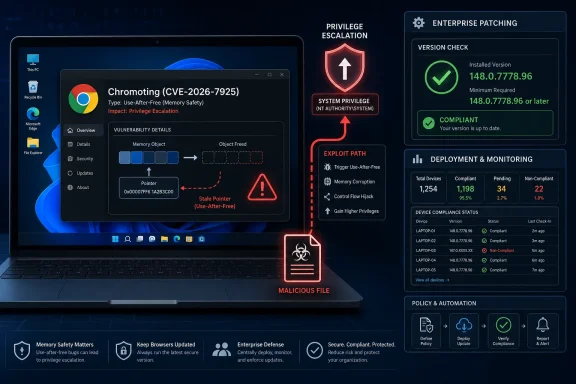
Google Chrome on Windows before version 148.0.7778.96 is affected by CVE-2026-7925, a high-severity use-after-free flaw in Chromoting that could let a local attacker escalate to operating-system privileges through a malicious file. The dry wording hides the important part: this is not another ordinary “visit a bad website” browser bug. It sits at the awkward boundary where Chrome, remote access plumbing, Windows identity, and enterprise patch discipline all meet.
The immediate fix is straightforward: update Chrome to 148.0.7778.96 or later, and do not assume that auto-update has already done the job on every endpoint. The more interesting story is why a Chrome component associated with remote desktop functionality can become part of an operating-system privilege escalation path — and why defenders should treat this as a Windows endpoint hygiene issue, not merely a browser maintenance chore.
CVE-2026-7925 is classified as a use-after-free vulnerability in Chromoting, the Chromium component better known to most administrators through Chrome Remote Desktop. Use-after-free bugs are familiar territory in browser security: software releases memory, later touches it again, and an attacker tries to shape what now occupies that memory. The result can be anything from a crash to controlled code execution, depending on the component, the process boundary, and the attacker’s ability to feed malicious input at the right moment.
What makes this one stand out is the privilege-escalation framing. The description says a local attacker could perform OS-level privilege escalation via a malicious file on Windows systems running vulnerable Chrome builds. That puts the bug in a different operational category from remote-renderer bugs that begin with a booby-trapped web page.
A local attacker is not necessarily sitting at the keyboard. “Local” can include malware already running with limited privileges, a user tricked into opening a file, or a foothold obtained through some other weakness. In real intrusions, that distinction matters less than vendors sometimes imply; attackers rarely need every bug to be remotely exploitable if they can chain a user-level foothold with a privilege-escalation flaw.
The practical reading is blunt: if Chrome is present on Windows endpoints, Chromoting code may be present in the risk model even if Chrome Remote Desktop is not part of the help desk’s official playbook. The browser has become a platform, and platform components have platform-sized consequences.
The phrase “via a malicious file” does not, by itself, tell us the file type, delivery mechanism, or exploit constraints. The Chromium issue tracker entry is permission-restricted, which is common when bug details could help attackers before most users have updated. That leaves defenders with an intentionally incomplete picture — enough to prioritize patching, not enough to reverse-engineer a detection strategy with confidence.
This is where enterprise instincts can go wrong. If a bug is described as requiring user interaction, some organizations downgrade it mentally, as if convincing a user to open a file were a high bar. In 2026, that is not a high bar; it is the default operating model of phishing, fake invoices, malicious archives, poisoned collaboration links, and help-desk impersonation.
The CVSS vector contributed by CISA’s ADP program rates the issue high, with local attack vector, low attack complexity, no privileges required, and user interaction required. That combination should not be dismissed. It says the exploit does not begin across the network unaided, but once the attacker gets the victim to interact, the expected impact reaches confidentiality, integrity, and availability at a high level.
That ambiguity is exactly why the bug deserves attention. Components embedded in widely deployed software often evade the clean ownership model that patch programs prefer. Chrome is “the browser,” but it also includes code for media, rendering, networking, identity integration, synchronization, device access, policy enforcement, and remote-control-adjacent workflows.
The lesson is not that Chrome Remote Desktop is uniquely dangerous. Remote access features are valuable, and modern browsers carry enormous amounts of complex code because users expect them to do enormous amounts of work. The lesson is that attack surface does not care how your asset inventory categorizes a feature.
For Windows administrators, the sharper question is whether browser components are governed with the same seriousness as VPN clients, remote management agents, and endpoint security tools. If the answer is no, CVE-2026-7925 is another reminder that the browser is no longer merely an application on the endpoint. It is one of the endpoint’s most exposed execution environments.
That scale is not automatically a sign of poor quality. Chrome is a massive codebase, Chromium receives constant security review, and Google’s bug bounty ecosystem gives researchers incentives to report memory-safety and logic flaws before criminals weaponize them. A large security release can mean the machine is working.
But rapid browser release models create a peculiar visibility problem for enterprises. Consumers usually trust auto-update and move on. Enterprises often stage, defer, pin, package, or wrap browser updates inside endpoint management workflows. Every one of those steps can add useful control; every one can also extend exposure.
The phrase “roll out over the coming days or weeks” is normal in Chrome release notes, but it should sound different to someone responsible for a Windows fleet. If the vulnerable boundary is operating-system privilege escalation, then the difference between “available” and “installed everywhere” is the whole game. Patch availability is not protection. Deployment is protection.
The CPE configuration shown in the NVD change history is revealing. It combines a vulnerable Google Chrome application entry up to, but excluding, 148.0.7778.96 with Microsoft Windows as the operating system context. That matches the description: this is a Chrome flaw whose known privilege-escalation impact is specific to Windows.
This is also why the “are we missing a CPE?” note on NVD pages matters less than administrators sometimes hope. CPE data is useful for scanners and dashboards, but it is not a perfect map of operational exposure. A vulnerability can be real, severe, and present in your environment before the enrichment machinery has fully caught up.
Security teams should resist the temptation to wait for every metadata field to become tidy. NVD did not yet have its own CVSS assessment in the provided record, while CISA-ADP supplied a 7.8 high score. That is enough to act. Mature vulnerability management means understanding when the advisory text is more important than the database neatness around it.
Still, defenders should avoid the opposite mistake: treating “not known exploited” as “not interesting.” Browser vulnerabilities often move through a predictable lifecycle. A patch lands, advisory text appears, scanners begin flagging old versions, researchers and criminals diff builds, and exploitability becomes clearer over time. Restricted bug tracker access slows that process for outsiders, but it does not stop sophisticated teams from studying the fix.
The correct response is proportionate urgency. Push the update quickly. Verify installation. Watch for suspicious local privilege-escalation chains where Chrome is part of the endpoint story. But do not claim compromise simply because vulnerable versions existed.
For WindowsForum readers, this nuance is important. Security commentary has a tendency to flatten everything into either panic or apathy. CVE-2026-7925 deserves neither. It deserves disciplined patching and a sober appreciation of how browser components can participate in privilege chains.
A use-after-free is not just a coding mistake; it is a failure of object lifetime management. In complex software, one subsystem believes an object is gone, another path still holds a reference, and attacker-controlled timing or input can turn that stale reference into a weapon. The problem becomes especially stubborn in asynchronous systems, where callbacks, threads, IPC, and resource cleanup all interact.
Chromoting is exactly the kind of component where complexity piles up. Remote desktop technology has to coordinate input, display state, codecs, authentication, transport, permissions, and operating-system integration. Even if a specific bug is narrow, the surrounding class of software is inherently difficult to reason about.
This is why the industry’s memory-safety conversation is not academic. Rust, hardened allocators, MiraclePtr-style mitigations, sandbox boundaries, and process isolation are all attempts to reduce the blast radius of errors that humans keep making. CVE-2026-7925 is another data point in a very long argument: we are improving the fences, but we have not yet replaced the terrain.
CVE-2026-7925’s description does not say that exploitation grants SYSTEM, administrator, or any specific token. “OS-level privilege escalation” is broader language, and without public technical details we should not overstate it. But the impact metrics — high confidentiality, high integrity, high availability — tell defenders to treat successful exploitation as serious.
This is the part that should influence patch prioritization. A high-severity Chrome bug that enables privilege escalation on Windows belongs higher in the queue than a medium browser issue that merely crashes a tab. It belongs in the same conversation as other local privilege-escalation flaws used after phishing, document exploitation, or initial malware execution.
The target population is also large. Chrome remains one of the most widely deployed applications on Windows, including in shops that otherwise standardize on Microsoft tooling. Even organizations that prefer Edge often have pockets of Chrome for testing, developer workflows, SaaS compatibility, or user preference. Shadow browser populations are still browser populations.
In unmanaged environments, users can check Chrome’s About page and let the browser trigger an update. In managed environments, administrators should rely on endpoint inventory, browser management reports, vulnerability scanners, and software deployment telemetry rather than user assurances. The browser saying it updated is useful; the fleet proving it updated is better.
This is also a good time to look for stale Chrome installations outside the main software management path. Old copies can live in golden images, VDI pools, lab machines, kiosk systems, developer test boxes, and rarely used administrative workstations. Those systems often become exceptions during normal patch cycles and liabilities during incident response.
Enterprises should also remember that Chromium derivatives are not automatically covered by Chrome’s version number. Edge, Brave, Vivaldi, Opera, Electron-based apps, and embedded Chromium runtimes have their own release and patch models. CVE-2026-7925 as described applies to Google Chrome on Windows, but the broader security lesson is to inventory Chromium-based software rather than assume “Chrome updated” means “Chromium risk gone.”
For vulnerability management teams, this creates a recurring tension. Dashboards like clean fields, normalized scores, and complete CPE mappings. Attackers like exploitable bugs. Those two timelines are not synchronized.
The CPE entry shown for Chrome versions up to, but excluding, 148.0.7778.96 on Windows is useful for automated matching. But organizations should not confuse CPE precision with asset precision. If software inventory is incomplete, if user-installed Chrome exists outside management, or if scanner credentials cannot read application versions reliably, the database entry will not save you.
This is where good vulnerability programs distinguish themselves. They use CVSS as a triage input, not a substitute for judgment. They read the advisory text. They ask whether the affected component is widespread. They ask whether the exploit path fits common attacker behavior. For CVE-2026-7925, the answers point toward fast remediation.
That does not mean every organization should drop everything in the middle of a production freeze. It does mean Chrome should not wait for the next leisurely desktop maintenance window if that window is weeks away. The operational sweet spot is rapid validation followed by aggressive rollout, with exceptions documented and revisited.
For home users and enthusiasts, the advice is even simpler. Open Chrome’s About page, let it update, relaunch the browser, and verify the version. If multiple Windows accounts use the same machine, make sure the installed browser updates at the machine level and that shortcuts are not launching an old portable copy.
For administrators, the useful question is not “Did Google fix it?” but “How quickly can we prove every Windows endpoint received the fixed build?” CVE-2026-7925 is the kind of bug that exposes the gap between vendor response and customer execution.
Remote access tools are high-value infrastructure, whether they are formal enterprise products or convenience features embedded in consumer-grade platforms. They cross trust boundaries. They interact with operating-system privileges. They create support workflows that attackers love to mimic.
Enterprises should ensure Chrome policies reflect their actual intent. If Chrome Remote Desktop is not approved, disable it through policy rather than relying on convention. If it is approved, manage it like any other remote access path: restrict who can use it, log activity, document support procedures, and watch for unauthorized enrollment.
This is not because CVE-2026-7925 proves Chrome Remote Desktop is unsafe. It is because incidents repeatedly show that unmanaged remote access is unsafe as a category. The vulnerability is a timely prompt to close the gap between what administrators think users can do and what policy actually enforces.
That combination should put the bug near the top of desktop patch queues. It should not be buried under “browser miscellaneous,” and it should not be treated as a remote-code-execution zero-day unless new evidence emerges. The right response is focused, quick, and measurable.
Source: NVD / Chromium Security Update Guide - Microsoft Security Response Center
The immediate fix is straightforward: update Chrome to 148.0.7778.96 or later, and do not assume that auto-update has already done the job on every endpoint. The more interesting story is why a Chrome component associated with remote desktop functionality can become part of an operating-system privilege escalation path — and why defenders should treat this as a Windows endpoint hygiene issue, not merely a browser maintenance chore.
 Chrome’s Browser Patch Is Really a Windows Privilege Story
CVE-2026-7925 is classified as a use-after-free vulnerability in Chromoting, the Chromium component better known to most administrators through Chrome Remote Desktop. Use-after-free bugs are familiar territory in browser security: software releases memory, later touches it again, and an attacker tries to shape what now occupies that memory. The result can be anything from a crash to controlled code execution, depending on the component, the process boundary, and the attacker’s ability to feed malicious input at the right moment.What makes this one stand out is the privilege-escalation framing. The description says a local attacker could perform OS-level privilege escalation via a malicious file on Windows systems running vulnerable Chrome builds. That puts the bug in a different operational category from remote-renderer bugs that begin with a booby-trapped web page.
A local attacker is not necessarily sitting at the keyboard. “Local” can include malware already running with limited privileges, a user tricked into opening a file, or a foothold obtained through some other weakness. In real intrusions, that distinction matters less than vendors sometimes imply; attackers rarely need every bug to be remotely exploitable if they can chain a user-level foothold with a privilege-escalation flaw.
The practical reading is blunt: if Chrome is present on Windows endpoints, Chromoting code may be present in the risk model even if Chrome Remote Desktop is not part of the help desk’s official playbook. The browser has become a platform, and platform components have platform-sized consequences.
The “Malicious File” Detail Should Make Admins Uneasy
Many Chrome advisories live in the mental bucket of “web content risk.” CVE-2026-7925 belongs in a more uncomfortable bucket: file-mediated local exploitation. That shifts attention from web filtering and safe browsing to the messy world of downloads, attachments, synced storage, shared folders, and user behavior.The phrase “via a malicious file” does not, by itself, tell us the file type, delivery mechanism, or exploit constraints. The Chromium issue tracker entry is permission-restricted, which is common when bug details could help attackers before most users have updated. That leaves defenders with an intentionally incomplete picture — enough to prioritize patching, not enough to reverse-engineer a detection strategy with confidence.
This is where enterprise instincts can go wrong. If a bug is described as requiring user interaction, some organizations downgrade it mentally, as if convincing a user to open a file were a high bar. In 2026, that is not a high bar; it is the default operating model of phishing, fake invoices, malicious archives, poisoned collaboration links, and help-desk impersonation.
The CVSS vector contributed by CISA’s ADP program rates the issue high, with local attack vector, low attack complexity, no privileges required, and user interaction required. That combination should not be dismissed. It says the exploit does not begin across the network unaided, but once the attacker gets the victim to interact, the expected impact reaches confidentiality, integrity, and availability at a high level.
Chromoting Is the Kind of Component Security Teams Forget They Own
Chromoting occupies a strange place in enterprise software inventories. Users may think of it as Chrome Remote Desktop. Administrators may think of it as something they blocked years ago. Endpoint teams may not think of it at all because it ships within Chrome rather than as a conventional line-of-business application.That ambiguity is exactly why the bug deserves attention. Components embedded in widely deployed software often evade the clean ownership model that patch programs prefer. Chrome is “the browser,” but it also includes code for media, rendering, networking, identity integration, synchronization, device access, policy enforcement, and remote-control-adjacent workflows.
The lesson is not that Chrome Remote Desktop is uniquely dangerous. Remote access features are valuable, and modern browsers carry enormous amounts of complex code because users expect them to do enormous amounts of work. The lesson is that attack surface does not care how your asset inventory categorizes a feature.
For Windows administrators, the sharper question is whether browser components are governed with the same seriousness as VPN clients, remote management agents, and endpoint security tools. If the answer is no, CVE-2026-7925 is another reminder that the browser is no longer merely an application on the endpoint. It is one of the endpoint’s most exposed execution environments.
Google’s Rapid Release Model Helps, But It Also Creates Blind Spots
Google’s Chrome stable release for desktop promoted Chrome 148 to Windows, macOS, and Linux, with Windows and Mac builds listed as 148.0.7778.96/97 and Linux as 148.0.7778.96. The release also included a large batch of security fixes, with reporting from security outlets counting more than 100 vulnerabilities addressed in the update.That scale is not automatically a sign of poor quality. Chrome is a massive codebase, Chromium receives constant security review, and Google’s bug bounty ecosystem gives researchers incentives to report memory-safety and logic flaws before criminals weaponize them. A large security release can mean the machine is working.
But rapid browser release models create a peculiar visibility problem for enterprises. Consumers usually trust auto-update and move on. Enterprises often stage, defer, pin, package, or wrap browser updates inside endpoint management workflows. Every one of those steps can add useful control; every one can also extend exposure.
The phrase “roll out over the coming days or weeks” is normal in Chrome release notes, but it should sound different to someone responsible for a Windows fleet. If the vulnerable boundary is operating-system privilege escalation, then the difference between “available” and “installed everywhere” is the whole game. Patch availability is not protection. Deployment is protection.
Microsoft’s Appearance in the Record Is Not an Accident
The user-facing source for this item is Microsoft’s Security Update Guide entry, even though the affected product is Google Chrome. That may look odd at first, but it reflects the reality of Windows security in 2026. Microsoft’s ecosystem is downstream of Chromium in more ways than one: Edge is Chromium-based, Windows endpoints commonly run Chrome, and MSRC tracks third-party vulnerabilities that matter to customers trying to assess their exposure.The CPE configuration shown in the NVD change history is revealing. It combines a vulnerable Google Chrome application entry up to, but excluding, 148.0.7778.96 with Microsoft Windows as the operating system context. That matches the description: this is a Chrome flaw whose known privilege-escalation impact is specific to Windows.
This is also why the “are we missing a CPE?” note on NVD pages matters less than administrators sometimes hope. CPE data is useful for scanners and dashboards, but it is not a perfect map of operational exposure. A vulnerability can be real, severe, and present in your environment before the enrichment machinery has fully caught up.
Security teams should resist the temptation to wait for every metadata field to become tidy. NVD did not yet have its own CVSS assessment in the provided record, while CISA-ADP supplied a 7.8 high score. That is enough to act. Mature vulnerability management means understanding when the advisory text is more important than the database neatness around it.
This Is Not Yet a Zero-Day Story, and That Distinction Matters
There is no public indication in the provided record that CVE-2026-7925 is being exploited in the wild. That matters because the urgency calculus for an actively exploited Chrome zero-day is different from the calculus for a high-severity bug fixed in a scheduled stable-channel update. Both require action; they do not require the same kind of incident response posture.Still, defenders should avoid the opposite mistake: treating “not known exploited” as “not interesting.” Browser vulnerabilities often move through a predictable lifecycle. A patch lands, advisory text appears, scanners begin flagging old versions, researchers and criminals diff builds, and exploitability becomes clearer over time. Restricted bug tracker access slows that process for outsiders, but it does not stop sophisticated teams from studying the fix.
The correct response is proportionate urgency. Push the update quickly. Verify installation. Watch for suspicious local privilege-escalation chains where Chrome is part of the endpoint story. But do not claim compromise simply because vulnerable versions existed.
For WindowsForum readers, this nuance is important. Security commentary has a tendency to flatten everything into either panic or apathy. CVE-2026-7925 deserves neither. It deserves disciplined patching and a sober appreciation of how browser components can participate in privilege chains.
Use-After-Free Bugs Keep Surviving Because Memory Safety Is a Long Migration
The weakness enumeration for CVE-2026-7925 is CWE-416, use after free. That category has haunted C and C++ software for decades, and Chrome has invested heavily in mitigations, sandboxing, fuzzing, safer libraries, and gradual memory-safety improvements. Yet these bugs continue to appear because huge browser codebases still contain vast amounts of performance-sensitive native code.A use-after-free is not just a coding mistake; it is a failure of object lifetime management. In complex software, one subsystem believes an object is gone, another path still holds a reference, and attacker-controlled timing or input can turn that stale reference into a weapon. The problem becomes especially stubborn in asynchronous systems, where callbacks, threads, IPC, and resource cleanup all interact.
Chromoting is exactly the kind of component where complexity piles up. Remote desktop technology has to coordinate input, display state, codecs, authentication, transport, permissions, and operating-system integration. Even if a specific bug is narrow, the surrounding class of software is inherently difficult to reason about.
This is why the industry’s memory-safety conversation is not academic. Rust, hardened allocators, MiraclePtr-style mitigations, sandbox boundaries, and process isolation are all attempts to reduce the blast radius of errors that humans keep making. CVE-2026-7925 is another data point in a very long argument: we are improving the fences, but we have not yet replaced the terrain.
The Windows Angle Turns a Browser Bug Into an Endpoint Governance Test
Windows privilege escalation vulnerabilities are especially attractive in attack chains because they convert limited execution into administrative control. A user-level foothold might be enough to steal browser cookies or run commodity malware, but elevated privileges let attackers disable defenses, install persistence, tamper with logs, dump credentials, and move laterally with greater confidence.CVE-2026-7925’s description does not say that exploitation grants SYSTEM, administrator, or any specific token. “OS-level privilege escalation” is broader language, and without public technical details we should not overstate it. But the impact metrics — high confidentiality, high integrity, high availability — tell defenders to treat successful exploitation as serious.
This is the part that should influence patch prioritization. A high-severity Chrome bug that enables privilege escalation on Windows belongs higher in the queue than a medium browser issue that merely crashes a tab. It belongs in the same conversation as other local privilege-escalation flaws used after phishing, document exploitation, or initial malware execution.
The target population is also large. Chrome remains one of the most widely deployed applications on Windows, including in shops that otherwise standardize on Microsoft tooling. Even organizations that prefer Edge often have pockets of Chrome for testing, developer workflows, SaaS compatibility, or user preference. Shadow browser populations are still browser populations.
Version Numbers Are the Only Safe Shortcut
The remediation line is refreshingly clear: Chrome before 148.0.7778.96 on Windows is vulnerable; 148.0.7778.96 or later is the target. Windows and macOS also saw 148.0.7778.97 in the stable-channel naming, but for this CVE the key threshold is the Windows Chrome build prior to 148.0.7778.96.In unmanaged environments, users can check Chrome’s About page and let the browser trigger an update. In managed environments, administrators should rely on endpoint inventory, browser management reports, vulnerability scanners, and software deployment telemetry rather than user assurances. The browser saying it updated is useful; the fleet proving it updated is better.
This is also a good time to look for stale Chrome installations outside the main software management path. Old copies can live in golden images, VDI pools, lab machines, kiosk systems, developer test boxes, and rarely used administrative workstations. Those systems often become exceptions during normal patch cycles and liabilities during incident response.
Enterprises should also remember that Chromium derivatives are not automatically covered by Chrome’s version number. Edge, Brave, Vivaldi, Opera, Electron-based apps, and embedded Chromium runtimes have their own release and patch models. CVE-2026-7925 as described applies to Google Chrome on Windows, but the broader security lesson is to inventory Chromium-based software rather than assume “Chrome updated” means “Chromium risk gone.”
Scanner Metadata Will Lag Behind Real Risk
The NVD record in the supplied details shows no NIST CVSS score yet, while CISA-ADP has provided a CVSS 3.1 base score of 7.8. That is not unusual in the first days of vulnerability publication. Enrichment takes time, affected software configurations can be adjusted, and vendor advisories often become the authoritative starting point before national databases finish their paperwork.For vulnerability management teams, this creates a recurring tension. Dashboards like clean fields, normalized scores, and complete CPE mappings. Attackers like exploitable bugs. Those two timelines are not synchronized.
The CPE entry shown for Chrome versions up to, but excluding, 148.0.7778.96 on Windows is useful for automated matching. But organizations should not confuse CPE precision with asset precision. If software inventory is incomplete, if user-installed Chrome exists outside management, or if scanner credentials cannot read application versions reliably, the database entry will not save you.
This is where good vulnerability programs distinguish themselves. They use CVSS as a triage input, not a substitute for judgment. They read the advisory text. They ask whether the affected component is widespread. They ask whether the exploit path fits common attacker behavior. For CVE-2026-7925, the answers point toward fast remediation.
The Patch Priority Is Higher Than the Headline Severity Suggests
“High” severity can be a strangely numbing label. Security teams see high-severity findings every day, many of them theoretical, many buried in software nobody exposes, many requiring improbable configurations. A high-severity Chrome-on-Windows privilege-escalation bug is different because it touches a ubiquitous application on a ubiquitous operating system with a plausible user-interaction path.That does not mean every organization should drop everything in the middle of a production freeze. It does mean Chrome should not wait for the next leisurely desktop maintenance window if that window is weeks away. The operational sweet spot is rapid validation followed by aggressive rollout, with exceptions documented and revisited.
For home users and enthusiasts, the advice is even simpler. Open Chrome’s About page, let it update, relaunch the browser, and verify the version. If multiple Windows accounts use the same machine, make sure the installed browser updates at the machine level and that shortcuts are not launching an old portable copy.
For administrators, the useful question is not “Did Google fix it?” but “How quickly can we prove every Windows endpoint received the fixed build?” CVE-2026-7925 is the kind of bug that exposes the gap between vendor response and customer execution.
Remote Desktop Features Deserve Local Policy Attention
Because the affected component is Chromoting, organizations should revisit how they govern Chrome Remote Desktop and similar remote access features. The existence of a vulnerability does not necessarily imply that disabling the feature would have fully removed exposure; the advisory does not provide enough public detail to make that claim. But it does raise the broader governance issue.Remote access tools are high-value infrastructure, whether they are formal enterprise products or convenience features embedded in consumer-grade platforms. They cross trust boundaries. They interact with operating-system privileges. They create support workflows that attackers love to mimic.
Enterprises should ensure Chrome policies reflect their actual intent. If Chrome Remote Desktop is not approved, disable it through policy rather than relying on convention. If it is approved, manage it like any other remote access path: restrict who can use it, log activity, document support procedures, and watch for unauthorized enrollment.
This is not because CVE-2026-7925 proves Chrome Remote Desktop is unsafe. It is because incidents repeatedly show that unmanaged remote access is unsafe as a category. The vulnerability is a timely prompt to close the gap between what administrators think users can do and what policy actually enforces.
The Evidence Points to Patch Discipline, Not Panic
The concrete facts are enough to drive action without inflating the story. CVE-2026-7925 affects Google Chrome on Windows before 148.0.7778.96, sits in Chromoting, is a use-after-free weakness, requires user interaction, and can lead to operating-system privilege escalation through a malicious file. NVD enrichment was still incomplete in the supplied record, while CISA-ADP scored it high at 7.8.That combination should put the bug near the top of desktop patch queues. It should not be buried under “browser miscellaneous,” and it should not be treated as a remote-code-execution zero-day unless new evidence emerges. The right response is focused, quick, and measurable.
- Chrome on Windows should be updated to 148.0.7778.96 or later, with fleet reporting used to verify deployment rather than assuming automatic updates completed.
- Administrators should treat the vulnerability as an endpoint privilege-escalation risk, not merely a web browsing risk.
- The malicious-file requirement still matters because phishing, downloads, shared storage, and collaboration platforms routinely deliver attacker-controlled files to users.
- The restricted Chromium bug entry means defenders should avoid overclaiming technical details while still acting on the vendor description and severity.
- Chrome Remote Desktop and related remote access features should be governed explicitly through policy, especially in managed Windows environments.
Source: NVD / Chromium Security Update Guide - Microsoft Security Response Center
