

Google and Microsoft disclosed CVE-2026-7928 on May 6, 2026, as a high-severity use-after-free flaw in Chromium’s WebRTC implementation affecting Google Chrome on Windows before version 148.0.7778.96, where a crafted HTML page could allow remote code execution inside the browser sandbox. The bug is not the loudest item in Chrome 148’s unusually large security haul, but it is the one Windows administrators should read most carefully. It sits at the intersection of browser memory safety, real-time communications, and the messy reality that “Chromium” now means more than Chrome. The practical answer is simple: update Chrome and track downstream Chromium browsers, especially Microsoft Edge, with the same urgency.
CVE-2026-7928 is the kind of vulnerability that sounds narrow until you translate it into operational terms. WebRTC is not an obscure plugin or optional download; it is the machinery that lets browsers do voice, video, screen sharing, peer-to-peer data channels, and low-latency collaboration without a separate native app. If the vulnerable code path can be reached through a crafted web page, then the attack surface is the open web.
The public description says the flaw allowed arbitrary code execution inside a sandbox. That caveat matters, but it should not comfort anyone too much. Browser sandboxes are designed precisely because browser renderer compromise is common enough to be planned for, and attackers often chain renderer bugs with sandbox escapes, kernel bugs, driver flaws, or stolen browser session material.
The CISA ADP scoring listed for the flaw puts it at CVSS 8.8, with network attack vector, low attack complexity, no privileges required, and user interaction required. In normal English, the victim needs to visit or be induced into loading attacker-controlled content, but the attacker does not need an account on the machine and does not need a complicated local setup. That is a classic browser-exploitation profile.
This is also why the “Windows prior to 148.0.7778.96” wording is more interesting than it first appears. Chromium is cross-platform, WebRTC is cross-platform, and Chrome 148 shipped for Windows, macOS, and Linux. But the CVE record, as described, scopes this particular vulnerability to Chrome on Windows, which means defenders should avoid inventing broader impact while also avoiding the opposite mistake: assuming that only Google Chrome matters.
Modern browsers are enormously hardened compared with their ancestors. They have site isolation, renderer sandboxes, exploit mitigations, partitioned processes, memory allocators designed to reduce predictable corruption, and a decade of institutional scar tissue. Yet use-after-free remains one of the recurring patterns because browsers are also sprawling state machines: tabs open and close, media tracks appear and disappear, devices are granted and revoked, pages navigate, permissions change, and JavaScript keeps asking the engine to do one more thing at the worst possible moment.
WebRTC adds its own pressure. It is asynchronous by design, juggling media streams, peer connections, codecs, device access, network negotiation, and state transitions that are often driven by remote peers and web-page script. That makes object lifetime management unusually delicate. A stale pointer in that neighborhood is not merely a crash bug; under the right conditions, it can become a controlled execution primitive.
The public advisory does not provide exploit details, and the linked Chromium issue is restricted, which is normal for recently patched security bugs. That restriction is not secrecy theater. It is an attempt to give the majority of users time to update before the exact bug anatomy becomes a how-to guide for exploit developers.
That changes the risk model. A vulnerability in a seldom-used browser feature can sometimes be mitigated by policy, configuration, or user education. A vulnerability in a collaboration stack used by sales, support, HR, engineering, and the executive floor is harder to quarantine. Telling users not to open suspicious links is still necessary, but it is not a control strategy.
It also makes phishing more powerful. A malicious meeting invite, fake support portal, spoofed webinar registration, or compromised collaboration site is a plausible delivery path for a crafted HTML page. The user interaction requirement is not a major barrier when the modern workday is a conveyor belt of links, embedded previews, calendar attachments, and browser-based tools.
That is why CVE-2026-7928 deserves attention even without a public “exploited in the wild” label. Browser bugs become dangerous not only because of their severity scores, but because they live in software that users are trained to trust hundreds of times per day.
That matters because defenders should resist treating CVE-2026-7928 as a standalone checkbox. It is one tile in a much larger mosaic of browser hardening. The same release cycle included memory corruption issues in other parts of Chromium, and at least some public reporting highlighted three critical vulnerabilities in Chrome 148 separate from this WebRTC flaw.
The overloaded release is a reminder of how browser security actually works. There is no single monthly “browser patch” in the tidy operating-system sense. Chrome stable updates arrive when the train is ready, emergency updates arrive when exploitation forces the issue, and extended-stable channels may lag or differ by version. The inventory problem is therefore not “Do we have Chrome installed?” but “Which exact channel, version, platform, and derivative browser are running on which machines today?”
For home users, the action is to open Chrome’s About page and let the updater do its job. For IT, the action is more mechanical: confirm version compliance through endpoint management, browser reporting, vulnerability scanning, and software inventory. A machine that “has auto-update enabled” is not the same thing as a machine that has actually restarted into the fixed build.
A renderer sandbox compromise is a serious foothold. It may not immediately hand an attacker the whole operating system, but it can expose browser memory, active web sessions, page contents, authentication flows, and sensitive data accessible to that process. Depending on the browser architecture and the site involved, that can still be damaging even without a full sandbox escape.
The bigger concern is chaining. Browser exploit campaigns often pair an initial renderer or component bug with a second vulnerability that breaks containment or elevates privileges. CVE-2026-7928 by itself is publicly described as sandboxed execution, but defenders should not assume attackers evaluate bugs one at a time. They evaluate chains, targets, and return on investment.
This is where Windows patch hygiene becomes inseparable from browser patch hygiene. A fully patched browser running on an unpatched OS, with stale GPU drivers and permissive endpoint controls, is a different target from a fully patched stack. The browser may be the door, but the hallway behind it is the operating system.
This is where the CPE question becomes more than database housekeeping. NVD’s initial configuration described Chrome as the vulnerable application and Windows as the operating system condition. That is reasonable for the CVE text as published, but it does not automatically enumerate every Chromium-based downstream product. Vulnerability scanners, patch dashboards, and compliance tools can lag behind that nuance.
If a CPE is missing, the practical answer is not to wait for the database to become perfect. CPEs are useful for automation, but they are not the vulnerability. The vulnerability lives in code. If Edge, Brave, Opera, Vivaldi, Electron apps, or embedded Chromium runtimes include the affected WebRTC code before the relevant fix, defenders need to know whether those products have consumed the patched Chromium revision or otherwise mitigated the flaw.
For Microsoft Edge specifically, administrators should follow Microsoft’s Edge security release notes and the MSRC entry, not just the Chrome blog. Microsoft’s cadence can differ from Google’s, and enterprise controls such as Edge Update policies, WSUS-adjacent workflows, Intune, Configuration Manager, or third-party patch platforms may determine how quickly the patched build lands.
CPE was built to name platforms and products in a standardized way. That is useful, but Chromium complicates the model because the same upstream code can appear in many downstream packages. A vulnerability may be assigned to Google Chrome because Google reported it and patched it, while the vulnerable code sits in an open-source component used elsewhere. The formal CVE record may not carry every downstream mapping on day one.
The result is a gap between known vulnerable software configurations and actual exposure. A scanner might flag Chrome on Windows below 148.0.7778.96 but miss an embedded Chromium runtime in a conferencing client, a kiosk shell, or an enterprise app using a stale WebView-like component. Conversely, a scanner might overgeneralize and create noise for platforms that are not affected by this particular Windows-scoped CVE.
This is why good vulnerability management teams treat CVE metadata as input, not gospel. They correlate CPEs with vendor advisories, application inventories, file versions, package versions, and actual browser update state. That is slower than blindly trusting a dashboard, but it is also how real risk gets separated from clerical artifacts.
At the same time, Windows is where the operational blast radius is largest for many organizations. It is the dominant managed desktop environment, the place where Edge and Chrome often coexist, and the platform where business-critical browser workflows have displaced thick clients. A Windows-only browser flaw is not a narrow problem when your help desk, finance department, classrooms, and call center all live in Windows browsers.
The important distinction is between technical scope and management scope. Technically, the public record says Chrome on Windows before a fixed version. Operationally, the same release event should trigger a broader review of Chromium-based browsers and runtimes on Windows endpoints. That review may find that some are unaffected, already patched, or covered by vendor updates. But the review still needs to happen.
This is especially true for organizations that standardize on Edge but allow Chrome for compatibility. Shadow browser populations are common: developers install Chrome Canary, contractors bring managed Chrome profiles, line-of-business apps bundle old Chromium, and users keep a secondary browser for “the site that only works there.” CVE-2026-7928 is another argument for treating browsers as managed assets, not user preferences.
This is the browser-security race in miniature. Vendors disclose enough to warn defenders but not enough to hand attackers a recipe. Attackers then use the patch itself as a map. The longer endpoints remain on vulnerable builds after the fix is public, the more they move from “theoretical exposure” toward “known patch gap.”
Chrome’s staged rollout makes sense for reliability, but it is not a security SLA. Google may roll updates over days or weeks to the general population, while enterprises often need to compress that window for high-severity browser issues. That does not mean recklessly pushing untested browser builds into every environment within minutes. It means prebuilding a process that can test fast, deploy fast, and verify fast.
The verification step is the one organizations most often underinvest in. A patch policy that says “browsers auto-update” is comforting until you discover laptops that have not restarted, VDI images frozen on older builds, kiosk devices pinned to a release, or update services blocked by network controls. Browser patching is only complete when the running version is known.
CVE-2026-7928 illustrates that shift neatly because it is not a classic download-and-run malware story. The delivery vehicle is HTML, the vulnerable subsystem is built into the browser, and the likely user action is ordinary web use. The browser has become a universal runtime, and universal runtimes need the same rigor that used to be reserved for operating systems.
That means browser security cannot be left solely to the browser vendor. Administrators need policies that restrict risky extensions, isolate unmanaged profiles, enforce updates, control third-party cookies and site permissions where appropriate, and monitor browser version drift. They also need user-facing processes that make emergency restarts normal rather than exceptional.
It also means incident responders should treat suspicious browser crashes differently. A crash after visiting a strange meeting link or support page may be nothing. It may also be an exploit attempt that failed against a patched build or succeeded only partially. Browser telemetry, EDR process ancestry, DNS logs, and proxy records are now part of the same story.
A better approach is policy discipline. Limit browser access to cameras and microphones through enterprise controls where possible. Restrict unnecessary third-party meeting tools. Keep collaboration platforms standardized and patched. Use site permissions deliberately instead of letting users accumulate permanent grants to every conferencing widget they encounter.
Network controls can help, but they are imperfect. WebRTC is designed to traverse networks and establish real-time sessions under varied conditions. Blocking it wholesale often breaks legitimate work, while allowing it wholesale expands exposure. The useful middle ground is to reduce unnecessary WebRTC use and make sure the browser code receiving that traffic is current.
For high-risk users, browser isolation can also be part of the answer. Executives, finance staff, administrators, and help-desk personnel face different phishing pressure than the average user. Running untrusted browsing in isolated environments, separating admin work from general browsing, and limiting token exposure can reduce the impact when browser bugs surface.
Users should also check other Chromium-based browsers. Edge, Brave, Opera, Vivaldi, and other derivatives have their own version strings and update mechanisms, so a patched Chrome install does not imply a patched ecosystem. The same goes for work machines where a corporate update policy may defer browser releases.
The advice about suspicious links remains valid, but it is secondary. Social engineering works because the links often look like work. A browser update does not make phishing safe, but it removes one class of weapon from the attacker’s toolkit. That is the boring bargain of security hygiene: fewer miracles, fewer catastrophes.
For WindowsForum readers running mixed home labs, developer workstations, or family support fleets, this is a good moment to audit defaults. Make sure Chrome and Edge are not blocked from updating. Remove abandoned Chromium forks. Check that old portable browsers are not sitting in Downloads folders and getting used for “testing.”
Source: NVD / Chromium Security Update Guide - Microsoft Security Response Center
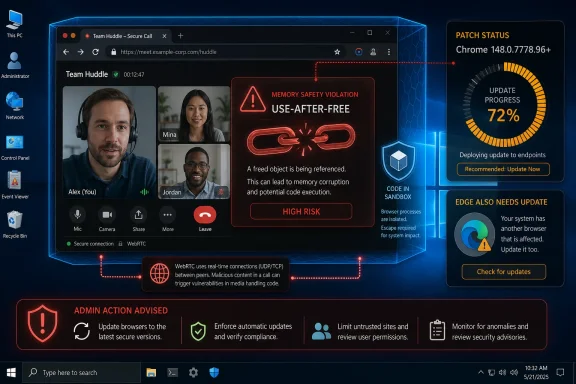 A Browser Bug Becomes a Windows Fleet Problem
CVE-2026-7928 is the kind of vulnerability that sounds narrow until you translate it into operational terms. WebRTC is not an obscure plugin or optional download; it is the machinery that lets browsers do voice, video, screen sharing, peer-to-peer data channels, and low-latency collaboration without a separate native app. If the vulnerable code path can be reached through a crafted web page, then the attack surface is the open web.The public description says the flaw allowed arbitrary code execution inside a sandbox. That caveat matters, but it should not comfort anyone too much. Browser sandboxes are designed precisely because browser renderer compromise is common enough to be planned for, and attackers often chain renderer bugs with sandbox escapes, kernel bugs, driver flaws, or stolen browser session material.
The CISA ADP scoring listed for the flaw puts it at CVSS 8.8, with network attack vector, low attack complexity, no privileges required, and user interaction required. In normal English, the victim needs to visit or be induced into loading attacker-controlled content, but the attacker does not need an account on the machine and does not need a complicated local setup. That is a classic browser-exploitation profile.
This is also why the “Windows prior to 148.0.7778.96” wording is more interesting than it first appears. Chromium is cross-platform, WebRTC is cross-platform, and Chrome 148 shipped for Windows, macOS, and Linux. But the CVE record, as described, scopes this particular vulnerability to Chrome on Windows, which means defenders should avoid inventing broader impact while also avoiding the opposite mistake: assuming that only Google Chrome matters.
Use-After-Free Is the Old Bug That Refuses to Retire
A use-after-free flaw is a memory safety bug in which software continues to use a chunk of memory after it has already been released. In a well-behaved program, freed memory is no longer trusted state; in a vulnerable program, an attacker may be able to influence what lands there next and trick the application into treating attacker-controlled data as a legitimate object. That is why CWE-416 still shows up again and again in browser advisories.Modern browsers are enormously hardened compared with their ancestors. They have site isolation, renderer sandboxes, exploit mitigations, partitioned processes, memory allocators designed to reduce predictable corruption, and a decade of institutional scar tissue. Yet use-after-free remains one of the recurring patterns because browsers are also sprawling state machines: tabs open and close, media tracks appear and disappear, devices are granted and revoked, pages navigate, permissions change, and JavaScript keeps asking the engine to do one more thing at the worst possible moment.
WebRTC adds its own pressure. It is asynchronous by design, juggling media streams, peer connections, codecs, device access, network negotiation, and state transitions that are often driven by remote peers and web-page script. That makes object lifetime management unusually delicate. A stale pointer in that neighborhood is not merely a crash bug; under the right conditions, it can become a controlled execution primitive.
The public advisory does not provide exploit details, and the linked Chromium issue is restricted, which is normal for recently patched security bugs. That restriction is not secrecy theater. It is an attempt to give the majority of users time to update before the exact bug anatomy becomes a how-to guide for exploit developers.
WebRTC Is No Longer a “Video Chat” Feature
For many users, WebRTC still means browser-based video calls. For enterprises, it now means a long list of daily workflows: Teams in the browser, Zoom links, Google Meet, contact-center dashboards, remote assistance tools, telehealth portals, online classrooms, virtual events, and embedded customer-support widgets. It is no longer a novelty API. It is infrastructure.That changes the risk model. A vulnerability in a seldom-used browser feature can sometimes be mitigated by policy, configuration, or user education. A vulnerability in a collaboration stack used by sales, support, HR, engineering, and the executive floor is harder to quarantine. Telling users not to open suspicious links is still necessary, but it is not a control strategy.
It also makes phishing more powerful. A malicious meeting invite, fake support portal, spoofed webinar registration, or compromised collaboration site is a plausible delivery path for a crafted HTML page. The user interaction requirement is not a major barrier when the modern workday is a conveyor belt of links, embedded previews, calendar attachments, and browser-based tools.
That is why CVE-2026-7928 deserves attention even without a public “exploited in the wild” label. Browser bugs become dangerous not only because of their severity scores, but because they live in software that users are trained to trust hundreds of times per day.
Chrome 148 Is a Patch Train, Not a Single Fix
Chrome 148’s stable desktop release is larger than an ordinary point update. Google promoted Chrome 148 to the stable channel on May 5, 2026, with version 148.0.7778.96 for Linux and 148.0.7778.96/97 for Windows and Mac, rolling out over days or weeks. Reporting on the release counted 127 security fixes, including critical and high-severity flaws across major browser components.That matters because defenders should resist treating CVE-2026-7928 as a standalone checkbox. It is one tile in a much larger mosaic of browser hardening. The same release cycle included memory corruption issues in other parts of Chromium, and at least some public reporting highlighted three critical vulnerabilities in Chrome 148 separate from this WebRTC flaw.
The overloaded release is a reminder of how browser security actually works. There is no single monthly “browser patch” in the tidy operating-system sense. Chrome stable updates arrive when the train is ready, emergency updates arrive when exploitation forces the issue, and extended-stable channels may lag or differ by version. The inventory problem is therefore not “Do we have Chrome installed?” but “Which exact channel, version, platform, and derivative browser are running on which machines today?”
For home users, the action is to open Chrome’s About page and let the updater do its job. For IT, the action is more mechanical: confirm version compliance through endpoint management, browser reporting, vulnerability scanning, and software inventory. A machine that “has auto-update enabled” is not the same thing as a machine that has actually restarted into the fixed build.
The Sandbox Is a Speed Bump, Not a Force Field
The phrase “execute arbitrary code inside a sandbox” can produce two bad reactions. The first is panic, because arbitrary code execution sounds like instant system compromise. The second is complacency, because the sandbox sounds like containment. Both reactions miss the point.A renderer sandbox compromise is a serious foothold. It may not immediately hand an attacker the whole operating system, but it can expose browser memory, active web sessions, page contents, authentication flows, and sensitive data accessible to that process. Depending on the browser architecture and the site involved, that can still be damaging even without a full sandbox escape.
The bigger concern is chaining. Browser exploit campaigns often pair an initial renderer or component bug with a second vulnerability that breaks containment or elevates privileges. CVE-2026-7928 by itself is publicly described as sandboxed execution, but defenders should not assume attackers evaluate bugs one at a time. They evaluate chains, targets, and return on investment.
This is where Windows patch hygiene becomes inseparable from browser patch hygiene. A fully patched browser running on an unpatched OS, with stale GPU drivers and permissive endpoint controls, is a different target from a fully patched stack. The browser may be the door, but the hallway behind it is the operating system.
Microsoft Edge Inherits the Chromium Clock
The user-submitted source points to Microsoft’s Security Update Guide, which is exactly where Windows shops often encounter Chromium CVEs in practice. Microsoft Edge is Chromium-based, and Microsoft routinely ships Edge Stable and Extended Stable updates that incorporate Chromium security fixes. That means a Chrome advisory is also an Edge watch item, even when the first public write-up says “Google Chrome.”This is where the CPE question becomes more than database housekeeping. NVD’s initial configuration described Chrome as the vulnerable application and Windows as the operating system condition. That is reasonable for the CVE text as published, but it does not automatically enumerate every Chromium-based downstream product. Vulnerability scanners, patch dashboards, and compliance tools can lag behind that nuance.
If a CPE is missing, the practical answer is not to wait for the database to become perfect. CPEs are useful for automation, but they are not the vulnerability. The vulnerability lives in code. If Edge, Brave, Opera, Vivaldi, Electron apps, or embedded Chromium runtimes include the affected WebRTC code before the relevant fix, defenders need to know whether those products have consumed the patched Chromium revision or otherwise mitigated the flaw.
For Microsoft Edge specifically, administrators should follow Microsoft’s Edge security release notes and the MSRC entry, not just the Chrome blog. Microsoft’s cadence can differ from Google’s, and enterprise controls such as Edge Update policies, WSUS-adjacent workflows, Intune, Configuration Manager, or third-party patch platforms may determine how quickly the patched build lands.
The CPE Gap Shows the Limits of Vulnerability Automation
The line “Are we missing a CPE here?” in vulnerability databases is easy to overlook, but it captures one of the quiet frustrations of modern exposure management. Security teams increasingly rely on machine-readable identifiers to decide whether a device is vulnerable. When the identifier set is incomplete or overly narrow, dashboards can undercount risk.CPE was built to name platforms and products in a standardized way. That is useful, but Chromium complicates the model because the same upstream code can appear in many downstream packages. A vulnerability may be assigned to Google Chrome because Google reported it and patched it, while the vulnerable code sits in an open-source component used elsewhere. The formal CVE record may not carry every downstream mapping on day one.
The result is a gap between known vulnerable software configurations and actual exposure. A scanner might flag Chrome on Windows below 148.0.7778.96 but miss an embedded Chromium runtime in a conferencing client, a kiosk shell, or an enterprise app using a stale WebView-like component. Conversely, a scanner might overgeneralize and create noise for platforms that are not affected by this particular Windows-scoped CVE.
This is why good vulnerability management teams treat CVE metadata as input, not gospel. They correlate CPEs with vendor advisories, application inventories, file versions, package versions, and actual browser update state. That is slower than blindly trusting a dashboard, but it is also how real risk gets separated from clerical artifacts.
Windows Is the Named Target, but Chromium Is the Ecosystem
The CVE description’s Windows specificity should be respected. It says Chrome on Windows prior to 148.0.7778.96, not “all Chromium browsers everywhere.” Ubuntu’s advisory, for example, marked its chromium-browser package as not affected across supported releases, which underlines the danger of assuming universal platform impact from a Chromium CVE headline.At the same time, Windows is where the operational blast radius is largest for many organizations. It is the dominant managed desktop environment, the place where Edge and Chrome often coexist, and the platform where business-critical browser workflows have displaced thick clients. A Windows-only browser flaw is not a narrow problem when your help desk, finance department, classrooms, and call center all live in Windows browsers.
The important distinction is between technical scope and management scope. Technically, the public record says Chrome on Windows before a fixed version. Operationally, the same release event should trigger a broader review of Chromium-based browsers and runtimes on Windows endpoints. That review may find that some are unaffected, already patched, or covered by vendor updates. But the review still needs to happen.
This is especially true for organizations that standardize on Edge but allow Chrome for compatibility. Shadow browser populations are common: developers install Chrome Canary, contractors bring managed Chrome profiles, line-of-business apps bundle old Chromium, and users keep a secondary browser for “the site that only works there.” CVE-2026-7928 is another argument for treating browsers as managed assets, not user preferences.
The Real Patch Deadline Is Before the Exploit Diff Lands
There is no public indication in the provided material that CVE-2026-7928 is being actively exploited. That is good news, but it is not a reason to drift. Once a browser patch ships, attackers can compare old and new code, study the restricted bug once it becomes available, and attempt to reconstruct the vulnerability from the fix.This is the browser-security race in miniature. Vendors disclose enough to warn defenders but not enough to hand attackers a recipe. Attackers then use the patch itself as a map. The longer endpoints remain on vulnerable builds after the fix is public, the more they move from “theoretical exposure” toward “known patch gap.”
Chrome’s staged rollout makes sense for reliability, but it is not a security SLA. Google may roll updates over days or weeks to the general population, while enterprises often need to compress that window for high-severity browser issues. That does not mean recklessly pushing untested browser builds into every environment within minutes. It means prebuilding a process that can test fast, deploy fast, and verify fast.
The verification step is the one organizations most often underinvest in. A patch policy that says “browsers auto-update” is comforting until you discover laptops that have not restarted, VDI images frozen on older builds, kiosk devices pinned to a release, or update services blocked by network controls. Browser patching is only complete when the running version is known.
The Enterprise Browser Has Become a Patchable OS Layer
For years, IT treated browsers as applications. That view is obsolete. The browser now mediates identity, productivity, file access, SaaS control planes, admin portals, password managers, remote meetings, device enrollment, and internal apps. In many enterprises, compromising the browser is not far from compromising the user’s working environment.CVE-2026-7928 illustrates that shift neatly because it is not a classic download-and-run malware story. The delivery vehicle is HTML, the vulnerable subsystem is built into the browser, and the likely user action is ordinary web use. The browser has become a universal runtime, and universal runtimes need the same rigor that used to be reserved for operating systems.
That means browser security cannot be left solely to the browser vendor. Administrators need policies that restrict risky extensions, isolate unmanaged profiles, enforce updates, control third-party cookies and site permissions where appropriate, and monitor browser version drift. They also need user-facing processes that make emergency restarts normal rather than exceptional.
It also means incident responders should treat suspicious browser crashes differently. A crash after visiting a strange meeting link or support page may be nothing. It may also be an exploit attempt that failed against a patched build or succeeded only partially. Browser telemetry, EDR process ancestry, DNS logs, and proxy records are now part of the same story.
WebRTC Policy Is a Scalpel, Not a Hammer
Some organizations will be tempted to ask whether they should disable WebRTC. In narrow environments, that may be plausible. In most modern workplaces, it is a self-inflicted outage. WebRTC is too deeply embedded in collaboration and customer-facing systems to be removed casually.A better approach is policy discipline. Limit browser access to cameras and microphones through enterprise controls where possible. Restrict unnecessary third-party meeting tools. Keep collaboration platforms standardized and patched. Use site permissions deliberately instead of letting users accumulate permanent grants to every conferencing widget they encounter.
Network controls can help, but they are imperfect. WebRTC is designed to traverse networks and establish real-time sessions under varied conditions. Blocking it wholesale often breaks legitimate work, while allowing it wholesale expands exposure. The useful middle ground is to reduce unnecessary WebRTC use and make sure the browser code receiving that traffic is current.
For high-risk users, browser isolation can also be part of the answer. Executives, finance staff, administrators, and help-desk personnel face different phishing pressure than the average user. Running untrusted browsing in isolated environments, separating admin work from general browsing, and limiting token exposure can reduce the impact when browser bugs surface.
The Home User Version Is Still “Restart the Browser”
There is a danger in overcomplicating a browser CVE. For most individual users, the correct mitigation is not a new security architecture. It is updating Chrome to 148.0.7778.96 or later on Windows and restarting the browser. If Chrome is open for weeks at a time, the update may be downloaded but not active.Users should also check other Chromium-based browsers. Edge, Brave, Opera, Vivaldi, and other derivatives have their own version strings and update mechanisms, so a patched Chrome install does not imply a patched ecosystem. The same goes for work machines where a corporate update policy may defer browser releases.
The advice about suspicious links remains valid, but it is secondary. Social engineering works because the links often look like work. A browser update does not make phishing safe, but it removes one class of weapon from the attacker’s toolkit. That is the boring bargain of security hygiene: fewer miracles, fewer catastrophes.
For WindowsForum readers running mixed home labs, developer workstations, or family support fleets, this is a good moment to audit defaults. Make sure Chrome and Edge are not blocked from updating. Remove abandoned Chromium forks. Check that old portable browsers are not sitting in Downloads folders and getting used for “testing.”
The Chrome 148 Lesson Is Bigger Than One WebRTC CVE
The concrete response to CVE-2026-7928 is short, but the lesson behind it is larger. Browser patching has become one of the few security controls that directly reduces exposure for almost every user, every day. When the vulnerable component is WebRTC, the line between “web browsing” and “communications infrastructure” disappears.- Chrome on Windows should be updated to version 148.0.7778.96 or later, and the browser should be restarted so the patched build is actually running.
- Microsoft Edge and other Chromium-based browsers should be checked separately because Chromium fixes do not protect downstream products until those products ship and run updated builds.
- Vulnerability teams should not rely solely on CPE matching when Chromium code is embedded across multiple browsers, runtimes, and enterprise applications.
- The sandboxed nature of the described code execution reduces immediate system-level impact but does not make the bug low risk, especially in realistic exploit-chain scenarios.
- WebRTC should be treated as a core enterprise attack surface because it now powers routine meetings, support workflows, and browser-based communications.
Source: NVD / Chromium Security Update Guide - Microsoft Security Response Center
