

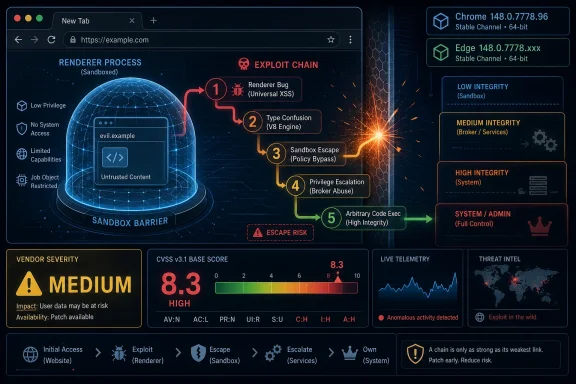
On May 7, 2026, Microsoft published guidance for CVE-2026-7967, a Chromium Navigation flaw fixed in Chrome 148.0.7778.96 and carried into Microsoft Edge because Edge consumes the Chromium open-source browser engine. The vulnerability is easy to underrate because Chromium labels it “Medium,” yet the available CVSS 3.1 vector scores it as high impact once an attacker has already broken into the renderer. That tension is the real story: modern browser security is less about one bug than about whether chained bugs can cross the sandbox boundary.
CVE-2026-7967 is described as insufficient validation of untrusted input in Chromium’s Navigation component. In plain English, some data handed to the browser’s navigation machinery was not checked tightly enough before being trusted by code running closer to the browser’s privileged side.
That does not mean a random website can directly own a Windows machine with this single flaw. The advisory’s key condition is that the attacker must already have compromised the renderer process, which is the sandboxed part of the browser designed to chew through hostile web content without giving that content the keys to the operating system.
But browser attackers do not think in single CVEs. They build chains. A renderer bug gets them code execution inside the sandbox; a second bug, like a navigation validation failure, potentially helps them climb out of it. That is why the same issue can look “Medium” from Chromium’s component-level severity process and still earn a high CVSS score from downstream vulnerability enrichment.
The Microsoft angle is straightforward but important. Microsoft did not assign this CVE, and the bug is not uniquely an Edge invention. Microsoft’s Security Update Guide lists it because Microsoft Edge is Chromium-based, and therefore Edge’s security posture depends on the Chromium fixes it ingests.
CVE-2026-7967 sits in that uncomfortable middle ground. It is not advertised as a one-click remote code execution bug by itself. Instead, it is the kind of weakness that matters after the first wall has already fallen.
That is how many real browser intrusions are assembled. One vulnerability parses a malicious page badly. Another vulnerability crosses a privilege boundary. A third may disable a security feature, persist in a profile, or move laterally through credentials and tokens. The industry’s advisory format tends to slice those steps into separate records, but attackers experience them as one path.
For Windows administrators, that distinction matters more than the severity label. A medium-rated Chromium flaw that enables a sandbox escape after renderer compromise belongs in the “patch promptly” bucket, especially when released alongside a large Chrome stable update containing many other security fixes.
A browser has to decide what is allowed to load, which process should host it, what origin it belongs to, which permissions follow, and whether a transition is safe. Those decisions are not cosmetic; they are central to site isolation, sandboxing, frame policy, and the separation between hostile web content and trusted browser logic.
That is why “insufficient validation of untrusted input” in navigation is a red flag even without public exploit details. Navigation code is where seemingly mundane assumptions can become privilege-boundary problems. If the browser accepts a crafted state transition or malformed input at the wrong layer, it may let compromised renderer code influence something it should only be able to request, not command.
Google and Chromium commonly restrict bug details until most users have updated, and that restraint is sensible here. The more a flaw involves a potential sandbox escape, the more useful implementation details become to exploit developers. The absence of a public proof of concept should not be mistaken for the absence of risk.
That context matters because enterprise patching often treats browser updates as background noise. Chrome and Edge update so frequently that each advisory can feel like another raindrop in a storm. Yet the modern browser is the universal client for email, SaaS, identity, admin consoles, file previews, collaboration apps, and untrusted content. If any application deserves fast patch muscle memory, it is the browser.
The uncomfortable reality is that browser update velocity is now part of the security model. Google, Microsoft, and other Chromium vendors ship fixes continuously because the web platform is sprawling, memory-unsafe components still exist, and researchers keep finding new ways to cross boundaries that looked solid five years ago.
Chrome 148’s scale reinforces that point. CVE-2026-7967 may not be the headline critical flaw in the bundle, but it is exactly the kind of supporting vulnerability that can make another bug worse. A browser release with many fixes should be treated as a reduction in attack surface, not as a menu from which administrators pick only the scary-looking CVEs.
This is open-source reuse working as designed, but it also complicates patch accountability. Google’s Chrome release may be the first place a fix becomes visible. Microsoft then has to absorb the Chromium patch, validate it in Edge, publish guidance, and distribute a corrected Edge build. Other Chromium-based vendors face similar obligations.
For most WindowsForum readers, Edge is the practical concern. Microsoft’s page lists Microsoft Edge (Chromium-based), marks customer action as required, and identifies a fixed build family of 148.0.7778.xxx. That is not a Windows Update KB in the old sense; it is a browser channel update tied to Edge’s own update mechanism and enterprise management controls.
This is where smaller organizations get tripped up. They may have a mature Patch Tuesday process for Windows cumulative updates, Office builds, and server maintenance windows, while browser updates happen through a different mechanism and a different operational rhythm. Chromium CVEs punish that separation.
That sounds simple until you look across a real fleet. There are always machines that were asleep, laptops behind captive portals, VDI images frozen before the update, developer workstations with nonstandard channels, and servers where Edge is present even if nobody thinks of them as browsing devices. Browser patch compliance is only as good as the inventory beneath it.
Admins should resist the urge to treat the CPE discussion as academic. The NVD configuration described Chrome on Windows, Linux, and macOS, and Microsoft’s entry covers Edge because of the shared Chromium base. If your vulnerability scanner misses a Chromium-based application because the CPE mapping is late or imperfect, the asset is still exposed.
This is one of the recurring weaknesses in CVE-driven operations. CPEs, CVSS vectors, and vendor release notes are necessary metadata, but they are not the same thing as a working exposure model. A fleet running Chromium-derived browsers needs version-based detection, not just advisory matching.
That looks contradictory only if you expect severity to be a single universal truth. Chromium’s severity ratings often consider exploit preconditions, component context, and how the bug fits into the browser’s internal security model. CVSS, by design, tries to express the technical characteristics of exploitation and impact using a standardized vector.
Here the vector tells the story: network attack vector, high attack complexity, no privileges required, user interaction required, changed scope, and high confidentiality, integrity, and availability impact. The high attack complexity reflects the need for a renderer compromise or an exploit chain. The changed scope and high impact reflect the danger if the chain succeeds.
For defenders, the practical answer is to ignore the false comfort of a single word. “Medium” does not mean “optional” when the bug can participate in a sandbox escape. “High” does not mean “panic” when there is no public evidence of exploitation. Together, they mean patch promptly and verify completion.
Modern work is saturated with links. Users open tickets, preview documents, authenticate into SaaS apps, follow search results, click vendor portals, and read messages that render remote content. Even cautious employees can be routed through compromised websites or malicious ad paths.
The condition that an attacker must first compromise the renderer is a bigger hurdle, but not an exotic one. Renderer bugs are a steady class of browser vulnerability, and Chrome 148 itself shipped with many fixes across components. A determined attacker does not need CVE-2026-7967 to be self-contained if it pairs well with another flaw.
This is why browser hardening still matters after patching. Site isolation, exploit protection, endpoint detection, least privilege, credential isolation, and extension control all reduce the blast radius when a browser bug lands. Patching closes known doors; hardening makes the remaining doors less useful.
On an unmanaged home PC, the danger is obvious enough: data theft, malware execution, or account compromise. In an enterprise, the browser may hold session cookies for privileged SaaS consoles, access tokens for cloud dashboards, cached documents, password manager integrations, and extensions with broad page access.
That is why an Edge listing in MSRC matters even when the root bug lives upstream in Chromium. Many Windows shops standardize on Edge because of Group Policy, Intune, Microsoft 365 integration, and enterprise identity features. Those same conveniences make Edge a high-value target when it is out of date.
The best defenders increasingly treat browsers as tier-one enterprise applications. They monitor versions, manage extensions, control update channels, and track exploit-driven releases with the same seriousness once reserved for operating system patches. CVE-2026-7967 is a small reminder of why that shift is overdue.
None of that is unusual, and none of it means defenders should wait. Vulnerability records are living documents, especially in the first 24 to 72 hours after publication. The authoritative fix usually arrives before every downstream database has a tidy severity block, complete CPE set, and polished explanation.
That lag creates real operational friction. Some scanners rely heavily on NVD enrichment. Some dashboards suppress items without NVD scores. Some teams triage by base score and accidentally underweight a new CVE until enrichment catches up. Browser vulnerabilities expose the weakness of those workflows because patches often move faster than metadata.
A better model is vendor-first for remediation and database-assisted for reporting. If Google ships a stable browser update and Microsoft says Edge customers require action, the fleet should move. The CVE record can catch up while the patched binaries are already landing.
This does not mean every browser update must trigger a crisis bridge. It does mean organizations need a separate browser patch lane that is faster, more automated, and less ceremonial than traditional operating system servicing. The browser’s threat model rewards hours and days, not weeks.
Edge complicates the picture because it wears a Microsoft badge but follows a Chromium cadence. Admins who think “Microsoft security update” only means Windows Update will miss part of the story. Edge has its own update channels, policies, baselines, and release notes, and they need to be wired into endpoint management.
Chrome has the same problem in mixed fleets. Some endpoints update through Google’s updater, some through package managers, some through enterprise deployment tools, and some not at all because a line-of-business app owner once froze a build and never revisited the exception. CVE-2026-7967 is not special in that regard; it is simply the latest test.
The correct response is boring and disciplined. Update Chrome. Update Edge. Confirm the build. Look for unmanaged Chromium-based browsers. Re-run inventory. Make sure update policies are not pinned to old versions. Close the loop with telemetry rather than assuming auto-update did its job.
For home users, that usually means opening the browser’s About page and letting the update complete, then relaunching. For enterprises, it means checking management console reports, endpoint inventory, vulnerability scanner output, and any policy that controls update cadence. The relaunch requirement remains the perennial weak spot; a downloaded browser update does not protect a session that never restarts.
The larger lesson is that browsers need operational ownership. If nobody owns browser currency across the fleet, then every Chromium security bulletin becomes a scramble. If ownership is clear, CVE-2026-7967 becomes what it should be: a prompt, measurable update event.
That makes this a clean compliance check. The question is not whether a machine “has Chrome” or “has Edge.” The question is whether its installed browser build is at or beyond the corrected version for its channel and platform.
Version precision is especially important for organizations that run multiple channels. Stable, Extended Stable, Beta, Dev, and Canary do not carry the same risk profile or the same release timing. A security team that flattens all of them into “Chrome installed” or “Edge installed” gives up the detail needed to know whether a fix is present.
There is also a lesson for vulnerability management teams handling the “are we missing a CPE?” problem. CPEs are useful for database matching, but Chromium exposure often maps better to installed application name, vendor, channel, and version. The browser’s build number is the ground truth.
The vendor ecosystem has responded with speed. Google ships quickly. Microsoft ingests Chromium and publishes Edge guidance. Linux distributions, security vendors, and vulnerability databases add their own layers of status and scoring. The defender’s job is to turn that noisy stream into a simple operational outcome: patched browsers on real machines.
CVE-2026-7967 is not the loudest vulnerability in Chrome 148, and that is precisely why it is useful. It shows how an advisory that looks secondary can still touch a critical boundary. It also shows why Windows administrators cannot outsource browser risk to labels like “Medium” or habits like “we’ll catch it next Patch Tuesday.”
Source: NVD / Chromium Security Update Guide - Microsoft Security Response Center
 A Medium Chromium Bug Becomes a High-Stakes Edge Patch
CVE-2026-7967 is described as insufficient validation of untrusted input in Chromium’s Navigation component. In plain English, some data handed to the browser’s navigation machinery was not checked tightly enough before being trusted by code running closer to the browser’s privileged side.That does not mean a random website can directly own a Windows machine with this single flaw. The advisory’s key condition is that the attacker must already have compromised the renderer process, which is the sandboxed part of the browser designed to chew through hostile web content without giving that content the keys to the operating system.
But browser attackers do not think in single CVEs. They build chains. A renderer bug gets them code execution inside the sandbox; a second bug, like a navigation validation failure, potentially helps them climb out of it. That is why the same issue can look “Medium” from Chromium’s component-level severity process and still earn a high CVSS score from downstream vulnerability enrichment.
The Microsoft angle is straightforward but important. Microsoft did not assign this CVE, and the bug is not uniquely an Edge invention. Microsoft’s Security Update Guide lists it because Microsoft Edge is Chromium-based, and therefore Edge’s security posture depends on the Chromium fixes it ingests.
The Browser Sandbox Is the Battlefield, Not the Footnote
The phrase sandbox escape still sounds abstract to many users, but for defenders it is one of the most meaningful phrases in browser security. A renderer compromise alone is dangerous, but the sandbox is designed to keep that compromise boxed in, limiting access to files, processes, and operating system interfaces. A sandbox escape changes the shape of the incident.CVE-2026-7967 sits in that uncomfortable middle ground. It is not advertised as a one-click remote code execution bug by itself. Instead, it is the kind of weakness that matters after the first wall has already fallen.
That is how many real browser intrusions are assembled. One vulnerability parses a malicious page badly. Another vulnerability crosses a privilege boundary. A third may disable a security feature, persist in a profile, or move laterally through credentials and tokens. The industry’s advisory format tends to slice those steps into separate records, but attackers experience them as one path.
For Windows administrators, that distinction matters more than the severity label. A medium-rated Chromium flaw that enables a sandbox escape after renderer compromise belongs in the “patch promptly” bucket, especially when released alongside a large Chrome stable update containing many other security fixes.
Navigation Is More Than the Address Bar
The “Navigation” component name may tempt readers to picture the address bar, back button, or tab history. In Chromium terms, navigation is closer to the traffic-control system for moving a frame or tab from one document, origin, state, or process relationship to another. It touches security boundaries because the web’s trust model is full of boundaries.A browser has to decide what is allowed to load, which process should host it, what origin it belongs to, which permissions follow, and whether a transition is safe. Those decisions are not cosmetic; they are central to site isolation, sandboxing, frame policy, and the separation between hostile web content and trusted browser logic.
That is why “insufficient validation of untrusted input” in navigation is a red flag even without public exploit details. Navigation code is where seemingly mundane assumptions can become privilege-boundary problems. If the browser accepts a crafted state transition or malformed input at the wrong layer, it may let compromised renderer code influence something it should only be able to request, not command.
Google and Chromium commonly restrict bug details until most users have updated, and that restraint is sensible here. The more a flaw involves a potential sandbox escape, the more useful implementation details become to exploit developers. The absence of a public proof of concept should not be mistaken for the absence of risk.
Chrome 148 Was Not a Routine Point Release
CVE-2026-7967 arrived in the broader Chrome 148 desktop promotion, with version 148.0.7778.96 for Linux and 148.0.7778.96 or 148.0.7778.97 for Windows and macOS. The release was not a tiny maintenance patch. Public reporting and Google’s release notes describe a large security update with more than 100 fixes, including several critical issues elsewhere in the browser stack.That context matters because enterprise patching often treats browser updates as background noise. Chrome and Edge update so frequently that each advisory can feel like another raindrop in a storm. Yet the modern browser is the universal client for email, SaaS, identity, admin consoles, file previews, collaboration apps, and untrusted content. If any application deserves fast patch muscle memory, it is the browser.
The uncomfortable reality is that browser update velocity is now part of the security model. Google, Microsoft, and other Chromium vendors ship fixes continuously because the web platform is sprawling, memory-unsafe components still exist, and researchers keep finding new ways to cross boundaries that looked solid five years ago.
Chrome 148’s scale reinforces that point. CVE-2026-7967 may not be the headline critical flaw in the bundle, but it is exactly the kind of supporting vulnerability that can make another bug worse. A browser release with many fixes should be treated as a reduction in attack surface, not as a menu from which administrators pick only the scary-looking CVEs.
Microsoft’s Edge Advisory Is Really a Supply-Chain Notice
The most revealing line in Microsoft’s guidance is not the CVE description. It is the explanation that Edge “ingests Chromium,” and that this is why the issue appears in Microsoft’s Security Update Guide. That sentence captures the browser market’s central dependency: multiple major browsers share a large body of code, so one upstream fix can matter across many downstream products.This is open-source reuse working as designed, but it also complicates patch accountability. Google’s Chrome release may be the first place a fix becomes visible. Microsoft then has to absorb the Chromium patch, validate it in Edge, publish guidance, and distribute a corrected Edge build. Other Chromium-based vendors face similar obligations.
For most WindowsForum readers, Edge is the practical concern. Microsoft’s page lists Microsoft Edge (Chromium-based), marks customer action as required, and identifies a fixed build family of 148.0.7778.xxx. That is not a Windows Update KB in the old sense; it is a browser channel update tied to Edge’s own update mechanism and enterprise management controls.
This is where smaller organizations get tripped up. They may have a mature Patch Tuesday process for Windows cumulative updates, Office builds, and server maintenance windows, while browser updates happen through a different mechanism and a different operational rhythm. Chromium CVEs punish that separation.
The Version Number Is the Control, Not the Advisory
The only reliable operational question is whether managed browsers have moved to a fixed build. For Chrome, that means at least 148.0.7778.96 on affected desktop platforms. For Edge, Microsoft’s guidance points to the 148.0.7778.xxx fixed build line, with the exact installed Edge build visible through the browser’s About page and management tooling.That sounds simple until you look across a real fleet. There are always machines that were asleep, laptops behind captive portals, VDI images frozen before the update, developer workstations with nonstandard channels, and servers where Edge is present even if nobody thinks of them as browsing devices. Browser patch compliance is only as good as the inventory beneath it.
Admins should resist the urge to treat the CPE discussion as academic. The NVD configuration described Chrome on Windows, Linux, and macOS, and Microsoft’s entry covers Edge because of the shared Chromium base. If your vulnerability scanner misses a Chromium-based application because the CPE mapping is late or imperfect, the asset is still exposed.
This is one of the recurring weaknesses in CVE-driven operations. CPEs, CVSS vectors, and vendor release notes are necessary metadata, but they are not the same thing as a working exposure model. A fleet running Chromium-derived browsers needs version-based detection, not just advisory matching.
Severity Labels Are Telling Different Stories
The advisory trail around CVE-2026-7967 gives us three different severity signals. Chromium calls the bug medium. CISA-ADP supplies a CVSS 3.1 base score of 8.3, which lands in high territory. NVD had not yet provided its own assessment at the time reflected in the supplied record.That looks contradictory only if you expect severity to be a single universal truth. Chromium’s severity ratings often consider exploit preconditions, component context, and how the bug fits into the browser’s internal security model. CVSS, by design, tries to express the technical characteristics of exploitation and impact using a standardized vector.
Here the vector tells the story: network attack vector, high attack complexity, no privileges required, user interaction required, changed scope, and high confidentiality, integrity, and availability impact. The high attack complexity reflects the need for a renderer compromise or an exploit chain. The changed scope and high impact reflect the danger if the chain succeeds.
For defenders, the practical answer is to ignore the false comfort of a single word. “Medium” does not mean “optional” when the bug can participate in a sandbox escape. “High” does not mean “panic” when there is no public evidence of exploitation. Together, they mean patch promptly and verify completion.
The User-Interaction Requirement Is Not Much Comfort
The CVSS vector includes user interaction required, which often leads to a dangerous sigh of relief. In browser land, user interaction usually means visiting a page, opening a link, loading attacker-controlled HTML, or encountering malicious content through an otherwise normal workflow. That is not a high bar.Modern work is saturated with links. Users open tickets, preview documents, authenticate into SaaS apps, follow search results, click vendor portals, and read messages that render remote content. Even cautious employees can be routed through compromised websites or malicious ad paths.
The condition that an attacker must first compromise the renderer is a bigger hurdle, but not an exotic one. Renderer bugs are a steady class of browser vulnerability, and Chrome 148 itself shipped with many fixes across components. A determined attacker does not need CVE-2026-7967 to be self-contained if it pairs well with another flaw.
This is why browser hardening still matters after patching. Site isolation, exploit protection, endpoint detection, least privilege, credential isolation, and extension control all reduce the blast radius when a browser bug lands. Patching closes known doors; hardening makes the remaining doors less useful.
Extensions, Profiles, and Sync Turn Browser Bugs Into Business Risk
The browser is no longer just a rendering engine. It is a credential manager, an identity broker, an extension host, a data sync client, and the front door to administrative control planes. A sandbox escape has a different business meaning in 2026 than it did in the early days of tabbed browsing.On an unmanaged home PC, the danger is obvious enough: data theft, malware execution, or account compromise. In an enterprise, the browser may hold session cookies for privileged SaaS consoles, access tokens for cloud dashboards, cached documents, password manager integrations, and extensions with broad page access.
That is why an Edge listing in MSRC matters even when the root bug lives upstream in Chromium. Many Windows shops standardize on Edge because of Group Policy, Intune, Microsoft 365 integration, and enterprise identity features. Those same conveniences make Edge a high-value target when it is out of date.
The best defenders increasingly treat browsers as tier-one enterprise applications. They monitor versions, manage extensions, control update channels, and track exploit-driven releases with the same seriousness once reserved for operating system patches. CVE-2026-7967 is a small reminder of why that shift is overdue.
The NVD Record Shows the Metadata Lag Defenders Live With
The supplied NVD history is a miniature case study in how vulnerability intelligence becomes usable over time. Chrome received the CVE. CISA-ADP added a CVSS vector. NIST’s enrichment added configurations and references. NVD’s own scoring fields were still blank in the displayed record.None of that is unusual, and none of it means defenders should wait. Vulnerability records are living documents, especially in the first 24 to 72 hours after publication. The authoritative fix usually arrives before every downstream database has a tidy severity block, complete CPE set, and polished explanation.
That lag creates real operational friction. Some scanners rely heavily on NVD enrichment. Some dashboards suppress items without NVD scores. Some teams triage by base score and accidentally underweight a new CVE until enrichment catches up. Browser vulnerabilities expose the weakness of those workflows because patches often move faster than metadata.
A better model is vendor-first for remediation and database-assisted for reporting. If Google ships a stable browser update and Microsoft says Edge customers require action, the fleet should move. The CVE record can catch up while the patched binaries are already landing.
Patch Tuesday Habits Do Not Fit Chromium’s Clock
Windows administrators are culturally trained around Patch Tuesday. Chromium does not care. Chrome stable releases, emergency fixes, and Edge security updates can appear outside the monthly Microsoft rhythm, and attackers know that many enterprises still batch their thinking around a calendar.This does not mean every browser update must trigger a crisis bridge. It does mean organizations need a separate browser patch lane that is faster, more automated, and less ceremonial than traditional operating system servicing. The browser’s threat model rewards hours and days, not weeks.
Edge complicates the picture because it wears a Microsoft badge but follows a Chromium cadence. Admins who think “Microsoft security update” only means Windows Update will miss part of the story. Edge has its own update channels, policies, baselines, and release notes, and they need to be wired into endpoint management.
Chrome has the same problem in mixed fleets. Some endpoints update through Google’s updater, some through package managers, some through enterprise deployment tools, and some not at all because a line-of-business app owner once froze a build and never revisited the exception. CVE-2026-7967 is not special in that regard; it is simply the latest test.
The Right Response Is Verification, Not Alarmism
There is no need to declare CVE-2026-7967 the browser apocalypse. The public record does not establish active exploitation, and the attack requires a prior renderer compromise. But there is also no justification for waiting on a perfect NVD score or a scanner plugin to bless the obvious.The correct response is boring and disciplined. Update Chrome. Update Edge. Confirm the build. Look for unmanaged Chromium-based browsers. Re-run inventory. Make sure update policies are not pinned to old versions. Close the loop with telemetry rather than assuming auto-update did its job.
For home users, that usually means opening the browser’s About page and letting the update complete, then relaunching. For enterprises, it means checking management console reports, endpoint inventory, vulnerability scanner output, and any policy that controls update cadence. The relaunch requirement remains the perennial weak spot; a downloaded browser update does not protect a session that never restarts.
The larger lesson is that browsers need operational ownership. If nobody owns browser currency across the fleet, then every Chromium security bulletin becomes a scramble. If ownership is clear, CVE-2026-7967 becomes what it should be: a prompt, measurable update event.
The Build Number Tells Admins Where to Look
CVE-2026-7967 gives defenders several concrete anchors. Chrome before 148.0.7778.96 is the affected line identified in the CVE description. Microsoft Edge’s fixed build family is listed as 148.0.7778.xxx. The release date in Microsoft’s guide is May 7, 2026, following Google’s Chrome 148 stable-channel promotion earlier that week.That makes this a clean compliance check. The question is not whether a machine “has Chrome” or “has Edge.” The question is whether its installed browser build is at or beyond the corrected version for its channel and platform.
Version precision is especially important for organizations that run multiple channels. Stable, Extended Stable, Beta, Dev, and Canary do not carry the same risk profile or the same release timing. A security team that flattens all of them into “Chrome installed” or “Edge installed” gives up the detail needed to know whether a fix is present.
There is also a lesson for vulnerability management teams handling the “are we missing a CPE?” problem. CPEs are useful for database matching, but Chromium exposure often maps better to installed application name, vendor, channel, and version. The browser’s build number is the ground truth.
The Small Navigation Bug That Should Change the Patch Conversation
This is the part of the story that should survive after CVE-2026-7967 fades into the next browser bulletin. Chromium’s architecture has raised the cost of browser exploitation dramatically, but it has also made exploit chains the normal unit of risk. A bug that matters only after a renderer compromise may still matter a great deal.The vendor ecosystem has responded with speed. Google ships quickly. Microsoft ingests Chromium and publishes Edge guidance. Linux distributions, security vendors, and vulnerability databases add their own layers of status and scoring. The defender’s job is to turn that noisy stream into a simple operational outcome: patched browsers on real machines.
CVE-2026-7967 is not the loudest vulnerability in Chrome 148, and that is precisely why it is useful. It shows how an advisory that looks secondary can still touch a critical boundary. It also shows why Windows administrators cannot outsource browser risk to labels like “Medium” or habits like “we’ll catch it next Patch Tuesday.”
The Admin’s Short List for CVE-2026-7967
The practical response is compact, but it should be explicit. Treat this as a browser currency issue first and a CVE paperwork issue second.- Chrome installations should be updated to 148.0.7778.96 or later on affected desktop platforms.
- Microsoft Edge installations should be verified against the 148.0.7778.xxx fixed build family identified by Microsoft.
- Browser restarts should be enforced or strongly prompted, because pending updates do not protect long-running sessions.
- Vulnerability teams should not wait for every NVD field to be populated before acting on vendor-published browser fixes.
- Asset inventory should include Chromium-based browsers by product, channel, and version rather than relying only on CPE matching.
- Security teams should treat sandbox-escape helper bugs as chainable risks, even when the individual Chromium severity label is not critical.
Source: NVD / Chromium Security Update Guide - Microsoft Security Response Center
