

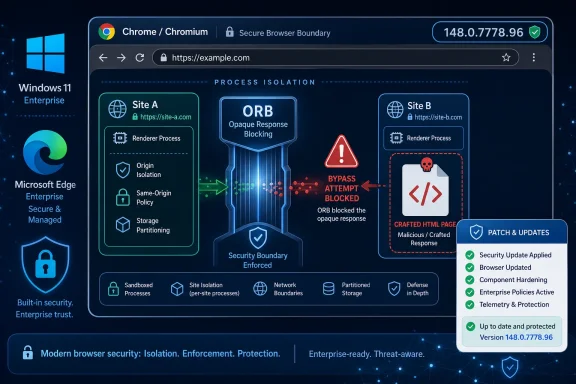
Google and Microsoft disclosed CVE-2026-7971 on May 6, 2026, after Chrome 148.0.7778.96/97 began rolling out for Windows, macOS, and Linux, fixing a medium-severity Chromium flaw in Opaque Response Blocking that could let a crafted HTML page bypass Site Isolation. The bug is not the loudest item in Chrome 148’s security pile, but it is one of the more instructive ones. It shows that the modern browser’s most important defenses are no longer just memory safety patches and sandbox escapes; they are the policy layers that decide which web content gets to see which bytes. For Windows shops running Chrome, Edge, or any Chromium-derived browser, that makes this a small CVE with a large architectural message.
There was a time when a “medium” Chrome vulnerability sounded like something administrators could fold into the next convenient maintenance window. That era is gone. The browser is now the place where identity, SaaS, email, file sharing, device trust, and session tokens all converge, which means even a medium-severity flaw can sit uncomfortably close to the keys of the kingdom.
CVE-2026-7971 is not described as a remote code execution bug. The public wording says it involved an “inappropriate implementation” in ORB, short for Opaque Response Blocking, and that a remote attacker could bypass Site Isolation with a crafted HTML page. The attack requires user interaction under the CISA-assigned CVSS 3.1 vector, which is another way of saying the victim has to load or be induced into loading attacker-controlled web content.
That sounds ordinary because the web made it ordinary. A crafted HTML page is not an exotic delivery mechanism; it is the native format of phishing, malvertising, watering-hole attacks, compromised forums, poisoned search results, and hostile ad tech. In browser security, “user interaction required” often means “the target used the internet.”
The more interesting phrase is “bypass Site Isolation.” Site Isolation is one of Chromium’s major post-Spectre security bets: keep different sites in different renderer processes, enforce access rules from the browser process where possible, and prevent one site from receiving sensitive cross-site data it should never have had in memory. ORB is part of that defensive perimeter. If Site Isolation is the building’s floor plan, ORB is one of the guards checking whether a delivery belongs in a room at all.
The web depends on cross-origin fetching. Pages routinely load images, fonts, scripts, embeds, videos, and style sheets from other domains. But not every cross-origin response is safe to hand to a renderer, especially if the content is actually HTML, XML, JSON, or another sensitive document masquerading as something else.
Earlier Chromium defenses such as CORB, or Cross-Origin Read Blocking, tried to reduce that exposure by blocking certain cross-site responses from ever reaching a renderer process. ORB is the more modern expression of the same broad idea: when a response is meant to be opaque to the requesting site, the browser should not accidentally expose useful contents through implementation gaps, sniffing errors, cache behavior, MIME confusion, or odd corners of the Fetch pipeline.
That is why a bug in ORB matters even when the severity is “medium.” It does not merely crash the browser or corrupt a peripheral component. It touches the browser’s internal judgment about what a hostile page is allowed to receive. When that judgment is wrong, the boundary between websites becomes less crisp.
The CVE description is deliberately sparse, as Chrome security advisories often are before most users have updated. That restraint is sensible; detailed exploit notes for a fresh browser isolation bypass would be a gift to attackers. But the outline is enough to understand the risk class: a crafted page could get around a defense designed to reduce cross-site data exposure.
Chromium’s process model helps here, but process separation by itself is not sufficient. The browser must also decide which process is allowed to request, receive, parse, cache, and display which resources. It must preserve compatibility with a web that was not designed with modern process isolation in mind. It must support old servers, wrong MIME types, complex redirects, service workers, downloads, extensions, enterprise proxies, and every weird CDN behavior that keeps the web operational.
That is where defenses such as ORB become both powerful and fragile. They sit at the seam between security purity and web compatibility. Block too little, and sensitive data can leak into the wrong process. Block too much, and legitimate sites break in ways users blame on the browser, not on the site’s server headers.
CVE-2026-7971 appears to live in that seam. The public record does not say attackers could directly execute code, escape the sandbox, or steal arbitrary files. It says the implementation of ORB was wrong enough to permit a Site Isolation bypass. In browser terms, that is not a footnote; it is a sign that one of the defensive assumptions below the address bar needed repair.
For sysadmins, the lesson is not that Site Isolation is weak. It is that Site Isolation is a layered mitigation, and layered mitigations require patching just like parsers, JavaScript engines, GPU components, and media stacks do. A mitigation can have vulnerabilities of its own, and when it does, the blast radius of some other bug may expand.
That context cuts both ways for CVE-2026-7971. On one hand, it is not the highest-severity issue in the batch, and organizations triaging by CVSS alone will naturally look first at critical memory corruption flaws. On the other hand, a large Chrome release is exactly when medium browser security bugs can get lost in the noise, especially when the affected component is a defensive subsystem rather than a user-visible feature.
The version threshold is straightforward: Chrome before 148.0.7778.96 is listed as affected. Windows and macOS users may see 148.0.7778.96 or 148.0.7778.97 depending on channel and platform packaging. Linux is listed at 148.0.7778.96. In practice, the operational question is not whether the exact micro-version looks elegant in a spreadsheet; it is whether every managed Chromium browser has crossed the fixed-build line.
Microsoft’s involvement is predictable because Edge is Chromium-based. When Chromium takes a security fix, Edge usually needs corresponding evaluation and release handling, and MSRC entries serve as the Microsoft-side coordination point for customers who track vulnerabilities through the Update Guide. That does not mean every Edge build has identical exposure at every moment, but it does mean Windows administrators should treat Chromium CVEs as part of their Microsoft browser risk surface.
This is where many enterprises still stumble. They have mature Windows Update reporting, decent Defender visibility, and increasingly good firmware posture, but browser version control remains scattered across Chrome Enterprise, Edge management, Intune, ConfigMgr, third-party patch tools, VDI images, golden masters, and unmanaged developer machines. Browser vulnerabilities exploit that fragmentation.
The score says the flaw is reachable over the network and does not require authentication. It says the attacker needs the user to interact, and it describes the expected impacts as limited rather than catastrophic. But it does not fully express the role of browser isolation in modern attack chains.
A Site Isolation bypass may be valuable as a component rather than a complete exploit. By itself, it may leak or expose only limited data, or it may weaken assumptions that another renderer bug depends on. Combined with a separate memory corruption flaw, a phishing workflow, a same-origin-policy confusion issue, or a sensitive intranet application, it could become more interesting than the base score suggests.
This is the recurring problem with browser CVEs. The public severity often describes the bug in isolation, while attackers think in chains. A bug that downgrades a boundary may not be the payload, but it can be the difference between a noisy crash and a useful compromise.
That does not mean defenders should panic over every medium Chromium advisory. It means they should stop treating browser CVSS scores as if they map cleanly to server-side vulnerability management. Browsers are exposed to arbitrary attacker content by design. The patch window should reflect that reality.
Edge has improved the Windows enterprise story in several ways. It integrates naturally with Microsoft 365, Entra ID, Defender for Endpoint, SmartScreen, Application Guard’s legacy lessons, and modern management policies. But none of that exempts it from Chromium’s shared security plumbing. If the vulnerability sits in Chromium’s network or rendering architecture, Microsoft has to ingest, validate, and ship the relevant fix.
That is why MSRC entries for Chromium CVEs matter. They translate a browser ecosystem issue into the language of Microsoft patch governance. Security teams that live in the Update Guide can track the CVE without pretending Chrome’s release blog is their only source of truth.
Still, the practical burden remains local. Edge Stable, Edge Extended Stable, Chrome Stable, Chrome Extended Stable, Chromium-based Electron applications, embedded WebView2 runtimes, and portable browser installs may not all move at the same speed. CVE-2026-7971 is formally about Google Chrome before 148.0.7778.96, but its defensive lesson applies wherever Chromium’s web platform code is part of the user’s daily attack surface.
The WebView2 angle deserves special caution. Many Windows applications now embed Chromium-powered web content without users thinking of them as browsers. Vulnerability scanners often see the runtime; asset owners often do not. If your organization has line-of-business apps built around WebView2, browser patch management and application inventory are no longer separate disciplines.
Attackers do not need victims to download suspicious executables when the browser is the execution environment. They can deliver hostile markup through phishing links, compromised legitimate sites, malicious ads, bugged content management systems, SaaS abuse, or poisoned collaboration tools. The user’s action may be as minimal as opening a link that looks like a document, invoice, ticket, dashboard, or shared file.
ORB and Site Isolation exist precisely because the web’s permission model is more complex than “trusted” and “untrusted.” A single page may combine first-party application code, third-party scripts, CDN-hosted assets, federated login flows, analytics tags, media embeds, fonts, and cross-origin API calls. The browser has to enforce boundaries while making all of that look seamless.
That complexity favors attackers looking for edge cases. If they can confuse how a response is classified, whether it is considered opaque, whether it should be blocked, or whether it can be loaded in a context that reveals something indirectly, they can pry at assumptions the user never sees. CVE-2026-7971’s public description does not disclose those mechanics, but it lands squarely in that family of risk.
The uncomfortable truth is that browser security has become less about preventing users from visiting bad pages and more about surviving the fact that they inevitably will. Patch speed, isolation, exploit mitigations, and identity controls all assume that hostile HTML will reach the endpoint. The question is what the browser can prevent after it does.
Security teams often automate triage around CPE matching, CVSS scoring, vendor advisories, exploit flags, and known exploited vulnerability lists. Those systems are necessary, but they have lag. A newly published browser CVE can move from vendor advisory to NVD enrichment to scanner plugin to dashboard finding over hours or days, while the browser update itself may already be available.
For fast-moving client software, waiting for perfect metadata is backwards. The fixed version is the key datum. If your fleet is below it, update. If your scanner has not yet learned the CPE, that does not make the endpoint safe. It just means the spreadsheet is behind the browser.
The CPE question also illustrates how awkward platform modeling can be. Chrome is an application, but its exposure is shaped by the operating system, update channel, architecture, enterprise policy, and sometimes packaging format. On Linux, distribution packaging and snaps complicate the picture. On Windows, per-user installs, enterprise MSI deployments, and auto-update state can diverge. On macOS, user permissions and management profiles add another layer.
This is why mature vulnerability management teams increasingly combine three views: vendor fixed-build data, endpoint software inventory, and runtime telemetry. CPEs are useful for correlation, not sufficient for confidence.
CVE-2026-7971 does not require a privileged local attacker. It is network-reachable through web content. That means forgotten browsers matter. A stale Chrome build sitting on a lightly used machine can still become the pivot point into cloud sessions, intranet portals, or privileged admin workflows.
Extended Stable channels complicate the calculus. They exist for a reason: enterprises need predictability, testing windows, and fewer disruptive feature changes. But security fixes still have to flow quickly, and organizations should know whether their Extended Stable deployments have received the relevant patched build. “We are on an enterprise channel” is not the same as “we are patched.”
The same goes for browser restarts. Chrome and Edge can download updates in the background, but the fix generally does not take effect until the browser restarts. Users who keep dozens of tabs open for weeks can remain exposed after the update payload is staged. Admins who measure only installed update availability may miss that distinction.
In 2026, a serious browser patch process includes forced relaunch policies with humane deferrals, clear user messaging, version compliance reporting, and exceptions that expire. Anything less is faith-based patch management wearing an enterprise badge.
Correct content types matter. So do headers such as
Enterprise web apps are especially guilty of getting this wrong. Internal tools often ship JSON with odd MIME types, serve downloads through generic endpoints, reuse authenticated document responses as embeddable resources, or assume that because an app sits behind SSO, browser-side cross-origin hardening is optional. That assumption ages badly.
The modern browser is increasingly strict because it has to be. Developers who rely on sloppy cross-origin behavior are not just creating console warnings; they are adding compatibility pressure against the very mitigations that protect users when the next browser bug appears.
For Windows administrators, this is an opportunity to bring application teams into the security conversation. If internal apps break under stricter cross-origin policies, the answer should not be to weaken the browser estate. The answer should be to fix the app before attackers find the same ambiguity.
Browser patching should be fast by default and exception-driven. That does not mean recklessly deploying every build the instant it appears. It means maintaining rings that are measured in hours and days, not weeks and months. A small pilot ring can catch catastrophic regressions quickly, but the broad fleet should not wait for a committee to admire the CVE description.
Enterprises should also distinguish between feature risk and security risk. Chrome 148 may carry feature changes, deprecations, and behavioral shifts that application owners care about. But the security fix train cannot be held hostage by every internal web app that depends on undefined behavior. If an app only works on an old vulnerable browser, the app is now part of the incident.
Consumer users have the easier path: open the browser’s About page, trigger the update check, and relaunch. Windows users running Edge should do the same through Edge’s About page or rely on Microsoft’s update mechanisms if managed. The visible version number matters more than the reassurance that automatic updates are enabled.
Security teams should look for three states, not two: patched and relaunched, update staged but browser not relaunched, and unpatched. The middle category is where many patch programs overstate success.
Source: NVD / Chromium Security Update Guide - Microsoft Security Response Center
 The Browser Patch Cycle Has Become the New Perimeter
There was a time when a “medium” Chrome vulnerability sounded like something administrators could fold into the next convenient maintenance window. That era is gone. The browser is now the place where identity, SaaS, email, file sharing, device trust, and session tokens all converge, which means even a medium-severity flaw can sit uncomfortably close to the keys of the kingdom.CVE-2026-7971 is not described as a remote code execution bug. The public wording says it involved an “inappropriate implementation” in ORB, short for Opaque Response Blocking, and that a remote attacker could bypass Site Isolation with a crafted HTML page. The attack requires user interaction under the CISA-assigned CVSS 3.1 vector, which is another way of saying the victim has to load or be induced into loading attacker-controlled web content.
That sounds ordinary because the web made it ordinary. A crafted HTML page is not an exotic delivery mechanism; it is the native format of phishing, malvertising, watering-hole attacks, compromised forums, poisoned search results, and hostile ad tech. In browser security, “user interaction required” often means “the target used the internet.”
The more interesting phrase is “bypass Site Isolation.” Site Isolation is one of Chromium’s major post-Spectre security bets: keep different sites in different renderer processes, enforce access rules from the browser process where possible, and prevent one site from receiving sensitive cross-site data it should never have had in memory. ORB is part of that defensive perimeter. If Site Isolation is the building’s floor plan, ORB is one of the guards checking whether a delivery belongs in a room at all.
ORB Is Boring Until It Fails
Opaque Response Blocking is not a feature most users know by name, and that is a compliment. Good browser plumbing is invisible when it works. It decides, in the background, whether a response fetched as an image, script, media resource, or other cross-origin object should actually be delivered to a renderer process.The web depends on cross-origin fetching. Pages routinely load images, fonts, scripts, embeds, videos, and style sheets from other domains. But not every cross-origin response is safe to hand to a renderer, especially if the content is actually HTML, XML, JSON, or another sensitive document masquerading as something else.
Earlier Chromium defenses such as CORB, or Cross-Origin Read Blocking, tried to reduce that exposure by blocking certain cross-site responses from ever reaching a renderer process. ORB is the more modern expression of the same broad idea: when a response is meant to be opaque to the requesting site, the browser should not accidentally expose useful contents through implementation gaps, sniffing errors, cache behavior, MIME confusion, or odd corners of the Fetch pipeline.
That is why a bug in ORB matters even when the severity is “medium.” It does not merely crash the browser or corrupt a peripheral component. It touches the browser’s internal judgment about what a hostile page is allowed to receive. When that judgment is wrong, the boundary between websites becomes less crisp.
The CVE description is deliberately sparse, as Chrome security advisories often are before most users have updated. That restraint is sensible; detailed exploit notes for a fresh browser isolation bypass would be a gift to attackers. But the outline is enough to understand the risk class: a crafted page could get around a defense designed to reduce cross-site data exposure.
Site Isolation Is a Strategy, Not a Magic Wall
Site Isolation is sometimes explained as “one site, one process,” but that shorthand misses the point. The deeper idea is that the browser should assume renderer processes are dangerous places. If an attacker compromises or confuses a renderer, the browser should still keep other sites’ data out of reach.Chromium’s process model helps here, but process separation by itself is not sufficient. The browser must also decide which process is allowed to request, receive, parse, cache, and display which resources. It must preserve compatibility with a web that was not designed with modern process isolation in mind. It must support old servers, wrong MIME types, complex redirects, service workers, downloads, extensions, enterprise proxies, and every weird CDN behavior that keeps the web operational.
That is where defenses such as ORB become both powerful and fragile. They sit at the seam between security purity and web compatibility. Block too little, and sensitive data can leak into the wrong process. Block too much, and legitimate sites break in ways users blame on the browser, not on the site’s server headers.
CVE-2026-7971 appears to live in that seam. The public record does not say attackers could directly execute code, escape the sandbox, or steal arbitrary files. It says the implementation of ORB was wrong enough to permit a Site Isolation bypass. In browser terms, that is not a footnote; it is a sign that one of the defensive assumptions below the address bar needed repair.
For sysadmins, the lesson is not that Site Isolation is weak. It is that Site Isolation is a layered mitigation, and layered mitigations require patching just like parsers, JavaScript engines, GPU components, and media stacks do. A mitigation can have vulnerabilities of its own, and when it does, the blast radius of some other bug may expand.
Chrome 148 Makes the Medium Bug Harder to Ignore
Chrome 148 is a big security release by modern standards. Public reporting and Google’s release notes put the desktop stable update at 148.0.7778.96 for Linux and 148.0.7778.96/97 for Windows and macOS, with the rollout beginning in early May 2026. The release contains a large bundle of security fixes, including critical vulnerabilities elsewhere in the browser.That context cuts both ways for CVE-2026-7971. On one hand, it is not the highest-severity issue in the batch, and organizations triaging by CVSS alone will naturally look first at critical memory corruption flaws. On the other hand, a large Chrome release is exactly when medium browser security bugs can get lost in the noise, especially when the affected component is a defensive subsystem rather than a user-visible feature.
The version threshold is straightforward: Chrome before 148.0.7778.96 is listed as affected. Windows and macOS users may see 148.0.7778.96 or 148.0.7778.97 depending on channel and platform packaging. Linux is listed at 148.0.7778.96. In practice, the operational question is not whether the exact micro-version looks elegant in a spreadsheet; it is whether every managed Chromium browser has crossed the fixed-build line.
Microsoft’s involvement is predictable because Edge is Chromium-based. When Chromium takes a security fix, Edge usually needs corresponding evaluation and release handling, and MSRC entries serve as the Microsoft-side coordination point for customers who track vulnerabilities through the Update Guide. That does not mean every Edge build has identical exposure at every moment, but it does mean Windows administrators should treat Chromium CVEs as part of their Microsoft browser risk surface.
This is where many enterprises still stumble. They have mature Windows Update reporting, decent Defender visibility, and increasingly good firmware posture, but browser version control remains scattered across Chrome Enterprise, Edge management, Intune, ConfigMgr, third-party patch tools, VDI images, golden masters, and unmanaged developer machines. Browser vulnerabilities exploit that fragmentation.
The CVSS Score Tells Only the First Half of the Story
CISA’s ADP assessment gives CVE-2026-7971 a CVSS 3.1 base score of 6.3, with network attack vector, low attack complexity, no privileges required, user interaction required, unchanged scope, and low impacts to confidentiality, integrity, and availability. That is a reasonable machine-readable summary. It is also a poor substitute for judgment.The score says the flaw is reachable over the network and does not require authentication. It says the attacker needs the user to interact, and it describes the expected impacts as limited rather than catastrophic. But it does not fully express the role of browser isolation in modern attack chains.
A Site Isolation bypass may be valuable as a component rather than a complete exploit. By itself, it may leak or expose only limited data, or it may weaken assumptions that another renderer bug depends on. Combined with a separate memory corruption flaw, a phishing workflow, a same-origin-policy confusion issue, or a sensitive intranet application, it could become more interesting than the base score suggests.
This is the recurring problem with browser CVEs. The public severity often describes the bug in isolation, while attackers think in chains. A bug that downgrades a boundary may not be the payload, but it can be the difference between a noisy crash and a useful compromise.
That does not mean defenders should panic over every medium Chromium advisory. It means they should stop treating browser CVSS scores as if they map cleanly to server-side vulnerability management. Browsers are exposed to arbitrary attacker content by design. The patch window should reflect that reality.
Windows Administrators Should Read This as an Edge Story Too
WindowsForum readers do not need to be told that Chrome and Edge are different products. They have different update channels, management templates, identity integrations, enterprise policies, PDF handling choices, and user defaults. But under the hood, they share enough Chromium DNA that a Chrome security advisory is often a warning flare for the wider Windows browsing estate.Edge has improved the Windows enterprise story in several ways. It integrates naturally with Microsoft 365, Entra ID, Defender for Endpoint, SmartScreen, Application Guard’s legacy lessons, and modern management policies. But none of that exempts it from Chromium’s shared security plumbing. If the vulnerability sits in Chromium’s network or rendering architecture, Microsoft has to ingest, validate, and ship the relevant fix.
That is why MSRC entries for Chromium CVEs matter. They translate a browser ecosystem issue into the language of Microsoft patch governance. Security teams that live in the Update Guide can track the CVE without pretending Chrome’s release blog is their only source of truth.
Still, the practical burden remains local. Edge Stable, Edge Extended Stable, Chrome Stable, Chrome Extended Stable, Chromium-based Electron applications, embedded WebView2 runtimes, and portable browser installs may not all move at the same speed. CVE-2026-7971 is formally about Google Chrome before 148.0.7778.96, but its defensive lesson applies wherever Chromium’s web platform code is part of the user’s daily attack surface.
The WebView2 angle deserves special caution. Many Windows applications now embed Chromium-powered web content without users thinking of them as browsers. Vulnerability scanners often see the runtime; asset owners often do not. If your organization has line-of-business apps built around WebView2, browser patch management and application inventory are no longer separate disciplines.
The Crafted HTML Page Is Still the Perfect Delivery Vehicle
The phrase “crafted HTML page” can sound quaint, almost like a throwback to the early web. It is not. HTML remains the most universal exploit delivery wrapper ever invented because every endpoint has a browser, every user expects pages to render, and every security product must allow some web content through to keep the business running.Attackers do not need victims to download suspicious executables when the browser is the execution environment. They can deliver hostile markup through phishing links, compromised legitimate sites, malicious ads, bugged content management systems, SaaS abuse, or poisoned collaboration tools. The user’s action may be as minimal as opening a link that looks like a document, invoice, ticket, dashboard, or shared file.
ORB and Site Isolation exist precisely because the web’s permission model is more complex than “trusted” and “untrusted.” A single page may combine first-party application code, third-party scripts, CDN-hosted assets, federated login flows, analytics tags, media embeds, fonts, and cross-origin API calls. The browser has to enforce boundaries while making all of that look seamless.
That complexity favors attackers looking for edge cases. If they can confuse how a response is classified, whether it is considered opaque, whether it should be blocked, or whether it can be loaded in a context that reveals something indirectly, they can pry at assumptions the user never sees. CVE-2026-7971’s public description does not disclose those mechanics, but it lands squarely in that family of risk.
The uncomfortable truth is that browser security has become less about preventing users from visiting bad pages and more about surviving the fact that they inevitably will. Patch speed, isolation, exploit mitigations, and identity controls all assume that hostile HTML will reach the endpoint. The question is what the browser can prevent after it does.
The NVD CPE Lag Is a Symptom of a Bigger Metadata Problem
The user-facing NVD detail for CVE-2026-7971 includes a familiar wrinkle: CPE data may be incomplete or still loading, while change history shows NIST adding a configuration for Google Chrome versions before 148.0.7778.96 across Windows, Linux, and macOS. That is normal for fresh CVEs. It is also a reminder that vulnerability metadata is not the same thing as vulnerability reality.Security teams often automate triage around CPE matching, CVSS scoring, vendor advisories, exploit flags, and known exploited vulnerability lists. Those systems are necessary, but they have lag. A newly published browser CVE can move from vendor advisory to NVD enrichment to scanner plugin to dashboard finding over hours or days, while the browser update itself may already be available.
For fast-moving client software, waiting for perfect metadata is backwards. The fixed version is the key datum. If your fleet is below it, update. If your scanner has not yet learned the CPE, that does not make the endpoint safe. It just means the spreadsheet is behind the browser.
The CPE question also illustrates how awkward platform modeling can be. Chrome is an application, but its exposure is shaped by the operating system, update channel, architecture, enterprise policy, and sometimes packaging format. On Linux, distribution packaging and snaps complicate the picture. On Windows, per-user installs, enterprise MSI deployments, and auto-update state can diverge. On macOS, user permissions and management profiles add another layer.
This is why mature vulnerability management teams increasingly combine three views: vendor fixed-build data, endpoint software inventory, and runtime telemetry. CPEs are useful for correlation, not sufficient for confidence.
The Real Risk Is the Fleet You Forgot to Count
The most dangerous browser in the enterprise is rarely the one on the CISO’s dashboard. It is the browser in the lab VM, the kiosk image, the contractor laptop, the developer’s secondary profile, the VDI pool that was frozen before the update, or the old management server that someone still uses to reach an admin console.CVE-2026-7971 does not require a privileged local attacker. It is network-reachable through web content. That means forgotten browsers matter. A stale Chrome build sitting on a lightly used machine can still become the pivot point into cloud sessions, intranet portals, or privileged admin workflows.
Extended Stable channels complicate the calculus. They exist for a reason: enterprises need predictability, testing windows, and fewer disruptive feature changes. But security fixes still have to flow quickly, and organizations should know whether their Extended Stable deployments have received the relevant patched build. “We are on an enterprise channel” is not the same as “we are patched.”
The same goes for browser restarts. Chrome and Edge can download updates in the background, but the fix generally does not take effect until the browser restarts. Users who keep dozens of tabs open for weeks can remain exposed after the update payload is staged. Admins who measure only installed update availability may miss that distinction.
In 2026, a serious browser patch process includes forced relaunch policies with humane deferrals, clear user messaging, version compliance reporting, and exceptions that expire. Anything less is faith-based patch management wearing an enterprise badge.
Developers Have a Role Even When the Bug Is in the Browser
It is tempting for web developers to look at CVE-2026-7971 and conclude that this is Google’s problem. In the narrow sense, it is. The bug is in Chromium’s implementation, and the fix belongs in Chromium-derived browsers. But the conditions that make ORB and Site Isolation difficult are partly created by the web’s long tail of ambiguous resource behavior.Correct content types matter. So do headers such as
X-Content-Type-Options: nosniff, Cross-Origin Resource Policy, Cross-Origin Opener Policy, and Cross-Origin Embedder Policy where appropriate. These controls do not patch CVE-2026-7971, and they should not be marketed as substitutes for browser updates. But they reduce ambiguity and give the browser clearer instructions about how resources are supposed to be consumed.Enterprise web apps are especially guilty of getting this wrong. Internal tools often ship JSON with odd MIME types, serve downloads through generic endpoints, reuse authenticated document responses as embeddable resources, or assume that because an app sits behind SSO, browser-side cross-origin hardening is optional. That assumption ages badly.
The modern browser is increasingly strict because it has to be. Developers who rely on sloppy cross-origin behavior are not just creating console warnings; they are adding compatibility pressure against the very mitigations that protect users when the next browser bug appears.
For Windows administrators, this is an opportunity to bring application teams into the security conversation. If internal apps break under stricter cross-origin policies, the answer should not be to weaken the browser estate. The answer should be to fix the app before attackers find the same ambiguity.
Patch Governance Needs to Move at Browser Speed
The operational response to CVE-2026-7971 is simple in principle: update Chrome to 148.0.7778.96 or later, verify Edge’s corresponding Microsoft guidance and patched builds, and make sure Chromium-based runtimes are not left behind. The hard part is doing that reliably across thousands of endpoints without treating every browser release as an emergency fire drill.Browser patching should be fast by default and exception-driven. That does not mean recklessly deploying every build the instant it appears. It means maintaining rings that are measured in hours and days, not weeks and months. A small pilot ring can catch catastrophic regressions quickly, but the broad fleet should not wait for a committee to admire the CVE description.
Enterprises should also distinguish between feature risk and security risk. Chrome 148 may carry feature changes, deprecations, and behavioral shifts that application owners care about. But the security fix train cannot be held hostage by every internal web app that depends on undefined behavior. If an app only works on an old vulnerable browser, the app is now part of the incident.
Consumer users have the easier path: open the browser’s About page, trigger the update check, and relaunch. Windows users running Edge should do the same through Edge’s About page or rely on Microsoft’s update mechanisms if managed. The visible version number matters more than the reassurance that automatic updates are enabled.
Security teams should look for three states, not two: patched and relaunched, update staged but browser not relaunched, and unpatched. The middle category is where many patch programs overstate success.
The Small ORB Bug Leaves a Big Checklist
CVE-2026-7971 will probably not be remembered as the defining browser vulnerability of 2026. It is more useful than that: it is a compact reminder of how much security work now happens below the level users can see. A medium Site Isolation bypass in Chrome is enough to expose weak inventory, slow relaunch policies, and misplaced confidence in metadata feeds.- Chrome installations should be verified at 148.0.7778.96 or later, with Windows and macOS fleets accepting the 148.0.7778.96/97 fixed-build pattern where applicable.
- Microsoft Edge administrators should track the corresponding MSRC guidance and confirm patched Chromium-based Edge builds rather than assuming Chrome-only exposure.
- Vulnerability teams should not wait for perfect NVD CPE enrichment before acting on a fresh browser fixed-version advisory.
- Endpoint reporting should separate browsers that have downloaded an update from browsers that have actually relaunched into the patched version.
- Web application owners should reduce cross-origin ambiguity by serving correct MIME types and adopting modern isolation-related headers where appropriate.
- Security teams should inventory Chromium-based runtimes and embedded browser components, not just the obvious Chrome and Edge desktop icons.
Source: NVD / Chromium Security Update Guide - Microsoft Security Response Center
